
雞肋還是革新——Blazor進(jìn)WinForm


winform是一老技術(shù),感覺都有點掉牙了(我近20年前就是從winform開始接觸.net的 );blazor,是微軟技術(shù)圈里的新寵,正在被悉心照顧。當(dāng)這一老一少的技術(shù)碰撞后,會有什么火花?
.net v6.0.0-preview.3,給winform和blazor結(jié)合帶來了前提。https://github.com/axzxs2001/Asp.NetCoreExperiment/tree/master/Asp.NetCoreExperiment/Blazor/BlazorWinForm 是我寫的一個簡單的demo,在winform窗體中引入blazor。
先看一下長什么樣:
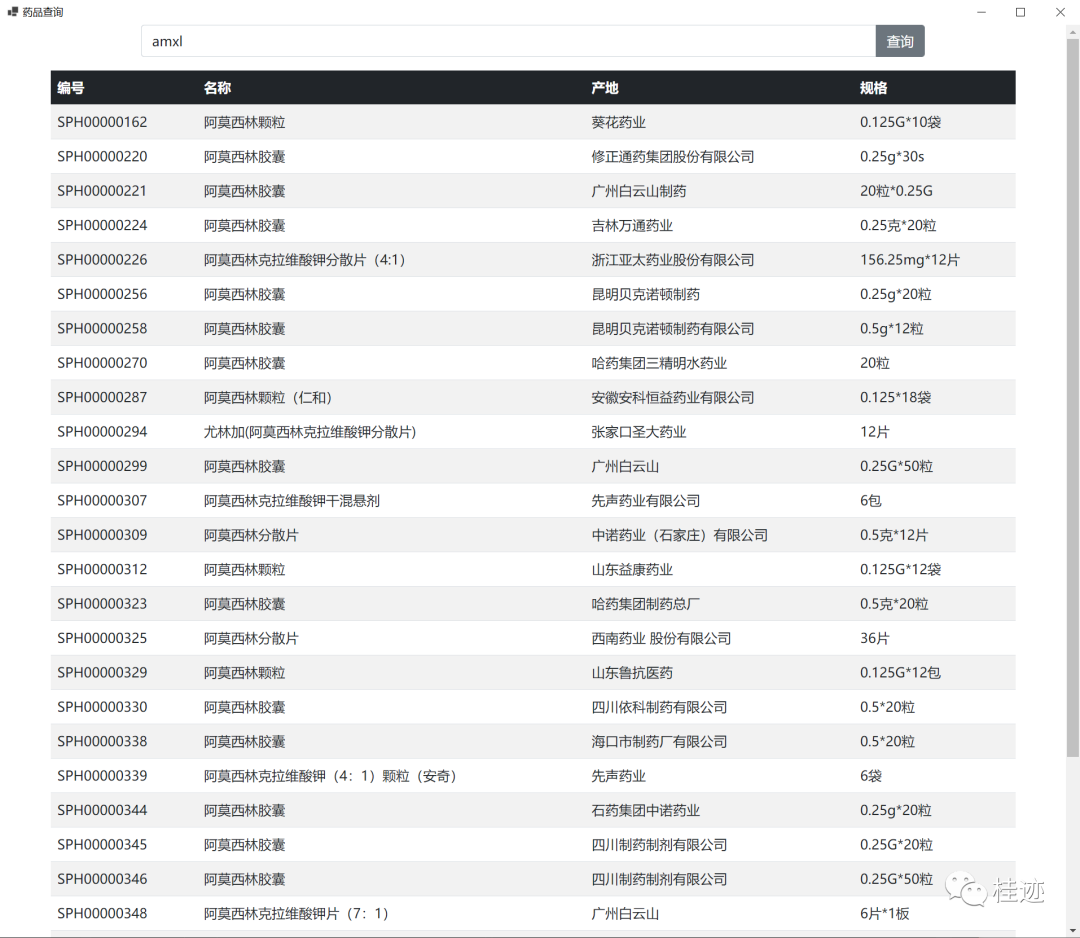
是一個簡單的用助記碼查詢藥品的例子,輸入框查詢按鈕,table的樣式都是Bootstrap5.0的,外層是一個winform的Form窗體。
具體實現(xiàn),先看項目文件csproj的不一樣:Sdk要換成Microsoft.NET.Sdk.Razor,然后是要通過nuget引入這些包。
<Project Sdk="Microsoft.NET.Sdk.Razor"><PropertyGroup><OutputType>WinExe</OutputType><TargetFramework>net6.0-windows</TargetFramework><UseWindowsForms>true</UseWindowsForms></PropertyGroup><ItemGroup><PackageReference Include="Dapper" Version="2.0.78" /><PackageReference Include="Microsoft.AspNetCore.Components.WebView.WindowsForms" Version="6.0.0-preview.3.21201.13" /><PackageReference Include="Microsoft.Extensions.DependencyInjection" Version="6.0.0-preview.3.21201.4" /><PackageReference Include="Microsoft.NET.Sdk.Razor" Version="5.0.0-preview.8.20414.8" /><PackageReference Include="System.Data.SqlClient" Version="4.8.2" /></ItemGroup><ItemGroup><Content Update="wwwroot\app.css"><CopyToOutputDirectory>Always</CopyToOutputDirectory></Content><Content Update="wwwroot\Query.razor"><CopyToOutputDirectory>Always</CopyToOutputDirectory></Content><Content Update="wwwroot\css\bootstrap.min.css"><CopyToOutputDirectory>Always</CopyToOutputDirectory></Content><Content Update="wwwroot\index.html"><CopyToOutputDirectory>Always</CopyToOutputDirectory></Content><Content Update="wwwroot\js\bootstrap.min.js"><CopyToOutputDirectory>Always</CopyToOutputDirectory></Content></ItemGroup><ItemGroup><None Update="wwwroot\app.css"><CopyToOutputDirectory>PreserveNewest</CopyToOutputDirectory></None><None Update="wwwroot\Query.razor"><CopyToOutputDirectory>Always</CopyToOutputDirectory></None><None Update="wwwroot\index.html"><CopyToOutputDirectory>Always</CopyToOutputDirectory></None></ItemGroup></Project>
通過csproj也知道,我是添加了wwwroot文件夾,并添加了一些前端文件:
index.html是一個模板頁,引入一些css和js
<html><head><meta charset="utf-8" /><meta name="viewport" content="width=device-width, initial-scale=1.0, maximum-scale=1.0, user-scalable=no" /><title>Blazor app</title><base href="/" /><link href="{PROJECT NAME}.styles.css" rel="stylesheet" /><link href="app.css" rel="stylesheet" /><link href="css/bootstrap.min.css" rel="stylesheet" /></head><body><div id="app" class="container"></div><div id="blazor-error-ui">An unhandled error has occurred.<a href="" class="reload">Reload</a><a class="dismiss">??</a></div><script src="_framework/blazor.webview.js"></script><script src="js/bootstrap.min.js"></script></body></html>
css和js就不說了,是前端的文件,重點看query.razor,這里實現(xiàn)了主要業(yè)務(wù)邏輯,業(yè)務(wù)數(shù)據(jù)+UI表現(xiàn)
@using Microsoft.AspNetCore.Components.Web@using Dapper@using System.Data.SqlClient;<div class="row"><div class="col-1"></div><div class="col-10"><div class="input-group mb-3"><input type="text" class="form-control" id="zjm" placeholder="請輸入助記碼" @bind="ZJM" aria-describedby="button-addon2"><button class="btn btn-outline-secondary" type="button" @onclick="GetGoods" id="button-addon2">查詢</button></div></div><div class="col-1"></div></div>@code {private string ZJM { get; set; }List<Goods> list = new List<Goods>();void GetGoods(){using (var con = new SqlConnection(System.Configuration.ConfigurationManager.ConnectionStrings["sqlcon"].ConnectionString)){if (string.IsNullOrWhiteSpace(ZJM)){list = con.Query<Goods>("select top 30 spid,spmch,shpchd,shpgg from spkfk ").ToList();}else{list = con.Query<Goods>("select top 30 spid,spmch,shpchd,shpgg from spkfk where zjm like @zjm ",new {zjm="%"+ZJM+"%" }).ToList();}}}}<div class="row"><table class="table table-striped table-hover"><thead><tr class="table-dark"><th scope="col">編號</th><th scope="col">名稱</th><th scope="col">產(chǎn)地</th><th scope="col">規(guī)格</th></tr></thead><tbody>@foreach (var item in list){<tr><td>@item.spid</td><td>@item.spmch</td><td>@item.shpchd</td><td>@item.shpgg</td></tr>}</tbody></table></div>
using BlazorWinForm.wwwroot;using Microsoft.AspNetCore.Components.WebView.WindowsForms;using Microsoft.Extensions.DependencyInjection;using System.Windows.Forms;namespace BlazorWinForm{public partial class frmMain : Form{public frmMain(){InitializeComponent();var serviceCollection = new ServiceCollection();serviceCollection.AddBlazorWebView();var blazor = new BlazorWebView(){Dock = DockStyle.Fill,HostPage = "wwwroot/index.html",Services = serviceCollection.BuildServiceProvider(),};blazor.AutoScroll = false;blazor.RootComponents.Add<Query>("#app");Controls.Add(blazor);}}class Goods{public string spid { get; set; }public string spmch { get; set; }public string shpchd { get; set; }public string shpgg { get; set; }}}
總體下來,這種把winform+c#+html,css,js混合起來編程,即把豐富的前端框架引入進(jìn)來,讓winform表現(xiàn)更加靈活,強(qiáng)大,也不丟失cs架構(gòu)對當(dāng)前電腦的控制力(有很多行業(yè)是通過exe來對接專有設(shè)備的驅(qū)動的)。winform的UI之前是通過三方UI控件比如DevExpress來增強(qiáng)的,雖然有WPF,但還是在微軟自己畫的一個圈圈里轉(zhuǎn),blazor則是帶來了豐富的前端庫。另外,與之前winform嵌入webview不一樣的是,blazor中的c#,可以方便的和winform來互動,語言相通,直接交流,比如你可以很輕松的在blazor的頁里里new一個form出來。
Blazor進(jìn)winform,是雞肋還是革新?應(yīng)該是仁者見仁,智者見智了。
【推薦】.NET Core開發(fā)實戰(zhàn)視頻課程 ★★★
.NET Core實戰(zhàn)項目之CMS 第一章 入門篇-開篇及總體規(guī)劃
【.NET Core微服務(wù)實戰(zhàn)-統(tǒng)一身份認(rèn)證】開篇及目錄索引
Redis基本使用及百億數(shù)據(jù)量中的使用技巧分享(附視頻地址及觀看指南)
.NET Core中的一個接口多種實現(xiàn)的依賴注入與動態(tài)選擇看這篇就夠了
用abp vNext快速開發(fā)Quartz.NET定時任務(wù)管理界面
在ASP.NET Core中創(chuàng)建基于Quartz.NET托管服務(wù)輕松實現(xiàn)作業(yè)調(diào)度
現(xiàn)身說法:實際業(yè)務(wù)出發(fā)分析百億數(shù)據(jù)量下的多表查詢優(yōu)化