
使用Python,Keras和OpenCV進(jìn)行實時面部檢測
點擊上方“小白學(xué)視覺”,選擇加"星標(biāo)"或“置頂”
重磅干貨,第一時間送達(dá)
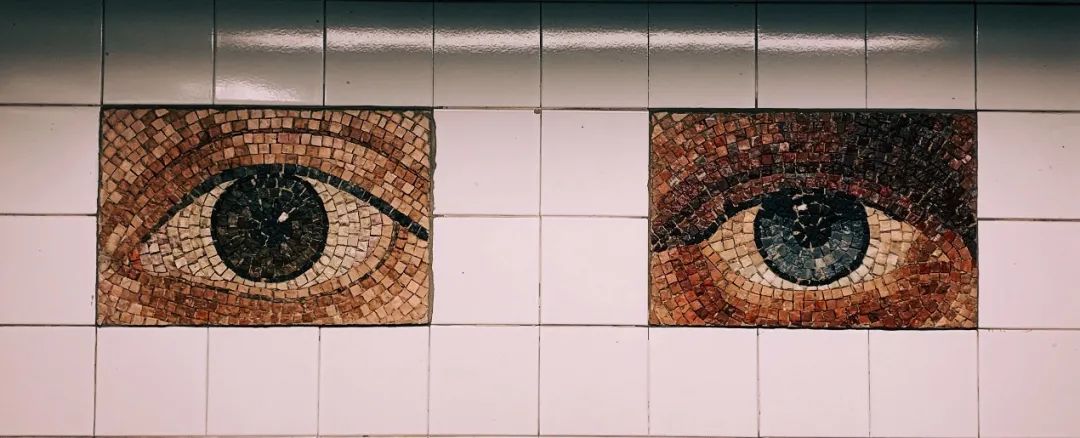
目前我們在互聯(lián)網(wǎng)和論文中看到的大多數(shù)面部識別算法都是以圖像為基礎(chǔ)進(jìn)行處理。這些方法在檢測和識別來自攝像頭的圖像、或視頻流各幀中的人臉時效果很好。但是,他們無法區(qū)分現(xiàn)實生活中的人臉和照片上的人臉,因為這些算法處理的是2D幀。
現(xiàn)在,讓我們想象一下,如果我們想要實現(xiàn)一個面部識別開門器。該系統(tǒng)可以很好地區(qū)分已知面孔和未知面孔,保證只有特定人員才能訪問。盡管如此,任意一個陌生人只要擁有他們的照片就很容易進(jìn)入該區(qū)域,這時3D檢測器(類似于Apple的FaceID)就被納入考慮范圍。但是,如果我們沒有3D探測器怎么辦?
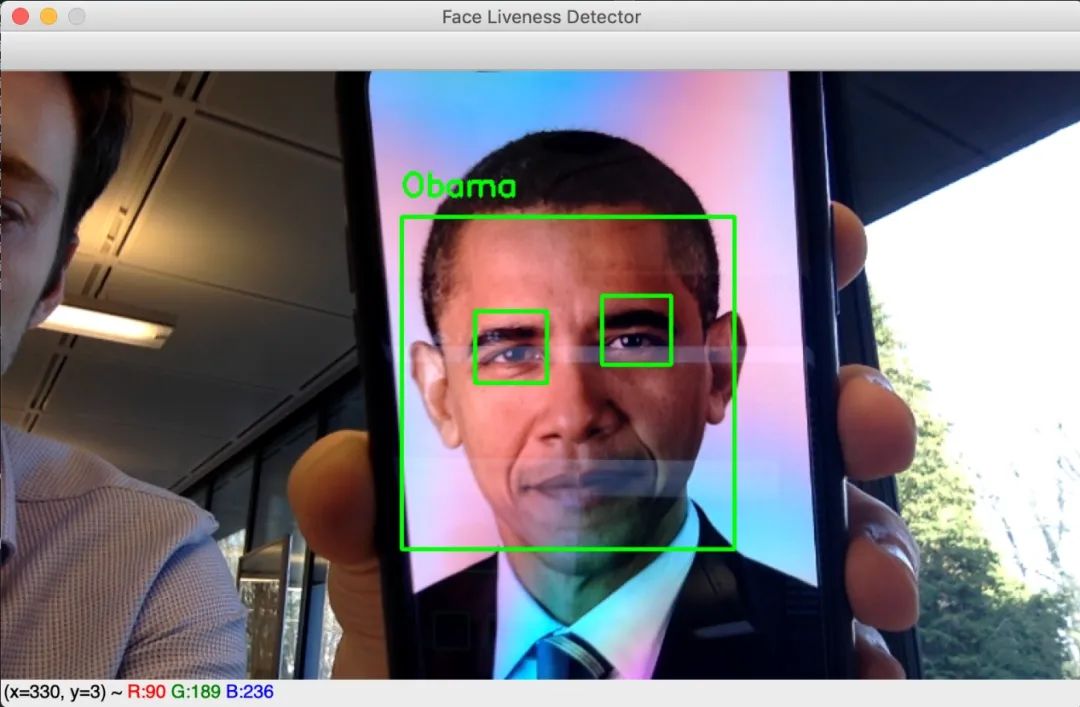
奧巴馬臉部照片識別案例?
本文旨在實現(xiàn)一種基于眨眼檢測的面部活動檢測算法來阻止照片的使用。該算法通過網(wǎng)絡(luò)攝像頭實時工作,并且僅在眨眼時才顯示該人的姓名。程序流程如下:
1. 對網(wǎng)絡(luò)攝像頭生成的每一幀圖像,進(jìn)行面部檢測。
2. 對于每個檢測到的臉部區(qū)域,進(jìn)行眼睛檢測。
3. 對于檢測到的每只眼睛,進(jìn)行眨眼檢測。
4. 如果在某個時刻檢測到眼睛合上后又睜開了,則認(rèn)為該人眨了眨眼,程序?qū)@示他的名字(對于面部識別開門器,我們將授權(quán)該人進(jìn)入)。
為了檢測和識別面部,我們需要安裝face_recognition庫,該庫提供了非常棒的深度學(xué)習(xí)算法來查找和識別圖像中的人臉。特別是face_locations,face_encodings和compare_faces函數(shù)是3個最常用的函數(shù)。face_locations函數(shù)有兩種可使用兩種方法進(jìn)行人臉檢測:梯度方向的Histrogram(HOG)和C?onvolutional神經(jīng)網(wǎng)絡(luò)(CNN)。由于時間限制?,選擇了HOG方法。face_encodings函數(shù)是一個預(yù)訓(xùn)練的卷積神經(jīng)網(wǎng)絡(luò),能夠?qū)D像編碼為128個特征的向量。這些向量的信息足夠以區(qū)分兩個不同的人。最后,使用compare_faces計算兩個嵌入向量之間的距離。它將允許算法識別從攝像頭幀中提取的面部,并將其嵌入矢量與我們數(shù)據(jù)集中的所有編碼面部進(jìn)行比較。最接近的向量對應(yīng)于同一個人。
1.已知的人臉數(shù)據(jù)集編碼
就我們的算法而言,它能夠識別我們自己和巴拉克·奧巴馬。分別選擇了約10張圖片。以下是用于處理和編碼已知面孔數(shù)據(jù)庫的代碼。
def process_and_encode(images):known_encodings = []known_names = []print("[LOG] Encoding dataset ...")for image_path in tqdm(images):# Load imageimage = cv2.imread(image_path)# Convert it from BGR to RGBimage = cv2.cvtColor(image, cv2.COLOR_BGR2RGB)# detect face in the image and get its location (square boxes coordinates)boxes = face_recognition.face_locations(image, model='hog')# Encode the face into a 128-d embeddings vectorencoding = face_recognition.face_encodings(image, boxes)# the person's name is the name of the folder where the image comes fromname = image_path.split(os.path.sep)[-2]if len(encoding) > 0 :known_encodings.append(encoding[0])known_names.append(name)return {"encodings": known_encodings, "names": known_names}
現(xiàn)在我們知道了要識別的每個人的編碼,我們可以嘗試通過網(wǎng)絡(luò)攝像頭識別和識別面部。但是,在進(jìn)行此部分操作之前,我們需要區(qū)分面部照片和活人的面部。
2.面部活躍度檢測
提醒一下,目標(biāo)是在某個點檢測“睜開-閉合-睜開”的眼圖。我訓(xùn)練了卷積神經(jīng)網(wǎng)絡(luò)來對眼睛是閉合還是睜開進(jìn)行分類。選擇的模型是LeNet-5,該模型已在?Closed Eyes In The Wild (CEW)?數(shù)據(jù)集中進(jìn)行了訓(xùn)練。它由大小約為24x24的4800眼圖像組成。
from keras.models import Sequentialfrom keras.layers import Conv2Dfrom keras.layers import AveragePooling2Dfrom keras.layers import Flattenfrom keras.layers import Densefrom keras.preprocessing.image import ImageDataGeneratorIMG_SIZE = 24def train(train_generator, val_generator):STEP_SIZE_TRAIN=train_generator.n//train_generator.batch_sizeSTEP_SIZE_VALID=val_generator.n//val_generator.batch_sizemodel = Sequential()model.add(Conv2D(filters=6, kernel_size=(3, 3), activation='relu', input_shape=(IMG_SIZE,IMG_SIZE,1)))model.add(AveragePooling2D())model.add(Conv2D(filters=16, kernel_size=(3, 3), activation='relu'))model.add(AveragePooling2D())model.add(Flatten())model.add(Dense(units=120, activation='relu'))model.add(Dense(units=84, activation='relu'))model.add(Dense(units=1, activation = 'sigmoid'))model.compile(loss='binary_crossentropy', optimizer='adam', metrics=['accuracy'])print('[LOG] Training CNN')model.fit_generator(generator=train_generator,steps_per_epoch=STEP_SIZE_TRAIN,validation_data=val_generator,validation_steps=STEP_SIZE_VALID,epochs=20)return model
在評估模型時,準(zhǔn)確率達(dá)到94%。
每次檢測到眼睛時,我們都會使用模型預(yù)測其狀態(tài),并跟蹤每個人的眼睛狀態(tài)。因此,借助以下功能,可使檢測眨眼變得很容易,該功能嘗試在眼睛狀態(tài)歷史記錄中查找閉合-閉合-閉合模式。
def isBlinking(history, maxFrames):""" @history: A string containing the history of eyes statuswhere a '1' means that the eyes were closed and '0' open.@maxFrames: The maximal number of successive frames where an eye is closed """for i in range(maxFrames):pattern = '1' + '0'*(i+1) + '1'if pattern in history:return Truereturn False
3.活人的面部識別
我們擁有構(gòu)建“真實”面部識別算法的所有要素,只需要一種實時檢測面部和眼睛的方法即可。我們選擇使用OpenCV預(yù)訓(xùn)練的Haar級聯(lián)分類器執(zhí)行這些任務(wù)。
def detect_and_display(model, video_capture, face_detector, open_eyes_detector, left_eye_detector, right_eye_detector, data, eyes_detected):frame = video_capture.read()# resize the frameframe = cv2.resize(frame, (0, 0), fx=0.6, fy=0.6)gray = cv2.cvtColor(frame, cv2.COLOR_BGR2GRAY)rgb = cv2.cvtColor(frame, cv2.COLOR_BGR2RGB)# Detect facesfaces = face_detector.detectMultiScale(gray,scaleFactor=1.2,minNeighbors=5,minSize=(50, 50),flags=cv2.CASCADE_SCALE_IMAGE)# for each detected facefor (x,y,w,h) in faces:# Encode the face into a 128-d embeddings vectorencoding = face_recognition.face_encodings(rgb, [(y, x+w, y+h, x)])[0]# Compare the vector with all known faces encodingsmatches = face_recognition.compare_faces(data["encodings"], encoding)# For now we don't know the person namename = "Unknown"# If there is at least one match:if True in matches:matchedIdxs = [i for (i, b) in enumerate(matches) if b]counts = {}for i in matchedIdxs:name = data["names"][i]= counts.get(name, 0) + 1# The known encoding with the most number of matches corresponds to the detected face namename = max(counts, key=counts.get)face = frame[y:y+h,x:x+w]gray_face = gray[y:y+h,x:x+w]eyes = []# Eyes detection# check first if eyes are open (with glasses taking into account)open_eyes_glasses = open_eyes_detector.detectMultiScale(gray_face,scaleFactor=1.1,minNeighbors=5,minSize=(30, 30),flags = cv2.CASCADE_SCALE_IMAGE)# if open_eyes_glasses detect eyes then they are openif len(open_eyes_glasses) == 2:='1'for (ex,ey,ew,eh) in open_eyes_glasses:cv2.rectangle(face,(ex,ey),(ex+ew,ey+eh),(0,255,0),2)# otherwise try detecting eyes using left and right_eye_detector# which can detect open and closed eyeselse:# separate the face into left and right sidesleft_face = frame[y:y+h, x+int(w/2):x+w]left_face_gray = gray[y:y+h, x+int(w/2):x+w]right_face = frame[y:y+h, x:x+int(w/2)]right_face_gray = gray[y:y+h, x:x+int(w/2)]# Detect the left eyeleft_eye = left_eye_detector.detectMultiScale(left_face_gray,scaleFactor=1.1,minNeighbors=5,minSize=(30, 30),flags = cv2.CASCADE_SCALE_IMAGE)# Detect the right eyeright_eye = right_eye_detector.detectMultiScale(right_face_gray,scaleFactor=1.1,minNeighbors=5,minSize=(30, 30),flags = cv2.CASCADE_SCALE_IMAGE)eye_status = '1' # we suppose the eyes are open# For each eye check wether the eye is closed.# If one is closed we conclude the eyes are closedfor (ex,ey,ew,eh) in right_eye:color = (0,255,0)pred = predict(right_face[ey:ey+eh,ex:ex+ew],model)if pred == 'closed':eye_status='0'color = (0,0,255)cv2.rectangle(right_face,(ex,ey),(ex+ew,ey+eh),color,2)for (ex,ey,ew,eh) in left_eye:color = (0,255,0)pred = predict(left_face[ey:ey+eh,ex:ex+ew],model)if pred == 'closed':eye_status='0'color = (0,0,255)cv2.rectangle(left_face,(ex,ey),(ex+ew,ey+eh),color,2)+= eye_status# Each time, we check if the person has blinked# If yes, we display its nameif isBlinking(eyes_detected[name],3):(x, y), (x+w, y+h), (0, 255, 0), 2)# Display namey = y - 15 if y - 15 > 15 else y + 15name, (x, y), cv2.FONT_HERSHEY_SIMPLEX,0.75, (0, 255, 0), 2)return frame
上面的功能是用于檢測和識別真實面部的代碼。它所需的輸入?yún)?shù):
? 型號:睜眼/閉眼分類器
? video_capture:流視頻
? face_detector:Haar級聯(lián)的人臉分類器。我們選擇了haarcascade_frontalface_alt.xml
? open_eyes_detector:Haar級聯(lián)睜眼分類器。我選擇了haarcascade_eye_tree_eyeglasses.xml
? left_eye_detector:Haar級聯(lián)的左眼分類器。我選擇了haarcascade_lefteye_2splits.xml,它可以檢測睜眼或閉眼。
? right_eye_detector:Haar級聯(lián)的右眼分類器。我們選擇了haarcascade_righteye_2splits.xml,它可以檢測睜眼或閉眼。
? 數(shù)據(jù):已知編碼和已知名稱的字典
? eyes_detected:包含每個名稱的眼睛狀態(tài)歷史記錄的字典。
在第2至4行,我們從網(wǎng)絡(luò)攝像頭流中抓取一幀,然后調(diào)整其大小以加快計算速度。在第10?行,我們從幀中檢測人臉,然后在第21行,將其編碼為128-d向量。在第23-38行中,我們將此向量與已知的面部編碼進(jìn)行比較,然后通過計算匹配次數(shù)確定該人的姓名。匹配次數(shù)最多的一個被選中。從第45行開始,我們在臉部范圍內(nèi)檢測眼睛是否存在。首先,我們嘗試使用open_eye_detector檢測睜眼。如果檢測器成功,則在第54行,將?''1''添加到眼睛狀態(tài)歷史記錄。如果第一個分類器失敗了(可能是因為閉眼或僅僅是因為它不識別眼睛),這意味著open_eye_detector無法檢測到閉合的眼睛,則使用left_eye和right_eye檢測器。該面部分為左側(cè)和右側(cè),以便對各個檢測器進(jìn)行分類。從第92行開始,提取眼睛部分,經(jīng)過訓(xùn)練的模型預(yù)測眼睛是否閉合。如果檢測到一只閉合的眼睛,則預(yù)測兩只眼睛都閉合,并且將''0''添加到眼睛狀態(tài)歷史記錄中。否則,可以得出結(jié)論,眼睛睜開了。最后在第110行,isBlinking()功能用于檢測眨眼以及是否眨眼的人。
參考資料
? https://docs.opencv.org/3.4.3/d7/d8b/tutorial_py_face_detection.html
? https://www.pyimagesearch.com/2018/06/18/face-recognition-with-opencv-python-and-deep-learning/
交流群
歡迎加入公眾號讀者群一起和同行交流,目前有SLAM、三維視覺、傳感器、自動駕駛、計算攝影、檢測、分割、識別、醫(yī)學(xué)影像、GAN、算法競賽等微信群(以后會逐漸細(xì)分),請掃描下面微信號加群,備注:”昵稱+學(xué)校/公司+研究方向“,例如:”張三?+?上海交大?+?視覺SLAM“。請按照格式備注,否則不予通過。添加成功后會根據(jù)研究方向邀請進(jìn)入相關(guān)微信群。請勿在群內(nèi)發(fā)送廣告,否則會請出群,謝謝理解~