
實(shí)戰(zhàn):使用 PyTorch 和 OpenCV 實(shí)現(xiàn)實(shí)時(shí)目標(biāo)檢測(cè)系統(tǒng)
點(diǎn)擊上方“小白學(xué)視覺(jué)”,選擇加"星標(biāo)"或“置頂”
重磅干貨,第一時(shí)間送達(dá)

將其與 OpenCV 等庫(kù)的圖像處理能力相結(jié)合,如今在數(shù)小時(shí)內(nèi)構(gòu)建實(shí)時(shí)對(duì)象檢測(cè)系統(tǒng)原型要容易得多。在本指南中,我們將嘗試向您展示如何開(kāi)發(fā)用于簡(jiǎn)單對(duì)象檢測(cè)應(yīng)用程序的子系統(tǒng),以及如何將所有這些組合在一起。
我知道你們中的一些人可能會(huì)想,為什么我們要使用Python,在某種程度上,它對(duì)于實(shí)時(shí)應(yīng)用程序來(lái)說(shuō)不是太慢了嗎。
大多數(shù)計(jì)算重操作,如預(yù)測(cè)或圖像處理,都是通過(guò)PyTrand和OpenCV來(lái)執(zhí)行的,它們都使用C++在場(chǎng)景后面實(shí)現(xiàn)這些操作,因此,如果我們?cè)谶@里使用C++或Python,則不會(huì)有太大的差別。
輸入的視頻源可以是任何內(nèi)容,從網(wǎng)絡(luò)攝像頭讀取,或解析現(xiàn)有視頻,或從連接到網(wǎng)絡(luò)的外部攝像頭。在此示例中,我們將展示如何從 youtube 或網(wǎng)絡(luò)攝像頭讀取視頻流。
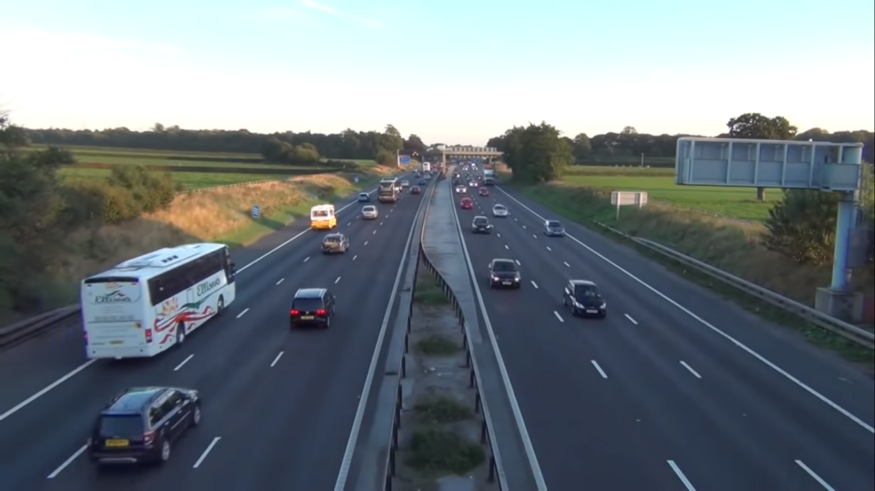
你們可能不想出去創(chuàng)建新視頻,而是使用許多在線可用的視頻。在這種情況下,你們可以從 youtube 讀取視頻流。
import cv2 # opencv2 package for python.import pafy # pafy allows us to read videos from youtube.URL = "https://www.youtube.com/watch?v=dQw4w9WgXcQ" #URL to parseplay = pafy.new(self._URL).streams[-1] #'-1' means read the lowest quality of video.assert play is not None # we want to make sure their is a input to read.stream = cv2.VideoCapture(play.url) #create a opencv video stream.
import cv2stream = cv2.VideoCapture(0) # 0 means read from local camera.
如果你們正在構(gòu)建將部署在服務(wù)器上的應(yīng)用程序,攝像機(jī)擁有一個(gè)自己的 IP 地址,你可以從中訪問(wèn)視頻流。
import cv2camera_ip = "rtsp://username:password@IP/port"stream = cv2.VideoCapture(camera_ip)
有許多不錯(cuò)的對(duì)象檢測(cè)模型,每個(gè)模型都有其優(yōu)點(diǎn)和缺點(diǎn)。為了簡(jiǎn)單起見(jiàn),我們將使用YoloV5,因?yàn)樗鼮槲覀兲峁┝藢?duì)我們的實(shí)時(shí)應(yīng)用程序至關(guān)重要的快速應(yīng)用。你們還可以查看其他模型,例如 FasterRCNN。
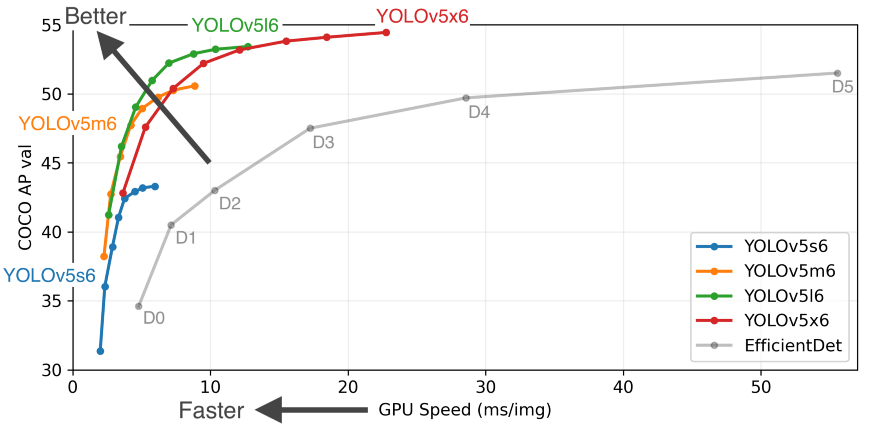
我們可以直接從 PyTorch hub 加載模型,第一次運(yùn)行代碼可能需要幾分鐘,因?yàn)樗鼤?huì)從互聯(lián)網(wǎng)上下載模型,但下次它將直接從磁盤加載。
from torch import hub # Hub contains other models like FasterRCNNmodel = torch.hub.load( \'ultralytics/yolov5', \'yolov5s', \pretrained=True)
我們可以說(shuō)“解析一個(gè)視頻流,從一幀開(kāi)始”。那么讓我們看看如何對(duì)單個(gè)幀進(jìn)行評(píng)分和解析。我們用來(lái)執(zhí)行應(yīng)用的設(shè)備對(duì)我們的應(yīng)用速度產(chǎn)生了巨大的影響,現(xiàn)代深度學(xué)習(xí)模型在使用 GPU 時(shí)效果最好,因此如果你們有一個(gè)帶有 CUDA 內(nèi)核的 GPU,它將大大提高您的性能。根據(jù)經(jīng)驗(yàn),即使是單個(gè) GPU 的系統(tǒng)也可以達(dá)到每秒 45-60 幀,而 CPU 最多只能提供 25-30 幀。
"""The function below identifies the device which is availabe to make the prediction and uses it to load and infer the frame. Once it has results it will extract the labels and cordinates(Along with scores) for each object detected in the frame."""def score_frame(frame, model):device = 'cuda' if torch.cuda.is_available() else 'cpu'model.to(device)frame = [torch.tensor(frame)]results = self.model(frame)labels = results.xyxyn[0][:, -1].numpy()cord = results.xyxyn[0][:, :-1].numpy()return labels, cord
一旦我們對(duì)幀進(jìn)行了評(píng)分,在將幀寫入輸出流之前,我們需要在幀上繪制識(shí)別的對(duì)象及其框。為此,我們可以使用 OpenCV 的圖像處理工具包。
"""The function below takes the results and the frame as input and plots boxes over all the objects which have a score higer than our threshold."""def plot_boxes(self, results, frame):labels, cord = resultsn = len(labels)x_shape, y_shape = frame.shape[1], frame.shape[0]for i in range(n):row = cord[i]# If score is less than 0.2 we avoid making a prediction.if row[4] < 0.2:continuex1 = int(row[0]*x_shape)y1 = int(row[1]*y_shape)x2 = int(row[2]*x_shape)y2 = int(row[3]*y_shape)bgr = (0, 255, 0) # color of the boxclasses = self.model.names # Get the name of label indexlabel_font = cv2.FONT_HERSHEY_SIMPLEX #Font for the label.cv2.rectangle(frame, \(x1, y1), (x2, y2), \bgr, 2) #Plot the boxescv2.putText(frame,\classes[labels[i]], \(x1, y1), \label_font, 0.9, bgr, 2) #Put a label over box.return frame
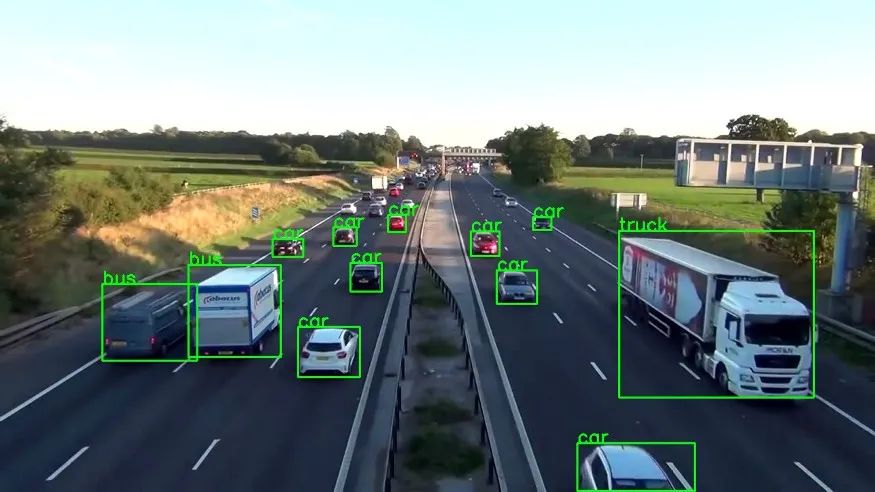
現(xiàn)在我們將它們整合到一個(gè)調(diào)用函數(shù)中,在循環(huán)中執(zhí)行整個(gè)操作,讓我們回顧一下我們的主要功能必須執(zhí)行以成功運(yùn)行應(yīng)用程序的步驟。
創(chuàng)建視頻流輸入。 加載模型。 當(dāng)輸入可用時(shí),閱讀下一幀。 對(duì)框架進(jìn)行評(píng)分以獲取標(biāo)簽和坐標(biāo)。 在檢測(cè)到的對(duì)象上繪制框。 將處理后的幀寫入輸出視頻流。
"""The Function below oracestrates the entire operation and performs the real-time parsing for video stream."""def __call__(self):player = self.get_video_stream() #Get your video stream.assert player.isOpened() # Make sure that their is a stream.#Below code creates a new video writer object to write our#output stream.x_shape = int(player.get(cv2.CAP_PROP_FRAME_WIDTH))y_shape = int(player.get(cv2.CAP_PROP_FRAME_HEIGHT))four_cc = cv2.VideoWriter_fourcc(*"MJPG") #Using MJPEG codexout = cv2.VideoWriter(out_file, four_cc, 20, \(x_shape, y_shape))ret, frame = player.read() # Read the first frame.while rect: # Run until stream is out of framesstart_time = time() # We would like to measure the FPS.results = self.score_frame(frame) # Score the Frameframe = self.plot_boxes(results, frame) # Plot the boxes.end_time = time()fps = 1/np.round(end_time - start_time, 3) #Measure the FPS.print(f"Frames Per Second : {fps}")out.write(frame) # Write the frame onto the output.ret, frame = player.read() # Read next frame.
你們應(yīng)該將所有這些組件打包到一個(gè)類中,該類可以與你們希望將輸出流寫入其中的 URL 和輸出文件一起調(diào)用。最終效果如下:
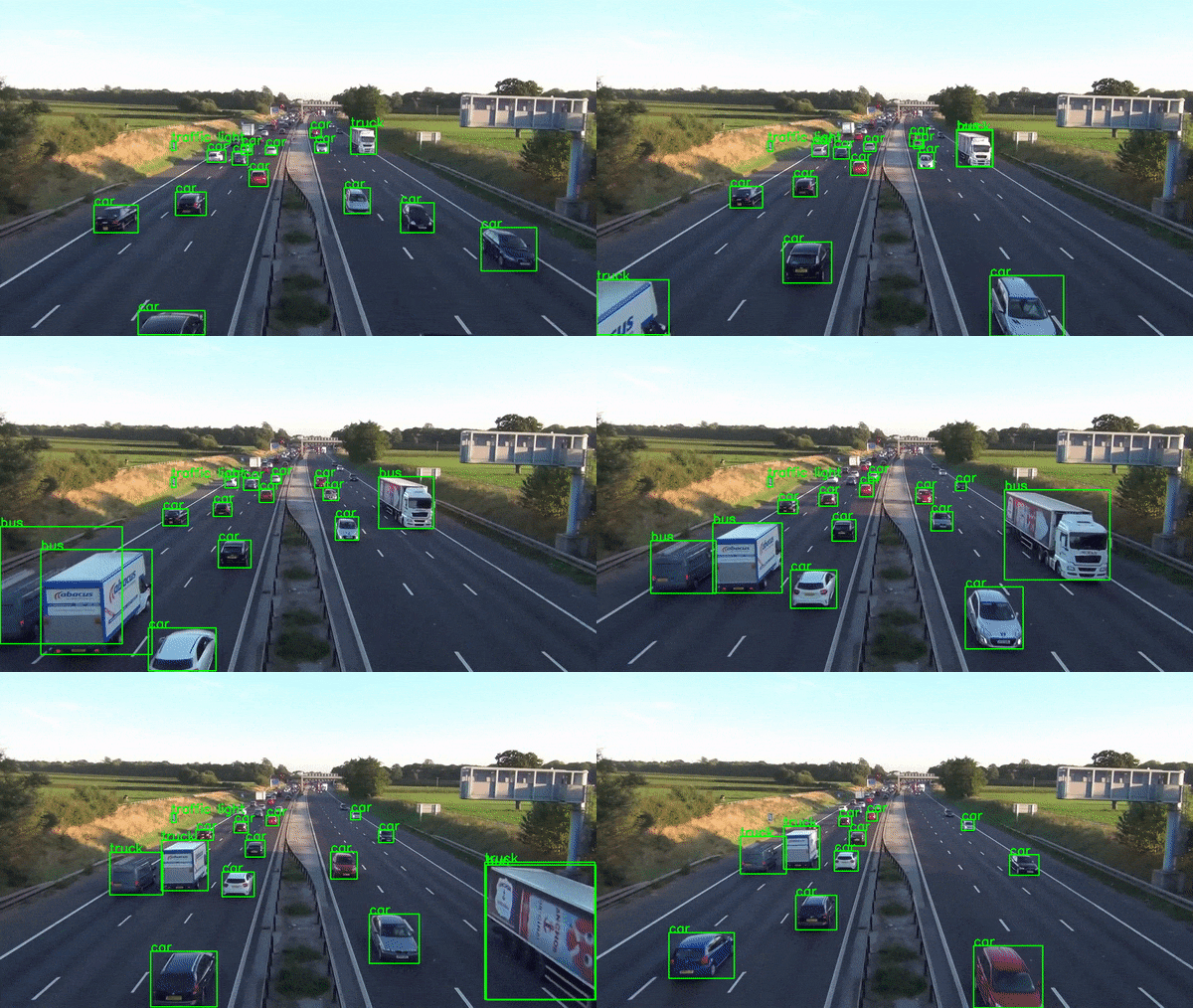
當(dāng)然,生產(chǎn)級(jí)實(shí)時(shí)應(yīng)用程序比這復(fù)雜得多,但本文并不打算教授這一點(diǎn)。它是為了展示 Python 的驚人力量,它使我們能夠在數(shù)小時(shí)內(nèi)構(gòu)建如此復(fù)雜的應(yīng)用程序原型。
Github代碼鏈接:https://github.com/akash-agni
交流群
歡迎加入公眾號(hào)讀者群一起和同行交流,目前有SLAM、三維視覺(jué)、傳感器、自動(dòng)駕駛、計(jì)算攝影、檢測(cè)、分割、識(shí)別、醫(yī)學(xué)影像、GAN、算法競(jìng)賽等微信群(以后會(huì)逐漸細(xì)分),請(qǐng)掃描下面微信號(hào)加群,備注:”昵稱+學(xué)校/公司+研究方向“,例如:”張三 + 上海交大 + 視覺(jué)SLAM“。請(qǐng)按照格式備注,否則不予通過(guò)。添加成功后會(huì)根據(jù)研究方向邀請(qǐng)進(jìn)入相關(guān)微信群。請(qǐng)勿在群內(nèi)發(fā)送廣告,否則會(huì)請(qǐng)出群,謝謝理解~