
自學(xué)鴻蒙應(yīng)用開發(fā)(20)- UI布局實(shí)戰(zhàn)練習(xí)
到上一篇為止,UI基本要素相關(guān)的內(nèi)容就算介紹了一遍,從這篇文章開始,我們進(jìn)行練習(xí)開發(fā)一個(gè)小程序:計(jì)算器。后面的內(nèi)容代碼居多,這里先說結(jié)論,無論是文檔還是功能,確實(shí)還有不少需要完善的地方。
首先是畫面布局的表示結(jié)果:
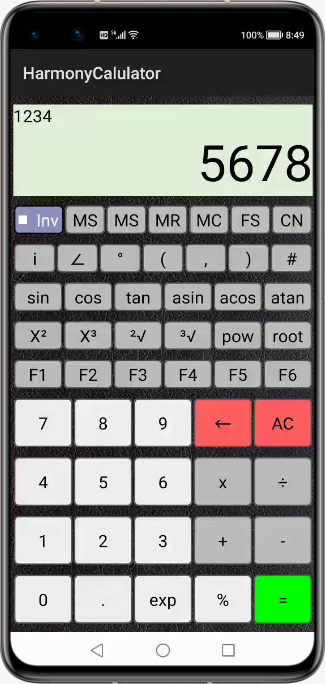
在設(shè)計(jì)這個(gè)布局的時(shí)候,最主要的考慮是布局的伸縮性,也就是說當(dāng)屏幕的分辨率發(fā)生變化時(shí),希望可以保證每個(gè)組件盡量可以正確表示。
畫面背景
全體背景畫面的背景使用了一個(gè)具有條紋的黑色背景Plastic.png

使用該圖像的布局代碼如下:
xmlns:ohos="http://schemas.huawei.com/res/ohos"ohos:height="match_parent"ohos:width="match_parent"ohos:padding="5vp"ohos:background_element="$media:Plastic"ohos:orientation="vertical">
如第6行所示,直接將background_element只想保存于media目錄之下的圖像文件即可。
組件大小調(diào)整策略
開發(fā)程序需要考慮不同分辨率情況下的表示結(jié)果,因此應(yīng)該盡量避免減少采用直接值的情況。本例使用如下策略:
垂直方向:為了保證數(shù)據(jù)的顯示效果,包含輸入表達(dá)式和結(jié)果的布局按照TextFileld來決定高度;其他所有的按鈕行使用按照固定比例分配高度。
水平方向:TextField占滿屏幕,其他所有按鈕行占滿屏幕寬度,其中的按鈕按照固定比例分配空間。
定制Checkbox
我們希望定制上檔鍵的表示方式,因此文字和標(biāo)記的顏色進(jìn)行了定制。首先是文字的顏色,可以通過布局文件指定選中和非選中狀態(tài)的顏色,具體如下面代碼第10行和第11行所示:
ohos:id="$+id:check_box"ohos:height="match_parent"ohos:width = "0vp"ohos:weight = "5"ohos:layout_alignment="center"ohos:margin="1vp"ohos:text="Inv"ohos:text_size="20fp"ohos:text_color_on="#00FF00"ohos:text_color_off="#FFFFFF"ohos:background_element="$graphic:background_checkbox"/>
但是很遺憾,好像只能通過代碼指定標(biāo)記顏色方法,具體如下面代碼所示:
ShapeElement?elementButtonOn?=?new?ShapeElement();elementButtonOn.setRgbColor(RgbPalette.GREEN);elementButtonOn.setShape(ShapeElement.RECTANGLE);ShapeElement?elementButtonOff?=?new?ShapeElement();elementButtonOff.setRgbColor(RgbPalette.WHITE);elementButtonOff.setShape(ShapeElement.RECTANGLE);StateElement?checkElement?=?new?StateElement();checkElement.addState(new?int[]{ComponentState.COMPONENT_STATE_CHECKED},?elementButtonOn);checkElement.addState(new?int[]{ComponentState.COMPONENT_STATE_EMPTY},?elementButtonOff);Checkbox?checkbox?=?(Checkbox)?findComponentById(ResourceTable.Id_check_box);checkbox.setButtonElement(checkElement);
相似的功能,必須使用兩種方式設(shè)定。略微有點(diǎn)不爽。
實(shí)際的動(dòng)作效果如下:
定制按鈕
布局中通過背景組件指定按鈕的形狀,圓角半徑,內(nèi)部顏色以及邊界線寬度和顏色。
<shape xmlns:ohos="http://schemas.huawei.com/res/ohos"ohos:shape="rectangle"><cornersohos:radius="5vp"/><strokeohos:width="5"ohos:color="#555555"/><solidohos:color="#BBBBBB"/>shape>
關(guān)于TableLayout
按照正常的想法,功能按鈕,數(shù)字按鈕分區(qū)更應(yīng)該使用TableLoyout而不是為每行指定一個(gè)DirectionLayout。但是作者在使用該布局時(shí)遇到了一個(gè)問題:無法讓布局中的組件按照比例分配空間,只能設(shè)定固定坐標(biāo)。而坐標(biāo)單位又有沒有按照屏幕比例分配的類型,無論如何也不能實(shí)現(xiàn)根據(jù)分辨率自動(dòng)調(diào)節(jié)組件大小的功能,因此只能放棄使用TableLayout。希望今后可以支持這種用法。
布局代碼
以下是實(shí)際的布局代碼ability_main.xml,僅供參考:
<DirectionalLayoutxmlns:ohos="http://schemas.huawei.com/res/ohos"ohos:height="match_parent"ohos:width="match_parent"ohos:padding="5vp"ohos:background_element="$media:Plastic"ohos:orientation="vertical"><DirectionalLayoutohos:id="$+id:display_area"ohos:height="match_content"ohos:width="match_parent"ohos:background_element="#000000"ohos:orientation="vertical"ohos:top_margin="5vp"ohos:bottom_margin="5vp"><TextFieldohos:id="$+id:question_field"ohos:width="match_parent"ohos:height="match_content"ohos:text = "1234"ohos:text_size="20fp"ohos:background_element="$graphic:background_lcd"/><TextFieldohos:id="$+id:answer_field"ohos:width="match_parent"ohos:height="match_content"ohos:text = "5678"ohos:text_size="60fp"ohos:text_alignment="right"ohos:background_element="$graphic:background_lcd"/>DirectionalLayout><DirectionalLayoutohos:id="$+id:control_area"ohos:height="0vp"ohos:weight="12"ohos:width="match_parent"ohos:orientation="horizontal"ohos:layout_alignment="horizontal_center"ohos:top_margin="5vp"ohos:bottom_margin="5vp"><Checkboxohos:id="$+id:check_box"ohos:height="match_parent"ohos:width = "0vp"ohos:weight = "5"ohos:layout_alignment="center"ohos:margin="1vp"ohos:text="Inv"ohos:text_size="20fp"ohos:text_color_on="#00FF00"ohos:text_color_off="#FFFFFF"ohos:background_element="$graphic:background_checkbox"/><Buttonohos:id="$+id:ms_button"ohos:height="match_parent"ohos:width = "0vp"ohos:weight = "4"ohos:layout_alignment="center"ohos:margin="1vp"ohos:text="MS"ohos:text_size="20fp"ohos:background_element="$graphic:background_function_button"/><Buttonohos:id="$+id:ms_button"ohos:height="match_parent"ohos:width = "0vp"ohos:weight = "4"ohos:layout_alignment="center"ohos:margin="1vp"ohos:text="MS"ohos:text_size="20fp"ohos:background_element="$graphic:background_function_button"/><Buttonohos:id="$+id:mr_button"ohos:height="match_parent"ohos:width = "0vp"ohos:weight = "4"ohos:layout_alignment="center"ohos:margin="1vp"ohos:text="MR"ohos:text_size="20fp"ohos:background_element="$graphic:background_function_button"/><Buttonohos:id="$+id:mc_button"ohos:height="match_parent"ohos:width = "0vp"ohos:weight = "4"ohos:layout_alignment="center"ohos:margin="1vp"ohos:text="MC"ohos:text_size="20fp"ohos:background_element="$graphic:background_function_button"/><Buttonohos:id="$+id:fs_button"ohos:height="match_parent"ohos:width = "0vp"ohos:weight = "4"ohos:layout_alignment="center"ohos:margin="1vp"ohos:text="FS"ohos:text_size="20fp"ohos:background_element="$graphic:background_function_button"/><Buttonohos:id="$+id:const_button"ohos:height="match_parent"ohos:width = "0vp"ohos:weight = "4"ohos:layout_alignment="center"ohos:margin="1vp"ohos:text="CN"ohos:text_size="20fp"ohos:background_element="$graphic:background_function_button"/>DirectionalLayout><DirectionalLayoutohos:id="$+id:token_area"ohos:height="0vp"ohos:weight="12"ohos:width="match_parent"ohos:orientation="horizontal"ohos:layout_alignment="horizontal_center"ohos:top_margin="5vp"ohos:bottom_margin="5vp"><Buttonohos:id="$+id:i_button"ohos:height="match_parent"ohos:width = "0vp"ohos:weight = "1"ohos:layout_alignment="center"ohos:margin="1vp"ohos:text="i"ohos:text_size="20fp"ohos:background_element="$graphic:background_function_button"/><Buttonohos:id="$+id:angle_button"ohos:height="match_parent"ohos:width = "0vp"ohos:weight = "1"ohos:layout_alignment="center"ohos:margin="1vp"ohos:text="∠"ohos:text_size="20fp"ohos:background_element="$graphic:background_function_button"/><Buttonohos:id="$+id:degree_button"ohos:height="match_parent"ohos:width = "0vp"ohos:weight = "1"ohos:layout_alignment="center"ohos:margin="1vp"ohos:text="°"ohos:text_size="20fp"ohos:background_element="$graphic:background_function_button"/><Buttonohos:id="$+id:left_parentheses_button"ohos:height="match_parent"ohos:width = "0vp"ohos:weight = "1"ohos:layout_alignment="center"ohos:margin="1vp"ohos:text="("ohos:text_size="20fp"ohos:background_element="$graphic:background_function_button"/><Buttonohos:id="$+id:comma_button"ohos:height="match_parent"ohos:width = "0vp"ohos:weight = "1"ohos:layout_alignment="center"ohos:margin="1vp"ohos:text=","ohos:text_size="20fp"ohos:background_element="$graphic:background_function_button"/><Buttonohos:id="$+id:rigght_parentheses_button"ohos:height="match_parent"ohos:width = "0vp"ohos:weight = "1"ohos:layout_alignment="center"ohos:margin="1vp"ohos:text=")"ohos:text_size="20fp"ohos:background_element="$graphic:background_function_button"/><Buttonohos:id="$+id:sharp_button"ohos:height="match_parent"ohos:width = "0vp"ohos:weight = "1"ohos:layout_alignment="center"ohos:margin="1vp"ohos:text="#"ohos:text_size="20fp"ohos:background_element="$graphic:background_function_button"/>DirectionalLayout><DirectionalLayoutohos:id="$+id:fun_area1"ohos:height="0vp"ohos:weight="12"ohos:width="match_parent"ohos:orientation="horizontal"ohos:layout_alignment="horizontal_center"ohos:top_margin="5vp"ohos:bottom_margin="5vp"><Buttonohos:id="$+id:sin_button"ohos:height="match_parent"ohos:width = "0vp"ohos:weight = "1"ohos:layout_alignment="center"ohos:margin="1vp"ohos:text="sin"ohos:text_size="20fp"ohos:background_element="$graphic:background_function_button"/><Buttonohos:id="$+id:cos_button"ohos:height="match_parent"ohos:width = "0vp"ohos:weight = "1"ohos:layout_alignment="center"ohos:margin="1vp"ohos:text="cos"ohos:text_size="20fp"ohos:background_element="$graphic:background_function_button"/><Buttonohos:id="$+id:tan_button"ohos:height="match_parent"ohos:width = "0vp"ohos:weight = "1"ohos:layout_alignment="center"ohos:margin="1vp"ohos:text="tan"ohos:text_size="20fp"ohos:background_element="$graphic:background_function_button"/><Buttonohos:id="$+id:asin_button"ohos:height="match_parent"ohos:width = "0vp"ohos:weight = "1"ohos:layout_alignment="center"ohos:margin="1vp"ohos:text="asin"ohos:text_size="20fp"ohos:background_element="$graphic:background_function_button"/><Buttonohos:id="$+id:acos_button"ohos:height="match_parent"ohos:width = "0vp"ohos:weight = "1"ohos:layout_alignment="center"ohos:margin="1vp"ohos:text="acos"ohos:text_size="20fp"ohos:background_element="$graphic:background_function_button"/><Buttonohos:id="$+id:atan_button"ohos:height="match_parent"ohos:width = "0vp"ohos:weight = "1"ohos:layout_alignment="center"ohos:margin="1vp"ohos:text="atan"ohos:text_size="20fp"ohos:background_element="$graphic:background_function_button"/>DirectionalLayout><DirectionalLayoutohos:id="$+id:fun_area2"ohos:height="0vp"ohos:weight="12"ohos:width="match_parent"ohos:orientation="horizontal"ohos:layout_alignment="horizontal_center"ohos:top_margin="5vp"ohos:bottom_margin="5vp"><Buttonohos:id="$+id:x2_button"ohos:height="match_parent"ohos:width = "0vp"ohos:weight = "1"ohos:layout_alignment="center"ohos:margin="1vp"ohos:text="X2"ohos:text_size="20fp"ohos:background_element="$graphic:background_function_button"/><Buttonohos:id="$+id:x3_button"ohos:height="match_parent"ohos:width = "0vp"ohos:weight = "1"ohos:layout_alignment="center"ohos:margin="1vp"ohos:text="X3"ohos:text_size="20fp"ohos:background_element="$graphic:background_function_button"/><Buttonohos:id="$+id:sqrt_button"ohos:height="match_parent"ohos:width = "0vp"ohos:weight = "1"ohos:layout_alignment="center"ohos:margin="1vp"ohos:text="2√"ohos:text_size="20fp"ohos:background_element="$graphic:background_function_button"/><Buttonohos:id="$+id:subtriplicate_button"ohos:height="match_parent"ohos:width = "0vp"ohos:weight = "1"ohos:layout_alignment="center"ohos:margin="1vp"ohos:text="3√"ohos:text_size="20fp"ohos:background_element="$graphic:background_function_button"/><Buttonohos:id="$+id:power_button"ohos:height="match_parent"ohos:width = "0vp"ohos:weight = "1"ohos:layout_alignment="center"ohos:margin="1vp"ohos:text="pow"ohos:text_size="20fp"ohos:background_element="$graphic:background_function_button"/><Buttonohos:id="$+id:root_button"ohos:height="match_parent"ohos:width = "0vp"ohos:weight = "1"ohos:layout_alignment="center"ohos:margin="1vp"ohos:text="root"ohos:text_size="20fp"ohos:background_element="$graphic:background_function_button"/>DirectionalLayout><DirectionalLayoutohos:id="$+id:fun_area3"ohos:height="0vp"ohos:weight="12"ohos:width="match_parent"ohos:orientation="horizontal"ohos:layout_alignment="horizontal_center"ohos:top_margin="5vp"ohos:bottom_margin="5vp"><Buttonohos:id="$+id:f1_button"ohos:height="match_parent"ohos:width = "0vp"ohos:weight = "1"ohos:layout_alignment="center"ohos:margin="1vp"ohos:text="F1"ohos:text_size="20fp"ohos:background_element="$graphic:background_function_button"/><Buttonohos:id="$+id:f2_button"ohos:height="match_parent"ohos:width = "0vp"ohos:weight = "1"ohos:layout_alignment="center"ohos:margin="1vp"ohos:text="F2"ohos:text_size="20fp"ohos:background_element="$graphic:background_function_button"/><Buttonohos:id="$+id:f3_button"ohos:height="match_parent"ohos:width = "0vp"ohos:weight = "1"ohos:layout_alignment="center"ohos:margin="1vp"ohos:text="F3"ohos:text_size="20fp"ohos:background_element="$graphic:background_function_button"/><Buttonohos:id="$+id:f4_button"ohos:height="match_parent"ohos:width = "0vp"ohos:weight = "1"ohos:layout_alignment="center"ohos:margin="1vp"ohos:text="F4"ohos:text_size="20fp"ohos:background_element="$graphic:background_function_button"/><Buttonohos:id="$+id:f5_button"ohos:height="match_parent"ohos:width = "0vp"ohos:weight = "1"ohos:layout_alignment="center"ohos:margin="1vp"ohos:text="F5"ohos:text_size="20fp"ohos:background_element="$graphic:background_function_button"/><Buttonohos:id="$+id:f6_button"ohos:height="match_parent"ohos:width = "0vp"ohos:weight = "1"ohos:layout_alignment="center"ohos:margin="1vp"ohos:text="F6"ohos:text_size="20fp"ohos:background_element="$graphic:background_function_button"/>DirectionalLayout><DirectionalLayoutohos:id="$+id:number_area1"ohos:height="0vp"ohos:weight="20"ohos:width="match_parent"ohos:orientation="horizontal"ohos:layout_alignment="horizontal_center"ohos:top_margin="5vp"ohos:bottom_margin="5vp"><Buttonohos:id="$+id:number7_button"ohos:height="match_parent"ohos:width = "0vp"ohos:weight = "2"ohos:layout_alignment="center"ohos:margin="1vp"ohos:text="7"ohos:text_size="20fp"ohos:background_element="$graphic:background_number_button"/><Buttonohos:id="$+id:number8_button"ohos:height="match_parent"ohos:width = "0vp"ohos:weight = "2"ohos:layout_alignment="center"ohos:margin="1vp"ohos:text="8"ohos:text_size="20fp"ohos:background_element="$graphic:background_number_button"/><Buttonohos:id="$+id:number9_button"ohos:height="match_parent"ohos:width = "0vp"ohos:weight = "2"ohos:layout_alignment="center"ohos:margin="1vp"ohos:text="9"ohos:text_size="20fp"ohos:background_element="$graphic:background_number_button"/><Buttonohos:id="$+id:back_button"ohos:height="match_parent"ohos:width = "0vp"ohos:weight = "2"ohos:layout_alignment="center"ohos:margin="1vp"ohos:text="←"ohos:text_size="20fp"ohos:background_element="$graphic:background_red_button"/><Buttonohos:id="$+id:ac_button"ohos:height="match_parent"ohos:width = "0vp"ohos:weight = "2"ohos:layout_alignment="center"ohos:margin="1vp"ohos:text="AC"ohos:text_size="20fp"ohos:background_element="$graphic:background_red_button"/>DirectionalLayout><DirectionalLayoutohos:id="$+id:number_area2"ohos:height="0vp"ohos:weight="20"ohos:width="match_parent"ohos:orientation="horizontal"ohos:layout_alignment="horizontal_center"ohos:top_margin="5vp"ohos:bottom_margin="5vp"><Buttonohos:id="$+id:number4_button"ohos:height="match_parent"ohos:width = "0vp"ohos:weight = "2"ohos:layout_alignment="center"ohos:margin="1vp"ohos:text="4"ohos:text_size="20fp"ohos:background_element="$graphic:background_number_button"/><Buttonohos:id="$+id:number5_button"ohos:height="match_parent"ohos:width = "0vp"ohos:weight = "2"ohos:layout_alignment="center"ohos:margin="1vp"ohos:text="5"ohos:text_size="20fp"ohos:background_element="$graphic:background_number_button"/><Buttonohos:id="$+id:number6_button"ohos:height="match_parent"ohos:width = "0vp"ohos:weight = "2"ohos:layout_alignment="center"ohos:margin="1vp"ohos:text="6"ohos:text_size="20fp"ohos:background_element="$graphic:background_number_button"/><Buttonohos:id="$+id:mul_button"ohos:height="match_parent"ohos:width = "0vp"ohos:weight = "2"ohos:layout_alignment="center"ohos:margin="1vp"ohos:text="ⅹ"ohos:text_size="20fp"ohos:background_element="$graphic:background_function_button"/><Buttonohos:id="$+id:div_button"ohos:height="match_parent"ohos:width = "0vp"ohos:weight = "2"ohos:layout_alignment="center"ohos:margin="1vp"ohos:text="÷"ohos:text_size="20fp"ohos:background_element="$graphic:background_function_button"/>DirectionalLayout><DirectionalLayoutohos:id="$+id:number_area3"ohos:height="0vp"ohos:weight="20"ohos:width="match_parent"ohos:orientation="horizontal"ohos:layout_alignment="horizontal_center"ohos:top_margin="5vp"ohos:bottom_margin="5vp"><Buttonohos:id="$+id:number1_button"ohos:height="match_parent"ohos:width = "0vp"ohos:weight = "2"ohos:layout_alignment="center"ohos:margin="1vp"ohos:text="1"ohos:text_size="20fp"ohos:background_element="$graphic:background_number_button"/><Buttonohos:id="$+id:number2_button"ohos:height="match_parent"ohos:width = "0vp"ohos:weight = "2"ohos:layout_alignment="center"ohos:margin="1vp"ohos:text="2"ohos:text_size="20fp"ohos:background_element="$graphic:background_number_button"/><Buttonohos:id="$+id:number3_button"ohos:height="match_parent"ohos:width = "0vp"ohos:weight = "2"ohos:layout_alignment="center"ohos:margin="1vp"ohos:text="3"ohos:text_size="20fp"ohos:background_element="$graphic:background_number_button"/><Buttonohos:id="$+id:plus_button"ohos:height="match_parent"ohos:width = "0vp"ohos:weight = "2"ohos:layout_alignment="center"ohos:margin="1vp"ohos:text="+"ohos:text_size="20fp"ohos:background_element="$graphic:background_function_button"/><Buttonohos:id="$+id:minus_button"ohos:height="match_parent"ohos:width = "0vp"ohos:weight = "2"ohos:layout_alignment="center"ohos:margin="1vp"ohos:text="-"ohos:text_size="20fp"ohos:background_element="$graphic:background_function_button"/>DirectionalLayout><DirectionalLayoutohos:id="$+id:number_area4"ohos:height="0vp"ohos:weight="20"ohos:width="match_parent"ohos:orientation="horizontal"ohos:layout_alignment="horizontal_center"ohos:top_margin="5vp"ohos:bottom_margin="5vp"><Buttonohos:id="$+id:number0_button"ohos:height="match_parent"ohos:width = "0vp"ohos:weight = "2"ohos:layout_alignment="center"ohos:margin="1vp"ohos:text="0"ohos:text_size="20fp"ohos:background_element="$graphic:background_number_button"/><Buttonohos:id="$+id:dot_button"ohos:height="match_parent"ohos:width = "0vp"ohos:weight = "2"ohos:layout_alignment="center"ohos:margin="1vp"ohos:text="."ohos:text_size="20fp"ohos:background_element="$graphic:background_number_button"/><Buttonohos:id="$+id:exp_button"ohos:height="match_parent"ohos:width = "0vp"ohos:weight = "2"ohos:layout_alignment="center"ohos:margin="1vp"ohos:text="exp"ohos:text_size="20fp"ohos:background_element="$graphic:background_number_button"/><Buttonohos:id="$+id:percent_button"ohos:height="match_parent"ohos:width = "0vp"ohos:weight = "2"ohos:layout_alignment="center"ohos:margin="1vp"ohos:text="%"ohos:text_size="20fp"ohos:background_element="$graphic:background_number_button"/><Buttonohos:id="$+id:calucate_button"ohos:height="match_parent"ohos:width = "0vp"ohos:weight = "2"ohos:layout_alignment="center"ohos:margin="1vp"ohos:text="="ohos:text_size="20fp"ohos:background_element="$graphic:background_green_button"/>????DirectionalLayout>
新書介紹
《實(shí)戰(zhàn)Python設(shè)計(jì)模式》是作者最近出版的新書,拜托多多關(guān)注!
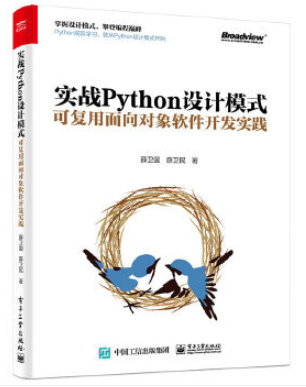
本書利用Python 的標(biāo)準(zhǔn)GUI 工具包tkinter,通過可執(zhí)行的示例對(duì)23 個(gè)設(shè)計(jì)模式逐個(gè)進(jìn)行說明。這樣一方面可以使讀者了解真實(shí)的軟件開發(fā)工作中每個(gè)設(shè)計(jì)模式的運(yùn)用場(chǎng)景和想要解決的問題;另一方面通過對(duì)這些問題的解決過程進(jìn)行說明,讓讀者明白在編寫代碼時(shí)如何判斷使用設(shè)計(jì)模式的利弊,并合理運(yùn)用設(shè)計(jì)模式。
對(duì)設(shè)計(jì)模式感興趣而且希望隨學(xué)隨用的讀者通過本書可以快速跨越從理解到運(yùn)用的門檻;希望學(xué)習(xí)Python GUI 編程的讀者可以將本書中的示例作為設(shè)計(jì)和開發(fā)的參考;使用Python 語言進(jìn)行圖像分析、數(shù)據(jù)處理工作的讀者可以直接以本書中的示例為基礎(chǔ),迅速構(gòu)建自己的系統(tǒng)架構(gòu)。
覺得本文有幫助?請(qǐng)分享給更多人。
關(guān)注微信公眾號(hào)【面向?qū)ο笏伎肌枯p松學(xué)習(xí)每一天!
面向?qū)ο箝_發(fā),面向?qū)ο笏伎迹?/span>