
基于opencv實(shí)戰(zhàn)眼睛控制鼠標(biāo)
點(diǎn)擊上方“小白學(xué)視覺(jué)”,選擇加"星標(biāo)"或“置頂”
重磅干貨,第一時(shí)間送達(dá)

如何用眼睛來(lái)控制鼠標(biāo)?一種基于單一前向視角的機(jī)器學(xué)習(xí)眼睛姿態(tài)估計(jì)方法。在此項(xiàng)目中,每次單擊鼠標(biāo)時(shí),我們都會(huì)編寫(xiě)代碼來(lái)裁剪你們的眼睛圖像。使用這些數(shù)據(jù),我們可以反向訓(xùn)練模型,從你們您的眼睛預(yù)測(cè)鼠標(biāo)的位置。在開(kāi)始項(xiàng)目之前,我們需要引入第三方庫(kù)。
# For monitoring web camera and performing image minipulationsimport cv2# For performing array operationsimport numpy as np# For creating and removing directoriesimport osimport shutil# For recognizing and performing actions on mouse pressesfrom pynput.mouse import Listener
首先讓我們了解一下Pynput的Listener工作原理。pynput.mouse.Listener創(chuàng)建一個(gè)后臺(tái)線程,該線程記錄鼠標(biāo)的移動(dòng)和鼠標(biāo)的點(diǎn)擊。這是一個(gè)簡(jiǎn)化代碼,當(dāng)你們按下鼠標(biāo)時(shí),它會(huì)打印鼠標(biāo)的坐標(biāo):
from pynput.mouse import Listenerdef on_click(x, y, button, pressed):"""Args:x: the x-coordinate of the mousey: the y-coordinate of the mousebutton: 1 or 0, depending on right-click or left-clickpressed: 1 or 0, whether the mouse was pressed or released"""if pressed:print (x, y)with Listener(on_click = on_click) as listener:listener.join()
現(xiàn)在,為了實(shí)現(xiàn)我們的目的,讓我們擴(kuò)展這個(gè)框架。但是,我們首先需要編寫(xiě)裁剪眼睛邊界框的代碼。我們稍后將在on_click函數(shù)內(nèi)部調(diào)用此函數(shù)。我們使用Haar級(jí)聯(lián)對(duì)象檢測(cè)來(lái)確定用戶眼睛的邊界框。你們可以在此處下載檢測(cè)器文件,讓我們做一個(gè)簡(jiǎn)單的演示來(lái)展示它是如何工作的:
import cv2# Load the cascade classifier detection objectcascade = cv2.CascadeClassifier("haarcascade_eye.xml")# Turn on the web cameravideo_capture = cv2.VideoCapture(0)# Read data from the web camera (get the frame)frame = video_capture.read()# Convert the image to grayscalegray = cv2.cvtColor(frame, cv2.COLOR_BGR2GRAY)# Predict the bounding box of the eyesboxes = cascade.detectMultiScale(gray, 1.3, 10)# Filter out images taken from a bad angle with errors# We want to make sure both eyes were detected, and nothing elseif len(boxes) == 2:eyes = []for box in boxes:# Get the rectangle parameters for the detected eyey, w, h = box# Crop the bounding box from the frameeye = frame[y:y + h, x:x + w]# Resize the crop to 32x32eye = cv2.resize(eye, (32, 32))# Normalizeeye = (eye - eye.min()) / (eye.max() - eye.min())# Further crop to just around the eyeballeye = eye[10:-10, 5:-5]# Scale between [0, 255] and convert to int datatypeeye = (eye * 255).astype(np.uint8)# Add the current eye to the list of 2 eyeseyes.append(eye)# Concatenate the two eye images into oneeyes = np.hstack(eyes)
現(xiàn)在,讓我們使用此知識(shí)來(lái)編寫(xiě)用于裁剪眼睛圖像的函數(shù)。首先,我們需要一個(gè)輔助函數(shù)來(lái)進(jìn)行標(biāo)準(zhǔn)化:
def normalize(x):minn, maxx = x.min(), x.max()return (x - minn) / (maxx - minn)
這是我們的眼睛裁剪功能。如果發(fā)現(xiàn)眼睛,它將返回圖像。否則,它返回None:
def scan(image_size=(32, 32)):frame = video_capture.read()gray = cv2.cvtColor(frame, cv2.COLOR_BGR2GRAY)boxes = cascade.detectMultiScale(gray, 1.3, 10)if len(boxes) == 2:eyes = []for box in boxes:y, w, h = boxeye = frame[y:y + h, x:x + w]eye = cv2.resize(eye, image_size)eye = normalize(eye)eye = eye[10:-10, 5:-5]eyes.append(eye)return (np.hstack(eyes) * 255).astype(np.uint8)else:return None
現(xiàn)在,讓我們來(lái)編寫(xiě)我們的自動(dòng)化,該自動(dòng)化將在每次按下鼠標(biāo)按鈕時(shí)運(yùn)行。(假設(shè)我們之前已經(jīng)root在代碼中將變量定義為我們要存儲(chǔ)圖像的目錄):
def on_click(x, y, button, pressed):# If the action was a mouse PRESS (not a RELEASE)if pressed:# Crop the eyeseyes = scan()# If the function returned None, something went wrongif not eyes is None:# Save the imagefilename = root + "{} {} {}.jpeg".format(x, y, button)cv2.imwrite(filename, eyes)
現(xiàn)在,我們可以回憶起pynput的實(shí)現(xiàn)Listener,并進(jìn)行完整的代碼實(shí)現(xiàn):
import cv2import numpy as npimport osimport shutilfrom pynput.mouse import Listenerroot = input("Enter the directory to store the images: ")if os.path.isdir(root):resp = ""while not resp in ["Y", "N"]:resp = input("This directory already exists. If you continue, the contents of the existing directory will be deleted. If you would still like to proceed, enter [Y]. Otherwise, enter [N]: ")if resp == "Y":shutil.rmtree(root)else:exit()os.mkdir(root)# Normalization helper functiondef normalize(x):minn, maxx = x.min(), x.max()return (x - minn) / (maxx - minn)# Eye cropping functiondef scan(image_size=(32, 32)):_, frame = video_capture.read()gray = cv2.cvtColor(frame, cv2.COLOR_BGR2GRAY)boxes = cascade.detectMultiScale(gray, 1.3, 10)if len(boxes) == 2:eyes = []for box in boxes:x, y, w, h = boxeye = frame[y:y + h, x:x + w]eye = cv2.resize(eye, image_size)eye = normalize(eye)eye = eye[10:-10, 5:-5]eyes.append(eye)return (np.hstack(eyes) * 255).astype(np.uint8)else:return Nonedef on_click(x, y, button, pressed):# If the action was a mouse PRESS (not a RELEASE)if pressed:# Crop the eyeseyes = scan()# If the function returned None, something went wrongif not eyes is None:# Save the imagefilename = root + "{} {} {}.jpeg".format(x, y, button)cv2.imwrite(filename, eyes)cascade = cv2.CascadeClassifier("haarcascade_eye.xml")video_capture = cv2.VideoCapture(0)with Listener(on_click = on_click) as listener:listener.join()
運(yùn)行此命令時(shí),每次單擊鼠標(biāo)(如果兩只眼睛都在視線中),它將自動(dòng)裁剪網(wǎng)絡(luò)攝像頭并將圖像保存到適當(dāng)?shù)哪夸浿小D像的文件名將包含鼠標(biāo)坐標(biāo)信息,以及它是右擊還是左擊。
這是一個(gè)示例圖像。在此圖像中,我在分辨率為2560x1440的監(jiān)視器上在坐標(biāo)(385,686)上單擊鼠標(biāo)左鍵:
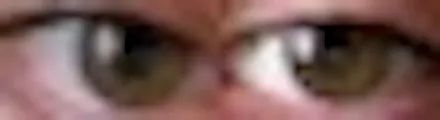
級(jí)聯(lián)分類(lèi)器非常準(zhǔn)確,到目前為止,我尚未在自己的數(shù)據(jù)目錄中看到任何錯(cuò)誤。現(xiàn)在,讓我們編寫(xiě)用于訓(xùn)練神經(jīng)網(wǎng)絡(luò)的代碼,以給定你們的眼睛圖像來(lái)預(yù)測(cè)鼠標(biāo)的位置。
import numpy as npimport osimport cv2import pyautoguifrom tensorflow.keras.models import *from tensorflow.keras.layers import *from tensorflow.keras.optimizers import *
現(xiàn)在,讓我們添加級(jí)聯(lián)分類(lèi)器:
cascade = cv2.CascadeClassifier("haarcascade_eye.xml")video_capture = cv2.VideoCapture(0)
正常化:
def normalize(x):minn, maxx = x.min(), x.max()return (x - minn) / (maxx - minn)
捕捉眼睛:
def scan(image_size=(32, 32)):frame = video_capture.read()gray = cv2.cvtColor(frame, cv2.COLOR_BGR2GRAY)boxes = cascade.detectMultiScale(gray, 1.3, 10)if len(boxes) == 2:eyes = []for box in boxes:y, w, h = boxeye = frame[y:y + h, x:x + w]eye = cv2.resize(eye, image_size)eye = normalize(eye)eye = eye[10:-10, 5:-5]eyes.append(eye)return (np.hstack(eyes) * 255).astype(np.uint8)else:return None
讓我們定義顯示器的尺寸。你們必須根據(jù)自己的計(jì)算機(jī)屏幕的分辨率更改以下參數(shù):
# Note that there are actually 2560x1440 pixels on my screen# I am simply recording one less, so that when we divide by these# numbers, we will normalize between 0 and 1. Note that mouse# coordinates are reported starting at (0, 0), not (1, 1)width, height = 2559, 1439
現(xiàn)在,讓我們加載數(shù)據(jù)(同樣,假設(shè)你們已經(jīng)定義了root)。我們并不在乎是單擊鼠標(biāo)右鍵還是單擊鼠標(biāo)左鍵,因?yàn)槲覀兊哪繕?biāo)只是預(yù)測(cè)鼠標(biāo)的位置:
filepaths = os.listdir(root)Y = [], []for filepath in filepaths:y, _ = filepath.split(' ')x = float(x) / widthy = float(y) / height+ filepath))y])X = np.array(X) / 255.0Y = np.array(Y)print (X.shape, Y.shape)
讓我們定義我們的模型架構(gòu):
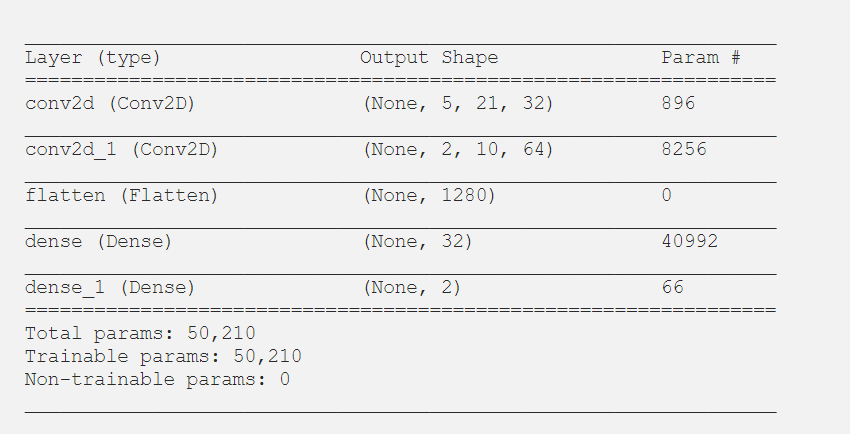
model = Sequential()model.add(Conv2D(32, 3, 2, activation = 'relu', input_shape = (12, 44, 3)))model.add(Conv2D(64, 2, 2, activation = 'relu'))model.add(Flatten())model.add(Dense(32, activation = 'relu'))model.add(Dense(2, activation = 'sigmoid'))model.compile(optimizer = "adam", loss = "mean_squared_error")model.summary()
這是我們的摘要:
接下來(lái)的任務(wù)是訓(xùn)練模型。我們將在圖像數(shù)據(jù)中添加一些噪點(diǎn):
epochs = 200for epoch in range(epochs):model.fit(X, Y, batch_size = 32)
現(xiàn)在讓我們使用我們的模型來(lái)實(shí)時(shí)移動(dòng)鼠標(biāo)。請(qǐng)注意,這需要大量數(shù)據(jù)才能正常工作。但是,作為概念證明,你們會(huì)注意到,實(shí)際上只有200張圖像,它確實(shí)將鼠標(biāo)移到了你們要查看的常規(guī)區(qū)域。當(dāng)然,除非你們擁有更多的數(shù)據(jù),否則這是不可控的。
while True:eyes = scan()if not eyes is None:eyes = np.expand_dims(eyes / 255.0, axis = 0)x, y = model.predict(eyes)[0]pyautogui.moveTo(x * width, y * height)
這是一個(gè)概念證明的例子。請(qǐng)注意,在進(jìn)行此屏幕錄像之前,我們只訓(xùn)練了很少的數(shù)據(jù)。這是我們的鼠標(biāo)根據(jù)眼睛自動(dòng)移動(dòng)到終端應(yīng)用程序窗口的視頻。就像我說(shuō)的那樣,這很容易,因?yàn)閿?shù)據(jù)很少。有了更多的數(shù)據(jù),它有望穩(wěn)定到足以以更高的特異性進(jìn)行控制。僅用幾百?gòu)垐D像,你們就只能將其移動(dòng)到注視的整個(gè)區(qū)域內(nèi)。另外,如果在整個(gè)數(shù)據(jù)收集過(guò)程中,你們?cè)谄聊坏奶囟▍^(qū)域(例如邊緣)都沒(méi)有拍攝任何圖像,則該模型不太可能在該區(qū)域內(nèi)進(jìn)行預(yù)測(cè)。
交流群
歡迎加入公眾號(hào)讀者群一起和同行交流,目前有SLAM、三維視覺(jué)、傳感器、自動(dòng)駕駛、計(jì)算攝影、檢測(cè)、分割、識(shí)別、醫(yī)學(xué)影像、GAN、算法競(jìng)賽等微信群(以后會(huì)逐漸細(xì)分),請(qǐng)掃描下面微信號(hào)加群,備注:”昵稱+學(xué)校/公司+研究方向“,例如:”張三 + 上海交大 + 視覺(jué)SLAM“。請(qǐng)按照格式備注,否則不予通過(guò)。添加成功后會(huì)根據(jù)研究方向邀請(qǐng)進(jìn)入相關(guān)微信群。請(qǐng)勿在群內(nèi)發(fā)送廣告,否則會(huì)請(qǐng)出群,謝謝理解~