
基于OpenCV實戰(zhàn):提取中心線
本文轉(zhuǎn)自|AI算法與圖像處理
問題
前幾天有個人問了我一個問題,問題是這樣的,他有如下的一張二值圖像:
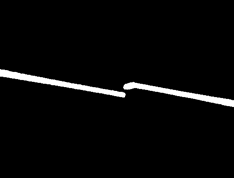
怎么得到白色Blob中心線,他希望的效果如下:
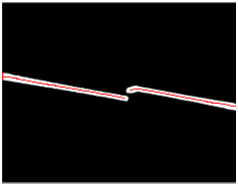
顯然OpenCV中常見的輪廓分析無法獲得上面的中心紅色線段,本質(zhì)上這個問題是如何提取二值對象的骨架,提取骨架的方法在OpenCV的擴展模塊中,另外skimage包也支持圖像的骨架提取。這里就分別基于OpenCV擴展模塊與skimage包來完成骨架提取,得到上述圖示的中心線。
01
安裝skimage與opencv擴展包
Python環(huán)境下安裝skimage圖像處理包與opencv計算機視覺包,只需要分別執(zhí)行下面兩行命令:
pip install opencv-contrib-pythonpip install skimage
導入使用
from skimage import morphologyimport cv2 as cv
02
使用skimage實現(xiàn)骨架提取
有兩個相關的函數(shù)實現(xiàn)二值圖像的骨架提取,一個是基于距離變換實現(xiàn)的medial_axis方法;另外一個是基于thin的skeletonize骨架提取方法。兩個方法的代碼實現(xiàn)分別如下:
 1def skeleton_demo(image):
 2    gray = cv.cvtColor(image, cv.COLOR_BGR2GRAY)
 3    ret, binary = cv.threshold(gray, 0, 255, cv.THRESH_BINARY | cv.THRESH_OTSU)
 4    binary[binary == 255] = 1
 5    skeleton0 = morphology.skeletonize(binary)
 6    skeleton = skeleton0.astype(np.uint8) * 255
 7    cv.imshow("skeleton", skeleton)
 8    cv.waitKey(0)
 9    cv.destroyAllWindows()
10
11
12def medial_axis_demo(image):
13    gray = cv.cvtColor(image, cv.COLOR_BGR2GRAY)
14    ret, binary = cv.threshold(gray, 0, 255, cv.THRESH_BINARY | cv.THRESH_OTSU)
15    binary[binary == 255] = 1
16    skel, distance = morphology.medial_axis(binary, return_distance=True)
17    dist_on_skel = distance * skel
18    skel_img = dist_on_skel.astype(np.uint8)*255
19    contours, hireachy = cv.findContours(skel_img, cv.RETR_EXTERNAL, cv.CHAIN_APPROX_SIMPLE)
20    cv.drawContours(image, contours, -1, (0, 0, 255), 1, 8)
21
22    cv.imshow("result", image)
23    cv.waitKey(0)
24    cv.destroyAllWindows()
03
使用OpenCV實現(xiàn)骨架提取
OpenCV的圖像細化的骨架提取方法在擴展模塊中,因此需要直接安裝opencv-python的擴展包。此外還可以通過形態(tài)學的膨脹與腐蝕來實現(xiàn)二值圖像的骨架提取,下面的代碼實現(xiàn)就是分別演示了基于OpenCV的兩種骨架提取方法。代碼分別如下:
 1def morph_find(image):
 2    gray = cv.cvtColor(image, cv.COLOR_BGR2GRAY)
 3    ret, binary = cv.threshold(gray, 0, 255, cv.THRESH_BINARY | cv.THRESH_OTSU)
 4    kernel = cv.getStructuringElement(cv.MORPH_CROSS, (3, 3))
 5    finished = False
 6    size = np.size(binary)
 7    skeleton = np.zeros(binary.shape, np.uint8)
 8    while (not finished):
 9        eroded = cv.erode(binary, kernel)
10        temp = cv.dilate(eroded, kernel)
11        temp = cv.subtract(binary, temp)
12        skeleton = cv.bitwise_or(skeleton, temp)
13        binary = eroded.copy()
14
15        zeros = size - cv.countNonZero(binary)
16        if zeros == size:
17            finished = True
18
19    contours, hireachy = cv.findContours(skeleton, cv.RETR_EXTERNAL, cv.CHAIN_APPROX_SIMPLE)
20    cv.drawContours(image, contours, -1, (0, 0, 255), 1, 8)
21    cv.imshow("skeleton", image)
22    cv.waitKey(0)
23    cv.destroyAllWindows()
24
25
26def thin_demo(image):
27    gray = cv.cvtColor(image, cv.COLOR_BGR2GRAY)
28    ret, binary = cv.threshold(gray, 0, 255, cv.THRESH_BINARY | cv.THRESH_OTSU)
29    thinned = cv.ximgproc.thinning(binary)
30    contours, hireachy = cv.findContours(thinned, cv.RETR_EXTERNAL, cv.CHAIN_APPROX_SIMPLE)
31    cv.drawContours(image, contours, -1, (0, 0, 255), 1, 8)
32    cv.imshow("thin", image)
33    cv.waitKey(0)
34    cv.destroyAllWindows()
運行結果如下:

 End
End
聲明:部分內(nèi)容來源于網(wǎng)絡,僅供讀者學術交流之目的。文章版權歸原作者所有。如有不妥,請聯(lián)系刪除。
評論
圖片
表情