
用 Python 分析全球最美Top100女神
一、前言
前一段時(shí)間,國(guó)外媒體 TOP BEAUTY WORLD 評(píng)選了全球最帥男性和最美女性Top100,肖戰(zhàn)成為了該排行榜歷屆以來(lái)首位登頂?shù)膩喼奕恕_@一消息立刻成為了流量的熱點(diǎn)。
想看一下榜單中的最美小姐姐的信息。可是現(xiàn)在還沒(méi)有最美小姐姐的文字榜單信息。但網(wǎng)站里有上一屆的全球最美女性前一百名的榜單數(shù)據(jù),包含了姓名、地區(qū)和職業(yè)等信息。
 全球最美 Top100 女神榜單數(shù)據(jù),怎能不獲取下來(lái)好好探究一波?下面我們利用 Python 爬蟲將榜單數(shù)據(jù)獲取下來(lái),并進(jìn)行數(shù)據(jù)可視化。
二、爬取數(shù)據(jù)
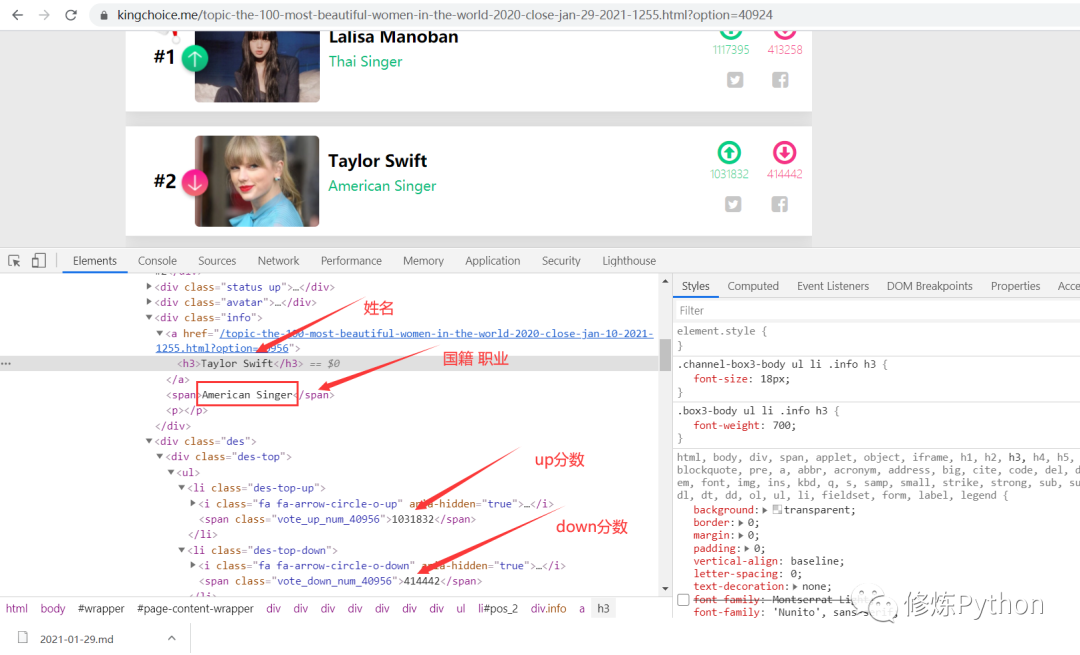 首先,我們想要獲取到的數(shù)據(jù),包括小姐姐的姓名、地區(qū)、職業(yè)等信息。檢查發(fā)現(xiàn)網(wǎng)頁(yè)屬于靜態(tài)網(wǎng)頁(yè),因此可以直接分析網(wǎng)頁(yè)源代碼,提取出我們想要的數(shù)據(jù)。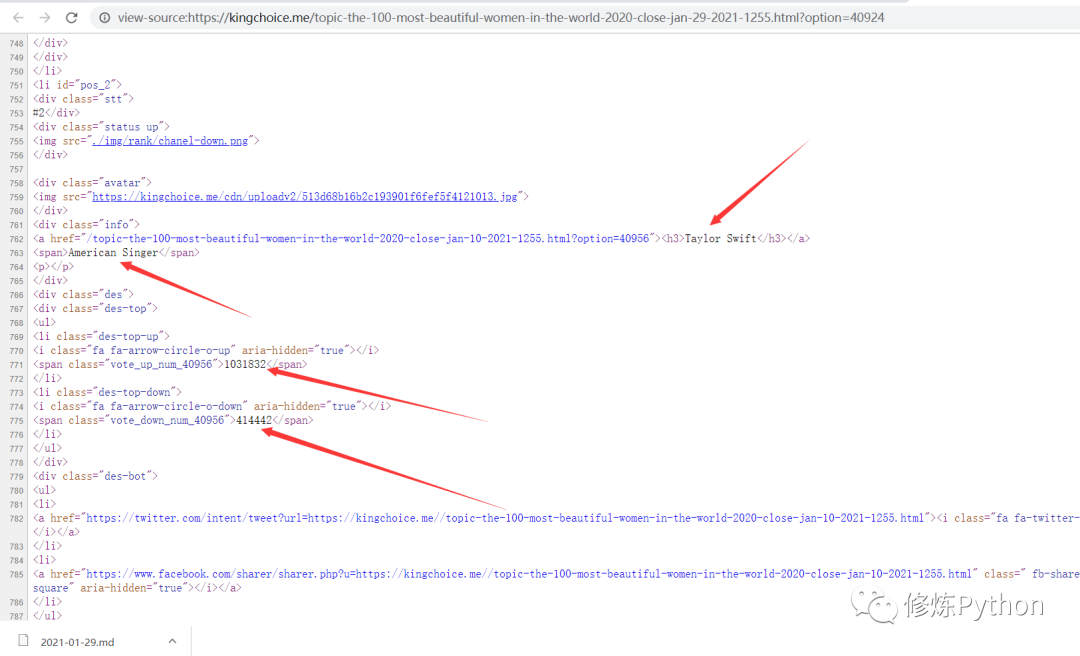
Python代碼如下:
#?-*-?coding:?UTF-8?-*-
"""
@File ???:spider.py
@Author ?:葉庭云
@CSDN ???:https://yetingyun.blog.csdn.net/
"""
import?requests
from?lxml?import?etree
import?logging
from?fake_useragent?import?UserAgent
import?openpyxl

wb?=?openpyxl.Workbook()
sheet?=?wb.active
sheet.append(['ranking',?'name',?'country',?'occupation',?'up_score',?'down_score'])
logging.basicConfig(level=logging.INFO,?format='%(asctime)s?-?%(levelname)s:?%(message)s')
#?隨機(jī)產(chǎn)生請(qǐng)求頭
ua?=?UserAgent(verify_ssl=False,?path='fake_useragent.json')

headers?=?{
????"accept-encoding":?"gzip",
????"upgrade-insecure-requests":?"1",
????"user-agent":?ua.random,
}

url?=?"https://kingchoice.me/topic-the-100-most-beautiful-women-in-the-world-2020-close-jan-29-2021-1255.html?option=40924"
response?=?requests.get(url,?headers=headers)
#?print(response.status_code)
#?print(response.text)
html?=?etree.HTML(response.text)
lis?=?html.xpath('//div[@class="channel-box3-body?box3-body"]/ul/li')
logging.info(len(lis))???#?100條信息

for?index_,?li?in?enumerate(lis,?start=1):
????src?=?li.xpath('.//div[@class="avatar"]/img/@src')[0]?????#?圖片
????name?=?li.xpath('.//div[@class="info"]/a/h3/text()')[0]???#?姓名
????country,?occupation?=?li.xpath('.//div[@class="info"]/span/text()')[0].split('?',?1)??#?地區(qū)?職業(yè)
????up_score?=?li.xpath('.//div[@class="des"]/div[1]/ul/li[1]/span/text()')[0]????#?up分?jǐn)?shù)
????down_score?=?li.xpath('.//div[@class="des"]/div[1]/ul/li[2]/span/text()')[0]??#?down分?jǐn)?shù)
????img?=?requests.get(src,?headers=headers).content
????with?open(r'.\Top100_beauty_img\{}.jpg'.format(name),?'wb')?as?f:
????????f.write(img)
????sheet.append([index_,?name,?country,?occupation,?up_score,?down_score])
????logging.info([index_,?name,?country,?occupation,?up_score,?down_score])
????logging.info('已保存{}的信息'.format(name))

wb.save(filename='datas.xlsx')
結(jié)果如下:

三、數(shù)據(jù)可視化
先來(lái)看看全球最美 Top100 女神得分情況
#?-*-?coding:?UTF-8?-*-
"""
@File ???:得分.py
@Author ?:葉庭云
@CSDN ???:https://yetingyun.blog.csdn.net/
"""
import?pandas?as?pd
import?pyecharts.options?as?opts
from?pyecharts.charts?import?Line
from?pyecharts.datasets?import?register_files
from?pyecharts.globals?import?CurrentConfig

#?導(dǎo)入自定義的主題?可自己定制??也可以就用pyecharts官方的幾種
register_files({"myTheme":?["themes/myTheme",?"js"]})
CurrentConfig.ONLINE_HOST?=?'D:/python/pyecharts-assets-master/assets/'

df?=?pd.read_excel('datas.xlsx')
up_score?=?list(df['up_score'])
down_score?=?list(df['down_score'])
x_data?=?[i?for?i?in?range(1,?101)]

c?=?(
????Line(init_opts=opts.InitOpts(theme='myTheme'))
????.add_xaxis(xaxis_data=x_data)
????.set_colors(['#7FFF00',?'red'])?????#?設(shè)置兩條折線圖的顏色
????.add_yaxis('up_score',?y_axis=up_score,
???????????????label_opts=opts.LabelOpts(is_show=False)
???????????????)
????.add_yaxis('down_socre',?y_axis=down_score,
????????????????label_opts=opts.LabelOpts(is_show=False)
???????????????)
????.set_global_opts(?????#?設(shè)置x軸?y軸標(biāo)簽
????????xaxis_opts=opts.AxisOpts(name='排名'),
????????yaxis_opts=opts.AxisOpts(name='得分'),
????????title_opts=opts.TitleOpts('得分情況')

????)
????.render('得分.html')
)
結(jié)果如下: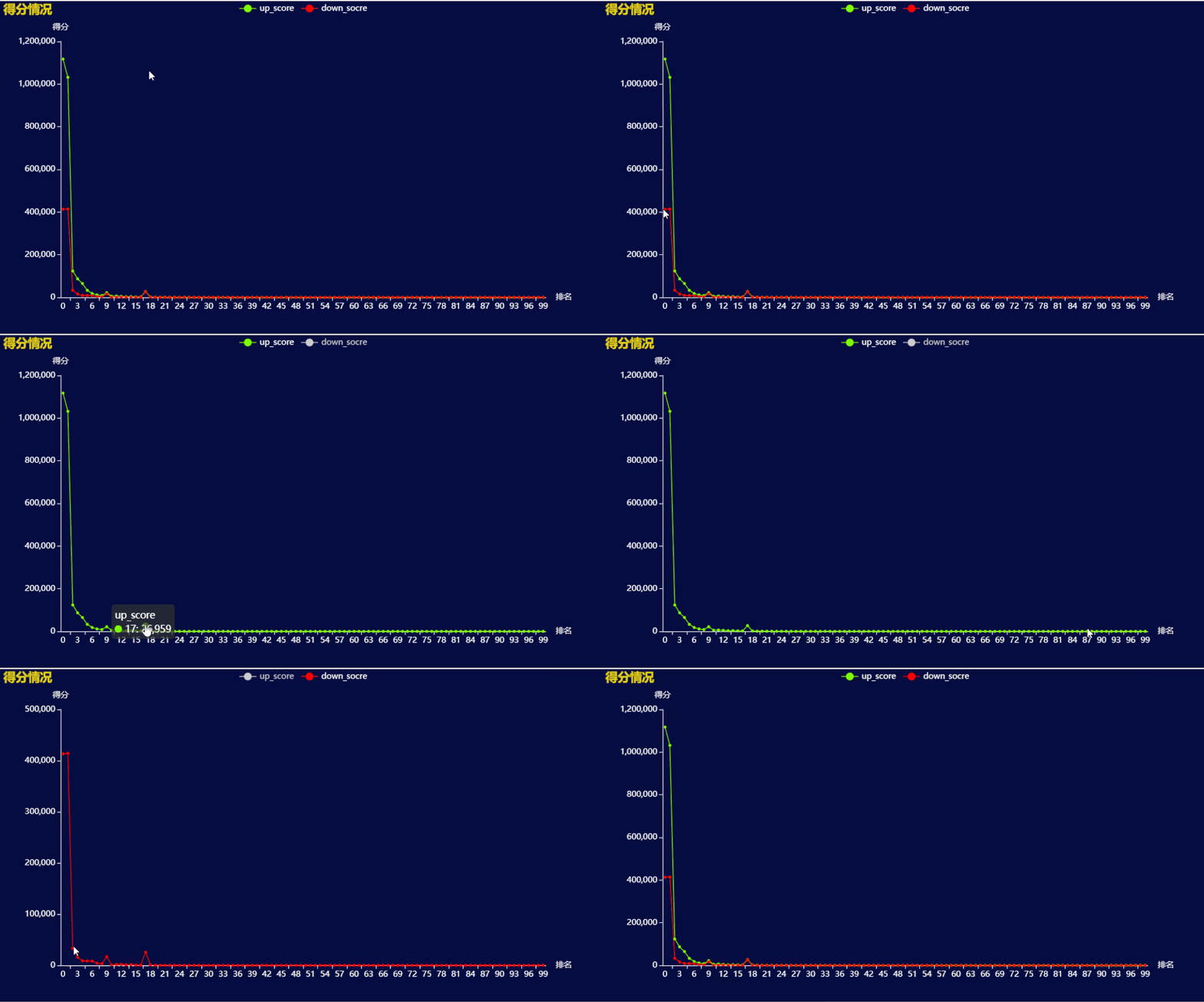 排第一、第二的 Lalisa Manoban 和 Taylor Swift 得分遠(yuǎn)遠(yuǎn)高于之后的美女。
Top100 美女地區(qū)分布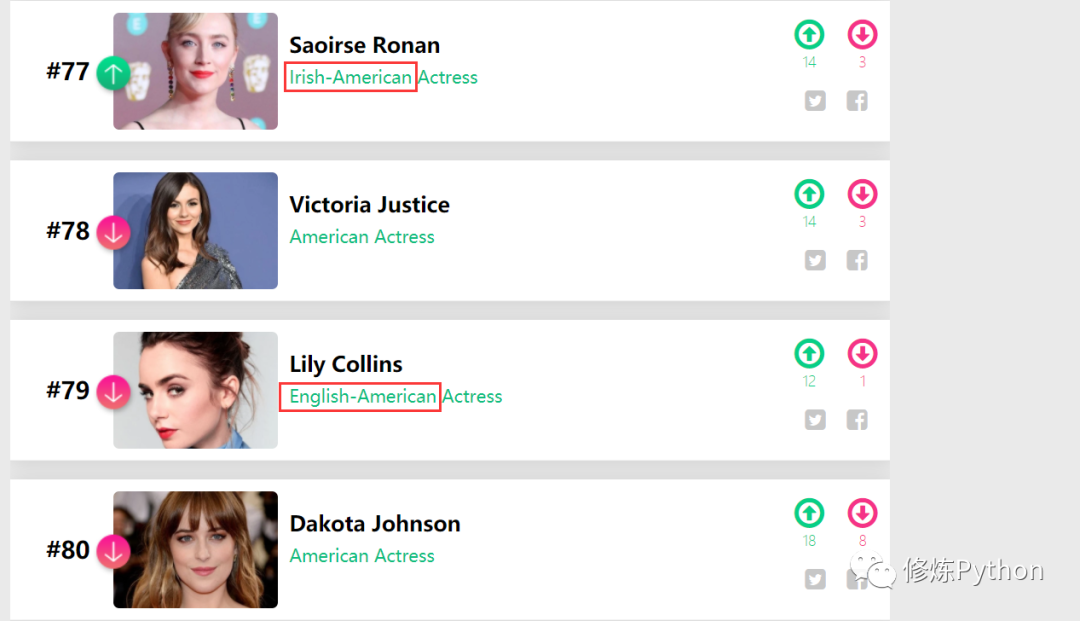
#?-*-?coding:?UTF-8?-*-
"""
@File ???:女神地區(qū).py
@Author ?:葉庭云
@CSDN ???:https://yetingyun.blog.csdn.net/
"""
import?pandas?as?pd
from?collections?import?Counter
from?pyecharts?import?options?as?opts
from?pyecharts.charts?import?Bar
from?pyecharts.globals?import?ThemeType,?CurrentConfig
import?random

CurrentConfig.ONLINE_HOST?=?'D:/python/pyecharts-assets-master/assets/'

df?=?pd.read_excel('datas.xlsx')
areas?=?df['country']
area_list?=?[]
for?item?in?areas:
?if?'-'?in?item:
??item?=?item.split('-')
??for?i?in?item:
???area_list.append(i)
?else:
??area_list.append(item)

area_count?=?Counter(area_list).most_common(10)
print(area_count)
area?=?[x[0]?for?x?in?area_count]
nums?=?[y[1]?for?y?in?area_count]
#?使用風(fēng)格
bar?=?Bar(init_opts=opts.InitOpts(theme=ThemeType.MACARONS))
colors?=?['red',?'#0000CD',?'#000000',?'#008000',?'#FF1493',?'#FFD700',?'#FF4500',?'#00FA9A',?'#191970',?'#9932CC']
random.shuffle(colors)
#?配置y軸數(shù)據(jù)??Baritem
y?=?[]
for?i?in?range(10):
?y.append(
??opts.BarItem(
???name=area[i],
???value=nums[i],
???itemstyle_opts=opts.ItemStyleOpts(color=colors[i])???#?設(shè)置每根柱子的顏色
??)
?)
bar.add_xaxis(xaxis_data=area)
bar.add_yaxis("上榜美女?dāng)?shù)",?y)
bar.set_global_opts(xaxis_opts=opts.AxisOpts(
?????????name='國(guó)家',
?????????axislabel_opts=opts.LabelOpts(rotate=45)
?????????),
?????yaxis_opts=opts.AxisOpts(
?????????name='上榜美女?dāng)?shù)',?min_=0,?max_=55,?????#?y軸刻度的最小值?最大值
?????),
?????title_opts=opts.TitleOpts(
??????title="各地區(qū)上榜美女?dāng)?shù)",
??????title_textstyle_opts=opts.TextStyleOpts(
???????font_family="KaiTi",?font_size=25,?color="black"
??????)
?????))
#?標(biāo)記最大值??最小值??平均值???標(biāo)記平均線
bar.set_series_opts(label_opts=opts.LabelOpts(is_show=False),
?????markpoint_opts=opts.MarkPointOpts(
?????data=[
??????opts.MarkPointItem(type_="max",?name="最大值"),
??????opts.MarkPointItem(type_="min",?name="最小值"),
??????opts.MarkPointItem(type_="average",?name="平均值")]),
?????markline_opts=opts.MarkLineOpts(
?????data=[
??????opts.MarkLineItem(type_="average",?name="平均值")]))
bar.render("女神地區(qū)分布.html")
結(jié)果如下: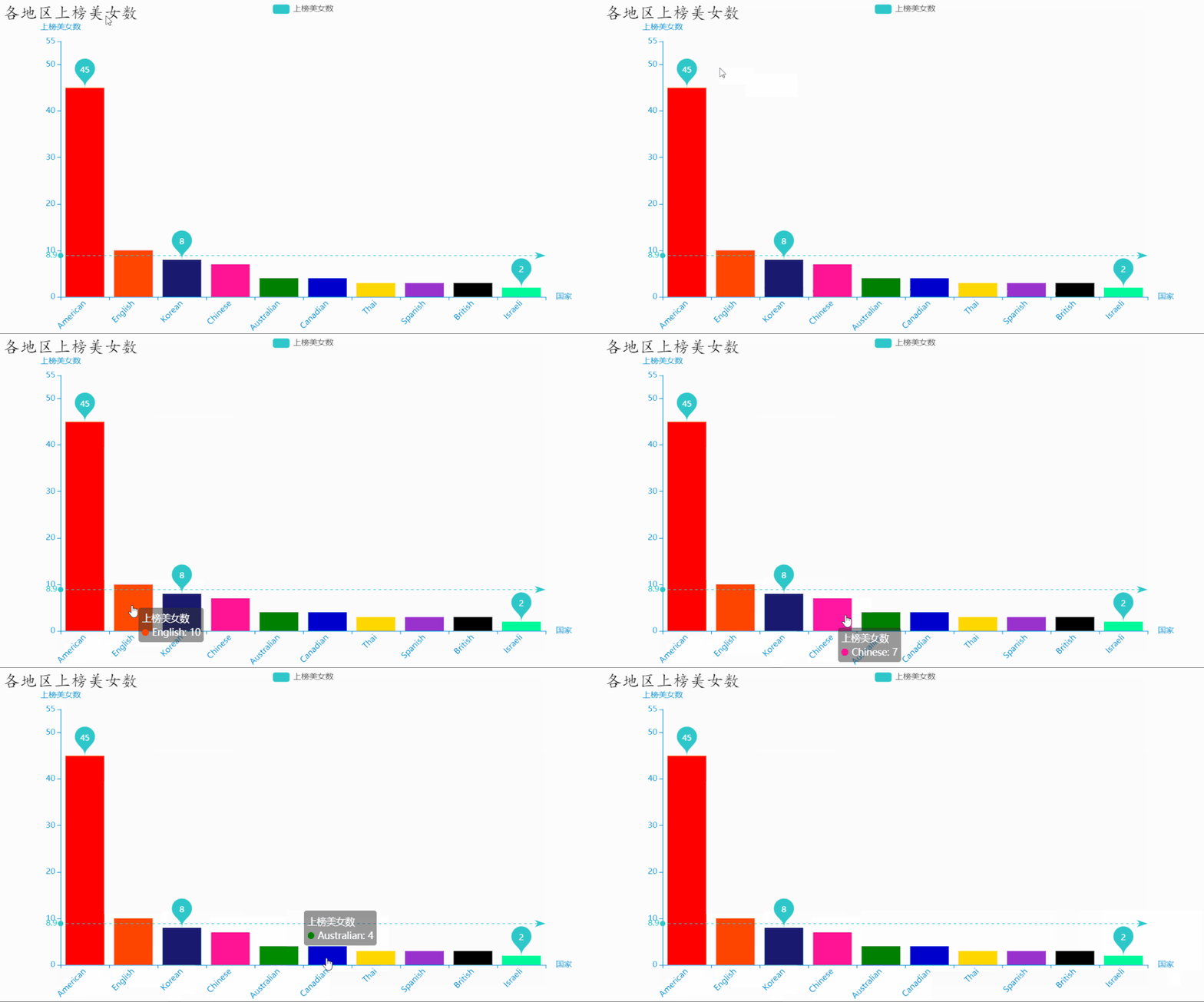 可以看到,英美地區(qū)的美女上榜人數(shù)最多,占了一半多,其次是韓國(guó)、中國(guó)的美女。
import?pandas?as?pd
????
df?=?pd.read_excel('datas.xlsx')
data?=?df[df['country'].str.contains('Chinese')]
data.to_excel('test.xlsx',?index=False)

發(fā)現(xiàn)國(guó)內(nèi)上榜的美女,職業(yè)均是演員。
import?pandas?as?pd

df?=?pd.read_excel('datas.xlsx')
data?=?df['occupation'].value_counts()
print(data)
Actress???????69
Singer????????18
Model?????????10
Atress?????????1
model??????????1
TV?Actress?????1
Name:?occupation,?dtype:?int64

Process?finished?with?exit?code?0


再檢查了網(wǎng)站里數(shù)據(jù)發(fā)現(xiàn),有個(gè)別數(shù)據(jù)美女職業(yè)是模特,其他都是Model,就這一個(gè)寫為model,還有某一個(gè)Actress拼寫錯(cuò)誤,弄成了Atress。還有一個(gè)的職業(yè)是 TV Actress,也將她歸入演員 Actress 內(nèi)。數(shù)據(jù)量少,我們直接在表格中找到,將其更改。
#?-*-?coding:?UTF-8?-*-
"""
@File ???:職業(yè)分布.py
@Author ?:葉庭云
@CSDN ???:https://yetingyun.blog.csdn.net/
"""
import?pandas?as?pd
from?collections?import?Counter
from?pyecharts.charts?import?Pie
from?pyecharts?import?options?as?opts
from?pyecharts.globals?import?ThemeType,?CurrentConfig

#?引用本地js資源渲染
CurrentConfig.ONLINE_HOST?=?'D:/python/pyecharts-assets-master/assets/'

df?=?pd.read_excel('datas.xlsx')
data?=?list(df['occupation'])
job_count?=?Counter(data).most_common()

pie?=?Pie(init_opts=opts.InitOpts(theme=ThemeType.MACARONS))
#?富文本效果??環(huán)圖
pie.add('職業(yè)',?data_pair=job_count,?radius=["40%",?"55%"],
????????label_opts=opts.LabelOpts(
????????????position="outside",
????????????formatter="{a|{a}}{abg|}\n{hr|}\n?{b|{b}:?}{c}??{per|go7utgvlrp%}??",
????????????background_color="#eee",
????????????border_color="#aaa",
????????????border_width=1,
????????????border_radius=4,
????????????rich={
????????????????"a":?{"color":?"#999",?"lineHeight":?22,?"align":?"center"},
????????????????"abg":?{
????????????????????"backgroundColor":?"#e3e3e3",
????????????????????"width":?"100%",
????????????????????"align":?"right",
????????????????????"height":?22,
????????????????????"borderRadius":?[4,?4,?0,?0],
????????????????},
????????????????"hr":?{
????????????????????"borderColor":?"#aaa",
????????????????????"width":?"100%",
????????????????????"borderWidth":?0.5,
????????????????????"height":?0,
????????????????},
????????????????"b":?{"fontSize":?16,?"lineHeight":?33},
????????????????"per":?{
????????????????????"color":?"#eee",
????????????????????"backgroundColor":?"#334455",
????????????????????"padding":?[2,?4],
????????????????????"borderRadius":?2,
????????????????},
????????????},
????????),)
pie.set_global_opts(title_opts=opts.TitleOpts(title='職業(yè)占比'))
pie.set_colors(['red',?'orange',?'purple'])???#?設(shè)置顏色
pie.render('美女職業(yè)分布.html')
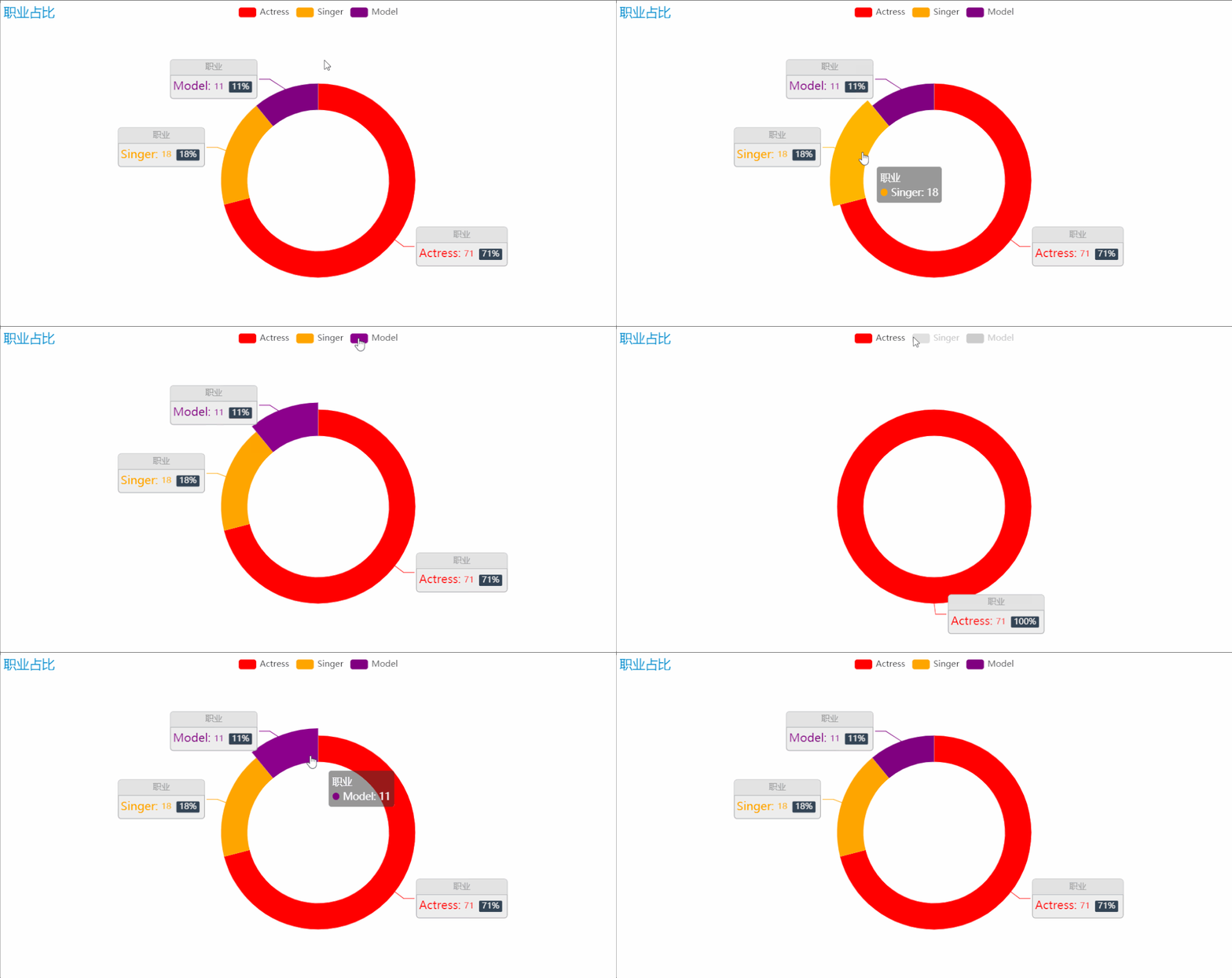
榜單中美女們的職業(yè),主要有三種:演員、模特、歌手。這些職業(yè)都對(duì)各方面都有一定要求,才能發(fā)展得好。職業(yè)的占比中,可以看到演員的占比是最高的,因?yàn)轭佒凳且粋€(gè)演員重要的名片,特別是如今這樣一個(gè)看顏值的時(shí)代,也是打分成績(jī)中占比最高的一項(xiàng),因此在榜單中,演員占比最高也就不足為奇了。
作者:葉庭云
CSDN:https://yetingyun.blog.csdn.net/熱愛(ài)可抵歲月漫長(zhǎng),發(fā)現(xiàn)求知的樂(lè)趣,在不斷總結(jié)和學(xué)習(xí)中進(jìn)步,與諸君共勉。
更多閱讀
特別推薦

點(diǎn)擊下方閱讀原文加入社區(qū)會(huì)員