<kbd id="afajh"><form id="afajh"></form></kbd>
<strong id="afajh"><dl id="afajh"></dl></strong>
    <del id="afajh"><form id="afajh"></form></del>
        1. <th id="afajh"><progress id="afajh"></progress></th>
          <b id="afajh"><abbr id="afajh"></abbr></b>
          <th id="afajh"><progress id="afajh"></progress></th>

          AutoML:訓(xùn)練模型以識別凹坑

          共 7518字,需瀏覽 16分鐘

           ·

          2022-02-26 05:56

          點擊下方卡片,關(guān)注“新機器視覺”公眾號

          重磅干貨,第一時間送達

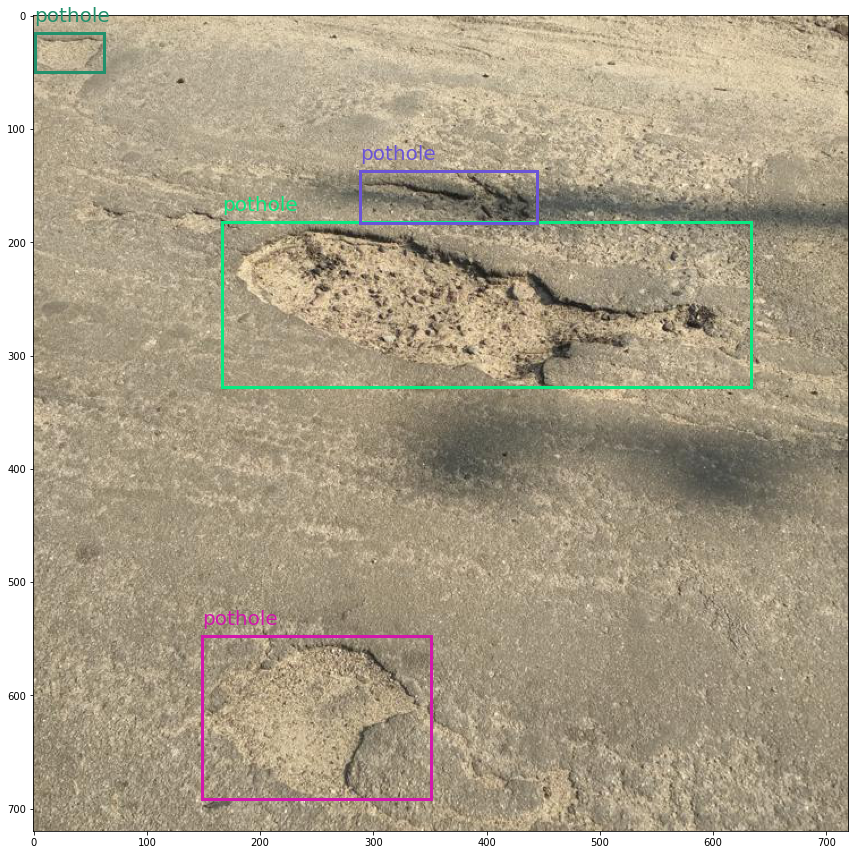
          從我們訓(xùn)練的模型中得到的坑洞預(yù)測和置信度分?jǐn)?shù):
          初始算法選擇和超參數(shù)優(yōu)化是我個人不喜歡做的活動。如果你像我一樣,那么也許你會喜歡自動機器學(xué)習(xí)(AutoML),一種我們可以讓腳本為我們完成這些耗時的ML任務(wù)的技術(shù)。
          Azure機器學(xué)習(xí)(AML)是一項云服務(wù),其功能包括準(zhǔn)備和創(chuàng)建數(shù)據(jù)集、訓(xùn)練模型以及將其部署為web服務(wù)變得更加容易。
          最近,AML團隊發(fā)布了AutoML功能,供公眾預(yù)覽。今天,我們將使用此功能訓(xùn)練一個目標(biāo)檢測模型,以識別道路上的凹坑。
          在這篇文章中,我將簡要回顧一些AML和目標(biāo)檢測的概念,因此你不必完全熟悉它們就可以進行后續(xù)操作。本教程主要基于Azure中的這個示例,你可以查看我在這里編寫的Jupyter筆記本:
          https://github.com/dmesquita/azureml-automl-potholes-object-detection
          酷,讓我們開始吧!

          我們該怎么辦?

          對象檢測數(shù)據(jù)集很有趣,因為它們由表格數(shù)據(jù)(邊界框的注釋)和圖像數(shù)據(jù)(.png、.jpeg等)組成。
          COCO格式是對象檢測數(shù)據(jù)集的一種流行格式,我們將使用此格式下載坑洞數(shù)據(jù)集:https://public.roboflow.com/object-detection/pothole
          Azure機器學(xué)習(xí)使用TABLAR DATASET格式,因此我們需要做的第一件事是將COCO轉(zhuǎn)換為TABLAR DATASET。
          轉(zhuǎn)換后,我們將選擇一種對象檢測算法,并最終訓(xùn)練模型。

          1-準(zhǔn)備數(shù)據(jù)集

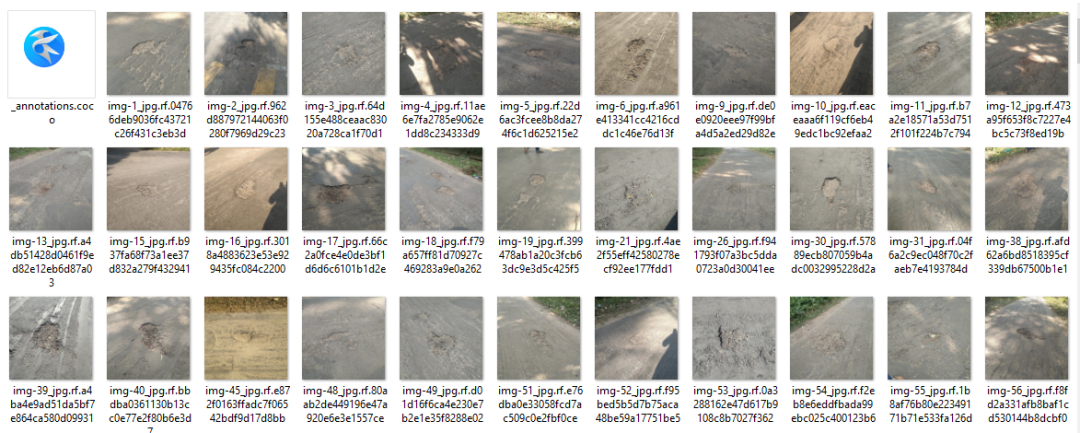
          我從Roboflow那里得到了數(shù)據(jù)集。它有665張標(biāo)有坑洞的道路圖片,由Atikur Rahman Chitholian創(chuàng)作并分享,作為其論文的一部分。Roboflow團隊按照70/20/10將數(shù)據(jù)集劃分為訓(xùn)練-驗證-測試集。
          每個拆分都有兩個主要組件:
          • _annotations.coco.json,一個包含images、categories和annotations的json文件
          • 圖像本身(.jpg文件)
          以下是鍵:
          • images:包含有關(guān)數(shù)據(jù)集圖像的信息(id、文件名、大小等)
          • categories:邊界框類別的名稱和id
          • annotations:包含有關(guān)對象的信息,包括邊界框坐標(biāo)(在此數(shù)據(jù)集中,它們位于絕對坐標(biāo))、對象的圖像id和類別id
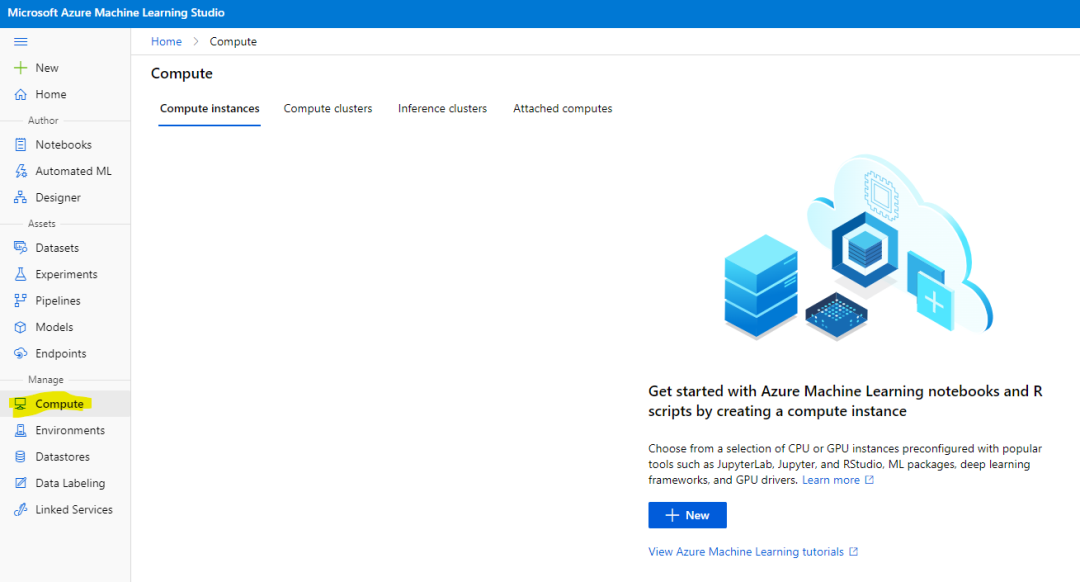
          現(xiàn)在是開始與AML合作的時候了。你需要做的第一件事是創(chuàng)建Azure機器學(xué)習(xí)工作區(qū)。你可以使用上的web界面來執(zhí)行此操作https://portal.azure.com.
          我們需要一個計算實例來運行,然后再運行訓(xùn)練,所以需要在你的工作區(qū)內(nèi)創(chuàng)建一個。圖像任務(wù)的AutoML模型需要GPU計算實例。你也可以使用web界面創(chuàng)建計算實例。
          創(chuàng)建計算實例:
          我已經(jīng)下載并提取了數(shù)據(jù)庫中的數(shù)據(jù)集.放在/potholeObjects文件夾。每個拆分都有一個文件夾,里面有圖像和JSON文件。
          你需要將圖像和JSON文件上傳到數(shù)據(jù)存儲,以便AML可以訪問它們。
          數(shù)據(jù)存儲是云數(shù)據(jù)源的抽象。創(chuàng)建AML工作區(qū)時,將創(chuàng)建AzureBlobDatastore并將其設(shè)置為默認(rèn)值。我們將使用此默認(rèn)數(shù)據(jù)存儲并將圖像上傳到那里。
          from?azureml.core?import?Workspace

          workspace?=?Workspace.from_config()?#?如果你在一個aml計算實例上運行notebook,這是可行的

          default_datastore?=?workspace.get_default_datastore()
          datastore_name?=?default_datastore.name
          注釋采用COCO格式(JSON),但tablerDataSet要求注釋采用JSON行。tablerDataset具有相同的元數(shù)據(jù),但以不同的鍵組織。以下是用于對象檢測的TablerDataset的外觀:
          {
          ???"image_url":"AmlDatastore://data_directory/../Image_name.image_format",
          ???"image_details":{
          ??????"format":"image_format",
          ??????"width":"image_width",
          ??????"height":"image_height"
          ???},
          ???"label":[
          ??????{
          ?????????"label":"class_name_1",
          ?????????"topX":"xmin/width",
          ?????????"topY":"ymin/height",
          ?????????"bottomX":"xmax/width",
          ?????????"bottomY":"ymax/height",
          ?????????"isCrowd":"isCrowd"
          ??????},
          ??????{
          ?????????"label":"class_name_2",
          ?????????"topX":"xmin/width",
          ?????????"topY":"ymin/height",
          ?????????"bottomX":"xmax/width",
          ?????????"bottomY":"ymax/height",
          ?????????"isCrowd":"isCrowd"
          ??????},
          ??????"..."
          ???]
          }
          幸運的是,微軟工程師編寫了一個腳本來轉(zhuǎn)換COCO:https://github.com/Azure/azureml-examples/blob/1a41978d7ddc1d1f831236ff0c5c970b86727b44/python-sdk/tutorials/automl-with-azureml/image-object-detection/coco2jsonl.py
          此文件的image_url鍵需要指向我們正在使用的數(shù)據(jù)存儲中的圖像文件(默認(rèn))。我們使用coco2jsonl的base_url參數(shù)指定。
          #?從coco文件生成訓(xùn)練jsonl文件
          !python?coco2jsonl.py?\
          --input_coco_file_path?"./potholeObjects/train/_annotations.coco.json"?\
          --output_dir?"./potholeObjects/train"?--output_file_name?"train_pothole_from_coco.jsonl"?\
          --task_type?"ObjectDetection"?\
          --base_url?"AmlDatastore://{datastore_name}/potholeObjects/train/"
          我們將對驗證集運行相同的命令。現(xiàn)在,下一步是將文件上傳到數(shù)據(jù)存儲,并在AML中創(chuàng)建數(shù)據(jù)集。不要將數(shù)據(jù)集與數(shù)據(jù)存儲混淆。數(shù)據(jù)集是版本控制的打包數(shù)據(jù)對象,通常基于數(shù)據(jù)存儲中的文件創(chuàng)建。我們將從JSON行文件創(chuàng)建數(shù)據(jù)集。
          from?azureml.core?import?Dataset
          from?azureml.data.datapath?import?DataPath
          from?azureml.data?import?DataType

          #?上傳文件到數(shù)據(jù)存儲
          Dataset.File.upload_directory(
          ????src_dir="./potholeObjects/train/",?target=DataPath(default_datastore,?"/potholeObjects/train"),?show_progress=True
          )

          training_dataset_name?=?"potholeObjectesTrainingDataset"

          #?創(chuàng)建數(shù)據(jù)集
          training_dataset?=?Dataset.Tabular.from_json_lines_files(
          ????????path=DataPath(default_datastore,?"/potholeObjects/train/train_pothole_from_coco.jsonl"),
          ????????set_column_types={"image_url":?DataType.to_stream(default_datastore.workspace)},
          )

          #?在工作區(qū)中注冊數(shù)據(jù)集
          training_dataset?=?training_dataset.register(
          ????????workspace=workspace,?name=training_dataset_name
          )
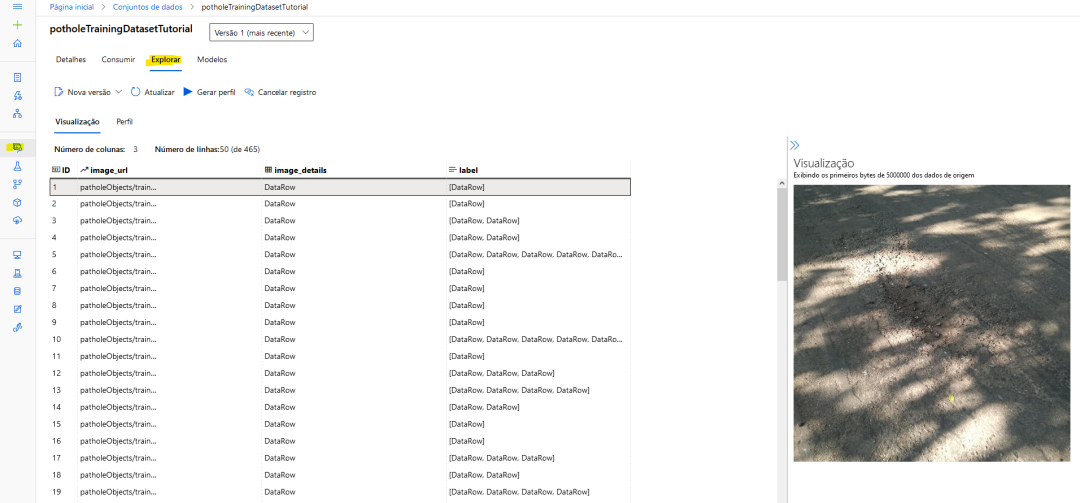
          對于訓(xùn)練和驗證拆分,也將這樣做。如果一切順利,你可以看到AML內(nèi)部的圖像預(yù)覽。
          AML工作區(qū)內(nèi)的數(shù)據(jù)集預(yù)覽

          2.進行實驗

          在AML內(nèi)部,你運行的一切都稱為實驗。要使用AutoML訓(xùn)練模型,你將創(chuàng)建一個實驗,指向它假定運行的計算目標(biāo),并提供AutoML參數(shù)的配置。
          讓我們首先創(chuàng)建實驗并從工作區(qū)獲取計算機實例:
          from?azureml.core?import?Experiment

          experiment_name?=?"pothole-yolov5-model"
          experiment?=?Experiment(workspace,?name=experiment_name)

          compute_target?=?workspace.compute_targets['gpu-computer']?#?給計算實例的名稱
          在這里,我將使用yolov5默認(rèn)參數(shù)運行實驗。你需要提供超參數(shù)、計算目標(biāo)、訓(xùn)練數(shù)據(jù)和驗證數(shù)據(jù)(如示例所示,驗證數(shù)據(jù)集是可選的)。
          from?azureml.automl.core.shared.constants?import?ImageTask
          from?azureml.train.automl?import?AutoMLImageConfig
          from?azureml.train.hyperdrive?import?GridParameterSampling,?choice

          automl_config_yolov5?=?AutoMLImageConfig(
          ????task=ImageTask.IMAGE_OBJECT_DETECTION,
          ????compute_target=compute_target,
          ????training_data=training_dataset,
          ????validation_data=validation_dataset,
          ????hyperparameter_sampling=GridParameterSampling({"model_name":?choice("yolov5")}),
          ????iterations=1,
          )
          現(xiàn)在可以提交實驗了:
          automl_image_run?=?experiment.submit(automl_config_yolov5)
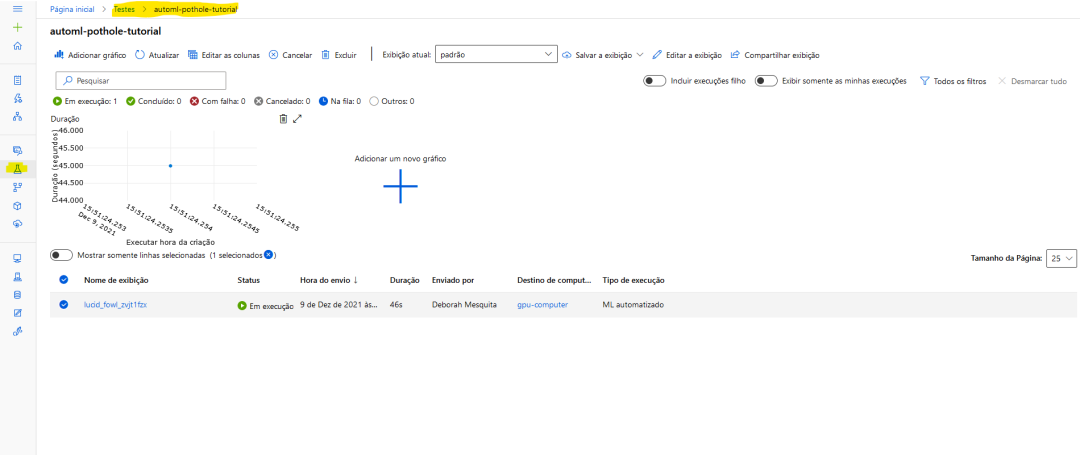
          你可以使用Workspace web界面監(jiān)控實驗:
          以下是Microsoft教程中的一個示例:
          from?azureml.automl.core.shared.constants?import?ImageTask
          from?azureml.train.automl?import?AutoMLImageConfig
          from?azureml.train.hyperdrive?import?BanditPolicy,?RandomParameterSampling
          from?azureml.train.hyperdrive?import?choice,?uniform

          parameter_space?=?{
          ????"model":?choice(
          ????????{
          ????????????"model_name":?choice("yolov5"),
          ????????????"learning_rate":?uniform(0.0001,?0.01),
          ????????????"model_size":?choice("small",?"medium"),??#?模型相關(guān)
          ????????????#'img_size':?choice(640,?704,?768),?#?特定型號;可能需要有大內(nèi)存的GPU
          ????????},
          ????????{
          ????????????"model_name":?choice("fasterrcnn_resnet50_fpn"),
          ????????????"learning_rate":?uniform(0.0001,?0.001),
          ????????????"optimizer":?choice("sgd",?"adam",?"adamw"),
          ????????????"min_size":?choice(600,?800),??#?模型相關(guān)
          ????????????#'warmup_cosine_lr_warmup_epochs':?choice(0,?3),
          ????????},
          ????),
          }

          tuning_settings?=?{
          ????"iterations":?10,
          ????"max_concurrent_iterations":?2,
          ????"hyperparameter_sampling":?RandomParameterSampling(parameter_space),
          ????"early_termination_policy":?BanditPolicy(
          ????????evaluation_interval=2,?slack_factor=0.2,?delay_evaluation=6
          ????),
          }

          automl_image_config?=?AutoMLImageConfig(
          ????task=ImageTask.IMAGE_OBJECT_DETECTION,
          ????compute_target=compute_target,
          ????training_data=training_dataset,
          ????validation_data=validation_dataset,
          ????**tuning_settings,
          )

          3-將預(yù)測可視化

          這個yolov5模型是使用Pytorch訓(xùn)練的,因此我們可以下載模型并使用Jupyter筆記本檢查預(yù)測。
          我的花了56分鐘訓(xùn)練。獲取模型需要做的第一件事是注冊工作區(qū)中的最佳運行,以便訪問模型。
          best_child_run?=?automl_image_run.get_best_child()

          model_name?=?best_child_run.properties["model_name"]
          model_output_path?=?best_child_run.properties["model_output_path"]

          #?從最佳運行中注冊模型
          model?=?best_child_run.register_model(
          ????model_name=model_name,?model_path=model_output_path
          )
          現(xiàn)在我們可以下載模型了并運行推斷。為此,我們將使用azureml contrib automl dnn vision包中的代碼:
          from?azureml.contrib.automl.dnn.vision.common.model_export_utils?import?load_model,?run_inference
          from?azureml.contrib.automl.dnn.vision.object_detection_yolo.writers.score?import?_score_with_model

          TASK_TYPE?=?'image-object-detection'
          model_settings?=?{"img_size":?640,?"model_size":?"medium",?"box_score_thresh":?0.1,?"box_iou_thresh":?0.5}

          model_wrapper?=?load_model(TASK_TYPE,?'model.pt',?**model_settings)

          sample_image?=?"./img-23_jpg.rf.e6aa0daf83e72ccbf1ea10eb6a6ab3bd.jpg"
          with?open(sample_image,?'rb')?as?f:
          ????bytes_img?=?f.read()
          ????
          model_response?=?run_inference(model_wrapper,?bytes_img,?_score_with_model)
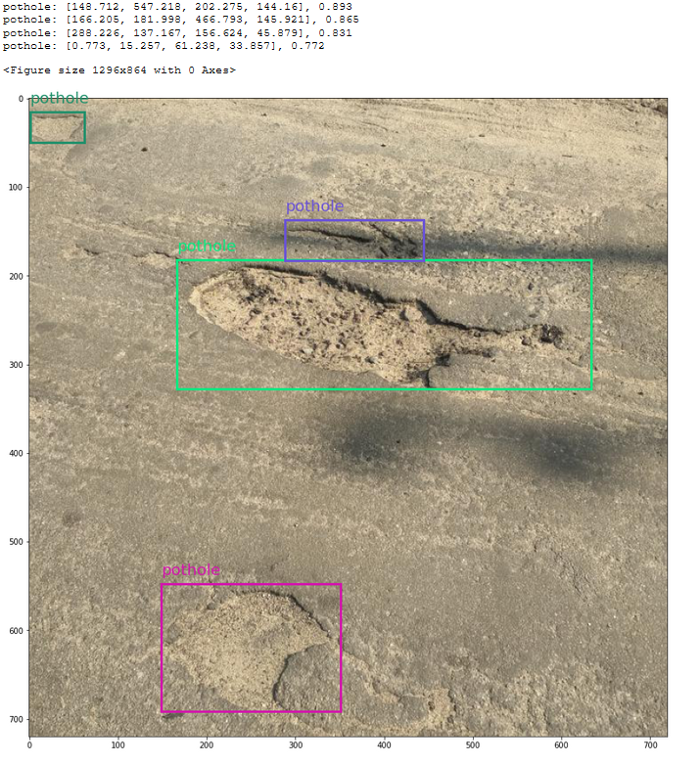
          我使用Microsoft教程中的代碼來可視化邊界框。以下是測試圖像的結(jié)果:
          從我們訓(xùn)練的模型中得到的坑洞預(yù)測和置信度分?jǐn)?shù):
          酷吧?

          最后

          Azure機器學(xué)習(xí)是一個很好的工具,可以讓你開始機器學(xué)習(xí)(在我們的例子中是深度學(xué)習(xí)),因為它隱藏了很多復(fù)雜性。
          你可以在Jupyter筆記本上查看所有代碼:https://github.com/dmesquita/azureml-automl-potholes-object-detection
          管道中的下一步是將模型部署為web服務(wù)。如果你有興趣,也可以使用Microsoft教程檢查如何做到這一點:https://github.com/dmesquita/azureml-automl-potholes-object-detection
          參考引用
          Pothole Dataset. Shared By. Atikur Rahman Chitholian. November 2020. License. ODbL v1.0
          來源:深度學(xué)習(xí)與計算機視覺

          本文僅做學(xué)術(shù)分享,如有侵權(quán),請聯(lián)系刪文。

          —THE END—
          瀏覽 110
          點贊
          評論
          收藏
          分享

          手機掃一掃分享

          分享
          舉報
          評論
          圖片
          表情
          推薦
          點贊
          評論
          收藏
          分享

          手機掃一掃分享

          分享
          舉報
          <kbd id="afajh"><form id="afajh"></form></kbd>
          <strong id="afajh"><dl id="afajh"></dl></strong>
            <del id="afajh"><form id="afajh"></form></del>
                1. <th id="afajh"><progress id="afajh"></progress></th>
                  <b id="afajh"><abbr id="afajh"></abbr></b>
                  <th id="afajh"><progress id="afajh"></progress></th>
                  国产av最新福利 国产jk在线观看 | 黄色小视频免费观看 | 亚州无码中文字幕日韩AV | 五月天色度导航 | 五月丁香在线视频 |