
使用Java帶你打造一款簡單的英語學(xué)習(xí)系統(tǒng)
點(diǎn)擊上方“IT共享之家”,進(jìn)行關(guān)注
回復(fù)“資料”可獲贈(zèng)Python學(xué)習(xí)福利
【一、項(xiàng)目背景】
? ??隨著移動(dòng)互聯(lián)網(wǎng)的發(fā)展,英語學(xué)習(xí)系統(tǒng)能結(jié)構(gòu)化的組織海量資料。針對(duì)用戶個(gè)性需求,有的放矢地呈現(xiàn)給用戶,從而為英語學(xué)習(xí)者提供便利,提升他們的學(xué)習(xí)效率。
【二、項(xiàng)目目標(biāo)】
??? 1. 實(shí)現(xiàn)美觀的界面,添加需要的組件。
??? 2. 能夠基本實(shí)現(xiàn)改變字體,顏色,背景,頁面切換功能。
??? 3. java讀取txt文件,簡化代碼。
【三、項(xiàng)目實(shí)施】
????使用eclipse軟件開發(fā),先上效果圖,如下圖所示。可以看到在界面上有可以改變字體、顏色、設(shè)置選項(xiàng)的菜單欄,頁面切換的功能。
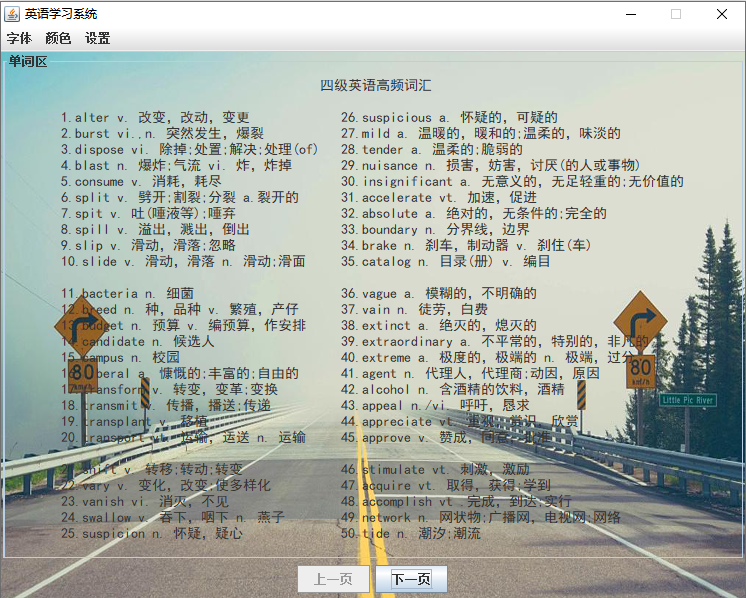
????接下來,小編帶大家進(jìn)行具體的實(shí)現(xiàn),具體的實(shí)現(xiàn)步驟如下。
【四、實(shí)現(xiàn)步驟】
一、首先實(shí)現(xiàn)窗體界面
????具體的代碼實(shí)現(xiàn)過程如下:
public static void main(String[] args){// TODO Auto-generated method stubEnglishSystem es =new EnglishSystem();es.setTitle("英語學(xué)習(xí)系統(tǒng)");es.setSize(750, 600);es.setVisible(true);es.setResizable(false);es.setLocationRelativeTo(null);??}
????使用new關(guān)鍵字創(chuàng)建EnglishSystem類;
??? setTitle表示設(shè)置界面的標(biāo)題;
??? setSize(寬,高)表示窗體大小;
??? setVisible(true或false)表示窗體是否可見;
??? setResizable(true或false)表示窗體是否可以由用戶調(diào)整大小;
??? setLocationRelativeTo()表示設(shè)置窗口相對(duì)于指定組件的位置。
二、實(shí)現(xiàn)菜單欄
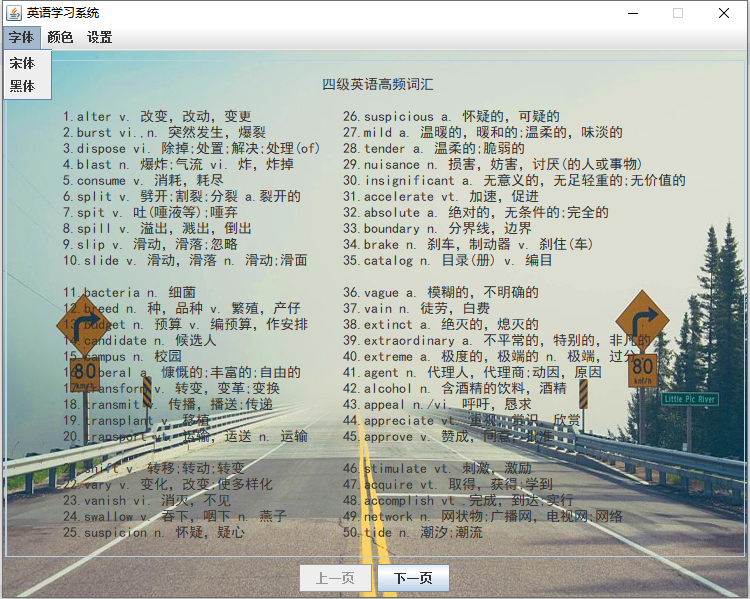
??? 1. 創(chuàng)建JFrame實(shí)例、JPanel面板,然后把面板添加到JFrame中。
??? 2. 創(chuàng)建JMenuBar菜單欄對(duì)象,JMenu在創(chuàng)建菜單對(duì)象,將菜單對(duì)象添加到菜單欄對(duì)象中。
??? 3. 將JMenuItem菜單項(xiàng)添加到JMenu中。
public class EnglishSystem extends JFrame {private JPanel panel01 = new JPanel();//菜單欄private JMenuBar jb = new JMenuBar();private JMenu menu01 = new JMenu("字體");private JMenuItem item01 = new JMenuItem("宋體");private JMenuItem item02 = new JMenuItem("黑體");private JMenu menu02 = new JMenu("顏色");private JMenuItem item03 = new JMenuItem("玫紅色");private JMenuItem item04 = new JMenuItem("藍(lán)色");private JMenuItem item05 = new JMenuItem("綠色");private JMenuItem item06 = new JMenuItem("橘色");private JMenuItem item07 = new JMenuItem("黑色");private JMenu menu03 = new JMenu("設(shè)置");private JMenuItem item08 = new JMenuItem("換壁紙");private?JMenuItem?item09?=?new?JMenuItem("退出");
????4.?實(shí)現(xiàn)單詞區(qū)
private JPanel panel03 = new JPanel();//單詞顯示private??static?JTextArea?text01?=?new?JTextArea(30,89);
?? ?5.?實(shí)現(xiàn)上下頁切換
private JPanel panel04 = new JPanel();private JButton btn_next = new JButton("下一頁");private?JButton?btn_last?=?new?JButton("上一頁");
? ?6.?當(dāng)前背景的圖片
private int photoNum=1;//背景圖數(shù)private JPanel imagePanel;private ImageIcon bg= new ImageIcon("photo//photo"+photoNum+".png");//背景圖private?JLabel?label?=?new?JLabel(bg);
??? 7. EnglishSystem類構(gòu)造函數(shù):構(gòu)造這個(gè)函數(shù)主要是實(shí)現(xiàn)界面的設(shè)計(jì),添加組件。
EnglishSystem(){jb.add(menu01);jb.add(menu02);jb.add(menu03);menu01.add(item01);menu01.add(item02);menu02.add(item03);menu02.add(item04);menu02.add(item05);menu02.add(item06);menu02.add(item07);menu03.add(item08);menu03.add(item09);panel01.add(jb);this.add(panel01);this.setJMenuBar(jb);panel03.add(text01);text01.setText(str1);text01.setEditable(false);text01.setLineWrap(true);text01.setWrapStyleWord(true);panel03.setBorder(new TitledBorder("單詞區(qū)"));this.add(panel03,BorderLayout.CENTER);??text01.setFont(new?Font("黑體",Font.PLAIN,14));
? ?8. 將字體、顏色、背景添加到JMenuBar菜單欄中,字體里面的菜單項(xiàng)如黑體、宋體添加到菜單中。其他顏色、背景添加組件也一樣!
panel04.add(btn_last);panel04.add(btn_next);this.add(panel04,BorderLayout.SOUTH);text01.setOpaque(false);panel01.setOpaque(false);panel03.setOpaque(false);panel04.setOpaque(false);label.setBounds(0,0,bg.getIconWidth(),bg.getIconHeight());//設(shè)置邊界imagePanel=(JPanel)this.getContentPane();//獲取窗體的內(nèi)容面板imagePanel.setOpaque(false);//設(shè)置透明????this.getLayeredPane().add(label,new?Integer(Integer.MIN_VALUE));
????9.?定義事件處理類,實(shí)現(xiàn)事件監(jiān)聽器
private MyListener my = new MyListener();????10.?在EnglishSystem構(gòu)造函數(shù)中給指定組件添加監(jiān)聽
item01.addActionListener(my);item02.addActionListener(my);item03.addActionListener(my);item04.addActionListener(my);item05.addActionListener(my);item06.addActionListener(my);item07.addActionListener(my);item08.addActionListener(my);item09.addActionListener(my);btn_next.addActionListener(my);????btn_last.addActionListener(my);
??? 11. 添加事件監(jiān)聽器MyListener(自己命名)。
private class MyListener implements ActionListener{@Overridepublic void actionPerformed(ActionEvent e) {// TODO Auto-generated method stubif(e.getSource()==item01){//宋體text01.setFont(new Font("宋體",Font.PLAIN,14));}if(e.getSource()==item02){//黑體text01.setFont(new Font("黑體",Font.PLAIN,14));}if(e.getSource()==item03){//玫紅色text01.setForeground(new Color(255,0,255));}if(e.getSource()==item04){//藍(lán)色text01.setForeground(Color.blue);}if(e.getSource()==item05){//綠色text01.setForeground(new Color(0,100,0));}if(e.getSource()==item06){//橘色text01.setForeground(new Color(255,140,0));}if(e.getSource()==item07){//黑色text01.setForeground(Color.BLACK);}if(e.getSource()==item08){//換壁紙photoNum++;if(photoNum>=6){photoNum=1;}label.setIcon(new ImageIcon("photo//photo"+photoNum+".png"));}if(e.getSource()==item09){//退出dispose();}if(e.getSource()==btn_next){//下一頁if(papeNumpapeNum++;btn_last.setEnabled(true);btn_next.setEnabled(true);}if(papeNum==s.length){btn_last.setEnabled(true);btn_next.setEnabled(false);}}if(e.getSource()==btn_last){//上一頁if(papeNum>1){//不是第一頁papeNum--;btn_last.setEnabled(true);btn_next.setEnabled(true);}if(papeNum==1){btn_last.setEnabled(false);btn_next.setEnabled(true);}}
??? 12. 程序中顯示文字是以String數(shù)組形式存儲(chǔ),這種方式比較方便易懂,但卻使得代碼較多。因此,在文字較多情況下,應(yīng)考慮以txt文檔形式存儲(chǔ)故事文字,在程序中讀取文檔內(nèi)容,以顯示在窗口中。
????讀取Txt文件:
File file = new File(s[papeNum-1]);String str1 = getFileContent(file);??????text01.setText(str1);
????13.?定義一個(gè)字符串?dāng)?shù)組
private String[] s = new String[]{"resource//s01.txt","resource//s02.txt","resource//s0 3.txt","resource//s04.txt","resource//s05.txt","resource//s06. txt","resource//s07.txt","resource//s08.txt","resource//s09.tx t","resource//s10.txt","resource//s11.txt","resource//s12.txt", "resource//s13.txt","resource//s14.txt"};private?int?papeNum=1;//頁數(shù)
????14.?在getFileContent函數(shù)獲取文件內(nèi)容
private String getFileContent(File file) {//獲取文件內(nèi)容BufferedReader br = null;StringBuffer sb = new StringBuffer();try {br = new BufferedReader(new FileReader(file));String hasRead = null;while ((hasRead = br.readLine()) != null) {sb.append(hasRead + "\n");}} catch (Exception e) {} finally {if (br != null) {try {br.close();} catch (IOException e) {}}}return sb.toString();}
????以上用到的組件主要是Java Swing圖形界面開發(fā):
??? 1. Swing是JAVA的基礎(chǔ)類的一部分。
??? 2. Swing包括了圖形用戶界面(GUI)器件如:文本框,按鈕,分隔窗格和表。
??? 3. Swing 提供了許多比 AWT 更好的屏幕顯示元素,使用純 Java 實(shí)現(xiàn),能夠更好的兼容跨平臺(tái)運(yùn)行。
【五、總結(jié)】
??? 1. 主要介紹了JPanel、JButton、JLabel、JTextArea、JMenu、JMenuItem等組件的基本使用,以及相應(yīng)的事件處理。
??? 2. 事件處理函數(shù)的添加,難點(diǎn)是運(yùn)用理解構(gòu)造函數(shù)、內(nèi)部類的創(chuàng)建。
????3. 如果需要本文源碼,請(qǐng)?jiān)诠娞?hào)后臺(tái)回復(fù)“英語系統(tǒng)”四個(gè)字獲取。
看完本文有收獲?請(qǐng)轉(zhuǎn)發(fā)分享給更多的人
IT共享之家
入群請(qǐng)?jiān)谖⑿藕笈_(tái)回復(fù)【入群】
-------------------?End?-------------------
往期精彩文章推薦: