
Android仿音軌跳動(dòng)效果
效果是一個(gè)紅色音軌不斷跳動(dòng)的效果,一般用于Loading等待時(shí)填充使用。本篇來(lái)自定義這個(gè)效果。
效果圖:
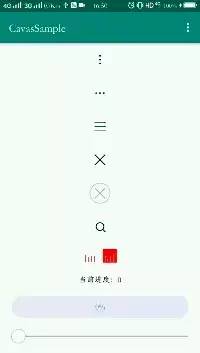
原理:
原理就是畫4條垂直線,使用隨機(jī)數(shù)不斷更新,只要速度夠快,就會(huì)形成跳動(dòng)的效果。
畫線調(diào)用canvas.drawLine()方法就可以畫出來(lái),而主要是計(jì)算每一條的垂直線的x坐標(biāo),y坐標(biāo)使用隨機(jī)比值(0 ~ 1)乘以總音軌高度即可算出。
其實(shí)x坐標(biāo)可以不計(jì)算,我們可以使用canvas.translate()方法,每次畫1條垂直線的時(shí)候,平移畫布一個(gè)固定的間距距離,x坐標(biāo)還是第一條先的垂直線的x坐標(biāo),再進(jìn)行畫線,疑似畫4次后,就出現(xiàn)了4條垂直線了。
遇到的問(wèn)題:
按照上面的平移的方式,就可以畫出4條垂直線,但是效果是反的,為什么呢?如下圖所示:
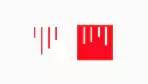
因?yàn)榘凑誂ndroid的坐標(biāo)系,我們知道,默認(rèn)坐標(biāo)系的(0,0)原點(diǎn)在控件的左上角,原點(diǎn)發(fā)射出來(lái)的2條邊都為正軸,如果按照這個(gè)坐標(biāo)系,我們畫出來(lái)的線是反的。
解決這個(gè)問(wèn)題也很簡(jiǎn)單,我們只要將畫布旋轉(zhuǎn)180度,而且旋轉(zhuǎn)中心指定在控件的中心點(diǎn),就可以擺正它。效果如下:
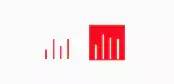
//旋轉(zhuǎn)畫布,按控件中心旋轉(zhuǎn)180度,即可讓音軌反轉(zhuǎn)canvas.rotate(180, mViewWidth / 2f, mViewHeight / 2f);
完整代碼
自定義屬性
<declare-styleable name="CloudMusicLoadingView"><!-- 音軌數(shù)量 --><attr name="cmlv_rail_count" format="integer" /><!-- 音軌的顏色 --><attr name="cmlv_rail_color" format="color" /><!-- 音軌線寬粗細(xì) --><attr name="cmlv_line_width" format="integer|float|dimension" /></declare-styleable>
Java代碼
public class CloudMusicLoadingView extends View implements Runnable {/*** 隨機(jī)數(shù)*/private static Random mRandom = new Random();/*** View默認(rèn)最小寬度*/private static final int DEFAULT_MIN_WIDTH = 65;/*** 默認(rèn)4條音軌*/private static final int DEFAULT_RAIL_COUNT = 4;/*** 控件寬*/private int mViewWidth;/*** 控件高*/private int mViewHeight;/*** 畫筆*/private Paint mPaint;/*** 音軌數(shù)量*/private int mRailCount;/*** 音軌顏色*/private int mRailColor;/*** 每條音軌的線寬*/private float mRailLineWidth;/*** Float類型估值器,用于在指定數(shù)值區(qū)域內(nèi)進(jìn)行估值*/private FloatEvaluator mFloatEvaluator;public CloudMusicLoadingView(Context context) {this(context, null);}public CloudMusicLoadingView(Context context, @Nullable AttributeSet attrs) {this(context, attrs, 0);}public CloudMusicLoadingView(Context context, @Nullable AttributeSet attrs, int defStyleAttr) {super(context, attrs, defStyleAttr);init(context, attrs, defStyleAttr);}private void init(Context context, @Nullable AttributeSet attrs, int defStyleAttr) {initAttr(context, attrs, defStyleAttr);mPaint = new Paint();mPaint.setColor(mRailColor);mPaint.setStrokeWidth(mRailLineWidth);mPaint.setStyle(Paint.Style.FILL);//設(shè)置筆觸為方形mPaint.setStrokeCap(Paint.Cap.SQUARE);mPaint.setAntiAlias(true);mFloatEvaluator = new FloatEvaluator();}private void initAttr(Context context, @Nullable AttributeSet attrs, int defStyleAttr) {TypedArray array = context.obtainStyledAttributes(attrs, R.styleable.CloudMusicLoadingView, defStyleAttr, 0);mRailCount = array.getInt(R.styleable.CloudMusicLoadingView_cmlv_rail_count, DEFAULT_RAIL_COUNT);mRailColor = array.getColor(R.styleable.CloudMusicLoadingView_cmlv_rail_color, Color.argb(255, 255, 255, 255));mRailLineWidth = array.getDimension(R.styleable.CloudMusicLoadingView_cmlv_line_width, dip2px(context, 1f));array.recycle();}protected void onSizeChanged(int w, int h, int oldw, int oldh) {super.onSizeChanged(w, h, oldw, oldh);mViewWidth = w;mViewHeight = h;}protected void onDraw(Canvas canvas) {super.onDraw(canvas);//計(jì)算可用高度float totalAvailableHeight = mViewHeight - getPaddingBottom() - getPaddingTop();//計(jì)算每條音軌平分寬度后的位置float averageBound = (mViewWidth * 1.0f) / mRailCount;//計(jì)算每條音軌的x坐標(biāo)位置float x = averageBound - mRailLineWidth;float y = getPaddingBottom();//旋轉(zhuǎn)畫布,按控件中心旋轉(zhuǎn)180度,即可讓音軌反轉(zhuǎn)canvas.rotate(180, mViewWidth / 2f, mViewHeight / 2f);//保存畫布canvas.save();for (int i = 1; i <= mRailCount; i++) {//估值x坐標(biāo)float fraction = nextRandomFloat(1.0f);float evaluateY = (mFloatEvaluator.evaluate(fraction, 0.3f, 0.9f)) * totalAvailableHeight;//第一個(gè)不需要偏移if (i == 1) {canvas.drawLine(x, y, x, evaluateY, mPaint);} else {//后續(xù),每個(gè)音軌都固定偏移間距后,再畫canvas.translate(x, 0);canvas.drawLine(x, y, x, evaluateY, mPaint);}}//恢復(fù)畫布canvas.restore();}protected void onMeasure(int widthMeasureSpec, int heightMeasureSpec) {super.onMeasure(widthMeasureSpec, heightMeasureSpec);setMeasuredDimension(handleMeasure(widthMeasureSpec), handleMeasure(heightMeasureSpec));}/*** 處理MeasureSpec*/private int handleMeasure(int measureSpec) {int result = DEFAULT_MIN_WIDTH;int specMode = MeasureSpec.getMode(measureSpec);int specSize = MeasureSpec.getSize(measureSpec);if (specMode == MeasureSpec.EXACTLY) {result = specSize;} else {//處理wrap_content的情況if (specMode == MeasureSpec.AT_MOST) {result = Math.min(result, specSize);}}return result;}protected void onAttachedToWindow() {super.onAttachedToWindow();start();}protected void onDetachedFromWindow() {super.onDetachedFromWindow();stop();}public void run() {invalidate();postDelayed(this, 100);}public void start() {postDelayed(this, 700);}private void stop() {removeCallbacks(this);}public static int dip2px(Context context, float dipValue) {final float scale = context.getResources().getDisplayMetrics().density;return (int) (dipValue * scale + 0.5f);}/*** 產(chǎn)生一個(gè)隨機(jī)float** @param sl 隨機(jī)數(shù)范圍[0,sl)*/public static float nextRandomFloat(float sl) {return mRandom.nextFloat() * sl;}}
簡(jiǎn)單使用
<com.zh.cavas.sample.widget.CloudMusicLoadingViewandroid:layout_width="25dp"android:layout_height="25dp"android:layout_marginTop="20dp"android:paddingBottom="2dp"app:cmlv_rail_color="#FB0006" />
到這里就結(jié)束了
評(píng)論
圖片
表情