IDEA懶人必備插件:自動生成單元測試,太爽了!
點擊關(guān)注公眾號,實用技術(shù)文章及時了解
今天來介紹一款工具Squaretest,它是一款自動生成單元測試的插件,會用到它也是因為最近公司上了代碼質(zhì)量管控的指標,會考評各個項目的單元測試覆蓋率,以及sonar掃描出來的各種問題。
很多老項目老代碼,或者著急交付的項目,單元測試嚴重缺失,覆蓋率只有5%不到,所以幾個小伙伴這幾天就在瘋狂的堆單元測試,3個人堆了2天才堆到30%,于是我也來上手幫忙寫了兩個,寫到第二個的時候就發(fā)現(xiàn),這個活不應該是人干的,要去看原來的代碼,然后根據(jù)邏輯寫各種Mock,感覺是有跡可循的東西,所以就查了下,發(fā)現(xiàn)果然有插件幫我們來干這個事情,那么解下來就來看看。
我使用的是idea,我們先來下載一下插件,File——>Settings——>Plugins,搜索Squaretest,然后install就好了,插件安裝完成后需要重啟一下
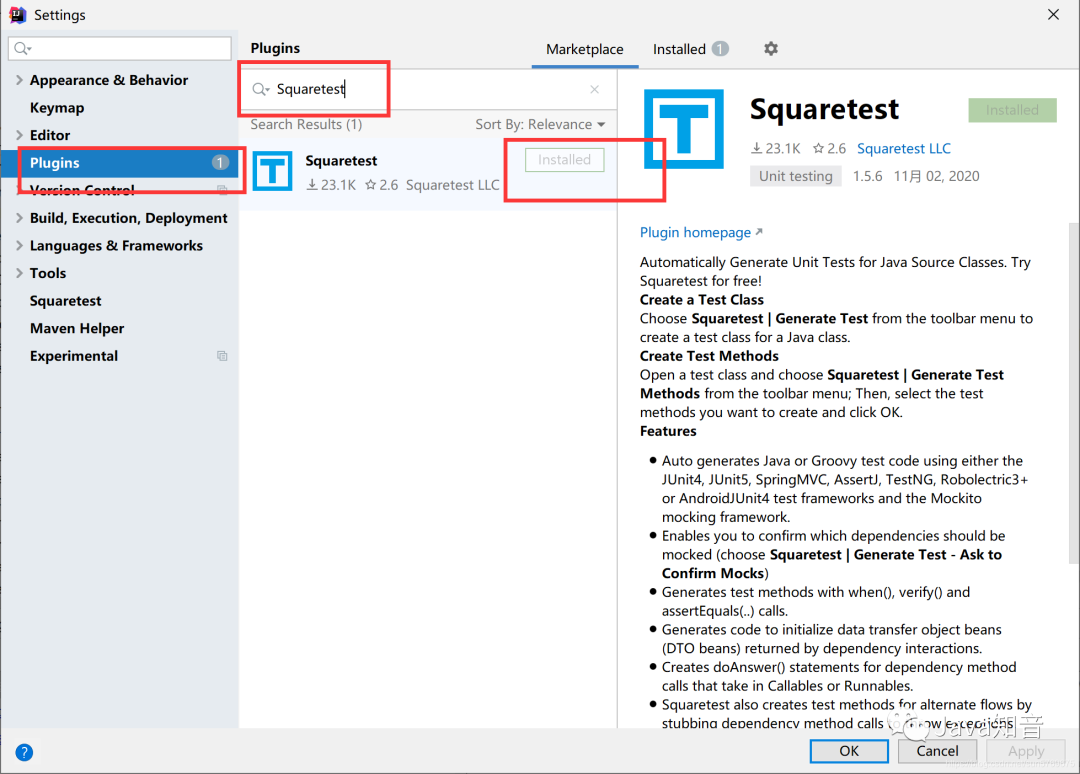
重啟之后,菜單欄就多了一項Squaretest,下面我們來講下怎么用,大家也可以通過看這個菜單的最后一項:Generate Test Methods(Help)來看它的一個演示,但演示不太全,我下面截圖給大家看下我怎么用的,以及一些使用心得。

首先我們打開一個類,這個類就是我們即將要作為實驗的類,這個類有7個public方法,因為Squaretest生成的單元測試方法都是只能生成public的,當然這也是合理的嘛!畢竟private的肯定被public調(diào)用了。
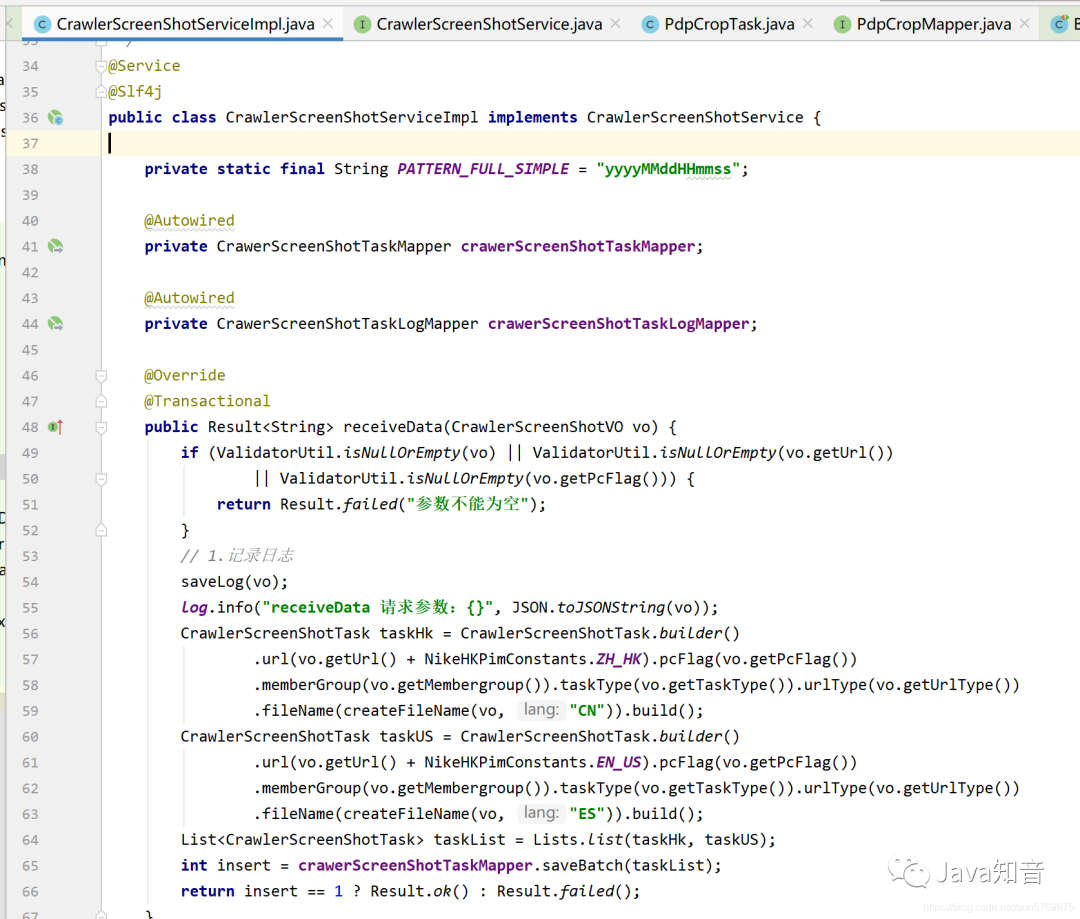
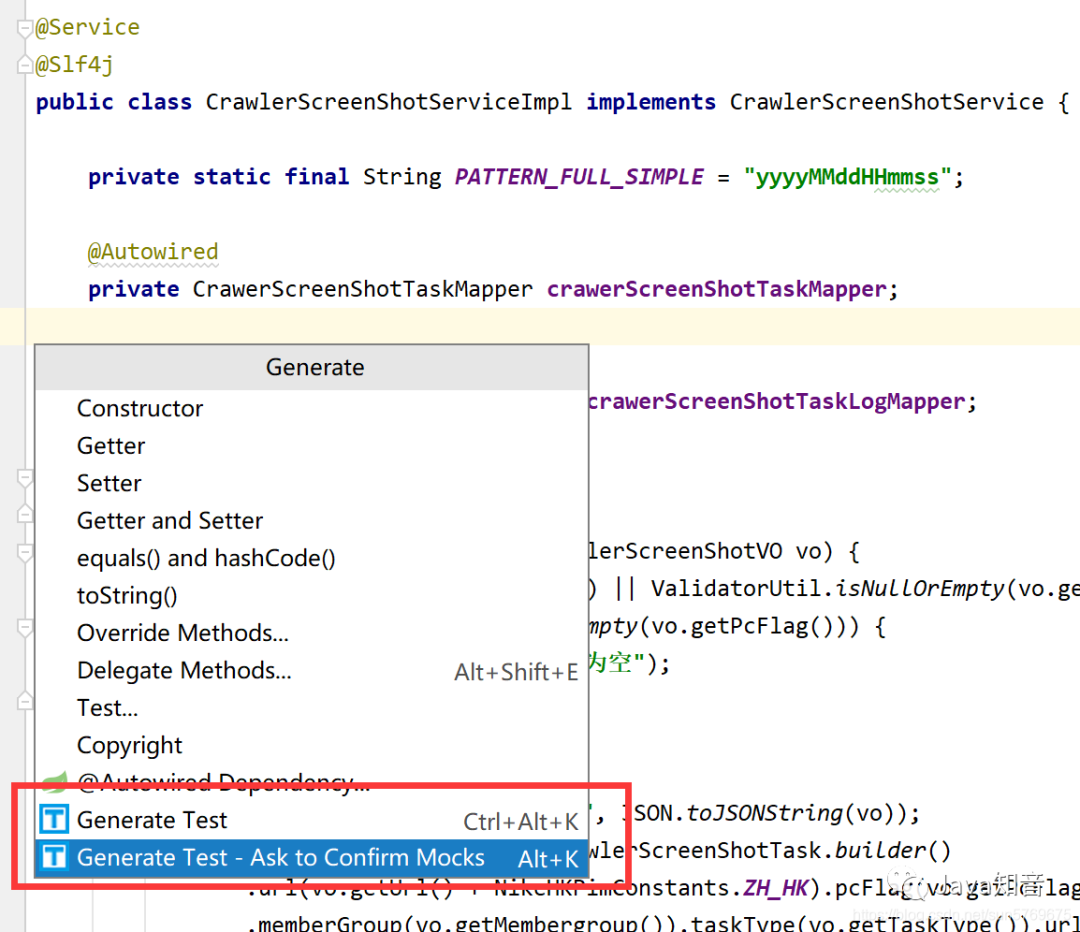
如果我們來手寫這個類的單元測試,光看都要一會,下面看我操作,打開你的類,光標定位到代碼里,右擊鼠標選擇Generate…
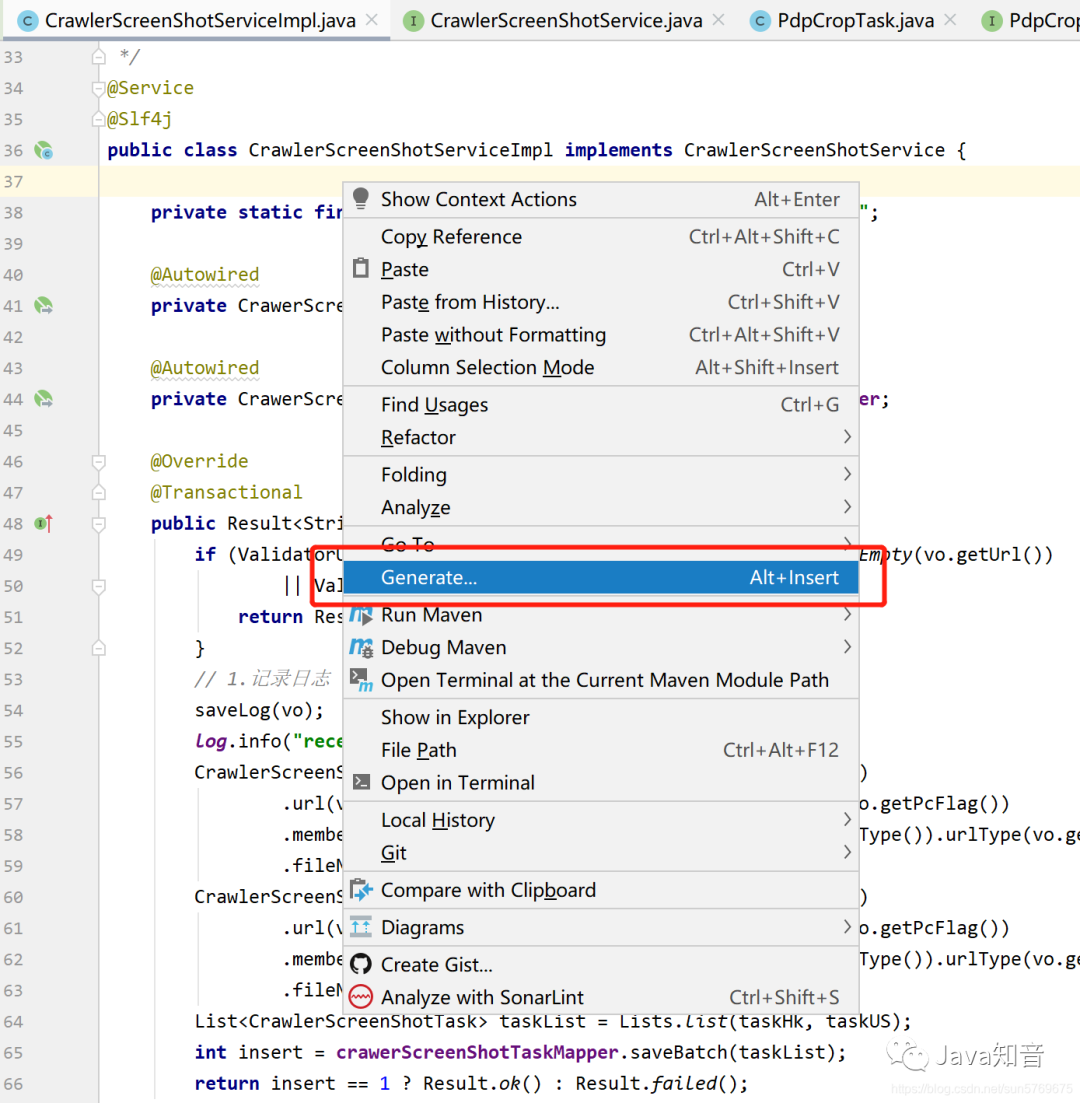
然后你就會看到這里有兩個熟悉的圖標,第一次的話選擇第二個選項,它會讓你選擇你一下單元測試的模板,因為我已經(jīng)選擇過了,所以我現(xiàn)在演示不回再彈出,但后面我會告訴你怎么更改模板。推薦:Java面試題
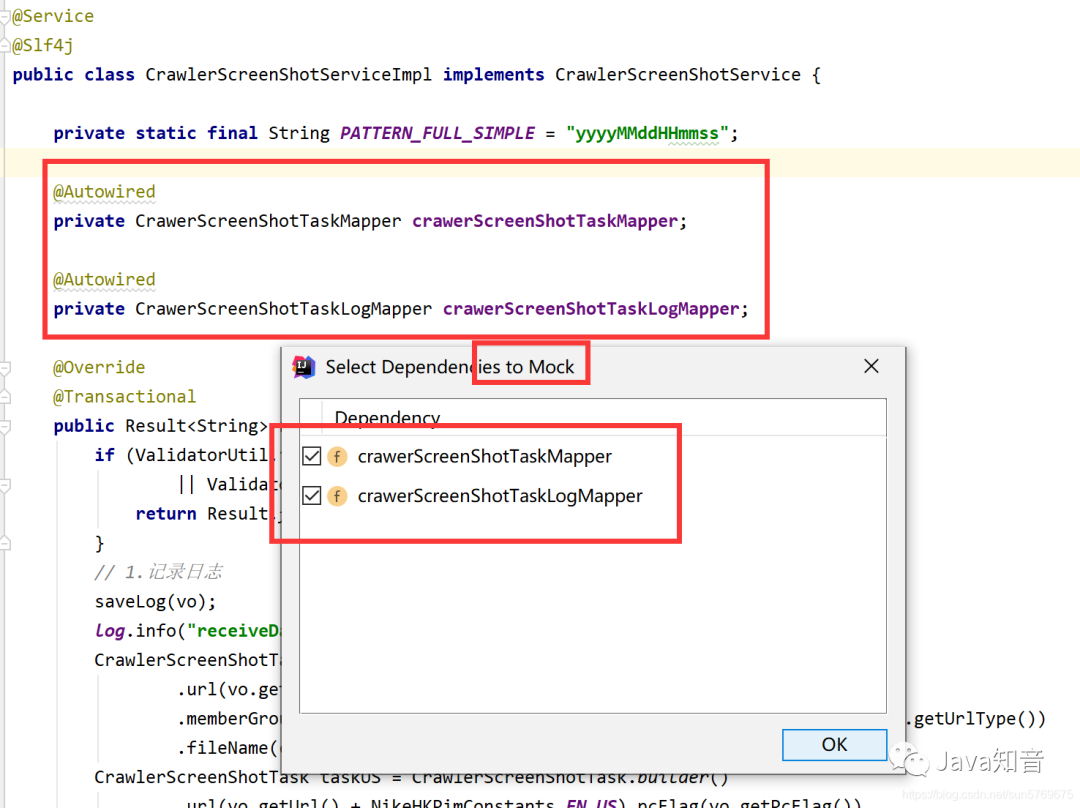
選擇第二項后就會彈出一個框看下面這里它自動會識別出當前類需要Mock的成員變量,直接點ok
自動會使用類的真實目錄層次在test文件夾中創(chuàng)建出來一個單元測試類,類名就是原類名后加Test
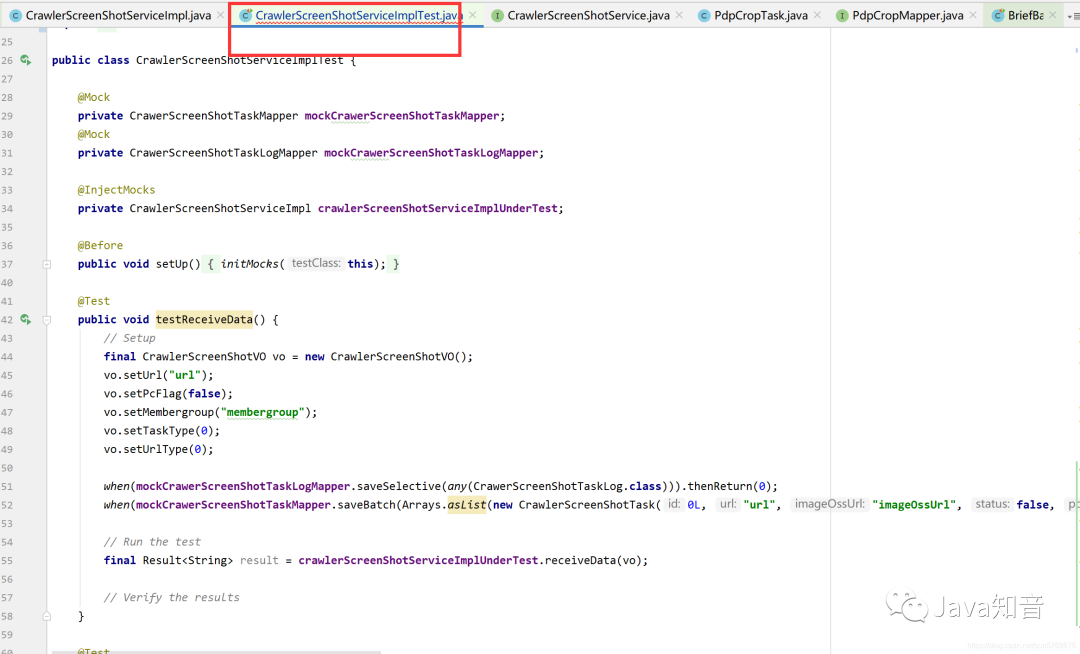
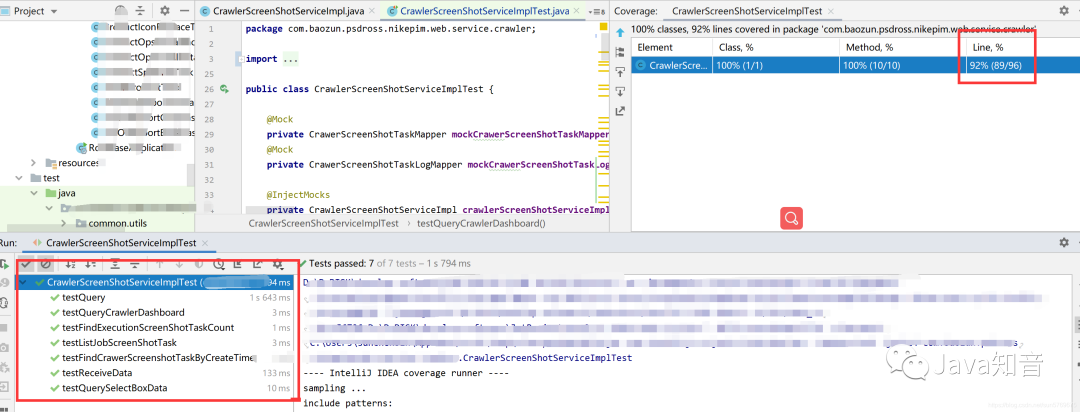
我把代碼貼出來給大家看看它生成出來的是什么樣的,看看嚇不嚇人,牛逼牛逼,7個單元測試方法,秒秒鐘就出來了,各位看官你們自己寫要多久能寫出來,畢竟時間就是金錢啊!然后我們執(zhí)行一把試試!
public class CrawlerScreenShotServiceImplTest {

    @Mock
    private CrawerScreenShotTaskMapper mockCrawerScreenShotTaskMapper;
    @Mock
    private CrawerScreenShotTaskLogMapper mockCrawerScreenShotTaskLogMapper;

    @InjectMocks
    private CrawlerScreenShotServiceImpl crawlerScreenShotServiceImplUnderTest;

    @Before
    public void setUp() {
        initMocks(this);
    }

    @Test
    public void testReceiveData() {
        // Setup
        final CrawlerScreenShotVO vo = new CrawlerScreenShotVO();
        vo.setUrl("url");
        vo.setPcFlag(false);
        vo.setMembergroup("membergroup");
        vo.setTaskType(0);
        vo.setUrlType(0);

        when(mockCrawerScreenShotTaskLogMapper.saveSelective(any(CrawerScreenShotTaskLog.class))).thenReturn(0);
        when(mockCrawerScreenShotTaskMapper.saveBatch(Arrays.asList(new CrawlerScreenShotTask(0L, "url", "imageOssUrl", false, false, "memberGroup", 0, 0, "fileName", new GregorianCalendar(2019, Calendar.JANUARY, 1).getTime(), new GregorianCalendar(2019, Calendar.JANUARY, 1).getTime(), false, "skuCode", "state", "operater")))).thenReturn(0);

        // Run the test
        final Result<String> result = crawlerScreenShotServiceImplUnderTest.receiveData(vo);

        // Verify the results
    }

    @Test
    public void testListJobScreenShotTask() {
        // Setup

        // Configure CrawerScreenShotTaskMapper.listJobScreenShotTask(...).
        final CrawlerScreenShotTaskDto crawlerScreenShotTaskDto = new CrawlerScreenShotTaskDto();
        crawlerScreenShotTaskDto.setId(0L);
        crawlerScreenShotTaskDto.setUrl("url");
        crawlerScreenShotTaskDto.setSkuCode("skuCode");
        crawlerScreenShotTaskDto.setPcFlag(false);
        crawlerScreenShotTaskDto.setMemberGroup("memberGroup");
        crawlerScreenShotTaskDto.setUrlType(0);
        crawlerScreenShotTaskDto.setFileName("fileName");
        crawlerScreenShotTaskDto.setTaskType(0);
        crawlerScreenShotTaskDto.setState("state");
        final List<CrawlerScreenShotTaskDto> crawlerScreenShotTaskDtos = Arrays.asList(crawlerScreenShotTaskDto);
        when(mockCrawerScreenShotTaskMapper.listJobScreenShotTask(new GregorianCalendar(2019, Calendar.JANUARY, 1).getTime())).thenReturn(crawlerScreenShotTaskDtos);

        // Run the test
        final List<CrawlerScreenShotTaskDto> result = crawlerScreenShotServiceImplUnderTest.listJobScreenShotTask();

        // Verify the results
    }

    @Test
    public void testQuery() {
        // Setup
        final NikeScreenShotListRequestVo requestVo = new NikeScreenShotListRequestVo();
        requestVo.setUrl("url");
        requestVo.setUrlType(0);
        requestVo.setStartTime(new GregorianCalendar(2019, Calendar.JANUARY, 1).getTime());
        requestVo.setEndTime(new GregorianCalendar(2019, Calendar.JANUARY, 1).getTime());
        requestVo.setStatus(0);
        requestVo.setPcFlag(0);
        requestVo.setPageNum(0);
        requestVo.setPageSize(0);

        // Configure CrawerScreenShotTaskMapper.query(...).
        final PimScreenShotVo pimScreenShotVo = new PimScreenShotVo();
        pimScreenShotVo.setId(0L);
        pimScreenShotVo.setUrl("url");
        pimScreenShotVo.setImageOssUrl("imageOssUrl");
        pimScreenShotVo.setStatus(0);
        pimScreenShotVo.setPcFlag(false);
        pimScreenShotVo.setCreateTime(new GregorianCalendar(2019, Calendar.JANUARY, 1).getTime());
        pimScreenShotVo.setUrlType(0);
        pimScreenShotVo.setMsg("msg");
        final List<PimScreenShotVo> pimScreenShotVos = Arrays.asList(pimScreenShotVo);
        when(mockCrawerScreenShotTaskMapper.query(any(NikeScreenShotListRequestVo.class))).thenReturn(pimScreenShotVos);

        // Run the test
        final PageInfo<PimScreenShotVo> result = crawlerScreenShotServiceImplUnderTest.query(requestVo);

        // Verify the results
    }

    @Test
    public void testQuerySelectBoxData() {
        // Setup

        // Configure CrawerScreenShotTaskMapper.query(...).
        final PimScreenShotVo pimScreenShotVo = new PimScreenShotVo();
        pimScreenShotVo.setId(0L);
        pimScreenShotVo.setUrl("url");
        pimScreenShotVo.setImageOssUrl("imageOssUrl");
        pimScreenShotVo.setStatus(0);
        pimScreenShotVo.setPcFlag(false);
        pimScreenShotVo.setCreateTime(new GregorianCalendar(2019, Calendar.JANUARY, 1).getTime());
        pimScreenShotVo.setUrlType(0);
        pimScreenShotVo.setMsg("msg");
        final List<PimScreenShotVo> pimScreenShotVos = Arrays.asList(pimScreenShotVo);
        when(mockCrawerScreenShotTaskMapper.query(any(NikeScreenShotListRequestVo.class))).thenReturn(pimScreenShotVos);

        // Run the test
        final PimScreenShotTaskParamsDto result = crawlerScreenShotServiceImplUnderTest.querySelectBoxData();

        // Verify the results
    }

    @Test
    public void testFindExecutionScreenShotTaskCount() {
        // Setup
        when(mockCrawerScreenShotTaskMapper.findExecutionScreenShotTaskCount()).thenReturn(0);

        // Run the test
        final Integer result = crawlerScreenShotServiceImplUnderTest.findExecutionScreenShotTaskCount();

        // Verify the results
        assertEquals(0, result);
    }

    @Test
    public void testFindCrawerScreenshotTaskByCreateTime() {
        // Setup
        final CrawlerScreenShotTaskSyncDto crawlerScreenShotTaskSyncDto = new CrawlerScreenShotTaskSyncDto();
        crawlerScreenShotTaskSyncDto.setId(0L);
        crawlerScreenShotTaskSyncDto.setUrl("url");
        crawlerScreenShotTaskSyncDto.setSkuCode("skuCode");
        crawlerScreenShotTaskSyncDto.setTaskType(0);
        crawlerScreenShotTaskSyncDto.setStatus(0);
        crawlerScreenShotTaskSyncDto.setLastModifyTime(new GregorianCalendar(2019, Calendar.JANUARY, 1).getTime());
        crawlerScreenShotTaskSyncDto.setOperater("operater");
        crawlerScreenShotTaskSyncDto.setMsg("msg");
        final List<CrawlerScreenShotTaskSyncDto> expectedResult = Arrays.asList(crawlerScreenShotTaskSyncDto);

        // Configure CrawerScreenShotTaskMapper.findCrawerScreenshotTaskByCreateTime(...).
        final CrawlerScreenShotTaskSyncDto crawlerScreenShotTaskSyncDto1 = new CrawlerScreenShotTaskSyncDto();
        crawlerScreenShotTaskSyncDto1.setId(0L);
        crawlerScreenShotTaskSyncDto1.setUrl("url");
        crawlerScreenShotTaskSyncDto1.setSkuCode("skuCode");
        crawlerScreenShotTaskSyncDto1.setTaskType(0);
        crawlerScreenShotTaskSyncDto1.setStatus(0);
        crawlerScreenShotTaskSyncDto1.setLastModifyTime(new GregorianCalendar(2019, Calendar.JANUARY, 1).getTime());
        crawlerScreenShotTaskSyncDto1.setOperater("operater");
        crawlerScreenShotTaskSyncDto1.setMsg("msg");
        final List<CrawlerScreenShotTaskSyncDto> crawlerScreenShotTaskSyncDtos = Arrays.asList(crawlerScreenShotTaskSyncDto1);
        when(mockCrawerScreenShotTaskMapper.findCrawerScreenshotTaskByCreateTime(new GregorianCalendar(2019, Calendar.JANUARY, 1).getTime())).thenReturn(crawlerScreenShotTaskSyncDtos);

        // Run the test
        final List<CrawlerScreenShotTaskSyncDto> result = crawlerScreenShotServiceImplUnderTest.findCrawerScreenshotTaskByCreateTime(new GregorianCalendar(2019, Calendar.JANUARY, 1).getTime());

        // Verify the results
        assertEquals(expectedResult, result);
    }

    @Test
    public void testQueryCrawlerDashboard() {
        // Setup
        when(mockCrawerScreenShotTaskMapper.queryCrawlerDashboard(0, 0, 0, new GregorianCalendar(2019, Calendar.JANUARY, 1).getTime(), new GregorianCalendar(2019, Calendar.JANUARY, 1).getTime())).thenReturn(0);

        // Run the test
        final Integer result = crawlerScreenShotServiceImplUnderTest.queryCrawlerDashboard(0, 0, 0, new GregorianCalendar(2019, Calendar.JANUARY, 1).getTime(), new GregorianCalendar(2019, Calendar.JANUARY, 1).getTime());

        // Verify the results
        assertEquals(0, result);
    }
}
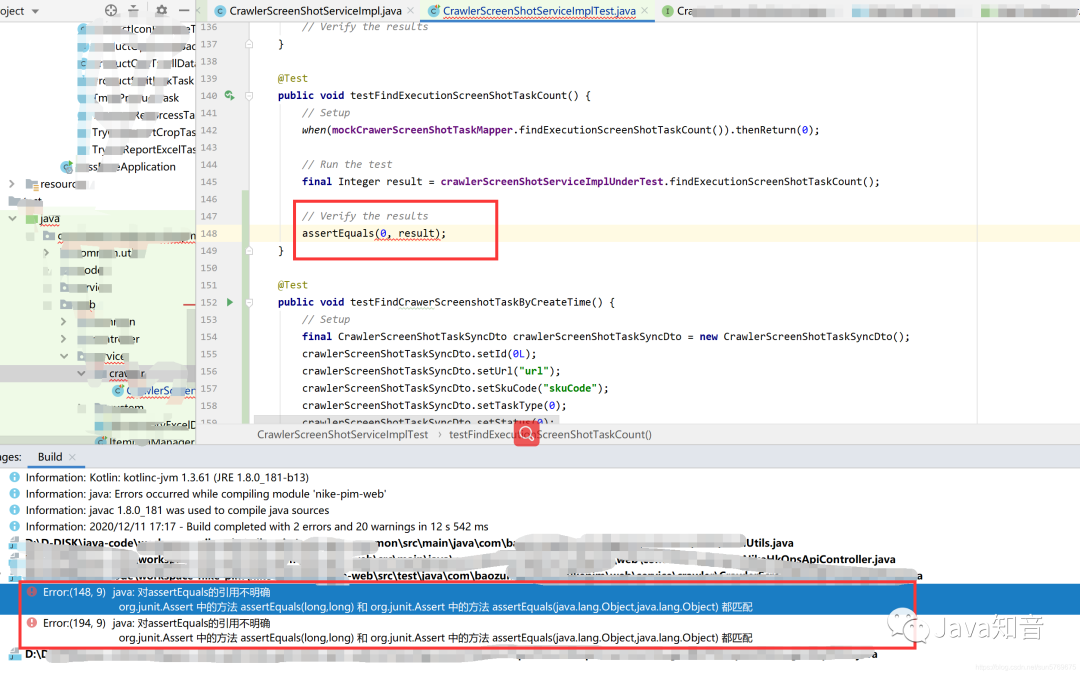
報錯了呢,不要慌,這個斷言是為了檢查你單元測試跑出來的結(jié)果是否符合預期的,如果你不想檢查只想完成覆蓋率,直接干掉就可以了(手動狗頭)。
怎么樣!刺不刺激,爽不爽,秒秒鐘90多行的代碼覆蓋率就到了90%以上。
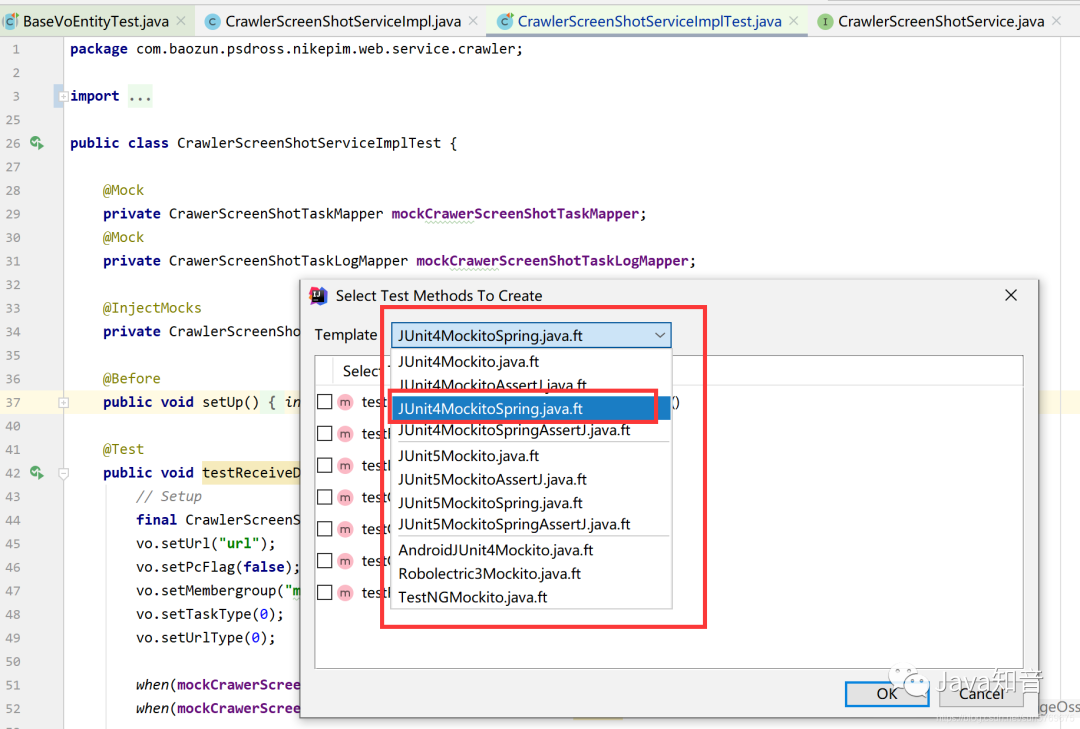
上面說過第一次進來會讓你選擇單元測試的模板,如果你要切換的話可以在單元測試類中按快捷鍵,Alt+M,或者通過Squaretest的菜單倒數(shù)第二個,下面這個就是按快捷鍵的效果,我選擇的是這個模板,你們也可以借鑒。
OK,以上Squaretest部分就結(jié)束了,當然拉也不能高興的太早,這個類算是比較成功的情況,很多時候還是要你自己小修小改的,畢竟它生成出來的測試數(shù)據(jù)可能完全匹配不上你的if else數(shù)據(jù)對吧,但這都很好改啊,這樣就從自己分析if else變成了,debug程序了呀,哪里報錯,debug過去,看看是不是生成的數(shù)據(jù)有問題,改個數(shù)據(jù),就通過了,反正本人用的是很舒暢的,妥妥的節(jié)省70%的工作量。推薦:Java面試題
解決了上面一個問題之后,又發(fā)現(xiàn)另一個問題,這個工具VO,DTO,Entity,Command,Model這種實體類來講,一般這種實體類我們都用lombok的注解get,set,還有constract構(gòu)造器等注解,但是這個工具只能生成這些實體類的構(gòu)造器的單元測試,無法生成get set方法的單元測試,所以寫了個base方法,實體類繼承一下,簡單的寫兩行帶就好了,看下面代碼:
@SpringBootTest
@RunWith(MockitoJUnitRunner.class)
public abstract class BaseVoEntityTest<T> {
    protected abstract T getT();

    private void testGetAndSet() throws IllegalAccessException, InstantiationException, IntrospectionException,
            InvocationTargetException {
        T t = getT();
        Class modelClass = t.getClass();
        Object obj = modelClass.newInstance();
        Field[] fields = modelClass.getDeclaredFields();
        for (Field f : fields) {
            boolean isStatic = Modifier.isStatic(f.getModifiers());
            // 過濾字段
            if (f.getName().equals("isSerialVersionUID") || f.getName().equals("serialVersionUID") || isStatic || f.getGenericType().toString().equals("boolean")
                    || f.isSynthetic()) {
                continue;
            }
            PropertyDescriptor pd = new PropertyDescriptor(f.getName(), modelClass);
            Method get = pd.getReadMethod();
            Method set = pd.getWriteMethod();
            set.invoke(obj, get.invoke(obj));
        }
    }

    @Test
    public void getAndSetTest() throws InvocationTargetException, IntrospectionException,
            InstantiationException, IllegalAccessException {
        this.testGetAndSet();
    }

}
同樣的方式我們在實體類上通過Squaretest生成單元測試,然后繼承我上面寫的那個base類,vo的單元測試代碼稍加改動,如下
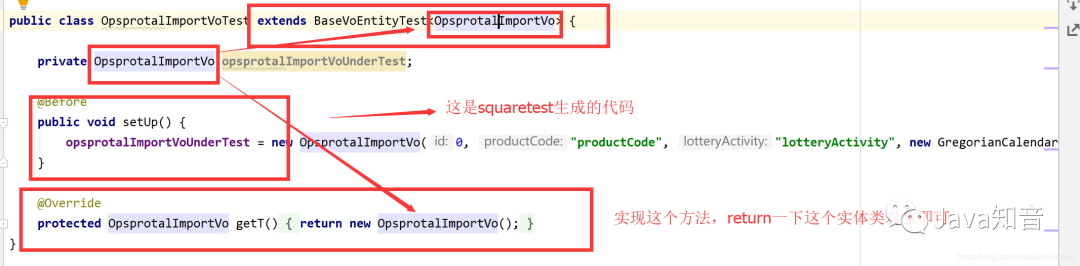
看run完之后,覆蓋率100%,妥妥的,通過這兩個解決方案,一天之內(nèi)我們就把覆蓋率搞到了60%以上,不要太刺激,大家可以用用試試哦,當然這個也不是純?yōu)榱藨恫钍聦懙膯卧獪y試,我們后續(xù)開發(fā)的時候,也可以用這個工具來生成,然后自測自己的代碼,這樣也是提升工作效率的嘛!

來源:blog.csdn.net/sun5769675/article/
details/111043213
程序汪資料鏈接
堪稱神級的Spring Boot手冊,從基礎(chǔ)入門到實戰(zhàn)進階
臥槽!字節(jié)跳動《算法中文手冊》火了,完整版 PDF 開放下載!
臥槽!阿里大佬總結(jié)的《圖解Java》火了,完整版PDF開放下載!
字節(jié)跳動總結(jié)的設(shè)計模式 PDF 火了,完整版開放下載!
歡迎添加程序汪個人微信 itwang009 進粉絲群或圍觀朋友圈