
GitHub Actions 部署 VuePress 文檔

GitHub Actions 是 GitHub 的持續(xù)集成服務(wù),于2018年10月推出。這些天,我一直在試用,覺(jué)得它非常強(qiáng)大,有創(chuàng)意,比 Travis CI 玩法更多。
本文是一個(gè)簡(jiǎn)單教程,演示如何使用 GitHub Actions 自動(dòng)發(fā)布一個(gè) VuePress 應(yīng)用到 GitHub Pages。
VuePress 文檔
官方文檔:鏈接[1]
1.創(chuàng)建并進(jìn)入一個(gè)新目錄
mkdir vuepress-starter && cd vuepress-starter2.使用你喜歡的包管理器進(jìn)行初始化
yarn init # npm init3.將 VuePress 安裝為本地依賴(lài)
yarn add -D vuepress 4.創(chuàng)建你的第一篇文檔
mkdir docs && echo '# Hello VuePress' > docs/README.md5.在 package.json 中添加一些 scripts (opens new window)
{"scripts": {"docs:dev": "vuepress dev docs","docs:build": "vuepress build docs"}}
6.在本地啟動(dòng)服務(wù)器
yarn docs:dev # npm run docs:devVuePress 會(huì)在 http://localhost:8080 (opens new window) 啟動(dòng)一個(gè)熱重載的開(kāi)發(fā)服務(wù)器。
7.在 docs/.vuepress/config.js 中設(shè)置正確的 base。
如果你打算發(fā)布到 https://<USERNAME or GROUP>.github.io/,則可以省略這一步,因?yàn)?base 默認(rèn)即是 "/"。
如果你打算發(fā)布到 https://<USERNAME or GROUP>.github.io/<REPO>/(也就是說(shuō)你的倉(cāng)庫(kù)在 https://github.com/<USERNAME>/<REPO>),則將 base 設(shè)置為 "/<REPO>/"。
創(chuàng)建 GitHub Actions
大家知道,持續(xù)集成由很多操作組成,比如抓取代碼、運(yùn)行測(cè)試、登錄遠(yuǎn)程服務(wù)器,發(fā)布到第三方服務(wù)等等。GitHub 把這些操作就稱(chēng)為 actions。
在倉(cāng)庫(kù)菜單欄中選擇 Actions 進(jìn)入到創(chuàng)建頁(yè)面。

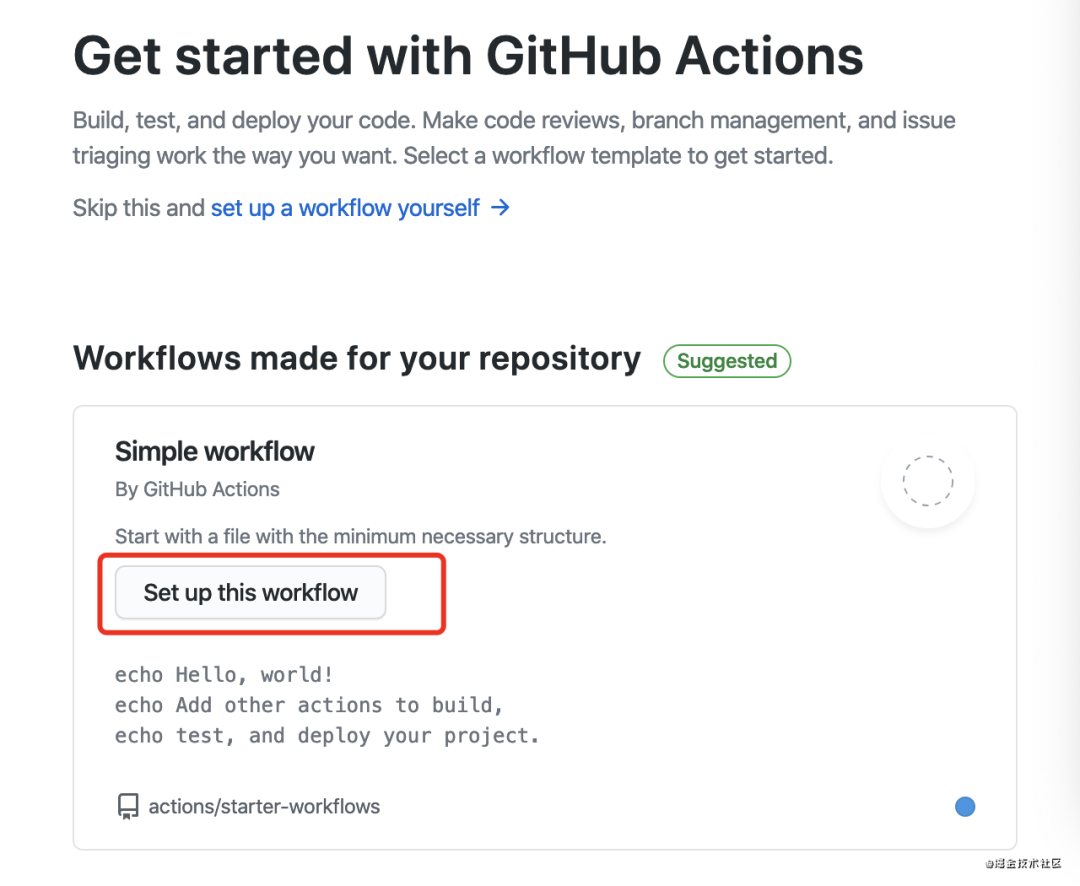
簡(jiǎn)單的修改自己需要執(zhí)行的命令:
# This is a basic workflow to help you get started with Actionsname: CI# Controls when the action will run.on:# Triggers the workflow on push or pull request events but only for the master branchpush:branches: [ master ]pull_request:branches: [ master ]# Allows you to run this workflow manually from the Actions tabworkflow_dispatch:# A workflow run is made up of one or more jobs that can run sequentially or in paralleljobs:# This workflow contains a single job called "build"build:# The type of runner that the job will run on: ubuntu-latest# Steps represent a sequence of tasks that will be executed as part of the jobsteps:# Checks-out your repository under $GITHUB_WORKSPACE, so your job can access ituses: actions/checkout@v2# Runs a single command using the runners shellname: Run a ci scriptrun: npm ciname: Run a docs scriptenv:TOKEN: ${{secrets.HEXO_DEPLOY_PRIVATE_KEY}}run: npm run docs# Runs a set of commands using the runners shellname: Run a multi-line scriptrun: |echo Add other actions to build,echo test, and deploy your project.
GitHub Actions 的配置文件叫做 workflow 文件,存放在代碼倉(cāng)庫(kù)的.github/workflows目錄。
workflow 文件采用 YAML 格式,文件名可以任意取,但是后綴名統(tǒng)一為 .yml,比如 foo.yml。一個(gè)庫(kù)可以有多個(gè) workflow 文件。GitHub 只要發(fā)現(xiàn) .github/workflows 目錄里面有 .yml 文件,就會(huì)自動(dòng)運(yùn)行該文件。
關(guān)于詳細(xì)的字段介紹可以參考這篇文章:鏈接[2]。
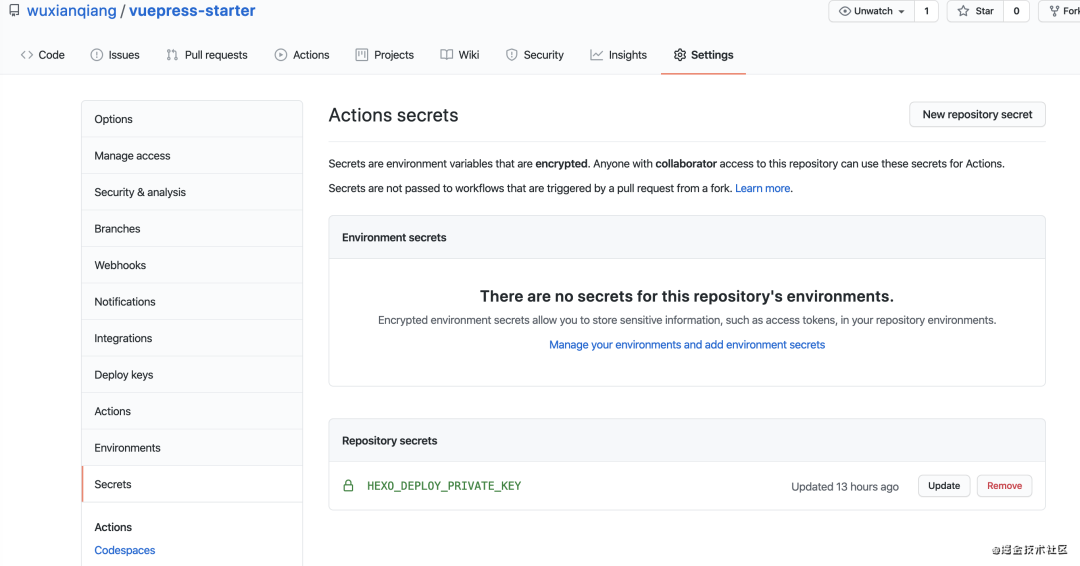
因?yàn)榇a中定義了一個(gè)環(huán)境變量 TOKEN: ${{secrets.HEXO_DEPLOY_PRIVATE_KEY}} 用來(lái) git ssh 免密登錄的,如果不配置就無(wú)法 git push 這些操作。
這個(gè)示例需要將構(gòu)建成果發(fā)到 GitHub 倉(cāng)庫(kù),因此需要 GitHub 密鑰。按照官方文檔:鏈接[3],生成一個(gè)密鑰。

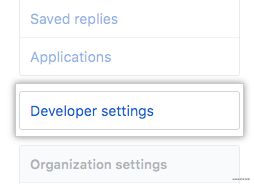
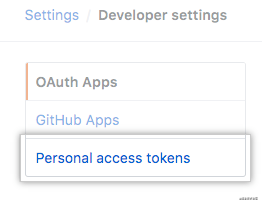

然后,將這個(gè)密鑰儲(chǔ)存到當(dāng)前倉(cāng)庫(kù)的 Settings/Secrets 里面。
最后創(chuàng)建文件 build/update-docs.sh 用來(lái)執(zhí)行 bash 腳本。
# Preparecd docsrm -rf .vuepress/dist# Buildvuepress build# Publish to GitHub Pagescd .vuepress/distgit initgit config user.name "wuxianqiang"git config user.email "[email protected]"git add -Agit commit -m "[vuepress] update docs"git push --force "https://${TOKEN}@github.com/wuxianqiang/vuepress-starter.git" "master:gh-pages"# Cleanupcd ../..rm -rf .vuepress/dist
在 package.json 中加一行 scripts 命令。
{"scripts": {"docs:dev": "vuepress dev docs","docs:build": "vuepress build docs","docs": "bash ./build/update-docs.sh"}}
最后提交代碼,就會(huì)自動(dòng)執(zhí)行 Actions 將部署 VuePress 文檔到 GitHub Pages。我們就可以訪問(wèn)頁(yè)面了,而且之后的每一次提交都會(huì)自動(dòng)執(zhí)行然后去更新文檔的內(nèi)容,這樣確實(shí)會(huì)方便很多。
項(xiàng)目演示地址:鏈接[4]
References
[1] 鏈接: https://vuepress.vuejs.org/zh/guide/getting-started.html[2] 鏈接: http://www.ruanyifeng.com/blog/2019/09/getting-started-with-github-actions.html[3] 鏈接: https://docs.github.com/en/github/authenticating-to-github/creating-a-personal-access-token[4] 鏈接: https://github.com/wuxianqiang/vuepress-starter