
可視化拖拽組件庫一些技術(shù)要點(diǎn)原理分析
本文是對《可視化拖拽組件庫一些技術(shù)要點(diǎn)原理分析》[1]的補(bǔ)充。上一篇文章主要講解了以下幾個(gè)功能點(diǎn):
1.編輯器2.自定義組件3.拖拽4.刪除組件、調(diào)整圖層層級5.放大縮小6.撤消、重做7.組件屬性設(shè)置8.吸附9.預(yù)覽、保存代碼10.綁定事件11.綁定動(dòng)畫12.導(dǎo)入 PSD13.手機(jī)模式
現(xiàn)在這篇文章會(huì)在此基礎(chǔ)上再補(bǔ)充 4 個(gè)功能點(diǎn),分別是:
?拖拽旋轉(zhuǎn)?復(fù)制粘貼剪切?數(shù)據(jù)交互?發(fā)布
和上篇文章一樣,我已經(jīng)將新功能的代碼更新到了 github:
?github 項(xiàng)目地址[2]?在線預(yù)覽[3]
友善提醒:建議結(jié)合源碼一起閱讀,效果更好(這個(gè) DEMO 使用的是 Vue 技術(shù)棧)。
14. 拖拽旋轉(zhuǎn)
在寫上一篇文章時(shí),原來的 DEMO 已經(jīng)可以支持旋轉(zhuǎn)功能了。但是這個(gè)旋轉(zhuǎn)功能還有很多不完善的地方:
1.不支持拖拽旋轉(zhuǎn)。2.旋轉(zhuǎn)后的放大縮小不正確。3.旋轉(zhuǎn)后的自動(dòng)吸附不正確。4.旋轉(zhuǎn)后八個(gè)可伸縮點(diǎn)的光標(biāo)不正確。
這一小節(jié),我們將逐一解決這四個(gè)問題。
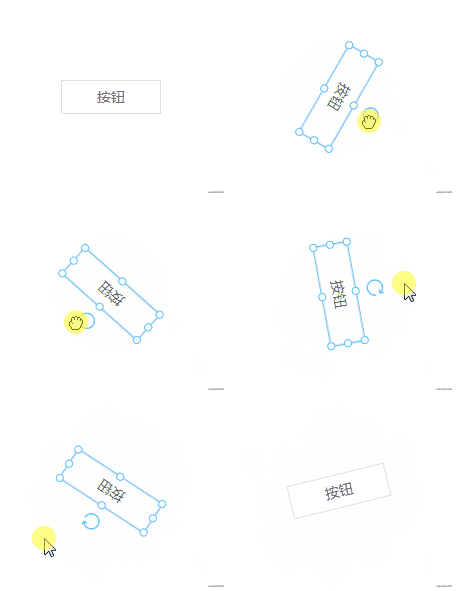
拖拽旋轉(zhuǎn)
拖拽旋轉(zhuǎn)需要使用?Math.atan2()[4]?函數(shù)。
Math.atan2() 返回從原點(diǎn)(0,0)到(x,y)點(diǎn)的線段與x軸正方向之間的平面角度(弧度值),也就是Math.atan2(y,x)。Math.atan2(y,x)中的y和x都是相對于圓點(diǎn)(0,0)的距離。
簡單的說就是以組件中心點(diǎn)為原點(diǎn)?(centerX,centerY),用戶按下鼠標(biāo)時(shí)的坐標(biāo)設(shè)為?(startX,startY),鼠標(biāo)移動(dòng)時(shí)的坐標(biāo)設(shè)為?(curX,curY)。旋轉(zhuǎn)角度可以通過?(startX,startY)?和?(curX,curY)?計(jì)算得出。
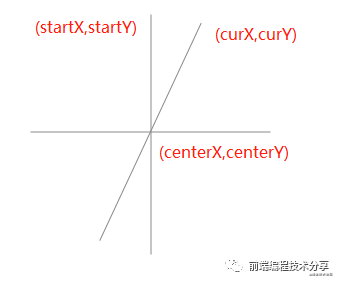
那我們?nèi)绾蔚玫綇狞c(diǎn)?(startX,startY)?到點(diǎn)?(curX,curY)?之間的旋轉(zhuǎn)角度呢?
第一步,鼠標(biāo)點(diǎn)擊時(shí)的坐標(biāo)設(shè)為?(startX,startY):
const startY = e.clientYconst startX = e.clientX
第二步,算出組件中心點(diǎn):
// 獲取組件中心點(diǎn)位置const rect = this.$el.getBoundingClientRect()const centerX = rect.left + rect.width / 2const centerY = rect.top + rect.height / 2
第三步,按住鼠標(biāo)移動(dòng)時(shí)的坐標(biāo)設(shè)為?(curX,curY):
const curX = moveEvent.clientXconst curY = moveEvent.clientY
第四步,分別算出?(startX,startY)?和?(curX,curY)?對應(yīng)的角度,再將它們相減得出旋轉(zhuǎn)的角度。另外,還需要注意的就是?Math.atan2()?方法的返回值是一個(gè)弧度,因此還需要將弧度轉(zhuǎn)化為角度。所以完整的代碼為:
// 旋轉(zhuǎn)前的角度const rotateDegreeBefore = Math.atan2(startY - centerY, startX - centerX) / (Math.PI / 180)// 旋轉(zhuǎn)后的角度const rotateDegreeAfter = Math.atan2(curY - centerY, curX - centerX) / (Math.PI / 180)// 獲取旋轉(zhuǎn)的角度值, startRotate 為初始角度值pos.rotate = startRotate + rotateDegreeAfter - rotateDegreeBefore
放大縮小
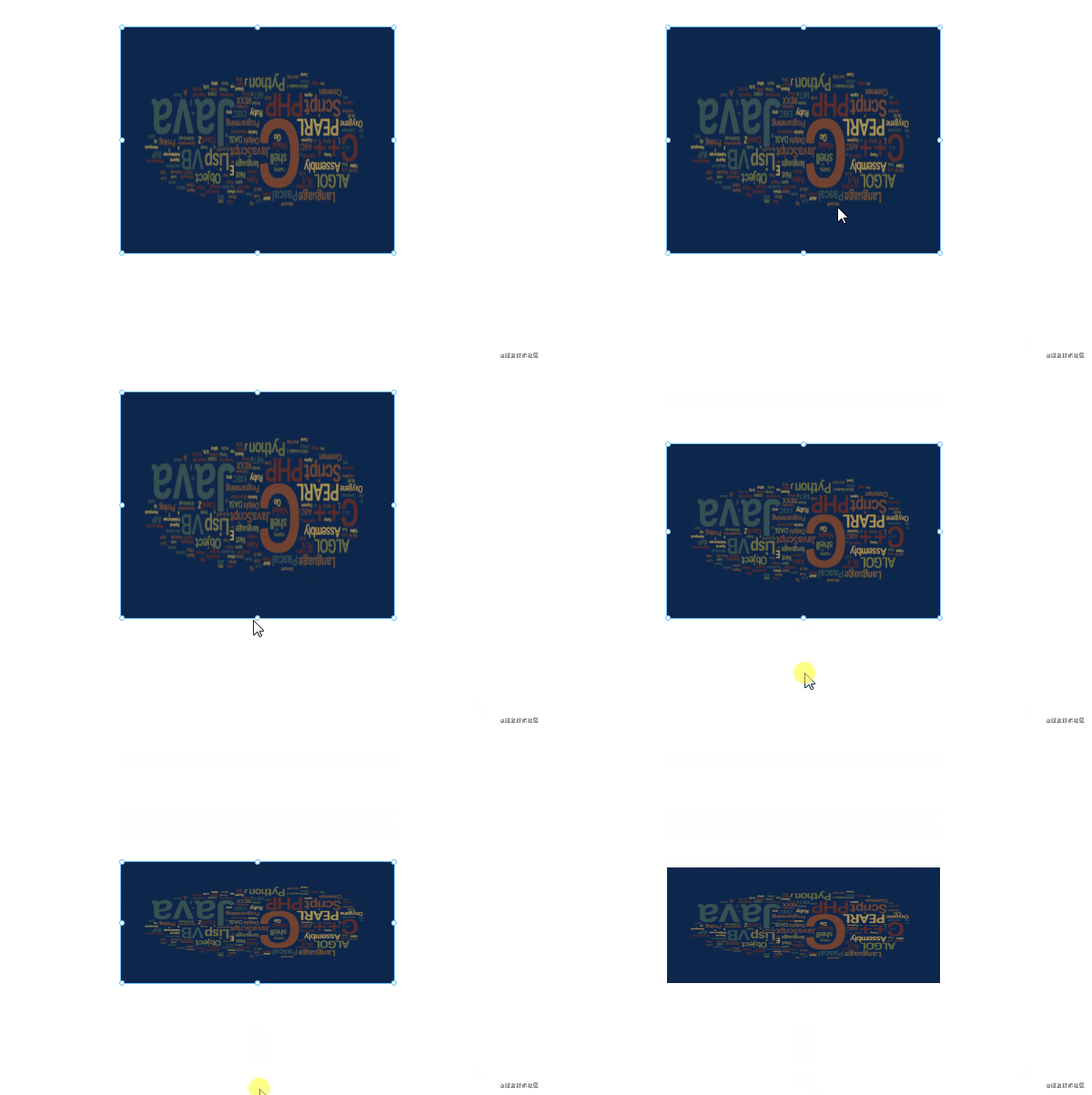
組件旋轉(zhuǎn)后的放大縮小會(huì)有 BUG。
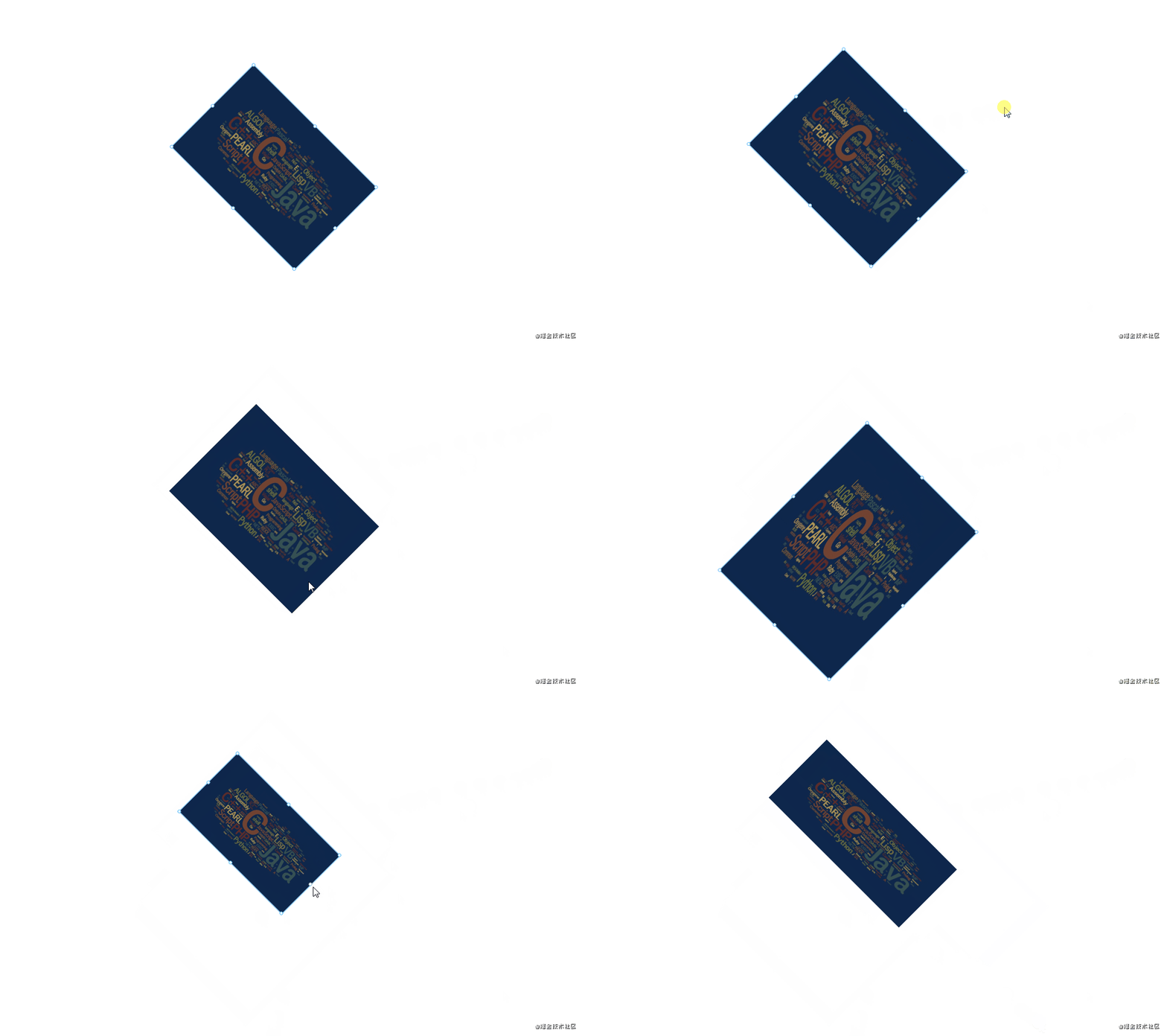
從上圖可以看到,放大縮小時(shí)會(huì)發(fā)生移位。另外伸縮的方向和我們拖動(dòng)的方向也不對。造成這一 BUG 的原因是:當(dāng)初設(shè)計(jì)放大縮小功能沒有考慮到旋轉(zhuǎn)的場景。所以無論旋轉(zhuǎn)多少角度,放大縮小仍然是按沒旋轉(zhuǎn)時(shí)計(jì)算的。
下面再看一個(gè)具體的示例:
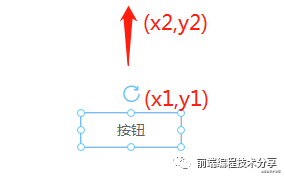
從上圖可以看出,在沒有旋轉(zhuǎn)時(shí),按住頂點(diǎn)往上拖動(dòng),只需用?y2 - y1?就可以得出拖動(dòng)距離?s。這時(shí)將組件原來的高度加上?s?就能得出新的高度,同時(shí)將組件的?top、left?屬性更新。
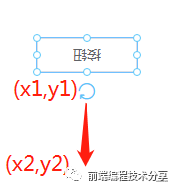
現(xiàn)在旋轉(zhuǎn) 180 度,如果這時(shí)拖住頂點(diǎn)往下拖動(dòng),我們期待的結(jié)果是組件高度增加。但這時(shí)計(jì)算的方式和原來沒旋轉(zhuǎn)時(shí)是一樣的,所以結(jié)果和我們期待的相反,組件的高度將會(huì)變小(如果不理解這個(gè)現(xiàn)象,可以想像一下沒有旋轉(zhuǎn)的那張圖,按住頂點(diǎn)往下拖動(dòng))。
如何解決這個(gè)問題呢?我從 github 上的一個(gè)項(xiàng)目?snapping-demo[5]?找到了解決方案:將放大縮小和旋轉(zhuǎn)角度關(guān)聯(lián)起來。
解決方案
下面是一個(gè)已旋轉(zhuǎn)一定角度的矩形,假設(shè)現(xiàn)在拖動(dòng)它左上方的點(diǎn)進(jìn)行拉伸。
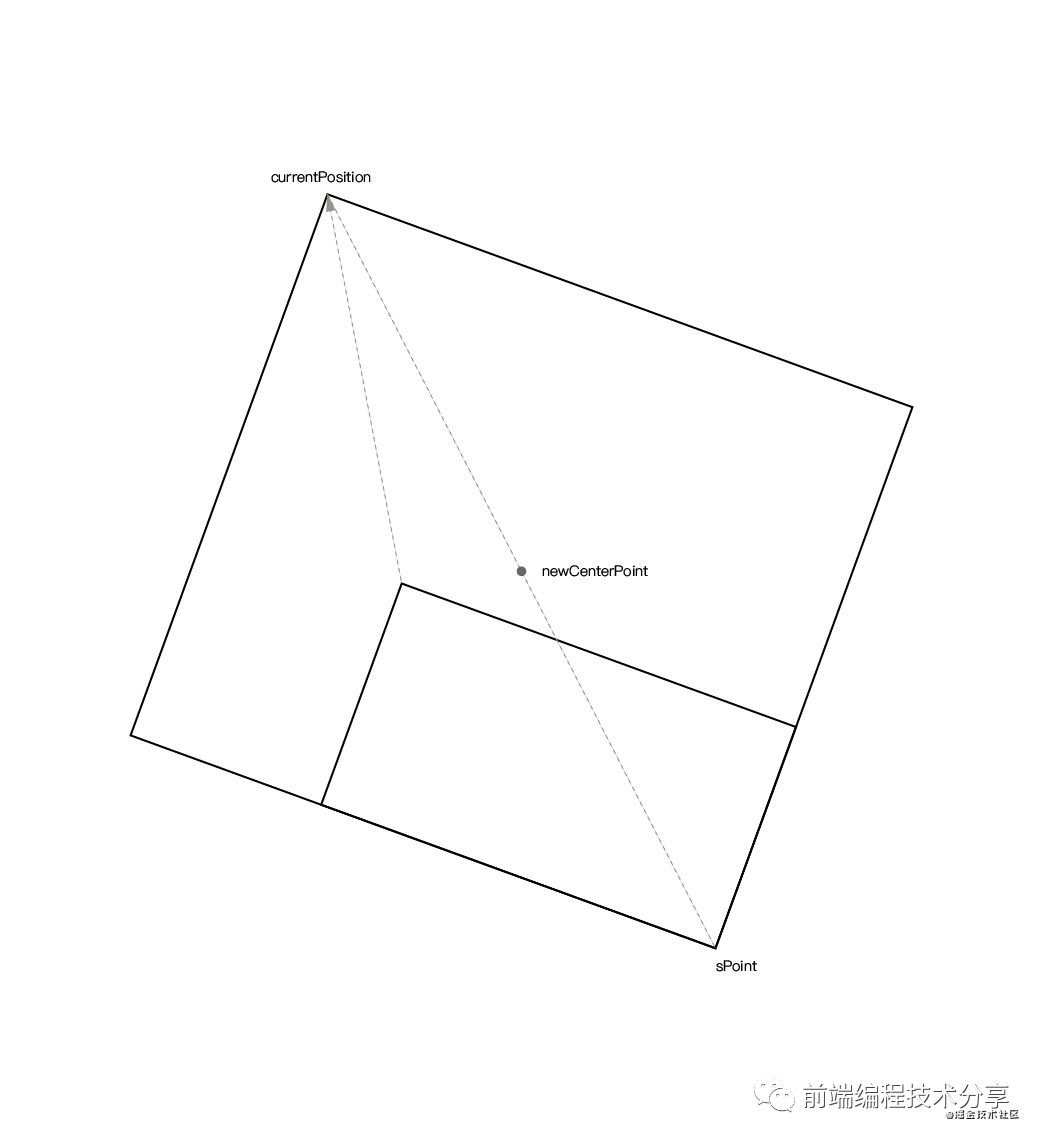
現(xiàn)在我們將一步步分析如何得出拉伸后的組件的正確大小和位移。
第一步,按下鼠標(biāo)時(shí)通過組件的坐標(biāo)(無論旋轉(zhuǎn)多少度,組件的?top?left?屬性不變)和大小算出組件中心點(diǎn):
const center = {x: style.left + style.width / 2,y: style.top + style.height / 2,}
第二步,用當(dāng)前點(diǎn)擊坐標(biāo)和組件中心點(diǎn)算出當(dāng)前點(diǎn)擊坐標(biāo)的對稱點(diǎn)坐標(biāo):
// 獲取畫布位移信息const editorRectInfo = document.querySelector('#editor').getBoundingClientRect()// 當(dāng)前點(diǎn)擊坐標(biāo)const curPoint = {x: e.clientX - editorRectInfo.left,y: e.clientY - editorRectInfo.top,}// 獲取對稱點(diǎn)的坐標(biāo)const symmetricPoint = {x: center.x - (curPoint.x - center.x),y: center.y - (curPoint.y - center.y),}
第三步,摁住組件左上角進(jìn)行拉伸時(shí),通過當(dāng)前鼠標(biāo)實(shí)時(shí)坐標(biāo)和對稱點(diǎn)計(jì)算出新的組件中心點(diǎn):
const curPositon = {x: moveEvent.clientX - editorRectInfo.left,y: moveEvent.clientY - editorRectInfo.top,}const newCenterPoint = getCenterPoint(curPositon, symmetricPoint)// 求兩點(diǎn)之間的中點(diǎn)坐標(biāo)function getCenterPoint(p1, p2) {return {x: p1.x + ((p2.x - p1.x) / 2),y: p1.y + ((p2.y - p1.y) / 2),}}
由于組件處于旋轉(zhuǎn)狀態(tài),即使你知道了拉伸時(shí)移動(dòng)的?xy?距離,也不能直接對組件進(jìn)行計(jì)算。否則就會(huì)出現(xiàn) BUG,移位或者放大縮小方向不正確。因此,我們需要在組件未旋轉(zhuǎn)的情況下對其進(jìn)行計(jì)算。
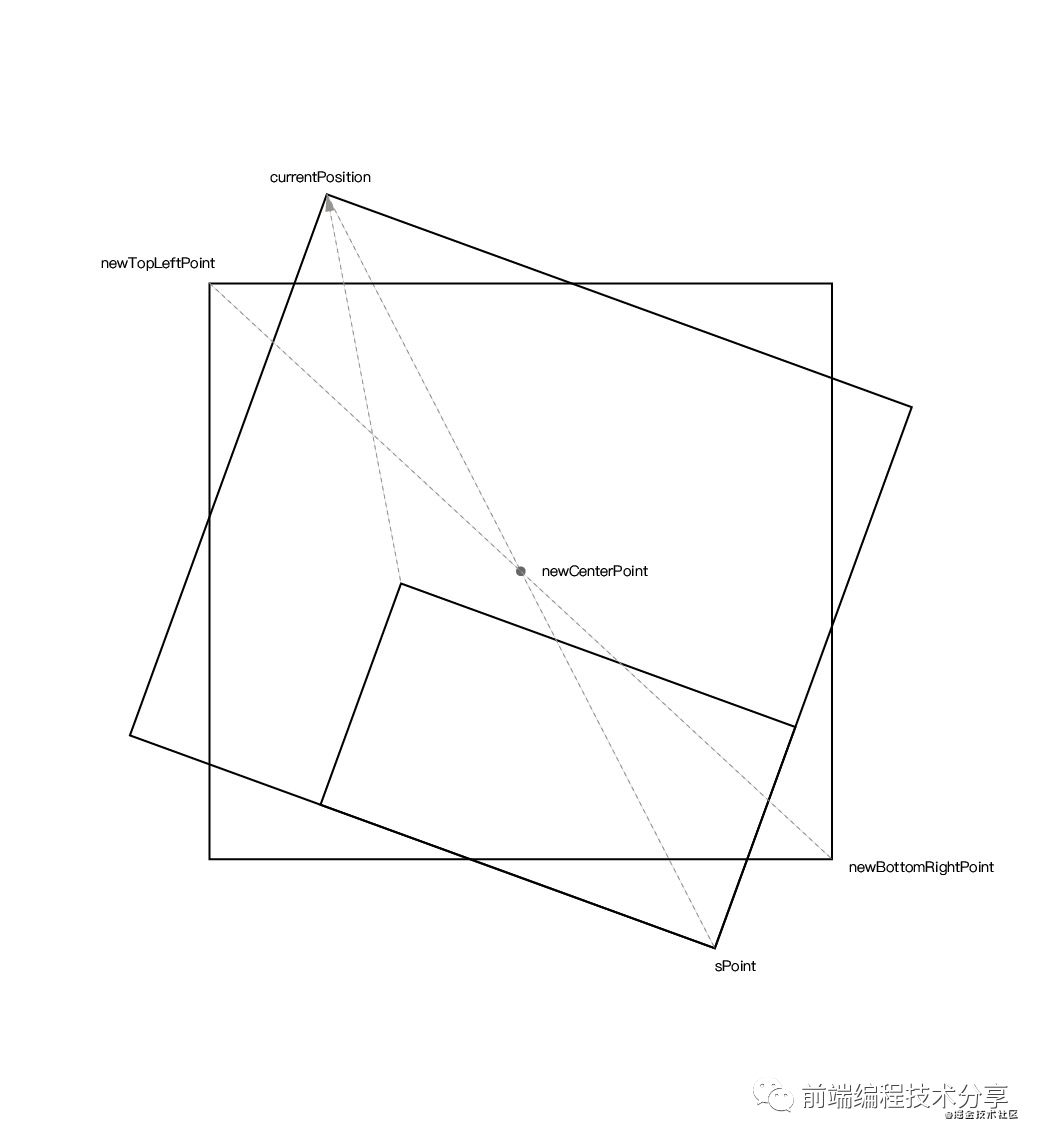
第四步,根據(jù)已知的旋轉(zhuǎn)角度、新的組件中心點(diǎn)、當(dāng)前鼠標(biāo)實(shí)時(shí)坐標(biāo)可以算出當(dāng)前鼠標(biāo)實(shí)時(shí)坐標(biāo)?currentPosition?在未旋轉(zhuǎn)時(shí)的坐標(biāo)?newTopLeftPoint。同時(shí)也能根據(jù)已知的旋轉(zhuǎn)角度、新的組件中心點(diǎn)、對稱點(diǎn)算出組件對稱點(diǎn)?sPoint?在未旋轉(zhuǎn)時(shí)的坐標(biāo)?newBottomRightPoint。
對應(yīng)的計(jì)算公式如下:
/*** 計(jì)算根據(jù)圓心旋轉(zhuǎn)后的點(diǎn)的坐標(biāo)* @param {Object} point 旋轉(zhuǎn)前的點(diǎn)坐標(biāo)* @param {Object} center 旋轉(zhuǎn)中心* @param {Number} rotate 旋轉(zhuǎn)的角度* @return {Object} 旋轉(zhuǎn)后的坐標(biāo)* https://www.zhihu.com/question/67425734/answer/252724399 旋轉(zhuǎn)矩陣公式*/export function calculateRotatedPointCoordinate(point, center, rotate) {/*** 旋轉(zhuǎn)公式:* 點(diǎn)a(x, y)* 旋轉(zhuǎn)中心c(x, y)* 旋轉(zhuǎn)后點(diǎn)n(x, y)* 旋轉(zhuǎn)角度θ tan ??* nx = cosθ * (ax - cx) - sinθ * (ay - cy) + cx* ny = sinθ * (ax - cx) + cosθ * (ay - cy) + cy*/return {x: (point.x - center.x) * Math.cos(angleToRadian(rotate)) - (point.y - center.y) * Math.sin(angleToRadian(rotate)) + center.x,y: (point.x - center.x) * Math.sin(angleToRadian(rotate)) + (point.y - center.y) * Math.cos(angleToRadian(rotate)) + center.y,}}
上面的公式涉及到線性代數(shù)中旋轉(zhuǎn)矩陣的知識(shí),對于一個(gè)沒上過大學(xué)的人來說,實(shí)在太難了。還好我從知乎上的一個(gè)回答[6]中找到了這一公式的推理過程,下面是回答的原文:
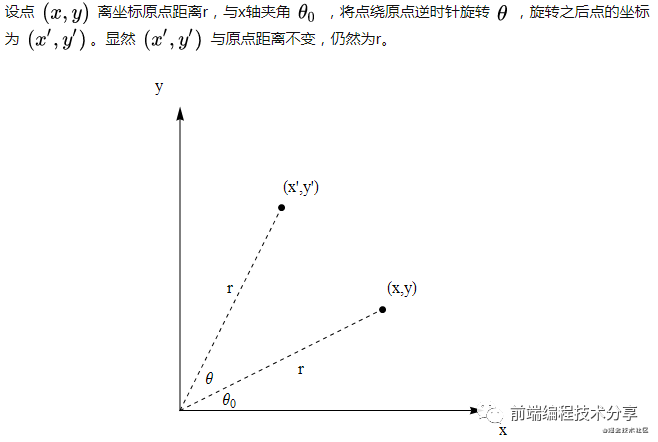
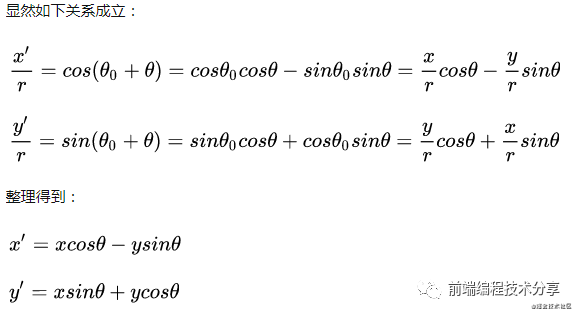
通過以上幾個(gè)計(jì)算值,就可以得到組件新的位移值?top?left?以及新的組件大小。對應(yīng)的完整代碼如下:
function calculateLeftTop(style, curPositon, pointInfo) {const { symmetricPoint } = pointInfoconst newCenterPoint = getCenterPoint(curPositon, symmetricPoint)const newTopLeftPoint = calculateRotatedPointCoordinate(curPositon, newCenterPoint, -style.rotate)const newBottomRightPoint = calculateRotatedPointCoordinate(symmetricPoint, newCenterPoint, -style.rotate)const newWidth = newBottomRightPoint.x - newTopLeftPoint.xconst newHeight = newBottomRightPoint.y - newTopLeftPoint.yif (newWidth > 0 && newHeight > 0) {style.width = Math.round(newWidth)style.height = Math.round(newHeight)style.left = Math.round(newTopLeftPoint.x)style.top = Math.round(newTopLeftPoint.y)}}
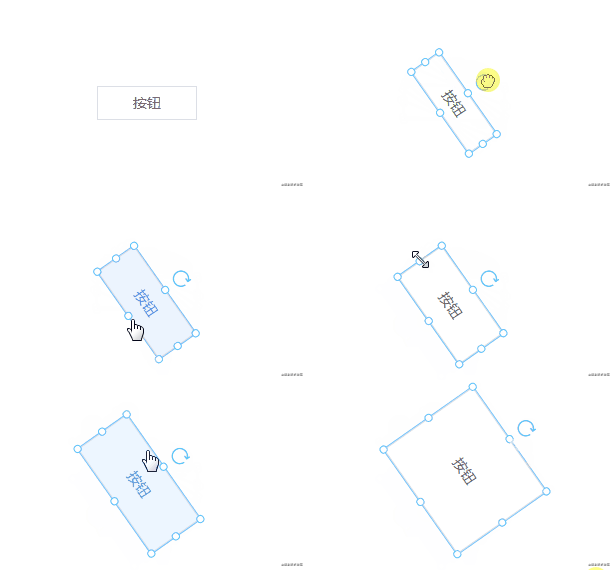
現(xiàn)在再來看一下旋轉(zhuǎn)后的放大縮小:
自動(dòng)吸附
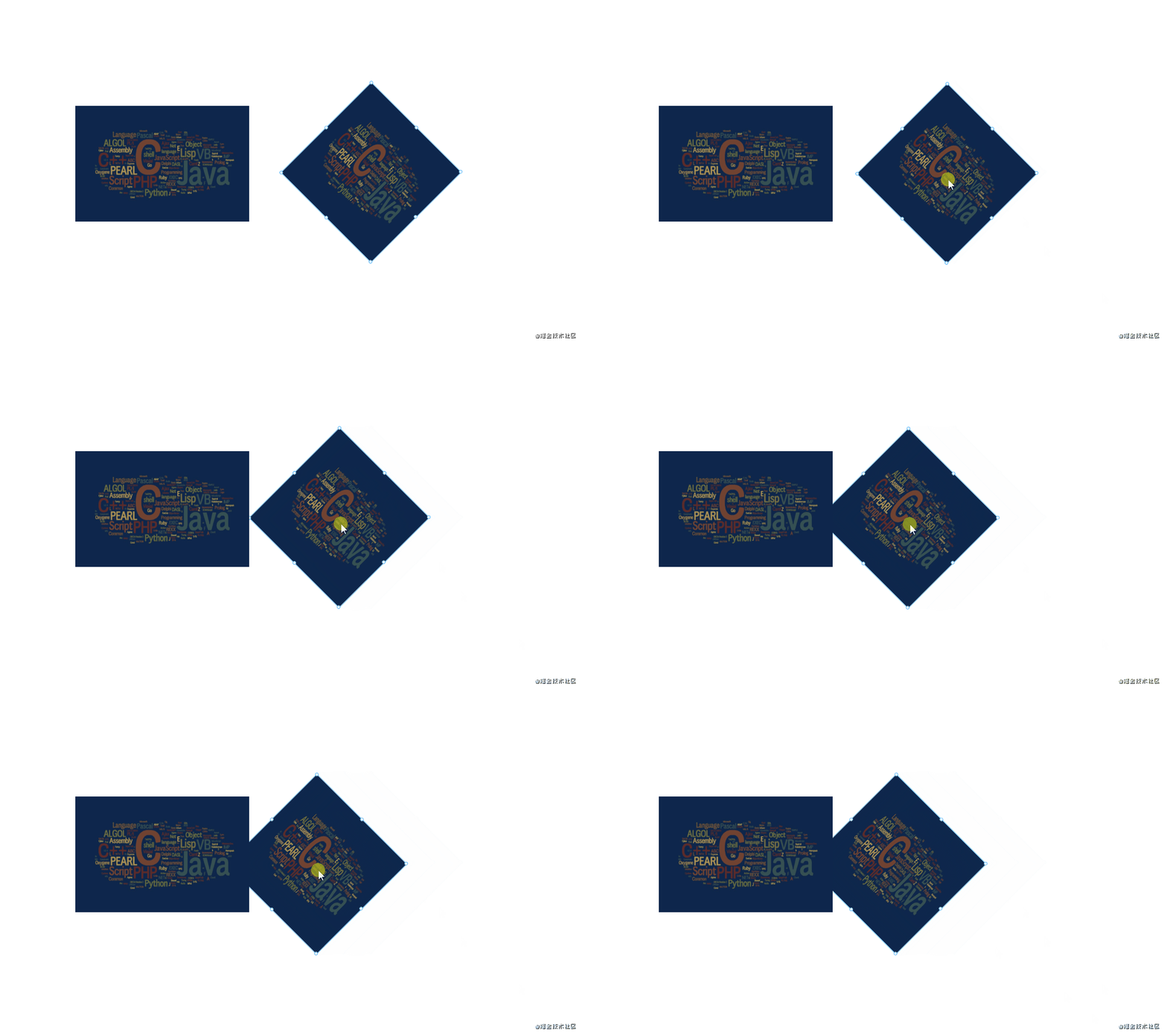
自動(dòng)吸附是根據(jù)組件的四個(gè)屬性?top?left?width?height?計(jì)算的,在將組件進(jìn)行旋轉(zhuǎn)后,這些屬性的值是不會(huì)變的。所以無論組件旋轉(zhuǎn)多少度,吸附時(shí)仍然按未旋轉(zhuǎn)時(shí)計(jì)算。這樣就會(huì)有一個(gè)問題,雖然實(shí)際上組件的?top?left?width?height?屬性沒有變化。但在外觀上卻發(fā)生了變化。下面是兩個(gè)同樣的組件:一個(gè)沒旋轉(zhuǎn),一個(gè)旋轉(zhuǎn)了 45 度。

可以看出來旋轉(zhuǎn)后按鈕的?height?屬性和我們從外觀上看到的高度是不一樣的,所以在這種情況下就出現(xiàn)了吸附不正確的 BUG。
解決方案
如何解決這個(gè)問題?我們需要拿組件旋轉(zhuǎn)后的大小及位移來做吸附對比。也就是說不要拿組件實(shí)際的屬性來對比,而是拿我們看到的大小和位移做對比。
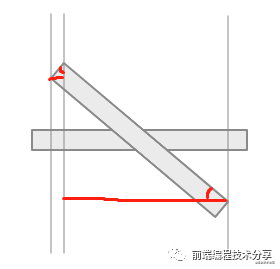
從上圖可以看出,旋轉(zhuǎn)后的組件在 x 軸上的投射長度為兩條紅線長度之和。這兩條紅線的長度可以通過正弦和余弦算出,左邊的紅線用正弦計(jì)算,右邊的紅線用余弦計(jì)算:
const newWidth = style.width * cos(style.rotate) + style.height * sin(style.rotate)同理,高度也是一樣:
const newHeight = style.height * cos(style.rotate) + style.width * sin(style.rotate)新的寬度和高度有了,再根據(jù)組件原有的?top?left?屬性,可以得出組件旋轉(zhuǎn)后新的?top?left?屬性。下面附上完整代碼:
translateComponentStyle(style) {style = { ...style }if (style.rotate != 0) {const newWidth = style.width * cos(style.rotate) + style.height * sin(style.rotate)const diffX = (style.width - newWidth) / 2style.left += diffXstyle.right = style.left + newWidthconst newHeight = style.height * cos(style.rotate) + style.width * sin(style.rotate)const diffY = (newHeight - style.height) / 2style.top -= diffYstyle.bottom = style.top + newHeightstyle.width = newWidthstyle.height = newHeight} else {style.bottom = style.top + style.heightstyle.right = style.left + style.width}return style}
經(jīng)過修復(fù)后,吸附也可以正常顯示了。
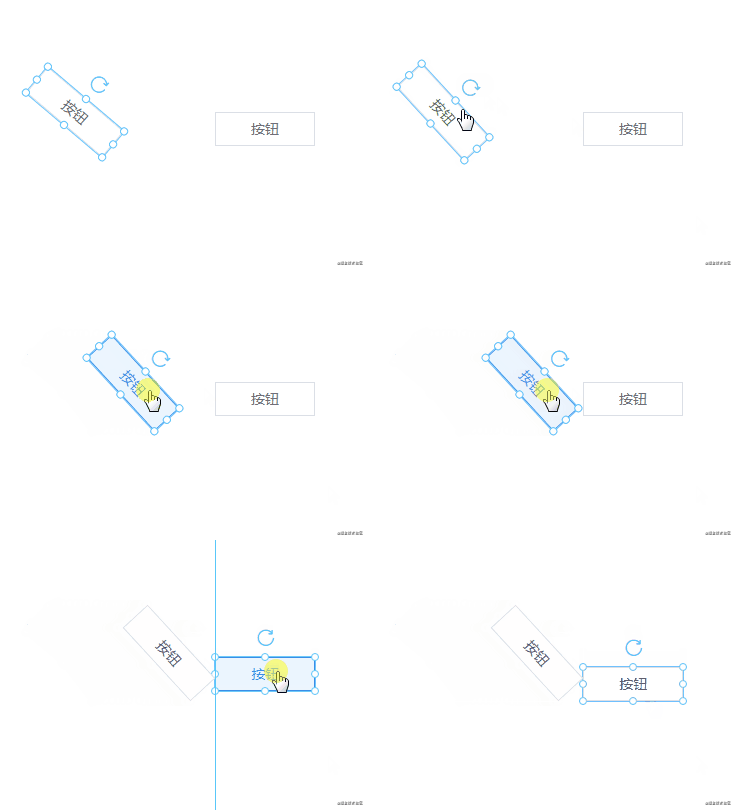
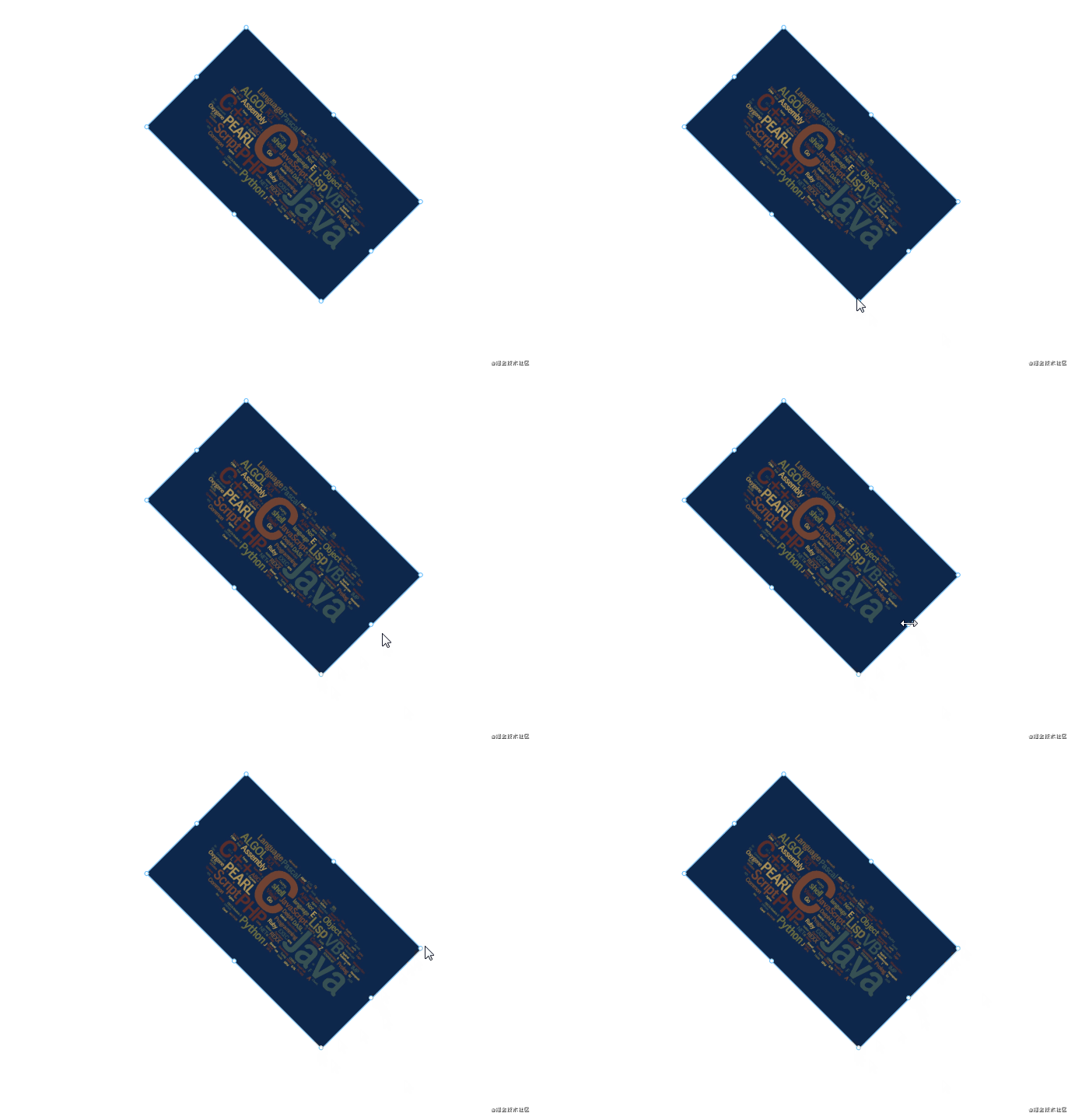
光標(biāo)
光標(biāo)和可拖動(dòng)的方向不對,是因?yàn)榘藗€(gè)點(diǎn)的光標(biāo)是固定設(shè)置的,沒有隨著角度變化而變化。
解決方案
由于?360 / 8 = 45,所以可以為每一個(gè)方向分配 45 度的范圍,每個(gè)范圍對應(yīng)一個(gè)光標(biāo)。同時(shí)為每個(gè)方向設(shè)置一個(gè)初始角度,也就是未旋轉(zhuǎn)時(shí)組件每個(gè)方向?qū)?yīng)的角度。
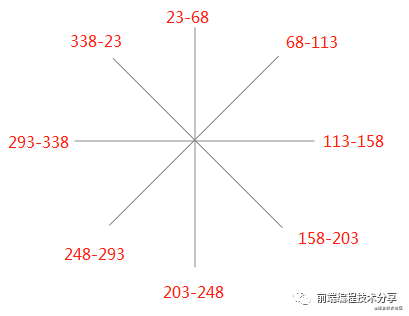
pointList: ['lt', 't', 'rt', 'r', 'rb', 'b', 'lb', 'l'], // 八個(gè)方向initialAngle: { // 每個(gè)點(diǎn)對應(yīng)的初始角度lt: 0,t: 45,rt: 90,r: 135,rb: 180,b: 225,lb: 270,l: 315,},angleToCursor: [ // 每個(gè)范圍的角度對應(yīng)的光標(biāo){ start: 338, end: 23, cursor: 'nw' },{ start: 23, end: 68, cursor: 'n' },{ start: 68, end: 113, cursor: 'ne' },{ start: 113, end: 158, cursor: 'e' },{ start: 158, end: 203, cursor: 'se' },{ start: 203, end: 248, cursor: 's' },{ start: 248, end: 293, cursor: 'sw' },{ start: 293, end: 338, cursor: 'w' },],cursors: {},
計(jì)算方式也很簡單:
1.假設(shè)現(xiàn)在組件已旋轉(zhuǎn)了一定的角度 a。2.遍歷八個(gè)方向,用每個(gè)方向的初始角度 + a 得出現(xiàn)在的角度 b。3.遍歷?angleToCursor?數(shù)組,看看 b 在哪一個(gè)范圍中,然后將對應(yīng)的光標(biāo)返回。
經(jīng)常上面三個(gè)步驟就可以計(jì)算出組件旋轉(zhuǎn)后正確的光標(biāo)方向。具體的代碼如下:
getCursor() {const { angleToCursor, initialAngle, pointList, curComponent } = thisconst rotate = (curComponent.style.rotate + 360) % 360 // 防止角度有負(fù)數(shù),所以 + 360const result = {}let lastMatchIndex = -1 // 從上一個(gè)命中的角度的索引開始匹配下一個(gè),降低時(shí)間復(fù)雜度pointList.forEach(point => {const angle = (initialAngle[point] + rotate) % 360const len = angleToCursor.lengthlet i = 0while (i < len) {lastMatchIndex = (lastMatchIndex + 1) % lenconst angleLimit = angleToCursor[lastMatchIndex]if (angle < 23 || angle >= 338) {result[point] = 'nw-resize'break}if (angleLimit.start <= angle && angle < angleLimit.end) {result[point] = angleLimit.cursor + '-resize'break}}})return result},
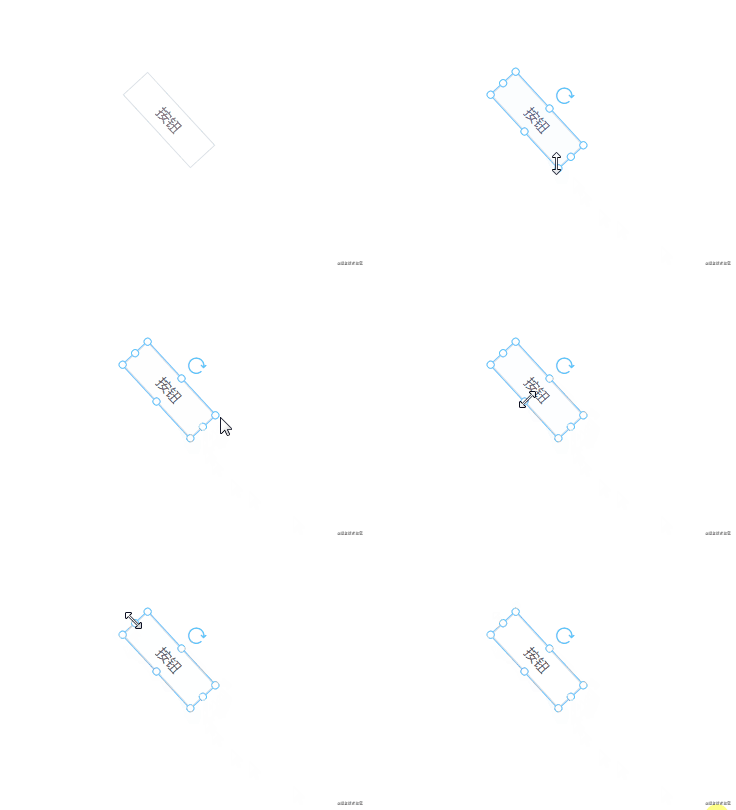
從上面的動(dòng)圖可以看出來,現(xiàn)在八個(gè)方向上的光標(biāo)是可以正確顯示的。
15. 復(fù)制粘貼剪切
相對于拖拽旋轉(zhuǎn)功能,復(fù)制粘貼就比較簡單了。
const ctrlKey = 17, vKey = 86, cKey = 67, xKey = 88let isCtrlDown = falsewindow.onkeydown = (e) => {if (e.keyCode == ctrlKey) {isCtrlDown = true} else if (isCtrlDown && e.keyCode == cKey) {this.$store.commit('copy')} else if (isCtrlDown && e.keyCode == vKey) {this.$store.commit('paste')} else if (isCtrlDown && e.keyCode == xKey) {this.$store.commit('cut')}}window.onkeyup = (e) => {if (e.keyCode == ctrlKey) {isCtrlDown = false}}
監(jiān)聽用戶的按鍵操作,在按下特定按鍵時(shí)觸發(fā)對應(yīng)的操作。
復(fù)制操作
在 vuex 中使用?copyData?來表示復(fù)制的數(shù)據(jù)。當(dāng)用戶按下?ctrl + c?時(shí),將當(dāng)前組件數(shù)據(jù)深拷貝到?copyData。
copy(state) {state.copyData = {data: deepCopy(state.curComponent),index: state.curComponentIndex,}},
同時(shí)需要將當(dāng)前組件在組件數(shù)據(jù)中的索引記錄起來,在剪切中要用到。
粘貼操作
paste(state, isMouse) {if (!state.copyData) {toast('請選擇組件')return}const data = state.copyData.dataif (isMouse) {data.style.top = state.menuTopdata.style.left = state.menuLeft} else {data.style.top += 10data.style.left += 10}data.id = generateID()store.commit('addComponent', { component: data })store.commit('recordSnapshot')state.copyData = null},
粘貼時(shí),如果是按鍵操作?ctrl+v。則將組件的?top?left?屬性加 10,以免和原來的組件重疊在一起。如果是使用鼠標(biāo)右鍵執(zhí)行粘貼操作,則將復(fù)制的組件放到鼠標(biāo)點(diǎn)擊處。
剪切操作
cut({ copyData }) {if (copyData) {store.commit('addComponent', { component: copyData.data, index: copyData.index })}store.commit('copy')store.commit('deleteComponent')},
剪切操作本質(zhì)上還是復(fù)制,只不過在執(zhí)行復(fù)制后,需要將當(dāng)前組件刪除。為了避免用戶執(zhí)行剪切操作后,不執(zhí)行粘貼操作,而是繼續(xù)執(zhí)行剪切。這時(shí)就需要將原先剪切的數(shù)據(jù)進(jìn)行恢復(fù)。所以復(fù)制數(shù)據(jù)中記錄的索引就起作用了,可以通過索引將原來的數(shù)據(jù)恢復(fù)到原來的位置中。
右鍵操作
右鍵操作和按鍵操作是一樣的,一個(gè)功能兩種觸發(fā)途徑。
<li @click="copy" v-show="curComponent">復(fù)制li><li @click="paste">粘貼li><li @click="cut" v-show="curComponent">剪切li>cut() {this.$store.commit('cut')},copy() {this.$store.commit('copy')},paste() {this.$store.commit('paste', true)},
16. 數(shù)據(jù)交互
方式一
提前寫好一系列 ajax 請求API,點(diǎn)擊組件時(shí)按需選擇 API,選好 API 再填參數(shù)。例如下面這個(gè)組件,就展示了如何使用 ajax 請求向后臺(tái)交互:
<template><div>{{ propValue.data }}div>template><script>export default {// propValue: {// api: {// request: a,// params,// },// data: null// }props: {propValue: {type: Object,default: () => {},},},created() {this.propValue.api.request(this.propValue.api.params).then(res => {this.propValue.data = res.data})},}script>
方式二
方式二適合純展示的組件,例如有一個(gè)報(bào)警組件,可以根據(jù)后臺(tái)傳來的數(shù)據(jù)顯示對應(yīng)的顏色。在編輯頁面的時(shí)候,可以通過 ajax 向后臺(tái)請求頁面能夠使用的 websocket 數(shù)據(jù):
const data = ['status', 'text'...]然后再為不同的組件添加上不同的屬性。例如有 a 組件,它綁定的屬性為?status。
// 組件能接收的數(shù)據(jù)props: {propValue: {type: String,},element: {type: Object,},wsKey: {type: String,default: '',},},
在組件中通過?wsKey?獲取這個(gè)綁定的屬性。等頁面發(fā)布后或者預(yù)覽時(shí),通過 weboscket 向后臺(tái)請求全局?jǐn)?shù)據(jù)放在 vuex 上。組件就可以通過?wsKey?訪問數(shù)據(jù)了。
<template><div>{{ wsData[wsKey] }}div>template><script>import { mapState } from 'vuex'export default {props: {propValue: {type: String,},element: {type: Object,},wsKey: {type: String,default: '',},},computed: mapState(['wsData',]),script>
和后臺(tái)交互的方式有很多種,不僅僅包括上面兩種,我在這里僅提供一些思路,以供參考。
17. 發(fā)布
頁面發(fā)布有兩種方式:一是將組件數(shù)據(jù)渲染為一個(gè)單獨(dú)的 HTML 頁面;二是從本項(xiàng)目中抽取出一個(gè)最小運(yùn)行時(shí) runtime 作為一個(gè)單獨(dú)的項(xiàng)目。
這里說一下第二種方式,本項(xiàng)目中的最小運(yùn)行時(shí)其實(shí)就是預(yù)覽頁面加上自定義組件。將這些代碼提取出來作為一個(gè)項(xiàng)目單獨(dú)打包。發(fā)布頁面時(shí)將組件數(shù)據(jù)以 JSON 的格式傳給服務(wù)端,同時(shí)為每個(gè)頁面生成一個(gè)唯一 ID。
假設(shè)現(xiàn)在有三個(gè)頁面,發(fā)布頁面生成的 ID 為 a、b、c。訪問頁面時(shí)只需要把 ID 帶上,這樣就可以根據(jù) ID 獲取每個(gè)頁面對應(yīng)的組件數(shù)據(jù)。
www.test.com/?id=awww.test.com/?id=cwww.test.com/?id=b
按需加載
如果自定義組件過大,例如有數(shù)十個(gè)甚至上百個(gè)。這時(shí)可以將自定義組件用?import?的方式導(dǎo)入,做到按需加載,減少首屏渲染時(shí)間:
import Vue from 'vue'const components = ['Picture','VText','VButton',]components.forEach(key => {Vue.component(key, () => import(`@/custom-component/${key}`))})
按版本發(fā)布
自定義組件有可能會(huì)有更新的情況。例如原來的組件使用了大半年,現(xiàn)在有功能變更,為了不影響原來的頁面。建議在發(fā)布時(shí)帶上組件的版本號(hào):
- v-text- v1.vue- v2.vue
例如?v-text?組件有兩個(gè)版本,在左側(cè)組件列表區(qū)使用時(shí)就可以帶上版本號(hào):
{component: 'v-text',version: 'v1'...}
這樣導(dǎo)入組件時(shí)就可以根據(jù)組件版本號(hào)進(jìn)行導(dǎo)入:
import Vue from 'vue'import componentList from '@/custom-component/component-list`componentList.forEach(component => {Vue.component(component.name, () => import(`@/custom-component/${component.name}/${component.version}`))})
參考資料
?Math[7]?通過Math.atan2 計(jì)算角度[8]?為什么矩陣能用來表示角的旋轉(zhuǎn)?[9]?snapping-demo[10]?vue-next-drag[11]
References
[1]?《可視化拖拽組件庫一些技術(shù)要點(diǎn)原理分析》:?https://juejin.cn/post/6908502083075325959[2]?github 項(xiàng)目地址:?https://github.com/woai3c/visual-drag-demo[3]?在線預(yù)覽:?https://woai3c.github.io/visual-drag-demo[4]?Math.atan2():?https://developer.mozilla.org/zh-CN/docs/Web/JavaScript/Reference/Global_Objects/Math/atan2[5]?snapping-demo:?https://github.com/shenhudong/snapping-demo/wiki/corner-handle[6]?回答:?https://www.zhihu.com/question/67425734/answer/252724399[7]?Math:?https://developer.mozilla.org/zh-CN/docs/Web/JavaScript/Reference/Global_Objects/Math[8]?通過Math.atan2 計(jì)算角度:?https://www.jianshu.com/p/9817e267925a[9]?為什么矩陣能用來表示角的旋轉(zhuǎn)?:?https://www.zhihu.com/question/67425734/answer/252724399[10]?snapping-demo:?https://github.com/shenhudong/snapping-demo/wiki/corner-handle[11]?vue-next-drag:?https://github.com/lycHub/vue-next-drag