可視化拖拽組件庫(kù)一些技術(shù)要點(diǎn)原理分析 關(guān)注 共
12350字,需瀏覽
25分鐘
·
2021-01-05 10:41
本文主要對(duì)以下技術(shù)要點(diǎn)進(jìn)行分析: 為了讓本文更加容易理解,我將以上技術(shù)要點(diǎn)結(jié)合在一起寫(xiě)了一個(gè)可視化拖拽組件庫(kù) DEMO:
建議結(jié)合源碼一起閱讀,效果更好(這個(gè) DEMO 使用的是 Vue 技術(shù)棧)。
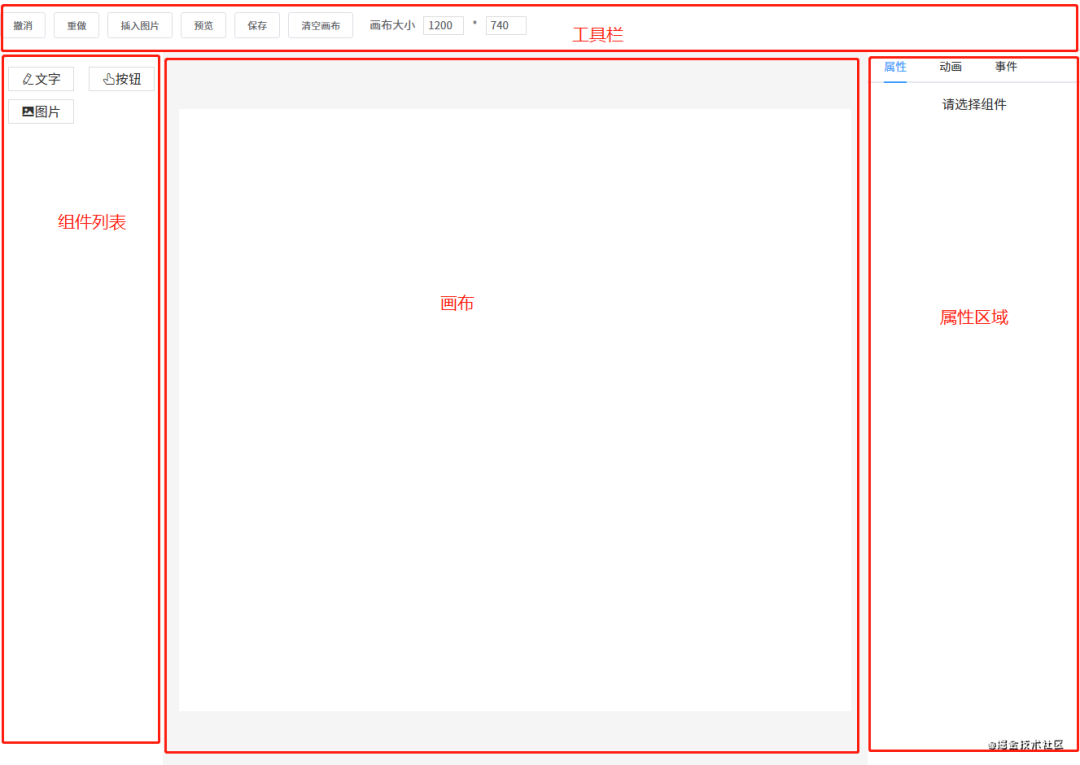
1.編輯器 先來(lái)看一下頁(yè)面的整體結(jié)構(gòu)。
這一節(jié)要講的編輯器其實(shí)就是中間的畫(huà)布。它的作用是:當(dāng)從左邊組件列表拖拽出一個(gè)組件放到畫(huà)布中時(shí),畫(huà)布要把這個(gè)組件渲染出來(lái)。
這個(gè)編輯器的實(shí)現(xiàn)思路是:
用一個(gè)數(shù)組?componentData?維護(hù)編輯器中的數(shù)據(jù)。 把組件拖拽到畫(huà)布中時(shí),使用?push()?方法將新的組件數(shù)據(jù)添加到?componentData。 編輯器使用?v-for?指令遍歷?componentData,將每個(gè)組件逐個(gè)渲染到畫(huà)布(也可以使用 JSX 語(yǔ)法結(jié)合?render()?方法代替)。 編輯器渲染的核心代碼如下所示:
??v-for="item?in?componentData" "item.id" "item.component" "item.style" "item.propValue" 每個(gè)組件數(shù)據(jù)大概是這樣:
{'v-text' ,?'文字' ,?'文字' ,?'el-icon-edit' ,?'' ,'' ,'' ,在遍歷?componentData?組件數(shù)據(jù)時(shí),主要靠?is?屬性來(lái)識(shí)別出真正要渲染的是哪個(gè)組件。
例如要渲染的組件數(shù)據(jù)是?{ component: 'v-text' },則?
如果你想了解更多?is?屬性的資料,請(qǐng)查看官方文檔。
2. 自定義組件 原則上使用第三方組件也是可以的,但建議你最好封裝一下。不管是第三方組件還是自定義組件,每個(gè)組件所需的屬性可能都不一樣,所以每個(gè)組件數(shù)據(jù)可以暴露出一個(gè)屬性?propValue?用于傳遞值。
例如 a 組件只需要一個(gè)屬性,你的?propValue?可以這樣寫(xiě):propValue: 'aaa'。如果需要多個(gè)屬性,propValue?則可以是一個(gè)對(duì)象:
propValue:?{'text' 在這個(gè) DEMO 組件庫(kù)中我定義了三個(gè)組件。
圖片組件?Picture:
按鈕組件?VButton:
{{?propValue?}} 文本組件?VText:
????????v-if="editMode?==?'edit'" "propValue" "handleInput" "v-text" "(text,?index)?in?propValue.split('\n')"?:key="index" >{{?text?}} ????
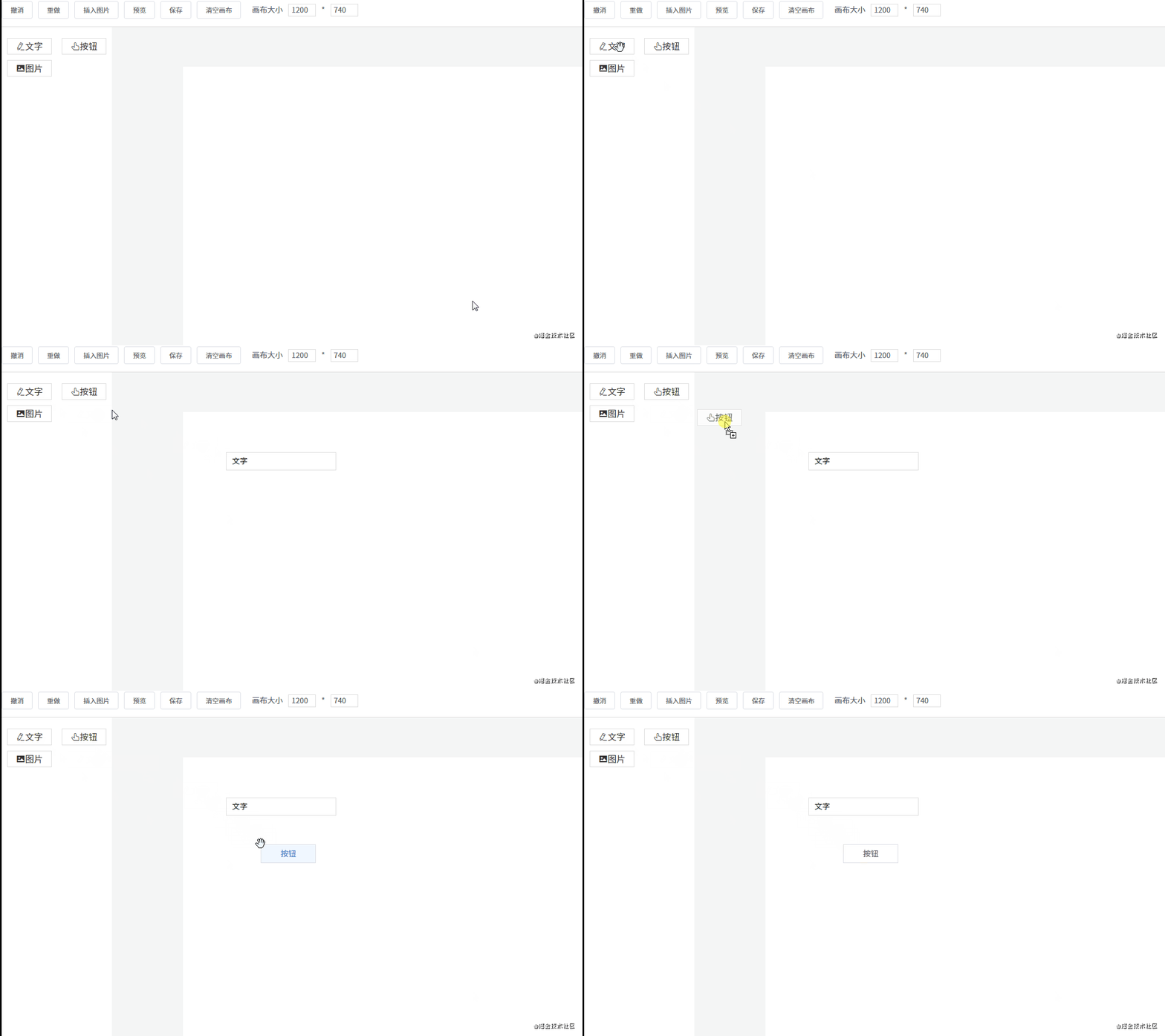
3. 拖拽 從組件列表到畫(huà)布 一個(gè)元素如果要設(shè)為可拖拽,必須給它添加一個(gè)?draggable?屬性。另外,在將組件列表中的組件拖拽到畫(huà)布中,還有兩個(gè)事件是起到關(guān)鍵作用的:
dragstart?事件,在拖拽剛開(kāi)始時(shí)觸發(fā)。它主要用于將拖拽的組件信息傳遞給畫(huà)布。drop?事件,在拖拽結(jié)束時(shí)觸發(fā)。主要用于接收拖拽的組件信息。先來(lái)看一下左側(cè)組件列表的代碼:
"handleDragStart">"(item,?index)?in?componentList"?:key="index" ?draggable?:data-index="index" >"item.icon">{{?item.label?}} handleDragStart(e)?{'index' ,?e.target.dataset.index)可以看到給列表中的每一個(gè)組件都設(shè)置了?draggable?屬性。另外,在觸發(fā)?dragstart?事件時(shí),使用?dataTransfer.setData()?傳輸數(shù)據(jù)。再來(lái)看一下接收數(shù)據(jù)的代碼:
"handleDrop"?@dragover="handleDragOver" ?@click="deselectCurComponent" > handleDrop(e)?{'index' )])$store .commit('addComponent' ,?component)觸發(fā)?drop?事件時(shí),使用?dataTransfer.getData()?接收傳輸過(guò)來(lái)的索引數(shù)據(jù),然后根據(jù)索引找到對(duì)應(yīng)的組件數(shù)據(jù),再添加到畫(huà)布,從而渲染組件。
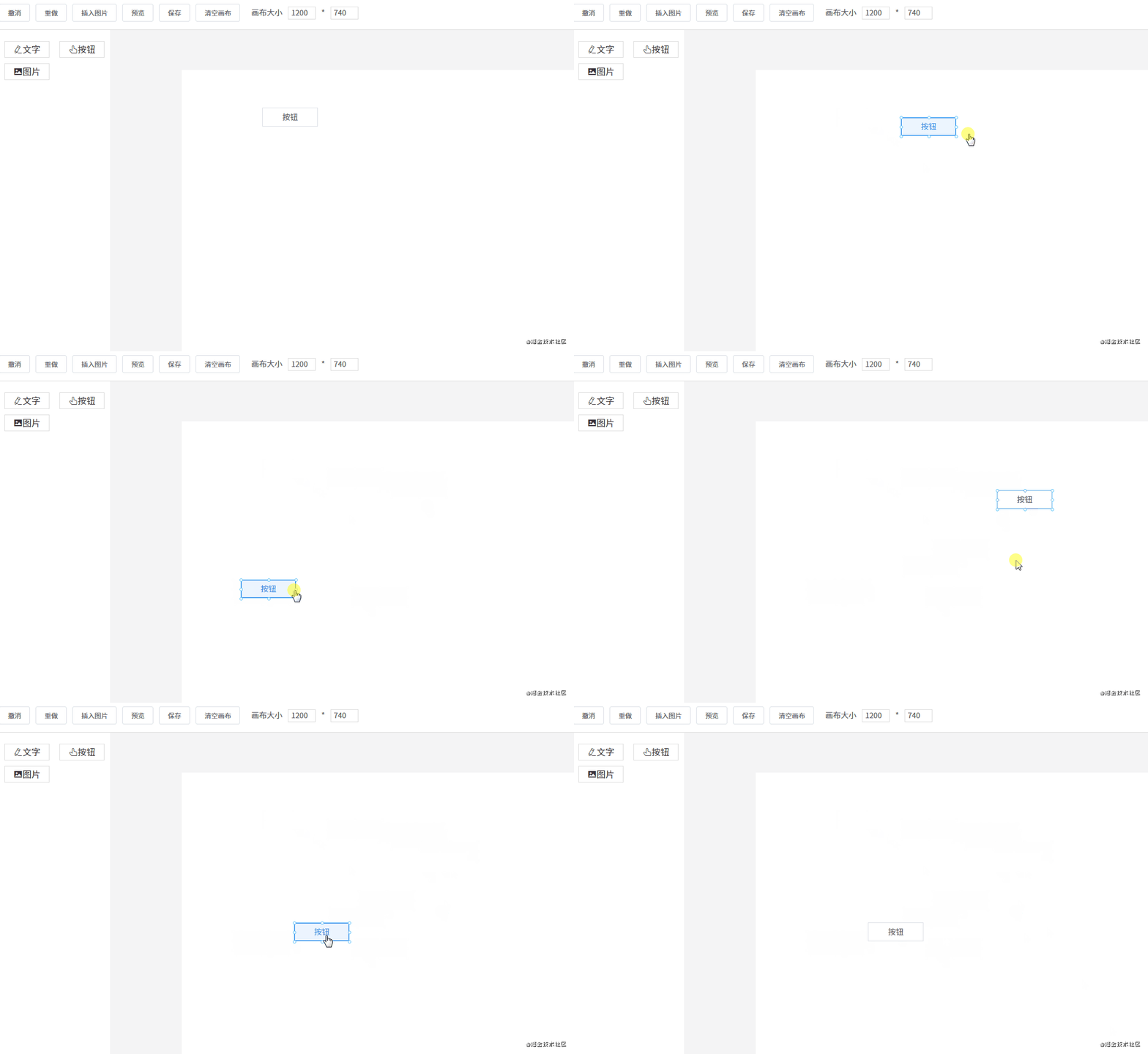
組件在畫(huà)布中移動(dòng) 首先需要將畫(huà)布設(shè)為相對(duì)定位?position: relative,然后將每個(gè)組件設(shè)為絕對(duì)定位?position: absolute。除了這一點(diǎn)外,還要通過(guò)監(jiān)聽(tīng)三個(gè)事件來(lái)進(jìn)行移動(dòng):
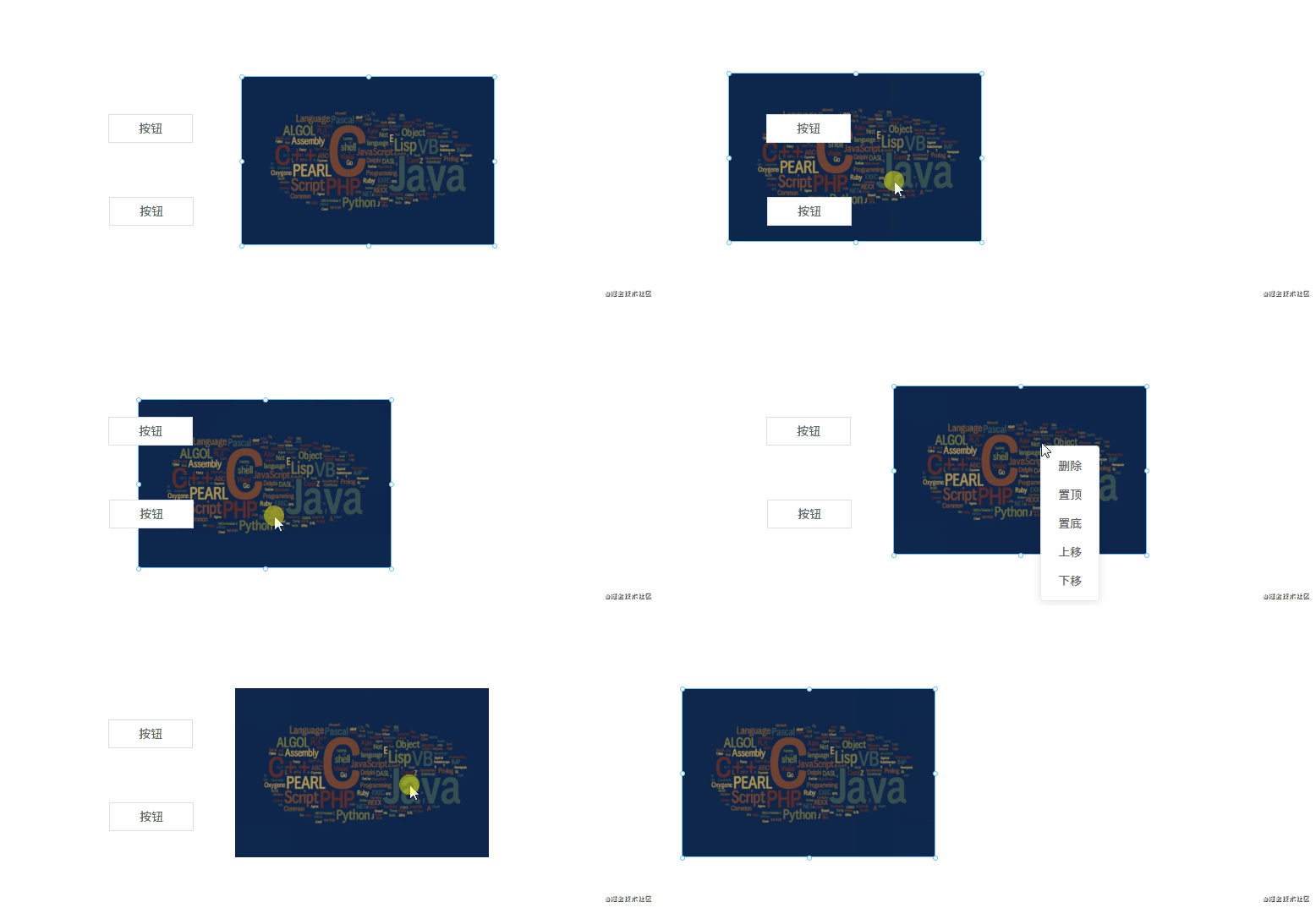
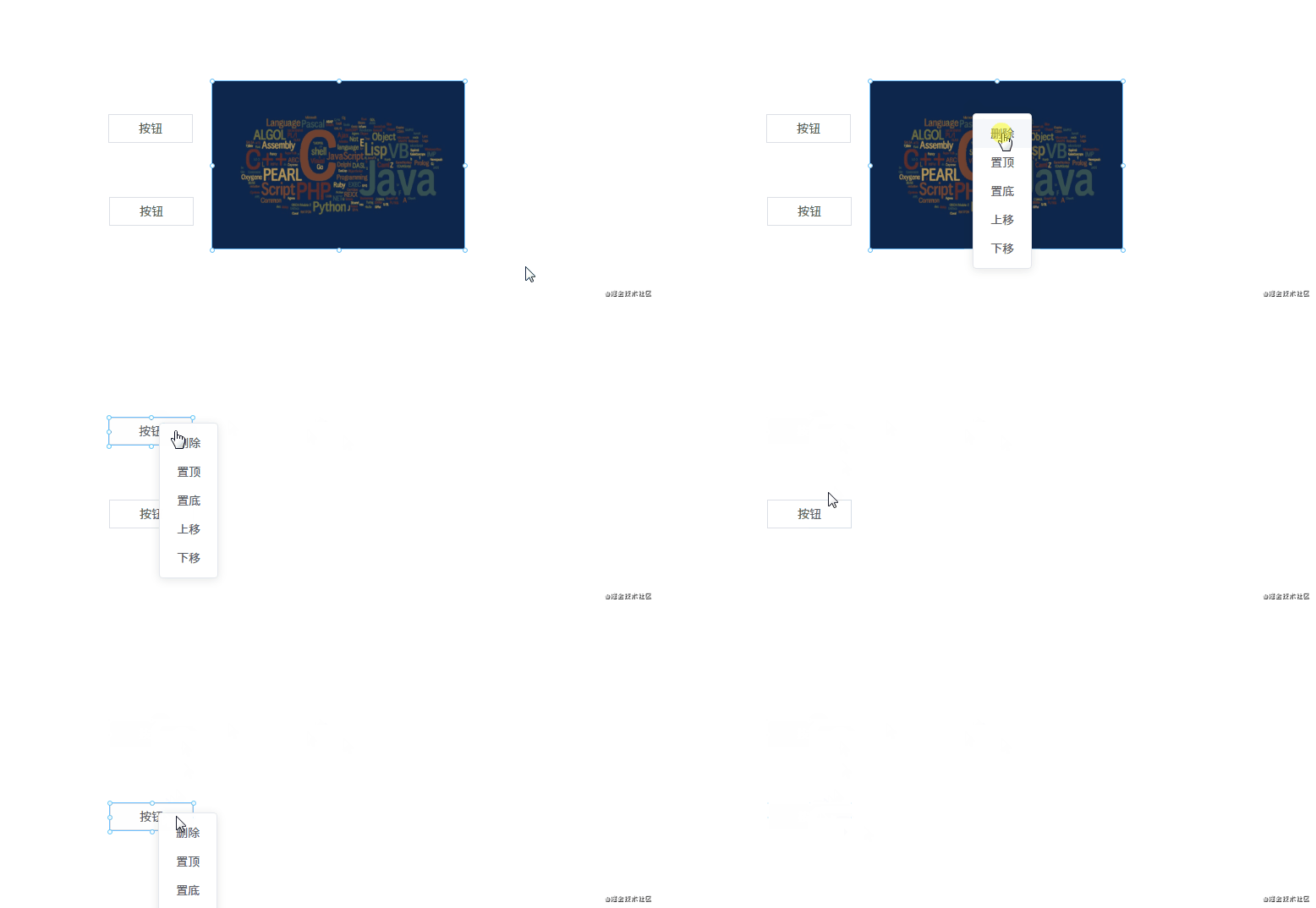
mousedown?事件,在組件上按下鼠標(biāo)時(shí),記錄組件當(dāng)前的位置,即 xy 坐標(biāo)(為了方便講解,這里使用的坐標(biāo)軸,實(shí)際上 xy 對(duì)應(yīng)的是 css 中的?left?和?top。mousemove?事件,每次鼠標(biāo)移動(dòng)時(shí),都用當(dāng)前最新的 xy 坐標(biāo)減去最開(kāi)始的 xy 坐標(biāo),從而計(jì)算出移動(dòng)距離,再改變組件位置。mouseup?事件,鼠標(biāo)抬起時(shí)結(jié)束移動(dòng)。handleMouseDown(e)?{$store .commit('setCurComponent' ,?{?component:?this.element,?zIndex:?this.zIndex?})$store .commit('setShapeStyle' ,?pos)'mousemove' ,?move)'mouseup' ,?up)'mousemove' ,?move)'mouseup' ,?up)4. 刪除組件、調(diào)整圖層層級(jí) 改變圖層層級(jí) 由于拖拽組件到畫(huà)布中是有先后順序的,所以可以按照數(shù)據(jù)順序來(lái)分配圖層層級(jí)。
例如畫(huà)布新增了五個(gè)組件 abcde,那它們?cè)诋?huà)布數(shù)據(jù)中的順序?yàn)?[a, b, c, d, e],圖層層級(jí)和索引一一對(duì)應(yīng),即它們的?z-index?屬性值是 01234(后來(lái)居上)。用代碼表示如下:
"(item,?index)?in?componentData"?:zIndex="index" > 如果不了解?z-index?屬性的,請(qǐng)看一下 MDN 文檔。
理解了這一點(diǎn)之后,改變圖層層級(jí)就很容易做到了。改變圖層層級(jí),即是改變組件數(shù)據(jù)在?componentData?數(shù)組中的順序。例如有?[a, b, c]?三個(gè)組件,它們的圖層層級(jí)從低到高順序?yàn)?abc(索引越大,層級(jí)越高)。
如果要將 b 組件上移,只需將它和 c 調(diào)換順序即可:
const?temp?=?componentData[1]同理,置頂置底也是一樣,例如我要將 a 組件置頂,只需將 a 和最后一個(gè)組件調(diào)換順序即可:
const?temp?=?componentData[0]刪除組件 刪除組件非常簡(jiǎn)單,一行代碼搞定:componentData.splice(index, 1)。
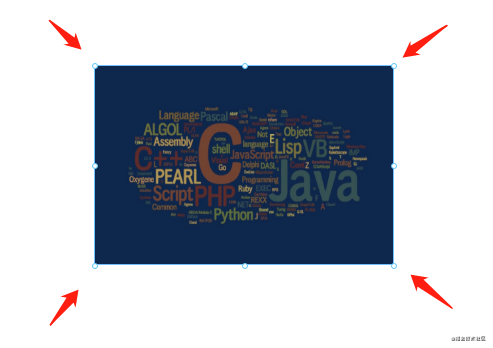
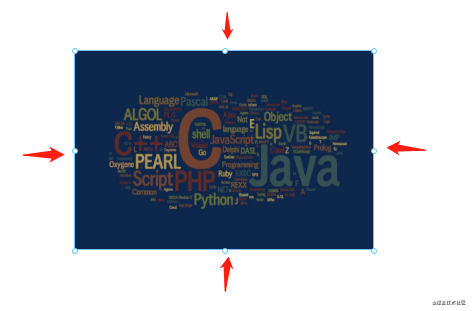
5. 放大縮小 細(xì)心的網(wǎng)友可能會(huì)發(fā)現(xiàn),點(diǎn)擊畫(huà)布上的組件時(shí),組件上會(huì)出現(xiàn) 8 個(gè)小圓點(diǎn)。這 8 個(gè)小圓點(diǎn)就是用來(lái)放大縮小用的。實(shí)現(xiàn)原理如下:
1. 在每個(gè)組件外面包一層?Shape?組件,Shape?組件里包含 8 個(gè)小圓點(diǎn)和一個(gè)? "(item,?index)?in?componentData""item.style" "getShapeStyle(item.style,?index)" "item.id" "item?===?curComponent" "item" "index" ???????"item.component" "getComponentStyle(item.style)" "item.propValue" Shape?組件內(nèi)部結(jié)構(gòu):
"{?active:?this.active?}"?@click="selectCurComponent" ?@mousedown="handleMouseDown" "handleContextMenu" >???????????"(item,?index)?in?(active??pointList?:?[])" "handleMouseDownOnPoint(item)" "index" "getPointStyle(item)" > 2. 點(diǎn)擊組件時(shí),將 8 個(gè)小圓點(diǎn)顯示出來(lái)。 起作用的是這行代碼?:active="item === curComponent"。
3. 計(jì)算每個(gè)小圓點(diǎn)的位置。 先來(lái)看一下計(jì)算小圓點(diǎn)位置的代碼:
const?pointList?=?['t' ,?'r' ,?'b' ,?'l' ,?'lt' ,?'rt' ,?'lb' ,?'rb' ]test (point)test (point)test (point)test (point)let ?newLeft?=?0let ?newTop?=?0if ?(point.length?===?2)?{else ?{if ?(hasT?||?hasB)?{if ?(hasL?||?hasR)?{'-4px' ?:?'-3px' ,'-3px' ,${newLeft} px`,${newTop} px`,'' ).reverse().map(m?=>?this.directionKey[m]).join('' )?+?'-resize' ,return ?style計(jì)算小圓點(diǎn)的位置需要獲取一些信息:
注意,小圓點(diǎn)也是絕對(duì)定位的,相對(duì)于?Shape?組件。所以有四個(gè)小圓點(diǎn)的位置很好確定:
左上角的小圓點(diǎn),坐標(biāo)?left: 0, top: 0 右上角的小圓點(diǎn),坐標(biāo)?left: width, top: 0 左下角的小圓點(diǎn),坐標(biāo)?left: 0, top: height 右下角的小圓點(diǎn),坐標(biāo)?left: width, top: height 另外的四個(gè)小圓點(diǎn)需要通過(guò)計(jì)算間接算出來(lái)。例如左邊中間的小圓點(diǎn),計(jì)算公式為?left: 0, top: height / 2,其他小圓點(diǎn)同理。
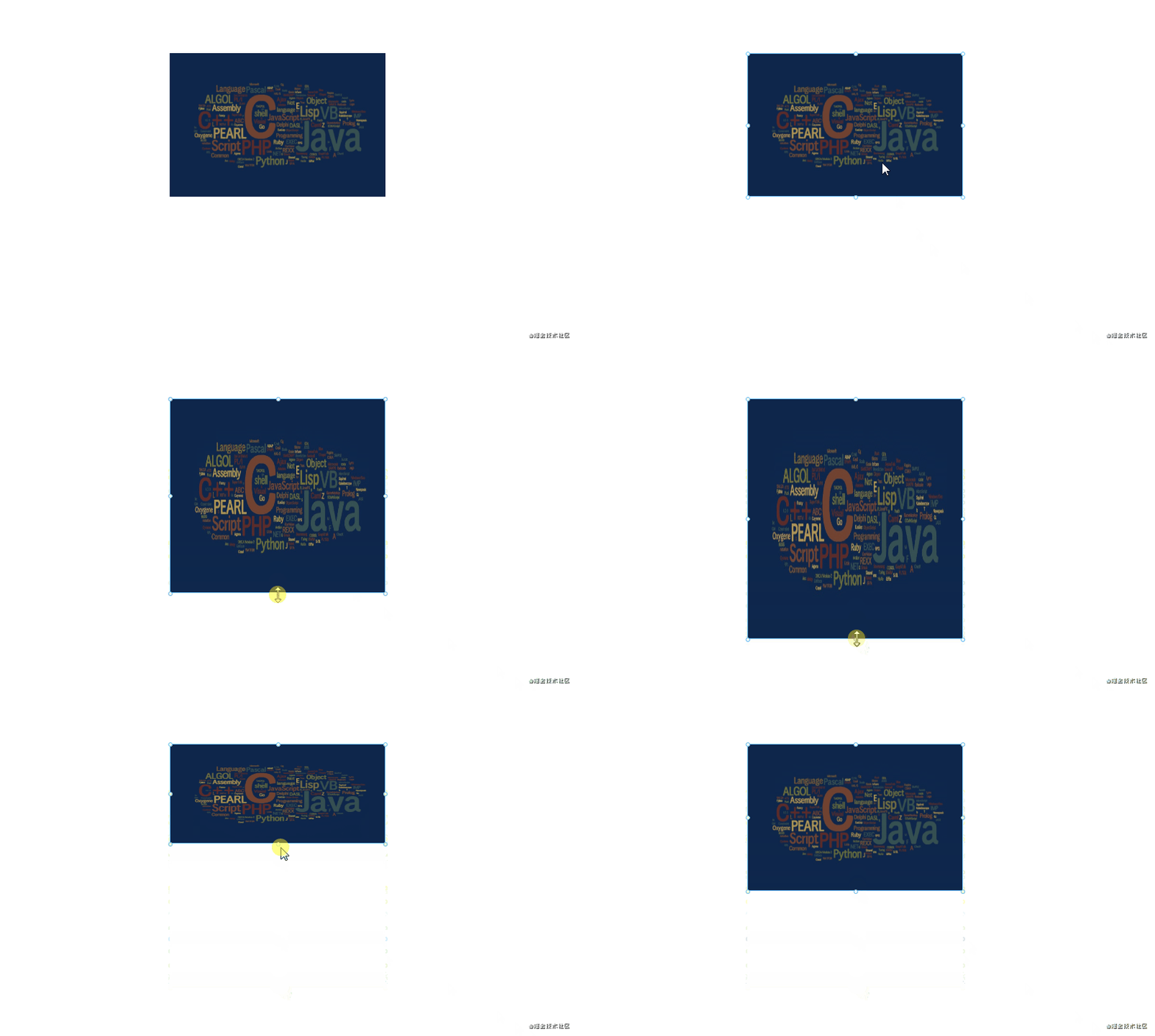
4. 點(diǎn)擊小圓點(diǎn)時(shí),可以進(jìn)行放大縮小操作。 handleMouseDownOnPoint(point)?{let ?needSave?=?false true test (point)test (point)test (point)test (point)$store .commit('setShapeStyle' ,?pos)'mousemove' ,?move)'mouseup' ,?up)$store .commit('recordSnapshot' )'mousemove' ,?move)'mouseup' ,?up)它的原理是這樣的:
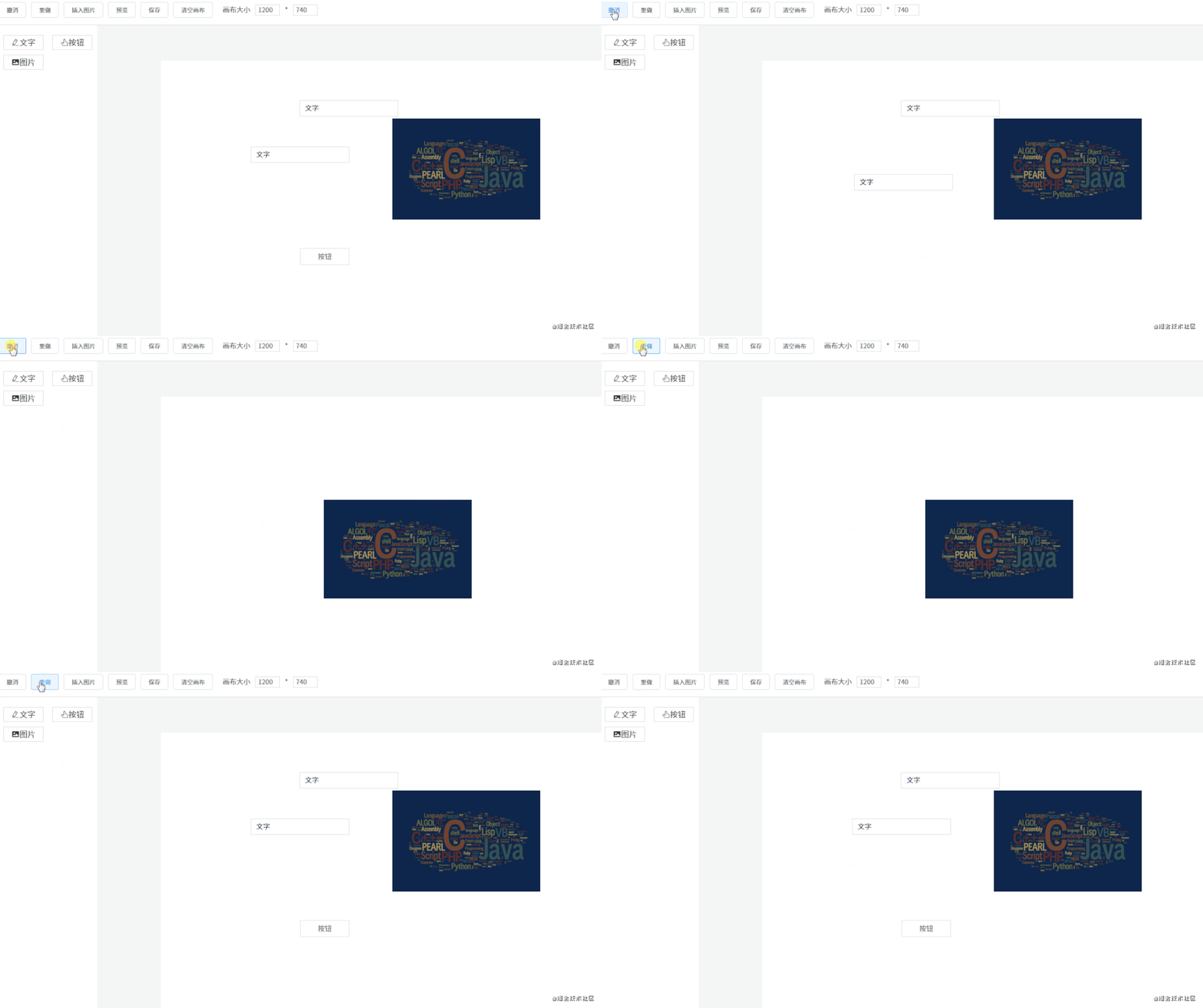
點(diǎn)擊小圓點(diǎn)時(shí),記錄點(diǎn)擊的坐標(biāo) xy。 假設(shè)我們現(xiàn)在向下拖動(dòng),那么 y 坐標(biāo)就會(huì)增大。 用新的 y 坐標(biāo)減去原來(lái)的 y 坐標(biāo),就可以知道在縱軸方向的移動(dòng)距離是多少。 最后再將移動(dòng)距離加上原來(lái)組件的高度,就可以得出新的組件高度。 如果是正數(shù),說(shuō)明是往下拉,組件的高度在增加。如果是負(fù)數(shù),說(shuō)明是往上拉,組件的高度在減少。 6. 撤消、重做 撤銷(xiāo)重做的實(shí)現(xiàn)原理其實(shí)挺簡(jiǎn)單的,先看一下代碼:
snapshotData:?[],?if ?(state.snapshotIndex?>=?0)?{'setComponentData' ,?deepCopy(state.snapshotData[state.snapshotIndex]))if ?(state.snapshotIndex?????????state.snapshotIndex++'setComponentData' ,?deepCopy(state.snapshotData[state.snapshotIndex]))'componentData' ,?componentData)if ?(state.snapshotIndex?????????state.snapshotData?=?state.snapshotData.slice(0,?state.snapshotIndex?+?1)用一個(gè)數(shù)組來(lái)保存編輯器的快照數(shù)據(jù)。保存快照就是不停地執(zhí)行?push()?操作,將當(dāng)前的編輯器數(shù)據(jù)推入?snapshotData?數(shù)組,并增加快照索引?snapshotIndex。目前以下幾個(gè)動(dòng)作會(huì)觸發(fā)保存快照操作:
...
撤銷(xiāo) 假設(shè)現(xiàn)在?snapshotData?保存了 4 個(gè)快照。即?[a, b, c, d],對(duì)應(yīng)的快照索引為 3。如果這時(shí)進(jìn)行了撤銷(xiāo)操作,我們需要將快照索引減 1,然后將對(duì)應(yīng)的快照數(shù)據(jù)賦值給畫(huà)布。
例如當(dāng)前畫(huà)布數(shù)據(jù)是 d,進(jìn)行撤銷(xiāo)后,索引 -1,現(xiàn)在畫(huà)布的數(shù)據(jù)是 c。
重做 明白了撤銷(xiāo),那重做就很好理解了,就是將快照索引加 1,然后將對(duì)應(yīng)的快照數(shù)據(jù)賦值給畫(huà)布。
不過(guò)還有一點(diǎn)要注意,就是在撤銷(xiāo)操作中進(jìn)行了新的操作,要怎么辦呢?有兩種解決方案:
新操作替換當(dāng)前快照索引后面所有的數(shù)據(jù)。還是用剛才的數(shù)據(jù)?[a, b, c, d]?舉例,假設(shè)現(xiàn)在進(jìn)行了兩次撤銷(xiāo)操作,快照索引變?yōu)?1,對(duì)應(yīng)的快照數(shù)據(jù)為 b,如果這時(shí)進(jìn)行了新的操作,對(duì)應(yīng)的快照數(shù)據(jù)為 e。那 e 會(huì)把 cd 頂?shù)簦F(xiàn)在的快照數(shù)據(jù)為?[a, b, e]。 不頂?shù)魯?shù)據(jù),在原來(lái)的快照中新增一條記錄。用剛才的例子舉例,e 不會(huì)把 cd 頂?shù)簦窃?cd 之前插入,即快照數(shù)據(jù)變?yōu)?[a, b, e, c, d]。 我采用的是第一種方案。
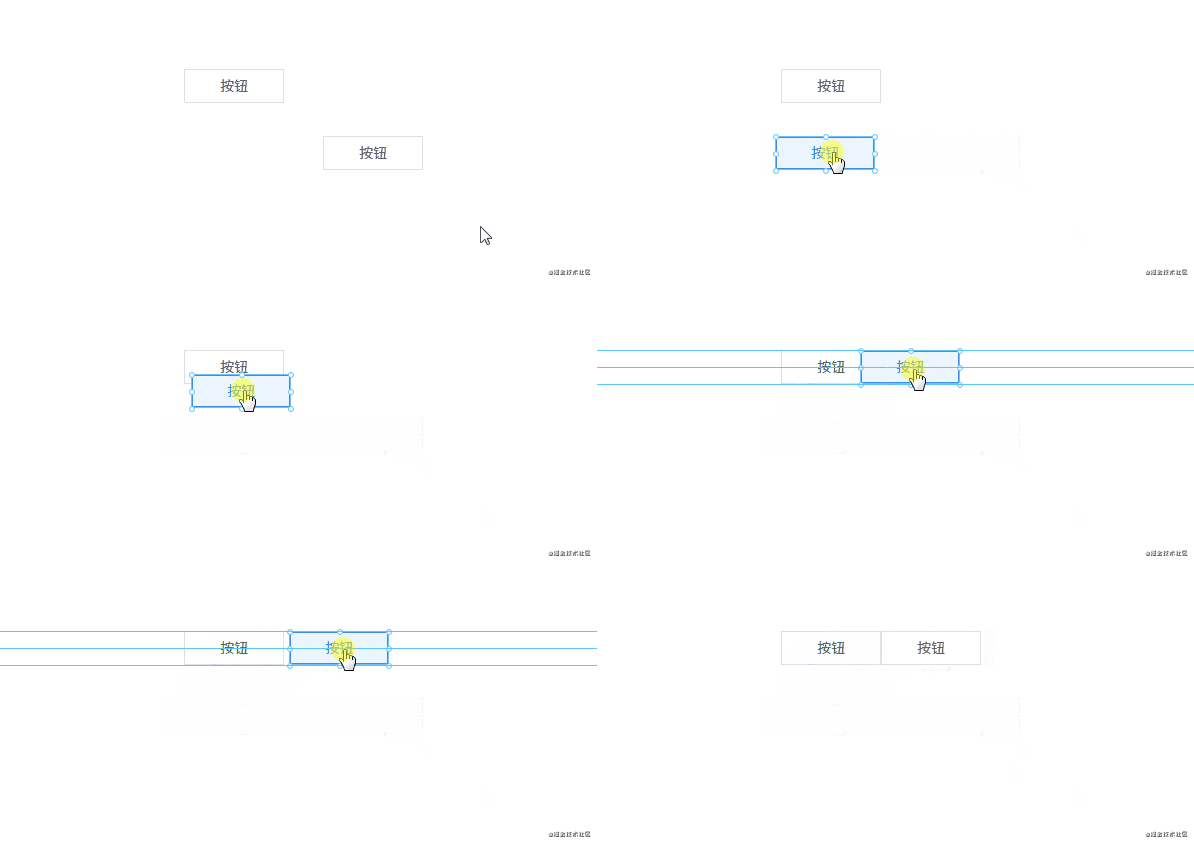
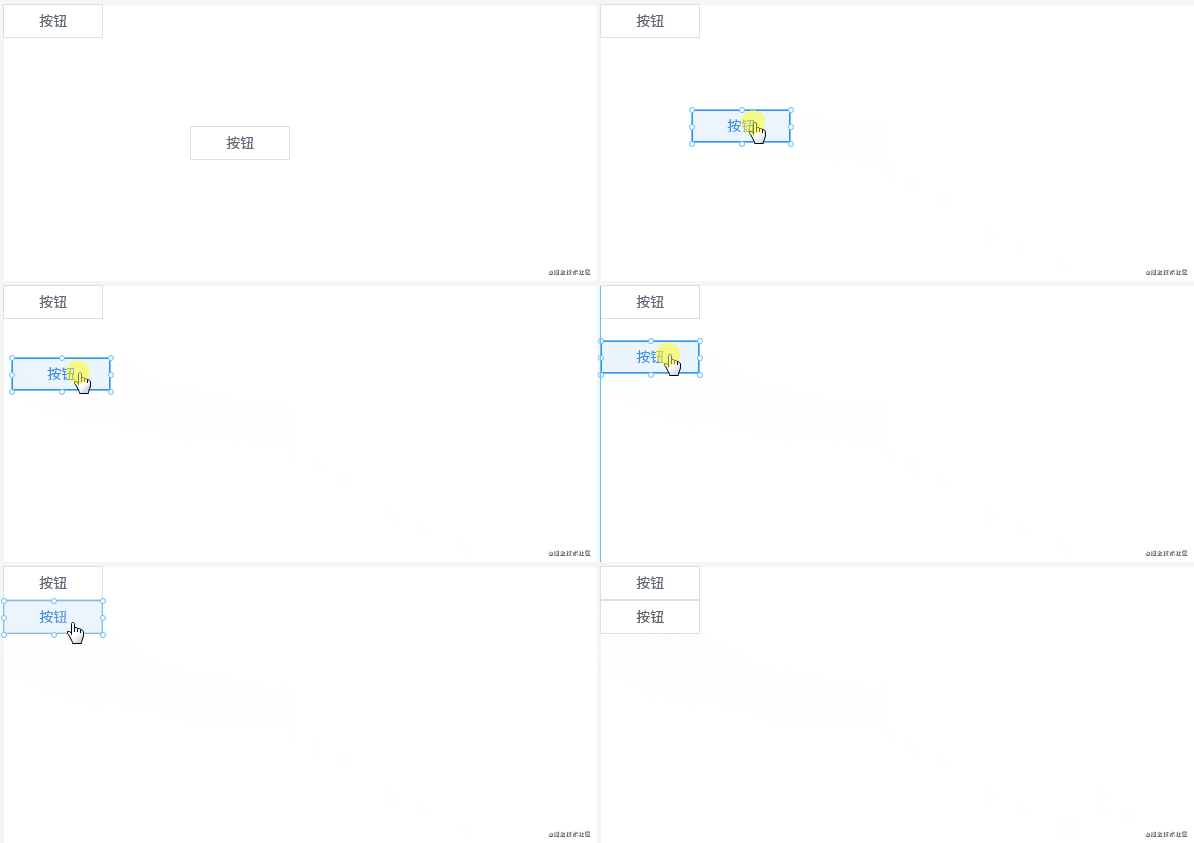
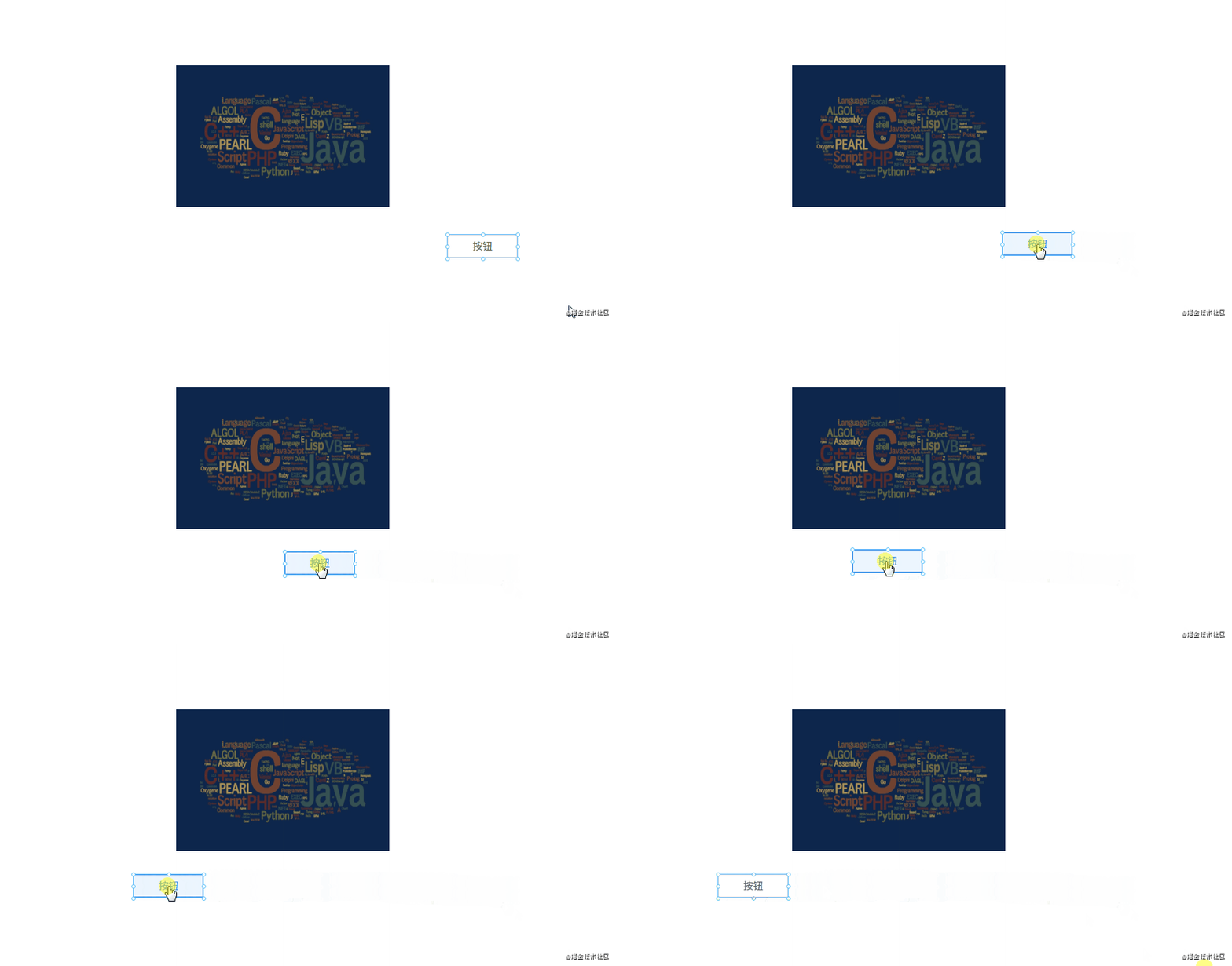
7. 吸附 什么是吸附?就是在拖拽組件時(shí),如果它和另一個(gè)組件的距離比較接近,就會(huì)自動(dòng)吸附在一起。
吸附的代碼大概在 300 行左右,建議自己打開(kāi)源碼文件看(文件路徑:src\components\Editor\MarkLine.vue)。這里不貼代碼了,主要說(shuō)說(shuō)原理是怎么實(shí)現(xiàn)的。
標(biāo)線 在頁(yè)面上創(chuàng)建 6 條線,分別是三橫三豎。這 6 條線的作用是對(duì)齊,它們什么時(shí)候會(huì)出現(xiàn)呢?
上下方向的兩個(gè)組件左邊、中間、右邊對(duì)齊時(shí)會(huì)出現(xiàn)豎線 左右方向的兩個(gè)組件上邊、中間、下邊對(duì)齊時(shí)會(huì)出現(xiàn)橫線 具體的計(jì)算公式主要是根據(jù)每個(gè)組件的 xy 坐標(biāo)和寬度高度進(jìn)行計(jì)算的。例如要判斷 ab 兩個(gè)組件的左邊是否對(duì)齊,則要知道它們每個(gè)組件的 x 坐標(biāo);如果要知道它們右邊是否對(duì)齊,除了要知道 x 坐標(biāo),還要知道它們各自的寬度。
a.x?==?b.x在對(duì)齊的時(shí)候,顯示標(biāo)線。
另外還要判斷 ab 兩個(gè)組件是否 “足夠” 近。如果足夠近,就吸附在一起。是否足夠近要靠一個(gè)變量來(lái)判斷:
diff:?3,?小于等于?diff?像素則自動(dòng)吸附。
吸附 吸附效果是怎么實(shí)現(xiàn)的呢?
假設(shè)現(xiàn)在有 ab 組件,a 組件坐標(biāo) xy 都是 0,寬高都是 100。現(xiàn)在假設(shè) a 組件不動(dòng),我們正在拖拽 b 組件。當(dāng)把 b 組件拖到坐標(biāo)為?x: 0, y: 103?時(shí),由于?103 - 100 <= 3(diff),所以可以判定它們已經(jīng)接近得足夠近。這時(shí)需要手動(dòng)將 b 組件的 y 坐標(biāo)值設(shè)為 100,這樣就將 ab 組件吸附在一起了。
優(yōu)化 在拖拽時(shí)如果 6 條標(biāo)線都顯示出來(lái)會(huì)不太美觀。所以我們可以做一下優(yōu)化,在縱橫方向上最多只同時(shí)顯示一條線。實(shí)現(xiàn)原理如下:
a 組件在左邊不動(dòng),我們拖著 b 組件往 a 組件靠近。 這時(shí)它們最先對(duì)齊的是 a 的右邊和 b 的左邊,所以只需要一條線就夠了。 如果 ab 組件已經(jīng)靠近,并且 b 組件繼續(xù)往左邊移動(dòng),這時(shí)就要判斷它們倆的中間是否對(duì)齊。 b 組件繼續(xù)拖動(dòng),這時(shí)需要判斷 a 組件的左邊和 b 組件的右邊是否對(duì)齊,也是只需要一條線。 可以發(fā)現(xiàn),關(guān)鍵的地方是我們要知道兩個(gè)組件的方向。即 ab 兩個(gè)組件靠近,我們要知道到底 b 是在 a 的左邊還是右邊。
這一點(diǎn)可以通過(guò)鼠標(biāo)移動(dòng)事件來(lái)判斷,之前在講解拖拽的時(shí)候說(shuō)過(guò),mousedown?事件觸發(fā)時(shí)會(huì)記錄起點(diǎn)坐標(biāo)。所以每次觸發(fā)?mousemove?事件時(shí),用當(dāng)前坐標(biāo)減去原來(lái)的坐標(biāo),就可以判斷組件方向。例如 x 方向上,如果?b.x - a.x?的差值為正,說(shuō)明是 b 在 a 右邊,否則為左邊。
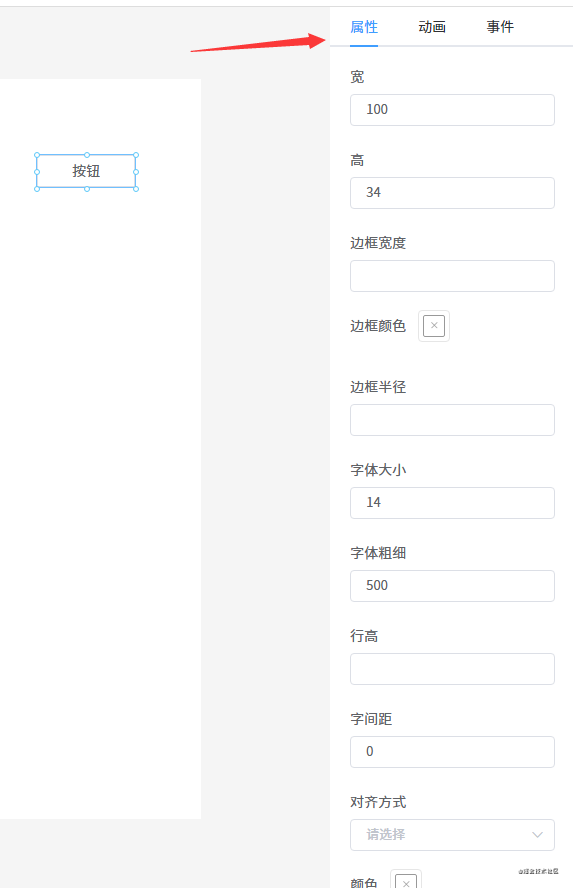
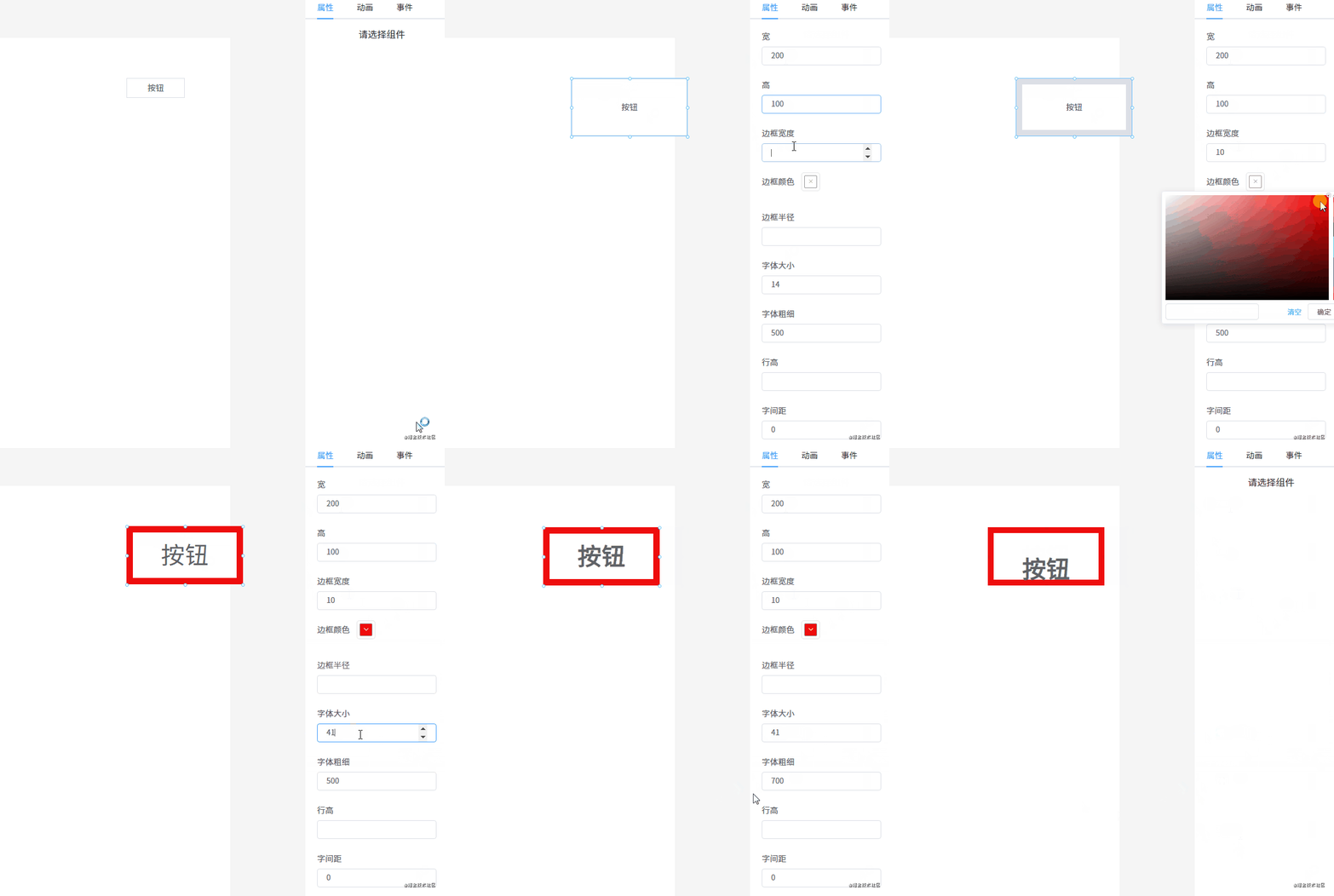
eventBus.$emit ('move' ,?this.$el ,?currY?-?startY?>?0,?currX?-?startX?>?0)8. 組件屬性設(shè)置 每個(gè)組件都有一些通用屬性和獨(dú)有的屬性,我們需要提供一個(gè)能顯示和修改屬性的地方。
{'v-text' ,?'文字' ,?'文字' ,?'el-icon-edit' ,?'' ,'' ,'' ,我定義了一個(gè)?AttrList?組件,用于顯示每個(gè)組件的屬性。
"(key,?index)?in?styleKeys"?:key="index" ?:label="map[key]" >"key?==?'borderColor'"?v-model="curComponent.style[key]" >"key?==?'color'"?v-model="curComponent.style[key]" >"key?==?'backgroundColor'"?v-model="curComponent.style[key]" >"key?==?'textAlign'"?v-model="curComponent.style[key]" >????????????????????????v-for="item?in?options" "item.value" "item.label" "item.value" type="number" ?v-else?v-model="curComponent.style[key]" ?/>"內(nèi)容"?v-if="curComponent?&&?curComponent.propValue?&&?!excludes.includes(curComponent.component)" >type="textarea" ?v-model="curComponent.propValue" ?/>
代碼邏輯很簡(jiǎn)單,就是遍歷組件的?style?對(duì)象,將每一個(gè)屬性遍歷出來(lái)。并且需要根據(jù)具體的屬性用不同的組件顯示出來(lái),例如顏色屬性,需要用顏色選擇器顯示;數(shù)值類(lèi)的屬性需要用?type=number?的 input 組件顯示等等。
為了方便用戶修改屬性值,我使用?v-model?將組件和值綁定在一起。
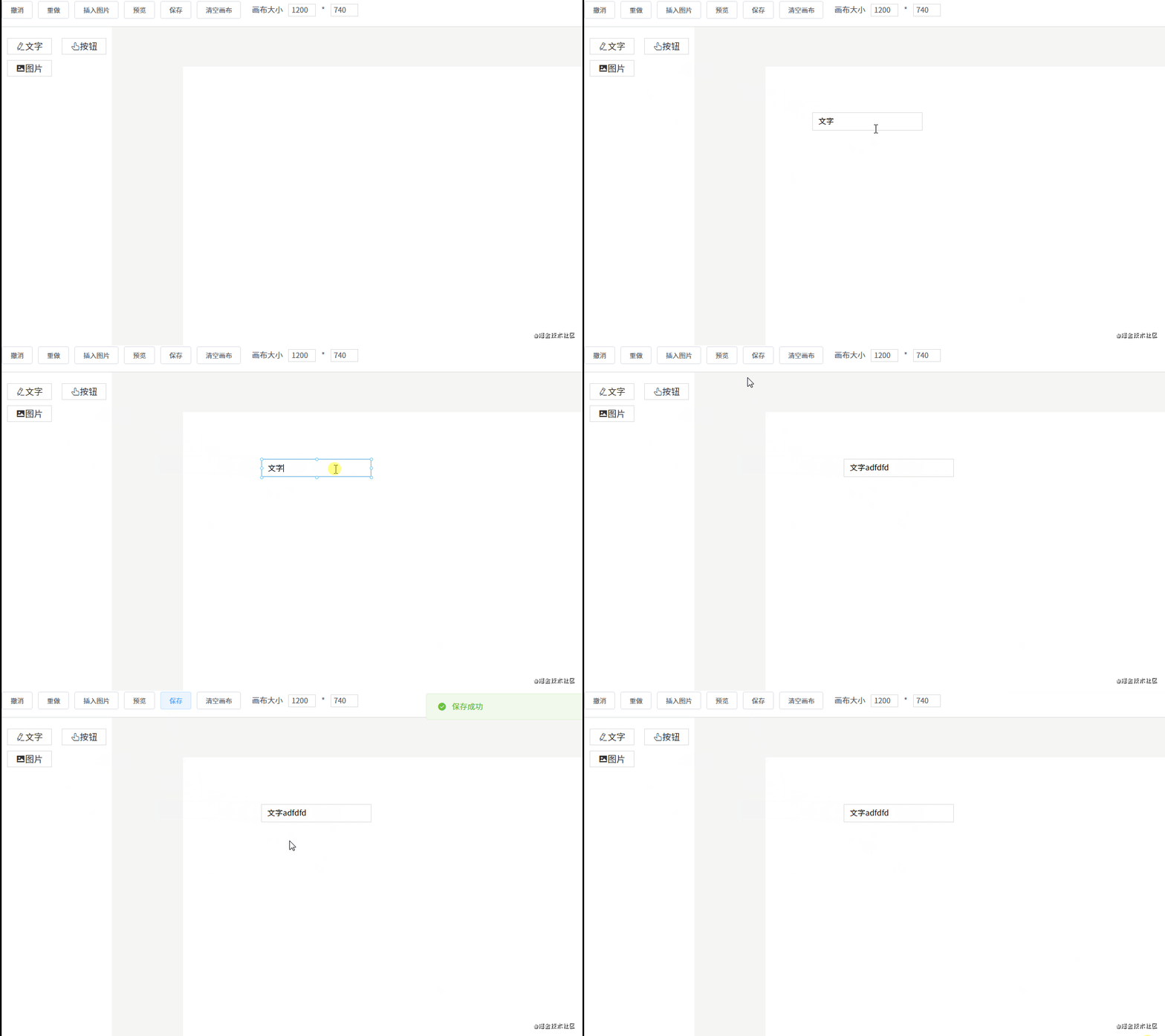
9. 預(yù)覽、保存代碼 預(yù)覽和編輯的渲染原理是一樣的,區(qū)別是不需要編輯功能。所以只需要將原先渲染組件的代碼稍微改一下就可以了。
"(item,?index)?in?componentData""item.style" "getShapeStyle(item.style,?index)" "item.id" "item?===?curComponent" "item" "index" ???????"item.component" "getComponentStyle(item.style)" "item.propValue" 經(jīng)過(guò)剛才的介紹,我們知道?Shape?組件具備了拖拽、放大縮小的功能。現(xiàn)在只需要將?Shape?組件去掉,外面改成套一個(gè)普通的 DIV 就可以了(其實(shí)不用這個(gè) DIV 也行,但為了綁定事件這個(gè)功能,所以需要加上)。
"(item,?index)?in?componentData"?:key="item.id" >???????"item.component" "getComponentStyle(item.style)" "item.propValue" 保存代碼的功能也特別簡(jiǎn)單,只需要保存畫(huà)布上的數(shù)據(jù)?componentData?即可。保存有兩種選擇:
在 DEMO 上我使用的?localStorage?保存在本地。
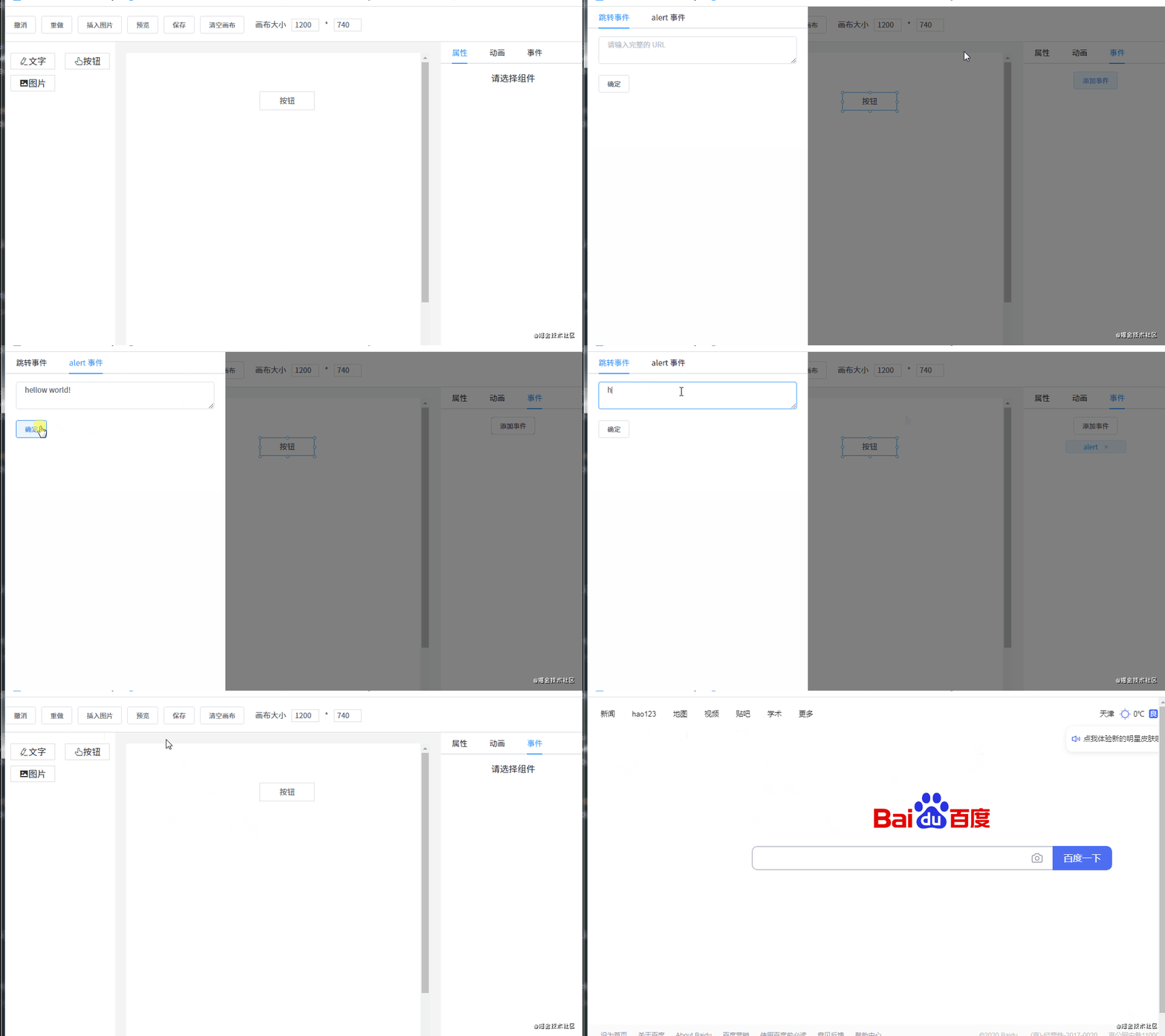
10. 綁定事件 每個(gè)組件有一個(gè)?events?對(duì)象,用于存儲(chǔ)綁定的事件。目前我只定義了兩個(gè)事件:
const?events?=?{if ?(url)?{if ?(msg)?{'redirect' ,'跳轉(zhuǎn)事件' ,'' ,'alert' ,'alert?事件' ,'' ,export ?{不過(guò)不能在編輯的時(shí)候觸發(fā),可以在預(yù)覽的時(shí)候觸發(fā)。
添加事件 通過(guò)?v-for?指令將事件列表渲染出來(lái):
"eventActiveName">"item?in?eventList"?:key="item.key" ?:label="item.label" ?:>"item.key?==?'redirect'"?v-model="item.param" ?type ="textarea" ?placeholder="請(qǐng)輸入完整的?URL" ?/>"item.key?==?'alert'"?v-model="item.param" ?type ="textarea" ?placeholder="請(qǐng)輸入要?alert?的內(nèi)容" ?/>"addEvent(item.key,?item.param)">確定 選中事件時(shí)將事件添加到組件的?events?對(duì)象。
觸發(fā)事件 預(yù)覽或真正渲染頁(yè)面時(shí),也需要在每個(gè)組件外面套一層 DIV,這樣就可以在 DIV 上綁定一個(gè)點(diǎn)擊事件,點(diǎn)擊時(shí)觸發(fā)我們剛才添加的事件。
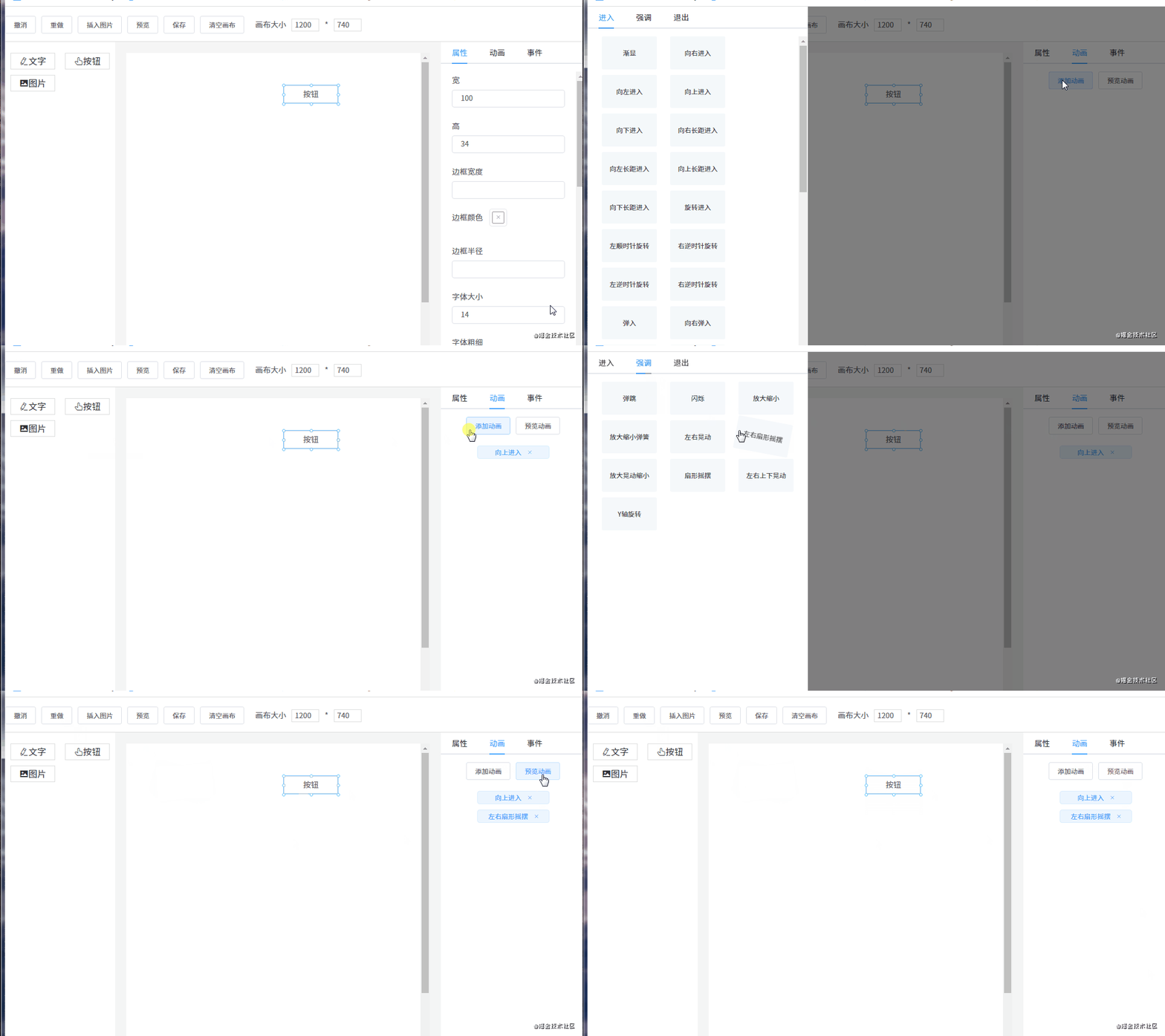
"handleClick">???????????"config.component" "getStyle(config.style)" "config.propValue" handleClick 11. 綁定動(dòng)畫(huà) 動(dòng)畫(huà)和事件的原理是一樣的,先將所有的動(dòng)畫(huà)通過(guò)?v-for?指令渲染出來(lái),然后點(diǎn)擊動(dòng)畫(huà)將對(duì)應(yīng)的動(dòng)畫(huà)添加到組件的?animations?數(shù)組里。同事件一樣,執(zhí)行的時(shí)候也是遍歷組件所有的動(dòng)畫(huà)并執(zhí)行。
為了方便,我們使用了 animate.css 動(dòng)畫(huà)庫(kù)。
import?'@/styles/animate.css' 現(xiàn)在我們提前定義好所有的動(dòng)畫(huà)數(shù)據(jù):
export ?default?['進(jìn)入' ,'漸顯' ,?value:?'fadeIn' ?},'向右進(jìn)入' ,?value:?'fadeInLeft' ?},'向左進(jìn)入' ,?value:?'fadeInRight' ?},'向上進(jìn)入' ,?value:?'fadeInUp' ?},'向下進(jìn)入' ,?value:?'fadeInDown' ?},'向右長(zhǎng)距進(jìn)入' ,?value:?'fadeInLeftBig' ?},'向左長(zhǎng)距進(jìn)入' ,?value:?'fadeInRightBig' ?},'向上長(zhǎng)距進(jìn)入' ,?value:?'fadeInUpBig' ?},'向下長(zhǎng)距進(jìn)入' ,?value:?'fadeInDownBig' ?},'旋轉(zhuǎn)進(jìn)入' ,?value:?'rotateIn' ?},'左順時(shí)針旋轉(zhuǎn)' ,?value:?'rotateInDownLeft' ?},'右逆時(shí)針旋轉(zhuǎn)' ,?value:?'rotateInDownRight' ?},'左逆時(shí)針旋轉(zhuǎn)' ,?value:?'rotateInUpLeft' ?},'右逆時(shí)針旋轉(zhuǎn)' ,?value:?'rotateInUpRight' ?},'彈入' ,?value:?'bounceIn' ?},'向右彈入' ,?value:?'bounceInLeft' ?},'向左彈入' ,?value:?'bounceInRight' ?},'向上彈入' ,?value:?'bounceInUp' ?},'向下彈入' ,?value:?'bounceInDown' ?},'光速?gòu)挠疫M(jìn)入' ,?value:?'lightSpeedInRight' ?},'光速?gòu)淖筮M(jìn)入' ,?value:?'lightSpeedInLeft' ?},'光速?gòu)挠彝顺? ,?value:?'lightSpeedOutRight' ?},'光速?gòu)淖笸顺? ,?value:?'lightSpeedOutLeft' ?},'Y軸旋轉(zhuǎn)' ,?value:?'flip' ?},'中心X軸旋轉(zhuǎn)' ,?value:?'flipInX' ?},'中心Y軸旋轉(zhuǎn)' ,?value:?'flipInY' ?},'左長(zhǎng)半徑旋轉(zhuǎn)' ,?value:?'rollIn' ?},'由小變大進(jìn)入' ,?value:?'zoomIn' ?},'左變大進(jìn)入' ,?value:?'zoomInLeft' ?},'右變大進(jìn)入' ,?value:?'zoomInRight' ?},'向上變大進(jìn)入' ,?value:?'zoomInUp' ?},'向下變大進(jìn)入' ,?value:?'zoomInDown' ?},'向右滑動(dòng)展開(kāi)' ,?value:?'slideInLeft' ?},'向左滑動(dòng)展開(kāi)' ,?value:?'slideInRight' ?},'向上滑動(dòng)展開(kāi)' ,?value:?'slideInUp' ?},'向下滑動(dòng)展開(kāi)' ,?value:?'slideInDown' ?},'強(qiáng)調(diào)' ,'彈跳' ,?value:?'bounce' ?},'閃爍' ,?value:?'flash' ?},'放大縮小' ,?value:?'pulse' ?},'放大縮小彈簧' ,?value:?'rubberBand' ?},'左右晃動(dòng)' ,?value:?'headShake' ?},'左右扇形搖擺' ,?value:?'swing' ?},'放大晃動(dòng)縮小' ,?value:?'tada' ?},'扇形搖擺' ,?value:?'wobble' ?},'左右上下晃動(dòng)' ,?value:?'jello' ?},'Y軸旋轉(zhuǎn)' ,?value:?'flip' ?},'退出' ,'漸隱' ,?value:?'fadeOut' ?},'向左退出' ,?value:?'fadeOutLeft' ?},'向右退出' ,?value:?'fadeOutRight' ?},'向上退出' ,?value:?'fadeOutUp' ?},'向下退出' ,?value:?'fadeOutDown' ?},'向左長(zhǎng)距退出' ,?value:?'fadeOutLeftBig' ?},'向右長(zhǎng)距退出' ,?value:?'fadeOutRightBig' ?},'向上長(zhǎng)距退出' ,?value:?'fadeOutUpBig' ?},'向下長(zhǎng)距退出' ,?value:?'fadeOutDownBig' ?},'旋轉(zhuǎn)退出' ,?value:?'rotateOut' ?},'左順時(shí)針旋轉(zhuǎn)' ,?value:?'rotateOutDownLeft' ?},'右逆時(shí)針旋轉(zhuǎn)' ,?value:?'rotateOutDownRight' ?},'左逆時(shí)針旋轉(zhuǎn)' ,?value:?'rotateOutUpLeft' ?},'右逆時(shí)針旋轉(zhuǎn)' ,?value:?'rotateOutUpRight' ?},'彈出' ,?value:?'bounceOut' ?},'向左彈出' ,?value:?'bounceOutLeft' ?},'向右彈出' ,?value:?'bounceOutRight' ?},'向上彈出' ,?value:?'bounceOutUp' ?},'向下彈出' ,?value:?'bounceOutDown' ?},'中心X軸旋轉(zhuǎn)' ,?value:?'flipOutX' ?},'中心Y軸旋轉(zhuǎn)' ,?value:?'flipOutY' ?},'左長(zhǎng)半徑旋轉(zhuǎn)' ,?value:?'rollOut' ?},'由小變大退出' ,?value:?'zoomOut' ?},'左變大退出' ,?value:?'zoomOutLeft' ?},'右變大退出' ,?value:?'zoomOutRight' ?},'向上變大退出' ,?value:?'zoomOutUp' ?},'向下變大退出' ,?value:?'zoomOutDown' ?},'向左滑動(dòng)收起' ,?value:?'slideOutLeft' ?},'向右滑動(dòng)收起' ,?value:?'slideOutRight' ?},'向上滑動(dòng)收起' ,?value:?'slideOutUp' ?},'向下滑動(dòng)收起' ,?value:?'slideOutDown' ?},然后用?v-for?指令渲染出來(lái)動(dòng)畫(huà)列表。
添加動(dòng)畫(huà) "animationActiveName">"item?in?animationClassData"?:key="item.label" ?:label="item.label" ?:>???????????????"(animate,?index)?in?item.children" "index" "hoverPreviewAnimate?=?animate.value" "addAnimation(animate)" "[hoverPreviewAnimate?===?animate.value?&&?animate.value?+?'?animated']"> 點(diǎn)擊動(dòng)畫(huà)將調(diào)用?addAnimation(animate)?將動(dòng)畫(huà)添加到組件的?animations?數(shù)組。
觸發(fā)動(dòng)畫(huà) 運(yùn)行動(dòng)畫(huà)的代碼:
export ?default?async?function ?runAnimation($el ,?animations?=?[])?{$el .classList.add(animation.value,?'animated' )$el .removeEventListener('animationend' ,?removeAnimation)$el .removeEventListener('animationcancel' ,?removeAnimation)$el .classList.remove(animation.value,?'animated' )$el .addEventListener('animationend' ,?removeAnimation)$el .addEventListener('animationcancel' ,?removeAnimation)for ?(let ?i?=?0,?len?=?animations.length;?i?????????await?play(animations[i])運(yùn)行動(dòng)畫(huà)需要兩個(gè)參數(shù):組件對(duì)應(yīng)的 DOM 元素(在組件使用?this.$el?獲取)和它的動(dòng)畫(huà)數(shù)據(jù)?animations。并且需要監(jiān)聽(tīng)?animationend?事件和?animationcancel?事件:一個(gè)是動(dòng)畫(huà)結(jié)束時(shí)觸發(fā),一個(gè)是動(dòng)畫(huà)意外終止時(shí)觸發(fā)。
利用這一點(diǎn)再配合?Promise?一起使用,就可以逐個(gè)運(yùn)行組件的每個(gè)動(dòng)畫(huà)了。
12. 導(dǎo)入 PSD 由于時(shí)間關(guān)系,這個(gè)功能我還沒(méi)做。現(xiàn)在簡(jiǎn)單的描述一下怎么做這個(gè)功能。那就是使用 psd.js 庫(kù),它可以解析 PSD 文件。
使用?psd?庫(kù)解析 PSD 文件得出的數(shù)據(jù)如下:
{?children:?type :?'group' ,false ,'normal' ,'Version?D' ,type :?'layer' ,true ,'normal' ,'Make?a?change?and?save.' ,'Make?a?change?and?save.' ,'HelveticaNeue-Light' ,'center' ?]?},'Version?A' ,?capturedInfo:?1?},'Version?B' ,?capturedInfo:?1?},'Version?C' ,?capturedInfo:?1?}?],從以上代碼可以發(fā)現(xiàn),這些數(shù)據(jù)和 css 非常像。根據(jù)這一點(diǎn),只需要寫(xiě)一個(gè)轉(zhuǎn)換函數(shù),將這些數(shù)據(jù)轉(zhuǎn)換成我們組件所需的數(shù)據(jù),就能實(shí)現(xiàn) PSD 文件轉(zhuǎn)成渲染組件的功能。目前 quark-h5 和 luban-h5 都是這樣實(shí)現(xiàn)的 PSD 轉(zhuǎn)換功能。
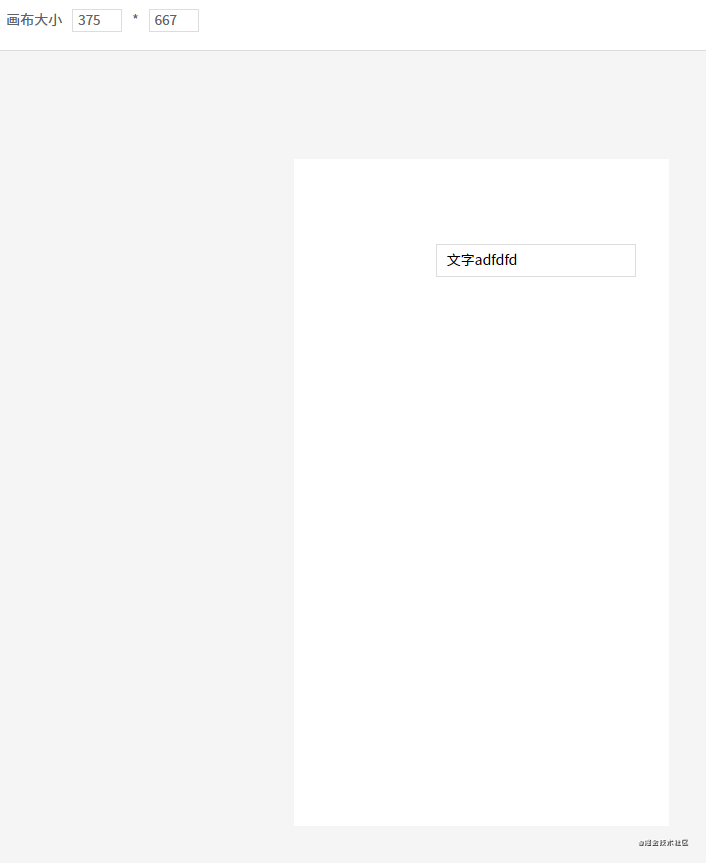
13. 手機(jī)模式 由于畫(huà)布是可以調(diào)整大小的,我們可以使用 iphone6 的分辨率來(lái)開(kāi)發(fā)手機(jī)頁(yè)面。
這樣開(kāi)發(fā)出來(lái)的頁(yè)面也可以在手機(jī)下正常瀏覽,但可能會(huì)有樣式偏差。因?yàn)槲易远x的三個(gè)組件是沒(méi)有做適配的,如果你需要開(kāi)發(fā)手機(jī)頁(yè)面,那自定義組件必須使用移動(dòng)端的 UI 組件庫(kù)。或者自己開(kāi)發(fā)移動(dòng)端專(zhuān)用的自定義組件。
總結(jié) 由于 DEMO 的代碼比較多,所以在講解每一個(gè)功能點(diǎn)時(shí),我只把關(guān)鍵代碼貼上來(lái)。所以大家會(huì)發(fā)現(xiàn) DEMO 的源碼和我貼上來(lái)的代碼會(huì)有些區(qū)別,請(qǐng)不必在意。
另外,DEMO 的樣式也比較簡(jiǎn)陋,主要是最近事情比較多,沒(méi)太多時(shí)間寫(xiě)好看點(diǎn),請(qǐng)見(jiàn)諒。
參考資料 1.看到這里了就點(diǎn)個(gè)在看支持下吧,你的「點(diǎn)贊 , 在看 」 是我創(chuàng)作的動(dòng)力。
2.關(guān)注公眾號(hào)程序員成長(zhǎng)指北,回復(fù)「1」加入高級(jí)前端交流群!「在這里有好多 前端?開(kāi)發(fā)者,會(huì)討論?前端 Node 知識(shí),互相學(xué)習(xí)」!
3.也可添加微信【ikoala520 】,一起成長(zhǎng)。
“在看轉(zhuǎn)發(fā)” 是最大的支持
瀏覽
34