基于OpenVINO的手寫數(shù)字識(shí)別
點(diǎn)擊上方“小白學(xué)視覺”,選擇加"星標(biāo)"或“置頂”
重磅干貨,第一時(shí)間送達(dá)
轉(zhuǎn)載自微信公眾號(hào):OpenCV學(xué)堂
關(guān)注獲取更多計(jì)算機(jī)視覺與深度學(xué)習(xí)知識(shí)
模型介紹
之前沒有注意到,最近在OpenVINO2020R04版本的模型庫中發(fā)現(xiàn)了它有個(gè)手寫數(shù)字識(shí)別的模型,支持
handwritten-score-recognition-0003該模型是基于LSTM雙向神經(jīng)網(wǎng)絡(luò)訓(xùn)練,基于CTC損失,
輸入格式為:[NCHW]= [1x1x32x64]輸出格式為:[WxBxL]=[16x1x13]
其中13表示"0123456789._#",#表示空白、_表示非數(shù)字的字符
對輸出格式的解碼方式支持CTC貪心與Beam搜索,演示程序使用CTC貪心解碼,這種方式最簡單,我喜歡!
代碼演示
代碼基于OPenVINO-Python SDK實(shí)現(xiàn),首先需要說明一下,OpenVINO python SDK中主要的類是IECore,首先創(chuàng)建IECore實(shí)例對象,然后完成下面的流程操作:
創(chuàng)建實(shí)例,加載模型
1log.info("Creating?Inference?Engine")
2ie?=?IECore()
3net?=?ie.read_network(model=model_xml,?weights=model_bin)
獲取輸入與輸出層名稱
 1log.info("Preparing?input?blobs")
 2input_it?=?iter(net.input_info)
 3input_blob?=?next(input_it)
 4print(input_blob)
 5output_it?=?iter(net.outputs)
 6out_blob?=?next(output_it)
 7
 8#?Read?and?pre-process?input?images
 9print(net.input_info[input_blob].input_data.shape)
10n,?c,?h,?w?=?net.input_info[input_blob].input_data.shape
加載網(wǎng)絡(luò)為可執(zhí)行網(wǎng)絡(luò),
1#?Loading?model?to?the?plugin
2exec_net?=?ie.load_network(network=net,?device_name="CPU")
讀取輸入圖像,并處理為
 1ocr?=?cv.imread("D:/images/zsxq/ocr1.png")
 2cv.imshow("input",?ocr)
 3gray?=?cv.cvtColor(ocr,?cv.COLOR_BGR2GRAY)
 4binary?=?cv.adaptiveThreshold(gray,?255,?cv.ADAPTIVE_THRESH_GAUSSIAN_C,?cv.THRESH_BINARY_INV,?25,?10)
 5cv.imshow("binary",?binary)
 6contours,?hireachy?=?cv.findContours(binary,?cv.RETR_EXTERNAL,?cv.CHAIN_APPROX_SIMPLE)
 7for?cnt?in?range(len(contours)):
 8????area?=?cv.contourArea(contours[cnt])
 9????if?area?10:
10????????cv.drawContours(binary,?contours,?cnt,?(0),?-1,?8)
11cv.imshow("remove?noise",?binary)
12
13#?獲取每個(gè)分?jǐn)?shù)
14temp?=?np.copy(binary)
15se?=?cv.getStructuringElement(cv.MORPH_RECT,?(45,?5))
16temp?=?cv.dilate(temp,?se)
17contours,?hireachy?=?cv.findContours(temp,?cv.RETR_EXTERNAL,?cv.CHAIN_APPROX_SIMPLE)
18for?cnt?in?range(len(contours)):
19????x,?y,?iw,?ih?=?cv.boundingRect(contours[cnt])
20????roi?=?gray[y:y?+?ih,?x:x?+?iw]
21????image?=?cv.resize(roi,?(w,?h))
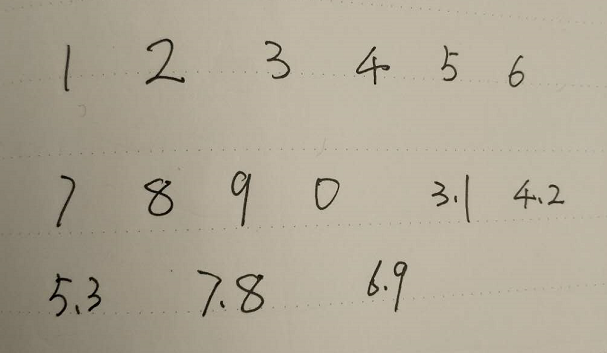
輸入原圖:
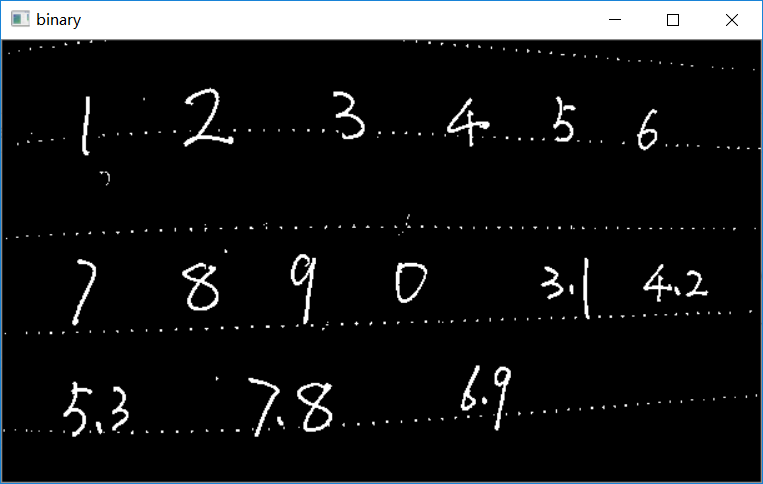
二值化以后:
去掉干擾之后:
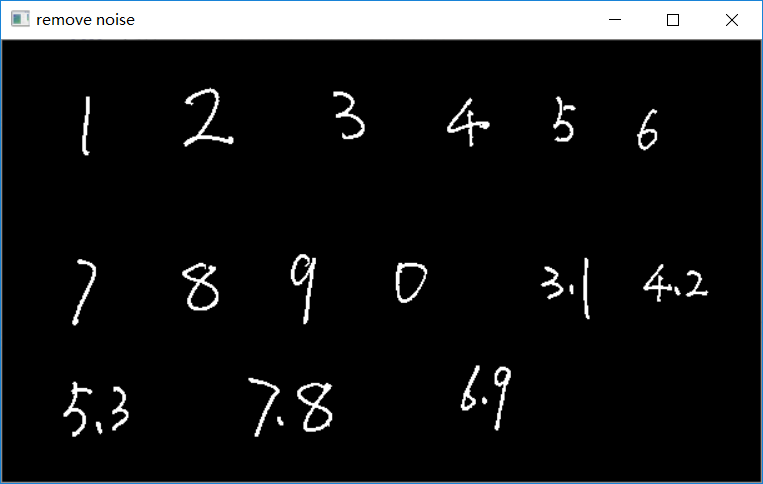
推理與解析
 1#?Start?sync?inference
 2log.info("Starting?inference?in?synchronous?mode")
 3inf_start1?=?time.time()
 4res?=?exec_net.infer(inputs={input_blob:?[img_blob]})
 5inf_end1?=?time.time()?-?inf_start1
 6print("inference?time(ms)?:?%.3f"?%?(inf_end1?*?1000))
 7res?=?res[out_blob]
 8
 9#?CTC?greedy?decode?from?here
10print(res.shape)
11#?解析輸出text
12ocrstr?=?""
13prev_pad?=?False;
14for?i?in?range(res.shape[0]):
15????ctc?=?res[i]?#?1x13
16????ctc?=?np.squeeze(ctc,?0)
17????index,?prob?=?ctc_soft_max(ctc)
18????if?digit_nums[index]?==?'#':
19????????prev_pad?=?True
20????else:
21????????if?len(ocrstr)?==?0?or?prev_pad?or?(len(ocrstr)?>?0?and?digit_nums[index]?!=?ocrstr[-1]):
22????????????prev_pad?=?False
23????????????ocrstr?+=?digit_nums[index]
24cv.putText(ocr,?ocrstr,?(x,?y-5),?cv.FONT_HERSHEY_SIMPLEX,?0.75,?(0,?0,?255),?2,?8)
25cv.rectangle(ocr,?(x,?y),?(x+iw,?y+ih),?(0,?255,?0),?2,?8,?0)
CTC貪心解析
這個(gè)上次有個(gè)哥們問我,原因居然是我很久以前寫的代碼,沒有交代CTC貪心解析,OpenVINO的文本與數(shù)字識(shí)別均支持CTC貪心解析,這個(gè)實(shí)現(xiàn)非常簡單,首先來看一下輸出的格式[16x1x13],可以簡化為[16x13],取得每個(gè)一行13列的softmax之后的最大值,或許還可以閾值一下,得到的結(jié)果就是輸出,這個(gè)就是CTC貪心解析最直接的解釋。不用看公式,看完你會(huì)暈倒而且寫不出代碼!這個(gè)函數(shù)為:
def ctc_soft_max(data):sum = 0;max_val = max(data)index = np.argmax(data)for i in range(len(data)):sum += np.exp(data[i]- max_val)prob = 1.0 / sumreturn index, prob
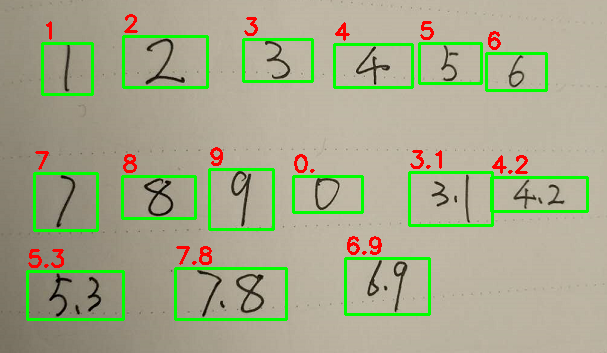
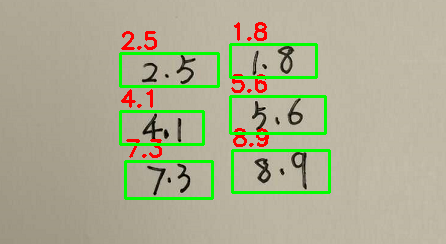
最終的測試結(jié)果如下: