
做動態(tài)圖表找不到數(shù)據(jù)?手把手教你用Python輕松獲取!

關于如何用Python制作酷炫的動態(tài)圖表
之前轉載過一篇文章,刷爆全網(wǎng)的動態(tài)條形圖,原來5行Python代碼就能實現(xiàn)!
既然有了Python這個制作動態(tài)條形圖工具,缺的那便是數(shù)據(jù)了。
先看一下B站2019年「數(shù)據(jù)可視化」版塊的情況,第一個視頻超2百萬的播放量,4萬+的彈幕。

小F自己在B站上制作的幾個視頻,也是幾十萬的播放量,累計獲得1萬贊。

那么作者是用什么來衡量手游的熱門程度呢,答案便是百度指數(shù)。
同樣小F使用的也是百度指數(shù),百度指數(shù)是以百度海量網(wǎng)民行為數(shù)據(jù)為基礎的數(shù)據(jù)分享平臺。
所以本期就來聊一聊可視化視頻的數(shù)據(jù)獲取,主要是「百度指數(shù)」和「微博指數(shù)」。
本來想加上「微信指數(shù)」的,發(fā)現(xiàn)電腦的抓包軟件出了問題,所以就沒有加上。
01. 百度指數(shù)
獲取百度指數(shù),首先需要登陸你的百度賬號。
以關鍵詞「王者榮耀」為例,時間自定義為2020-10-01~2020-10-10。
通過開發(fā)者工具,我們就能看到曲線圖的數(shù)據(jù)接口。
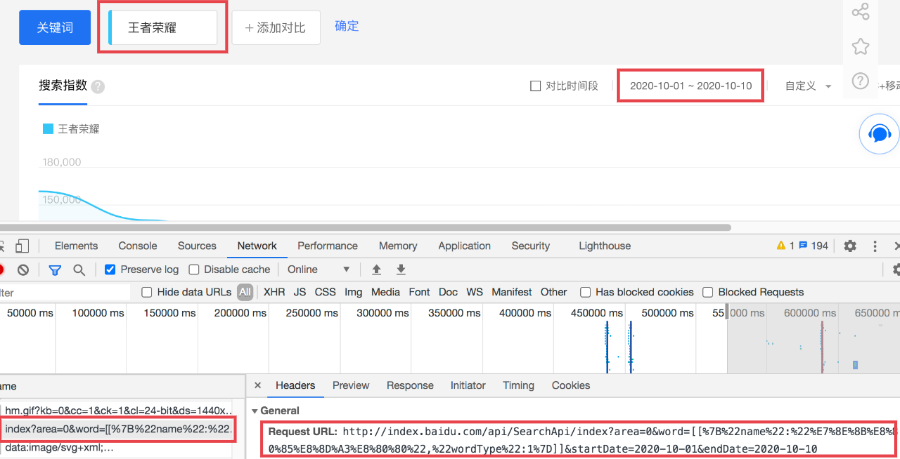
然而一看請求得到的結果,發(fā)現(xiàn)并沒有數(shù)據(jù),原因是這里使用了JS加密。
這可碰到小F的知識盲區(qū)了,果斷選擇去找度娘,各位有興趣的同學也可自行百度。
最終找到解決方法,成功實現(xiàn)爬取,代碼如下~
import?time
import?json
import?execjs
import?datetime
import?requests
from?urllib.parse?import?urlencode


def?get_data(keywords,?startDate,?endDate,?area):
????"""
????獲取加密的參數(shù)數(shù)據(jù)
????"""
????#?data_url?=?"http://index.baidu.com/api/SearchApi/index?area=0&word=[[%7B%22name%22:%22%E7%8E%8B%E8%80%85%E8%8D%A3%E8%80%80%22,%22wordType%22:1%7D]]&startDate=2020-10-01&endDate=2020-10-10"
????params?=?{
????????'word':?json.dumps([[{'name':?keyword,?'wordType':?1}]?for?keyword?in?keywords]),
????????'startDate':?startDate,
????????'endDate':?endDate,
????????'area':?area
????}
????data_url?=?'http://index.baidu.com/api/SearchApi/index?'?+?urlencode(params)
????#?print(data_url)
????headers?=?{
????????#?復制登錄后的cookie
????????"Cookie":?'你的cookie',
????????"Referer":?"http://index.baidu.com/v2/main/index.html",
????????"User-Agent":?"Mozilla/5.0?(Windows?NT?10.0;?Win64;?x64)?AppleWebKit/537.36?(KHTML,?like?Gecko)?Chrome/77.0.3865.90?Safari/537.36"
????}

????#?獲取data和uniqid
????res?=?requests.get(url=data_url,?headers=headers).json()
????data?=?res["data"]["userIndexes"][0]["all"]["data"]
????uniqid?=?res["data"]["uniqid"]

????#?獲取js函數(shù)中的參數(shù)t?=?"ev-fxk9T8V1lwAL6,51348+.9270-%"
????t_url?=?"http://index.baidu.com/Interface/ptbk?uniqid={}".format(uniqid)
????rep?=?requests.get(url=t_url,?headers=headers).json()
????t?=?rep["data"]
????return?{"data":?data,?"t":?t}


def?get_search_index(word,?startDate,?endDate,?area):
????"""
????獲取最終數(shù)據(jù)
????"""
????word?=?word
????startDate?=?startDate
????endDate?=?endDate
????#?調(diào)用get_data獲取data和uniqid
????res?=?get_data(word,?startDate,?endDate,?area)
????e?=?res["data"]
????t?=?res["t"]

????#?讀取js文件
????with?open('parsing_data_function.js',?encoding='utf-8')?as?f:
????????js?=?f.read()

????#?通過compile命令轉成一個js對象
????docjs?=?execjs.compile(js)

????#?調(diào)用function方法,得到指數(shù)數(shù)值
????res?=?docjs.call('decrypt',?t,?e)
????#?print(res)
????return?res


def?get_date_list(begin_date,?end_date):
????"""
????獲取時間列表
????"""
????dates?=?[]
????dt?=?datetime.datetime.strptime(begin_date,?"%Y-%m-%d")
????date?=?begin_date[:]
????while?date?<=?end_date:
????????dates.append(date)
????????dt?+=?datetime.timedelta(days=1)
????????date?=?dt.strftime("%Y-%m-%d")
????return?dates


def?get_area():
????areas?=?{"901":?"山東",?"902":?"貴州",?"903":?"江西",?"904":?"重慶",?"905":?"內(nèi)蒙古",?"906":?"湖北",?"907":?"遼寧",?"908":?"湖南",?"909":?"福建",?"910":?"上海",?"911":?"北京",?"912":?"廣西",?"913":?"廣東",?"914":?"四川",?"915":?"云南",?"916":?"江蘇",?"917":?"浙江",?"918":?"青海",?"919":?"寧夏",?"920":?"河北",?"921":?"黑龍江",?"922":?"吉林",?"923":?"天津",?"924":?"陜西",?"925":?"甘肅",?"926":?"新疆",?"927":?"河南",?"928":?"安徽",?"929":?"山西",?"930":?"海南",?"931":?"臺灣",?"932":?"西藏",?"933":?"香港",?"934":?"澳門"}
????for?value?in?areas.keys():
????????try:
????????????word?=?['王者榮耀']
????????????time.sleep(1)
????????????startDate?=?'2020-10-01'
????????????endDate?=?'2020-10-10'
????????????area?=?value
????????????res?=?get_search_index(word,?startDate,?endDate,?area)
????????????result?=?res.split(',')
????????????dates?=?get_date_list(startDate,?endDate)
????????????for?num,?date?in?zip(result,?dates):
????????????????print(areas[value],?num,?date)
????????????????with?open('area.csv',?'a+',?encoding='utf-8')?as?f:
????????????????????f.write(areas[value]?+?','?+?str(num)?+?','?+?date?+?'\n')
????????except:
????????????pass


def?get_word():
????words?=?['諸葛大力',?'張偉',?'胡一菲',?'呂子喬',?'陳美嘉',?'趙海棠',?'咖喱醬',?'曾小賢',?'秦羽墨']
????for?word?in?words:
????????try:
????????????time.sleep(2)
????????????startDate?=?'2020-10-01'
????????????endDate?=?'2020-10-10'
????????????area?=?0
????????????res?=?get_search_index(word,?startDate,?endDate,?area)
????????????result?=?res.split(',')
????????????dates?=?get_date_list(startDate,?endDate)
????????????for?num,?date?in?zip(result,?dates):
????????????????print(word,?num,?date)
????????????????with?open('word.csv',?'a+',?encoding='utf-8')?as?f:
????????????????????f.write(word?+?','?+?str(num)?+?','?+?date?+?'\n')
????????except:
????????????pass


get_area()
get_word()
得到的CSV文件結果如下,有兩種形式的數(shù)據(jù)。
一種是多個關鍵詞每日指數(shù)數(shù)據(jù),另一種是一個關鍵詞各省市每日指數(shù)數(shù)據(jù)。
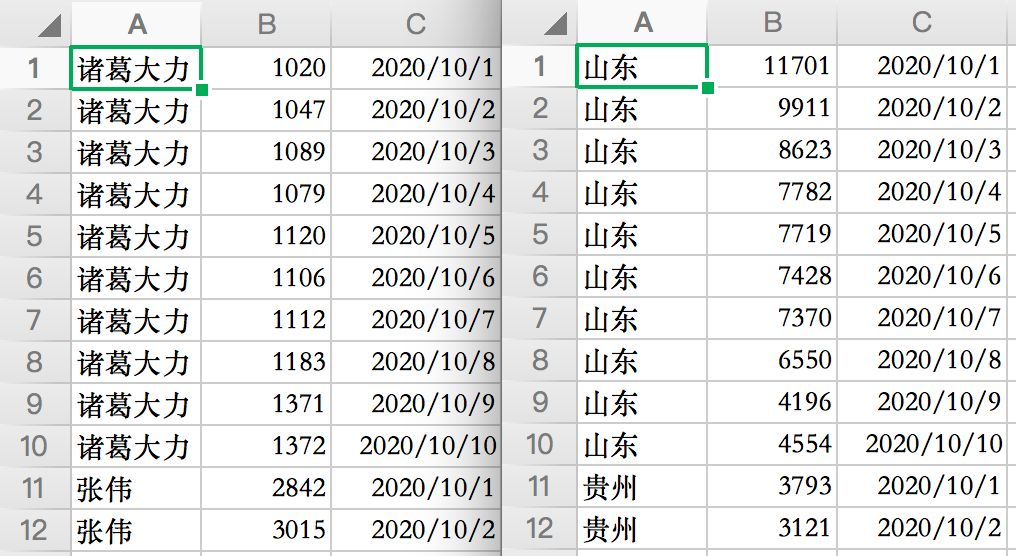
有了數(shù)據(jù)就可以用Python制作動圖啦。
import?pandas?as?pd
import?bar_chart_race?as?bcr

#?讀取數(shù)據(jù)
#?df?=?pd.read_csv('word.csv',?encoding='utf-8',?header=None,?names=['name',?'number',?'day'])
df?=?pd.read_csv('area.csv',?encoding='utf-8',?header=None,?names=['name',?'number',?'day'])

#?數(shù)據(jù)處理,數(shù)據(jù)透視表
df_result?=?pd.pivot_table(df,?values='number',?index=['day'],?columns=['name'],?fill_value=0)

#?生成GIF
#?bcr.bar_chart_race(df_result,?filename='word.gif',?title='愛情公寓5演職人員熱度排行')
bcr.bar_chart_race(df_result,?filename='area.gif',?title='國內(nèi)各省市王者榮耀熱度排行')
5行Python代碼,來看一下效果如何。
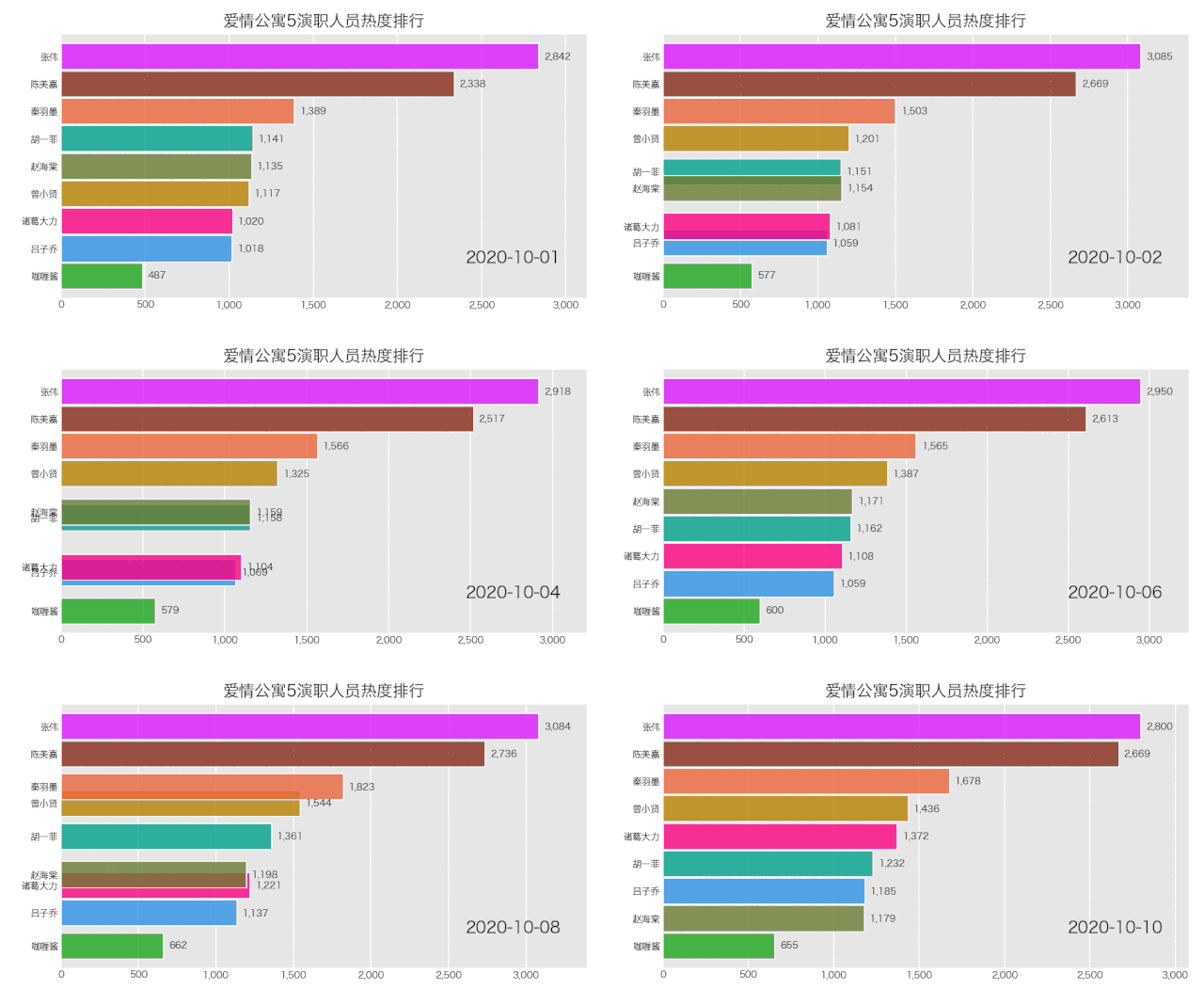
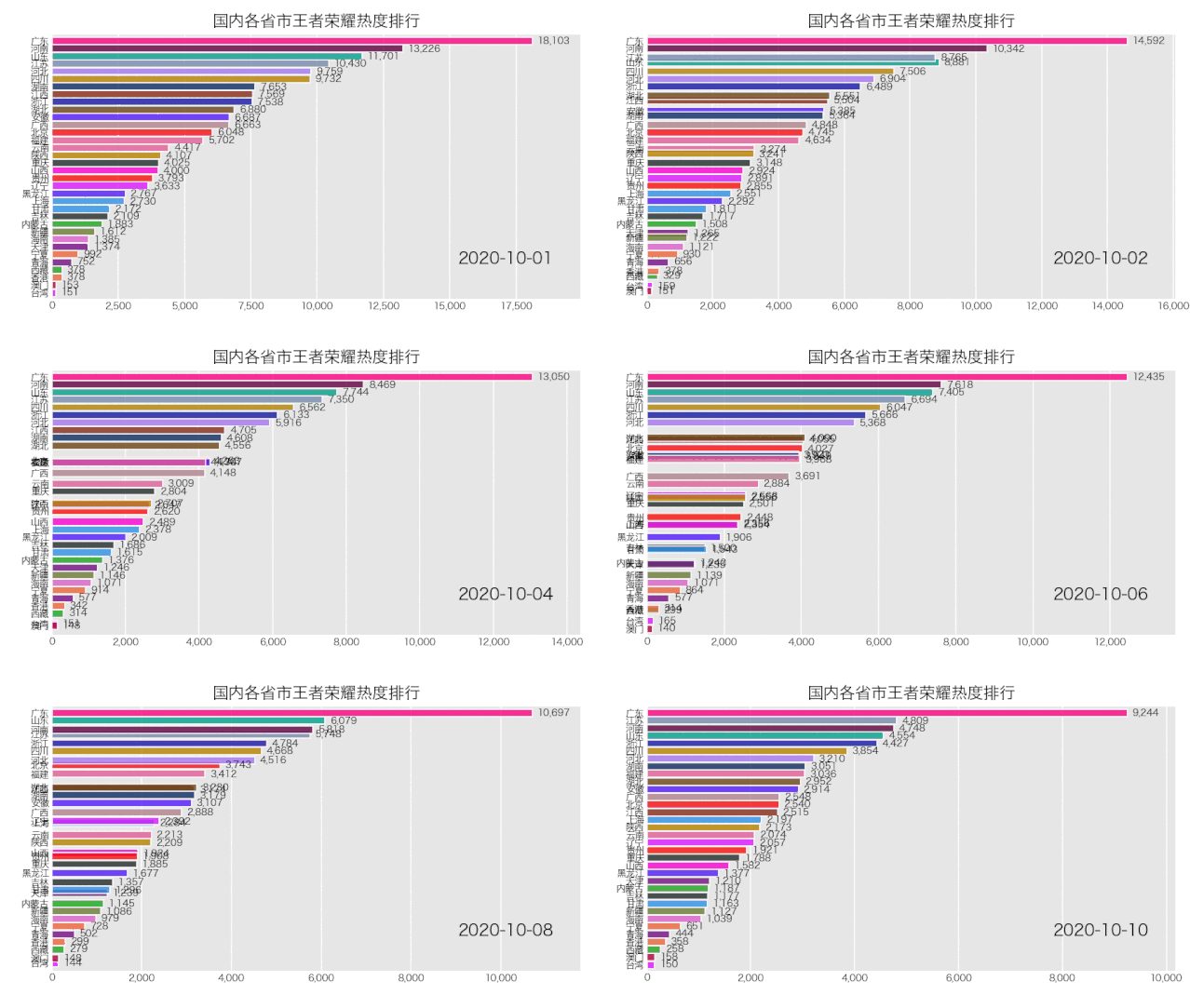
是成功實現(xiàn)了,就是配色有那么點渣,這個可自行修改顏色配置文件,讓你的動圖變得好看。
02. 微博指數(shù)
百度搜索新浪的微博指數(shù),打開網(wǎng)站一看,發(fā)現(xiàn)網(wǎng)頁版無法使用。
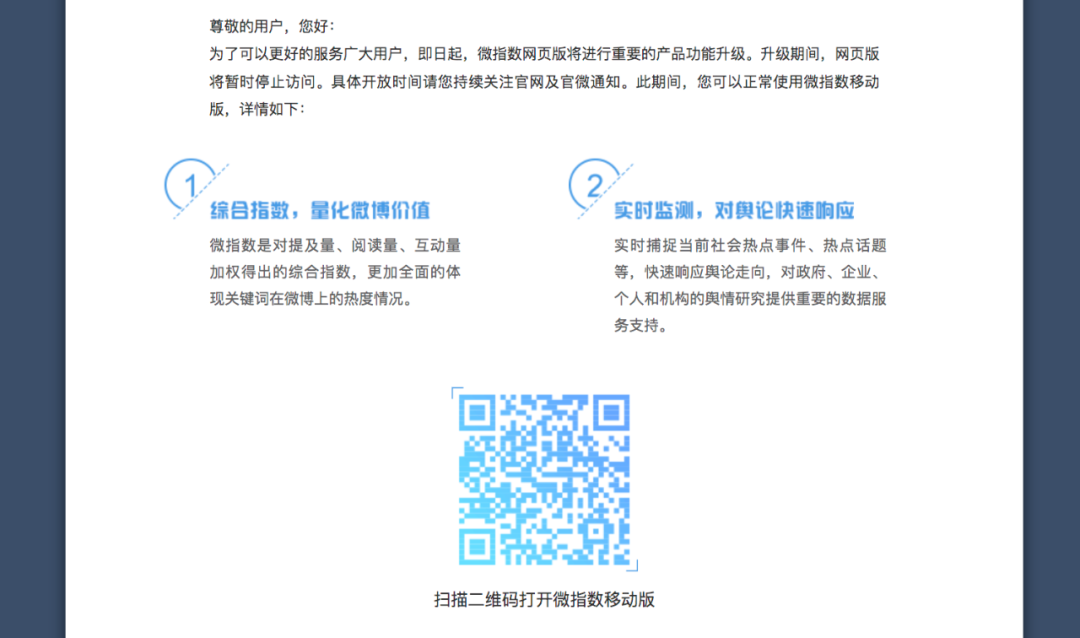
此時我們只需打開開發(fā)者工具,將你的瀏覽器模擬為手機端,刷新網(wǎng)頁即可。
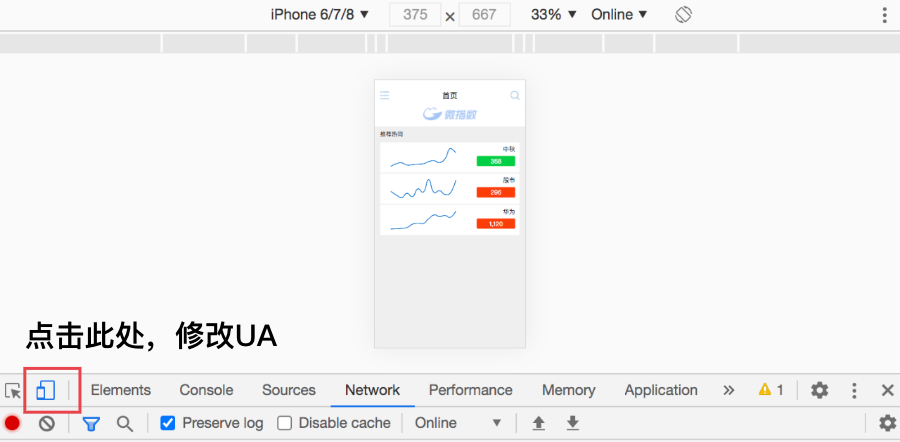
可以看到,微指數(shù)的界面出來了。
添加關鍵詞,查看指數(shù)的數(shù)據(jù)接口。
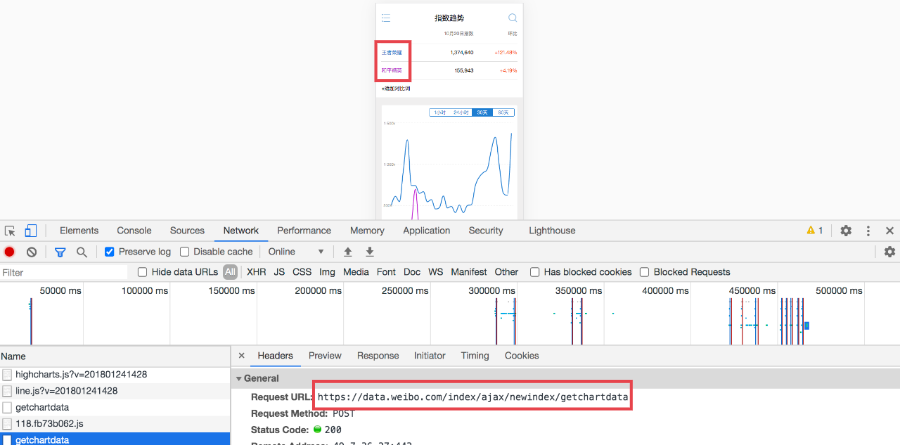
請求是Post方法,并且不需要登陸微博賬號。
import?re
import?time
import?json
import?requests
import?datetime


#?請求頭信息
headers?=?"""accept:?application/json
accept-encoding:?gzip,?deflate,?br
accept-language:?zh-CN,zh;q=0.9
content-length:?50
content-type:?application/x-www-form-urlencoded
cookie:?'你的cookie'
origin:?https://data.weibo.com
referer:?https://data.weibo.com/index/newindex?visit_type=trend&wid=1011224685661
sec-fetch-mode:?cors
sec-fetch-site:?same-origin
user-agent:?Mozilla/5.0?(iPhone;?CPU?iPhone?OS?11_0?like?Mac?OS?X)?AppleWebKit/604.1.38?(KHTML,?like?Gecko)?Version/11.0?Mobile/15A372?Safari/604.1
x-requested-with:?XMLHttpRequest"""

#?將請求頭字符串轉化為字典
headers?=?dict([line.split(":?",1)?for?line?in?headers.split("\n")])
print(headers)

#?數(shù)據(jù)接口
url?=?'https://data.weibo.com/index/ajax/newindex/getchartdata'


#?獲取時間列表
def?get_date_list(begin_date,?end_date):
????dates?=?[]
????dt?=?datetime.datetime.strptime(begin_date,?"%Y-%m-%d")
????date?=?begin_date[:]
????while?date?<=?end_date:
????????dates.append(date)
????????dt?+=?datetime.timedelta(days=1)
????????date?=?dt.strftime("%Y-%m-%d")
????return?dates


#?相關信息
names?=?['湯唯',?'朱亞文',?'鄧家佳',?'喬振宇',?'王學圻',?'張藝興',?'俞灝明',?'吳越',?'梁冠華',?'李昕亮',?'蘇可',?'孫驍驍',?'趙韓櫻子',?'孫耀琦',?'魏巍']


#?獲取微指數(shù)數(shù)據(jù)
for?name?in?names:
????try:
????????#?獲取關鍵詞ID
????????url_id?=?'https://data.weibo.com/index/ajax/newindex/searchword'
????????data_id?=?{
????????????'word':?name
????????}
????????html_id?=?requests.post(url=url_id,?data=data_id,?headers=headers)
????????pattern?=?re.compile(r'li?wid=\\\"(.*?)\\\"?word')
????????id?=?pattern.findall(html_id.text)[0]

????????#?接口參數(shù)
????????data?=?{
????????????'wid':?id,
????????????'dateGroup':?'1month'
????????}
????????time.sleep(2)
????????#?請求數(shù)據(jù)
????????html?=?requests.post(url=url,?data=data,?headers=headers)
????????result?=?json.loads(html.text)
????????#?處理數(shù)據(jù)
????????if?result['data']:
????????????values?=?result['data'][0]['trend']['s']
????????????startDate?=?'2019-01-01'
????????????endDate?=?'2020-01-01'
????????????dates?=?result['data'][0]['trend']['x']
????????????#?保存數(shù)據(jù)
????????????for?value,?date?in?zip(values,?dates):
????????????????print(name,?value,?date)
????????????????with?open('weibo.csv',?'a+',?encoding='utf-8')?as?f:
????????????????????f.write(name?+?','?+?str(value)?+?','?+?date?+?'\n')
????except:
????????pass
獲取到的信息如下。

也來生成一個動態(tài)圖表。
import?pandas?as?pd
import?bar_chart_race?as?bcr

#?讀取數(shù)據(jù)
df?=?pd.read_csv('weibo.csv',?encoding='utf-8',?header=None,?names=['name',?'number',?'day'])

#?數(shù)據(jù)處理,數(shù)據(jù)透視表
df_result?=?pd.pivot_table(df,?values='number',?index=['day'],?columns=['name'],?fill_value=0)
#?print(df_result[:10])

#?生成GIF
bcr.bar_chart_race(df_result[:10],?filename='weibo.gif',?title='大明風華演職人員熱度排行')
得到結果如下。
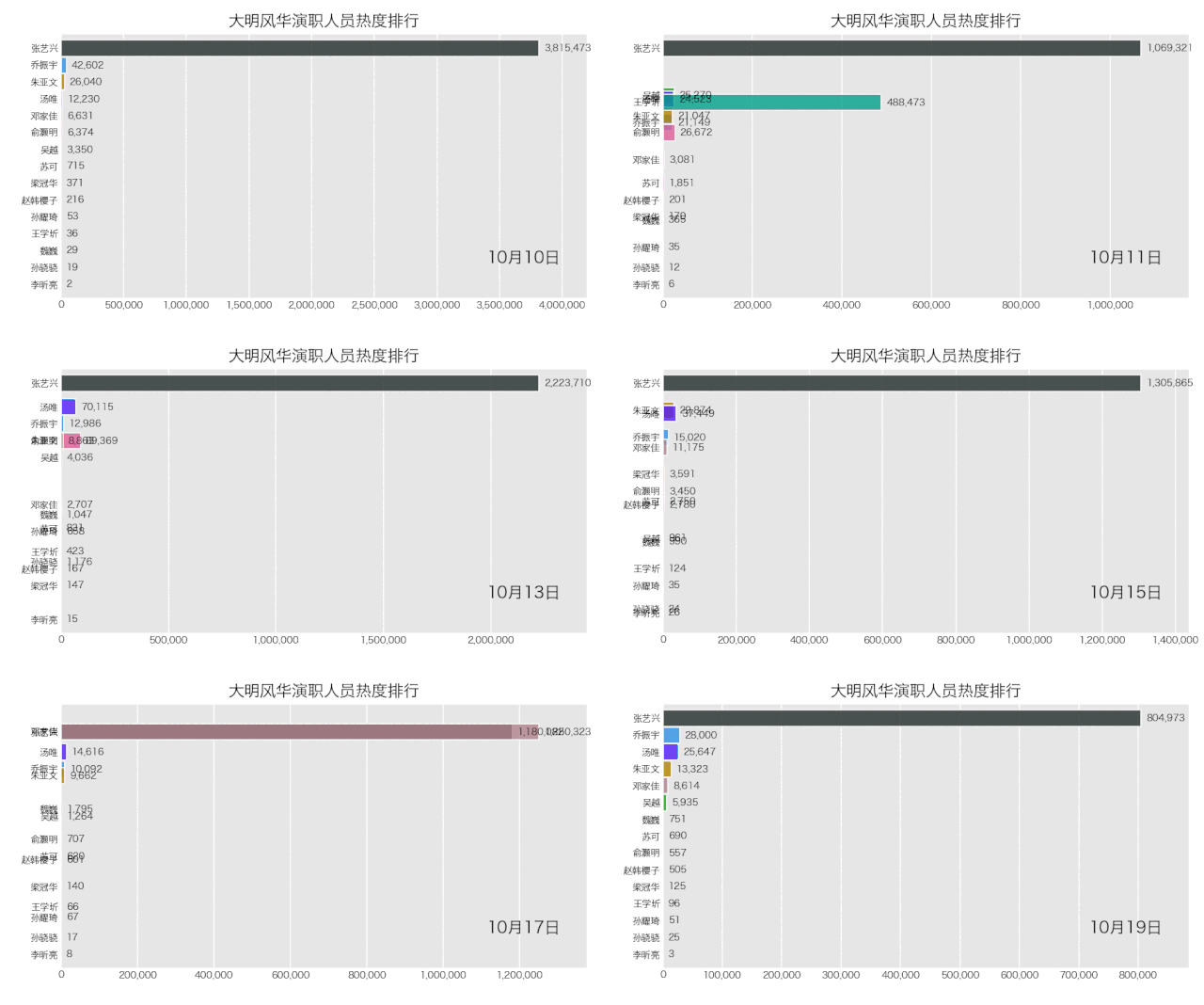
是不是也不難?
相關代碼我已上傳公眾號,回復「指數(shù)」即可獲取。
萬水千山總是情,點個? ?? 行不行。
-END-
添加早小起微信,備注進群進入技術交流群