
極致舒適的Vue高性能列表
列表是一種常見(jiàn)的UI組件,相信大家應(yīng)該都遇到過(guò),并且也都自己實(shí)現(xiàn)過(guò)!不知道大家是怎么實(shí)現(xiàn)的,是根據(jù)業(yè)務(wù)進(jìn)行CSS布局還是使用了第三方的組件。
在這里分享下自認(rèn)為比較舒適的列表組件及實(shí)現(xiàn)思路。
使用及效果
網(wǎng)格列表
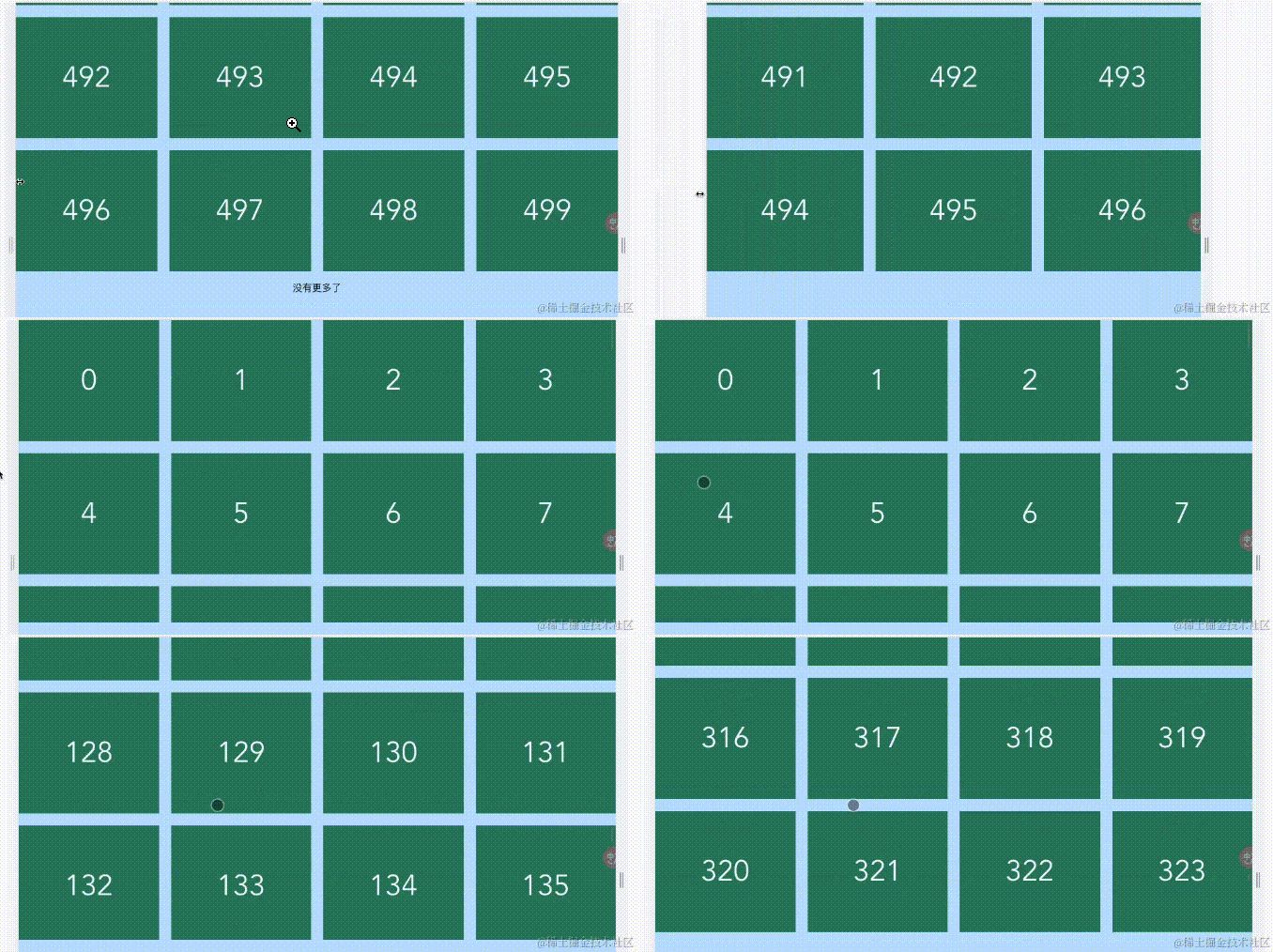
代碼
      <script setup lang="ts">
import GridList, { RequestFunc } from '@/components/GridList.vue';

const data: RequestFunc<number> = ({ page, limit }) => {
  return new Promise((resolve) => {
    console.log('開(kāi)始加載啦', page, limit);

    setTimeout(() => {
      resolve({
        data: Array.from({ length: limit }, (_, index) => index + (page - 1) * limit),
        total: 500,
      });
    }, 1000);
  });
};
</script>

<template>
  <GridList :request="data" :column-gap="20" :row-gap="20" :limit="100" :item-min-width="200" class="grid-list">
    <template #empty>
      <p>暫無(wú)數(shù)據(jù)</p>
    </template>
    <template #default="{ item }">
      <div class="item">{{ item }}</div>
    </template>
    <template #loading>
      <p>加載中...</p>
    </template>
    <template #noMore>
      <p>沒(méi)有更多了</p>
    </template>
  </GridList>
</template>
行列表
實(shí)現(xiàn)行列表只需要將item-min-width屬性配置為100%,即表示每個(gè)item最小寬度為容器寬度。
代碼
      <script setup lang="ts">
import GridList, { RequestFunc } from '@/components/GridList.vue';

const data: RequestFunc<number> = ({ page, limit }) => {
  return new Promise((resolve) => {
    console.log('開(kāi)始加載啦', page, limit);

    setTimeout(() => {
      resolve({
        data: Array.from({ length: limit }, (_, index) => index + (page - 1) * limit),
        total: 500,
      });
    }, 1000);
  });
};
</script>

<template>
  <GridList :request="data" :column-gap="20" :row-gap="20" :limit="100" item-min-width="100%" class="grid-list">
    <template #empty>
      <p>暫無(wú)數(shù)據(jù)</p>
    </template>
    <template #default="{ item }">
      <div class="item">{{ item }}</div>
    </template>
    <template #loading>
      <p>加載中...</p>
    </template>
    <template #noMore>
      <p>沒(méi)有更多了</p>
    </template>
  </GridList>
</template>
實(shí)現(xiàn)思路
網(wǎng)格布局
我們創(chuàng)建了一個(gè)名為GridList的組件,用于展示網(wǎng)格卡片的效果。該組件的主要功能是處理網(wǎng)格布局,而不關(guān)心卡片的具體內(nèi)容。
GridList組件通過(guò)data-source屬性接收數(shù)據(jù)。為了實(shí)現(xiàn)響應(yīng)式布局,我們還提供了一些輔助屬性,如item-min-width、item-min-height、row-gap和column-gap。
      <script lang="ts" setup>
import { computed, ref, watch } from 'vue';

const props = defineProps<{
  dataSource?: any[];
  itemMinWidth?: number;
  itemMinHeight?: number;
  rowGap?: number;
  columnGap?: number;
}>();

const data = ref<any[]>([...props.dataSource]);
</script>

<template>
  <div ref="containerRef" class="infinite-list-wrapper">
    <div v-else class="list">
      <div v-for="(item, index) in data" :key="index">
        <slot :item="item" :index="index">
          {{ item }}
        </slot>
      </div>
    </div>
  </div>
</template>

<style lang="scss" scoped>
.infinite-list-wrapper {
  text-align: center;
  overflow-y: scroll;
  position: relative;
  -webkit-overflow-scrolling: touch;

  .list {
    display: grid;
    grid-template-columns: repeat(auto-fill, minmax(calc(v-bind(itemMinWidth) * 1px), 1fr));
    grid-auto-rows: minmax(auto, calc(v-bind(itemMinHeight) * 1px));
    column-gap: calc(v-bind(columnGap) * 1px);
    row-gap: calc(v-bind(rowGap) * 1px);

    div:first-of-type {
      grid-column-start: 1;
      grid-column-end: 1;
    }
  }
}
</style>
實(shí)現(xiàn)響應(yīng)式網(wǎng)格布局的關(guān)鍵點(diǎn)如下:
- 使用
display: grid;將.list元素設(shè)置為網(wǎng)格布局。 -
grid-template-columns屬性創(chuàng)建了自適應(yīng)的列布局。使用repeat(auto-fill, minmax(...))表示根據(jù)容器寬度自動(dòng)填充列,并指定每列的最小和最大寬度。 -
grid-auto-rows屬性創(chuàng)建了自適應(yīng)的行布局。使用minmax(auto, ...)表示根據(jù)內(nèi)容自動(dòng)調(diào)整行高度。 -
column-gap和row-gap屬性設(shè)置了網(wǎng)格項(xiàng)之間的列間距和行間距。
分頁(yè)加載
盡管我們的組件能夠滿(mǎn)足設(shè)計(jì)要求,但面臨的最明顯問(wèn)題是處理大量數(shù)據(jù)時(shí)的效率問(wèn)題。隨著數(shù)據(jù)量的增加,接口響應(yīng)速度變慢,頁(yè)面可能出現(xiàn)白屏現(xiàn)象,因?yàn)?DOM 元素太多。
這時(shí)候,后端團(tuán)隊(duì)提出了一個(gè)合理的疑問(wèn)(BB)??:難道我們不能進(jìn)行分頁(yè)查詢(xún)嗎?我們需要聯(lián)合多個(gè)表進(jìn)行數(shù)據(jù)組裝,這本身就很耗時(shí)啊...
確實(shí),他們說(shuō)得有道理。為了解決這個(gè)問(wèn)題,我們需要在不改變交互方式的情況下實(shí)現(xiàn)數(shù)據(jù)的分頁(yè)查詢(xún)。
以前,GridList 組件的數(shù)據(jù)是通過(guò) data-source 屬性傳遞給它的,由組件的使用方進(jìn)行數(shù)據(jù)處理和傳遞。但如果每個(gè)使用 GridList 的頁(yè)面都要自己處理分頁(yè)邏輯,那會(huì)變得非常麻煩。
為了提供更舒適的組件使用體驗(yàn),我們決定在 GridList 組件內(nèi)部完成分頁(yè)邏輯。無(wú)論數(shù)據(jù)如何到達(dá),對(duì)于 GridList 組件來(lái)說(shuō),都是通過(guò)函數(shù)調(diào)用的方式進(jìn)行數(shù)據(jù)獲取。為此,我們引入了一個(gè)新的屬性 request,用于處理分頁(yè)邏輯。
通過(guò)這樣的改進(jìn),我們可以在不影響現(xiàn)有交互方式的前提下,讓 GridList 組件自己處理數(shù)據(jù)分頁(yè),從而提升整體的使用便捷性。
request 接受一個(gè)類(lèi)型為 RequestFunc 的函數(shù),該函數(shù)的定義如下:
      export interface Pagination {
  limit: number;
  page: number;
}

export interface RequestResult<T> {
  data: T[];
  total: number;
}

export type RequestFunc<T> = (pagination: Pagination) => Promise<RequestResult<T>> | RequestResult<T>;
通過(guò)使用 request 函數(shù),使用方無(wú)需手動(dòng)維護(hù) data 數(shù)據(jù)或處理分頁(yè)邏輯。現(xiàn)在只需將數(shù)據(jù)獲取邏輯封裝到 request 函數(shù)中。
一旦滾動(dòng)條滾動(dòng)到底部,就會(huì)觸發(fā) props.request 函數(shù)來(lái)獲取數(shù)據(jù),實(shí)現(xiàn)滾動(dòng)分頁(yè)加載的效果。
這樣的改進(jìn)使得使用方能夠?qū)W⒂跀?shù)據(jù)獲取邏輯,并將其封裝到 request 函數(shù)中。不再需要手動(dòng)管理數(shù)據(jù)和分頁(yè)邏輯,簡(jiǎn)化了使用方式,使得整體體驗(yàn)更加簡(jiǎn)潔和便捷。
        <script lang="ts" setup>

import { computed, ref, watch } from 'vue';

const props = defineProps<{
    request?: RequestFunc<any>;
    limit?: number;
    loadDistance?: number;
    //...原有props
  }>();

const containerRef = ref<HTMLDivElement>();
const loading = ref<boolean>(false);
const data = ref<any[]>([]);
const total = ref<number>(0);
const page = ref<number>(1);
/** 沒(méi)有更多了 */
const noMore = computed<boolean>(
  () => total.value === 0 || data.value.length >= total.value || data.value.length < props.limit
);

//... watch處理

function handleScroll(event: Event) {
  event.preventDefault();
  const container = event.target as HTMLDivElement;
  const canLoad =
    container.scrollTop + container.clientHeight >= container.scrollHeight - props.loadDistance &&
    !loading.value &&
    !noMore.value;
  if (canLoad) {
    load();
  }
}

async function load() {
  loading.value = true;
  const result = await Promise.resolve(
    props.request({
      limit: props.limit,
      page: page.value,
    })
  );
  total.value = result.total;
  data.value.push(...result.data);
  if (!noMore.value) {
    page.value = page.value + 1;
  }
  loading.value = false;
}

        </script>
虛擬列表
除了添加 request 屬性以實(shí)現(xiàn)分頁(yè)加載數(shù)據(jù),我們還需要進(jìn)一步優(yōu)化。盡管這種懶加載的分頁(yè)加載可以解決網(wǎng)絡(luò)請(qǐng)求和首屏加載的問(wèn)題,但隨著數(shù)據(jù)增加,DOM 元素的數(shù)量也會(huì)不斷增加,可能導(dǎo)致頁(yè)面出現(xiàn)卡頓的情況。
為了解決這個(gè)問(wèn)題,我們可以引入虛擬列表的概念和實(shí)現(xiàn)方法。虛擬列表的原理和實(shí)現(xiàn)思路已經(jīng)在網(wǎng)上有很多資料,這里就不再贅述。
虛擬列表的主要目標(biāo)是解決列表渲染性能問(wèn)題,并解決隨著數(shù)據(jù)增加而導(dǎo)致的 DOM 元素過(guò)多的問(wèn)題。
虛擬列表的關(guān)鍵在于計(jì)算出當(dāng)前可視區(qū)域的數(shù)據(jù)起始索引 startIndex 和終點(diǎn)索引 endIndex。GridList 組件本身并不需要關(guān)心計(jì)算的具體過(guò)程,只需要獲得 startIndex 和 endIndex 即可。因此,我們可以將虛擬列表的計(jì)算邏輯封裝成一個(gè)自定義 Hook,該 Hook 的作用就是計(jì)算當(dāng)前可視區(qū)域的 startIndex 和 endIndex ???。
通過(guò)這樣的優(yōu)化,我們能夠更好地處理大量數(shù)據(jù)的渲染問(wèn)題,提升頁(yè)面的性能和流暢度。同時(shí),GridList 組件無(wú)需關(guān)心具體的計(jì)算過(guò)程,只需要使用計(jì)算得到的 startIndex 和 endIndex 即可 ????。
useVirtualGridList
在虛擬列表中,只渲染可視區(qū)域的 DOM 元素,為了實(shí)現(xiàn)滾動(dòng)效果,我們需要一個(gè)隱藏的 DOM 元素,并將其高度設(shè)置為列表的總高度。
已知屬性:
-
containerWidth: 容器寬度,通過(guò)container.clientWidth獲取 -
containerHeight: 容器高度,通過(guò)container.clientHeight獲取 -
itemMinWidth: item 最小寬度,通過(guò)props.itemMinWidth獲取 -
itemMinHeight: item 最小高度,通過(guò)props.itemMinHeight獲取 -
columnGap: item 的列間距,通過(guò)props.columnGap獲取 -
rowGap: item 的行間距,通過(guò)props.rowGap獲取 -
data: 渲染數(shù)據(jù)列表,通過(guò)props.dataSource/props.request獲取 -
scrollTop: 滾動(dòng)條偏移量,通過(guò)container.addEventListener('scroll', () => {...})獲取
計(jì)算屬性:
- 渲染列數(shù)
columnNum:Math.floor((containerWidth - itemMinWidth) / (itemMinWidth + columnGap)) + 1 - 渲染行數(shù)
rowNum:Math.ceil(data.length / columnNum) - 列表總高度
listHeight:Math.max(rowNum * itemMinHeight + (rowNum - 1) * rowGap, 0) - 可見(jiàn)行數(shù)
visibleRowNum:Math.ceil((containerHeight - itemMinHeight) / (itemMinHeight + rowGap)) + 1 - 可見(jiàn) item 數(shù)
visibleCount:visibleRowNum * columnNum - 起始索引
startIndex:Math.ceil((scrollTop - itemMinHeight) / (itemMinHeight + rowGap)) * columnNum - 終點(diǎn)索引
endIndex:startIndex + visibleCount - 列表偏移位置
startOffset:scrollTop - (scrollTop % (itemMinHeight + rowGap))
通過(guò)以上計(jì)算,我們可以根據(jù)容器尺寸、item 最小尺寸、間距和滾動(dòng)條位置來(lái)計(jì)算出虛擬列表的相關(guān)參數(shù),以便準(zhǔn)確渲染可見(jiàn)區(qū)域的數(shù)據(jù)。這樣的優(yōu)化能夠提升列表的渲染性能,并確保用戶(hù)在滾動(dòng)時(shí)獲得平滑的體驗(yàn)。
      //vue依賴(lài)引入
export const useVirtualGridList = ({
  containerRef,
  itemMinWidth,
  itemMinHeight,
  rowGap,
  columnGap,
  data,
}: VirtualGridListConfig) => {
  const phantomElement = document.createElement('div');
  //...phantomElement布局

  const containerHeight = ref<number>(0);
  const containerWidth = ref<number>(0);
  const startIndex = ref<number>(0);
  const endIndex = ref<number>(0);
  const startOffset = ref<number>(0);

  /** 計(jì)算列數(shù) */
  const columnNum = computed<number>(
    () => Math.floor((containerWidth.value - itemMinWidth.value) / (itemMinWidth.value + columnGap.value)) + 1
  );
  /** 計(jì)算行數(shù) */
  const rowNum = computed<number>(() => Math.ceil(data.value.length / columnNum.value));
  /** 計(jì)算總高度 */
  const listHeight = computed<number>(() =>
    Math.max(rowNum.value * itemMinHeight.value + (rowNum.value - 1) * rowGap.value, 0)
  );
  /** 可見(jiàn)行數(shù) */
  const visibleRowNum = computed<number>(
    () => Math.ceil((containerHeight.value - itemMinHeight.value) / (itemMinHeight.value + rowGap.value)) + 1
  );
  /** 可見(jiàn)item數(shù)量 */
  const visibleCount = computed<number>(() => visibleRowNum.value * columnNum.value);

  watch(
    () => listHeight.value,
    () => {
      phantomElement.style.height = `${listHeight.value}px`;
    }
  );

  watchEffect(() => {
    endIndex.value = startIndex.value + visibleCount.value;
  });

  const handleContainerResize = () => {
    nextTick(() => {
      if (containerRef.value) {
        containerHeight.value = containerRef.value.clientHeight;
        containerWidth.value = containerRef.value.clientWidth;
      }
    });
  };

  const handleScroll = () => {
    if (!containerRef.value) {
      return;
    }
    const scrollTop = containerRef.value.scrollTop;
    const startRowNum = Math.ceil((scrollTop - itemMinHeight.value) / (itemMinHeight.value + rowGap.value));
    /** 計(jì)算起始索引 */
    startIndex.value = startRowNum * columnNum.value;
    /** 計(jì)算內(nèi)容偏移量 */
    startOffset.value = scrollTop - (scrollTop % (itemMinHeight.value + rowGap.value));
  };

  onMounted(() => {
    if (containerRef.value) {
      containerRef.value.appendChild(phantomElement);
      containerRef.value.addEventListener('scroll', (event: Event) => {
        event.preventDefault();
        handleScroll();
      });
      handleScroll();
    }
  });

  return { startIndex, endIndex, startOffset, listHeight };
};
這段代碼實(shí)現(xiàn)了虛擬網(wǎng)格列表的核心邏輯,通過(guò)監(jiān)聽(tīng)容器的滾動(dòng)和大小改變事件,實(shí)現(xiàn)了僅渲染可見(jiàn)區(qū)域的列表項(xiàng),從而提高性能。??
在代碼中,我們創(chuàng)建了一個(gè) phantomElement 占位元素,其高度被設(shè)置為列表的總高度,以確保滾動(dòng)條的滾動(dòng)范圍與實(shí)際列表的高度一致。這樣,在滾動(dòng)時(shí),我們可以根據(jù)滾動(dòng)位置動(dòng)態(tài)計(jì)算可見(jiàn)區(qū)域的起始和結(jié)束索引,并只渲染可見(jiàn)的列表項(xiàng),避免了不必要的 DOM 元素渲染,從而提升了性能。??
在代碼中,phantomElement 被創(chuàng)建為絕對(duì)定位的元素,并設(shè)置了其位置屬性和高度。通過(guò) watch 監(jiān)聽(tīng)器,它的高度會(huì)根據(jù)列表的總高度進(jìn)行更新,以保持與實(shí)際列表的高度一致。??
通過(guò)利用占位元素,我們成功實(shí)現(xiàn)了虛擬列表的滾動(dòng)渲染,減少了不必要的 DOM 元素渲染,從而顯著提升了用戶(hù)體驗(yàn)和性能表現(xiàn)。???
在GridList中使用useVirtualGridList:
      <script lang="ts" setup>
import { computed, ref, watch } from 'vue';

import { useVirtualGridList } from '@/hooks/useVirtualGridList';

//...其他代碼

/** 計(jì)算最小寬度的像素值 */
const itemMinWidth = computed<number>(() => props.itemMinWidth);
/** 計(jì)算最小高度的像素值 */
const itemMinHeight = computed<number>(() => props.itemMinHeight);
/** 計(jì)算列間距的像素值 */
const columnGap = computed<number>(() => props.columnGap);
/** 計(jì)算行間距的像素值 */
const rowGap = computed<number>(() => props.rowGap);
/** 計(jì)算虛擬列表的起始/終止索引 */
const { startIndex, endIndex, startOffset, listHeight } = useVirtualGridList({
  containerRef,
  data,
  itemMinWidth,
  itemMinHeight,
  columnGap,
  rowGap,
});

//...其他代碼
</script>

<template>
  <div ref="containerRef" class="infinite-list-wrapper" @scroll="handleScroll">
    <div v-if="data.length === 0 && !loading">
      <slot name="empty">No Data</slot>
    </div>
    <div v-else class="list">
      <div v-for="(item, index) in data.slice(startIndex, endIndex)" :key="index">
        <slot :item="item" :index="index">
          {{ item }}
        </slot>
      </div>
    </div>
    <div v-if="loading" class="bottom">
      <slot name="loading"></slot>
    </div>
    <div v-if="noMore && data.length > 0" class="bottom">
      <slot name="noMore"></slot>
    </div>
  </div>
</template>
性能展示
虛擬列表
一次性加載十萬(wàn)條數(shù)據(jù)
懶加載+虛擬列表
分頁(yè)加載,每頁(yè)加載一萬(wàn)條
最后
如果覺(jué)得GridList對(duì)你有所幫助或啟發(fā),希望你能點(diǎn)贊/收藏/評(píng)論!