
這個(gè)Python腳本,讓工作自動(dòng)向你匯報(bào)進(jìn)度

筆者經(jīng)常編寫Python腳本來進(jìn)行數(shù)據(jù)處理、數(shù)據(jù)傳輸和模型訓(xùn)練。隨著數(shù)據(jù)量和數(shù)據(jù)復(fù)雜性的增加,運(yùn)行腳本可能需要一些時(shí)間。在等待數(shù)據(jù)處理完成時(shí)可以同時(shí)做一些其他工作。
為了達(dá)到這個(gè)目的,筆者編寫了一組用于解決這個(gè)問題的Python腳本。使用這些腳本向手機(jī)發(fā)送流程更新、可視化和完成通知。當(dāng)偶爾擁有這些自由的時(shí)刻,你可以享受而不是擔(dān)心模型的進(jìn)度。
需要什么
第一個(gè)問題是,需要知道什么?這取決于你正在做的工作。對(duì)于筆者來說主要有有三個(gè)可能會(huì)占用時(shí)間的處理任務(wù):
· 模型訓(xùn)練
· 數(shù)據(jù)處理和/或傳輸
· 金融模型
我們 需要 對(duì)于每一種情況具體分析。
模型訓(xùn)練
更新每n個(gè)epoch,必須包括關(guān)鍵指標(biāo)。例如,訓(xùn)練和驗(yàn)證集的損失和準(zhǔn)確性。接著完成通知,包括:
· 訓(xùn)練期間關(guān)鍵指標(biāo)的可視化(同樣,訓(xùn)練和驗(yàn)證集的損失和準(zhǔn)確性)
· 其他不太重要但仍然有用的信息,如本地模型目錄、訓(xùn)練時(shí)間、模型架構(gòu)等
· 預(yù)測(cè)輸出,對(duì)于文本生成來說輸出生成的文本(或它的一個(gè)樣本);對(duì)于圖像生成來說,輸出結(jié)果是一個(gè)(希望)很酷的可視化
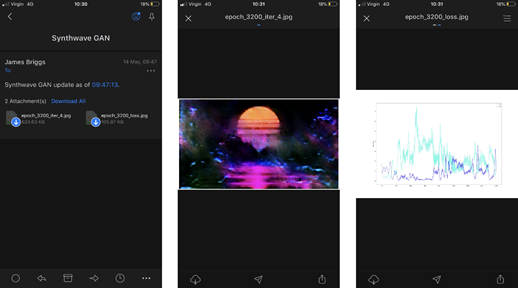
以訓(xùn)練一個(gè)神經(jīng)網(wǎng)絡(luò)來重現(xiàn)給定的藝術(shù)風(fēng)格為例。我們需要重點(diǎn)從模型中生成的圖像,損失和精度圖,當(dāng)前的訓(xùn)練時(shí)間,和一個(gè)模型的名稱。
import notify
             START= datetime.now()  # this line would be placed before modeltraining begins
      MODELNAME="SynthwaveGAN"  # giving us ourmodel name
      NOTIFY=100  # so we send an update notification every100 epochs
             # for each epoch e,we would include the following code
      if e % notify_epoch ==0and e !=0:
          # here we createthe email body message
         txt = (f"{MODELNAME} update as of "
                f"{datetime.now().strftime( %H:%M:%S )}.")
                 # we build theMIME message object with notify.message
         msg = notify.message(
             subject= Synthwave GAN ,
             text=txt,
             img=[
                 f ../visuals/{MODELNAME}/epoch_{e}_loss.png ,
                 f ../visuals/{MODELNAME}/epoch_{e}_iter_{i}.png
             ]
         )  # note that weattach two images here, the loss plot and
          #    ...a generated image output from our model
                    notify.send(msg)  # we then send the message
每隔100個(gè)epoch,就會(huì)發(fā)送一封包含上述所有內(nèi)容的電子郵件。以下是其中一封郵件:
數(shù)據(jù)處理和傳輸
這點(diǎn)不是很有趣,但在時(shí)間消耗方面,它排第一名。
以使用Python將批量數(shù)據(jù)上傳到SQLServer為例(對(duì)于沒有BULK INSERT的人)。在上傳腳本的最后,會(huì)有一個(gè)簡(jiǎn)單的消息通知上傳完成。
import os
      import notify
      from data importSql  # seehttps://jamescalam.github.io/pysqlplus/lib/data/sql.html
             dt =Sql( database123 ,  server001 )  # setup theconnection to SQL Server
             for i, file inenumerate(os.listdir( ../data/new )):
          dt.push_raw(f ../data/new/{file} )  # push a file to SQL Server
             # once the upload is complete, send a notification
      # first we create the message
      msg = notify.message(
          subject= SQL Data Upload ,
          text=f Data upload complete, {i} filesuploaded. ,
      )
             # send the message
      notify.send(msg)
如果偶爾拋出錯(cuò)誤,還可以添加一個(gè)try-except語句來捕獲錯(cuò)誤,并將其添加到一個(gè)列表中,以包含在更新和/或完成電子郵件中。
金融模型
金融建模中運(yùn)行的所有東西實(shí)際上都非常快,所以此處只能提供一個(gè)示例。
以 現(xiàn)金流動(dòng)模型工具 為例。現(xiàn)實(shí)中,這個(gè)過程只需要10-20秒,但現(xiàn)在假設(shè)你是華爾街炙手可熱的定量分析師,正在處理幾百萬筆貸款。在這封電子郵件中,可能想要包含一個(gè)高級(jí)概要分析的投資組合。可以隨機(jī)選擇一些貸款,并在給定的時(shí)間段內(nèi)可視化關(guān)鍵值——給定一個(gè)小樣本來交叉檢驗(yàn)?zāi)P偷男阅堋?/span>
end = datetime.datetime.now()  # get the ending datetime
             # get the total runtime in hours:minutes:seconds
                      hours,rem =divmod((end - start).seconds, 3600)
                      mins,secs =divmod(rem, 60)
                      runtime= {:02d}:{:02d}:{:02d} .format(hours, mins,secs)
             # now built our message
                      notify.msg(
                          subject="Cashflow Model Completion",
                          text=(f {len(model.output)} loansprocessed.
                                f Total runtime:{runtime} ),
                          img=[
                               ../vis/loan01_amortisation.png ,
                               ../vis/loan07_amortisation.png ,
                               ../vis/loan01_profit_and_loss.png ,
                               ../vis/loan07_profit_and_loss.png
                          ]
                      )
             notify.send(msg)  # and send it
代碼
上面的所有功能節(jié)選自一個(gè)名為notify.py的腳本。在示例代碼中將使用Outlook。這里需要兩個(gè)Python庫,email和smtplib:
· email :用于管理電子郵件消息。有了這個(gè)庫就可以設(shè)置電子郵件消息本身,包括主題、正文和附件。
· smtplib :處理SMTP連接。簡(jiǎn)單郵件傳輸協(xié)議(SMTP)是大多數(shù)電子郵件系統(tǒng)使用的協(xié)議,允許郵件通過互聯(lián)網(wǎng)發(fā)送。

MIME
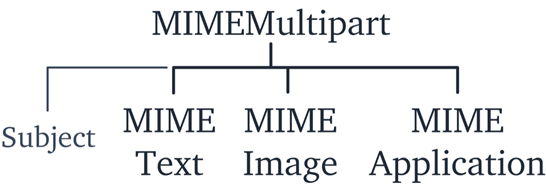
消息本身是使用來自email模塊的MIMEMultipart對(duì)象構(gòu)建的。還需要使用三個(gè)MIME子類,并將它們附加到MIMEMultipart對(duì)象上:
· mimetext:這將包含電子郵件“有效負(fù)載”,即電子郵件正文中的文本。
· mimeimage :這是用于在電子郵件中包含圖像。
· mimeapplication:用于MIME消息應(yīng)用程序?qū)ο蟆R簿褪俏募郊?/span>
除了這些子類之外,還有其他參數(shù),比如MimeMultipart中的Subject值。所有這些加在一起就形成了下面的結(jié)構(gòu)。
把它們都放在一起會(huì)發(fā)生什么:
import os
      from email.mime.text importMIMEText
      from email.mime.image importMIMEImage
      from email.mime.application importMIMEApplication
      from email.mime.multipart importMIMEMultipart
             defmessage(subject="PythonNotification", text="", img=None, attachment=None):
          # build messagecontents
          msg =MIMEMultipart()
          msg[ Subject ] = subject  # add in thesubject
          msg.attach(MIMEText(text))  # add text contents
                 # check if wehave anything given in the img parameter
          if img isnotNone:
              # if we do, wewant to iterate through the images, so let s check that
              # what we haveis actually a list
              iftype(img) isnot list:
                  img = [img]  # if it isn t alist, make it one
              # now iteratethrough our list
              for one_img in img:
                  img_data =open(one_img,  rb ).read()  # read the imagebinary data
                  # attach theimage data to MIMEMultipart using MIMEImage, we add
                  # the givenfilename use os.basename
                  msg.attach(MIMEImage(img_data, name=os.path.basename(one_img)))
                 # we do the samefor attachments as we did for images
          if attachment isnotNone:
              iftype(attachment) isnot list:
                  attachment = [attachment]  # if it isn t a list, make it one
                          for one_attachment in attachment:
                  withopen(one_attachment, rb ) as f:
                      # read in theattachment using MIMEApplication
                      file =MIMEApplication(
                          f.read(),
                          name=os.path.basename(one_attachment)
                      )
                  # here we editthe attached file metadata
                  file[ Content-Disposition ] =f attachment; filename="{os.path.basename(one_attachment)}"
                  msg.attach(file)  # finally, addthe attachment to our message object
          return msg
這個(gè)腳本相當(dāng)簡(jiǎn)單。在頂部,有導(dǎo)入(這是以前介紹過的MIME部分)以及Python的os庫。
接下來定義一個(gè)名為message的函數(shù)。這允許使用不同的參數(shù)調(diào)用函數(shù)并輕松地構(gòu)建一個(gè)電子郵件消息對(duì)象。例如,可以這樣寫一封帶有多張圖片和附件的郵件:
email_msg= message(
    text="Model processing complete,please see attached data.",
    img=[ accuracy.png ,  loss.png ],
    attachments=[ data_in.csv ,  data_out.csv ]
)
首先,初始化MIMEMultipart對(duì)象,并將其分配給msg;然后,使用“subject”鍵設(shè)置電子郵件主題。attach方法向MIMEMultipart對(duì)象添加不同的MIME子類。你可以使用MIMEText子類添加電子郵件正文。
對(duì)于圖像img和attachment附件,可以什么都不傳遞,只傳遞一個(gè)文件路徑,或者傳遞一組文件路徑。我們通過首先檢查參數(shù)是否為None來處理它,如果參數(shù)為None,則傳遞;否則,檢查給定的數(shù)據(jù)類型,不是一個(gè)list,就創(chuàng)建一個(gè),這就使得可以用下面的for循環(huán)來遍歷項(xiàng)。
接著,使用MIMEImage和MIMEApplication子類分別附加圖像和文件。使用os.basename從給定的文件路徑中獲取文件名,附件名包括該文件名。

SMTP
現(xiàn)在已經(jīng)構(gòu)建好電子郵件消息對(duì)象,下一步就是發(fā)送它。這就是smtplib模塊發(fā)揮作用的地方。代碼同樣非常簡(jiǎn)單,只有一處例外。
由于直接處理不同的電子郵件供應(yīng)商和他們各自的服務(wù)器,需要不同的SMTP地址。在谷歌中輸入“outlook smtp”。不需要單擊頁面,你就可以得到服務(wù)器地址smtp-mail.outlook.com和端口號(hào)587。
當(dāng)使用smtplib.SMTP初始化SMTP對(duì)象時(shí),這兩種方法都需要用。SMTP -接近開始的send函數(shù):
import smtplib
       import socket
             defsend(server= smtp-mail.outlook.com , port= 587 , msg):
           # contain followingin try-except in case of momentary network errors
           try:
               # initialiseconnection to email server, the default is Outlook
               smtp = smtplib.SMTP(server, port)
               # this is the Extended Hello  command, essentially greeting our SMTP or ESMTP server
               smtp.ehlo()
               # this is the Start Transport Layer Security  command, tells the server we will
               # becommunicating with TLS encryption
               smtp.starttls()
                          # read email andpassword from file
               withopen( ../data/email.txt ,  r ) as fp:
                   email = fp.read()
               withopen( ../data/password.txt ,  r ) as fp:
                   pwd = fp.read()
                        # login tooutlook server
               smtp.login(email, pwd)
               # sendnotification to self
               smtp.sendmail(email, email, msg.as_string())
               # disconnectfrom the server
               smtp.quit()
           except socket.gaierror:
               print("Network connection error, email notsent.")
smtp.ehlo()和smtp.starttls()都是SMTP命令。ehlo(擴(kuò)展Hello)本質(zhì)上是向服務(wù)器打招呼。starttls通知服務(wù)器,將使用加密傳輸級(jí)別安全(TLS)連接進(jìn)行通信。
在此之后,只需從文件中讀取電子郵件和密碼,分別存儲(chǔ)在email和pwd中。然后,使用smtp.login登錄到SMTP服務(wù)器。登錄并使用smtp.sendmail發(fā)送電子郵件。
筆者總是給自己發(fā)送通知,但在自動(dòng)報(bào)告的情況下,可能希望將電子郵件發(fā)送到其他地方。為此,我會(huì)更改destination_address: smtp.sendmail(email、destination_address、 msg.as_string)。
最后,終止會(huì)話并關(guān)閉與smtp.quit的連接。
將所有這些都放在try-except語句中。在瞬間網(wǎng)絡(luò)連接丟失的情況下,將無法連接到服務(wù)器。導(dǎo)致socket.gaierror。使用try-except語句可以防止程序在網(wǎng)絡(luò)連接失敗的情況下崩潰。
筆者將其用于ML模型培訓(xùn)更新和數(shù)據(jù)傳輸完成。如果郵件沒有被發(fā)送,那也沒有關(guān)系。這種簡(jiǎn)單、被動(dòng)地處理連接丟失是合適的。
放在一起
現(xiàn)在已經(jīng)寫了代碼的兩部分,我們就可以發(fā)送電子郵件了:
 # builda message object
msg = message(text="See attached!", img= important.png ,
             attachment= data.csv )send(msg)  #send the email (defaults to Outlook)
這是所有的電子郵件通知和/或使用Python的自動(dòng)化的全過程。感謝email和smptlib庫,設(shè)置過程變得非常容易。

還有一點(diǎn)請(qǐng)注意,公共電子郵件提供程序服務(wù)器地址和TLS端口。
對(duì)于任何耗費(fèi)大量時(shí)間的處理或訓(xùn)練任務(wù),進(jìn)度更新和完成通知通常才是真正的解放。Python,讓工作更美好!
(版權(quán)歸原作者所有,侵刪)


點(diǎn)擊下方“閱讀原文”查看更多