日計不足涓滴成河-自定義響應結果格式化器
什么是響應結果
響應結果就是,在客戶端向服務器發(fā)出請求后,服務器根據(jù)客戶端的請求參數(shù),給出的結果,這就是一個完整的響應結果過程。
響應的結果包含的內(nèi)容非常多,主要的有 HTTP Status Code,Content-Type,Content 等等,在這里不再一一贅述。
一般情況下,在 .NET MVC 中,如果是 API 接口,默認使用 JsonOutputFormatter 對結果進行格式化。
但是也不排除某些情況下,我們需要對業(yè)務進行兼容化的設置,比如部分接口使用 xml,部分接口使用自定義的格式,需求的響應是第一要務。
常見響應結果格式化器
在 .NET(介于官方改名,咱也不叫 Core 了哈) MVC中,有幾種內(nèi)置的常見響應結果格式化器,他們分別是:
0、OutputFormatter(基類)1、TextOutputFormatter(基類)2、StringOutputFormatter3、StreamOutputFormatter4、JsonOutputFormatter5、XmlSerializerOutputFormatter
由于這幾種常見的格式化器的存在,我們可以放心的在 .NET MVC 中使用 請求-> 響應 過程,而不必關心他具體的實現(xiàn)。
來自天氣預報的示例
默認的響應結果格式json
private static readonly string[] Summaries = new[]{"Freezing", "Bracing", "Chilly", "Cool", "Mild", "Warm", "Balmy", "Hot", "Sweltering", "Scorching"};private IEnumerableGetWeatherForecast() {var rng = new Random();return Enumerable.Range(1, 3).Select(index => new WeatherForecast{Date = DateTime.Now.AddDays(index),TemperatureC = rng.Next(-20, 55),Summary = Summaries[rng.Next(Summaries.Length)]}).ToArray();}[]public IEnumerableGet() {return GetWeatherForecast();}
當我們請求上面的 API 接口,將得到下面的默認輸出結果。
[{"date": "2020-10-24T17:19:05.4638588+08:00","temperatureC": 2,"temperatureF": 35,"summary": "Cool"},{"date": "2020-10-25T17:19:05.464602+08:00","temperatureC": 18,"temperatureF": 64,"summary": "Sweltering"},{"date": "2020-10-26T17:19:05.4646057+08:00","temperatureC": -14,"temperatureF": 7,"summary": "Mild"}]
這很好,是我們想要的結果。
Xml響應結果格式器
在上面的天氣預報示例中,API接口默認使用了 json 格式輸出響應結果。
在不改動業(yè)務代碼的情況下,我們可以增加一種 xml 輸出結果,具體做法就是增加一個 API 接口,然后在 startup.cs 中添加 xml 格式化器。
[][]public IEnumerableXml() {return GetWeatherForecast();}
配置 Xml 格式器 XmlDataContractSerializerOutputFormatter
public void ConfigureServices(IServiceCollection services){services.AddControllers(configure =>{configure.OutputFormatters.Add(new XmlDataContractSerializerOutputFormatter());});}
這個時候再請求 API 地址:/weatherforecast/xml ,我們將會得到的結果如下
<ArrayOfWeatherForecast xmlns:i="http://www.w3.org/2001/XMLSchema-instance" xmlns="http://schemas.datacontract.org/2004/07/CustomBinder"><WeatherForecast><Date>2020-10-24T17:24:19.1047116+08:00Date><Summary>ScorchingSummary><TemperatureC>49TemperatureC>WeatherForecast><WeatherForecast><Date>2020-10-25T17:24:19.1047219+08:00Date><Summary>CoolSummary><TemperatureC>6TemperatureC>WeatherForecast><WeatherForecast><Date>2020-10-26T17:24:19.1047221+08:00Date><Summary>FreezingSummary><TemperatureC>-20TemperatureC>WeatherForecast>ArrayOfWeatherForecast>
ProducesAttribute?特性(內(nèi)容協(xié)定)
API 接口 /xml 的特性標注多了一個 [Produces("application/xml")]正是得益于 ProducesAttribute 特性,我們可以在 MVC 框架內(nèi)隨意的定制響應結果。
ProducesAttribute 和其它的特性類沒有太多的區(qū)別,其基本原理就是使用用戶指定的 contentType 參數(shù)(本例中為 application/xml) 到 OutputFormatters 中查找對應類型的 Formatters。
如果找到了,就使用該 Formatters 格式化響應結果,如果沒有找到,就拋出 No output formatter was found for content types 的警告,同時,客戶端會收到一個? 406(Not Acceptable) 的響應結果。

我想要更多-自定義格式化器
沒錯,上面的幾種常見的格式化器雖然非常好用。但是,我現(xiàn)在要對接一個舊的第三方客戶端,該客戶端采用的是 url 參數(shù)請求協(xié)議包,很明顯,由于這個客戶端過于年長(假裝找不到維護人員),只能在服務器端進行兼容了。
不過也不用過于擔心,開發(fā)一個自定義的格式化器還是非常簡單的。我們只需要定義一個繼承自 TextOutputFormatter 的子類即可,其中有小部分需要編寫的代碼。
需求
我們接到的需求是兼容 url 方式的請求參數(shù)響應結果,經(jīng)過調(diào)研,確認格式如下
key=value&key=value&key=value需求調(diào)研清楚后,編碼的速度就得跟上了
定義格式化器 WeatherOutputFormatter
public class WeatherOutputFormatter : TextOutputFormatter{private readonly static Type WeatherForecastType = typeof(WeatherForecast);public WeatherOutputFormatter(){SupportedEncodings.Add(Encoding.UTF8);SupportedEncodings.Add(Encoding.Unicode);SupportedMediaTypes.Add("text/weather");}public override bool CanWriteResult(OutputFormatterCanWriteContext context){if (context == null){throw new ArgumentNullException(nameof(context));}if (context.ObjectType == WeatherForecastType || context.Object is WeatherForecast || context.ObjectType.GenericTypeArguments[0] == WeatherForecastType){return base.CanWriteResult(context);}return false;}private string WriterText(IEnumerableweathers ){StringBuilder builder = new StringBuilder();foreach (var wealther in weathers){builder.Append(WriterText(wealther));}return builder.ToString();}private string WriterText(WeatherForecast weather) => $"date={WebUtility.UrlEncode(weather.Date.ToString())}&temperatureC={weather.TemperatureC}&temperatureF={weather.TemperatureF}&summary={WebUtility.UrlEncode(weather.Summary)}";public override async Task WriteResponseBodyAsync(OutputFormatterWriteContext context, Encoding selectedEncoding){if (context == null){throw new ArgumentNullException(nameof(context));}if (selectedEncoding == null){throw new ArgumentNullException(nameof(selectedEncoding));}string text = string.Empty;if (context.ObjectType == WeatherForecastType)text = WriterText(context.Object as WeatherForecast);else if (context.ObjectType.GenericTypeArguments[0] == WeatherForecastType)text = WriterText(context.Object as IEnumerable); if (string.IsNullOrEmpty(text)){await Task.CompletedTask;}var response = context.HttpContext.Response;await response.WriteAsync(text, selectedEncoding);}}
正所謂一圖勝千言,所以我給大家畫了一張圖,方便理解
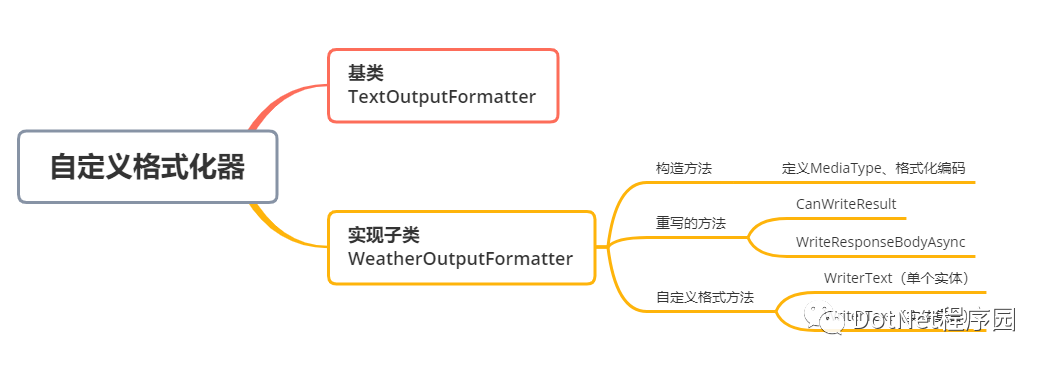
從圖中可以看出,我們只需要重寫兩個方法,同時編寫一個自定義格式化邏輯即可完成,看起來還是非常簡單的。
細心的同學可能發(fā)現(xiàn)了,在 WriterText 方法中,考慮到兼容性的問題,我們還將 url 中的 value 進行轉(zhuǎn)義,可以說還是非常貼心的哈。
編寫測試方法
[][]public IEnumerableWeather() {return GetWeatherForecast();}
測試方法中定義 Produces("text/weather"),指定需要的 ContentType,同時,還需要將 WeatherOutputFormatter 添加到 OutputFormatters 中使用。
public void ConfigureServices(IServiceCollection services){services.AddControllers(configure =>{configure.OutputFormatters.Add(new XmlDataContractSerializerOutputFormatter());configure.OutputFormatters.Add(new WeatherOutputFormatter());});}
調(diào)用接口進行測試
請求 API 地址 /weather,得到結果如下
date=2020%2F10%2F27+10%3A35%3A36&temperatureC=42&temperatureF=107&summary=Scorchingdate=2020%2F10%2F28+10%3A35%3A36&temperatureC=28&temperatureF=82&summary=Freezingdate=2020%2F10%2F29+10%3A35%3A36&temperatureC=17&temperatureF=62&summary=Sweltering結束語
至此,自定義格式化器已經(jīng)完成,本文通過一個簡單的示例實現(xiàn),幫助大家理解如何在 MVC 中使用自定義格式化器,文章篇幅不長,做圖花了點心思,歡迎您的關注。
示例代碼托管在:
https://github.com/lianggx/EasyAspNetCoreDemo/tree/master/CustomBinder