
如何設(shè)計(jì)一個(gè)好用的 React Image 組件?
大廠技術(shù)??高級(jí)前端??Node進(jìn)階
點(diǎn)擊上方?程序員成長指北,關(guān)注公眾號(hào)
回復(fù)1,加入高級(jí)Node交流群
前言
本文為筆者閱讀 react-image[1] 源碼過程中的總結(jié),若有所錯(cuò)漏煩請(qǐng)指出。? 倉庫傳送門[2]
作者:海秋
https://github.com/worldzhao/blog/issues/1
一把梭,直到 UI 小姐姐來找你談?wù)勅松硐耄?/p>
圖片加載太慢,需要展示 loading占位符;圖片加載失敗,加載備選圖片或展示 error占位符。
作為開發(fā)者的我們,可能會(huì)經(jīng)歷以下幾個(gè)階段:
第一階段: img標(biāo)簽上使用onLoad以及onError進(jìn)行處理;第二階段:寫一個(gè)較為通用的組件; 第三階段:抽離 hooks,使用方自定義視圖組件(當(dāng)然也要提供基本組件);
現(xiàn)在讓我們直接從第三階段開始,看看如何使用少量代碼打造一個(gè)易用性、封裝性以及擴(kuò)展性俱佳的image組件。
useImage
首先分析可復(fù)用的邏輯,可以發(fā)現(xiàn)使用者需要關(guān)注三個(gè)狀態(tài):loading、error以及src,畢竟加載圖片也是異步請(qǐng)求嘛。
對(duì) react-use[3] 熟悉的同學(xué)會(huì)很容易聯(lián)想到
useAsync。
自定義一個(gè) hooks,接收?qǐng)D片鏈接作為參數(shù),返回調(diào)用方需要的三個(gè)狀態(tài)。
基礎(chǔ)實(shí)現(xiàn)
import?*?as?React?from?"react";

//?將圖片加載轉(zhuǎn)為promise調(diào)用形式
function?imgPromise(src:?string)?{
??return?new?Promise((resolve,?reject)?=>?{
????const?i?=?new?Image();
????i.onload?=?()?=>?resolve();
????i.onerror?=?reject;
????i.src?=?src;
??});
}

function?useImage({?src?}:?{?src:?string?}):?{
??src:?string?|?undefined,
??isLoading:?boolean,
??error:?any,
}?{
??const?[loading,?setLoading]?=?React.useState(true);
??const?[error,?setError]?=?React.useState(null);
??const?[value,?setValue]?=?(React.useState?undefined?>?undefined);

??React.useEffect(()?=>?{
????imgPromise(src)
??????.then(()?=>?{
????????//?加載成功
????????setLoading(false);
????????setValue(src);
??????})
??????.catch((error)?=>?{
????????//?加載失敗
????????setLoading(false);
????????setError(error);
??????});
??},?[src]);

??return?{?isLoading:?loading,?src:?value,?error:?error?};
}
我們已經(jīng)完成了最基礎(chǔ)的實(shí)現(xiàn),現(xiàn)在來慢慢優(yōu)化。
性能優(yōu)化
對(duì)于同一張圖片來講,在組件 A 加載過的圖片,組件 B 不用再走一遍new Image()的流程,直接返回上一次結(jié)果即可。
+?const?cache:?{
+??[key:?string]:?Promise;
+?}?=?{};

function?useImage({
??src,
}:?{
??src:?string;
}):?{?src:?string?|?undefined;?isLoading:?boolean;?error:?any?}?{
??const?[loading,?setLoading]?=?React.useState(true);
??const?[error,?setError]?=?React.useState(null);
??const?[value,?setValue]?=?React.useState(undefined);

??React.useEffect(()?=>?{
+???if?(!cache[src])?{
+?????cache[src]?=?imgPromise(src);
+???}

-???imgPromise(src)
+???cache[src]
??????.then(()?=>?{
????????setLoading(false);
????????setValue(src);
??????})
??????.catch(error?=>?{
????????setLoading(false);
????????setError(error);
??????});
??},?[src]);

??return?{?isLoading:?loading,?src:?value,?error:?error?};
}
優(yōu)化了一丟丟性能。
支持 srcList
上文提到過一點(diǎn):圖片加載失敗,加載備選圖片或展示error占位符。
展示error占位符我們可以通過error狀態(tài)去控制,但是加載備選圖片的功能還沒有完成。
主要思路如下:
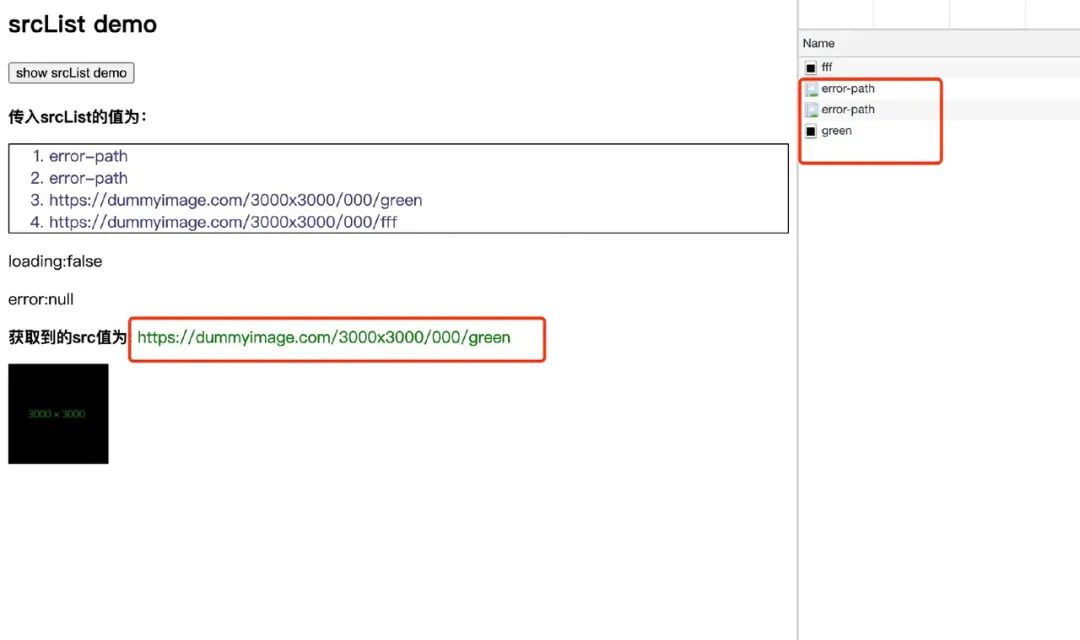
將入?yún)?code style="margin-right: 2px;margin-left: 2px;font-family: "Operator Mono", Consolas, Monaco, Menlo, monospace;word-break: break-all;background-image: initial;background-position: initial;background-size: initial;background-repeat: initial;background-attachment: initial;background-origin: initial;background-clip: initial;line-height: 1.5;font-size: 90%;padding: 3px 5px;border-radius: 2px;background-color: rgba(255, 229, 100, 0.2) !important;">src改為 srcList,值為圖片url或圖片(含備選圖片)的url數(shù)組;從第一張開始加載,若失敗則加載第二張,直到某一張成功或全部失敗,流程結(jié)束。類似于 tapable[4] 的 AsyncSeriesBailHook。
對(duì)入?yún)⑦M(jìn)行處理:
const?removeBlankArrayElements?=?(a:?string[])?=>?a.filter((x)?=>?x);

const?stringToArray?=?(x:?string?|?string[])?=>?(Array.isArray(x)???x?:?[x]);

function?useImage({?srcList?}:?{?srcList:?string?|?string[]?}):?{
??src:?string?|?undefined,
??loading:?boolean,
??error:?any,
}?{
??//?獲取url數(shù)組
??const?sourceList?=?removeBlankArrayElements(stringToArray(srcList));
??//?獲取用于緩存的鍵名
??const?sourceKey?=?sourceList.join("");
}
接下來就是重要的加載流程啦,定義promiseFind方法,用于完成以上加載圖片的邏輯。
/**
?*?注意?此處將imgPromise作為參數(shù)傳入,而沒有直接使用imgPromise
?*?主要是為了擴(kuò)展性
?*?后面會(huì)將imgPromise方法作為一個(gè)參數(shù)由使用者傳入,使得使用者加載圖片的操作空間更大
?*?當(dāng)然若使用者不傳該參數(shù),就是用默認(rèn)的imgPromise方法
?*/
function?promiseFind(
??sourceList:?string[],
??imgPromise:?(src:?string)?=>?Promise<void>
):?Promise<string>?{
??let?done?=?false;
??//?重新使用Promise包一層
??return?new?Promise((resolve,?reject)?=>?{
????const?queueNext?=?(src:?string)?=>?{
??????return?imgPromise(src).then(()?=>?{
????????done?=?true;
????????//?加載成功?resolve
????????resolve(src);
??????});
????};

????const?firstPromise?=?queueNext(sourceList.shift()?||?"");

????//?生成一條promise鏈[隊(duì)列],每一個(gè)promise都跟著catch方法處理當(dāng)前promise的失敗
????//?從而繼續(xù)下一個(gè)promise的處理
????sourceList
??????.reduce((p,?src)?=>?{
????????//?如果加載失敗?繼續(xù)加載
????????return?p.catch(()?=>?{
??????????if?(!done)?return?queueNext(src);
??????????return;
????????});
??????},?firstPromise)
??????//?全都掛了?reject
??????.catch(reject);
??});
}
再來改動(dòng)useImage。
const?cache:?{
-??[key:?string]:?Promise;
+??[key:?string]:?Promise;
}?=?{};

function?useImage({
-??src,
+??srcList,
}:?{
-?src:?string;
+?srcList:?string?|?string[];
}):?{?src:?string?|?undefined;?loading:?boolean;?error:?any?}?{
??const?[loading,?setLoading]?=?React.useState(true);
??const?[error,?setError]?=?React.useState(null);
??const?[value,?setValue]?=?React.useState(undefined);

//?圖片鏈接數(shù)組
+?const?sourceList?=?removeBlankArrayElements(stringToArray(srcList));
//?cache唯一鍵名
+?const?sourceKey?=?sourceList.join('');

??React.useEffect(()?=>?{
-???if?(!cache[src])?{
-?????cache[src]?=?imgPromise(src);
-???}

+???if?(!cache[sourceKey])?{
+?????cache[sourceKey]?=?promiseFind(sourceList,?imgPromise);
+???}

-????cache[src]
-????.then(()?=>?{
+????cache[sourceKey]
+?????.then((src)?=>?{
????????setLoading(false);
????????setValue(src);
??????})
??????.catch(error?=>?{
????????setLoading(false);
????????setError(error);
??????});
??},?[src]);

??return?{?isLoading:?loading,?src:?value,?error:?error?};
}
需要注意的一點(diǎn):現(xiàn)在傳入的圖片鏈接可能不是單個(gè)src,最終設(shè)置的value為promiseFind找到的src,所以 cache 類型定義也有變化。
自定義 imgPromise
前面提到過,加載圖片過程中,使用方可能會(huì)插入自己的邏輯,所以將 imgPromise 方法作為可選參數(shù)loadImg傳入,若使用者想自定義加載方法,可傳入該參數(shù)。
function?useImage({
+?loadImg?=?imgPromise,
??srcList,
}:?{
+?loadImg?:?(src:?string)?=>?Promise;
??srcList:?string?|?string[];
}):?{?src:?string?|?undefined;?loading:?boolean;?error:?any?}?{
??const?[loading,?setLoading]?=?React.useState(true);
??const?[error,?setError]?=?React.useState(null);
??const?[value,?setValue]?=?React.useState(undefined);

??const?sourceList?=?removeBlankArrayElements(stringToArray(srcList));
??const?sourceKey?=?sourceList.join('');

??React.useEffect(()?=>?{
????if?(!cache[sourceKey])?{
-?????cache[sourceKey]?=?promiseFind(sourceList,?imgPromise);
+?????cache[sourceKey]?=?promiseFind(sourceList,?loadImg);
????}

????cache[sourceKey]
??????.then(src?=>?{
????????setLoading(false);
????????setValue(src);
??????})
??????.catch(error?=>?{
????????setLoading(false);
????????setError(error);
??????});
??},?[sourceKey]);

??return?{?loading:?loading,?src:?value,?error:?error?};
}
實(shí)現(xiàn) Img 組件
完成useImage后,我們就可以基于其實(shí)現(xiàn) Img 組件了。
預(yù)先定義好相關(guān) API:
屬性 說明 類型 默認(rèn)值
src 圖片鏈接 string / string[] -
loader 可選,加載過程占位元素 ReactNode null
unloader 可選,加載失敗占位元素 ReactNode null
loadImg 可選,圖片加載方法,返回一個(gè) Promise (src:string)=>Promise imgPromise
當(dāng)然,除了以上 API,還有標(biāo)簽原生屬性。編寫類型聲明文件如下:
export?type?ImgProps?=?Omit<
??React.DetailedHTMLProps<
????React.ImgHTMLAttributes,
????HTMLImageElement
??>,
??"src"
>?&
??Omit"srcList">?&?{
????src:?useImageParams["srcList"];
????loader?:?JSX.Element?|?null;
????unloader?:?JSX.Element?|?null;
??};
實(shí)現(xiàn)如下:
export?default?({
??src:?srcList,
??loadImg,
??loader?=?null,
??unloader?=?null,
??...imgProps
}:?ImgProps)?=>?{
??const?{?src,?loading,?error?}?=?useImage({
????srcList,
????loadImg,
??});

??if?(src)?return?<img?src={src}?{...imgProps}?/>;
??if?(loading)?return?loader;
??if?(error)?return?unloader;

??return?null;
};
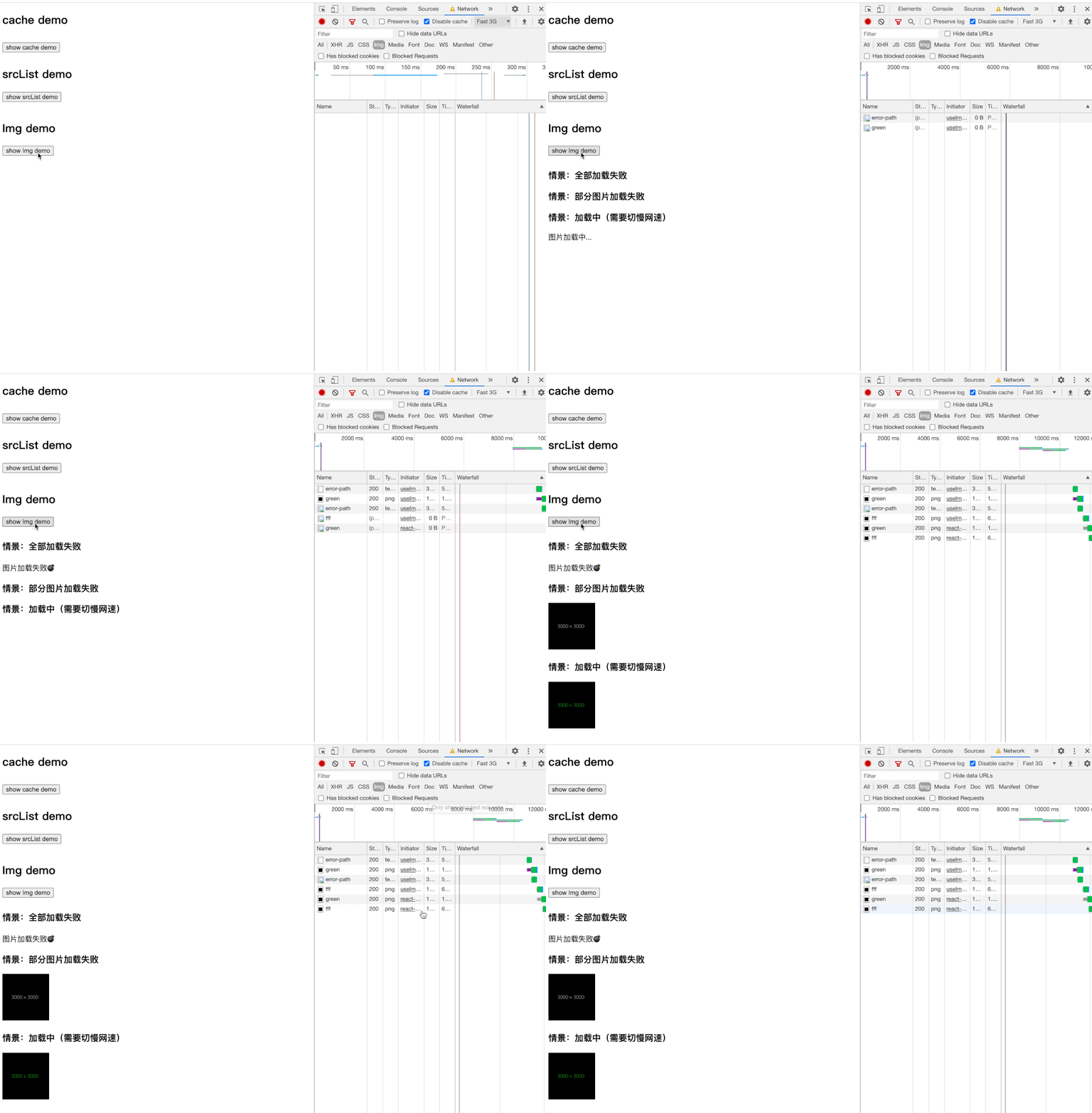
測(cè)試效果如下:
結(jié)語
值得注意的是,本文遵循 react-image 大體思路,但部分內(nèi)容暫未實(shí)現(xiàn)(所以代碼可讀性要好一點(diǎn))。其它特性,如:
支持 Suspense 形式調(diào)用; 默認(rèn)在渲染圖片前會(huì)進(jìn)行 decode,避免頁面卡頓或者閃爍。
有興趣的同學(xué)可以看看下面這些文章:
用于數(shù)據(jù)獲取的 Suspense(試驗(yàn)階段)[5] 錯(cuò)誤邊界(Error Boundaries)[6] React:Suspense 的實(shí)現(xiàn)與探討[7] HTMLImageElement.decode()[8] Chrome 圖片解碼與 Image.decode API[9]
參考資料
react-image: https://github.com/mbrevda/react-image
[2]? 倉庫傳送門: https://github.com/worldzhao/build-your-own-react-image
[3]react-use: https://github.com/streamich/react-use
[4]tapable: https://github.com/webpack/tapable
[5]用于數(shù)據(jù)獲取的 Suspense(試驗(yàn)階段): https://zh-hans.reactjs.org/docs/concurrent-mode-suspense.html
[6]錯(cuò)誤邊界(Error Boundaries): https://zh-hans.reactjs.org/docs/error-boundaries.html#introducing-error-boundaries
[7]React:Suspense 的實(shí)現(xiàn)與探討: https://zhuanlan.zhihu.com/p/34210780
[8]HTMLImageElement.decode(): https://developer.mozilla.org/zh-CN/docs/Web/API/HTMLImageElement/decode
[9]Chrome 圖片解碼與 Image.decode API: https://zhuanlan.zhihu.com/p/43991630
Node 社群
我組建了一個(gè)氛圍特別好的 Node.js 社群,里面有很多 Node.js小伙伴,如果你對(duì)Node.js學(xué)習(xí)感興趣的話(后續(xù)有計(jì)劃也可以),我們可以一起進(jìn)行Node.js相關(guān)的交流、學(xué)習(xí)、共建。下方加 考拉 好友回復(fù)「Node」即可。

???“分享、點(diǎn)贊、在看” 支持一波??
我組建了一個(gè)氛圍特別好的 Node.js 社群,里面有很多 Node.js小伙伴,如果你對(duì)Node.js學(xué)習(xí)感興趣的話(后續(xù)有計(jì)劃也可以),我們可以一起進(jìn)行Node.js相關(guān)的交流、學(xué)習(xí)、共建。下方加 考拉 好友回復(fù)「Node」即可。
???“分享、點(diǎn)贊、在看” 支持一波??