
《精通react/vue組件設(shè)計》之實現(xiàn)一個健壯的警告提示(Alert)組件

前言
本文是筆者寫組件設(shè)計的第七篇文章, 今天帶大家實現(xiàn)一個自帶主題且可關(guān)閉的Alert組件, 該組件在諸如Antd或者elementUI等第三方組件庫中都會出現(xiàn),主要用來提供系統(tǒng)的用戶反饋.
之所以會寫組件設(shè)計相關(guān)的文章,是因為作為一名前端優(yōu)秀的前端工程師,面對各種繁瑣而重復(fù)的工作,我們不應(yīng)該按部就班的去"辛勤勞動",而是要根據(jù)已有前端的開發(fā)經(jīng)驗,總結(jié)出一套自己的高效開發(fā)的方法.
前端組件一般會劃分為如下幾種類型:
- 通用型組件: 比如Button, Icon等.
- 布局型組件: 比如Grid, Layout布局等.
- 導(dǎo)航型組件: 比如面包屑Breadcrumb, 下拉菜單Dropdown, 菜單Menu等.
- 數(shù)據(jù)錄入型組件: 比如form表單, Switch開關(guān), Upload文件上傳等.
- 數(shù)據(jù)展示型組件: 比如Avator頭像, Table表格, List列表等.
- 反饋型組件: 比如Progress進度條, Drawer抽屜, Modal對話框等.
- 其他業(yè)務(wù)類型
正文
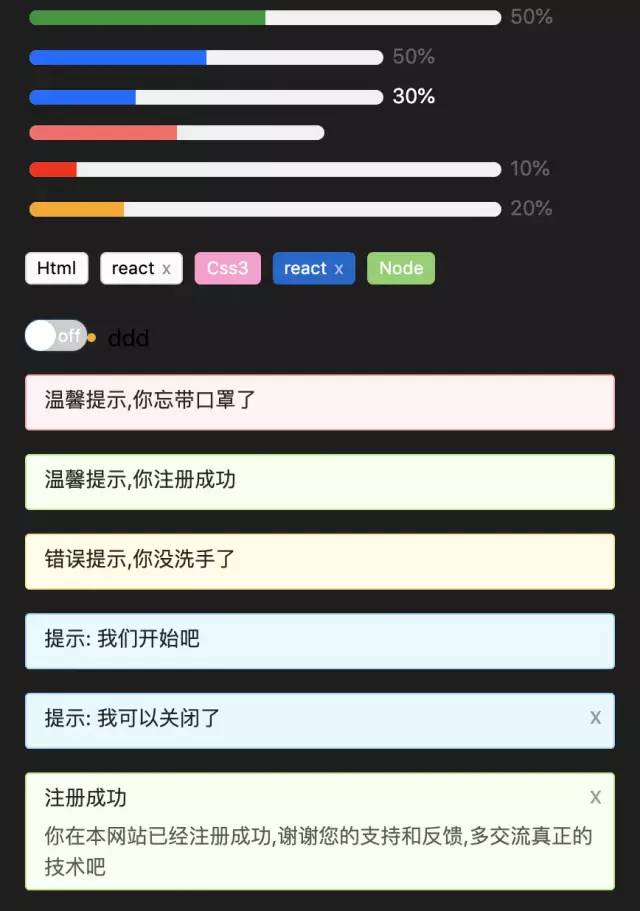
在開始組件設(shè)計之前希望大家對css3和js有一定的基礎(chǔ),并了解基本的react/vue語法.我們先看看實現(xiàn)后的組件效果:
1. 組件設(shè)計思路
按照之前筆者總結(jié)的組件設(shè)計原則,我們第一步是要確認需求. 一個警告提示(Alert)組件會有如下需求點:
- 能控制Alert組件的樣式
- 能控制Alert組件的關(guān)閉按鈕是否顯示
- 用戶可以自己輸入提示內(nèi)容
- 能控制關(guān)閉按鈕的文本,或者自定義關(guān)閉按鈕
- 支持顯示提示內(nèi)容的輔助文本
- 內(nèi)置提供不同類型的警告提示樣式,比如成功, 錯誤, 警告等
- 關(guān)閉提示時能提供自定義事件
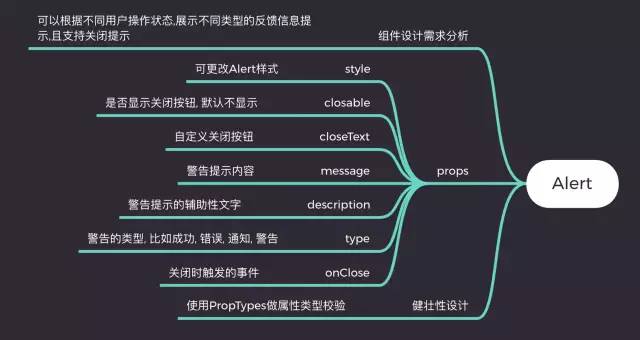
對于react選手來說,如果沒用typescript,建議大家都用PropTypes, 它是react內(nèi)置的類型檢測工具,我們可以直接在項目中導(dǎo)入. vue有自帶的屬性檢測方式,這里就不一一介紹了.
通過以上需求分析, 我們發(fā)現(xiàn)實現(xiàn)一個Alert非常簡單, 它屬于反饋型組件,所以不會涉及到太多功能.接下來我們就來看看具體實現(xiàn).
2. 基于react實現(xiàn)一個Alert組件
2.1. Alert組件框架設(shè)計
首先我們先根據(jù)需求將組件框架寫好,這樣后面寫業(yè)務(wù)邏輯會更清晰:
          import classnames from 'classnames'


          import styles from './index.less'


          /**


           * 警告提示組件


           * @param {style} object 更改Alert樣式


           * @param {closable} bool 是否顯示關(guān)閉按鈕, 默認不顯示


           * @param {closeText} string|reactNode 自定義關(guān)閉按鈕


           * @param {message} string 警告提示內(nèi)容


           * @param {description} string 警告提示的輔助性文字


           * @param {type} string 警告的類型


           * @param {onClose} func 關(guān)閉時觸發(fā)的事件


           */


          function Alert(props) {


            const {


              style,


              closable,


              closeText,


              message,


              description,


              type,


              onClose


            } = props


            return <div className={styles.xAlertWrap}>


                    <div className={styles.alertMes}>{ message }</div>


                    <div className={styles.alertDesc}>{ description }</div>


                    <span className={styles.closeBtn}>{ closeText ? closeText : 'x' }</span>


                   </div>


          }


          export default Alert
有了這個框架,我們就來往里面實現(xiàn)內(nèi)容吧.
2.2 實現(xiàn)style,closeText,message, description,type
這幾個功能在框架搭建好之后已經(jīng)部分實現(xiàn)了,是因為他們都比較簡單,不會牽扯到其他復(fù)雜邏輯.只需要對外暴露屬性并使用屬性即可. 具體實現(xiàn)如下:
          function Alert(props) {


            const {


              style,


              closable,


              closeText,


              message,


              description,


              type,


              onClose


            } = props


            return <div


                className={classnames(styles.xAlertWrap, styles[type] || styles.warning)}


                style={{


                  ...style


                }}


              >


                <div className={styles.alertMes}>{ message }</div>


                <div className={styles.alertDesc}>{ description }</div>


                <span className={styles.closeBtn}>{ closeText ? closeText : 'x' }</span>


              </div>


          }
以上代碼可以發(fā)現(xiàn)筆者采用了classnames這個第三方工具, 他可以組合我們的class以實現(xiàn)更靈活的配置. 對于type的實現(xiàn),我的思路是提前預(yù)制好幾種類型樣式, 通過用戶手動配置來匹配到對應(yīng)的樣式:
          .xAlertWrap {


            box-sizing: border-box;


            position: relative;


            padding: 5px 12px;


            margin-bottom: 16px;


            border-radius: 3px;


            &.success {


              background-color: #f6ffed;


              border: 1px solid #b7eb8f;


            }


            &.info {


              background-color: #e6f7ff;


              border: 1px solid #91d5ff;


            }


            &.error {


              background-color: #fffbe6;


              border: 1px solid #ffe58f;


            }


            &.warning {


              background-color: #fff1f0;


              border: 1px solid #ffa39e;


            }


          }
2.3 實現(xiàn)closable和onClose
closable主要是用來讓用戶能手動關(guān)閉Alert,onClose是對外暴露的關(guān)閉時的方法, 因為沒必要也不需要向外暴露屬性來讓Alert關(guān)閉, 所以最好的方式是在組件內(nèi)部實現(xiàn), 我們會通過useState這個鉤子來處理,代碼如下:
          function Alert(props) {


            const {


              style,


              closable,


              closeText,


              message,


              description,


              type,


              onClose


            } = props


            let [visible, setVisible] = useState(true)


            const handleColse = () => {


              setVisible(false)


              onClose && onClose()


            }


            return visible ?


              <div


                className={classnames(styles.xAlertWrap, styles[type] || styles.warning)}


                style={{


                  opacity: visible ? '1' : '0',


                  ...style


                }}


              >


                <div className={styles.alertMes}>{ message }</div>


                <div className={styles.alertDesc}>{ description }</div>


                {


                  !!closable && <span className={styles.closeBtn} onClick={handleColse}>{ closeText ? closeText : 'x' }</span>


                }


              </div> : null


          }
通過控制visible來控制Alert的出現(xiàn)和消失, 并且當(dāng)點擊關(guān)閉按鈕時能調(diào)用外部暴露的onClose方法.
2.4 健壯性支持, 我們采用react提供的propTypes工具:
          import PropTypes from 'prop-types'


          // ...


          Alert.propTypes = {


            style: PropTypes.object,


            closable: PropTypes.bool,


            closeText: PropTypes.oneOfType([


              PropTypes.string,


              PropTypes.element


            ]),


            message: PropTypes.string,


            description: PropTypes.string,


            type: PropTypes.string,


            onClose: PropTypes.func


          }
關(guān)于prop-types的使用官網(wǎng)上有很詳細的案例,這里說一點就是oneOfType的用法, 它用來支持一個組件可能是多種類型中的一個. ?組件完整css代碼如下:
{
: border-box;
position: relative;
padding: 5px 12px;
: 16px;
: 3px;
{
: #f6ffed;
border: 1px solid #b7eb8f;
}
{
: #e6f7ff;
border: 1px solid #91d5ff;
}
{
: #fffbe6;
border: 1px solid #ffe58f;
}
{
: #fff1f0;
border: 1px solid #ffa39e;
}
{
:5px;
color: rgba(0, 0, 0, 0.85);
: 14px;
: 1.5em;
}
{
color: rgba(0, 0, 0, 0.65);
: 14px;
: 1.5em;
: break-all;
}
{
position: absolute;
right: 8px;
top: 5px;
color: rgba(0, 0, 0, 0.4);
cursor: pointer;
}
}
通過以上步驟, 一個健壯的的Alert組件就完成了,關(guān)于代碼中的css module和classnames的使用大家可以自己去官網(wǎng)學(xué)習(xí),非常簡單.如果不懂的可以在趣談前端技術(shù)群里提問,筆者看到后會第一時間解答.
2.5 使用Alert組件
我們可以通過如下方式使用它:
          <Alert message="溫馨提示,你忘帶口罩了" />


          <Alert message="溫馨提示,你注冊成功" type="success" />


          <Alert message="錯誤提示,你沒洗手了" type="error" />


          <Alert message="提示: 我們開始吧" type="info" />


          <Alert message="提示: 我可以關(guān)閉了" type="info" closable onClose={() => { alert(111) }} /><Alert message="注冊成功" description="你在本網(wǎng)站已經(jīng)注冊成功,謝謝您的支持和反饋,多交流真正的技術(shù)吧" closable type="success" />
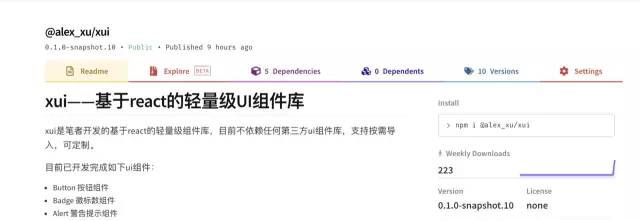
筆者已經(jīng)將實現(xiàn)過的組件發(fā)布到npm上了,大家如果感興趣可以直接用npm安裝后使用,方式如下:
npm i /xui
//?導(dǎo)入xui
import {
Button,
Skeleton,
Empty,
Progress,
Tag,
Switch,
Drawer,
Badge,
Alert
}?from?'@alex_xu/xui'
該組件庫支持按需導(dǎo)入,我們只需要在項目里配置babel-plugin-import即可,具體配置如下:
          // .babelrc


          "plugins": [


            ["import", { "libraryName": "@alex_xu/xui", "style": true }]


          ]
npm庫截圖如下:
最后
我在之前的文章中已實現(xiàn):
- modal(模態(tài)窗),
- badge(徽標(biāo)),
- table(表格),
- tooltip(工具提示條),
- Skeleton(骨架屏),
- Message(全局提示),
- form(form表單),
- switch(開關(guān)),
- 日期/日歷,
- 二維碼識別器組件
等組件, 歡迎學(xué)習(xí)參考.
如果想獲取組件設(shè)計系列完整源碼, 或者想學(xué)習(xí)更多H5游戲, webpack,node,gulp,css3,javascript,nodeJS,canvas數(shù)據(jù)可視化等前端知識和實戰(zhàn),歡迎在公號《趣談前端》加入我們的技術(shù)群一起學(xué)習(xí)討論,共同探索前端的邊界。
如果對于react/vue組件設(shè)計原理不熟悉的,可以參考我的之前寫的組件設(shè)計系列文章:
- 《精通react/vue組件設(shè)計》之配合React Portals實現(xiàn)一個功能強大的抽屜(Drawer)組件
- 《精通react/vue組件設(shè)計》之5分鐘實現(xiàn)一個Tag(標(biāo)簽)組件和Empty(空狀態(tài))組件
- 《精通react/vue組件設(shè)計》之用純css打造類materialUI的按鈕點擊動畫并封裝成react組件
- 《精通react/vue組件設(shè)計》之快速實現(xiàn)一個可定制的進度條組件
- 《精通react/vue組件設(shè)計》之基于jsoneditor二次封裝一個可實時預(yù)覽的json編輯器組件(react版)