
記一次 .NET 某新能源汽車鋰電池檢測程序 UI掛死分析
一:背景
1. 講故事
這世間事說來也奇怪,近兩個月有三位朋友找到我,讓我?guī)兔Ψ治鱿滤某绦騢angon現(xiàn)象,這三個dump分別涉及:醫(yī)療,新能源,POS系統(tǒng)。截圖如下:

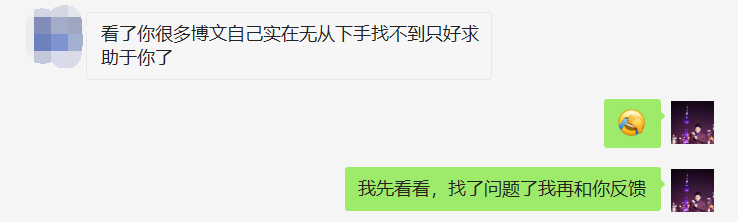
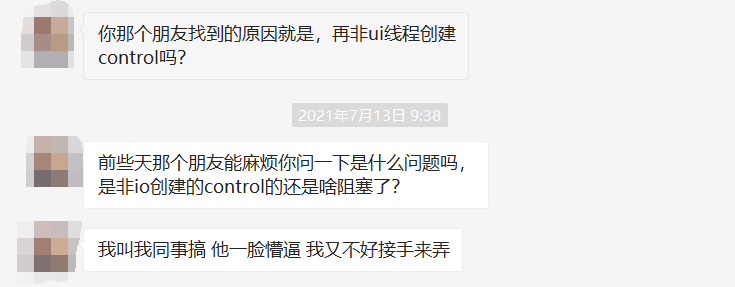
那這篇為什么要拿其中的 新能源 說事呢?因為這位朋友解決的最順利,在提供的一些線索后比較順利的找出了問題代碼。
說點題外話,我本人對 winform 是不熟的,又奈何它三番五次的出現(xiàn)在我的視野里,所以我決定寫一篇文章好好的總結(jié)下,介于沒有太多的參考資料,能力有限,只能自己試著解讀。
二:Windbg 分析
1. 程序現(xiàn)象
開始之前先吐槽一下,這幾位大佬抓的dump文件都是 wow64,也就是用64bit任務(wù)管理器抓了32bit的程序,見如下輸出:
wow64cpu!CpupSyscallStub+0x9:
00000000`756d2e09 c3              ret
所以就不好用 windbg preview 來分析了,首先要用 !wow64exts.sw 將 64bit 轉(zhuǎn)為 32bit ,本篇用的是 windbg10,好了,既然是UI卡死,首當其沖就是要看一下UI線程到底被什么東西卡住了,可以用命令 !clrstack 看一下。
0:000:x86> !clrstack
OS Thread Id: 0x1d90 (0)
Child SP       IP Call Site
0019ee6c 0000002b [HelperMethodFrame_1OBJ: 0019ee6c] System.Threading.WaitHandle.WaitOneNative(System.Runtime.InteropServices.SafeHandle, UInt32, Boolean, Boolean)
0019ef50 6c4fc7c1 System.Threading.WaitHandle.InternalWaitOne(System.Runtime.InteropServices.SafeHandle, Int64, Boolean, Boolean)
0019ef68 6c4fc788 System.Threading.WaitHandle.WaitOne(Int32, Boolean)
0019ef7c 6e094e7e System.Windows.Forms.Control.WaitForWaitHandle(System.Threading.WaitHandle)
0019efbc 6e463b96 System.Windows.Forms.Control.MarshaledInvoke(System.Windows.Forms.Control, System.Delegate, System.Object[], Boolean)
0019efc0 6e09722b [InlinedCallFrame: 0019efc0]
0019f044 6e09722b System.Windows.Forms.Control.Invoke(System.Delegate, System.Object[])
0019f078 6e318556 System.Windows.Forms.WindowsFormsSynchronizationContext.Send(System.Threading.SendOrPostCallback, System.Object)
0019f090 6eef65a8 Microsoft.Win32.SystemEvents+SystemEventInvokeInfo.Invoke(Boolean, System.Object[])
0019f0c4 6eff850c Microsoft.Win32.SystemEvents.RaiseEvent(Boolean, System.Object, System.Object[])
0019f110 6eddb134 Microsoft.Win32.SystemEvents.OnUserPreferenceChanged(Int32, IntPtr, IntPtr)
0019f130 6f01f0b0 Microsoft.Win32.SystemEvents.WindowProc(IntPtr, Int32, IntPtr, IntPtr)
0019f134 001cd246 [InlinedCallFrame: 0019f134]
0019f2e4 001cd246 [InlinedCallFrame: 0019f2e4]
0019f2e0 6dbaefdc DomainBoundILStubClass.IL_STUB_PInvoke(MSG ByRef)
0019f2e4 6db5e039 [InlinedCallFrame: 0019f2e4] System.Windows.Forms.UnsafeNativeMethods.DispatchMessageW(MSG ByRef)
0019f318 6db5e039 System.Windows.Forms.Application+ComponentManager.System.Windows.Forms.UnsafeNativeMethods.IMsoComponentManager.FPushMessageLoop(IntPtr, Int32, Int32)
0019f31c 6db5dc49 [InlinedCallFrame: 0019f31c]
0019f3a4 6db5dc49 System.Windows.Forms.Application+ThreadContext.RunMessageLoopInner(Int32, System.Windows.Forms.ApplicationContext)
0019f3f4 6db5dac0 System.Windows.Forms.Application+ThreadContext.RunMessageLoop(Int32, System.Windows.Forms.ApplicationContext)
0019f420 6db4a7b1 System.Windows.Forms.Application.Run(System.Windows.Forms.Form)
0019f434 003504a3 xxx.Program.Main()
0019f5a8 6f191366 [GCFrame: 0019f5a8]
從調(diào)用棧上看,代碼是由于 Microsoft.Win32.SystemEvents.OnUserPreferenceChanged 被觸發(fā),然后在 System.Windows.Forms.Control.WaitForWaitHandle處被卡死,從前者的名字上就能看到,OnUserPreferenceChanged(用戶首選項) 是一個系統(tǒng)級別的 Microsoft.Win32.SystemEvents 事件,那到底是什么導致了這個系統(tǒng)事件被觸發(fā),為此我查了下資料,大概是說:如果應(yīng)用程序的 Control 注冊了這些系統(tǒng)級事件,那么當windows發(fā)出 WM_SYSCOLORCHANGE, WM_DISPLAYCHANGED, WM_THEMECHANGED(主題,首選項,界面顯示) 消息時,這些注冊了系統(tǒng)級事件的 Control 的handle將會被執(zhí)行,比如刷新自身。
覺得文字比較拗口的話,我試著畫一張圖來闡明一下。
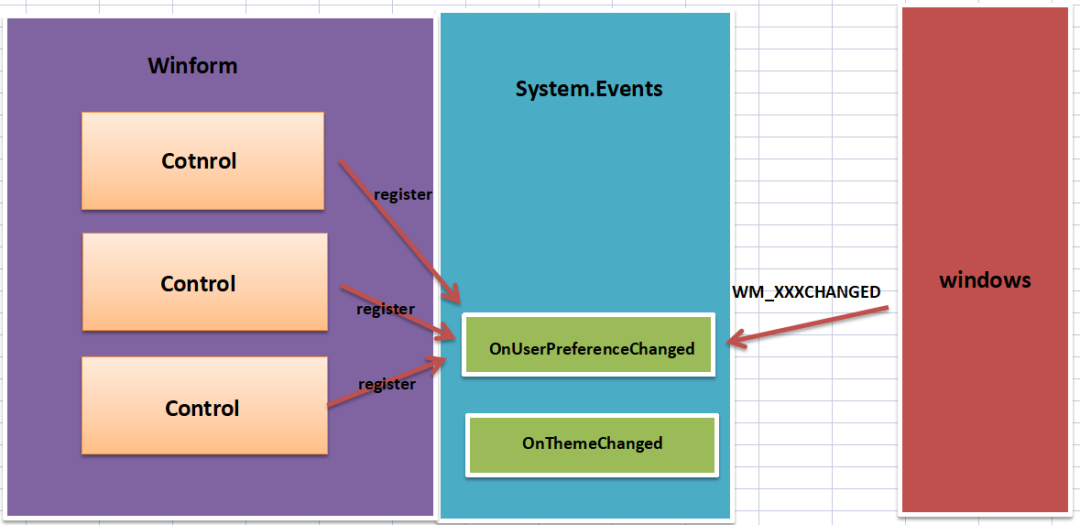
從本質(zhì)上來說,它就是一個觀察者模式,但這和UI卡死沒有半點關(guān)系,充其量就是解決問題前需要了解的背景知識,還有一個重要概念沒有說,那就是:WindowsFormsSynchronizationContext 。
2. 理解 WindowsFormsSynchronizationContext
為什么一定要了解 WindowsFormsSynchronizationContext 呢?理解了它,你就搞明白了為什么會卡死,我們知道 winform 的UI線程是一個 STA 模型,它的一個特點就是單線程,其他線程想要更新Control,都需要調(diào)度到UI線程的Queue隊列中,不存在也不允許并發(fā)更新Control的情況,參考如下:
0:000:x86> !t
ThreadCount:      207
UnstartedThread:  0
BackgroundThread: 206
PendingThread:    0
DeadThread:       0
Hosted Runtime:   no
                                                                         Lock
       ID OSID ThreadOBJ    State GC Mode     GC Alloc Context  Domain   Count Apt Exception
   0    1 1d90 003e2430   2026020 Preemptive  00000000:00000000 003db8b8 0     STA
   2    2 2804 003f0188     2b220 Preemptive  00000000:00000000 003db8b8 0     MTA (Finalizer)
Winform 還有一個特點:它會給那些創(chuàng)建 Control 的線程配一個 WindowsFormsSynchronizationContext 同步上下文,也就是說如果其他線程想要更新那個 Control,那就必須將更新的值通過 WindowsFormsSynchronizationContext 調(diào)度到那個創(chuàng)建它的線程上,這里的線程不僅僅是 UI 線程哦,有了這些基礎(chǔ)知識后,再來分析下為什么會被卡死。
3. 卡死的真正原因
再重新看下主線程的調(diào)用棧,它的走勢是這樣的:OnUserPreferenceChanged -> WindowsFormsSynchronizationContext.Send -> Control.MarshaledInvoke -> WaitHandle.WaitOneNative,哈哈,有看出什么問題嗎???
眼尖的朋友會發(fā)現(xiàn),為什么主線程會調(diào)用 WindowsFormsSynchronizationContext.Send 方法呢?難道那個注冊 handler的 Control 不是由主線程創(chuàng)建的嗎?要想回答這個問題,需要看一下 WindowsFormsSynchronizationContext 類的 destinationThreadRef 字段值,源碼如下:
public sealed class WindowsFormsSynchronizationContext : SynchronizationContext, IDisposable
{
    private Control controlToSendTo;

    private WeakReference destinationThreadRef;
}
可以用 !dso 命令把線程棧上的 WindowsFormsSynchronizationContext 給找出來,簡化輸出如下:
0:000:x86> !dso
OS Thread Id: 0x1d90 (0)
ESP/REG  Object   Name
0019ED70 027e441c System.Windows.Forms.WindowsFormsSynchronizationContext
0019EDC8 112ee43c Microsoft.Win32.SafeHandles.SafeWaitHandle
0019F078 11098b74 System.Windows.Forms.WindowsFormsSynchronizationContext
0019F080 1107487c Microsoft.Win32.SystemEvents+SystemEventInvokeInfo
0019F08C 10fa386c System.Object[]    (System.Object[])
0019F090 1107487c Microsoft.Win32.SystemEvents+SystemEventInvokeInfo
0019F0AC 027ebf60 System.Object
0019F0C0 10fa386c System.Object[]    (System.Object[])
0019F0C8 027ebe3c System.Object
0019F0CC 10fa388c Microsoft.Win32.SystemEvents+SystemEventInvokeInfo[]
...

0:000:x86> !do 11098b74
Name:        System.Windows.Forms.WindowsFormsSynchronizationContext
Fields:
      MT    Field   Offset                 Type VT     Attr    Value Name
6dbd8f30  4002567        8 ...ows.Forms.Control  0 instance 11098c24 controlToSendTo
6c667c2c  4002568        c System.WeakReference  0 instance 11098b88 destinationThreadRef

0:000:x86> !do 11098b88
Name:        System.WeakReference
Fields:
      MT    Field   Offset                 Type VT     Attr    Value Name
6c66938c  4000705        4        System.IntPtr  1 instance  86e426c m_handle

0:000:x86> !do poi(86e426c)
Name:        System.Threading.Thread
Fields:
      MT    Field   Offset                 Type VT     Attr    Value Name
6c663cc4  40018a5       24         System.Int32  1 instance        2 m_Priority
6c663cc4  40018a6       28         System.Int32  1 instance        7 m_ManagedThreadId
6c66f3d8  40018a7       2c       System.Boolean  1 instance        1 m_ExecutionContextBelongsToOuterScope
果然不出所料, 從卦象上看 Thread=7 線程上有 Control 注冊了系統(tǒng)事件,那 Thread=7 到底是什么線程呢?可以通過 !t 查看。
0:028:x86> !t
ThreadCount:      207
UnstartedThread:  0
BackgroundThread: 206
PendingThread:    0
DeadThread:       0
Hosted Runtime:   no
                                                                         Lock
       ID OSID ThreadOBJ    State GC Mode     GC Alloc Context  Domain   Count Apt Exception
   0    1 1d90 003e2430   2026020 Preemptive  00000000:00000000 003db8b8 0     STA
   2    2 2804 003f0188     2b220 Preemptive  00000000:00000000 003db8b8 0     MTA (Finalizer)
  28    7 27f0 0b29cd30   3029220 Preemptive  00000000:00000000 003db8b8 0     MTA (Threadpool Worker)
從卦象上看:ID=7 是一個線程池線程,而且是 MTA 模式,按理說它應(yīng)該將創(chuàng)建控件的邏輯調(diào)度給UI線程,而不是自己創(chuàng)建,所以UI線程一直在 WaitOneNative 處等待 7號線程消息泵響應(yīng),所以導致了無限期等待。
4. 7號線程到底創(chuàng)建了什么控件
這又是一個考驗底層知識的問題,也困擾著我至今,太難了,我曾今嘗試著把 UserPreferenceChangedEventHandler 事件上的所有 handles 撈出來,寫了一個腳本大概如下:
"use strict";

// 32bit
let arr = ["xxxx"];

function initializeScript() { return [new host.apiVersionSupport(1, 7)]; }
function log(str) { host.diagnostics.debugLog(str + "\n"); }
function exec(str) { return host.namespace.Debugger.Utility.Control.ExecuteCommand(str); }

function invokeScript() {

    for (var address of arr) {
        var commandText = ".printf \"%04x\", poi(poi(poi(poi(" + address + "+0x4)+0xc)+0x4))";
        var output = exec(commandText).First();

        if (parseInt(output) == 0) continue; //not exists thread info

        commandText = ".printf \"%04x\", poi(poi(poi(poi(poi(" + address + "+0x4)+0xc)+0x4))+0x28)";
        output = exec(commandText).First();

        //thread id
        var tid = parseInt(output);

        if (tid > 1) log("Thread=" + tid + ",systemEventInvokeInfo=" + address);
    }
}
輸出結(jié)果:
||2:2:438>     !wow64exts.sw
Switched to Guest (WoW) mode
Thread=7,systemEventInvokeInfo=1107487c
從輸出中找到了 7號線程 對應(yīng)的處理事件 systemEventInvokeInfo ,然后對其追查如下:
0:028:x86> !do 1107487c
Name:        Microsoft.Win32.SystemEvents+SystemEventInvokeInfo
Fields:
      MT    Field   Offset                 Type VT     Attr    Value Name
6c65ae34  4002e9f        4 ...ronizationContext  0 instance 11098b74 _syncContext
6c6635ac  4002ea0        8      System.Delegate  0 instance 1107485c _delegate

0:028:x86> !DumpObj /d 1107485c
Name:        Microsoft.Win32.UserPreferenceChangedEventHandler
Fields:
      MT    Field   Offset                 Type VT     Attr    Value Name
6c66211c  40002b0        4        System.Object  0 instance 110747bc _target
6c66211c  40002b1        8        System.Object  0 instance 00000000 _methodBase
6c66938c  40002b2        c        System.IntPtr  1 instance  6ebdc00 _methodPtr
6c66938c  40002b3       10        System.IntPtr  1 instance        0 _methodPtrAux
6c66211c  40002bd       14        System.Object  0 instance 00000000 _invocationList
6c66938c  40002be       18        System.IntPtr  1 instance        0 _invocationCount

0:028:x86> !DumpObj /d 110747bc
Name:        DevExpress.LookAndFeel.Design.UserLookAndFeelDefault
從輸出中可以看到,最后的控件是 DevExpress.LookAndFeel.Design.UserLookAndFeelDefault ,我以為找到了答案,拿著這個結(jié)果去 google,結(jié)果 devExpress 踢皮球,截圖如下:
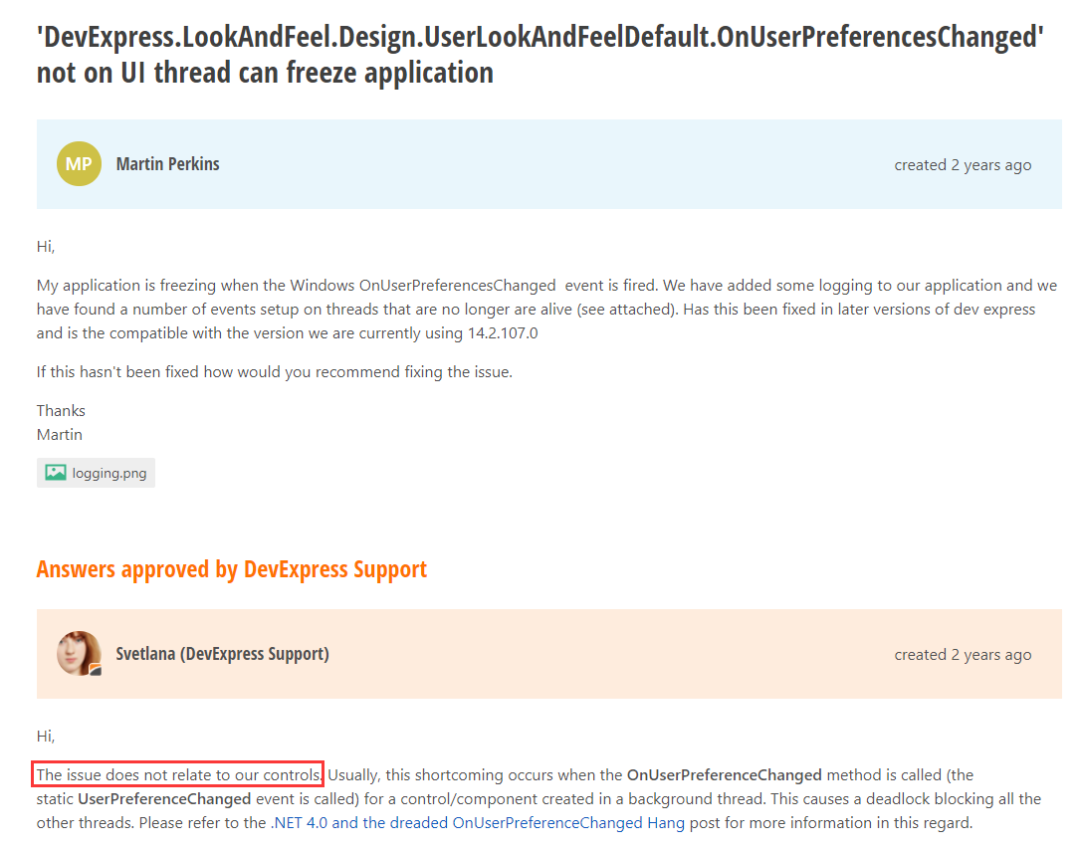
咳,到這里貌似就查不下去了,有其他資料上說 Control 在跨線程注冊 handler 時會經(jīng)過 MarshalingControl ,所以在這個控件設(shè)置bp斷點是能夠抓到的,參考命令如下:
bp xxx ".echo MarshalingControl creation detected. Callstack follows.;!clrstack;.echo
這里我就沒法驗證了。
三:總結(jié)
雖然知道這三起事故都是由于非UI線程創(chuàng)建Control所致,但很遺憾的是我盡了最大的知識邊界還沒有找到最重要的罪魁禍首,不過值得開心的是基于現(xiàn)有線索有一位朋友終于找到了問題代碼,真替他開心??????,解決辦法也很簡單,將 創(chuàng)建控件 通過 Invoke 調(diào)度到 UI線程 執(zhí)行。截圖如下:

通過這個案例,我發(fā)現(xiàn)高級調(diào)試真的是一場苦行之旅,且調(diào)且珍惜!