
Flutter動(dòng)態(tài)加載設(shè)置字體
Flutter 有好多關(guān)于設(shè)置字體樣式的教程,官網(wǎng)上就有,但好多都是把字體放到 assets 資源包,指定加載,這樣會(huì)讓 App 的包超級(jí)大不說(shuō),字體加載還死板。今天介紹一種動(dòng)態(tài)加載字體的教程。
其實(shí)也超級(jí)簡(jiǎn)單,核心代碼就幾句:
// 構(gòu)建 loadervar fontLoader = FontLoader('family');// 獲取字體 (Future) 裝載到 loader fontLoader.addFont(fetchFontByteData());// 加載字體await fontLoader.load();
下面稍微介紹一下其用法:
代碼目錄結(jié)構(gòu)
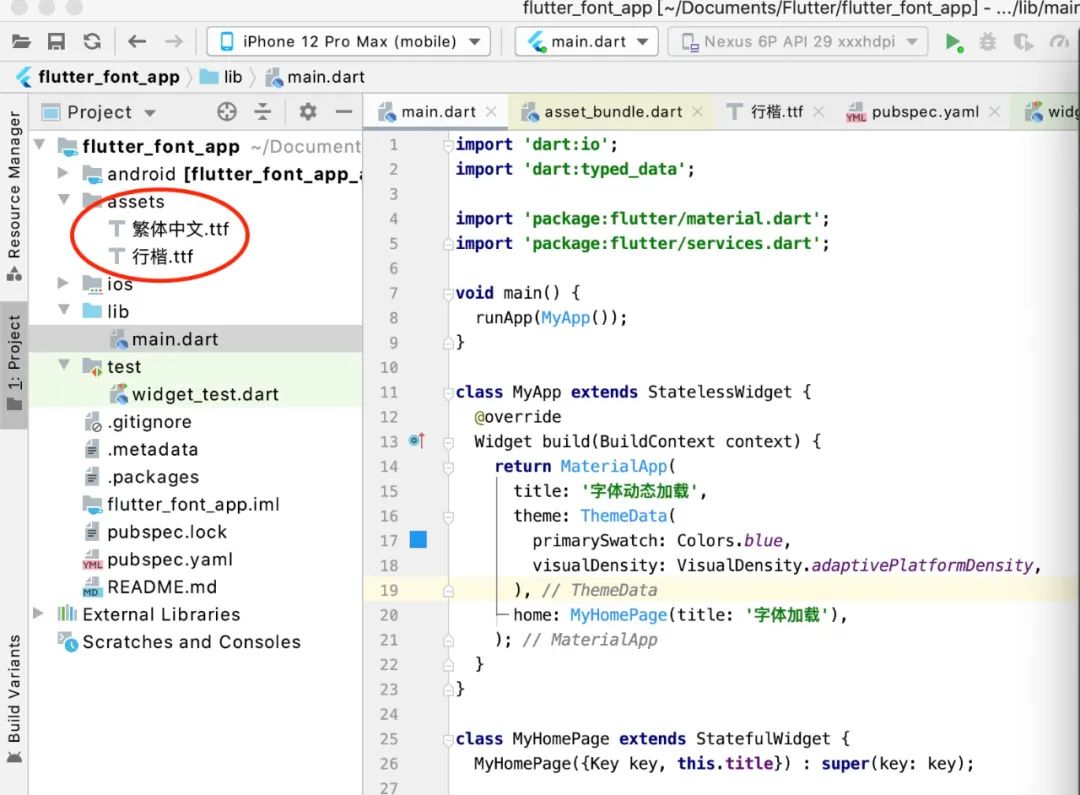
模擬從手機(jī)應(yīng)用中獲取到文件字體并加載
思路: 用文件選擇器找到字體文件路徑,生成 file 并轉(zhuǎn)為 ByteData,進(jìn)行加載。就這么簡(jiǎn)單。核心代碼如下:
void _loadFontFile() async {????//字體路徑String FontPath ="/Users/huangsir/Documents/Flutter/flutter_font_app/assets/繁體中文.ttf";var fontLoader = FontLoader("testFamily1"); //此處設(shè)置的名字需和使用時(shí)指定的family一致//獲取本地字體File fontFile = File(FontPath);Uint8List bytes = fontFile.readAsBytesSync();fontLoader.loadFont(bytes, "testFamily1");await fontLoader.load().catchError((e) {print("loadFontFile erro: $e");});print("加載成功");_fontFamily = "testFamily1";setState(() {});}
獲取 Asset 字體文件
//獲取Asset字體文件void _loadFontFile1() async {var fontLoader = FontLoader('testFamily2');fontLoader.addFont(fetchFontByteData());await fontLoader.load().catchError((e) {print("loadFontFile erro: $e");});_fontFamily = "testFamily2";setState(() {});}//此處的byte 數(shù)據(jù)也可以從網(wǎng)上下載獲取,實(shí)現(xiàn)網(wǎng)上下載替換字體FuturefetchFontByteData() => rootBundle.load('assets/行楷.ttf');
fetchFontByteData()就是獲取 Future
應(yīng)用
TextStyle 里面有一個(gè) fontFamily 屬性,可以用_fontFamily 字段接收,設(shè)置 TextStyle 即可。
Text('如果這世界復(fù)雜,虛假,喧嘩',style: TextStyle(fontSize: 16,fontFamily: _fontFamily,color: Theme.of(context).primaryColor),)
效果
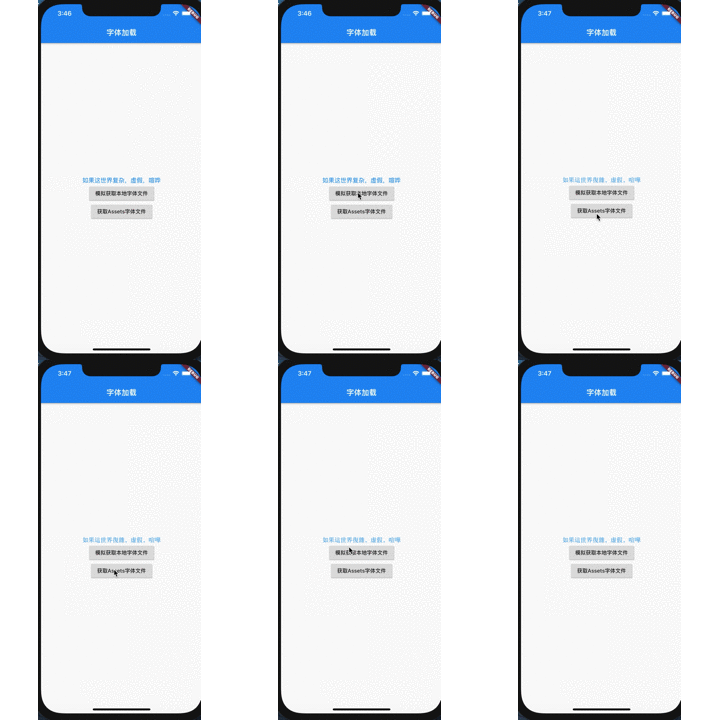
現(xiàn)實(shí)應(yīng)用
現(xiàn)實(shí) App 中替換字體大部分都是全局,即整個(gè) App 的字體都會(huì)替換。這種實(shí)現(xiàn)思路就是用 Redux 或者其他狀態(tài)管理替換 MaterialApp 中 ThemeData 的 fontFamily 屬性,即可實(shí)現(xiàn)整個(gè) App 字體切換。
MaterialApp(...theme: ThemeData(fontFamily: _fontFamily,),home: HomePage(),)
全部代碼
import 'dart:io';import 'dart:typed_data';import 'package:flutter/material.dart';import 'package:flutter/services.dart';void main() {runApp(MyApp());}class MyApp extends StatelessWidget {Widget build(BuildContext context) {return MaterialApp(title: '字體動(dòng)態(tài)加載',theme: ThemeData(primarySwatch: Colors.blue,visualDensity: VisualDensity.adaptivePlatformDensity,),home: MyHomePage(title: '字體加載'),);}}class MyHomePage extends StatefulWidget {MyHomePage({Key key, this.title}) : super(key: key);final String title;_MyHomePageState createState() => _MyHomePageState();}class _MyHomePageState extends State<MyHomePage> {//接收設(shè)置字體樣式String _fontFamily;void initState() {// TODO: implement initStatesuper.initState();}Widget build(BuildContext context) {return Scaffold(appBar: AppBar(title: Text(widget.title),),body: Center(child: Column(mainAxisAlignment: MainAxisAlignment.center,children:[ Text('如果這世界復(fù)雜,虛假,喧嘩',style: TextStyle(fontSize: 16,fontFamily: _fontFamily,color: Theme.of(context).primaryColor),),RaisedButton(onPressed: () {//模擬加載字體文件_loadFontFile();},child: Text("模擬獲取本地字體文件"),),RaisedButton(onPressed: () {//模擬加載字體文件_loadFontFile1();},child: Text("獲取Assets字體文件"),)],),), //);}//現(xiàn)實(shí)運(yùn)用中肯定是從手機(jī)中讀取到字體文件導(dǎo)入,此處模擬獲取本地字體文件,void _loadFontFile() async {//字體路勁String FontPath ="/Users/huangsir/Documents/Flutter/flutter_font_app/assets/繁體中文.ttf";var fontLoader = FontLoader("testFamily1"); //此處設(shè)置的名字需和使用時(shí)指定的family一致//獲取本地字體File fontFile = File(FontPath);Uint8List bytes = fontFile.readAsBytesSync();fontLoader.loadFont(bytes, "testFamily1");await fontLoader.load().catchError((e) {print("loadFontFile erro: $e");});print("加載成功");_fontFamily = "testFamily1";setState(() {});}//獲取Asset字體文件void _loadFontFile1() async {var fontLoader = FontLoader('testFamily2');fontLoader.addFont(fetchFontByteData());await fontLoader.load().catchError((e) {print("loadFontFile erro: $e");});_fontFamily = "testFamily2";setState(() {});}//此處的byte 數(shù)據(jù)也可以從網(wǎng)上下載獲取,實(shí)現(xiàn)網(wǎng)上下載替換字體FuturefetchFontByteData() => rootBundle.load('assets/行楷.ttf');}
評(píng)論
圖片
表情