
Flutter 實現(xiàn)"劍氣"加載
前言:前幾天在掘金上看到一篇文章,用html+css編寫了一個劍氣加載的動效。前端能做的東西,我Flutter大前端豈能罷休?于是小弟班門弄斧,用Flutter編寫了這個劍氣動效。相關(guān)掘金文章:juejin.cn/post/7001779766852321287
效果圖
知識點
Animation【動效】 Clipper/Canvas【路徑裁剪/畫布】 Matrix4【矩陣轉(zhuǎn)化】
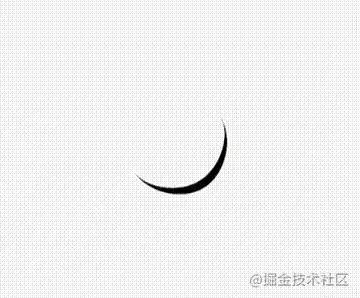
劍氣形狀
我們仔細看一道劍氣,它的形狀是一輪非常細小的彎彎的月牙;在Flutter中,我們可以通過Clipper路徑來裁剪出來,或者也可以通過canvas繪制出來。
先看canvas如何進行繪制的
class MyPainter extends CustomPainter {
  Color paintColor;

  MyPainter(this.paintColor);

  Paint _paint = Paint()
    ..strokeCap = StrokeCap.round
    ..isAntiAlias = true
    ..strokeJoin = StrokeJoin.bevel
    ..strokeWidth = 1.0;

  @override
  void paint(Canvas canvas, Size size) {
    _paint..color = this.paintColor;
    Path path = new Path();
    // 獲取視圖的大小
    double w = size.width;
    double h = size.height;
    // 月牙上邊界的高度
    double topH = h * 0.92;
    // 以區(qū)域中點開始繪制
    path.moveTo(0, h / 2);
    // 貝塞爾曲線連接path
    path.cubicTo(0, topH * 3 / 4, w / 4, topH, w / 2, topH);
    path.cubicTo((3 * w) / 4, topH, w, topH * 3 / 4, w, h / 2);
    path.cubicTo(w, h * 3 / 4, 3 * w / 4, h, w / 2, h);
    path.cubicTo(w / 4, h, 0, h * 3 / 4, 0, h / 2);

    canvas.drawPath(path, _paint);
  }

  @override
  bool shouldRepaint(covariant CustomPainter oldDelegate) => false; // 一次性畫好,不需要更新,返回false
}
Clipper也上代碼,跟canvas兩種選其一即可,我用的是canvas
class SwordPath extends CustomClipper<Path> {
  @override
  getClip(Size size) {
    print(size);
    // 獲取視圖的大小
    double w = size.width;
    double h = size.height;
    // 月牙上邊界的高度
    double topH = h * 0.92;
    Path path = new Path();
    // 以區(qū)域中點開始繪制
    path.moveTo(0, h / 2);
    // 貝塞爾曲線連接path
    path.cubicTo(0, topH * 3 / 4, w / 4, topH, w / 2, topH);
    path.cubicTo((3 * w) / 4, topH, w, topH * 3 / 4, w, h / 2);
    path.cubicTo(w, h * 3 / 4, 3 * w / 4, h, w / 2, h);
    path.cubicTo(w / 4, h, 0, h * 3 / 4, 0, h / 2);
    return path;
  }

  @override
  bool shouldReclip(covariant CustomClipper oldClipper) => false;
}
生成月牙控件
CustomPaint(
    painter: MyPainter(widget.loadColor),
    size: Size(200, 200),
),
讓劍氣旋轉(zhuǎn)起來
我們需要劍氣一直不停的循環(huán)轉(zhuǎn)動,所以需要用到動畫,讓劍氣圍繞中心的轉(zhuǎn)動起來。注意這里只是單純的平面旋轉(zhuǎn),也就是我們說的2D變換。這里我們用到的是Transform.rotate控件,通過animation.value傳入旋轉(zhuǎn)的角度,從而實現(xiàn)360度的旋轉(zhuǎn)。
class _SwordLoadingState extends State<SwordLoading>
    with TickerProviderStateMixin {
  late AnimationController _controller;
  late Animation<double> _animation;
  double angle = 0;

  @override
  void initState() {
    _controller =
        AnimationController(vsync: this, duration: Duration(milliseconds: 800));
    // pi * 2:360°旋轉(zhuǎn)
    _animation = Tween(begin: 0.0, end: pi * 2).animate(_controller);
    _controller.repeat(); // 循環(huán)播放動畫
    super.initState();
  }

  @override
  Widget build(BuildContext context) {
    return Transform.rotate(
      alignment: Alignment.center,
      angle: _animation.value,
      child: CustomPaint(
        painter: MyPainter(widget.loadColor),
        size: Size(widget.size, widget.size),
      ),
    );
   }
}
讓劍氣有角度的、更犀利的轉(zhuǎn)動
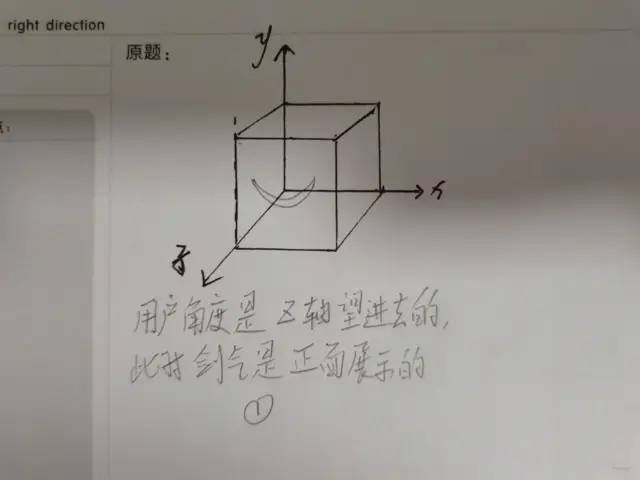
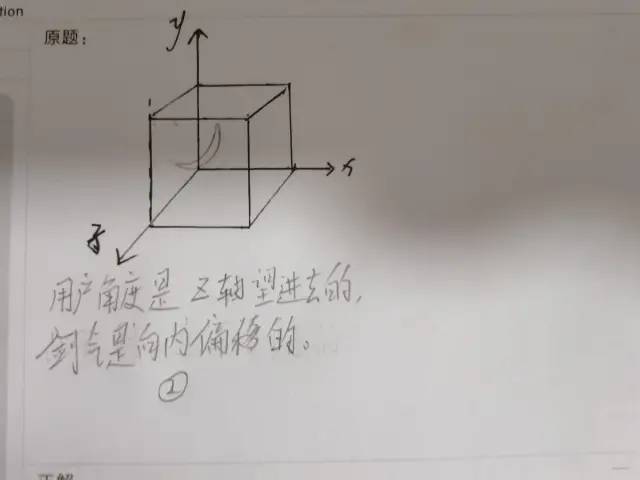
我們仔細看單獨一條劍氣,其實是在一個三維的模型中,把與Z軸垂直的劍氣 向Y軸、X軸進行了一定角度的偏移。 相當于在這個3D空間內(nèi),劍氣不在某一個平面了,而是斜在這個空間內(nèi),然后 再繞著圓心去旋轉(zhuǎn)。 而觀者的視圖,永遠與Z軸垂直【或者說:X軸和Y軸共同組成的平面上】,所以就會產(chǎn)生劍氣 從外到里進行旋轉(zhuǎn) 的感覺。
下圖純手工繪制,不要笑我~~~
綜上,可以確定這個過程是一個3D的變換,很明顯我們Transform.rotate這種2D的widget已經(jīng)不滿足需求了,這個時候Matrix4大佬上場了,我們通過Matrix4.identity()..rotate的方法,傳入我們的3D轉(zhuǎn)化,在通過rotateZ進行旋轉(zhuǎn),簡直完美。代碼如下
 AnimatedBuilder(
    animation: _animation,
    builder: (context, _) => Transform(
      transform: Matrix4.identity()
              ..rotate(v.Vector3(0, -8, 12), pi)
              ..rotateZ(_animation.value),
      alignment: Alignment.center,
      child: CustomPaint(
              painter: MyPainter(widget.loadColor),
              size: Size(widget.size, widget.size),
      ),
   ),
),
這里多說一句,要完成矩陣變換,Matrix4必不可少,可以著重學習下。
讓劍氣一起動起來
完成一個劍氣的旋轉(zhuǎn)之后,我們回到預(yù)覽效果,無非就是3個劍氣堆疊在一起,通過偏移角度去區(qū)分。Flutter堆疊效果直接用Stack實現(xiàn),完整代碼如下:
import 'package:flutter/material.dart';
import 'dart:math';
import 'package:vector_math/vector_math_64.dart' as v;

class SwordLoading extends StatefulWidget {
  const SwordLoading({Key? key, this.loadColor = Colors.black, this.size = 88})
      : super(key: key);

  final Color loadColor;
  final double size;

  @override
  _SwordLoadingState createState() => _SwordLoadingState();
}

class _SwordLoadingState extends State<SwordLoading>
    with TickerProviderStateMixin {
  late AnimationController _controller;
  late Animation<double> _animation;
  double angle = 0;

  @override
  void initState() {
    _controller =
        AnimationController(vsync: this, duration: Duration(milliseconds: 800));
    _animation = Tween(begin: 0.0, end: pi * 2).animate(_controller);
    _controller.repeat();
    super.initState();
  }

  @override
  Widget build(BuildContext context) {
    return Stack(
      children: [
        AnimatedBuilder(
          animation: _animation,
          builder: (context, _) => Transform(
            transform: Matrix4.identity()
              ..rotate(v.Vector3(0, -8, 12), pi)
              ..rotateZ(_animation.value),
            alignment: Alignment.center,
            child: CustomPaint(
              painter: MyPainter(widget.loadColor),
              size: Size(widget.size, widget.size),
            ),
          ),
        ),
        AnimatedBuilder(
          animation: _animation,
          builder: (context, _) => Transform(
            transform: Matrix4.identity()
              ..rotate(v.Vector3(-12, 8, 8), pi)
              ..rotateZ(_animation.value),
            alignment: Alignment.center,
            child: CustomPaint(
              painter: MyPainter(widget.loadColor),
              size: Size(widget.size, widget.size),
            ),
          ),
        ),
        AnimatedBuilder(
          animation: _animation,
          builder: (context, _) => Transform(
            transform: Matrix4.identity()
              ..rotate(v.Vector3(-8, -8, 6), pi)
              ..rotateZ(_animation.value),
            alignment: Alignment.center,
            child: CustomPaint(
              painter: MyPainter(widget.loadColor),
              size: Size(widget.size, widget.size),
            ),
          ),
        ),
      ],
    );
  }
}

class MyPainter extends CustomPainter {
  Color paintColor;

  MyPainter(this.paintColor);

  Paint _paint = Paint()
    ..strokeCap = StrokeCap.round
    ..isAntiAlias = true
    ..strokeJoin = StrokeJoin.bevel
    ..strokeWidth = 1.0;

  @override
  void paint(Canvas canvas, Size size) {
    _paint..color = this.paintColor;
    Path path = new Path();
    // 獲取視圖的大小
    double w = size.width;
    double h = size.height;
    // 月牙上邊界的高度
    double topH = h * 0.92;
    // 以區(qū)域中點開始繪制
    path.moveTo(0, h / 2);
    // 貝塞爾曲線連接path
    path.cubicTo(0, topH * 3 / 4, w / 4, topH, w / 2, topH);
    path.cubicTo((3 * w) / 4, topH, w, topH * 3 / 4, w, h / 2);
    path.cubicTo(w, h * 3 / 4, 3 * w / 4, h, w / 2, h);
    path.cubicTo(w / 4, h, 0, h * 3 / 4, 0, h / 2);

    canvas.drawPath(path, _paint);
  }

  @override
  bool shouldRepaint(covariant CustomPainter oldDelegate) =>
      false; // 一次性畫好,不需要更新,返回false
}
業(yè)務(wù)端調(diào)用
SwordLoading(loadColor: Colors.black,size: 128),
寫在最后
花了我整個周六下午的時間,很開心用Flutter實現(xiàn)了加載動畫,說說感受吧。
在編寫的過程中,對比html+css的方式,F(xiàn)lutter的實現(xiàn)難度其實更大,而且劍氣必須使用canvas繪制出來。 如果你也懂前端,你可以深刻體會聲明式和命令式UI在編寫布局和動畫所帶來的強烈差異,從而加深Flutter萬物皆對象的思想。*【因為萬物皆對象,所以所有控件和動畫,都是可以顯示聲明的對象,而不是像前端那樣通過解析xml命令來顯示】 2D/3D變換,我建議Flutter學者們,一定要深入學習,這種空間思維對我們實現(xiàn)特效是不可獲取的能力。
轉(zhuǎn)自:掘金 Karl_wei
https://juejin.cn/post/7002977635206692901
PS:如果覺得我的分享不錯,歡迎大家隨手點贊、轉(zhuǎn)發(fā)、在看。
PS:如果覺得我的分享不錯,歡迎大家隨手點贊、轉(zhuǎn)發(fā)、在看。