
K8S 部署 SpringBoot 項(xiàng)目(一篇夠用)
今日推薦
現(xiàn)在比較多的互聯(lián)網(wǎng)公司都在嘗試將微服務(wù)遷到云上,這樣的能夠通過(guò)一些成熟的云容器管理平臺(tái)更為方便地管理微服務(wù)集群,從而提高微服務(wù)的穩(wěn)定性,同時(shí)也能較好地提升團(tuán)隊(duì)開(kāi)發(fā)效率。
但是遷云存在一定的技術(shù)難點(diǎn),今天這篇文章主要介紹如何從0開(kāi)始搭建一套基于K8s部署的SpringBoot案例教程。
基礎(chǔ)環(huán)境準(zhǔn)備:
mac操作系統(tǒng) SpringBoot的簡(jiǎn)單Web工程
minikube的環(huán)境搭建
安裝一個(gè)適合我們初級(jí)入門(mén)的k8s環(huán)境,比較好的推薦是使用minikube工具,同時(shí)使用該工具可以更好地降低我們對(duì)k8s的學(xué)習(xí)門(mén)檻。首先我們需要下載minikube文件:
curl -Lo minikube https://github.com/kubernetes/minikube/releases/download/v1.5.0/minikube-linux-amd64 && chmod +x minikube && sudo mv minikube /usr/local/bin/
在安裝minikube的時(shí)候,嘗試下載鏡像的時(shí)候可能會(huì)卡住,例如出現(xiàn)下邊的這類(lèi)異常:
【idea @ Mac】>>>>>>minikube start --registry-mirror=https://w4i0ckag.mirror.aliyuncs.com
??  Darwin 10.15.3 上的 minikube v1.16.0
?  根據(jù)現(xiàn)有的配置文件使用 docker 驅(qū)動(dòng)程序
??  Starting control plane node minikube in cluster minikube
??  Pulling base image ...


E0126 17:03:30.131026   34416 cache.go:180] Error downloading kic artifacts:  failed to download kic base image or any fallback image
??  Creating docker container (CPUs=2, Memory=1988MB) ...

??  StartHost failed, but will try again: creating host: create: creating: setting up container node: preparing volume for minikube container: docker run --rm --entrypoint /usr/bin/test -v minikube:/var gcr.io/k8s-minikube/kicbase:v0.0.15-snapshot4@sha256:ef1f485b5a1cfa4c989bc05e153f0a8525968ec999e242efff871cbb31649c16 -d /var/lib: exit status 125
stdout:

stderr:
Unable to find image 'gcr.io/k8s-minikube/kicbase:v0.0.15-snapshot4@sha256:ef1f485b5a1cfa4c989bc05e153f0a8525968ec999e242efff871cbb31649c16' locally
docker: Error response from daemon: Get https://gcr.io/v2/: net/http: request canceled while waiting for connection (Client.Timeout exceeded while awaiting headers).
See 'docker run --help'.

??  docker "minikube" container is missing, will recreate.

??  Creating docker container (CPUs=2, Memory=1988MB) ...
??  Failed to start docker container. Running "minikube delete" may fix it: recreate: creating host: create: creating: setting up container node: preparing volume for minikube container: docker run --rm --entrypoint /usr/bin/test -v minikube:/var gcr.io/k8s-minikube/kicbase:v0.0.15-snapshot4@sha256:ef1f485b5a1cfa4c989bc05e153f0a8525968ec999e242efff871cbb31649c16 -d /var/lib: exit status 125
stdout:

stderr:
Unable to find image 'gcr.io/k8s-minikube/kicbase:v0.0.15-snapshot4@sha256:ef1f485b5a1cfa4c989bc05e153f0a8525968ec999e242efff871cbb31649c16' locally
docker: Error response from daemon: Get https://gcr.io/v2/: net/http: request canceled while waiting for connection (Client.Timeout exceeded while awaiting headers).
See 'docker run --help'.


?  Exiting due to GUEST_PROVISION: Failed to start host: recreate: creating host: create: creating: setting up container node: preparing volume for minikube container: docker run --rm --entrypoint /usr/bin/test -v minikube:/var gcr.io/k8s-minikube/kicbase:v0.0.15-snapshot4@sha256:ef1f485b5a1cfa4c989bc05e153f0a8525968ec999e242efff871cbb31649c16 -d /var/lib: exit status 125
stdout:

stderr:
Unable to find image 'gcr.io/k8s-minikube/kicbase:v0.0.15-snapshot4@sha256:ef1f485b5a1cfa4c989bc05e153f0a8525968ec999e242efff871cbb31649c16' locally
docker: Error response from daemon: Get https://gcr.io/v2/: net/http: request canceled while waiting for connection (Client.Timeout exceeded while awaiting headers).
See 'docker run --help'.


??  If the above advice does not help, please let us know:
??  https://github.com/kubernetes/minikube/issues/new/choose
此時(shí)可以嘗試先在宿主機(jī)上安裝好對(duì)應(yīng)的鏡像文件:
docker pull anjone/kicbase
然后minikube在啟動(dòng)的時(shí)候使用本地的鏡像,這樣可以減少minikube start過(guò)程的耗時(shí)。minikube下載了之后便到了啟動(dòng)環(huán)節(jié):
minikube start --vm-driver=docker --base-image="anjone/kicbase"
如果啟動(dòng)失敗,不妨試試更換指定的鏡像倉(cāng)庫(kù),例如下邊這段:
minikube start
--registry-mirror=https://bmtb46e4.mirror.aliyuncs.com
--vm-driver=docker
--base-image="anjone/kicbase"
--image-repository=registry.cn-hangzhou.aliyuncs.com/google_containers
這里頭我大概介紹一下啟動(dòng)參數(shù)的含義:
--registry-mirror這里的地址會(huì)和啟動(dòng)的minikube內(nèi)部的docker.daemon文件中所指向的鏡像倉(cāng)庫(kù)地址一致。--vm-driver虛擬機(jī)引擎 這里是指minikube的內(nèi)部通過(guò)docker來(lái)作為核心--base-image聲明好基礎(chǔ)鏡像,如果宿主機(jī)內(nèi)部有對(duì)應(yīng)鏡像,就不需要額外拉取--image-repository拉取鏡像的倉(cāng)庫(kù)
當(dāng)minikube啟動(dòng)成功之后,大致如下所示:
【idea @ Mac】>>>>>>minikube start --vm-driver=docker --base-image="anjone/kicbase"
??  Darwin 10.15.3 上的 minikube v1.16.0
?  根據(jù)現(xiàn)有的配置文件使用 docker 驅(qū)動(dòng)程序
??  Starting control plane node minikube in cluster minikube
??  docker "minikube" container is missing, will recreate.
??  Creating docker container (CPUs=2, Memory=1988MB) ...
?  This container is having trouble accessing https://k8s.gcr.io
??  To pull new external images, you may need to configure a proxy: https://minikube.sigs.k8s.io/docs/reference/networking/proxy/
??  正在 Docker 19.03.2 中準(zhǔn)備 Kubernetes v1.20.0…
    ? Generating certificates and keys ...
    ? Booting up control plane ...\

    ? Configuring RBAC rules ...
??  Verifying Kubernetes components...
??  Enabled addons: default-storageclass
??  Done! kubectl is now configured to use "minikube" cluster and "default" namespace by default
【idea @ Mac】>>>>>>
好了,接下來(lái)便到了部署SpringBoot應(yīng)用的部分了。
基于SpringBoot部署到k8s中
首先我們需要搭建一個(gè)簡(jiǎn)單的SpringBoot應(yīng)用:
引入dependency依賴(lài)
<dependencies>
????<dependency>
????????<groupId>org.springframework.bootgroupId>
????????<artifactId>spring-boot-starter-webartifactId>
????dependency>
dependencies>
打包docker鏡像的配置:
<build>
????<finalName>打包出來(lái)的鏡像名稱(chēng)finalName>
????<plugins>
????????<plugin>
????????????<groupId>org.springframework.bootgroupId>
????????????<artifactId>spring-boot-maven-pluginartifactId>
????????????<version>2.2.5.RELEASEversion>
????????plugin>
????????
????????<plugin>
????????????<groupId>com.spotifygroupId>
????????????<artifactId>docker-maven-pluginartifactId>
????????????<version>1.0.0version>
????????????<configuration>
????????????????<imageName>${project.artifactId}imageName>
????????????????<imageTags>
????????????????????<tag>1.0.1tag>
????????????????imageTags>
????????????????<dockerDirectory>src/main/dockerdockerDirectory>
????????????????<resources>
????????????????????<resource>
????????????????????????<targetPath>/targetPath>
????????????????????????<directory>${project.build.directory}directory>
????????????????????????<include>${project.build.finalName}.jarinclude>
????????????????????resource>
????????????????resources>
????????????configuration>
????????plugin>
????????
????plugins>
build>
接著是簡(jiǎn)單的controller和啟動(dòng)類(lèi):
@RestController
@RequestMapping(value?=?"/test")
public?class?TestController?{

????@GetMapping(value?=?"/do-test")
????public?String?doTest(){
????????System.out.println("this?is?a?test");
????????return?"success";
????}
}

@SpringBootApplication
public?class?WebApplication?{

????public?static?void?main(String[]?args)?{
????????SpringApplication.run(WebApplication.class);
????}
}
編寫(xiě)Dockerfile的腳本:
FROM?openjdk:8-jdk-alpine
VOLUME?/tmp
#將springboot-k8s-template.jar復(fù)制到容器內(nèi)部?并且別名叫springboot-k8s-template-v1.jar
ADD?springboot-k8s-template.jar?springboot-k8s-template-v1.jar
#相當(dāng)于在容器中用cmd命令執(zhí)行jar包??指定外部配置文件
ENTRYPOINT?["java","-Djava.security.egd=file:/dev/./urandom","-jar","/springboot-k8s-template-v1.jar"]
然后進(jìn)入到Dockerfile的目錄底下,進(jìn)行鏡像的構(gòu)建:
【idea?@?Mac】>>>>>>docker?build?-t?springboot-k8s-template:1.0?.
[+]?Building?0.5s?(7/7)?FINISHED????????????????????????????????????????????????????????????????????????????????????????????????????????????????????????????????????????????????????????????????
?=>?[internal]?load?build?definition?from?Dockerfile???????????????????????????????????????????????????????????????????????????????????????????????????????????????????????????????????????0.0s
?=>?=>?transferring?dockerfile:?419B???????????????????????????????????????????????????????????????????????????????????????????????????????????????????????????????????????????????????????0.0s
?=>?[internal]?load?.dockerignore??????????????????????????????????????????????????????????????????????????????????????????????????????????????????????????????????????????????????????????0.0s
?=>?=>?transferring?context:?2B????????????????????????????????????????????????????????????????????????????????????????????????????????????????????????????????????????????????????????????0.0s
?=>?[internal]?load?metadata?for?docker.io/library/openjdk:8-jdk-alpine????????????????????????????????????????????????????????????????????????????????????????????????????????????????????0.0s
?=>?[internal]?load?build?context??????????????????????????????????????????????????????????????????????????????????????????????????????????????????????????????????????????????????????????0.3s
?=>?=>?transferring?context:?17.60MB???????????????????????????????????????????????????????????????????????????????????????????????????????????????????????????????????????????????????????0.3s
?=>?CACHED?[1/2]?FROM?docker.io/library/openjdk:8-jdk-alpine???????????????????????????????????????????????????????????????????????????????????????????????????????????????????????????????0.0s
?=>?[2/2]?ADD?springboot-k8s-template.jar?springboot-k8s-template-v1.jar???????????????????????????????????????????????????????????????????????????????????????????????????????????????????0.1s
?=>?exporting?to?image?????????????????????????????????????????????????????????????????????????????????????????????????????????????????????????????????????????????????????????????????????0.1s
?=>?=>?exporting?layers????????????????????????????????????????????????????????????????????????????????????????????????????????????????????????????????????????????????????????????????????0.1s
?=>?=>?writing?image?sha256:86d02961c4fa5bb576c91e3ebf031a3d8b140ddbb451b9613a2c4d601ac4d853???????????????????????????????????????????????????????????????????????????????????????????????0.0s
?=>?=>?naming?to?docker.io/library/springboot-k8s-template:1.0?????????????????????????????????????????????????????????????????????????????????????????????????????????????????????????????0.0s

Use?'docker?scan'?to?run?Snyk?tests?against?images?to?find?vulnerabilities?and?learn?how?to?fix?them

【idea?@?Mac】>>>>>>docker?images?|?grep?template
springboot-k8s-template???????????????????????????????????1.0?????????????????????????????????????????????????????86d02961c4fa???48?seconds?ago???122MB
構(gòu)建完成之后,將本地鏡像打包發(fā)布到鏡像倉(cāng)庫(kù)中,這里我是通過(guò)推送到阿里云鏡像倉(cāng)庫(kù)的方式來(lái)處理的。
推送本地鏡像到阿里云
首先是登錄到docker倉(cāng)庫(kù),然后記錄對(duì)應(yīng)的tag信息,最終推送鏡像。
$?docker?login?--username=[阿里云賬戶(hù)名稱(chēng)]?registry.cn-qingdao.aliyuncs.com
$?docker?tag?[ImageId]?registry.cn-qingdao.aliyuncs.com/idea_hub/idea_resp:[鏡像版本號(hào)]
$?docker?push?registry.cn-qingdao.aliyuncs.com/idea_hub/idea_resp:[鏡像版本號(hào)]
例如:
【idea?@?Mac】>>>>>>docker?images?|?grep?config
qiyu-framework-k8s-config??????????1.0???????????6168639757e9???2?minutes?ago???122MB
【idea?@?Mac】>>>>>>docker?tag?6168639757e9?registry.cn-qingdao.aliyuncs.com/idea_hub/idea_resp:qiyu-framework-k8s-config-1.0
【idea?@?Mac】>>>>>>docker?push?registry.cn-qingdao.aliyuncs.com/idea_hub/idea_resp:qiyu-framework-k8s-config-1.0
The?push?refers?to?repository?[registry.cn-qingdao.aliyuncs.com/idea_hub/idea_resp]
1ace00556b41:?Pushed?
ceaf9e1ebef5:?Layer?already?exists?
9b9b7f3d56a0:?Layer?already?exists?
f1b5933fe4b5:?Layer?already?exists?
qiyu-framework-k8s-config-1.0:?digest:?sha256:50c1a87484f6cbec699d65321fa5bbe70f5ad6da5a237e95ea87c7953a1c80da?size:?1159
【idea?@?Mac】>>>>>>
請(qǐng)根據(jù)實(shí)際鏡像信息替換示例中的[ImageId]和[鏡像版本號(hào)]參數(shù)。
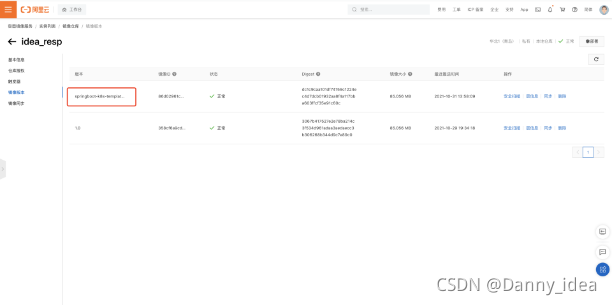
將鏡像文件打包并且推送到鏡像倉(cāng)庫(kù)之后,可以通過(guò)在yaml文件中編寫(xiě)對(duì)應(yīng)的鏡像地址,這樣就能保證在鏡像下載的時(shí)候能從倉(cāng)庫(kù)拉取出對(duì)應(yīng)的鏡像文件。
通常項(xiàng)目中我們會(huì)采用統(tǒng)一的yaml文件來(lái)進(jìn)行pod節(jié)點(diǎn)的部署與構(gòu)建。
yaml配置文件:
apiVersion:?apps/v1??#kubectl?api-versions?可以通過(guò)這條指令去看版本信息
kind:?Deployment?#?指定資源類(lèi)別
metadata:?#資源的一些元數(shù)據(jù)
??name:?springboot-k8s-template-deployment?#deloyment的名稱(chēng)
??labels:
????app:?springboot-k8s-template-deployment??#標(biāo)簽
spec:
??replicas:?2?#創(chuàng)建pod的個(gè)數(shù)
??selector:
????matchLabels:
??????app:?springboot-k8s-template-deployment?#滿(mǎn)足標(biāo)簽為這個(gè)的時(shí)候相關(guān)的pod才能被調(diào)度到
??template:
????metadata:
??????labels:
????????app:?springboot-k8s-template-v1
????spec:
??????containers:
????????-?name:?springboot-k8s-template-v1
??????????image:?registry.cn-qingdao.aliyuncs.com/idea_hub/idea_resp:1.0
??????????imagePullPolicy:?IfNotPresent
??????????ports:
????????????-?containerPort:?8080
由于阿里云的鏡像倉(cāng)庫(kù)需要用戶(hù)賬號(hào)密碼權(quán)限訪問(wèn),所以這里我們可以嘗試簡(jiǎn)單一些的策略,登錄minikube的內(nèi)部,提前下載好對(duì)應(yīng)的阿里云鏡像。
通過(guò) minikube ssh 指令即可登錄到minikube的內(nèi)部:
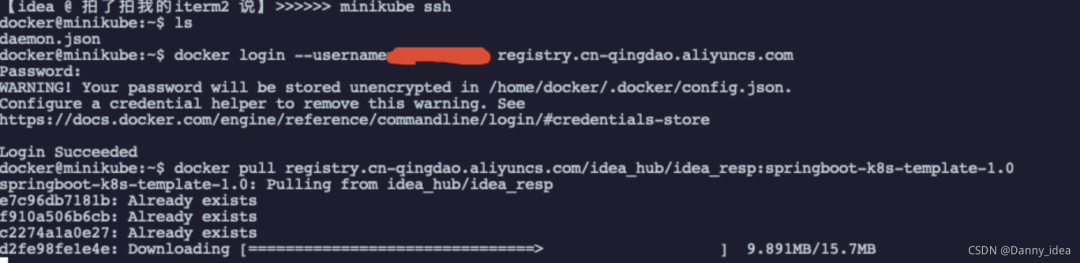
采用docker pull指令即可下載對(duì)應(yīng)資源:
docker@minikube:~$?docker?pull?registry.cn-qingdao.aliyuncs.com/idea_hub/idea_resp:springboot-k8s-template-1.0
springboot-k8s-template-1.0:?Pulling?from?idea_hub/idea_resp
e7c96db7181b:?Already?exists
f910a506b6cb:?Already?exists
c2274a1a0e27:?Already?exists
d2fe98fe1e4e:?Pull?complete
Digest:?sha256:dc1c9caa101df74159c1224ec4d7dcb01932aa8f4a117bba603ffcf35e91c60c
Status:?Downloaded?newer?image?for?registry.cn-qingdao.aliyuncs.com/idea_hub/idea_resp:springboot-k8s-template-1.0
registry.cn-qingdao.aliyuncs.com/idea_hub/idea_resp:springboot-k8s-template-1.0
docker@minikube:~$
查看對(duì)應(yīng)的鏡像文件

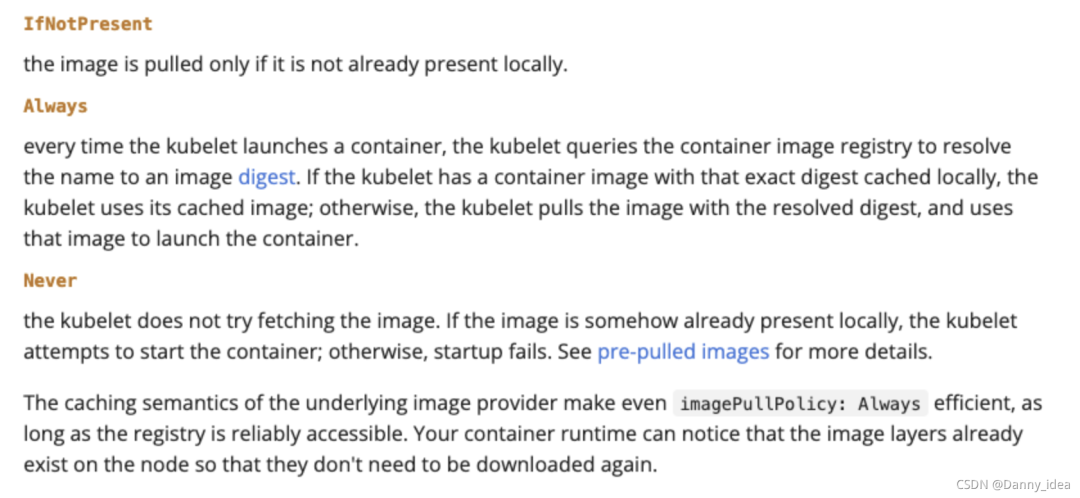
鏡像拉取策略可以對(duì)照官網(wǎng)的介紹來(lái)系統(tǒng)認(rèn)識(shí):
https://kubernetes.io/docs/concepts/containers/images/
在yaml文件里我選用了IfNotPresent策略,這條策略能夠保證當(dāng)本地有鏡像的時(shí)候優(yōu)先選用本地,沒(méi)有才選擇網(wǎng)絡(luò)拉取。
最后是找到相關(guān)的yaml文件進(jìn)行pod的部署啟動(dòng)。
kubectl?create?-f?./k8s-springboot-template.yaml?
此時(shí)通過(guò) kubectl get pod 命令可以看到對(duì)應(yīng)的pod節(jié)點(diǎn):
最終需要暴露deployment服務(wù):
【idea @ 拍了拍我的iterm2 說(shuō)】>>>>>> kubectl expose deployment springboot-k8s-template-deployment --type=NodePort
service/springboot-k8s-template-deployment exposed
【idea @ 拍了拍我的iterm2 說(shuō)】>>>>>> kubectl get pods
NAME                                                  READY   STATUS    RESTARTS   AGE
springboot-k8s-template-deployment-687f8bf86d-gqxcp   1/1     Running   0          7m50s
springboot-k8s-template-deployment-687f8bf86d-lcq5p   1/1     Running   0          7m50s
【idea @ 拍了拍我的iterm2 說(shuō)】>>>>>> minikube service springboot-k8s-template-deployment
|-----------|------------------------------------|-------------|---------------------------|
| NAMESPACE |                NAME                | TARGET PORT |            URL            |
|-----------|------------------------------------|-------------|---------------------------|
| default   | springboot-k8s-template-deployment |        8080 | http://192.168.49.2:31179 |
|-----------|------------------------------------|-------------|---------------------------|
??  Starting tunnel for service springboot-k8s-template-deployment.
|-----------|------------------------------------|-------------|------------------------|
| NAMESPACE |                NAME                | TARGET PORT |          URL           |
|-----------|------------------------------------|-------------|------------------------|
| default   | springboot-k8s-template-deployment |             | http://127.0.0.1:57109 |
|-----------|------------------------------------|-------------|------------------------|
??  正通過(guò)默認(rèn)瀏覽器打開(kāi)服務(wù) default/springboot-k8s-template-deployment...
?  Because you are using a Docker driver on darwin, the terminal needs to be open to run it.
暴露之后訪問(wèn):
http://127.0.0.1:57109/test/do-test
驗(yàn)證接口正常。
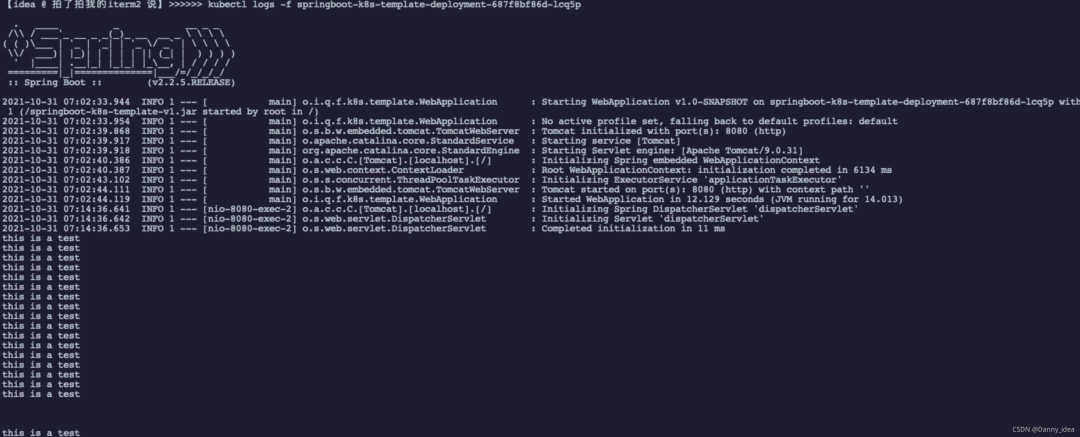
minikube日志查看:
?kubectl?logs?-f?springboot-k8s-template-deployment-687f8bf86d-lcq5p
推薦文章
1、一款高顏值的 SpringBoot+JPA 博客項(xiàng)目
2、超優(yōu) Vue+Element+Spring 中后端解決方案
4、推薦一個(gè) Java 企業(yè)信息化系統(tǒng)
5、一款基于 Spring Boot 的現(xiàn)代化社區(qū)(論壇/問(wèn)答/社交網(wǎng)絡(luò)/博客)