
云原生初體驗(yàn):在k8s上部署springboot應(yīng)用
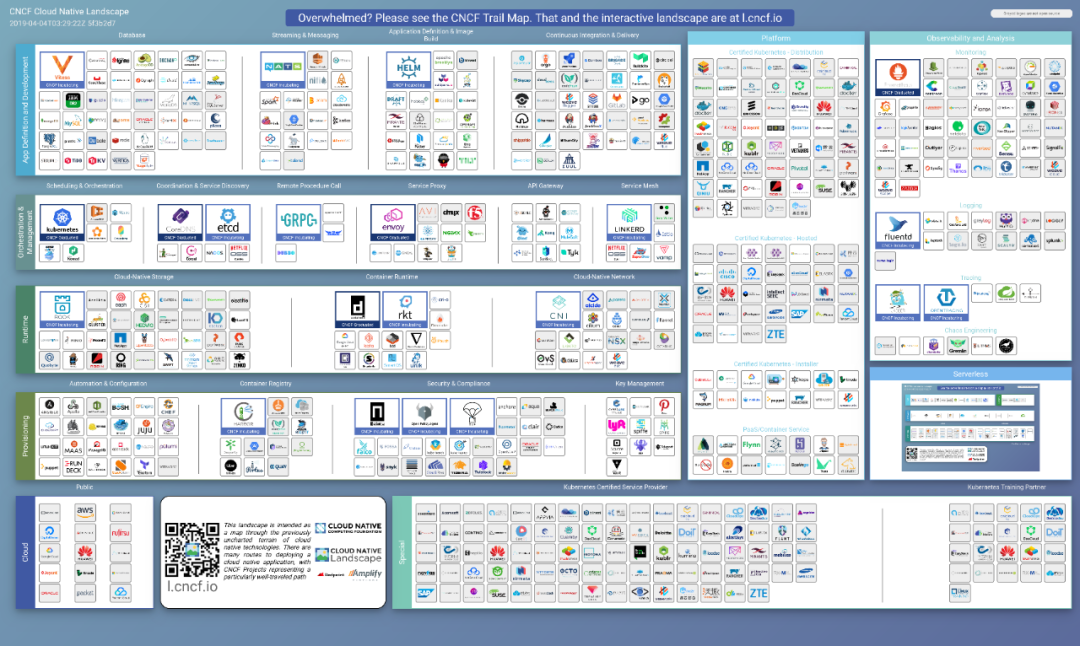
你會(huì)不會(huì)對(duì)“云原生”很有興趣,卻不知道從何入手?
本文會(huì)在window環(huán)境下,構(gòu)建一套基于k8s的istio環(huán)境,并且通過(guò)skaffold完成鏡像的構(gòu)建和項(xiàng)目部署到集群環(huán)境。其實(shí)對(duì)于實(shí)驗(yàn)環(huán)境有限的朋友們,完全可以在某里云上,按量付費(fèi)搞3臺(tái)”突發(fā)性能實(shí)例“,玩一晚,也就是杯咖啡錢(qián)。
好吧,讓我開(kāi)始吧!
執(zhí)行流程
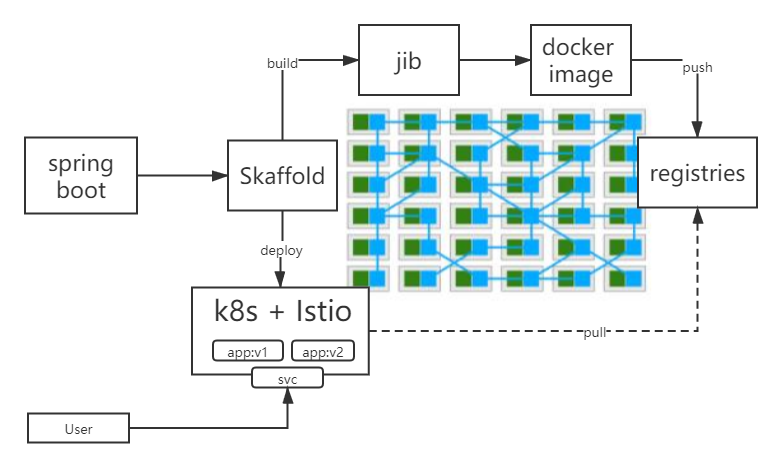
整體流程的話,如下圖所示,通過(guò) Skaffold+jib 將開(kāi)發(fā)的應(yīng)用打包成鏡像,提交到本地倉(cāng)庫(kù),并且將應(yīng)用部署到集群中。k8s中部署2個(gè)pod,模擬應(yīng)用不同的版本,并且配置訪問(wèn)權(quán)重20%:80%。
環(huán)境選擇
我之前有文章詳細(xì)介紹過(guò)minikube。本次實(shí)驗(yàn),開(kāi)始的時(shí)候,我就一直沉溺在使用kind的便捷上,而且直接可以在docker上部署集群,可以說(shuō)非常方便。但是由于我對(duì)K8S的理解并不足夠,導(dǎo)致后面遇到了很多問(wèn)題,所以,在這里建議新上手的小伙伴,還是使用minikube吧。k3s和RKE都需要多臺(tái)虛擬機(jī),礙于機(jī)器性能,這種方案暫時(shí)不考慮了。
下面表格,對(duì)比了minikube、kind、k3s 部署環(huán)境,以及支持情況,方便大家選擇。
| minikube | kind | k3s | |
|---|---|---|---|
| runtime | VM | container | native |
| supported architectures | AMD64 | AMD64 | AMD64, ARMv7, ARM64 |
| supported container runtimes | Docker,CRI-O,containerd,gvisor | Docker | Docker, containerd |
| startup time initial/following | 5:19 / 3:15 | 2:48 / 1:06 | 0:15 / 0:15 |
| memory requirements | 2GB | 8GB (Windows, MacOS) | 512 MB |
| requires root? | no | no | yes (rootless is experimental) |
| multi-cluster support | yes | yes | no (can be achieved using containers) |
| multi-node support | no | yes | yes |
| project page | https://minikube.sigs.k8s.io/ | https://kind.sigs.k8s.io/ | https://k3s.io/ |
[1] 表格引用自:http://jiagoushi.pro/minikube-vs-kind-vs-k3s-what-should-i-use
docker desktop 沒(méi)有特殊要求。其他的自己用的順手就好,還是需要特別說(shuō)一下minikube,別用最新的coredns一直都拉不下來(lái),除非你的魔法,可以完全搞定,否則,還是用阿里編譯的minikube版本吧,別跟自己較勁,別問(wèn)我為什么...
我用的版本羅列在下面了:
?  ~ istioctl version
client version: 1.10.2
control plane version: 1.10.2
data plane version: 1.10.2 (10 proxies)

?  ~ minikube version
minikube version: v1.18.1
commit: 511aca80987826051cf1c6527c3da706925f7909

?  ~ skaffold version
v1.29.0
環(huán)境搭建
使用minikube創(chuàng)建集群
使用 hyperv 作為引擎 , 內(nèi)存 8192M cup 4核,不能再少了,否則拉不起來(lái) istio
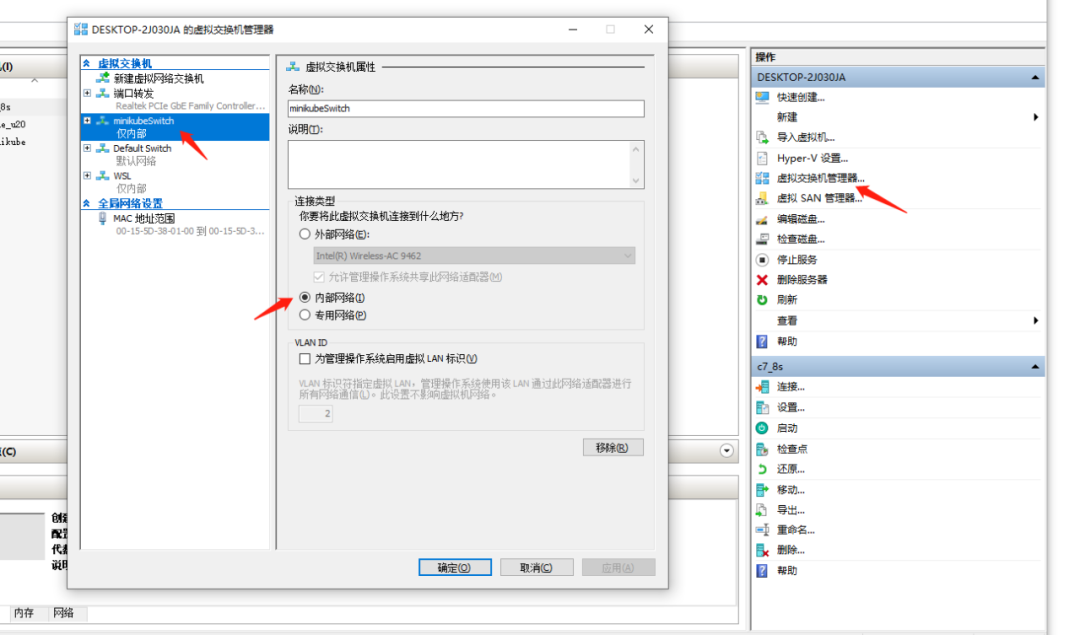
? ~ minikube start --image-mirror-country='cn' --registry-mirror=https://hq0igpc0.mirror.aliyuncs.com --vm-driver="hyperv" --memory=8192 --cpus=4 --hyperv-virtual-switch="minikubeSwitch" --image-repository=registry.cn-hangzhou.aliyuncs.com/google_containers還要在 hyperv里創(chuàng)建一個(gè)虛擬路由,這里我構(gòu)建了一個(gè)內(nèi)部網(wǎng)絡(luò),這樣可以通過(guò)設(shè)置網(wǎng)卡的ip,將內(nèi)部網(wǎng)絡(luò)的網(wǎng)段固定下來(lái),否則,每次重啟都會(huì)變化ip
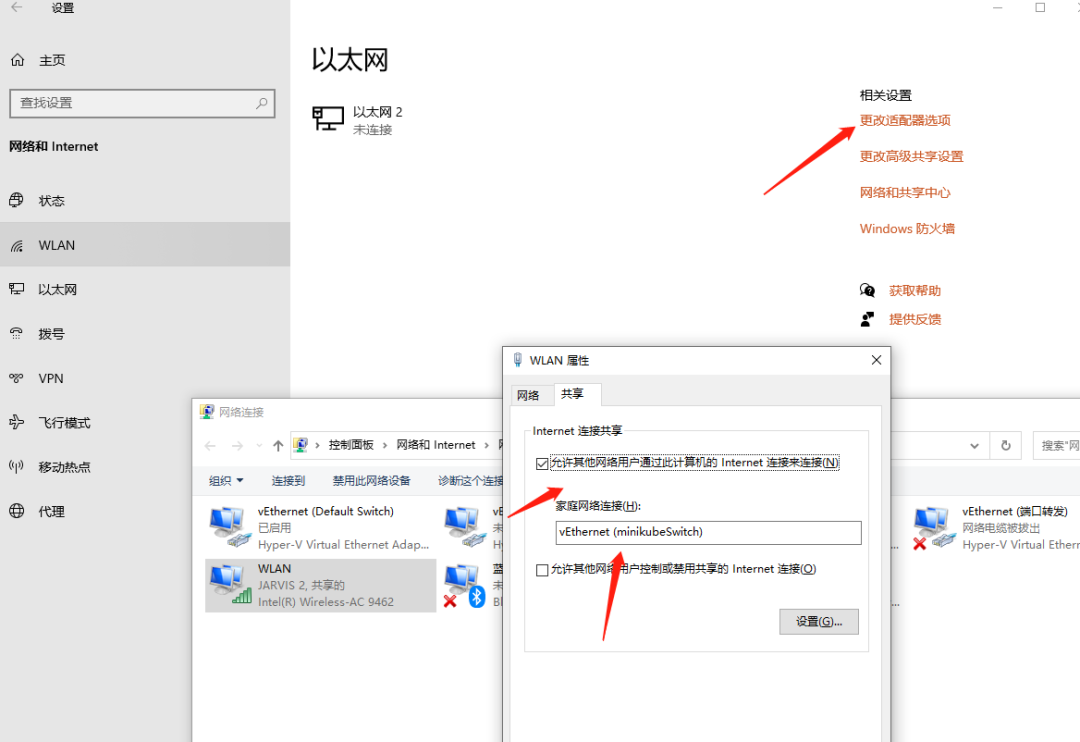
配置讓內(nèi)部網(wǎng)絡(luò),共享訪問(wèn)互聯(lián)網(wǎng)
啟動(dòng)成功
?  istio-1.10.2 minikube start
??  Microsoft Windows 10 Pro 10.0.19042 Build 19042 上的 minikube v1.18.1
??  minikube 1.20.0 is available! Download it: https://github.com/kubernetes/minikube/releases/tag/v1.20.0

?  根據(jù)現(xiàn)有的配置文件使用 hyperv 驅(qū)動(dòng)程序
??  Starting control plane node minikube in cluster minikube
??  Restarting existing hyperv VM for "minikube" ...
??  正在 Docker 20.10.3 中準(zhǔn)備 Kubernetes v1.20.2…
??  Verifying Kubernetes components...
    ? Using image registry.cn-hangzhou.aliyuncs.com/google_containers/storage-provisioner:v4 (global image repository)
    ? Using image registry.hub.docker.com/kubernetesui/dashboard:v2.1.0
    ? Using image registry.hub.docker.com/kubernetesui/metrics-scraper:v1.0.4
    ? Using image registry.cn-hangzhou.aliyuncs.com/google_containers/metrics-server-amd64:v0.2.1 (global image repository)
??  Enabled addons: metrics-server, storage-provisioner, dashboard, default-storageclass
??  Done! kubectl is now configured to use "minikube" cluster and "default" namespace by default
部署 istio
創(chuàng)建 istio-system 的命名空間
kubectl create namespace istio-system
安裝 istio
istioctl manifest apply --set profile=demo
安裝完成后,執(zhí)行命令 kubectl get svc -n istio-system
?  ~ kubectl get svc -n istio-system
NAME                   TYPE           CLUSTER-IP       EXTERNAL-IP   PORT(S)                                                                      AGE
istio-egressgateway    ClusterIP      10.105.31.73     <none>        80/TCP,443/TCP                                                               8d
istio-ingressgateway   LoadBalancer   10.103.61.73     <pending>     15021:31031/TCP,80:31769/TCP,443:30373/TCP,31400:31833/TCP,15443:32411/TCP   8d
istiod                 ClusterIP      10.110.109.205   <none>        15010/TCP,15012/TCP,443/TCP,15014/TCP                                        8d
部署 bookinfo
部署 bookinfo demo 驗(yàn)證環(huán)境
執(zhí)行命令
kubectl label namespace default istio-injection=enabled

kubectl apply -f samples/bookinfo/platform/kube/bookinfo.yaml
等待pod都啟動(dòng)起來(lái)以后,添加bookinfo網(wǎng)絡(luò)配置,用于訪問(wèn) kubectl apply -f .\samples\bookinfo\networking\bookinfo-gateway.yaml
? istio-1.10.2 kubectl apply -f .\samples\bookinfo\networking\bookinfo-gateway.yaml

gateway.networking.istio.io/bookinfo-gateway created

virtualservice.networking.istio.io/bookinfo created
使用命令查看service : kubectl get services
?  ~ kubectl get services
NAME             TYPE        CLUSTER-IP       EXTERNAL-IP   PORT(S)          AGE
callme-service   NodePort    10.106.26.24     <none>        8080:30101/TCP   8d
details          ClusterIP   10.110.253.19    <none>        9080/TCP         8d
kubernetes       ClusterIP   10.96.0.1        <none>        443/TCP          8d
productpage      ClusterIP   10.96.246.175    <none>        9080/TCP         8d
ratings          ClusterIP   10.99.234.109    <none>        9080/TCP         8d
reviews          ClusterIP   10.103.177.123   <none>        9080/TCP         8d
查看pods狀態(tài) kubectl get pods
?  ~ kubectl get pods
NAME                                 READY   STATUS    RESTARTS   AGE
callme-service-v1-76dd76ddcc-znb62   2/2     Running   0          4h59m
callme-service-v2-679db76bbc-m4svm   2/2     Running   0          4h59m
details-v1-79f774bdb9-qk9q8          2/2     Running   8          8d
productpage-v1-6b746f74dc-p4xcb      2/2     Running   8          8d
ratings-v1-b6994bb9-dlvjm            2/2     Running   8          8d
reviews-v1-545db77b95-sgdzq          2/2     Running   8          8d
reviews-v2-7bf8c9648f-t6s8z          2/2     Running   8          8d
reviews-v3-84779c7bbc-4p8hv          2/2     Running   8          8d
查看集群ip 以及 端口
?  ~ kubectl get po -l istio=ingressgateway -n istio-system -o 'jsonpath={.items[0].status.hostIP}'
192.168.137.115


? istio-1.10.2 kubectl get svc istio-ingressgateway -n istio-system

NAME          TYPE      CLUSTER-IP   EXTERNAL-IP  PORT(S)                                   AGE

istio-ingressgateway  LoadBalancer  10.110.228.32  <pending>   15021:32343/TCP,80:30088/TCP,443:31869/TCP,31400:32308/TCP,15443:32213/TCP  3m17s
于是訪問(wèn)地址: http://192.168.137.115:31769/productpage
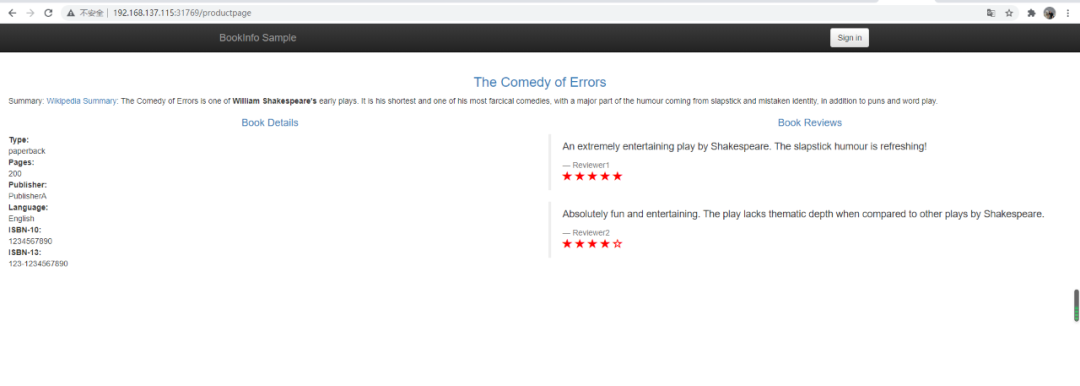
我們 bookinfo 就部署成功了。接下來(lái)我們創(chuàng)建應(yīng)用
構(gòu)建應(yīng)用
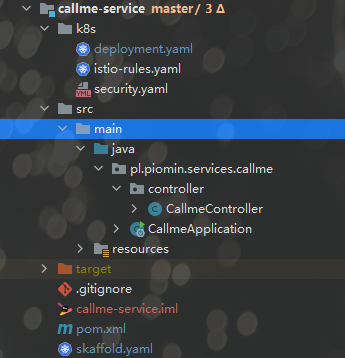
構(gòu)建一個(gè)普通的springboot工程,添加編譯插件,這里我們使用了本地的docker倉(cāng)庫(kù)存儲(chǔ)鏡像
<build>
        <plugins>
            <plugin>
                <groupId>org.springframework.boot</groupId>
                <artifactId>spring-boot-maven-plugin</artifactId>
                <executions>
                    <execution>
                        <goals>
                            <goal>build-info</goal>
                            <goal>repackage</goal>
                        </goals>
                    </execution>
                </executions>
            </plugin>
            <plugin>
                <groupId>com.google.cloud.tools</groupId>
                <artifactId>jib-maven-plugin</artifactId>
                <version>3.1.1</version>
                <configuration>
                    <to>
                        <image>127.0.0.1:9001/${project.artifactId}:${project.version}</image>
                        <auth>
                            <username>
                                xxx
                            </username>
                            <password>
                                xxx
                            </password>
                        </auth>
                    </to>
                    <allowInsecureRegistries>true</allowInsecureRegistries>
                </configuration>
            </plugin>
        </plugins>
    </build>
構(gòu)建一個(gè)簡(jiǎn)單的rest,現(xiàn)實(shí)一個(gè)構(gòu)建名稱,以及配置的一個(gè)版本號(hào)
@Autowired
BuildProperties buildProperties;
@Value("${VERSION}")
private String version;

@GetMapping("/ping")
public String ping() {
    LOGGER.info("Ping: name={}, version={}", buildProperties.getName(), version);
    return "I'm callme-service " + version;
}
創(chuàng)建 skaffold.xml 用于給 skafflod 編譯鏡像,提交集群使用
apiVersion: skaffold/v2alpha1
kind: Config
build:
  artifacts:
    - image: 127.0.0.1:9001/callme-service
      jib: {}
  tagPolicy:
gitCommit: {}創(chuàng)建k8s的部署描述k8s/deployment.yml,以及service用于訪問(wèn)
apiVersion: apps/v1
kind: Deployment
metadata:
  name: callme-service-v1
spec:
  replicas: 1
  selector:
    matchLabels:
      app: callme-service
      version: v1
  template:
    metadata:
      labels:
        app: callme-service
        version: v1
    spec:
      containers:
        - name: callme-service
          image: 127.0.0.1:9001/callme-service
          imagePullPolicy: IfNotPresent
          ports:
            - containerPort: 8080
          env:
            - name: VERSION
              value: "v1"
---
apiVersion: apps/v1
kind: Deployment
metadata:
  name: callme-service-v2
spec:
  replicas: 1
  selector:
    matchLabels:
      app: callme-service
      version: v2
  template:
    metadata:
      labels:
        app: callme-service
        version: v2
    spec:
      containers:
        - name: callme-service
          image: 127.0.0.1:9001/callme-service
          imagePullPolicy: IfNotPresent
          ports:
            - containerPort: 8080
          env:
            - name: VERSION
              value: "v2"
---
apiVersion: v1
kind: Service
metadata:
  name: callme-service
  labels:
    app: callme-service
spec:
  type: NodePort
  ports:
  - port: 8080
    name: http
    nodePort: 30101
  selector:
    app: callme-service
創(chuàng)建 istio描述文件 k8s\istio-rules.yaml
apiVersion: networking.istio.io/v1beta1
kind: DestinationRule
metadata:
  name: callme-service-destination
spec:
  host: callme-service
  subsets:
    - name: v1
      labels:
        version: v1
    - name: v2
      labels:
        version: v2
#  trafficPolicy: # --- enable for adding circuit breaker into DestinationRule
#    connectionPool:
#      http:
#        http1MaxPendingRequests: 1
#        maxRequestsPerConnection: 1
#        maxRetries: 0
#    outlierDetection:
#      consecutive5xxErrors: 3
#      interval: 30s
#      baseEjectionTime: 1m
#      maxEjectionPercent: 100
---
apiVersion: networking.istio.io/v1beta1
kind: VirtualService
metadata:
  name: callme-service-route
spec:
  hosts:
    - callme-service
  http:
    - route:
      - destination:
          host: callme-service
          subset: v2
        weight: 80
      - destination:
          host: callme-service
          subset: v1
        weight: 20
      retries:
        attempts: 3
        retryOn: gateway-error,connect-failure,refused-stream
      timeout: 0.5s
#      fault: # --- enable for inject fault into the route
#        delay:
#          percentage:
#            value: 33
#          fixedDelay: 3s
運(yùn)行 skaffold 進(jìn)行編譯,提交鏡像,并部署應(yīng)用 skaffold run --tail
?  callme-service git:(master) ? skaffold run --tail
Generating tags...

 - 127.0.0.1:9001/callme-service -> 127.0.0.1:9001/callme-service:e9c731f-dirty
   Checking cache...
 - 127.0.0.1:9001/callme-service: Found Locally
   Starting test...
   Tags used in deployment:
 - 127.0.0.1:9001/callme-service -> 127.0.0.1:9001/callme-service:60f1bf39367673fd0d30ec1305d8a02cb5a1ed43cf6603e767a98dc0523c65f3
   Starting deploy...
 - deployment.apps/callme-service-v1 configured
 - deployment.apps/callme-service-v2 configured
 - service/callme-service configured
 - destinationrule.networking.istio.io/callme-service-destination configured
 - virtualservice.networking.istio.io/callme-service-route configured
   Waiting for deployments to stabilize...
 - deployment/callme-service-v1: waiting for init container istio-init to start
   - pod/callme-service-v1-76dd76ddcc-znb62: waiting for init container istio-init to start
 - deployment/callme-service-v2: waiting for init container istio-init to start
   - pod/callme-service-v2-679db76bbc-m4svm: waiting for init container istio-init to start
 - deployment/callme-service-v2 is ready. [1/2 deployment(s) still pending]
 - deployment/callme-service-v1 is ready.
   Deployments stabilized in 45.671 seconds
訪問(wèn)查看結(jié)果
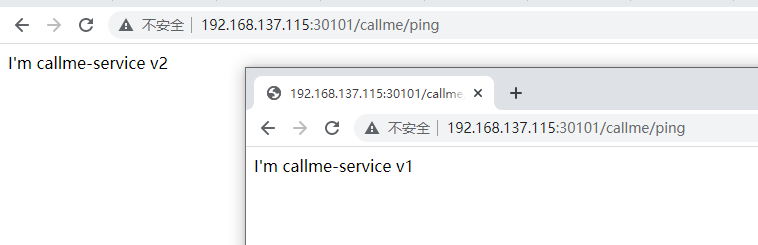
致此,我們初級(jí)的環(huán)境搭建基本完成了,對(duì)應(yīng)云原生,感覺(jué)懂了一點(diǎn),好像又沒(méi)有懂,需要理解的東西還有很多,這個(gè)系列也會(huì)持續(xù)下去,希望大家和我交流,也歡迎關(guān)注,轉(zhuǎn)發(fā)。
參考鏈接;
https://piotrminkowski.com/2020/02/14/local-java-development-on-kubernetes/
https://pklinker.medium.com/integrating-a-spring-boot-application-into-an-istio-service-mesh-a55948666fd
https://blog.csdn.net/xixingzhe2/article/details/88537038
https://blog.csdn.net/chenleiking/article/details/86716049