
分享5個(gè)關(guān)于 Vue 的小知識(shí),希望對(duì)你有所幫助(二)

大家好,上一篇文章《分享5個(gè)關(guān)于 Vue 的小知識(shí),希望對(duì)你有所幫助(一)》,今天我們繼續(xù)分享5個(gè)關(guān)于 Vue 的小知識(shí),希望對(duì)你有所幫助。
1、如何深度監(jiān)視對(duì)象數(shù)組的內(nèi)容變化?
我們可以使用watcher來(lái)深度監(jiān)視對(duì)象數(shù)組并使用Vue.js計(jì)算更改。
例如,我們可以編寫:
App.vue
<template>
  <div id="app">
    <Person :person="person" v-for="person in people" :key="person.id"></Person>
  </div>
</template>
<script>
import Person from "@/components/Person";
export default {
  name: "App",
  components: {
    Person,
  },
  data() {
    return {
      people: [
        { id: 0, name: "Bob", age: 27 },
        { id: 1, name: "Frank", age: 32 },
        { id: 2, name: "Joe", age: 38 },
      ],
    };
  },
};
</script>
Person.vue
<template>
  <div class="hello">
    <div class="person">
      {{ p.name }}
      <input type="text" v-model="p.age" />
    </div>
  </div>
</template>
<script>
export default {
  name: "Person",
  props: {
    person: Object,
  },
  data() {
    return {
      p: {},
    };
  },
  watch: {
    p: {
      handler(newValue) {
        console.log(newValue.id);
        console.log(newValue.age);
      },
      deep: true,
    },
  },
  mounted() {
    this.p = { ...this.person };
  },
};
</script>
在App.vue中,我們有一個(gè)people數(shù)組,用于使用v-for呈現(xiàn)Person組件。
我們將person作為person prop的值傳遞。
然后在Person中,我們添加了props屬性來(lái)接受person prop。
我們有一個(gè)p響應(yīng)式屬性,我們?cè)趍ounted hook中將其設(shè)置為person的副本作為其值。
在watch屬性中的p watcher中,我們記錄newValue值。
我們將deep選項(xiàng)設(shè)置為true,以便讓我們監(jiān)視對(duì)象中的更改。
在模板中,我們呈現(xiàn)p.name,并將p.age綁定為文本輸入的輸入值。
現(xiàn)在,當(dāng)我們?cè)谖谋据斎胫墟I入時(shí),p watcher應(yīng)該運(yùn)行并記錄newValue.age值。
2、如何在Vue.js的組件中調(diào)用全局自定義函數(shù)?

我們可以創(chuàng)建混入(mixins)使助手函數(shù)在Vue.js的單文件組件中全局可用。
例如,我們可以這樣編寫:
<template>
<!--在HTML中展示capitalizedName這個(gè)計(jì)算屬性-->
<div id="app">
{{ capitalizedName }}
</div>
</template>
<script>
// 引入Vue庫(kù)
import Vue from "vue";
// 創(chuàng)建一個(gè)全局混入,添加了一個(gè)可以在任何組件中使用的方法capitalizeFirstLetter
Vue.mixin({
methods: {
// 這個(gè)方法的作用是將傳入的字符串的首字母轉(zhuǎn)化為大寫
capitalizeFirstLetter: (str) => str[0].toUpperCase() + str.slice(1),
},
});
// 導(dǎo)出當(dāng)前Vue組件
export default {
// 組件名稱
name: "App",
// 組件的data屬性,定義了組件的內(nèi)部狀態(tài)
data() {
return {
// 定義了一個(gè)名為name的狀態(tài),初始值為"james"
name: "james",
};
},
// 計(jì)算屬性,這是根據(jù)組件狀態(tài)或者其它計(jì)算屬性派生出的值
computed: {
// capitalizedName計(jì)算屬性,會(huì)調(diào)用我們?cè)谌只烊胫卸x的capitalizeFirstLetter方法,對(duì)name狀態(tài)進(jìn)行處理
capitalizedName() {
return this.capitalizeFirstLetter(this.name);
},
},
};
</script>
我們通過(guò)調(diào)用Vue.mixin并傳入一個(gè)對(duì)象來(lái)創(chuàng)建我們自己的混入。
這將創(chuàng)建一個(gè)全局混入,所以它會(huì)自動(dòng)在所有組件中可用。
在這個(gè)對(duì)象中,我們?cè)O(shè)置了methods屬性,它是帶有一些組件方法的對(duì)象。
它有一個(gè)capitalizeFirstLetter方法,這個(gè)方法接收一個(gè)字符串并返回一個(gè)首字母大寫的字符串。
接下來(lái),我們?cè)赿ata方法中返回name這個(gè)響應(yīng)式屬性。
然后我們創(chuàng)建了一個(gè)名為capitalizedName的計(jì)算屬性,它調(diào)用了混入中的capitalizeFirstLetter方法并將this.name作為參數(shù),返回處理后的結(jié)果。
接著,我們將capitalizedName添加到模板中進(jìn)行渲染。
最后,我們看到結(jié)果顯示為‘James’。
3、在Vue.js中使用setTimeout

我們可以通過(guò)將箭頭函數(shù)作為參數(shù)傳遞給setTimeout來(lái)在Vue.js中使用它。
例如,我們可以編寫:
<template>
  <div id="app">
    <button @click="setShow">show</button>
    <p v-if="show">hello</p>
  </div>
</template>
<script>
export default {
  name: "App",
  data() {
    return {
      show: false,
    };
  },
  methods: {
    setShow() {
      setTimeout(() => {
        this.show = true;
      }, 2000);
    },
  },
};
</script>
我們有一個(gè)名為setShow的方法,它調(diào)用setTimeout并傳入一個(gè)箭頭函數(shù)作為第一個(gè)參數(shù),該箭頭函數(shù)調(diào)用this.show為true。
第二個(gè)參數(shù)是在毫秒中運(yùn)行第一個(gè)參數(shù)的回調(diào)之前的延遲時(shí)間。
我們必須使用箭頭函數(shù)才能在回調(diào)函數(shù)中獲得正確的this值。
這個(gè)this應(yīng)該是組件實(shí)例,因?yàn)榧^函數(shù)不綁定它們的this值。
我們將setShow設(shè)置為@click指令的值,以便在單擊按鈕時(shí)運(yùn)行它。
因此,當(dāng)我們單擊它時(shí),div會(huì)顯示,因?yàn)閟how變?yōu)閠rue。
4、如何防止點(diǎn)擊按鈕時(shí),點(diǎn)擊事件冒泡到父級(jí)元素?
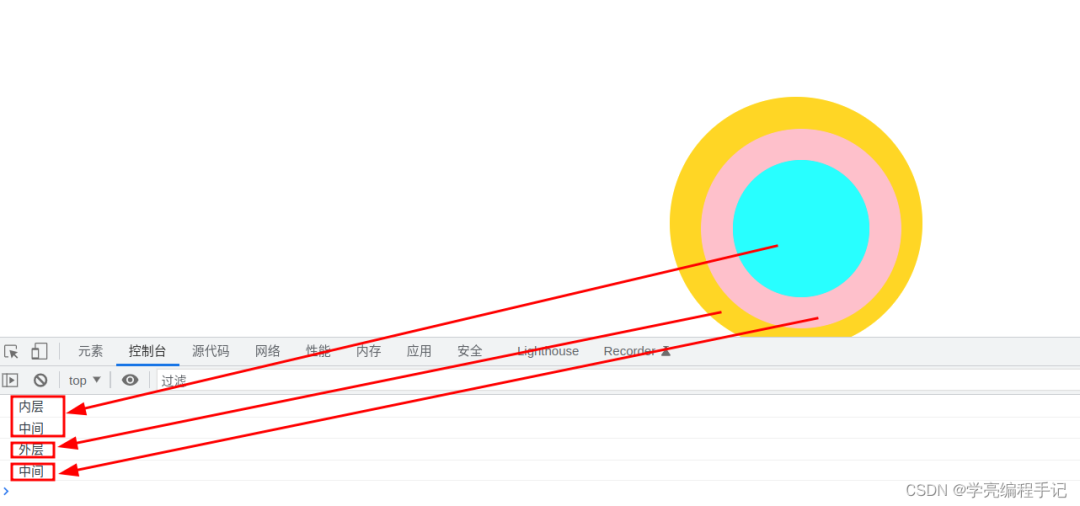
當(dāng)在Vue.js中點(diǎn)擊一個(gè)包含按鈕的元素時(shí),我們可以使用self修飾符來(lái)防止點(diǎn)擊事件冒泡到父元素。
例如,我們可以這樣寫:
<template>
  <div id="app">
    <div class="parent" @click.self="showAlert('parent clicked')">
      <span class="child" @click="showAlert('child1 clicked')">Child1</span>
      <span class="child" @click="showAlert('child2 clicked')">Child2</span>
      <span class="child" @click="showAlert('child3 clicked')">Child3</span>
    </div>
  </div>
</template>
<script>
export default {
  name: "App",
  methods: {
    showAlert(str) {
      alert(str);
    },
  },
};
</script>
<style scoped>
.parent {
  padding: 20px;
}
</style>
我們?cè)谕獠縟iv元素上添加self修飾符,這樣點(diǎn)擊事件就只會(huì)限定在父級(jí)div中。
當(dāng)我們點(diǎn)擊每個(gè)div或span元素時(shí),將會(huì)運(yùn)行showAlert方法。
5、使用Vue.js滾動(dòng)到一個(gè)元素

有時(shí)候,我們需要使用Vue.js滾動(dòng)到一個(gè)元素。 在本文中,我們將看看如何使用Vue.js滾動(dòng)到一個(gè)元素。
我們可以通過(guò)為想要滾動(dòng)到的元素分配一個(gè)引用來(lái)使用Vue.js滾動(dòng)到該元素然后,我們可以在分配給引用的元素上調(diào)用scrollIntoView方法來(lái)滾動(dòng)到該元素。例如,我們可以編寫:
<template>
  <div id="app">
    <button @click="scrollToElement">scroll to last</button>
    <p v-for="n of 100" :key="n" :ref="n === 100 ? 'last' : undefined">
      {{ n }}
    </p>
  </div>
</template>
<script>
export default {
  name: "App",
  methods: {
    scrollToElement() {
      const [el] = this.$refs.last;
      if (el) {
        el.scrollIntoView({ behavior: "smooth" });
      }
    },
  },
};
</script>
我們有一個(gè)名為scrollToElement的按鈕,用于調(diào)用該方法。然后我們有一些p元素,其中最后一個(gè)引用被分配給最后一個(gè)p元素。在scrollToElement方法中,我們通過(guò)解構(gòu)使用this.$refs.last獲取分配給最后一個(gè)引用的元素。然后我們調(diào)用el.scrollIntoView,并使用一個(gè)具有behavior屬性的對(duì)象來(lái)更改滾動(dòng)行為。
結(jié)論
由于文章內(nèi)容篇幅有限,今天的內(nèi)容就分享到這里,文章結(jié)尾,我想提醒您,文章的創(chuàng)作不易,如果您喜歡我的分享,請(qǐng)別忘了點(diǎn)贊和轉(zhuǎn)發(fā),讓更多有需要的人看到。同時(shí),如果您想獲取更多前端技術(shù)的知識(shí),歡迎關(guān)注我,您的支持將是我分享最大的動(dòng)力。我會(huì)持續(xù)輸出更多內(nèi)容,敬請(qǐng)期待。