Redis系列:高可用哨兵方案部署

點(diǎn)擊上方「藍(lán)字」關(guān)注我們

? ? ? ? Sentinel是Redis的高可用性(HA)解決方案,由一個(gè)或多個(gè)Sentinel實(shí)例組成的Sentinel系統(tǒng)可以監(jiān)視任意多個(gè)主服務(wù)器,以及這些主服務(wù)器屬下的所有從服務(wù)器,并在被監(jiān)視的主服務(wù)器進(jìn)行下線狀態(tài)時(shí),自動(dòng)將下線主服務(wù)器屬下的某個(gè)從服務(wù)器升級(jí)為新的主服務(wù)器,然后由新的主服務(wù)器代替已下線的主服務(wù)器繼續(xù)處理命令請(qǐng)求。
? ? ? ? ?Redis提供的sentinel(哨兵)機(jī)制,通過(guò)sentinel模式啟動(dòng)redis后,自動(dòng)監(jiān)控master/slave的運(yùn)行狀態(tài),基本原理是:心跳機(jī)制+投票裁決
監(jiān)控(Monitoring):Sentinel 會(huì)不斷地檢查主服務(wù)器和從服務(wù)器是否運(yùn)作正常。
提醒(Notification):當(dāng)被監(jiān)控的某個(gè) Redis 服務(wù)器出現(xiàn)問(wèn)題時(shí), Sentinel 可以通過(guò) API 向管理員或者其他應(yīng)用程序發(fā)送通知。
自動(dòng)故障遷移(Automatic failover):當(dāng)一個(gè)主服務(wù)器不能正常工作時(shí), Sentinel 會(huì)開始一次自動(dòng)故障遷移操作, 它會(huì)將失效主服務(wù)器的其中一個(gè)從服務(wù)器升級(jí)為新的主服務(wù)器,并讓失效主服務(wù)器的其他從服務(wù)器改為復(fù)制新的主服務(wù)器;當(dāng)客戶端試圖連接失效的主服務(wù)器時(shí), 集群也會(huì)向客戶端返回新主服務(wù)器的地址, 使得集群可以使用新主服務(wù)器代替失效服務(wù)器。
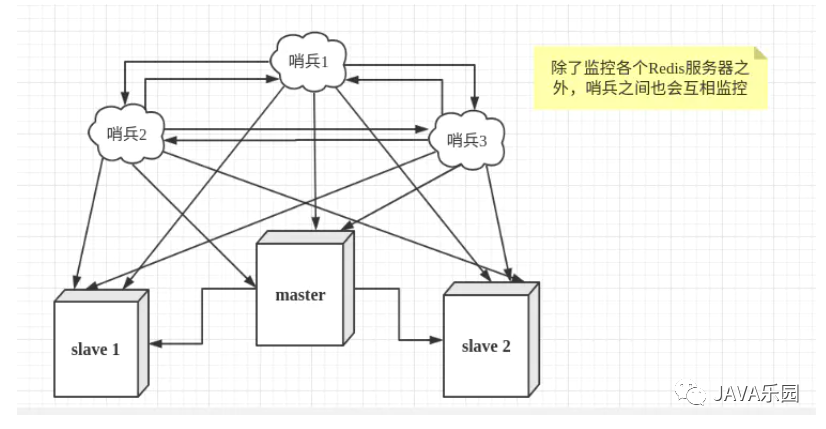
0x01: 高可用哨兵方案推演
服務(wù)器信息如下
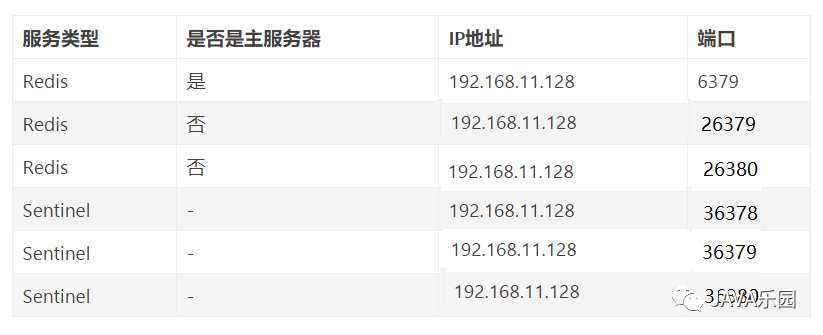
這里只有一臺(tái)虛擬主機(jī),采用端口不一樣的方式。如果大家有多臺(tái)虛擬主機(jī)的話,也可以使用多臺(tái)虛擬主機(jī)部署。
基于redis.conf創(chuàng)建主從配置文件
cp?/usr/local/redis/etc/redis.conf?/usr/local/redis/redis-6739.conf
cp?/usr/local/redis/etc/redis.conf?/usr/local/redis/redis-26379.conf
cp?/usr/local/redis/etc/redis.conf?/usr/local/redis/redis-26380.conf
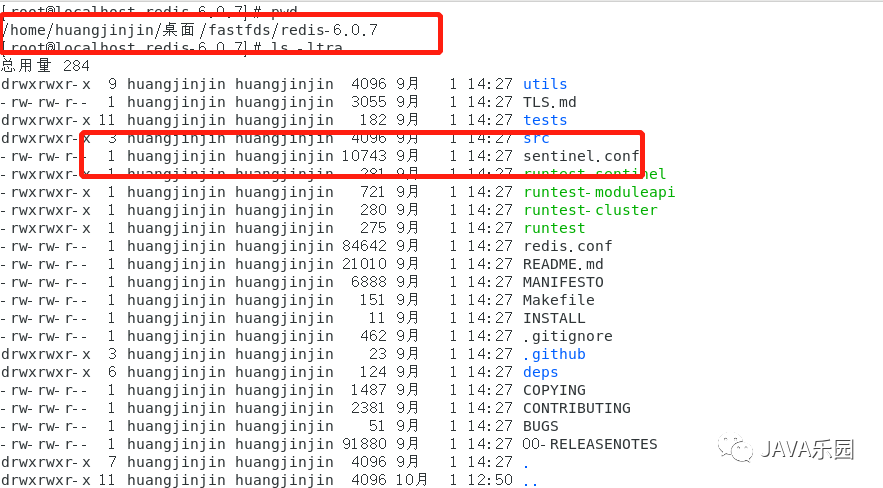
基于sentinel.conf 創(chuàng)建哨兵配置文件,sentinel.conf配置文件可以在下載的redis源碼目錄找到
cp?sentinel.conf?/usr/local/redis/sentinel-36378.conf
cp?sentinel.conf??/usr/local/redis/sentinel-36379.conf
cp?sentinel.conf??/usr/local/redis/sentinel-36380.conf
主服務(wù)器配置
bind?127.0.0.1?192.168.122.1
port?6379
daemonize?yes
pidfile?/var/run/redis_6379.pid
logfile?"/tmp/redis-6379.log"
dbfilename?dump-6379.rdb
requirepass?new2020
從服務(wù)器一配置
bind?127.0.0.1?192.168.122.1
port?26379
daemonize?yes
pidfile?/var/run/redis_26379.pid
logfile?"/tmp/redis-26379.log"
dbfilename?dump-26379.rdb
requirepass?new2020
replicaof?127.0.0.1?6379
masterauth?new2020
從服務(wù)器二配置
bind?127.0.0.1?192.168.122.1
port?26380
daemonize?yes
pidfile?/var/run/redis_26380.pid
logfile?"/tmp/redis-26380.log"
dbfilename?dump-26380.rdb
requirepass?new2020
replicaof?127.0.0.1?6379
masterauth?new2020
哨兵一配置
bind?127.0.0.1?192.168.122.1
protected-mode?no
port?36378
daemonize?yes
pidfile?/var/run/redis-sentinel-36278.pid
logfile?/tmp/redis-36378.log"
dir?/tmp/36378
sentinel?monitor?mymaster?127.0.0.1?6379?2
sentinel?auth-pass?mymaster?new2020
sentinel?down-after-milliseconds?mymaster?30000
sentinel?parallel-syncs?mymaster?1
sentinel?failover-timeout?mymaster?180000
sentinel?deny-scripts-reconfig?yes
哨兵二配置
bind?127.0.0.1?192.168.122.1
protected-mode?no
port?36379
daemonize?yes
pidfile?/var/run/redis-sentinel-36379.pid
logfile?"/tmp/redis-36379.log"
dir?/tmp/36379
sentinel?monitor?mymaster?127.0.0.1?6379?2
sentinel?auth-pass?mymaster?new2020
sentinel?down-after-milliseconds?mymaster?30000
sentinel?parallel-syncs?mymaster?1
sentinel?failover-timeout?mymaster?180000
sentinel?deny-scripts-reconfig?yes
哨兵三配置
bind?127.0.0.1?192.168.122.1
protected-mode?no
port?36380
daemonize?yes
pidfile?/var/run/redis-sentinel-36380.pid
logfile?"/tmp/redis-36380.log"
dir?/tmp/36380
sentinel?monitor?mymaster?127.0.0.1?6379?2
sentinel?auth-pass?mymaster?new2020
sentinel?down-after-milliseconds?mymaster?30000
sentinel?parallel-syncs?mymaster?1
sentinel?failover-timeout?mymaster?180000
sentinel?deny-scripts-reconfig?yes
說(shuō)明:
① 禁止保護(hù)模式
protected-mode?no
② 配置監(jiān)聽(tīng)的主服務(wù)器,這里sentinel monitor代表監(jiān)控,mymaster代表服務(wù)器的名稱,可以自定義,127.0.0.1代表監(jiān)控的主服務(wù)器,6379代表端口,2代表只有兩個(gè)或兩個(gè)以上的哨兵認(rèn)為主服務(wù)器不可用的時(shí)候,才會(huì)進(jìn)行failover操作。
sentinel?monitor?mymaster?127.0.0.1?6379?2
③ sentinel author-pass定義服務(wù)的密碼,mymaster是服務(wù)名稱,new2020是Redis服務(wù)器密碼
#?sentinel?auth-pass?
sentinel?auth-pass?mymaster?new2020
④ 判斷主master的掛機(jī)時(shí)間(毫秒),超時(shí)未返回正確信息后標(biāo)記為sdown狀態(tài)
sentinel?down-after-milliseconds?master-1?3000
⑤ 選項(xiàng)指定了在執(zhí)行故障轉(zhuǎn)移時(shí), 最多可以有多少個(gè)從服務(wù)器同時(shí)對(duì)新的主服務(wù)器進(jìn)行同步,這個(gè)數(shù)字越小,完成故障轉(zhuǎn)移所需的時(shí)間就越長(zhǎng)
sentinel?parallel-syncs?mymaster?1
⑥ 若sentinel在該配置值內(nèi)未能完成failover操作(即故障時(shí)master/slave自動(dòng)切換),則認(rèn)為本次failover失敗。
sentinel?failover-timeout?mymaster?180000
⑦ 工作路徑,注意路徑不要和主重復(fù)
dir?"/tmp/36379"
0x02:?jiǎn)?dòng)redis
安裝如下順序
首先是主Redis服務(wù)進(jìn)程,然后再啟動(dòng)從機(jī)的服務(wù)進(jìn)程,最后啟動(dòng)3個(gè)哨兵的服務(wù)進(jìn)程。
主Redis啟動(dòng)
#?啟動(dòng)主Redis服務(wù)器進(jìn)程
/usr/local/redis/bin/redis-server?/usr/local/redis/redis-6379.conf?
從Rdis啟動(dòng)
#?啟動(dòng)從Redis服務(wù)器進(jìn)程
/usr/local/redis/bin/redis-server?/usr/local/redis/redis-26379.conf?
/usr/local/redis/bin/redis-server?/usr/local/redis/redis-26380.conf?
啟動(dòng)哨兵
#?啟動(dòng)啟動(dòng)Redis哨兵進(jìn)程
/usr/local/redis/bin/redis-sentinel?/usr/local/redis/sentinel-36378.conf?
/usr/local/redis/bin/redis-sentinel?/usr/local/redis/sentinel-36379.conf?
/usr/local/redis/bin/redis-sentinel?/usr/local/redis/sentinel-36380.conf?
ps?-ef?|?grep?redis
如下圖所示,說(shuō)明啟動(dòng)成功

0x03:查看各服務(wù)的狀態(tài)
查看主Redis狀態(tài)

輸入info命令,如果出現(xiàn)信息,說(shuō)明一主兩從搭建成功
#?Replication
role:master
connected_slaves:2
slave0:ip=127.0.0.1,port=26379,state=online,offset=43689,lag=1
slave1:ip=127.0.0.1,port=26380,state=online,offset=43955,lag=0
master_replid:b92588e7ee2f1922498de16031b7649b3082b22b
master_replid2:0000000000000000000000000000000000000000
master_repl_offset:43955
second_repl_offset:-1
repl_backlog_active:1
repl_backlog_size:1048576
repl_backlog_first_byte_offset:1
repl_backlog_histlen:43955
查看從Redis一狀態(tài)

輸入info命令
#?Replication
role:slave
master_host:127.0.0.1
master_port:6379
master_link_status:up
master_last_io_seconds_ago:1
master_sync_in_progress:0
slave_repl_offset:101019
slave_priority:100
slave_read_only:1
connected_slaves:0
master_replid:b92588e7ee2f1922498de16031b7649b3082b22b
master_replid2:0000000000000000000000000000000000000000
master_repl_offset:101019
second_repl_offset:-1
repl_backlog_active:1
repl_backlog_size:1048576
repl_backlog_first_byte_offset:1
repl_backlog_histlen:101019
注,使用同樣的方式可以看到從Redis二也是一樣的。
查看哨兵Redis狀態(tài)

輸入info命令
#?Sentinel
sentinel_masters:1
sentinel_tilt:0
sentinel_running_scripts:0
sentinel_scripts_queue_length:0
sentinel_simulate_failure_flags:0
master0:name=mymaster,status=ok,address=127.0.0.1:6379,slaves=2,sentinels=3
注,使用同樣的方式可以看到哨兵Redis二和哨兵Redis三也是一樣的。
0x04:驗(yàn)證主從切換
1、首先關(guān)閉主Redis(6379)服務(wù)(shutdown)。
2、查看哨兵,發(fā)現(xiàn)端口號(hào)為263的從服務(wù)變成了主服務(wù),sentinel自動(dòng)完成了故障切換。
#查看主Reids的進(jìn)程號(hào)
ps?-ef?|?grep?redis
#殺死主Redis進(jìn)程
kill?-9?7973
#連接哨兵一
/usr/local/redis/bin/redis-cli?-h?127.0.0.1?-p?36378
使用info sentinel命令
127.0.0.1:36378>?info?sentinel
#?Sentinel
sentinel_masters:1
sentinel_tilt:0
sentinel_running_scripts:0
sentinel_scripts_queue_length:0
sentinel_simulate_failure_flags:0
master0:name=mymaster,status=ok,address=127.0.0.1:26379,slaves=2,sentinels=3
3、啟動(dòng)剛才被shutdown的6379服務(wù)并查看,發(fā)現(xiàn)它變成了從服務(wù)。
連接6379Redis服務(wù)
/usr/local/redis/bin/redis-cli?-h?127.0.0.1?-p?6379
使用info replication命令
127.0.0.1:6379>?info?replication
#?Replication
role:slave
master_host:127.0.0.1
master_port:26379
master_link_status:down
master_last_io_seconds_ago:-1
master_sync_in_progress:0
slave_repl_offset:1
master_link_down_since_seconds:1601531690
slave_priority:100
slave_read_only:1
connected_slaves:0
master_replid:739195dc3c4b405905edb43b35cdd48e1589e48d
master_replid2:0000000000000000000000000000000000000000
master_repl_offset:0
second_repl_offset:-1
repl_backlog_active:0
repl_backlog_size:1048576
repl_backlog_first_byte_offset:0
repl_backlog_histlen:0
掃碼二維碼
獲取更多精彩
Java樂(lè)園