
Android實(shí)現(xiàn)梯形TextView效果
效果圖:
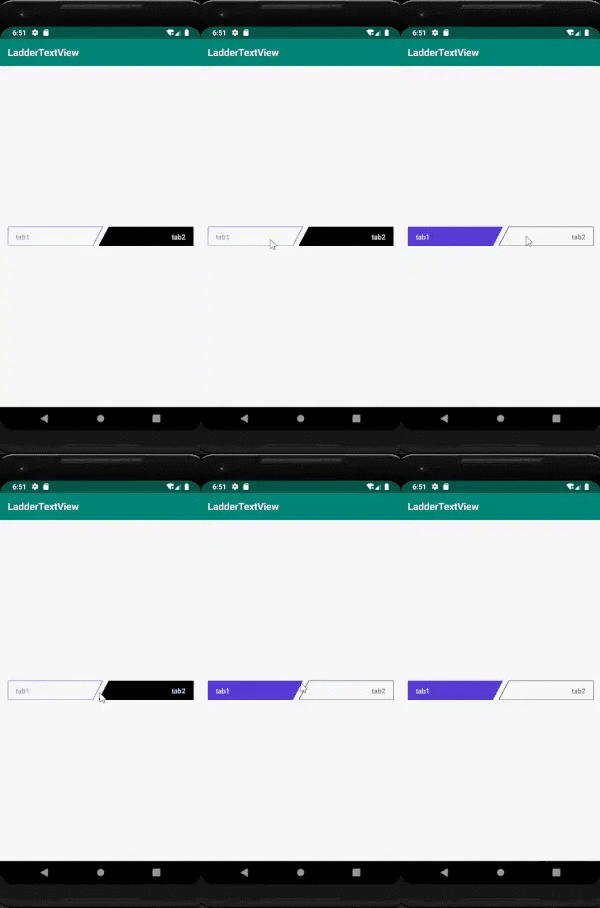
自定義代碼實(shí)現(xiàn)邏輯:
public class LadderTextView extends android.support.v7.widget.AppCompatTextView {private static final String TAG = "LadderView";private Path linePath;private Paint paint, textPaint;private int width, height;private float strokeWidth = 2;private Region mRegion;private String textContent;private int lineOffset = 0;//劃線的偏移量private int textOffset = 0;//文本的偏移量private float offsetScale = 1;//梯高與(梯頂與梯底)之差的比例(梯底比梯頂長)private boolean isLeft = true;//分為左和右兩種斜角梯形模式private boolean isSelected = false;//是否是選定private int selectedColor = Color.BLACK;public LadderTextView(Context context) {super(context);init();}public LadderTextView(Context context, AttributeSet attrs) {super(context, attrs);initAttributes(context, attrs);init();}public LadderTextView(Context context, AttributeSet attrs, int defStyleAttr) {super(context, attrs, defStyleAttr);initAttributes(context, attrs);init();}private void initAttributes(Context context, AttributeSet attrs) {TypedArray typedArray = context.obtainStyledAttributes(attrs, R.styleable.LadderTextView);textContent = typedArray.getString(R.styleable.LadderTextView_textContent);offsetScale = typedArray.getFloat(R.styleable.LadderTextView_offsetScale, 0.5f);isLeft = typedArray.getBoolean(R.styleable.LadderTextView_isLeft, true);isSelected = typedArray.getBoolean(R.styleable.LadderTextView_isSelected, true);selectedColor = typedArray.getColor(R.styleable.LadderTextView_selectedColor, Color.GREEN);strokeWidth = typedArray.getDimension(R.styleable.LadderTextView_strokeWidth, 1);typedArray.recycle();}private void init() {Log.v(TAG, "init");mRegion = new Region();paint = new Paint();textPaint = new Paint();linePath = new Path();paint.setAntiAlias(true);paint.setStrokeWidth(dp2px(getContext(), strokeWidth));paint.setColor(selectedColor);paint.setStyle(isSelected ? Paint.Style.FILL_AND_STROKE : Paint.Style.STROKE);paint.setStrokeJoin(Paint.Join.ROUND);textPaint.setAntiAlias(true);textPaint.setTextSize(getTextSize());//傳遞TextSize(px)textPaint.setColor(isSelected ? Color.WHITE : selectedColor);setText("");//去除掉原有的Text內(nèi)容lineOffset = dp2px(getContext(), strokeWidth) / 2;textOffset = (int) (getTextSize() / 2) + getBaseline() * 2;Log.v(TAG, "lineOffset textOffset ->" + lineOffset + " " + textOffset);}@Overrideprotected void onLayout(boolean changed, int left, int top, int right, int bottom) {super.onLayout(changed, left, top, right, bottom);width = getWidth();height = getHeight();Log.v(TAG, "width height->" + width + " " + height);}@Overrideprotected void onDraw(Canvas canvas) {super.onDraw(canvas);Log.v(TAG, "onDraw");if (isLeft) {linePath.moveTo(0 + lineOffset, 0 + lineOffset);linePath.lineTo(width, 0 + lineOffset);linePath.lineTo((int) (width - offsetScale * height), height - lineOffset);linePath.lineTo(0 + lineOffset, height - lineOffset);linePath.close();setTextAlignment(TEXT_ALIGNMENT_TEXT_START);canvas.drawPath(linePath, paint);canvas.drawText(textContent == null ? "" : textContent,getPaddingStart() + lineOffset,height / 2 + textOffset, textPaint);} else {linePath.moveTo(0 + lineOffset + offsetScale * height, 0 + lineOffset);linePath.lineTo(width - lineOffset, 0 + lineOffset);linePath.lineTo(width - lineOffset, height - lineOffset);linePath.lineTo(0, height - lineOffset);linePath.close();setTextAlignment(TEXT_ALIGNMENT_TEXT_END);canvas.drawPath(linePath, paint);canvas.drawText(textContent == null ? "" : textContent,getWidth() - lineOffset - getPaddingEnd() - getDrawTextWidth(textPaint, textContent),height / 2 + textOffset, textPaint);}}@Overridepublic boolean dispatchTouchEvent(MotionEvent event) {if (event.getAction() == MotionEvent.ACTION_DOWN) {if (!isInRegion(event)) {//點(diǎn)擊的點(diǎn)的位置不在范圍內(nèi)則不響應(yīng)return false;}}return super.dispatchTouchEvent(event);}/*** 判斷點(diǎn)擊的位置是否在要求的范圍內(nèi)* @param event* @return*/public boolean isInRegion(MotionEvent event) {RectF rectF = new RectF();linePath.computeBounds(rectF, true);mRegion.setPath(linePath, new Region((int) rectF.left, (int) rectF.top, (int) rectF.right, (int) rectF.bottom));return mRegion.contains((int) event.getX(), (int) event.getY());}/*** 獲取要畫的字符串的寬度** @param paint* @param textContent* @return*/private int getDrawTextWidth(Paint paint, String textContent) {float totalWidth = 0f;if (textContent != null && textContent.length() > 0) {int len = textContent.length();float[] widths = new float[len];paint.getTextWidths(textContent, widths);for (int j = 0; j < len; j++) {totalWidth += widths[j];}}return (int) Math.ceil(totalWidth);}/*** @param dpValue (DisplayMetrics類中屬性density)* @return*/private int dp2px(Context context, float dpValue) {final float scale = context.getResources().getDisplayMetrics().density;return (int) (dpValue * scale + 0.5f);}public void setTextContent(String textContent) {this.textContent = textContent;invalidate();}public void setMSelected(boolean isSelected) {textPaint.setColor(isSelected ? Color.WHITE : selectedColor);paint.setStyle(isSelected ? Paint.Style.FILL_AND_STROKE : Paint.Style.STROKE);this.isSelected = isSelected;invalidate();}@Overridepublic boolean isSelected() {return isSelected;}}
要點(diǎn)分析
1.背景與文本內(nèi)容的繪制
計(jì)算好四個點(diǎn)的位置連線,TextView默認(rèn)的文本內(nèi)容則設(shè)置為空字符串,采用drawText的方式來實(shí)現(xiàn)文本的顯示。需要注意的是計(jì)算文本的字號長度大小、顏色以及位于整個view的位置、偏移量等。
2.梯形范圍內(nèi)外的點(diǎn)擊事件處理
依照于設(shè)計(jì),梯形內(nèi)的點(diǎn)擊才有響應(yīng),則要計(jì)算點(diǎn)擊的位置是否在梯形內(nèi),然后通過dispatchTouchEvent來做事件的分發(fā)。
/*** 判斷點(diǎn)擊的位置是否在要求的范圍內(nèi)* @param event* @return*/public boolean isInRegion(MotionEvent event) {RectF rectF = new RectF();linePath.computeBounds(rectF, true);mRegion.setPath(linePath, new Region((int) rectF.left, (int) rectF.top, (int) rectF.right, (int) rectF.bottom));return mRegion.contains((int) event.getX(), (int) event.getY());}
源碼地址:
https://github.com/ganshenml/LadderTextView
到這里就結(jié)束啦。
評論
圖片
表情