
SpringBoot 實現(xiàn) Excel 導(dǎo)入導(dǎo)出,性能爆表,用起來夠優(yōu)雅!
大家好,我是二哥呀!
操作Excel實現(xiàn)導(dǎo)入導(dǎo)出是個非常常見的需求,之前介紹了一款非常好用的工具EasyPoi 。有讀者提出在數(shù)據(jù)量大的情況下,EasyPoi占用內(nèi)存大,性能不夠好。今天給大家推薦一款性能更好的Excel導(dǎo)入導(dǎo)出工具
EasyExcel,希望對大家有所幫助!
EasyExcel簡介
EasyExcel是一款阿里開源的Excel導(dǎo)入導(dǎo)出工具,具有處理快速、占用內(nèi)存小、使用方便的特點,在Github上已有22k+Star,可見其非常流行。
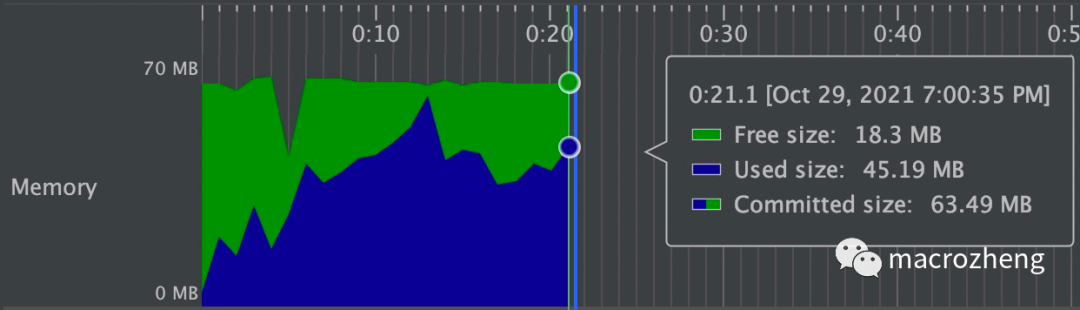
EasyExcel讀取75M(46W行25列)的Excel,僅需使用64M內(nèi)存,耗時20s,極速模式還可以更快!
集成
在SpringBoot中集成EasyExcel非常簡單,僅需一個依賴即可。
<dependency>
????<groupId>com.alibabagroupId>
????<artifactId>easyexcelartifactId>
????<version>3.0.5version>
dependency>
使用
EasyExcel和EasyPoi的使用非常類似,都是通過注解來控制導(dǎo)入導(dǎo)出。接下來我們以會員信息和訂單信息的導(dǎo)入導(dǎo)出為例,分別實現(xiàn)下簡單的單表導(dǎo)出和具有一對多關(guān)系的復(fù)雜導(dǎo)出。
簡單導(dǎo)出
我們以會員信息的導(dǎo)出為例,來體驗下EasyExcel的導(dǎo)出功能。
首先創(chuàng)建一個會員對象 Member,封裝會員信息,這里使用了EasyExcel的注解;
/**
?*?購物會員
?*?Created?by?macro?on?2021/10/12.
?*/
@Data
@EqualsAndHashCode(callSuper?=?false)
public?class?Member?{
????@ExcelProperty("ID")
????@ColumnWidth(10)
????private?Long?id;
????@ExcelProperty("用戶名")
????@ColumnWidth(20)
????private?String?username;
????@ExcelIgnore
????private?String?password;
????@ExcelProperty("昵稱")
????@ColumnWidth(20)
????private?String?nickname;
????@ExcelProperty("出生日期")
????@ColumnWidth(20)
????@DateTimeFormat("yyyy-MM-dd")
????private?Date?birthday;
????@ExcelProperty("手機號")
????@ColumnWidth(20)
????private?String?phone;
????@ExcelIgnore
????private?String?icon;
????@ExcelProperty(value?=?"性別",?converter?=?GenderConverter.class)
????@ColumnWidth(10)
????private?Integer?gender;
}
上面代碼使用到了EasyExcel的核心注解,我們分別來了解下:
@ExcelProperty:核心注解, value屬性可用來設(shè)置表頭名稱,converter屬性可以用來設(shè)置類型轉(zhuǎn)換器;@ColumnWidth:用于設(shè)置表格列的寬度; @DateTimeFormat:用于設(shè)置日期轉(zhuǎn)換格式。 在EasyExcel中,如果你想實現(xiàn)枚舉類型到字符串的轉(zhuǎn)換(比如gender屬性中,
0->男,1->女),需要自定義轉(zhuǎn)換器,下面為自定義的GenderConverter代碼實現(xiàn);
/**
?*?excel性別轉(zhuǎn)換器
?*?Created?by?macro?on?2021/12/29.
?*/
public?class?GenderConverter?implements?Converter<Integer>?{
????@Override
????public?Class?supportJavaTypeKey()?{
????????//對象屬性類型
????????return?Integer.class;
????}

????@Override
????public?CellDataTypeEnum?supportExcelTypeKey()?{
????????//CellData屬性類型
????????return?CellDataTypeEnum.STRING;
????}

????@Override
????public?Integer?convertToJavaData(ReadConverterContext?context)?throws?Exception?{
????????//CellData轉(zhuǎn)對象屬性
????????String?cellStr?=?context.getReadCellData().getStringValue();
????????if?(StrUtil.isEmpty(cellStr))?return?null;
????????if?("男".equals(cellStr))?{
????????????return?0;
????????}?else?if?("女".equals(cellStr))?{
????????????return?1;
????????}?else?{
????????????return?null;
????????}
????}

????@Override
????public?WriteCellData?convertToExcelData(WriteConverterContext?context)?throws?Exception?{
????????//對象屬性轉(zhuǎn)CellData
????????Integer?cellValue?=?context.getValue();
????????if?(cellValue?==?null)?{
????????????return?new?WriteCellData<>("");
????????}
????????if?(cellValue?==?0)?{
????????????return?new?WriteCellData<>("男");
????????}?else?if?(cellValue?==?1)?{
????????????return?new?WriteCellData<>("女");
????????}?else?{
????????????return?new?WriteCellData<>("");
????????}
????}
}
接下來我們在Controller中添加一個接口,用于導(dǎo)出會員列表到Excel,還需給響應(yīng)頭設(shè)置下載excel的屬性,具體代碼如下;
/**
?*?EasyExcel導(dǎo)入導(dǎo)出測試Controller
?*?Created?by?macro?on?2021/10/12.
?*/
@Controller
@Api(tags?=?"EasyExcelController",?description?=?"EasyExcel導(dǎo)入導(dǎo)出測試")
@RequestMapping("/easyExcel")
public?class?EasyExcelController?{

????@SneakyThrows(IOException.class)
????@ApiOperation(value?=?"導(dǎo)出會員列表Excel")
????@RequestMapping(value?=?"/exportMemberList",?method?=?RequestMethod.GET)
????public?void?exportMemberList(HttpServletResponse?response)?{
????????setExcelRespProp(response,?"會員列表");
????????List?memberList?=?LocalJsonUtil.getListFromJson("json/members.json",?Member.class);
????????EasyExcel.write(response.getOutputStream())
????????????????.head(Member.class)
????????????????.excelType(ExcelTypeEnum.XLSX)
????????????????.sheet("會員列表")
????????????????.doWrite(memberList);
????}
????
??/**
???*?設(shè)置excel下載響應(yīng)頭屬性
???*/
??private?void?setExcelRespProp(HttpServletResponse?response,?String?rawFileName)?throws?UnsupportedEncodingException?{
????response.setContentType("application/vnd.openxmlformats-officedocument.spreadsheetml.sheet");
????response.setCharacterEncoding("utf-8");
????String?fileName?=?URLEncoder.encode(rawFileName,?"UTF-8").replaceAll("\\+",?"%20");
????response.setHeader("Content-disposition",?"attachment;filename*=utf-8''"?+?fileName?+?".xlsx");
??}
}
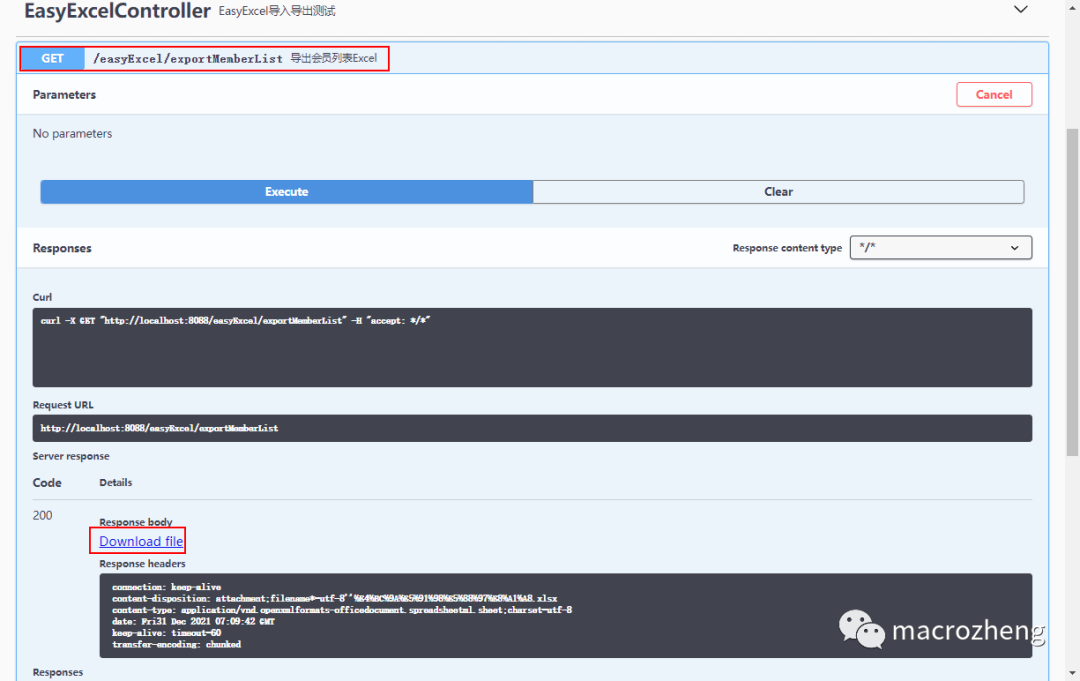
運行項目,通過Swagger測試接口,注意在Swagger中訪問接口無法直接下載,需要點擊返回結(jié)果中的 下載按鈕才行,訪問地址:http://localhost:8088/swagger-ui/
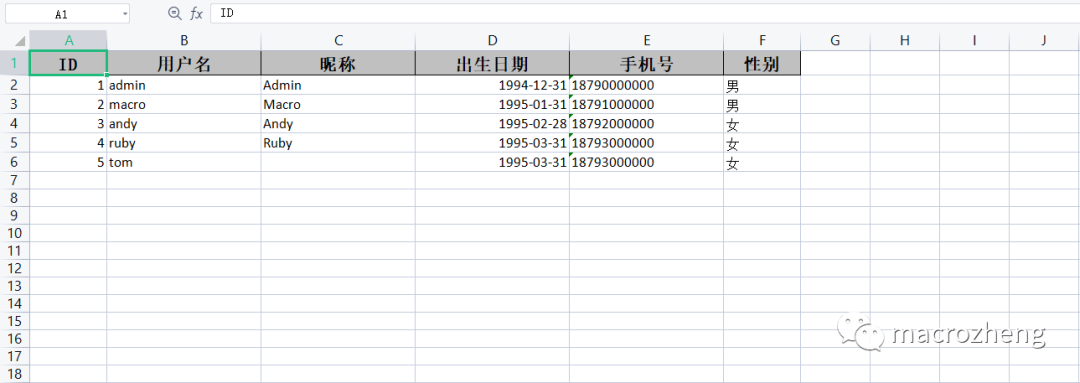
下載完成后,查看下文件,一個標準的Excel文件已經(jīng)被導(dǎo)出了。
簡單導(dǎo)入
接下來我們以會員信息的導(dǎo)入為例,來體驗下EasyExcel的導(dǎo)入功能。
在Controller中添加會員信息導(dǎo)入的接口,這里需要注意的是使用 @RequestPart注解修飾文件上傳參數(shù),否則在Swagger中就沒法顯示上傳按鈕了;
/**
?*?EasyExcel導(dǎo)入導(dǎo)出測試Controller
?*?Created?by?macro?on?2021/10/12.
?*/
@Controller
@Api(tags?=?"EasyExcelController",?description?=?"EasyExcel導(dǎo)入導(dǎo)出測試")
@RequestMapping("/easyExcel")
public?class?EasyExcelController?{
????
????@SneakyThrows
????@ApiOperation("從Excel導(dǎo)入會員列表")
????@RequestMapping(value?=?"/importMemberList",?method?=?RequestMethod.POST)
????@ResponseBody
????public?CommonResult?importMemberList(@RequestPart("file")?MultipartFile?file)?{
????????List?memberList?=?EasyExcel.read(file.getInputStream())
????????????????.head(Member.class)
????????????????.sheet()
????????????????.doReadSync();
????????return?CommonResult.success(memberList);
????}
}
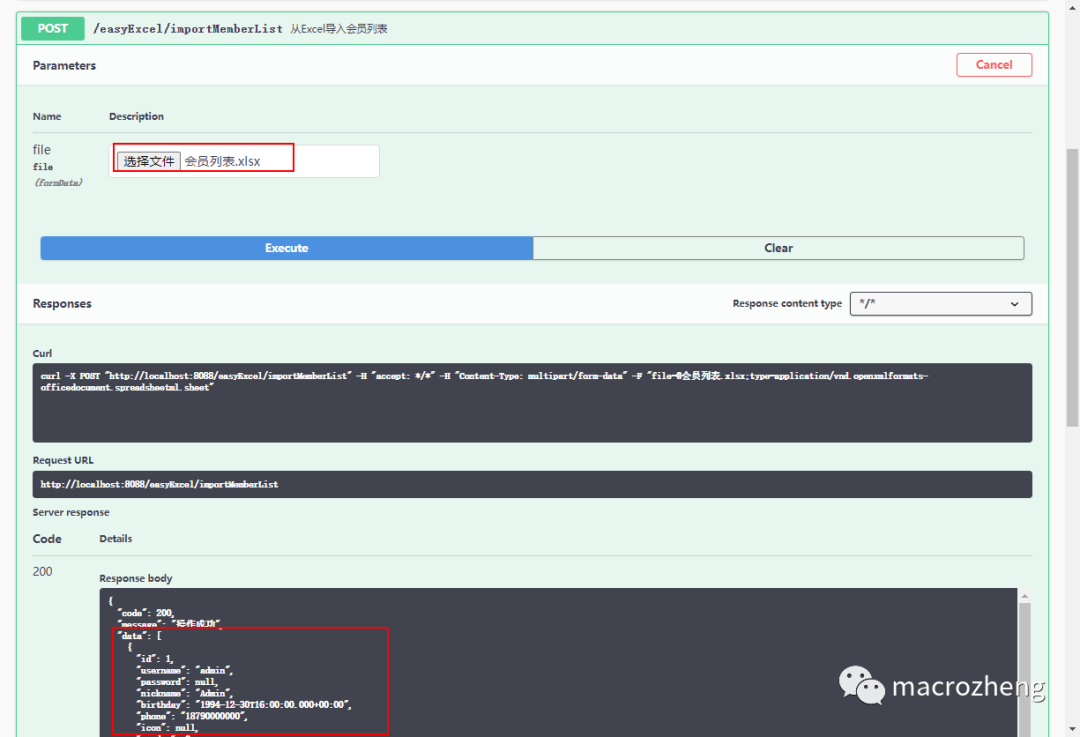
然后在Swagger中測試接口,選擇之前導(dǎo)出的Excel文件即可,導(dǎo)入成功后會返回解析到的數(shù)據(jù)。
復(fù)雜導(dǎo)出
當然EasyExcel也可以實現(xiàn)更加復(fù)雜的導(dǎo)出,比如導(dǎo)出一個嵌套了商品信息的訂單列表,下面我們來實現(xiàn)下!
使用EasyPoi實現(xiàn)
之前我們使用過EasyPoi實現(xiàn)該功能,由于EasyPoi本來就支持嵌套對象的導(dǎo)出,直接使用內(nèi)置的@ExcelCollection注解即可實現(xiàn),非常方便也符合面向?qū)ο蟮乃枷搿?/p>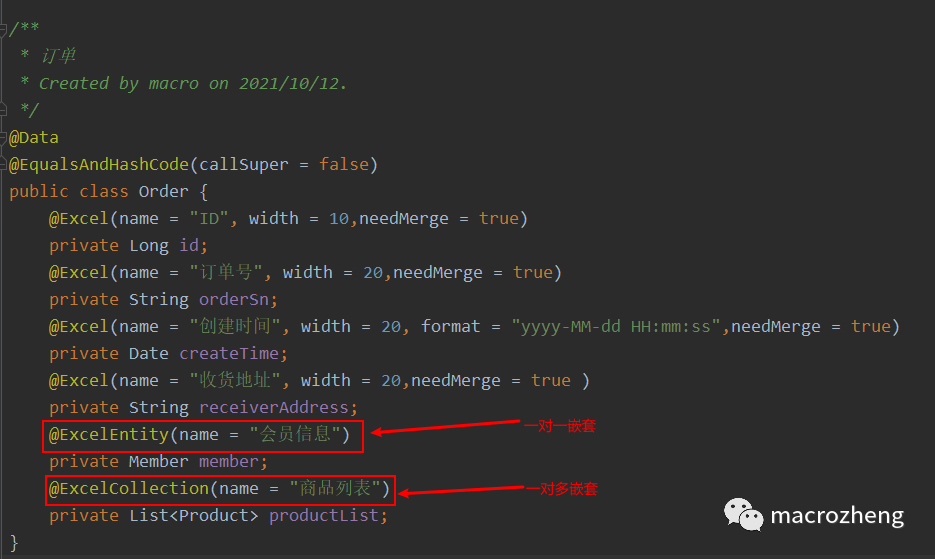
尋找方案
由于EasyExcel本身并不支持這種一對多的信息導(dǎo)出,所以我們得自行實現(xiàn)下,這里分享一個我平時常用的
快速查找解決方案的辦法。
我們可以直接從開源項目的issues里面去搜索,比如搜索下一對多,會直接找到有無一對多導(dǎo)出比較優(yōu)雅的方案這個issue。
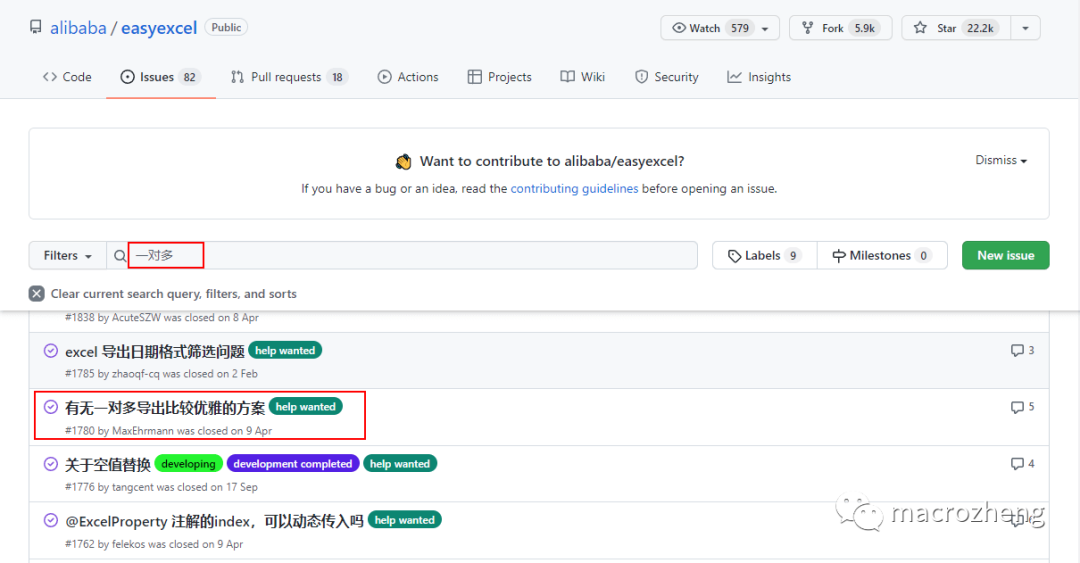
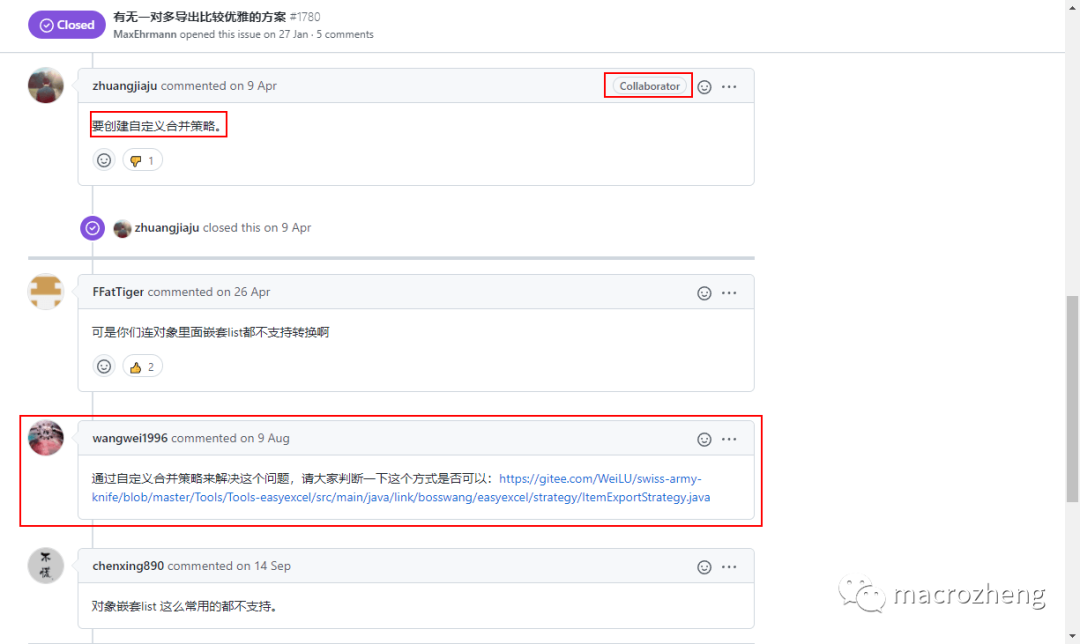
從此issue的回復(fù)我們可以發(fā)現(xiàn),項目維護者建議創(chuàng)建自定義合并策略來實現(xiàn),有位回復(fù)的老哥已經(jīng)給出了實現(xiàn)代碼,接下來我們就用這個方案來實現(xiàn)下。
解決思路
為什么自定義單元格合并策略能實現(xiàn)一對多的列表信息的導(dǎo)出呢?首先我們來看下將嵌套數(shù)據(jù)平鋪,不進行合并導(dǎo)出的Excel。
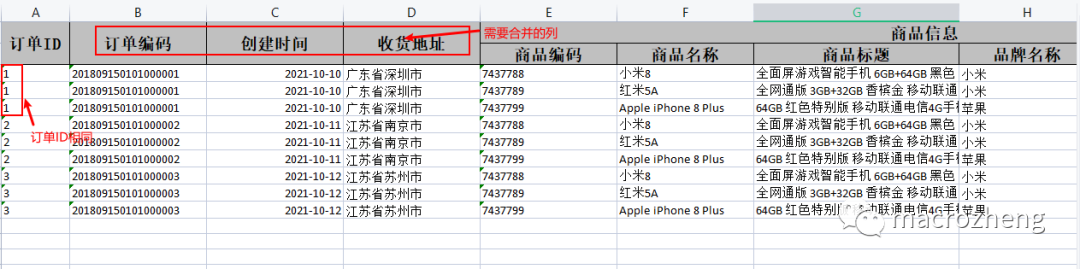
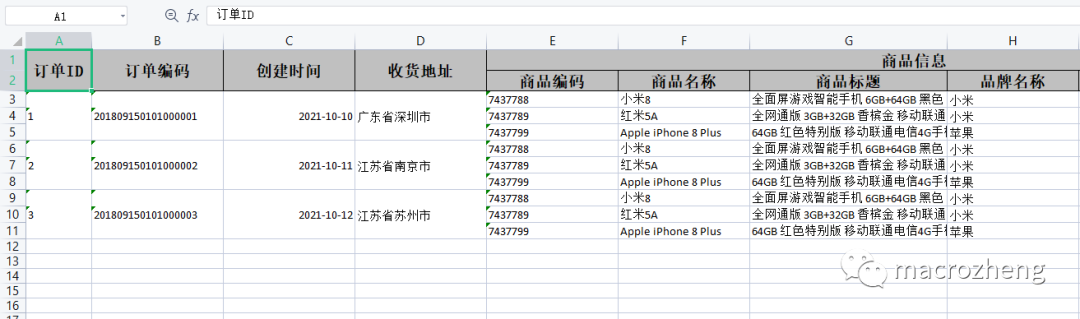
看完之后我們很容易理解解決思路,只要把訂單ID相同的列中需要合并的列給合并了,就可以實現(xiàn)這種一對多嵌套信息的導(dǎo)出了。
實現(xiàn)過程
首先我們得把原來嵌套的訂單商品信息給平鋪了,創(chuàng)建一個專門的導(dǎo)出對象 OrderData,包含訂單和商品信息,二級表頭可以通過設(shè)置@ExcelProperty的value為數(shù)組來實現(xiàn);
/**
?*?訂單導(dǎo)出
?*?Created?by?macro?on?2021/12/30.
?*/
@Data
@EqualsAndHashCode(callSuper?=?false)
public?class?OrderData?{
????@ExcelProperty(value?=?"訂單ID")
????@ColumnWidth(10)
????@CustomMerge(needMerge?=?true,?isPk?=?true)
????private?String?id;
????@ExcelProperty(value?=?"訂單編碼")
????@ColumnWidth(20)
????@CustomMerge(needMerge?=?true)
????private?String?orderSn;
????@ExcelProperty(value?=?"創(chuàng)建時間")
????@ColumnWidth(20)
????@DateTimeFormat("yyyy-MM-dd")
????@CustomMerge(needMerge?=?true)
????private?Date?createTime;
????@ExcelProperty(value?=?"收貨地址")
????@CustomMerge(needMerge?=?true)
????@ColumnWidth(20)
????private?String?receiverAddress;
????@ExcelProperty(value?=?{"商品信息",?"商品編碼"})
????@ColumnWidth(20)
????private?String?productSn;
????@ExcelProperty(value?=?{"商品信息",?"商品名稱"})
????@ColumnWidth(20)
????private?String?name;
????@ExcelProperty(value?=?{"商品信息",?"商品標題"})
????@ColumnWidth(30)
????private?String?subTitle;
????@ExcelProperty(value?=?{"商品信息",?"品牌名稱"})
????@ColumnWidth(20)
????private?String?brandName;
????@ExcelProperty(value?=?{"商品信息",?"商品價格"})
????@ColumnWidth(20)
????private?BigDecimal?price;
????@ExcelProperty(value?=?{"商品信息",?"商品數(shù)量"})
????@ColumnWidth(20)
????private?Integer?count;
}
然后將原來嵌套的 Order對象列表轉(zhuǎn)換為OrderData對象列表;
/**
?*?EasyExcel導(dǎo)入導(dǎo)出測試Controller
?*?Created?by?macro?on?2021/10/12.
?*/
@Controller
@Api(tags?=?"EasyExcelController",?description?=?"EasyExcel導(dǎo)入導(dǎo)出測試")
@RequestMapping("/easyExcel")
public?class?EasyExcelController?{
????private?List?convert(List?orderList) ? {
????????List?result?=?new?ArrayList<>();
????????for?(Order?order?:?orderList)?{
????????????List?productList?=?order.getProductList();
????????????for?(Product?product?:?productList)?{
????????????????OrderData?orderData?=?new?OrderData();
????????????????BeanUtil.copyProperties(product,orderData);
????????????????BeanUtil.copyProperties(order,orderData);
????????????????result.add(orderData);
????????????}
????????}
????????return?result;
????}
}
再創(chuàng)建一個自定義注解 CustomMerge,用于標記哪些屬性需要合并,哪個是主鍵;
/**
?*?自定義注解,用于判斷是否需要合并以及合并的主鍵
?*/
@Target({ElementType.FIELD})
@Retention(RetentionPolicy.RUNTIME)
@Inherited
public?@interface?CustomMerge?{

????/**
?????*?是否需要合并單元格
?????*/
????boolean?needMerge()?default?false;

????/**
?????*?是否是主鍵,即該字段相同的行合并
?????*/
????boolean?isPk()?default?false;
}
再創(chuàng)建自定義單元格合并策略類 CustomMergeStrategy,當Excel中兩列主鍵相同時,合并被標記需要合并的列;
/**
?*?自定義單元格合并策略
?*/
public?class?CustomMergeStrategy?implements?RowWriteHandler?{
????/**
?????*?主鍵下標
?????*/
????private?Integer?pkIndex;

????/**
?????*?需要合并的列的下標集合
?????*/
????private?List?needMergeColumnIndex?=?new?ArrayList<>();

????/**
?????*?DTO數(shù)據(jù)類型
?????*/
????private?Class?elementType;

????public?CustomMergeStrategy(Class?elementType)?{
????????this.elementType?=?elementType;
????}

????@Override
????public?void?afterRowDispose(WriteSheetHolder?writeSheetHolder,?WriteTableHolder?writeTableHolder,?Row?row,?Integer?relativeRowIndex,?Boolean?isHead)?{
????????//?如果是標題,則直接返回
????????if?(isHead)?{
????????????return;
????????}

????????//?獲取當前sheet
????????Sheet?sheet?=?writeSheetHolder.getSheet();

????????//?獲取標題行
????????Row?titleRow?=?sheet.getRow(0);

????????if?(null?==?pkIndex)?{
????????????this.lazyInit(writeSheetHolder);
????????}

????????//?判斷是否需要和上一行進行合并
????????//?不能和標題合并,只能數(shù)據(jù)行之間合并
????????if?(row.getRowNum()?<=?1)?{
????????????return;
????????}
????????//?獲取上一行數(shù)據(jù)
????????Row?lastRow?=?sheet.getRow(row.getRowNum()?-?1);
????????//?將本行和上一行是同一類型的數(shù)據(jù)(通過主鍵字段進行判斷),則需要合并
????????if?(lastRow.getCell(pkIndex).getStringCellValue().equalsIgnoreCase(row.getCell(pkIndex).getStringCellValue()))?{
????????????for?(Integer?needMerIndex?:?needMergeColumnIndex)?{
????????????????CellRangeAddress?cellRangeAddress?=?new?CellRangeAddress(row.getRowNum()?-?1,?row.getRowNum(),
????????????????????????needMerIndex,?needMerIndex);
????????????????sheet.addMergedRegionUnsafe(cellRangeAddress);
????????????}
????????}
????}

????/**
?????*?初始化主鍵下標和需要合并字段的下標
?????*/
????private?void?lazyInit(WriteSheetHolder?writeSheetHolder)?{

????????//?獲取當前sheet
????????Sheet?sheet?=?writeSheetHolder.getSheet();

????????//?獲取標題行
????????Row?titleRow?=?sheet.getRow(0);
????????//?獲取DTO的類型
????????Class?eleType?=?this.elementType;

????????//?獲取DTO所有的屬性
????????Field[]?fields?=?eleType.getDeclaredFields();

????????//?遍歷所有的字段,因為是基于DTO的字段來構(gòu)建excel,所以字段數(shù)?>=?excel的列數(shù)
????????for?(Field?theField?:?fields)?{
????????????//?獲取@ExcelProperty注解,用于獲取該字段對應(yīng)在excel中的列的下標
????????????ExcelProperty?easyExcelAnno?=?theField.getAnnotation(ExcelProperty.class);
????????????//?為空,則表示該字段不需要導(dǎo)入到excel,直接處理下一個字段
????????????if?(null?==?easyExcelAnno)?{
????????????????continue;
????????????}
????????????//?獲取自定義的注解,用于合并單元格
????????????CustomMerge?customMerge?=?theField.getAnnotation(CustomMerge.class);

????????????//?沒有@CustomMerge注解的默認不合并
????????????if?(null?==?customMerge)?{
????????????????continue;
????????????}

????????????for?(int?index?=?0;?index?????????????????Cell?theCell?=?titleRow.getCell(index);
????????????????//?當配置為不需要導(dǎo)出時,返回的為null,這里作一下判斷,防止NPE
????????????????if?(null?==?theCell)?{
????????????????????continue;
????????????????}
????????????????//?將字段和excel的表頭匹配上
????????????????if?(easyExcelAnno.value()[0].equalsIgnoreCase(theCell.getStringCellValue()))?{
????????????????????if?(customMerge.isPk())?{
????????????????????????pkIndex?=?index;
????????????????????}

????????????????????if?(customMerge.needMerge())?{
????????????????????????needMergeColumnIndex.add(index);
????????????????????}
????????????????}
????????????}
????????}

????????//?沒有指定主鍵,則異常
????????if?(null?==?this.pkIndex)?{
????????????throw?new?IllegalStateException("使用@CustomMerge注解必須指定主鍵");
????????}

????}
}
接下來在Controller中添加導(dǎo)出訂單列表的接口,將我們自定義的合并策略 CustomMergeStrategy給注冊上去;
/**
?*?EasyExcel導(dǎo)入導(dǎo)出測試Controller
?*?Created?by?macro?on?2021/10/12.
?*/
@Controller
@Api(tags?=?"EasyExcelController",?description?=?"EasyExcel導(dǎo)入導(dǎo)出測試")
@RequestMapping("/easyExcel")
public?class?EasyExcelController?{
????
????@SneakyThrows
????@ApiOperation(value?=?"導(dǎo)出訂單列表Excel")
????@RequestMapping(value?=?"/exportOrderList",?method?=?RequestMethod.GET)
????public?void?exportOrderList(HttpServletResponse?response)?{
????????List?orderList?=?getOrderList();
????????List?orderDataList?=?convert(orderList);
????????setExcelRespProp(response,?"訂單列表");
????????EasyExcel.write(response.getOutputStream())
????????????????.head(OrderData.class)
????????????????.registerWriteHandler(new?CustomMergeStrategy(OrderData.class))
????????????????.excelType(ExcelTypeEnum.XLSX)
????????????????.sheet("訂單列表")
????????????????.doWrite(orderDataList);
????}
}
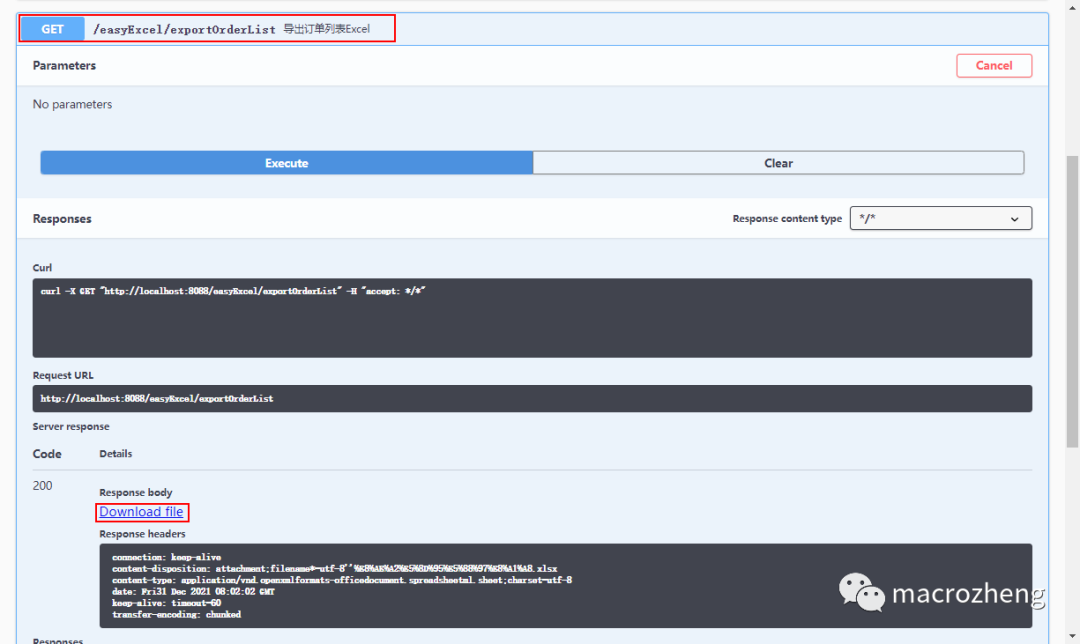
在Swagger中訪問接口測試,導(dǎo)出訂單列表對應(yīng)Excel;
下載完成后,查看下文件,由于EasyExcel需要自己來實現(xiàn),對比之前使用EasyPoi來實現(xiàn)麻煩了不少。
其他使用
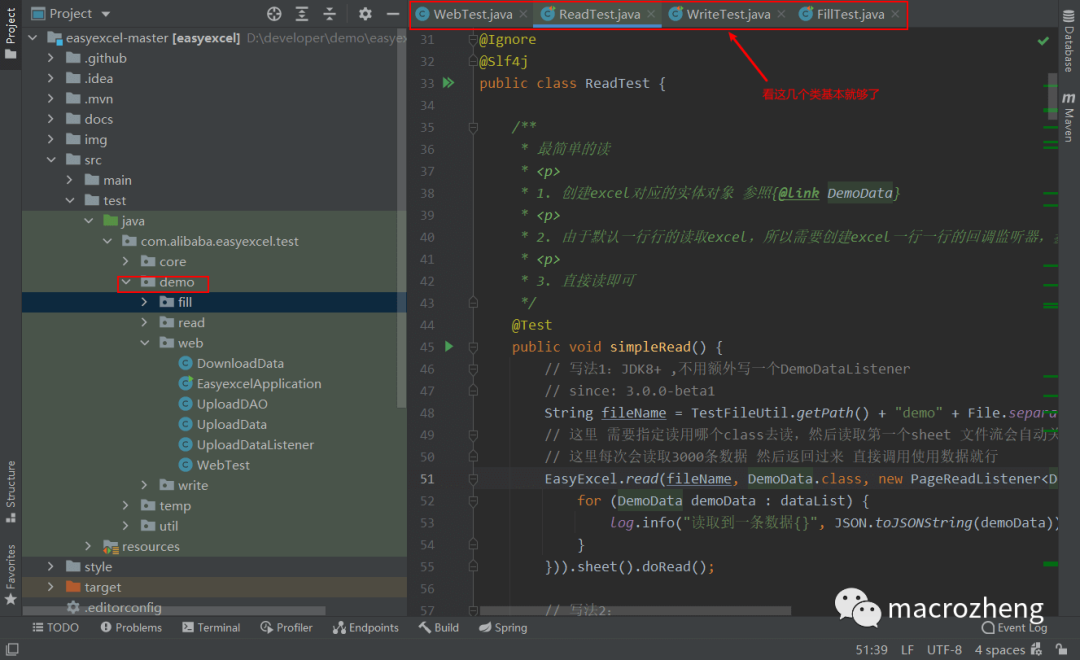
由于EasyExcel的官方文檔介紹的比較簡單,如果你想要更深入地進行使用的話,建議大家看下官方Demo。
總結(jié)
體驗了一把EasyExcel,使用還是挺方便的,性能也很優(yōu)秀。但是比較常見的一對多導(dǎo)出實現(xiàn)比較復(fù)雜,而且功能也不如EasyPoi 強大。如果你的Excel導(dǎo)出數(shù)據(jù)量不大的話,可以使用EasyPoi,如果數(shù)據(jù)量大,比較在意性能的話,還是使用EasyExcel吧。
參考資料
項目地址:https://github.com/alibaba/easyexcel 官方文檔:https://www.yuque.com/easyexcel/doc/easyexcel
推薦閱讀
沒有什么使我停留——除了目的,縱然岸旁有玫瑰、有綠蔭、有寧靜的港灣,我是不系之舟。