
SpringBoot 搭建基于 minio 的高性能存儲(chǔ)服務(wù)
什么是minio
引用官網(wǎng):
MinIO是根據(jù)GNU Affero通用公共許可證v3.0發(fā)布的高性能對(duì)象存儲(chǔ)。它與Amazon S3云存儲(chǔ)服務(wù)兼容。使用MinIO構(gòu)建用于機(jī)器學(xué)習(xí),分析和應(yīng)用程序數(shù)據(jù)工作負(fù)載的高性能基礎(chǔ)架構(gòu)。
官網(wǎng)地址:
https://min.io/
文檔地址:
https://docs.min.io/
一. 使用docker 搭建minio 服務(wù)。
GNU / Linux和macOS
docker?run?-p?9000:9000?\
??--name?minio1?\
??-v?/mnt/data:/data?\
??-e?"MINIO_ROOT_USER=AKIAIOSFODNN7EXAMPLE"?\
??-e?"MINIO_ROOT_PASSWORD=wJalrXUtnFEMI/K7MDENG/bPxRfiCYEXAMPLEKEY"?\
??minio/minio?server?/data
windows
docker?run?-p?9000:9000?\
??--name?minio1?\
??-v?D:\data:/data?\
??-e?"MINIO_ROOT_USER=AKIAIOSFODNN7EXAMPLE"?\
??-e?"MINIO_ROOT_PASSWORD=wJalrXUtnFEMI/K7MDENG/bPxRfiCYEXAMPLEKEY"?\
??minio/minio?server?/data
MINIO_ROOT_USER:為用戶keyMINIO_ROOT_PASSWORD:為用戶密鑰
以上搭建的都是單機(jī)版的。想要了解分布式 的方式請(qǐng)查看官網(wǎng)文檔。

這就是在win的docker上運(yùn)行的。
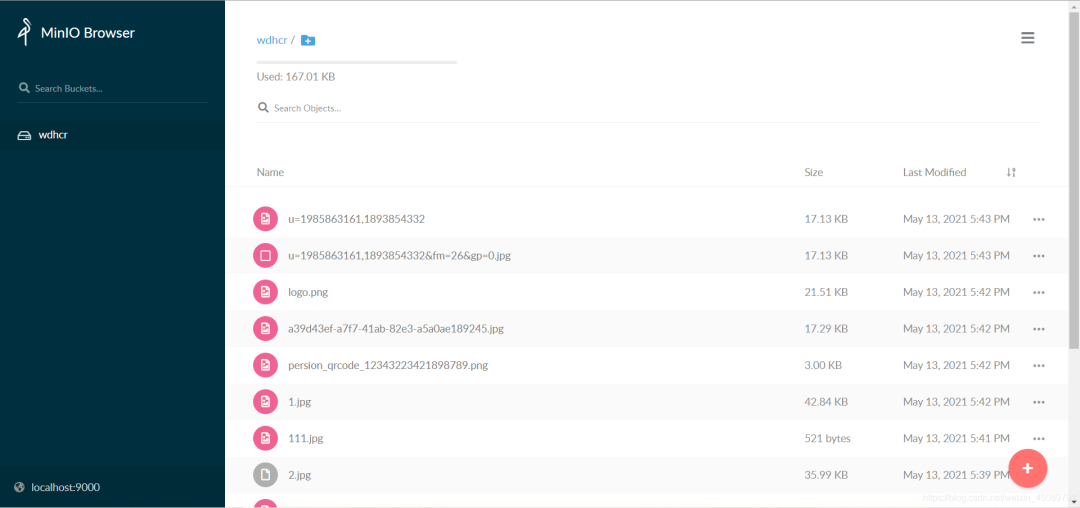
當(dāng)啟動(dòng)后在瀏覽器訪問(wèn)http://localhost:9000就可以訪問(wèn)minio的圖形化界面了,如圖所示:

二. 下面開(kāi)始搭建springboot 環(huán)境
初始化一個(gè)springboot項(xiàng)目大家都會(huì),這里不多做介紹。
主要是介紹需要引入的依賴:
??<dependency>
????????????<groupId>org.springframework.bootgroupId>
????????????<artifactId>spring-boot-starter-thymeleafartifactId>
????????dependency>

?????????<dependency>
????????????<groupId>io.miniogroupId>
????????????<artifactId>minioartifactId>
????????????<version>8.2.1version>
????????dependency>

?????????<dependency>
????????????<groupId>org.projectlombokgroupId>
????????????<artifactId>lombokartifactId>
????????????<optional>trueoptional>
????????dependency>
依賴可以官方文檔里找:https://docs.min.io/docs/java-client-quickstart-guide.html
下面介紹配置文件:
spring:
??servlet:
????multipart:
??????max-file-size:?10MB
??????max-request-size:?10MB
#minio配置
??minio:
????access-key:?AKIAIOSFODNN7EXAMPLE??????#key就是docker初始化是設(shè)置的,密鑰相同
????secret-key:?wJalrXUtnFEMI/K7MDENG/bPxRfiCYEXAMPLEKEY
????url:?http://localhost:9000
????bucket-name:?wdhcr
??thymeleaf:
????cache:?false
創(chuàng)建minio的配置類:
@Configuration
@ConfigurationProperties(prefix?=?"spring.minio")
@Data
public?class?MinioConfiguration?{
????private?String?accessKey;

????private?String?secretKey;

????private?String?url;

????private?String?bucketName;

????@Bean
????public?MinioClient?minioClient()?{
????????return?MinioClient.builder()
????????????????.endpoint(url)
????????????????.credentials(accessKey,?secretKey)
????????????????.build();
????}
}
使用配置屬性綁定進(jìn)行參數(shù)綁定,并初始化一個(gè)minio client對(duì)象放入容器中。
下面就是我封裝的minio client 操作minio的簡(jiǎn)單方法的組件。
@Component
public?class?MinioComp?{

????@Autowired
????private?MinioClient?minioClient;

????@Autowired
????private?MinioConfiguration?configuration;

????/**
?????*?@description:?獲取上傳臨時(shí)簽名
?????*?@dateTime:?2021/5/13?14:12
?????*/
????public?Map?getPolicy(String?fileName,?ZonedDateTime?time)?{
????????PostPolicy?postPolicy?=?new?PostPolicy(configuration.getBucketName(),?time);
????????postPolicy.addEqualsCondition("key",?fileName);
????????try?{
????????????Map?map?=?minioClient.getPresignedPostFormData(postPolicy);
????????????HashMap?map1?=?new?HashMap<>();
????????????map.forEach((k,v)->{
???????????????map1.put(k.replaceAll("-",""),v);
???????????});
????????????map1.put("host",configuration.getUrl()+"/"+configuration.getBucketName());
????????????return?map1;
????????}?catch?(ErrorResponseException?e)?{
????????????e.printStackTrace();
????????}?catch?(InsufficientDataException?e)?{
????????????e.printStackTrace();
????????}?catch?(InternalException?e)?{
????????????e.printStackTrace();
????????}?catch?(InvalidKeyException?e)?{
????????????e.printStackTrace();
????????}?catch?(InvalidResponseException?e)?{
????????????e.printStackTrace();
????????}?catch?(IOException?e)?{
????????????e.printStackTrace();
????????}?catch?(NoSuchAlgorithmException?e)?{
????????????e.printStackTrace();
????????}?catch?(ServerException?e)?{
????????????e.printStackTrace();
????????}?catch?(XmlParserException?e)?{
????????????e.printStackTrace();
????????}
????????return?null;
????}

????/**
?????*?@description:?獲取上傳文件的url
?????*?@dateTime:?2021/5/13?14:15
?????*/
????public?String?getPolicyUrl(String?objectName,?Method?method,?int?time,?TimeUnit?timeUnit)?{
????????try?{
????????????return?minioClient.getPresignedObjectUrl(GetPresignedObjectUrlArgs.builder()
????????????????????.method(method)
????????????????????.bucket(configuration.getBucketName())
????????????????????.object(objectName)
????????????????????.expiry(time,?timeUnit).build());
????????}?catch?(ErrorResponseException?e)?{
????????????e.printStackTrace();
????????}?catch?(InsufficientDataException?e)?{
????????????e.printStackTrace();
????????}?catch?(InternalException?e)?{
????????????e.printStackTrace();
????????}?catch?(InvalidKeyException?e)?{
????????????e.printStackTrace();
????????}?catch?(InvalidResponseException?e)?{
????????????e.printStackTrace();
????????}?catch?(IOException?e)?{
????????????e.printStackTrace();
????????}?catch?(NoSuchAlgorithmException?e)?{
????????????e.printStackTrace();
????????}?catch?(XmlParserException?e)?{
????????????e.printStackTrace();
????????}?catch?(ServerException?e)?{
????????????e.printStackTrace();
????????}
????????return?null;
????}


????/**
?????*?@description:?上傳文件
?????*?@dateTime:?2021/5/13?14:17
?????*/
????public?void?upload(MultipartFile?file,?String?fileName)?{
????????//?使用putObject上傳一個(gè)文件到存儲(chǔ)桶中。
????????try?{
????????????InputStream?inputStream?=?file.getInputStream();
????????????minioClient.putObject(PutObjectArgs.builder()
????????????????????.bucket(configuration.getBucketName())
????????????????????.object(fileName)
????????????????????.stream(inputStream,?file.getSize(),?-1)
????????????????????.contentType(file.getContentType())
????????????????????.build());
????????}?catch?(ErrorResponseException?e)?{
????????????e.printStackTrace();
????????}?catch?(InsufficientDataException?e)?{
????????????e.printStackTrace();
????????}?catch?(InternalException?e)?{
????????????e.printStackTrace();
????????}?catch?(InvalidKeyException?e)?{
????????????e.printStackTrace();
????????}?catch?(InvalidResponseException?e)?{
????????????e.printStackTrace();
????????}?catch?(IOException?e)?{
????????????e.printStackTrace();
????????}?catch?(NoSuchAlgorithmException?e)?{
????????????e.printStackTrace();
????????}?catch?(ServerException?e)?{
????????????e.printStackTrace();
????????}?catch?(XmlParserException?e)?{
????????????e.printStackTrace();
????????}
????}
??/**
?????*?@description:?根據(jù)filename獲取文件訪問(wèn)地址
?????*?@dateTime:?2021/5/17?11:28
?????*/
????public?String?getUrl(String?objectName,?int?time,?TimeUnit?timeUnit)?{
????????String?url?=?null;
????????try?{
????????????url?=?minioClient.getPresignedObjectUrl(GetPresignedObjectUrlArgs.builder()
????????????????????.method(Method.GET)
????????????????????.bucket(configuration.getBucketName())
????????????????????.object(objectName)
????????????????????.expiry(time,?timeUnit).build());
????????}?catch?(ErrorResponseException?e)?{
????????????e.printStackTrace();
????????}?catch?(InsufficientDataException?e)?{
????????????e.printStackTrace();
????????}?catch?(InternalException?e)?{
????????????e.printStackTrace();
????????}?catch?(InvalidKeyException?e)?{
????????????e.printStackTrace();
????????}?catch?(InvalidResponseException?e)?{
????????????e.printStackTrace();
????????}?catch?(IOException?e)?{
????????????e.printStackTrace();
????????}?catch?(NoSuchAlgorithmException?e)?{
????????????e.printStackTrace();
????????}?catch?(XmlParserException?e)?{
????????????e.printStackTrace();
????????}?catch?(ServerException?e)?{
????????????e.printStackTrace();
????????}
????????return?url;
????}
}
簡(jiǎn)單說(shuō)明:
使用MultipartFile接收前端文件流,再上傳到minio。 構(gòu)建一個(gè)formData的簽名數(shù)據(jù),給前端,讓前端之前上傳到minio。 構(gòu)建一個(gè)可以上傳的臨時(shí)URL給前端,前端通過(guò)攜帶文件請(qǐng)求該URL進(jìn)行上傳。 使用filename請(qǐng)求服務(wù)端獲取臨時(shí)訪問(wèn)文件的URL。(最長(zhǎng)時(shí)間為7 天,想要永久性訪問(wèn),需要其他設(shè)置,這里不做說(shuō)明。)
下面展示頁(yè)面html,使用的是VUE+element-ui進(jìn)行渲染。
html>
<html>
<head>
????<meta?charset="UTF-8">
????
????<link?rel="stylesheet"?href="https://unpkg.com/element-ui/lib/theme-chalk/index.css">
????<title>上傳圖片title>
head>
<body>
<div?id="app">

????<el-row?:gutter="2">
????????<el-col?:span="8">
????????????<div?class="div-center-class">
????????????????<div?class="">
????????????????????<center><h3>傳統(tǒng)上傳h3>center>
????????????????????<el-upload
????????????????????????????class="upload-demo"
????????????????????????????action="#"
????????????????????????????drag
????????????????????????????:http-request="uploadHandle">
????????????????????????<i?class="el-icon-upload">i>
????????????????????????<div?class="el-upload__text">將文件拖到此處,或<em>點(diǎn)擊上傳em>div>
????????????????????????<div?class="el-upload__tip"?slot="tip">只能上傳jpg/png文件,且不超過(guò)500kbdiv>
????????????????????el-upload>
????????????????????<div?v-if="imgUrl">
????????????????????????<img?:src="imgUrl"?style="width:?40px;height:?40px">img>
????????????????????div>
????????????????div>
????????????div>
????????el-col>
????????<el-col?:span="8">
????????????<div?class="div-center-class">
????????????????<div?class="">
????????????????????<center><h3>前端formData直傳h3>center>
????????????????????<el-upload
????????????????????????????class="upload-demo"
????????????????????????????action="#"
????????????????????????????drag
????????????????????????????:http-request="httpRequestHandle">
????????????????????????<i?class="el-icon-upload">i>
????????????????????????<div?class="el-upload__text">將文件拖到此處,或<em>點(diǎn)擊上傳em>div>
????????????????????????<div?class="el-upload__tip"?slot="tip">只能上傳jpg/png文件,且不超過(guò)500kbdiv>
????????????????????el-upload>
????????????????????<div?v-if="directUrl">
????????????????????????<img?:src="directUrl"?style="width:?40px;height:?40px">img>
????????????????????div>
????????????????div>
????????????div>
????????el-col>
????????<el-col?:span="8">
????????????<div?class="div-center-class">
????????????????<div?class="">
????????????????????<center><h3>前端Url直傳h3>center>
????????????????????<el-upload
????????????????????????????class="upload-demo"
????????????????????????????action="#"
????????????????????????????drag
????????????????????????????:http-request="UrlUploadHandle">
????????????????????????<i?class="el-icon-upload">i>
????????????????????????<div?class="el-upload__text">將文件拖到此處,或<em>點(diǎn)擊上傳em>div>
????????????????????????<div?class="el-upload__tip"?slot="tip">只能上傳jpg/png文件,且不超過(guò)500kbdiv>
????????????????????el-upload>
????????????????????<div?v-if="uploadUrl">
????????????????????????<img?:src="uploadUrl"?style="width:?40px;height:?40px">img>
????????????????????div>
????????????????div>
????????????div>
????????el-col>
????el-row>
div>
body>

<script?src="https://unpkg.com/vue/dist/vue.js">script>

<script?src="https://unpkg.com/element-ui/lib/index.js">script>

<script?src="https://unpkg.com/axios/dist/axios.min.js">script>
<script>
????new?Vue({
????????el:?'#app',
????????data:?function?()?{
????????????return?{
????????????????imgUrl:?'',
????????????????directUrl:?'',
????????????????uploadUrl:?''
????????????}
????????},
????????methods:?{

????????????uploadHandle(options)?{
????????????????let?{file}?=?options;
????????????????this.traditionPost(file);
????????????},
????????????traditionPost(file)?{
????????????????_that?=?this
????????????????const?form?=?new?FormData();
????????????????form.append("fileName",?file.name);
????????????????form.append("file",?file);
????????????????this.axiosPost("post",?"/upload",?form).then(function?(res)?{
????????????????????if?(res.status?===?200)?{
????????????????????????_that.imgUrl?=?res.data.data
????????????????????}?else?{
????????????????????????alert("上傳失敗!")
????????????????????}
????????????????})
????????????},
????????????getpolicy(file)?{
????????????????_that?=?this
????????????????axios.get('policy?fileName='?+?file.name)
????????????????????.then(function?(response)?{
????????????????????????let?{xamzalgorithm,?xamzcredential,?policy,?xamzsignature,?xamzdate,?host}?=?response.data.data;
????????????????????????let?formData?=?new?FormData();
????????????????????????formData.append("key",?file.name);
????????????????????????formData.append("x-amz-algorithm",?xamzalgorithm);??//?讓服務(wù)端返回200,不設(shè)置則默認(rèn)返回204。
????????????????????????formData.append("x-amz-credential",?xamzcredential);
????????????????????????formData.append("policy",?policy);
????????????????????????formData.append("x-amz-signature",?xamzsignature);
????????????????????????formData.append("x-amz-date",?xamzdate);
????????????????????????formData.append("file",?file);
????????????????????????//?發(fā)送?POST?請(qǐng)求
????????????????????????_that.axiosPost("post",?host,?formData).then(function?(res)?{
????????????????????????????if?(res.status?===?204)?{
????????????????????????????????axios.get('url?fileName='?+?file.name).then(function?(res)?{
????????????????????????????????????_that.directUrl?=?res.data.data;
????????????????????????????????})
????????????????????????????}?else?{
????????????????????????????????alert("上傳失敗!")
????????????????????????????}
????????????????????????})
????????????????????})
????????????},
????????????httpRequestHandle(options)?{
????????????????let?{file}?=?options;
????????????????this.getpolicy(file);
????????????},

????????????UrlUploadHandle(options)?{
????????????????let?{file}?=?options;
????????????????this.getUploadUrl(file);
????????????},
????????????getUploadUrl(file)?{
????????????????_that?=?this
????????????????console.log(file)
????????????????axios.get('uploadUrl?fileName='?+?file.name)
????????????????????.then(function?(response)?{
????????????????????????let?url?=?response.data.data;
????????????????????????//?發(fā)送?put?請(qǐng)求
????????????????????????let?config?=?{'Content-Type':?file.type}
????????????????????????_that.axiosPost("put",?url,?file,?config).then(function?(res)?{
????????????????????????????if?(res.status?===?200)?{
????????????????????????????????axios.get('url?fileName='?+?file.name).then(function?(res)?{
????????????????????????????????????_that.uploadUrl?=?res.data.data;
????????????????????????????????})
????????????????????????????}?else?{
????????????????????????????????alert("上傳失敗!")
????????????????????????????}
????????????????????????})
????????????????????})
????????????},
????????????//封裝
????????????//axios封裝post請(qǐng)求
????????????axiosPost(method,?url,?data,?config)?{
????????????????let?result?=?axios({
????????????????????method:?method,
????????????????????url:?url,
????????????????????data:?data,
????????????????????headers:?config
????????????????}).then(resp?=>?{
????????????????????return?resp
????????????????}).catch(error?=>?{
????????????????????return?"exception="?+?error;
????????????????});
????????????????return?result;
????????????}

????????}
????})
script>
<style>
????.div-center-class?{
????????padding:?28%?0%;
????????text-align:?center;
????????background:?beige;
????}
style>
html>
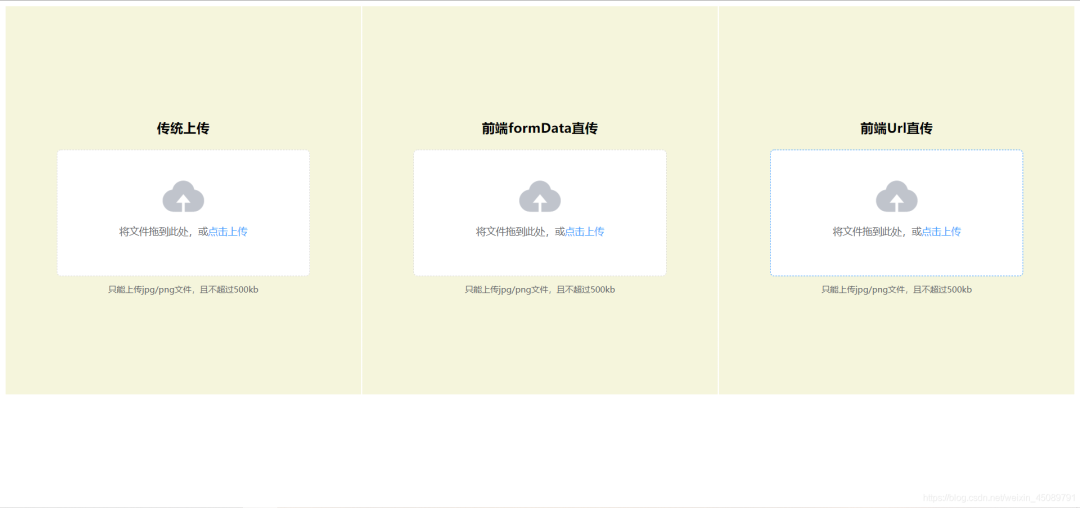
可以分別體驗(yàn)不同的實(shí)現(xiàn)效果。
以上就是使用springboot搭建基于minio的高性能存儲(chǔ)服務(wù)的全部步驟了。
項(xiàng)目地址是:
https://gitee.com/jack_whh/minio-upload