
四十五、Redis數(shù)據(jù)庫學習
「@Author:Runsen」
Redis
Redis是一個開源的使用ANSI C語言編寫、支持網(wǎng)絡(luò)、可基于內(nèi)存亦可持久化的日志型、Key-Value數(shù)據(jù)庫,并提供多種語言的API。
從2010年3月15日起,Redis的開發(fā)工作由VMware主持。從2013年5月開始,Redis的開發(fā)由Pivotal贊助。
Redis特性
Redis支持數(shù)據(jù)的持久化,可以將內(nèi)存中的數(shù)據(jù)保存在磁盤中,重啟的時候可以再次加載進行使用。 Redis不僅僅支持簡單的key-value類型的數(shù)據(jù),同時還把value分為list,set,zset,hash等數(shù)據(jù)結(jié)構(gòu)存儲。 因為Redis交換數(shù)據(jù)快,所以在服務(wù)器中常用來存儲一些需要頻繁調(diào)取的數(shù)據(jù),提高效率。
Redis安裝
在Linux下安裝Redis非常簡單,主要命令就下面4個:
Redis數(shù)據(jù)庫需要gcc編譯,因此第一步檢查是否安裝gcc環(huán)境
[root@VM_0_16_centos?~]#?rpm?-qa|grep?gcc*
//無則安裝。
[root@VM_0_16_centos?~]#?yum?install?gcc-c++
創(chuàng)建目錄,下載源碼(通過華為鏡像),解壓源碼
[root@VM_0_16_centos?redis]#?mkdir?/usr/lib/redis
[root@VM_0_16_centos?redis]#?cd?/usr/lib/redis/
[root@VM_0_16_centos?redis]#?wget?https://mirrors.huaweicloud.com/redis/redis-5.0.5.tar.gz
[root@VM_0_16_centos?redis]#?tar?-zxvf?redis-5.0.5.tar.gz?
進入文件夾,編譯
[root@VM_0_16_centos?redis]#?cd?./redis-5.0.5/
[root@VM_0_16_centos?redis-5.0.5]#?make
上面4命令如果安裝正常的話代表make編譯成功了!
修改配置文件
1、將源碼目錄下redis配置文件redis.conf拷貝到/usr/local/software/redis/目錄下。cp redis.conf /usr/local/software/redis/ 2、修改配置項,根據(jù)需要;如果不修改,使用默認配置也可以
安裝,并檢查是否安裝了服務(wù)
[root@VM_0_16_centos?redis-5.0.5]#?make?PREFIX=/usr/local/redis?install
//查看是否有此服務(wù)
[root@VM_0_16_centos?bin]#?ls?/usr/local/redis/bin
redis-benchmark??redis-check-aof??redis-check-rdb??redis-cli??redis-sentinel??redis-server
//把解壓目錄下配置文件復(fù)制到安裝路徑下

[root@VM_0_16_centos?usr]#?cp?/usr/lib/redis/redis-5.0.5/redis.conf??/usr/local/redis/
//?由于前端啟動模式啟動后不可以隨意關(guān)閉(進程斷開),所以需要配置后端模式啟動
下面,配置Redis外網(wǎng)訪問,修改后端啟動(即守護進程開啟),取消ip綁定
[root@VM_0_16_centos?~]#?vim?/usr/local/redis/redis.conf
注釋掉bind?127.0.0.1?或改為bind?0.0.0.0
#bind?127.0.0.1
更改protected-mode?yes為
#?關(guān)閉保護模式
protected-mode?no

更改daemonize?no為
daemonize?yes
設(shè)置密碼requirepass 要很長的密碼
啟動,并指定配置文件
[root@VM_0_16_centos?~]#?cd?/usr/local/redis/

[root@VM_0_16_centos?redis]#?./bin/redis-server?./redis.conf

1675:C?15?Sep?2019?22:50:52.157?#?oO0OoO0OoO0Oo?Redis?is?starting?oO0OoO0OoO0Oo

1675:C?15?Sep?2019?22:50:52.157?#?Redis?version=5.0.5,?bits=64,?commit=00000000,?modified=0,?pid=1675,?just?started
1675:C?15?Sep?2019?22:50:52.157?#?Configuration?loaded
通過端口(6379)查看服務(wù)是否啟動
[root@VM_0_16_centos?redis]#?ps?-ef|grep?redis
root?????1676?????1??0?22:50??????????00:00:00?./bin/redis-server?*:6379
root??????1900??1219??0?22:52?pts/6????00:00:00?grep?–color=auto?redis
本地客戶端連接和redis服務(wù)關(guān)閉
[root@VM_0_16_centos?redis]#?./bin/redis-cli
127.0.0.1:6379>?eixt
[root@VM_0_16_centos?redis]#?./bin/redis-cli?shutdown
通過外部(ip)連接,(需要開放云服務(wù)器相應(yīng)端口)
[root@VM_0_16_centos?redis]#?./bin/redis-cli?-h?49.ip.ip.2?-p?6379?-a?密碼
Warning:?Using?a?password?with?‘-a’?or?‘-u’?option?on?the?command?line?interface?may?not?be?safe.
49.ip.ip.2:6379>?
上面步驟參考:騰訊云服務(wù)器安裝redis,https://cloud.tencent.com/developer/article/1532497。
Redis數(shù)據(jù)模型
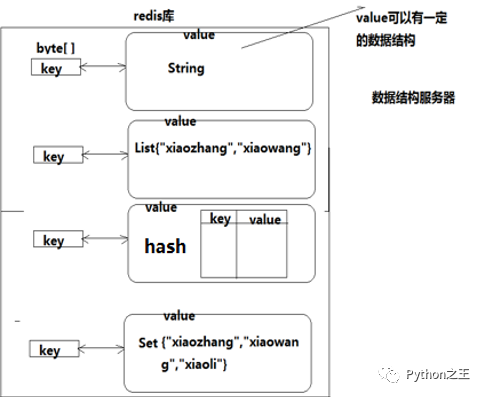
Redis支持五種數(shù)據(jù)類型:string(字符串),hash(哈希),list(列表),set(集合)及zset(sorted set:有序集合)。
String ? ------> ?字符串 Hash ? ? ------> ?哈希 List ? ? ? ?------> ?列表 set ? ? ? ? ------> ?集合 Zset ? ? ? ------> ?有序集合
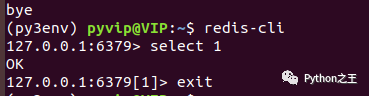
連接redis:
redis-cli退出:
exit操作服務(wù)端:
service redis start/stop/restart切換數(shù)據(jù)庫:select n

Redis五大數(shù)據(jù)類型使用
全局key操作
對5 個數(shù)據(jù)類型都使用的命令
查看所有的key:keys *
刪除鍵值對:del key
改名:rename  key  new_key
設(shè)置過期時間:expire key seconds
String類型
strings是redis最基本的數(shù)據(jù)類型,一個key對應(yīng)一個value
設(shè)置數(shù)據(jù):set??key??value
查看數(shù)據(jù):get  key
追加數(shù)據(jù):append  key  value
刪除數(shù)據(jù):del key;
List類型
添加數(shù)據(jù):rpush key value [value…]
lpush?key?value?[value…]?????頭部添加數(shù)據(jù)

查看數(shù)據(jù):lrange key start stop
lindex?key?index??????查看某個數(shù)據(jù)?

修改數(shù)據(jù):lset key index value
刪除數(shù)據(jù):rpop key
lpop?key?頭部刪除數(shù)據(jù)?
Hash類型
添加數(shù)據(jù):hset key field value
查看域值:hget key field
hgetall?key??查看所有的field和value
查看所有的value:hvals key
查看所有的field:hkeys key
Set類型
添加數(shù)據(jù):sadd key member [member …]
查看數(shù)據(jù):smembers key
隨機刪除:spop key
指定刪除:srem key member [member …]
Sorted Set類型
添加數(shù)據(jù):zadd key score member [score2 member2 …]?
查看數(shù)據(jù):zrange key start stop
zrangebyscore?key?min?max?通過scores值查看
刪除數(shù)據(jù):zrem key member [member …]
通過索引刪除多個數(shù)據(jù):zremrangebyrank key min max
zremrangebyscore?key?min?max??--??通過scores值刪除
「flushall 刪除所有數(shù)據(jù)」
Redis可視化
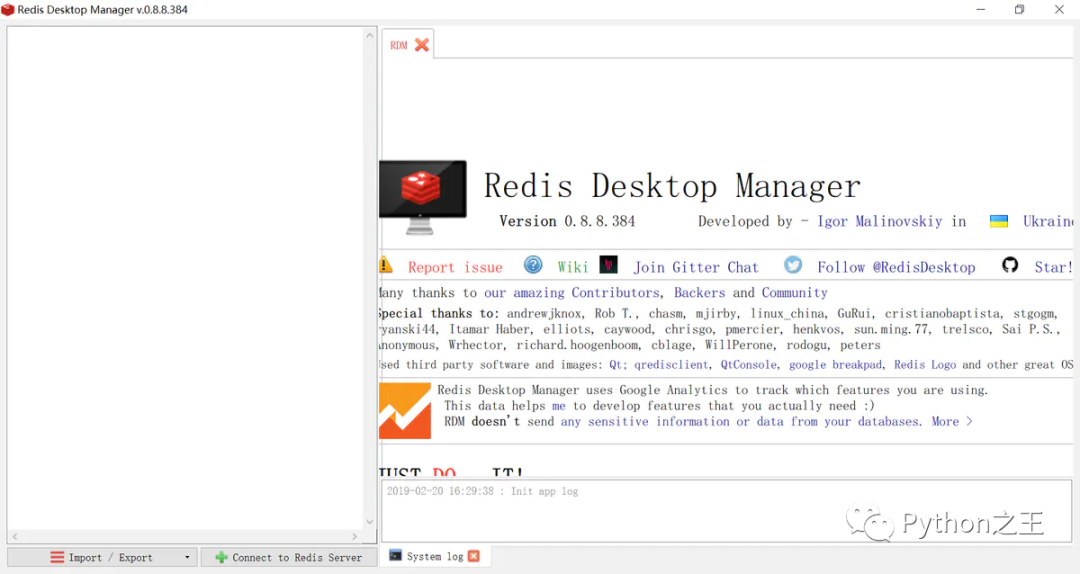
我使用的是redis desktop manager。這個工具應(yīng)該是現(xiàn)在使用率最廣的可視化工具了。下載鏈接為:https://rdm.dev/pricing。
Python連接redis
Python連接redis數(shù)據(jù)庫的庫是redis,沒有Pyredis。
安裝:pip install redis
Python連接redis前,確保配置Redis外網(wǎng)訪問成功。
import?redis

#?普通連接
conn?=?redis.Redis(host="192.168.92.90",?port=6379,password="123456")
conn.set("x","hello")
val?=?conn.get("x")
print(val)?#?hello


import?redis

#?連接池
pool?=?redis.ConnectionPool(host="192.168.23.166",?port=6379,password="123456",max_connections=1024)
conn?=?redis.Redis(connection_pool=pool)
print(conn.get("x1"))
?本文已收錄 GitHub,傳送門~[1] ,里面更有大廠面試完整考點,歡迎 Star。
?
Reference
傳送門~: https://github.com/MaoliRUNsen/runsenlearnpy100
更多的文章
點擊下面小程序

- END -