Spring Boot + flowable 快速實(shí)現(xiàn)工作流,好用到爆,Activiti 可以扔了。。
點(diǎn)擊關(guān)注公眾號(hào),Java干貨及時(shí)送達(dá)
背景
使用flowable自帶的flowable-ui制作流程圖 使用springboot開(kāi)發(fā)流程使用的接口完成流程的業(yè)務(wù)功能
flowable-ui部署運(yùn)行
flowable-6.6.0 運(yùn)行 官方demo
參考文檔:
https://flowable.com/open-source/docs/bpmn/ch14-Applications/
1、從官網(wǎng)下載flowable-6.6.0 : https://github.com/flowable/flowable-engine/releases/download/flowable-6.6.0/flowable-6.6.0.zip
2、將壓縮包中的 flowable-6.6.0\wars\flowable-ui.war 丟到Tomcat中跑起來(lái)
3、打開(kāi)http://localhost:8080/flowable-ui 用賬戶:admin/test 登錄
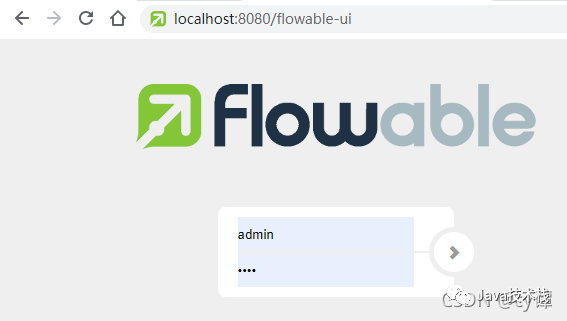
4、進(jìn)入APP.MODELER創(chuàng)建流程,之后可以導(dǎo)出流程到項(xiàng)目中使用,或者配置
apache-tomcat-9.0.37\webapps\flowable-ui\WEB-INF\classes\flowable-default.properties連接本地?cái)?shù)據(jù)庫(kù)
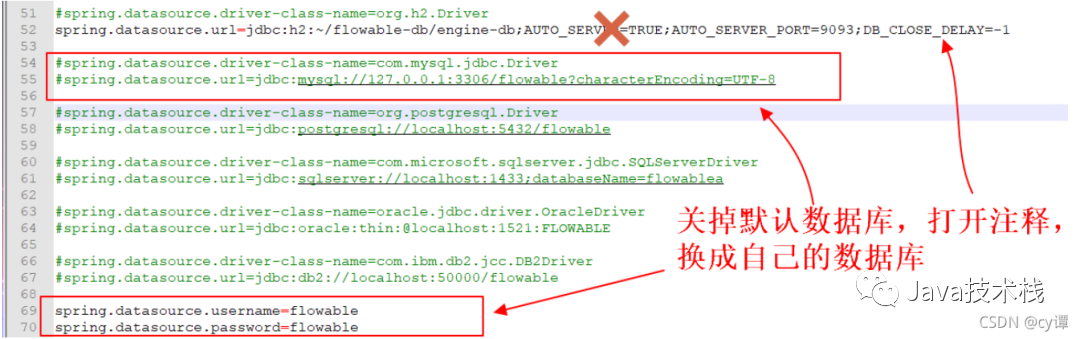
注意:需要將java驅(qū)動(dòng)jar(mysql-connector-java-5.1.45.jar)復(fù)制到 apache-tomcat-9.0.37\webapps\flowable-rest\WEB-INF\lib這樣創(chuàng)建的流程后端程序就能直接使用
繪制流程圖
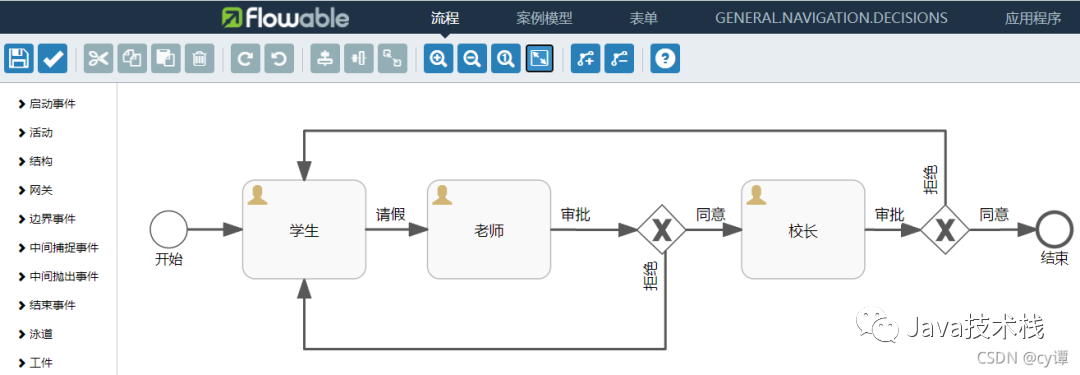
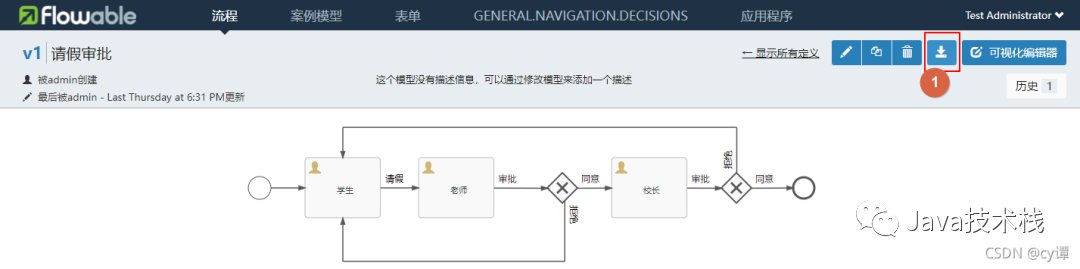
根據(jù)業(yè)務(wù)需要在 flowable-ui>APP.MODELER里面繪制流程圖,示例如上圖。先解釋一些概念。
事件(event)通常用于為流程生命周期中發(fā)生的事情建模,圖里是【開(kāi)始、結(jié)束】?jī)蓚€(gè)圈。
順序流(sequence flow)是流程中兩個(gè)元素間的連接器。圖里是【箭頭線段】。
網(wǎng)關(guān)(gateway)用于控制執(zhí)行的流向。圖里是【菱形(中間有X)】
用戶任務(wù)(user task)用于對(duì)需要人工執(zhí)行的任務(wù)進(jìn)行建模。圖里是【矩形】。
簡(jiǎn)單的工作流大概就這些元素(還有很多這里就不擴(kuò)展了)。下面描述一下工作流是如何流動(dòng)的。最新面試題整理好了,大家可以在Java面試庫(kù)小程序在線刷題。
首先啟動(dòng)了工作流后,由【開(kāi)始】節(jié)點(diǎn)自動(dòng)流向【學(xué)生】節(jié)點(diǎn),等待該任務(wù)執(zhí)行。任務(wù)被分配的學(xué)生用戶執(zhí)行后流向 【老師】節(jié)點(diǎn),再次等待該任務(wù)執(zhí)行。被分配的老師用戶執(zhí)行后流向 【網(wǎng)關(guān)】,網(wǎng)關(guān)以此檢查每個(gè)出口,流向符合條件的任務(wù),比如這里老師執(zhí)行任務(wù)時(shí)是同意,就流向【校長(zhǎng)】節(jié)點(diǎn),等待該任務(wù)執(zhí)行。執(zhí)行后跟老師類似,同意后就流向【結(jié)束】節(jié)點(diǎn),整個(gè)流程到此結(jié)束。
繪圖細(xì)節(jié):
1、保留流程模型
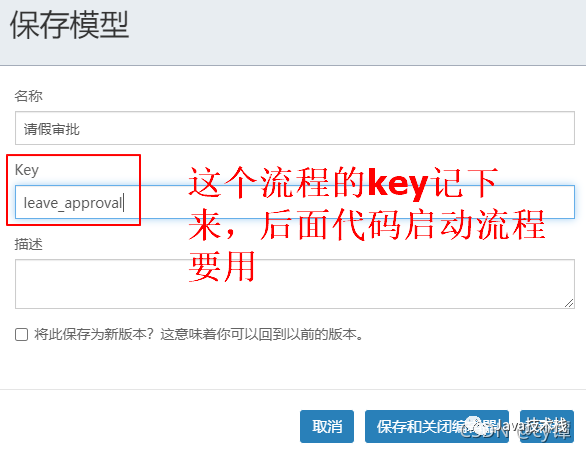
2、順序流可以設(shè)置流條件來(lái)限制流動(dòng),比如上面的網(wǎng)關(guān)出口就設(shè)置了條件

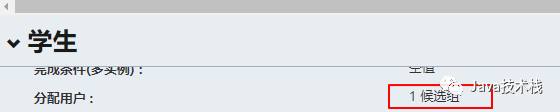
3、任務(wù)需要分配任務(wù)的執(zhí)行用戶,可以分配到候選組,也可以直接分配到候選人
最后導(dǎo)出工作流文件
文件內(nèi)容
<?xml version="1.0" encoding="UTF-8"?>
<definitions xmlns="http://www.omg.org/spec/BPMN/20100524/MODEL" xmlns:xsi="http://www.w3.org/2001/XMLSchema-insmtece" xmlns:xsd="http://www.w3.org/2001/XMLSchema" xmlns:flowable="http://flowable.org/bpmn" xmlns:bpmndi="http://www.omg.org/spec/BPMN/20100524/DI" xmlns:omgdc="http://www.omg.org/spec/DD/20100524/DC" xmlns:omgdi="http://www.omg.org/spec/DD/20100524/DI" typeLanguage="http://www.w3.org/2001/XMLSchema" expressionLanguage="http://www.w3.org/1999/XPath" targetNamespace="http://www.flowable.org/processdef">
  <process id="leave_approval" name="請(qǐng)假審批" isExecutable="true">
    <startEvent id="start" name="開(kāi)始" flowable:initiator="startuser" flowable:formFieldValidation="true"></startEvent>
    <userTask id="stu_task" name="學(xué)生" flowable:candidateGroups="stu_group" flowable:formFieldValidation="true"></userTask>
    <sequenceFlow id="flow1" sourceRef="start" targetRef="stu_task"></sequenceFlow>
    <userTask id="te_task" name="老師" flowable:candidateGroups="te_group" flowable:formFieldValidation="true"></userTask>
    <exclusiveGateway id="getway1" name="網(wǎng)關(guān)1"></exclusiveGateway>
    <userTask id="mte_task" name="校長(zhǎng)" flowable:candidateGroups="mte_group" flowable:formFieldValidation="true"></userTask>
    <exclusiveGateway id="getway2" name="網(wǎng)關(guān)2"></exclusiveGateway>
    <endEvent id="end" name="結(jié)束"></endEvent>
    <sequenceFlow id="flow1" name="請(qǐng)假" sourceRef="stu_task" targetRef="te_task" skipExpression="${command=='agree'}"></sequenceFlow>
    <sequenceFlow id="flow3_1" name="同意" sourceRef="getway1" targetRef="mte_task">
      <conditionExpression xsi:type="tFormalExpression"><![CDATA[${command=='agree'}]]></conditionExpression>
    </sequenceFlow>
    <sequenceFlow id="flow2" name="審批" sourceRef="te_task" targetRef="getway1"></sequenceFlow>
    <sequenceFlow id="flow3_2" name="拒絕" sourceRef="getway1" targetRef="stu_task">
      <conditionExpression xsi:type="tFormalExpression"><![CDATA[${command=='refuse'}]]></conditionExpression>
    </sequenceFlow>
    <sequenceFlow id="flow4" name="審批" sourceRef="mte_task" targetRef="getway2"></sequenceFlow>
    <sequenceFlow id="flow4_1" name="同意" sourceRef="getway2" targetRef="end" skipExpression="${command=='free'}">
      <conditionExpression xsi:type="tFormalExpression"><![CDATA[${command=='agree'}]]></conditionExpression>
    </sequenceFlow>
    <sequenceFlow id="flow4_2" name="拒絕" sourceRef="getway2" targetRef="stu_task">
      <conditionExpression xsi:type="tFormalExpression"><![CDATA[${command=='refuse'}]]></conditionExpression>
    </sequenceFlow>
  </process>
  <bpmndi:BPMNDiagram id="BPMNDiagram_leave_approval">
    這里先省略
  </bpmndi:BPMNDiagram>
</definitions>
【完整文件】:leave_approval.bpmn20.xml
點(diǎn)擊關(guān)注公眾號(hào),Java干貨及時(shí)送達(dá)
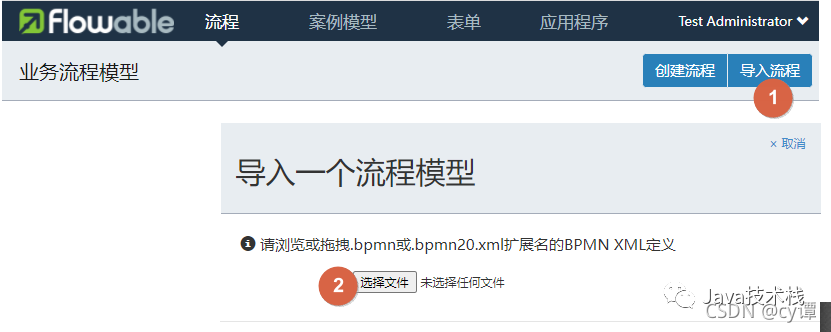
4、bpmn文件導(dǎo)入
如果需要,可以把這個(gè)流程文件下載下來(lái),直接導(dǎo)入使用
后臺(tái)項(xiàng)目搭建
后臺(tái)項(xiàng)目基于jdk8,使用springboot框架
Spring Boot 基礎(chǔ)就不介紹了,推薦下這個(gè)實(shí)戰(zhàn)教程:https://github.com/javastacks/spring-boot-best-practice
spring 版本
<parent>
    <groupId>org.springframework.boot</groupId>
    <artifactId>spring-boot-starter-parent</artifactId>
    <version>2.3.0.RELEASE</version>
    <relativePath/> <!-- lookup parent from repository -->
</parent>
分享資料:Spring Boot 學(xué)習(xí)筆記,這個(gè)太全了!
項(xiàng)目依賴pom.xml
<dependency>
    <groupId>org.flowable</groupId>
    <artifactId>flowable-spring-boot-starter</artifactId>
    <version>6.6.0</version>
</dependency>
<dependency>
    <groupId>mysql</groupId>
    <artifactId>mysql-connector-java</artifactId>
    <version>5.1.45</version>
</dependency>
項(xiàng)目配置application.yml
spring:
  datasource:
    url: jdbc:mysql://localhost:3306/flowable?useSSL=false&characterEncoding=UTF-8&serverTimezone=GMT%2B8
    driver-class-name: com.mysql.jdbc.Driver
    username: root
    password: 123456
數(shù)據(jù)庫(kù)
2、ACT_RE_: 'RE’代表repository。帶有這個(gè)前綴的表包含“靜態(tài)”信息,例如流程定義與流程資源(圖片、規(guī)則等)。
4、ACT_HI_: 'HI’代表history。這些表存儲(chǔ)歷史數(shù)據(jù),例如已完成的流程實(shí)例、變量、任務(wù)等。
5、ACT_GE_: 通用數(shù)據(jù)。在多處使用。
act_ge_bytearray:二進(jìn)制數(shù)據(jù)表,如流程定義、流程模板、流程圖的字節(jié)流文件; act_ge_property:屬性數(shù)據(jù)表(不常用);
2)歷史表(8個(gè),HistoryService接口操作的表)
act_hi_actinst:歷史節(jié)點(diǎn)表,存放流程實(shí)例運(yùn)轉(zhuǎn)的各個(gè)節(jié)點(diǎn)信息(包含開(kāi)始、結(jié)束等非任務(wù)節(jié)點(diǎn)); act_hi_attachment:歷史附件表,存放歷史節(jié)點(diǎn)上傳的附件信息(不常用); act_hi_comment:歷史意見(jiàn)表; act_hi_detail:歷史詳情表,存儲(chǔ)節(jié)點(diǎn)運(yùn)轉(zhuǎn)的一些信息(不常用); act_hi_identitylink:歷史流程人員表,存儲(chǔ)流程各節(jié)點(diǎn)候選、辦理人員信息,常用于查詢某人或部門的已辦任務(wù); act_hi_procinst:歷史流程實(shí)例表,存儲(chǔ)流程實(shí)例歷史數(shù)據(jù)(包含正在運(yùn)行的流程實(shí)例); act_hi_taskinst:歷史流程任務(wù)表,存儲(chǔ)歷史任務(wù)節(jié)點(diǎn); act_hi_varinst:流程歷史變量表,存儲(chǔ)流程歷史節(jié)點(diǎn)的變量信息;
3)用戶相關(guān)表(4個(gè),IdentityService接口操作的表)
4)流程定義、流程模板相關(guān)表(3個(gè),RepositoryService接口操作的表)
act_re_deployment:部屬信息表,存儲(chǔ)流程定義、模板部署信息; act_re_procdef:流程定義信息表,存儲(chǔ)流程定義相關(guān)描述信息,但其真正內(nèi)容存儲(chǔ)在act_ge_bytearray表中,以字節(jié)形式存儲(chǔ); act_re_model:流程模板信息表,存儲(chǔ)流程模板相關(guān)描述信息,但其真正內(nèi)容存儲(chǔ)在act_ge_bytearray表中,以字節(jié)形式存儲(chǔ);
5)流程運(yùn)行時(shí)表(6個(gè),RuntimeService接口操作的表)
act_ru_task:運(yùn)行時(shí)流程任務(wù)節(jié)點(diǎn)表,存儲(chǔ)運(yùn)行中流程的任務(wù)節(jié)點(diǎn)信息,重要,常用于查詢?nèi)藛T或部門的待辦任務(wù)時(shí)使用; act_ru_event_subscr:監(jiān)聽(tīng)信息表,不常用; act_ru_execution:運(yùn)行時(shí)流程執(zhí)行實(shí)例表,記錄運(yùn)行中流程運(yùn)行的各個(gè)分支信息(當(dāng)沒(méi)有子流程時(shí),其數(shù)據(jù)與act_ru_task表數(shù)據(jù)是一一對(duì)應(yīng)的); act_ru_identitylink:運(yùn)行時(shí)流程人員表,重要,常用于查詢?nèi)藛T或部門的待辦任務(wù)時(shí)使用; act_ru_job:運(yùn)行時(shí)定時(shí)任務(wù)數(shù)據(jù)表,存儲(chǔ)流程的定時(shí)任務(wù)信息; act_ru_variable:運(yùn)行時(shí)流程變量數(shù)據(jù)表,存儲(chǔ)運(yùn)行中的流程各節(jié)點(diǎn)的變量信息;
流程引擎API與服務(wù)
引擎API是與Flowable交互的最常用手段。總?cè)肟邳c(diǎn)是ProcessEngine。
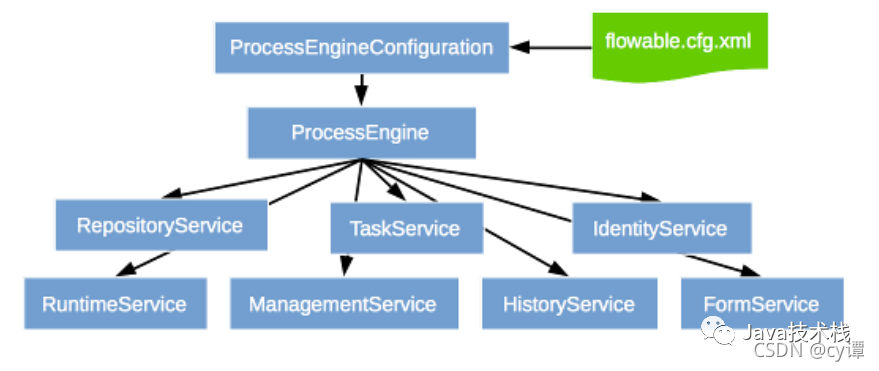
1、RepositoryService很可能是使用Flowable引擎要用的第一個(gè)服務(wù)。這個(gè)服務(wù)提供了管理與控制部署(deployments)與流程定義(process definitions)的操作。管理靜態(tài)信息,
2、RuntimeService用于啟動(dòng)流程定義的新流程實(shí)例。
3、IdentityService很簡(jiǎn)單。它用于管理(創(chuàng)建,更新,刪除,查詢……)組與用戶。
4、FormService是可選服務(wù)。也就是說(shuō)Flowable沒(méi)有它也能很好地運(yùn)行,而不必犧牲任何功能。
5、HistoryService暴露Flowable引擎收集的所有歷史數(shù)據(jù)。要提供查詢歷史數(shù)據(jù)的能力。
6、ManagementService通常在用Flowable編寫用戶應(yīng)用時(shí)不需要使用。它可以讀取數(shù)據(jù)庫(kù)表與表原始數(shù)據(jù)的信息,也提供了對(duì)作業(yè)(job)的查詢與管理操作。
7、DynamicBpmnService可用于修改流程定義中的部分內(nèi)容,而不需要重新部署它。例如可以修改流程定義中一個(gè)用戶任務(wù)的辦理人設(shè)置,或者修改一個(gè)服務(wù)任務(wù)中的類名。
最新面試題整理好了,大家可以在Java面試庫(kù)小程序在線刷題。接下來(lái)使用之前的請(qǐng)假流程圖,上代碼
import lombok.extern.slf4j.Slf4j;
import org.flowable.engine.HistoryService;
import org.flowable.engine.RepositoryService;
import org.flowable.engine.RuntimeService;
import org.flowable.engine.history.HistoricProcessInstance;
import org.flowable.engine.repository.Deployment;
import org.flowable.engine.repository.ProcessDefinition;
import org.flowable.engine.runtime.Execution;
import org.flowable.engine.runtime.ProcessInstance;
import org.flowable.idm.api.Group;
import org.flowable.idm.api.User;
import org.flowable.task.api.Task;
import org.flowable.task.api.history.HistoricTaskInstance;
import org.springframework.beans.factory.annotation.Autowired;

import java.io.File;
import java.io.FileInputStream;
import java.io.FileNotFoundException;
import java.util.HashMap;
import java.util.List;
import java.util.Map;
import java.util.zip.ZipInputStream;

/**
 * TestFlowable
 *
 * @Author
 * @Date: 2021/10/17 23:35
 * @Version 1.0
 */
@Slf4j
public class TestFlowable {

    @Autowired
    private RepositoryService repositoryService;

    @Autowired
    private RuntimeService runtimeService;

    @Autowired
    private HistoryService historyService;

    @Autowired
    private org.flowable.engine.TaskService taskService;

    @Autowired
    private org.flowable.engine.IdentityService identityService;

    public void createDeploymentZip() {
        /*
         * @Date: 2021/10/17 23:38
         * Step 1: 部署xml(壓縮到zip形式,直接xml需要配置相對(duì)路徑,麻煩,暫不用)
         */
        try {
            File zipTemp = new File("f:/leave_approval.bpmn20.zip");
            ZipInputStream zipInputStream = new ZipInputStream(new FileInputStream(zipTemp));
            Deployment deployment = repositoryService
                    .createDeployment()
                    .addZipInputStream(zipInputStream)
                    .deploy();
            log.info("部署成功:{}", deployment.getId());
        } catch (FileNotFoundException e) {
            e.printStackTrace();
        }
        /*
         * @Date: 2021/10/17 23:40
         * Step 2: 查詢部署的流程定義
         */
        List<ProcessDefinition> list = repositoryService.createProcessDefinitionQuery().processDefinitionKey("leave_approval").list();
        List<ProcessDefinition> pages = repositoryService.createProcessDefinitionQuery().processDefinitionKey("leave_approval").listPage(1, 30);

        /*
         * @Date: 2021/10/17 23:40
         * Step 3: 啟動(dòng)流程,創(chuàng)建實(shí)例
         */
        String processDefinitionKey = "leave_approval";//流程定義的key,對(duì)應(yīng)請(qǐng)假的流程圖
        String businessKey = "schoolleave";//業(yè)務(wù)代碼,根據(jù)自己的業(yè)務(wù)用
        Map<String, Object> variablesDefinition = new HashMap<>();//流程變量,可以自定義擴(kuò)充
        ProcessInstance processInstance = runtimeService.startProcessInstanceByKey(processDefinitionKey, businessKey, variablesDefinition);
        log.info("啟動(dòng)成功:{}", processInstance.getId());
        /*
         * @Date: 2021/10/17 23:40
         * Step 4: 查詢指定流程所有啟動(dòng)的實(shí)例列表
         * 列表,或 分頁(yè) 刪除
         */
        List<Execution> executions = runtimeService.createExecutionQuery().processDefinitionKey("leave_approval").list();
        List<Execution> executionPages = runtimeService.createExecutionQuery().processDefinitionKey("leave_approval").listPage(1, 30);
//        runtimeService.deleteProcessInstance(processInstanceId, deleteReason); //刪除實(shí)例

        /*
         * @Date: 2021/10/17 23:40
         * Step 5: 學(xué)生查詢可以操作的任務(wù),并完成任務(wù)
         */
        String candidateGroup = "stu_group"; //候選組 xml文件里面的 flowable:candidateGroups="stu_group"
        List<Task> taskList = taskService.createTaskQuery().taskCandidateGroup(candidateGroup).orderByTaskCreateTime().desc().list();
        for (Task task : taskList) {
            // 申領(lǐng)任務(wù)
            taskService.claim(task.getId(), "my");
            // 完成
            taskService.complete(task.getId());
        }

        /*
         * @Date: 2021/10/17 23:40
         * Step 6: 老師查詢可以操作的任務(wù),并完成任務(wù)
         */
        String candidateGroupTe = "te_group"; //候選組 xml文件里面的 flowable:candidateGroups="te_group"
        List<Task> taskListTe = taskService.createTaskQuery().taskCandidateGroup(candidateGroupTe).orderByTaskCreateTime().desc().list();
        for (Task task : taskListTe) {
            // 申領(lǐng)任務(wù)
            taskService.claim(task.getId(), "myte");
            // 完成
            Map<String, Object> variables = new HashMap<>();
            variables.put("command","agree"); //攜帶變量,用于網(wǎng)關(guān)流程的條件判定,這里的條件是同意
            taskService.complete(task.getId(), variables);
        }
        /*
         * @Date: 2021/10/18 0:17
         * Step 7: 歷史查詢,因?yàn)橐坏┝鞒虉?zhí)行完畢,活動(dòng)的數(shù)據(jù)都會(huì)被清空,上面查詢的接口都查不到數(shù)據(jù),但是提供歷史查詢接口
         */
        // 歷史流程實(shí)例
        List<HistoricProcessInstance> historicProcessList = historyService.createHistoricProcessInstanceQuery().processDefinitionKey("leave_approval").list();
        // 歷史任務(wù)
        List<HistoricTaskInstance> historicTaskList = historyService.createHistoricTaskInstanceQuery().processDefinitionKey("leave_approval").list();
        // 實(shí)例歷史變量 , 任務(wù)歷史變量
        // historyService.createHistoricVariableInstanceQuery().processInstanceId(processInstanceId);
        // historyService.createHistoricVariableInstanceQuery().taskId(taskId);
        // *****************************************************分隔符********************************************************************
        // *****************************************************分隔符********************************************************************
        // 可能還需要的API
        // 移動(dòng)任務(wù),人為跳轉(zhuǎn)任務(wù)
        // runtimeService.createChangeActivityStateBuilder().processInstanceId(processInstanceId)
        //       .moveActivityIdTo(currentActivityTaskId, newActivityTaskId).changeState();

        // 如果在數(shù)據(jù)庫(kù)配置了分組和用戶,還會(huì)用到
        List<User> users = identityService.createUserQuery().list();    //用戶查詢,用戶id對(duì)應(yīng)xml 里面配置的用戶
        List<Group> groups = identityService.createGroupQuery().list(); //分組查詢,分組id對(duì)應(yīng)xml 里面配置的分組 如 stu_group,te_group 在表里是id的值

        // 另外,每個(gè)查詢后面都可以拼條件,內(nèi)置恁多查詢,包括模糊查詢,大小比較都有
    }
}
參考資料
【1】分享牛Flowable文檔漢化:https://github.com/qiudaoke/flowable-userguide
【2】貓七姑娘 flowable-6.6.0 運(yùn)行官方 demo
【3】華格瑞沙 https://www.cnblogs.com/yangjiming/p/10938515.html
版權(quán)聲明:本文為CSDN博主「cy譚」的原創(chuàng)文章,遵循CC 4.0 BY-SA版權(quán)協(xié)議,轉(zhuǎn)載請(qǐng)附上原文出處鏈接及本聲明。
本文鏈接:https://blog.csdn.net/zhan107876/article/details/120815560


關(guān)注Java技術(shù)棧看更多干貨