
.NET Core 下使用 NLog 記錄日志

“NLog is a flexible and free logging platform for various .NET platforms, including .NET standard. NLog makes it easy to write to several targets. (database, file, console) and change the logging configuration on-the-fly.
官網(wǎng):https://nlog-project.org 開(kāi)源地址:https://github.com/NLog/NLog
最佳實(shí)踐
控制臺(tái)項(xiàng)目
在項(xiàng)目中添加組件包
Install-Package Microsoft.Extensions.Configuration.Json
Install-Package NLog
Install-Package NLog.Extensions.Logging
{
??"Logging":?{
????"LogLevel":?{
??????"Default":?"Information",
??????"Microsoft":?"Warning",
??????"Microsoft.Hosting.Lifetime":?"Information"
????}
??},
??"AllowedHosts":?"*"
}
<nlog?xmlns="http://www.nlog-project.org/schemas/NLog.xsd"
??????xmlns:xsi="http://www.w3.org/2001/XMLSchema-instance"
??????autoReload="true"
??????internalLogLevel="Warn"
??????internalLogFile="internal-nlog.txt">

??
??<targets>
????
????<target?xsi:type="File"?name="allfile"?fileName="nlog-all-${shortdate}.log"
?????????????????layout="${longdate}|${logger}|${uppercase:${level}}|${message}?${exception}"?/>


????<target?xsi:type="File"?name="ownFile-web"?fileName="nlog-own-${shortdate}.log"
?????????????layout="${longdate}|${logger}|${uppercase:${level}}|??${message}?${exception}"?/>

????<target?xsi:type="Null"?name="blackhole"?/>
??targets>

??<rules>
????
????<logger?name="*"?minlevel="Trace"?writeTo="allfile"?/>

????
????<logger?name="Microsoft.*"?minlevel="Trace"?writeTo="blackhole"?final="true"?/>
????<logger?name="*"?minlevel="Trace"?writeTo="ownFile-web"?/>
??rules>
nlog>
添加一個(gè)類Runner.cs。
using?Microsoft.Extensions.Logging;
namespace?ConsoleDemo
{
????public?class?Runner
????{
????????private?readonly?ILogger?_logger;
????????public?Runner(ILogger?logger )
????????{
????????????_logger?=?logger;
????????}
????????public?void?DoAction(string?name)
????????{
????????????_logger.LogDebug(20,?"Doing?hard?work!?{Action}",?name);
????????}
????}
}
通過(guò)注入的方式調(diào)用。
using?Microsoft.Extensions.Configuration;
using?Microsoft.Extensions.DependencyInjection;
using?Microsoft.Extensions.Logging;
using?NLog;
using?NLog.Extensions.Logging;
using?System;

namespace?ConsoleDemo
{
????class?Program
????{
????????static?void?Main(string[]?args)
????????{
????????????var?logger?=?LogManager.GetCurrentClassLogger();

????????????try
????????????{
????????????????var?config?=?new?ConfigurationBuilder().SetBasePath(System.IO.Directory.GetCurrentDirectory())
???????????????????????????????????????????????????????.AddJsonFile("appsettings.json",?optional:?true,?reloadOnChange:?true)
???????????????????????????????????????????????????????.Build();
????????????????var?servicesProvider?=?BuildDi(config);

????????????????using?(servicesProvider?as?IDisposable)
????????????????{
????????????????????var?runner?=?servicesProvider.GetRequiredService();
????????????????????runner.DoAction("Action1");

????????????????????Console.WriteLine("Press?ANY?key?to?exit");
????????????????????Console.ReadKey();
????????????????}

????????????}
????????????catch?(Exception?ex)
????????????{
????????????????//?NLog:?catch?any?exception?and?log?it.
????????????????logger.Error(ex,?"Stopped?program?because?of?exception");
????????????????throw;
????????????}
????????????finally
????????????{
????????????????LogManager.Shutdown();
????????????}
????????}

????????private?static?IServiceProvider?BuildDi(IConfiguration?config)
????????{
????????????return?new?ServiceCollection()
???????????????.AddTransient()?//?Runner?is?the?custom?class
???????????????.AddLogging(loggingBuilder?=>
???????????????{
???????????????????//?configure?Logging?with?NLog
???????????????????loggingBuilder.ClearProviders();
???????????????????loggingBuilder.SetMinimumLevel(Microsoft.Extensions.Logging.LogLevel.Trace);
???????????????????loggingBuilder.AddNLog(config);
???????????????})
???????????????.BuildServiceProvider();
????????}
????}
}
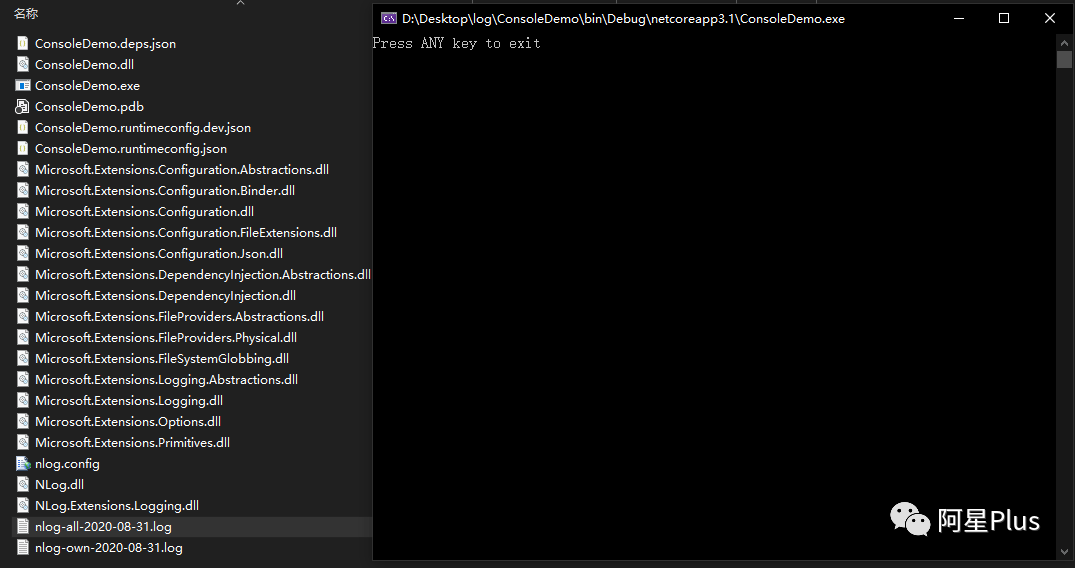
運(yùn)行項(xiàng)目,項(xiàng)目根目錄下會(huì)多出兩個(gè)日志文件。
AspNetCore項(xiàng)目
在項(xiàng)目中添加組件包
Install-Package NLog
Install-Package NLog.Web.AspNetCore
{
??"Logging":?{
????"LogLevel":?{
??????"Default":?"Trace",
??????"Microsoft":?"Warning",
??????"Microsoft.Hosting.Lifetime":?"Information"
????}
??},
??"AllowedHosts":?"*"
}
<nlog?xmlns="http://www.nlog-project.org/schemas/NLog.xsd"
??????xmlns:xsi="http://www.w3.org/2001/XMLSchema-instance"
??????autoReload="true"
??????internalLogLevel="Warn"
??????internalLogFile="internal-nlog.txt">

??
??<targets>
????
????<target?xsi:type="File"?name="allfile"?fileName="nlog-all-${shortdate}.log"
?????????????????layout="${longdate}|${logger}|${uppercase:${level}}|${message}?${exception}"?/>


????<target?xsi:type="File"?name="ownFile-web"?fileName="nlog-own-${shortdate}.log"
?????????????layout="${longdate}|${logger}|${uppercase:${level}}|??${message}?${exception}"?/>

????<target?xsi:type="Null"?name="blackhole"?/>
??targets>

??<rules>
????
????<logger?name="*"?minlevel="Trace"?writeTo="allfile"?/>

????
????<logger?name="Microsoft.*"?minlevel="Trace"?writeTo="blackhole"?final="true"?/>
????<logger?name="*"?minlevel="Trace"?writeTo="ownFile-web"?/>
??rules>
nlog>
在Program.cs中使用NLog。
using?Microsoft.AspNetCore.Hosting;
using?Microsoft.Extensions.Hosting;
using?Microsoft.Extensions.Logging;
using?NLog.Web;
using?System;

namespace?WebDemo
{
????public?class?Program
????{
????????public?static?void?Main(string[]?args)
????????{
????????????var?logger?=?NLog.Web.NLogBuilder.ConfigureNLog("nlog.config").GetCurrentClassLogger();

????????????try
????????????{
????????????????logger.Debug("init?main");
????????????????CreateHostBuilder(args).Build().Run();
????????????}
????????????catch?(Exception?exception)
????????????{
????????????????//NLog:?catch?setup?errors
????????????????logger.Error(exception,?"Stopped?program?because?of?exception");
????????????????throw;
????????????}
????????????finally
????????????{
????????????????//?Ensure?to?flush?and?stop?internal?timers/threads?before?application-exit?(Avoid?segmentation?fault?on?Linux)
????????????????NLog.LogManager.Shutdown();
????????????}
????????}


????????public?static?IHostBuilder?CreateHostBuilder(string[]?args)?=>
????????????Host.CreateDefaultBuilder(args)
????????????????.ConfigureWebHostDefaults(webBuilder?=>
????????????????{
????????????????????webBuilder.UseStartup();
????????????????})
????????????????.ConfigureLogging(logging?=>
????????????????{
????????????????????logging.ClearProviders();
????????????????????logging.SetMinimumLevel(LogLevel.Trace);
????????????????}).UseNLog();??//?NLog:?Setup?NLog?for?Dependency?injection
????}
}
一切準(zhǔn)備就緒,在任意地方寫(xiě)日志。
using?Microsoft.AspNetCore.Mvc;
using?Microsoft.Extensions.Logging;
using?System;
using?System.Collections.Generic;
using?System.Linq;
namespace?WebDemo.Controllers
{
????[ApiController]
????[Route("[controller]")]
????public?class?WeatherForecastController?:?ControllerBase
????{
????????private?static?readonly?string[]?Summaries?=?new[]
????????{
????????????"Freezing",?"Bracing",?"Chilly",?"Cool",?"Mild",?"Warm",?"Balmy",?"Hot",?"Sweltering",?"Scorching"
????????};
????????private?readonly?ILogger?_logger;
????????public?WeatherForecastController(ILogger?logger )
????????{
????????????_logger?=?logger;
????????}
????????[HttpGet]
????????public?IEnumerable?Get()
????????{
????????????_logger.LogInformation("Hello,?this?is?a?Weather?api!");
????????????var?rng?=?new?Random();
????????????return?Enumerable.Range(1,?5).Select(index?=>?new?WeatherForecast
????????????{
????????????????Date?=?DateTime.Now.AddDays(index),
????????????????TemperatureC?=?rng.Next(-20,?55),
????????????????Summary?=?Summaries[rng.Next(Summaries.Length)]
????????????}).ToArray();
????????}
????}
}
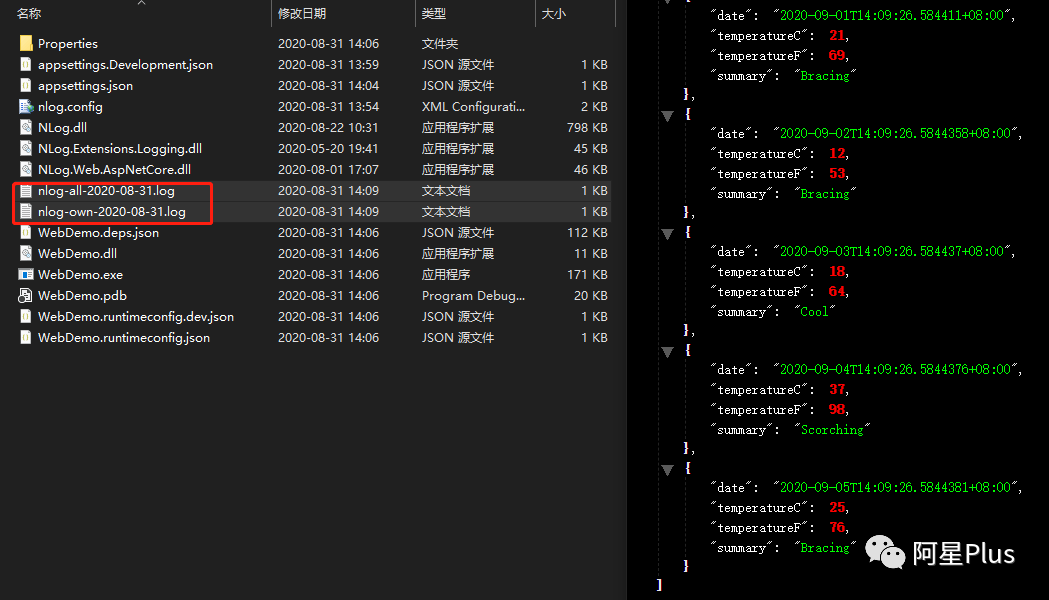
調(diào)用上面api,查看日志文件。
更多用法,請(qǐng)查看官方wiki文檔:https://github.com/NLog/NLog/wiki
【推薦】.NET Core開(kāi)發(fā)實(shí)戰(zhàn)視頻課程?★★★
.NET Core實(shí)戰(zhàn)項(xiàng)目之CMS 第一章 入門(mén)篇-開(kāi)篇及總體規(guī)劃
【.NET Core微服務(wù)實(shí)戰(zhàn)-統(tǒng)一身份認(rèn)證】開(kāi)篇及目錄索引
Redis基本使用及百億數(shù)據(jù)量中的使用技巧分享(附視頻地址及觀看指南)
.NET Core中的一個(gè)接口多種實(shí)現(xiàn)的依賴注入與動(dòng)態(tài)選擇看這篇就夠了
10個(gè)小技巧助您寫(xiě)出高性能的ASP.NET Core代碼
用abp vNext快速開(kāi)發(fā)Quartz.NET定時(shí)任務(wù)管理界面
在ASP.NET Core中創(chuàng)建基于Quartz.NET托管服務(wù)輕松實(shí)現(xiàn)作業(yè)調(diào)度
現(xiàn)身說(shuō)法:實(shí)際業(yè)務(wù)出發(fā)分析百億數(shù)據(jù)量下的多表查詢優(yōu)化