
SpringBoot + Redis實(shí)現(xiàn)token權(quán)限認(rèn)證(附源碼)
點(diǎn)擊上方藍(lán)色字體,選擇“標(biāo)星公眾號(hào)”
優(yōu)質(zhì)文章,第一時(shí)間送達(dá)
一、引言
登陸權(quán)限控制是每個(gè)系統(tǒng)都應(yīng)必備的功能,實(shí)現(xiàn)方法也有好多種。下面使用Token認(rèn)證來實(shí)現(xiàn)系統(tǒng)的權(quán)限訪問。
功能描述:
用戶登錄成功后,后臺(tái)返回一個(gè)token給調(diào)用者,同時(shí)自定義一個(gè)@AuthToken注解,被該注解標(biāo)注的API請(qǐng)求都需要進(jìn)行token效驗(yàn),效驗(yàn)通過才可以正常訪問,實(shí)現(xiàn)接口級(jí)的鑒權(quán)控制。同時(shí)token具有生命周期,在用戶持續(xù)一段時(shí)間不進(jìn)行操作的話,token則會(huì)過期,用戶一直操作的話,則不會(huì)過期。
二、環(huán)境
SpringBoot Redis(Docke中鏡像) MySQL(Docker中鏡像)
三、流程分析
1、流程分析
(1)、客戶端登錄,輸入用戶名和密碼,后臺(tái)進(jìn)行驗(yàn)證,如果驗(yàn)證失敗則返回登錄失敗的提示。如果驗(yàn)證成功,則生成 token 然后將 username 和 token 雙向綁定 (可以根據(jù) username 取出 token 也可以根據(jù) token 取出username)存入redis,同時(shí)使用 token+username 作為key把當(dāng)前時(shí)間戳也存入redis。并且給它們都設(shè)置過期時(shí)間。
(2)、每次請(qǐng)求接口都會(huì)走攔截器,如果該接口標(biāo)注了@AuthToken注解,則要檢查客戶端傳過來的Authorization字段,獲取 token。由于 token 與 username 雙向綁定,可以通過獲取的 token 來嘗試從 redis 中獲取 username,如果可以獲取則說明 token 正確,反之,說明錯(cuò)誤,返回鑒權(quán)失敗。
(3)、token可以根據(jù)用戶使用的情況來動(dòng)態(tài)的調(diào)整自己過期時(shí)間。在生成 token 的同時(shí)也往 redis 里面存入了創(chuàng)建 token 時(shí)的時(shí)間戳,每次請(qǐng)求被攔截器攔截 token 驗(yàn)證成功之后,將當(dāng)前時(shí)間與存在 redis 里面的 token 生成時(shí)刻的時(shí)間戳進(jìn)行比較,當(dāng)當(dāng)前時(shí)間的距離創(chuàng)建時(shí)間快要到達(dá)設(shè)置的redis過期時(shí)間的話,就重新設(shè)置token過期時(shí)間,將過期時(shí)間延長。如果用戶在設(shè)置的 redis 過期時(shí)間的時(shí)間長度內(nèi)沒有進(jìn)行任何操作(沒有發(fā)請(qǐng)求),則token會(huì)在redis中過期。
四、具體代碼實(shí)現(xiàn)
1、自定義注解
@Target({ElementType.METHOD,?ElementType.TYPE})
@Retention(RetentionPolicy.RUNTIME)
public?@interface?AuthToken?{

}
2、登陸控制器
@RestController
public?class?welcome?{

????Logger?logger?=?LoggerFactory.getLogger(welcome.class);

????@Autowired
????Md5TokenGenerator?tokenGenerator;

????@Autowired
????UserMapper?userMapper;

????@GetMapping("/welcome")
????public?String?welcome(){

????????return?"welcome?token?authentication";
????}

????@RequestMapping(value?=?"/login",?method?=?RequestMethod.GET)
????public?ResponseTemplate?login(String?username,?String?password)?{

????????logger.info("username:"+username+"??????password:"+password);
????????User?user?=?userMapper.getUser(username,password);
????????logger.info("user:"+user);

????????JSONObject?result?=?new?JSONObject();
????????if?(user?!=?null)?{

????????????Jedis?jedis?=?new?Jedis("192.168.1.106",?6379);
????????????String?token?=?tokenGenerator.generate(username,?password);
????????????jedis.set(username,?token);
????????????//設(shè)置key生存時(shí)間,當(dāng)key過期時(shí),它會(huì)被自動(dòng)刪除,時(shí)間是秒
????????????jedis.expire(username,?ConstantKit.TOKEN_EXPIRE_TIME);
????????????jedis.set(token,?username);
????????????jedis.expire(token,?ConstantKit.TOKEN_EXPIRE_TIME);
????????????Long?currentTime?=?System.currentTimeMillis();
????????????jedis.set(token?+?username,?currentTime.toString());

????????????//用完關(guān)閉
????????????jedis.close();

????????????result.put("status",?"登錄成功");
????????????result.put("token",?token);
????????}?else?{
????????????result.put("status",?"登錄失敗");
????????}

????????return?ResponseTemplate.builder()
????????????????.code(200)
????????????????.message("登錄成功")
????????????????.data(result)
????????????????.build();

????}

?//測(cè)試權(quán)限訪問
????@RequestMapping(value?=?"test",?method?=?RequestMethod.GET)
????@AuthToken
????public?ResponseTemplate?test()?{

????????logger.info("已進(jìn)入test路徑");

????????return?ResponseTemplate.builder()
????????????????.code(200)
????????????????.message("Success")
????????????????.data("test?url")
????????????????.build();
????}

}
3、攔截器
@Slf4j
public?class?AuthorizationInterceptor?implements?HandlerInterceptor?{

????//存放鑒權(quán)信息的Header名稱,默認(rèn)是Authorization
????private?String?httpHeaderName?=?"Authorization";

????//鑒權(quán)失敗后返回的錯(cuò)誤信息,默認(rèn)為401?unauthorized
????private?String?unauthorizedErrorMessage?=?"401?unauthorized";

????//鑒權(quán)失敗后返回的HTTP錯(cuò)誤碼,默認(rèn)為401
????private?int?unauthorizedErrorCode?=?HttpServletResponse.SC_UNAUTHORIZED;

?//存放登錄用戶模型Key的Request?Key
????public?static?final?String?REQUEST_CURRENT_KEY?=?"REQUEST_CURRENT_KEY";

????@Override
????public?boolean?preHandle(HttpServletRequest?request,?HttpServletResponse?response,?Object?handler)?throws?Exception?{
????????if?(!(handler?instanceof?HandlerMethod))?{
????????????return?true;
????????}
????????HandlerMethod?handlerMethod?=?(HandlerMethod)?handler;
????????Method?method?=?handlerMethod.getMethod();

????????//?如果打上了AuthToken注解則需要驗(yàn)證token
????????if?(method.getAnnotation(AuthToken.class)?!=?null?||?handlerMethod.getBeanType().getAnnotation(AuthToken.class)?!=?null)?{

????????????String?token?=?request.getParameter(httpHeaderName);
????????????log.info("Get?token?from?request?is?{}?",?token);
????????????String?username?=?"";
????????????Jedis?jedis?=?new?Jedis("192.168.1.106",?6379);
????????????if?(token?!=?null?&&?token.length()?!=?0)?{
????????????????username?=?jedis.get(token);
????????????????log.info("Get?username?from?Redis?is?{}",?username);
????????????}
????????????if?(username?!=?null?&&?!username.trim().equals(""))?{
????????????????Long?tokeBirthTime?=?Long.valueOf(jedis.get(token?+?username));
????????????????log.info("token?Birth?time?is:?{}",?tokeBirthTime);
????????????????Long?diff?=?System.currentTimeMillis()?-?tokeBirthTime;
????????????????log.info("token?is?exist?:?{}?ms",?diff);
????????????????if?(diff?>?ConstantKit.TOKEN_RESET_TIME)?{
????????????????????jedis.expire(username,?ConstantKit.TOKEN_EXPIRE_TIME);
????????????????????jedis.expire(token,?ConstantKit.TOKEN_EXPIRE_TIME);
????????????????????log.info("Reset?expire?time?success!");
????????????????????Long?newBirthTime?=?System.currentTimeMillis();
????????????????????jedis.set(token?+?username,?newBirthTime.toString());
????????????????}

????????????????//用完關(guān)閉
????????????????jedis.close();
????????????????request.setAttribute(REQUEST_CURRENT_KEY,?username);
????????????????return?true;
????????????}?else?{
????????????????JSONObject?jsonObject?=?new?JSONObject();

????????????????PrintWriter?out?=?null;
????????????????try?{
????????????????????response.setStatus(unauthorizedErrorCode);
????????????????????response.setContentType(MediaType.APPLICATION_JSON_VALUE);

????????????????????jsonObject.put("code",?((HttpServletResponse)?response).getStatus());
????????????????????jsonObject.put("message",?HttpStatus.UNAUTHORIZED);
????????????????????out?=?response.getWriter();
????????????????????out.println(jsonObject);

????????????????????return?false;
????????????????}?catch?(Exception?e)?{
????????????????????e.printStackTrace();
????????????????}?finally?{
????????????????????if?(null?!=?out)?{
????????????????????????out.flush();
????????????????????????out.close();
????????????????????}
????????????????}

????????????}

????????}

????????request.setAttribute(REQUEST_CURRENT_KEY,?null);

????????return?true;
????}

????@Override
????public?void?postHandle(HttpServletRequest?request,?HttpServletResponse?response,?Object?handler,?ModelAndView?modelAndView)?throws?Exception?{

????}

????@Override
????public?void?afterCompletion(HttpServletRequest?request,?HttpServletResponse?response,?Object?handler,?Exception?ex)?throws?Exception?{

????}
}
4、測(cè)試結(jié)果
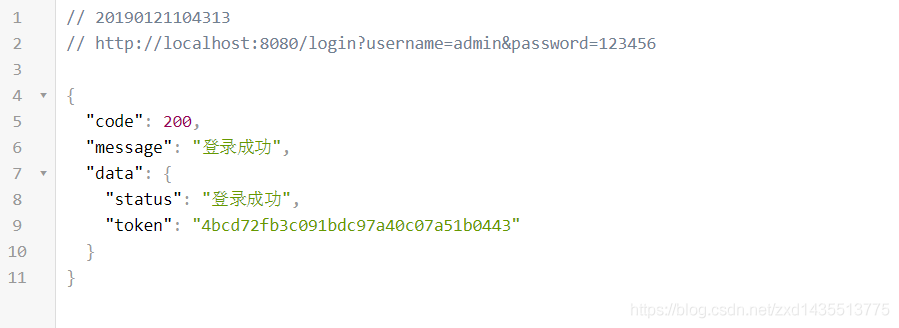
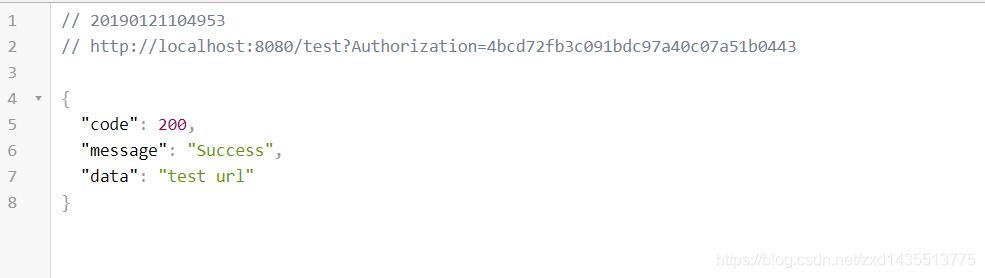
五、小結(jié)
登陸權(quán)限控制,實(shí)際上利用的就是攔截器的攔截功能。因?yàn)槊恳淮握?qǐng)求都要通過攔截器,只有攔截器驗(yàn)證通過了,才能訪問想要的請(qǐng)求路徑,所以在攔截器中做校驗(yàn)Token校驗(yàn)。想要代碼,可以去GitHub上查看。
https://github.com/Hofanking/token-authentication.git
攔截器介紹,可以參考:
https://blog.csdn.net/zxd1435513775/article/details/80556034