
YYDS!Python實(shí)現(xiàn)自動(dòng)駕駛
點(diǎn)擊下方卡片,關(guān)注“新機(jī)器視覺(jué)”公眾號(hào)
重磅干貨,第一時(shí)間送達(dá)
作者 |?Veronica1312
來(lái)源丨CSDN博客
一、安裝環(huán)境
gym是用于開(kāi)發(fā)和比較強(qiáng)化學(xué)習(xí)算法的工具包,在python中安裝gym庫(kù)和其中子場(chǎng)景都較為簡(jiǎn)便。
安裝gym:
pip?install?gym
安裝自動(dòng)駕駛模塊,這里使用Edouard Leurent發(fā)布在github上的包highway-env(鏈接:https://github.com/eleurent/highway-env):
pip?install?--user?git+https://github.com/eleurent/highway-env
其中包含6個(gè)場(chǎng)景:
高速公路——“highway-v0”
匯入——“merge-v0”
環(huán)島——“roundabout-v0”
泊車(chē)——“parking-v0”
十字路口——“intersection-v0”
賽車(chē)道——“racetrack-v0”
詳細(xì)文檔可以參考這里:
https://highway-env.readthedocs.io/en/latest/
二、配置環(huán)境
安裝好后即可在代碼中進(jìn)行實(shí)驗(yàn)(以高速公路場(chǎng)景為例):
import?gym
import?highway_env
%matplotlib?inline
env?=?gym.make('highway-v0')
env.reset()
for?_?in?range(3):
????action?=?env.action_type.actions_indexes["IDLE"]
????obs,?reward,?done,?info?=?env.step(action)
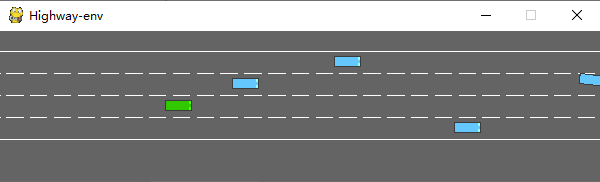
????env.render()運(yùn)行后會(huì)在模擬器中生成如下場(chǎng)景:
綠色為ego vehicle env類(lèi)有很多參數(shù)可以配置,具體可以參考原文檔。
三、訓(xùn)練模型
1、數(shù)據(jù)處理
(1)state
highway-env包中沒(méi)有定義傳感器,車(chē)輛所有的state (observations) 都從底層代碼讀取,節(jié)省了許多前期的工作量。根據(jù)文檔介紹,state (ovservations) 有三種輸出方式:Kinematics,Grayscale Image和Occupancy grid。
Kinematics
輸出V*F的矩陣,V代表需要觀測(cè)的車(chē)輛數(shù)量(包括ego vehicle本身),F(xiàn)代表需要統(tǒng)計(jì)的特征數(shù)量。例:
數(shù)據(jù)生成時(shí)會(huì)默認(rèn)歸一化,取值范圍:[100, 100, 20, 20],也可以設(shè)置ego vehicle以外的車(chē)輛屬性是地圖的絕對(duì)坐標(biāo)還是對(duì)ego vehicle的相對(duì)坐標(biāo)。
在定義環(huán)境時(shí)需要對(duì)特征的參數(shù)進(jìn)行設(shè)定:
config?=?\
????{
????"observation":?
?????????{
????????"type":?"Kinematics",
????????#選取5輛車(chē)進(jìn)行觀察(包括ego?vehicle)
????????"vehicles_count":?5,??
????????#共7個(gè)特征
????????"features":?["presence",?"x",?"y",?"vx",?"vy",?"cos_h",?"sin_h"],?
????????"features_range":?
????????????{
????????????"x":?[-100,?100],
????????????"y":?[-100,?100],
????????????"vx":?[-20,?20],
????????????"vy":?[-20,?20]
????????????},
????????"absolute":?False,
????????"order":?"sorted"
????????},
????"simulation_frequency":?8,??#?[Hz]
????"policy_frequency":?2,??#?[Hz]
????}Grayscale Image
生成一張W*H的灰度圖像,W代表圖像寬度,H代表圖像高度
Occupancy grid
生成一個(gè)WHF的三維矩陣,用W*H的表格表示ego vehicle周?chē)能?chē)輛情況,每個(gè)格子包含F(xiàn)個(gè)特征。
(2) action
highway-env包中的action分為連續(xù)和離散兩種。連續(xù)型action可以直接定義throttle和steering angle的值,離散型包含5個(gè)meta actions:
ACTIONS_ALL?=?{
????????0:?'LANE_LEFT',
????????1:?'IDLE',
????????2:?'LANE_RIGHT',
????????3:?'FASTER',
????????4:?'SLOWER'
????}(3) reward
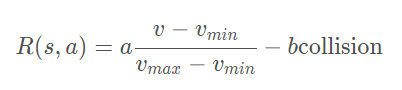
highway-env包中除了泊車(chē)場(chǎng)景外都采用同一個(gè)reward function:
這個(gè)function只能在其源碼中更改,在外層只能調(diào)整權(quán)重。(泊車(chē)場(chǎng)景的reward function原文檔里有,懶得打公式了……)
2、搭建模型
DQN網(wǎng)絡(luò)的結(jié)構(gòu)和搭建過(guò)程已經(jīng)在我另一篇文章中討論過(guò),所以這里不再詳細(xì)解釋。我采用第一種state表示方式——Kinematics進(jìn)行示范。
由于state數(shù)據(jù)量較小(5輛車(chē)*7個(gè)特征),可以不考慮使用CNN,直接把二維數(shù)據(jù)的size[5,7]轉(zhuǎn)成[1,35]即可,模型的輸入就是35,輸出是離散action數(shù)量,共5個(gè)。
import?torch
import?torch.nn?as?nn
from?torch.autograd?import?Variable
import?torch.nn.functional?as?F
import?torch.optim?as?optim
import?torchvision.transforms?as?T
from?torch?import?FloatTensor,?LongTensor,?ByteTensor
from?collections?import?namedtuple
import?random?
Tensor?=?FloatTensor
EPSILON?=?0????#?epsilon?used?for?epsilon?greedy?approach
GAMMA?=?0.9
TARGET_NETWORK_REPLACE_FREQ?=?40???????#?How?frequently?target?netowrk?updates
MEMORY_CAPACITY?=?100
BATCH_SIZE?=?80
LR?=?0.01?????????#?learning?rate
class?DQNNet(nn.Module):
????def?__init__(self):
????????super(DQNNet,self).__init__()??????????????????
????????self.linear1?=?nn.Linear(35,35)
????????self.linear2?=?nn.Linear(35,5)???????????????
????def?forward(self,s):
????????s=torch.FloatTensor(s)????????
????????s?=?s.view(s.size(0),1,35)????????
????????s?=?self.linear1(s)
????????s?=?self.linear2(s)
????????return?s???????????
?????????????????????????
class?DQN(object):
????def?__init__(self):
????????self.net,self.target_net?=?DQNNet(),DQNNet()????????
????????self.learn_step_counter?=?0??????
????????self.memory?=?[]
????????self.position?=?0?
????????self.capacity?=?MEMORY_CAPACITY???????
????????self.optimizer?=?torch.optim.Adam(self.net.parameters(),?lr=LR)
????????self.loss_func?=?nn.MSELoss()
????def?choose_action(self,s,e):
????????x=np.expand_dims(s,?axis=0)
????????if?np.random.uniform()?-e:??
????????????actions_value?=?self.net.forward(x)????????????
????????????action?=?torch.max(actions_value,-1)[1].data.numpy()
????????????action?=?action.max()???????????
????????else:?
????????????action?=?np.random.randint(0,?5)
????????return?action
????def?push_memory(self,?s,?a,?r,?s_):
????????if?len(self.memory)?????????????self.memory.append(None)
????????self.memory[self.position]?=?Transition(torch.unsqueeze(torch.FloatTensor(s),?0),torch.unsqueeze(torch.FloatTensor(s_),?0),\
????????????????????????????????????????????????torch.from_numpy(np.array([a])),torch.from_numpy(np.array([r],dtype='float32')))#
????????self.position?=?(self.position?+?1)?%?self.capacity
???????
????def?get_sample(self,batch_size):
????????sample?=?random.sample(self.memory,batch_size)
????????return?sample
??????
????def?learn(self):
????????if?self.learn_step_counter?%?TARGET_NETWORK_REPLACE_FREQ?==?0:
????????????self.target_net.load_state_dict(self.net.state_dict())
????????self.learn_step_counter?+=?1
????????
????????transitions?=?self.get_sample(BATCH_SIZE)
????????batch?=?Transition(*zip(*transitions))
????????b_s?=?Variable(torch.cat(batch.state))
????????b_s_?=?Variable(torch.cat(batch.next_state))
????????b_a?=?Variable(torch.cat(batch.action))
????????b_r?=?Variable(torch.cat(batch.reward))????
?????????????
????????q_eval?=?self.net.forward(b_s).squeeze(1).gather(1,b_a.unsqueeze(1).to(torch.int64))?
????????q_next?=?self.target_net.forward(b_s_).detach()?#
????????q_target?=?b_r?+?GAMMA?*?q_next.squeeze(1).max(1)[0].view(BATCH_SIZE,?1).t()???????????
????????loss?=?self.loss_func(q_eval,?q_target.t())????????
????????self.optimizer.zero_grad()?#?reset?the?gradient?to?zero????????
????????loss.backward()
????????self.optimizer.step()?#?execute?back?propagation?for?one?step???????
????????return?loss
Transition?=?namedtuple('Transition',('state',?'next_state','action',?'reward'))3、運(yùn)行結(jié)果
各個(gè)部分都完成之后就可以組合在一起訓(xùn)練模型了,流程和用CARLA差不多,就不細(xì)說(shuō)了。
初始化環(huán)境(DQN的類(lèi)加進(jìn)去就行了):
import?gym
import?highway_env
from?matplotlib?import?pyplot?as?plt
import?numpy?as?np
import?time
config?=?\
????{
????"observation":?
?????????{
????????"type":?"Kinematics",
????????"vehicles_count":?5,
????????"features":?["presence",?"x",?"y",?"vx",?"vy",?"cos_h",?"sin_h"],
????????"features_range":?
????????????{
????????????"x":?[-100,?100],
????????????"y":?[-100,?100],
????????????"vx":?[-20,?20],
????????????"vy":?[-20,?20]
????????????},
????????"absolute":?False,
????????"order":?"sorted"
????????},
????"simulation_frequency":?8,??#?[Hz]
????"policy_frequency":?2,??#?[Hz]
????}
????
env?=?gym.make("highway-v0")
env.configure(config)訓(xùn)練模型:
dqn=DQN()
count=0
reward=[]
avg_reward=0
all_reward=[]
time_=[]
all_time=[]
collision_his=[]
all_collision=[]
while?True:
????done?=?False????
????start_time=time.time()
????s?=?env.reset()
????
????while?not?done:
????????e?=?np.exp(-count/300)??#隨機(jī)選擇action的概率,隨著訓(xùn)練次數(shù)增多逐漸降低
????????a?=?dqn.choose_action(s,e)
????????s_,?r,?done,?info?=?env.step(a)
????????env.render()
????????
????????dqn.push_memory(s,?a,?r,?s_)
????????
????????if?((dqn.position?!=0)&(dqn.position?%?99==0)):
????????????loss_=dqn.learn()
????????????count+=1
????????????print('trained?times:',count)
????????????if?(count%40==0):
????????????????avg_reward=np.mean(reward)
????????????????avg_time=np.mean(time_)
????????????????collision_rate=np.mean(collision_his)
????????????????????????????????
????????????????all_reward.append(avg_reward)
????????????????all_time.append(avg_time)
????????????????all_collision.append(collision_rate)
????????????????????????????????
????????????????plt.plot(all_reward)
????????????????plt.show()
????????????????plt.plot(all_time)
????????????????plt.show()
????????????????plt.plot(all_collision)
????????????????plt.show()
????????????????
????????????????reward=[]
????????????????time_=[]
????????????????collision_his=[]
????????????????
????????s?=?s_
????????reward.append(r)??????
????
????end_time=time.time()
????episode_time=end_time-start_time
????time_.append(episode_time)
????????
????is_collision=1?if?info['crashed']==True?else?0
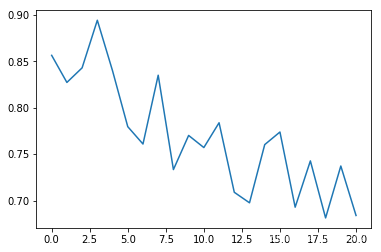
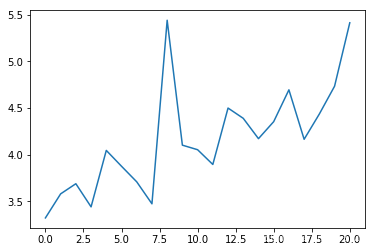
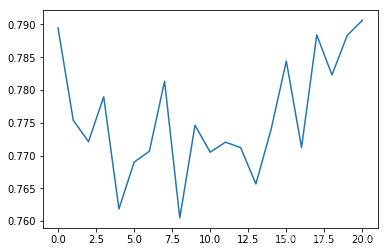
????collision_his.append(is_collision)我在代碼中添加了一些畫(huà)圖的函數(shù),在運(yùn)行過(guò)程中就可以掌握一些關(guān)鍵的指標(biāo),每訓(xùn)練40次統(tǒng)計(jì)一次平均值。
平均碰撞發(fā)生率:
epoch平均時(shí)長(zhǎng)(s):
平均reward:
可以看出平均碰撞發(fā)生率會(huì)隨訓(xùn)練次數(shù)增多逐漸降低,每個(gè)epoch持續(xù)的時(shí)間會(huì)逐漸延長(zhǎng)(如果發(fā)生碰撞epoch會(huì)立刻結(jié)束)
四、總結(jié)
相比于我在之前文章中使用過(guò)的模擬器CARLA,highway-env環(huán)境包明顯更加抽象化,用類(lèi)似游戲的表示方式,使得算法可以在一個(gè)理想的虛擬環(huán)境中得到訓(xùn)練,而不用考慮數(shù)據(jù)獲取方式、傳感器精度、運(yùn)算時(shí)長(zhǎng)等現(xiàn)實(shí)問(wèn)題。對(duì)于端到端的算法設(shè)計(jì)和測(cè)試非常友好,但從自動(dòng)控制的角度來(lái)看,可以入手的方面較少,研究起來(lái)不太靈活。

本文僅做學(xué)術(shù)分享,如有侵權(quán),請(qǐng)聯(lián)系刪文。