
基于 TDD 模式在 Laravel 項(xiàng)目中開發(fā)后端評(píng)論接口

在繼續(xù)編寫前端 Vue 評(píng)論組件之前,我們使用同樣的測(cè)試驅(qū)動(dòng)開發(fā)模式在 Laravel 項(xiàng)目中開發(fā)后端評(píng)論接口,正如學(xué)院君前面說的,除了框架和語法的不同,思路和模式是一模一樣的。
編寫測(cè)試用例
首先,在 Laravel 項(xiàng)目根目錄下運(yùn)行 make:test 命令創(chuàng)建一個(gè)測(cè)試類 CommentTest:

然后打開這個(gè)測(cè)試類文件(位于 tests/Feature 目錄下),編寫簡(jiǎn)單的符合 BDD 風(fēng)格的評(píng)論保存和獲取接口測(cè)試用例代碼如下:
<?php

namespace Tests\Feature;

use Illuminate\Foundation\Testing\RefreshDatabase;
use Illuminate\Foundation\Testing\WithFaker;
use Tests\TestCase;

class CommentTest extends TestCase
{
    use RefreshDatabase;  // 測(cè)試用例在執(zhí)行完畢后回滾數(shù)據(jù)庫更新
    use WithFaker;  // 引入 Faker 偽造評(píng)論內(nèi)容

    protected function setUp(): void
    {
        parent::setUp();
        $this->faker = $this->makeFaker('zh_CN');  // 本地化 Faker
    }

    /**
     * @test
     */
    public function submit_comment_add_then_display()
    {
          // Given
        $content = $this->faker->sentence;

        // When
        $response = $this->post('/comments', ['content' => $content]);

        // Then
        $response->assertStatus(200);

        $response = $this->get('/comments');
        $response->assertSeeText($content);
    }
}
我們先通過 Faker 偽造評(píng)論內(nèi)容,調(diào)用后端保存評(píng)論接口,保存成功后,再調(diào)用后端評(píng)論列表接口,如果返回?cái)?shù)據(jù)包含剛剛提交的評(píng)論,則意味著評(píng)論保存和獲取功能可用。
現(xiàn)在通過 php artisan test tests/Feature/CommentTest.php 命令運(yùn)行這個(gè)測(cè)試用例,肯定會(huì)失敗,因?yàn)楹蠖私涌诙紱]有實(shí)現(xiàn):
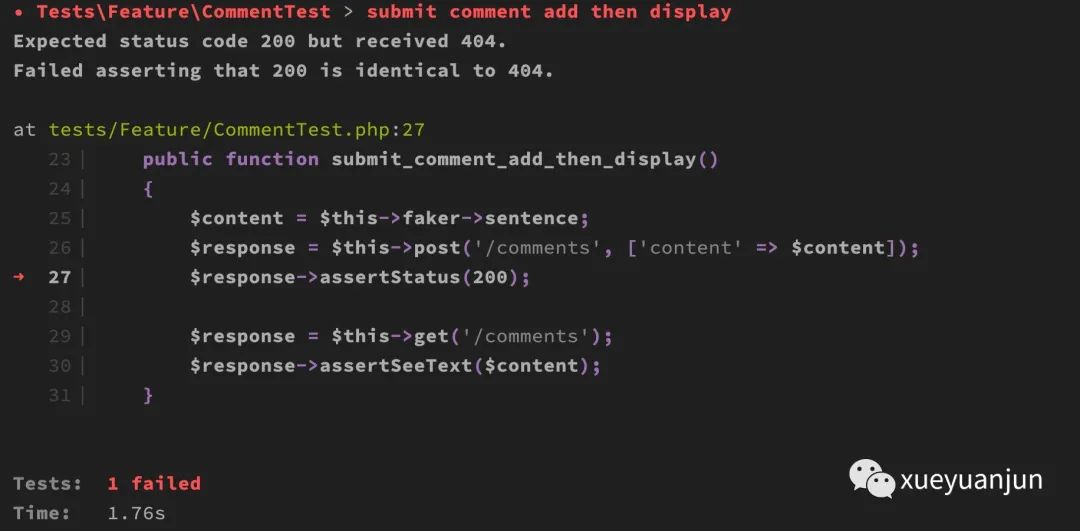
所有相關(guān)的響應(yīng)斷言返回的都是 404 狀態(tài)碼。接下來我們需要編寫業(yè)務(wù)代碼。
路由和控制器
首先我們需要注冊(cè)相應(yīng)的后端接口路由:
use App\Http\Controllers\CommentController;
Route::group(['prefix' => '/comments'], function () {
    Route::get('/', [CommentController::class, 'all']);
    Route::post('/', [CommentController::class, 'store']);
});
以及對(duì)應(yīng)的控制器代碼:
<?php

namespace App\Http\Controllers;

use App\Models\Comment;
use Illuminate\Http\Request;

class CommentController extends Controller
{
    public function all()
    {
        return Comment::orderByDesc('created_at')->simplePaginate(10);
    }
    public function store(Request $request)
    {
        $data = $request->validate([
            'content' => 'required'
        ]);
        $comment = new Comment($data);
        return $comment->save();
    }
}
此時(shí)測(cè)試仍然不通過,因?yàn)槟P皖惡蛿?shù)據(jù)庫還不存在:
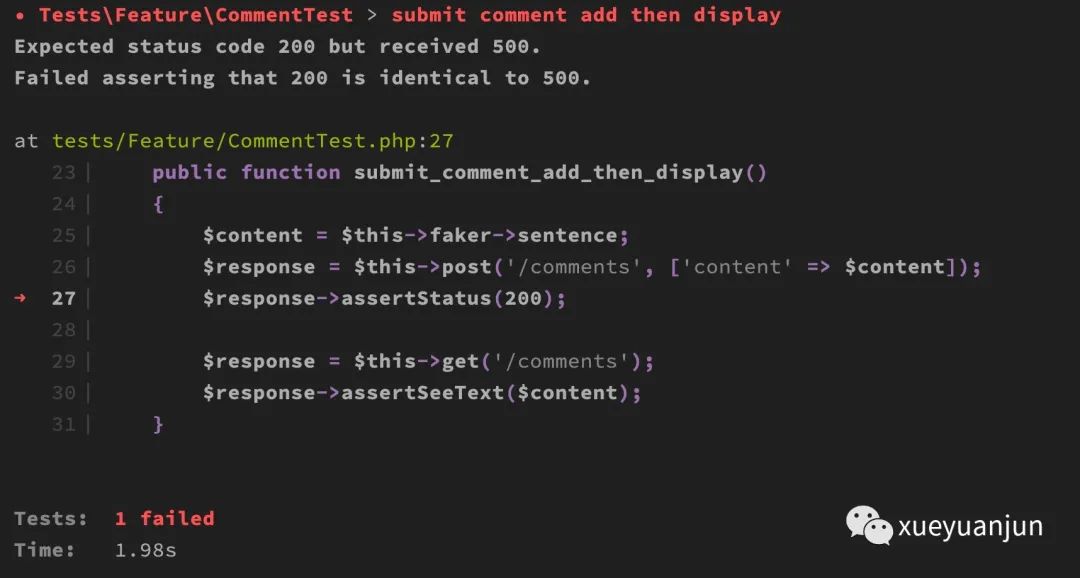
所以響應(yīng)狀態(tài)碼是 500。
模型類和數(shù)據(jù)庫準(zhǔn)備
接下來我們創(chuàng)建模型類和數(shù)據(jù)庫遷移文件:
php artisan make:model Comment -m
生成的模型類位于 app/Models/Comment.php,我們?cè)谶@個(gè)模型類中設(shè)置批量賦值白名單和關(guān)聯(lián)關(guān)系:
<?php

namespace App\Models;

use Illuminate\Database\Eloquent\Factories\HasFactory;
use Illuminate\Database\Eloquent\Model;

class Comment extends Model
{
    use HasFactory;

    protected $fillable = ['content'];

    public function user()
    {
        $this->belongsTo(User::class);
    }
}
在 .env 中配置數(shù)據(jù)庫連接信息(需要提前創(chuàng)建好數(shù)據(jù)庫 component_test):
DB_CONNECTION=mysql
DB_HOST=127.0.0.1
DB_PORT=3306
DB_DATABASE=component_test
DB_USERNAME=root
DB_PASSWORD=root
編輯評(píng)論表對(duì)應(yīng)的數(shù)據(jù)庫遷移文件如下:
<?php

use Illuminate\Database\Migrations\Migration;
use Illuminate\Database\Schema\Blueprint;
use Illuminate\Support\Facades\Schema;

class CreateCommentsTable extends Migration
{
    /**
     * Run the migrations.
     *
     * @return void
     */
    public function up()
    {
        Schema::create('comments', function (Blueprint $table) {
            $table->id();
            $table->bigInteger('user_id')->unsigned()->default(0);
            $table->string('content');
            $table->timestamps();
        });
    }

    /**
     * Reverse the migrations.
     *
     * @return void
     */
    public function down()
    {
        Schema::dropIfExists('comments');
    }
}
我們只設(shè)置了主鍵 ID、user_id、content 以及創(chuàng)建/更新時(shí)間幾個(gè)字段。然后運(yùn)行 php artisan migrate 命令創(chuàng)建數(shù)據(jù)表:
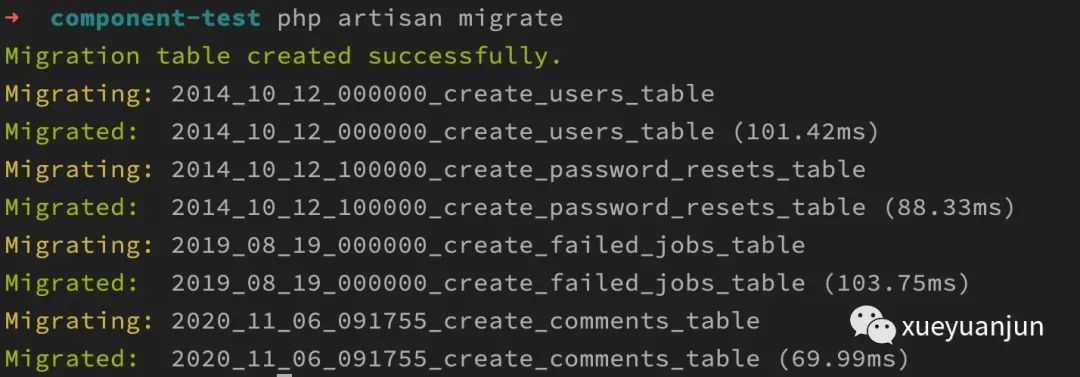
讓業(yè)務(wù)代碼通過測(cè)試用例
此時(shí)再去運(yùn)行 php artisan test 測(cè)試命令,測(cè)試通過:
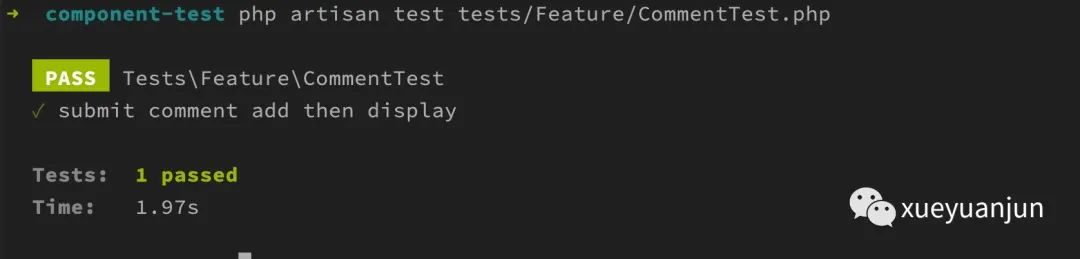
表明我們的后端評(píng)論接口已經(jīng)可以正常對(duì)外提供服務(wù)。
怎么樣,你已經(jīng)熟悉了 TDD 開發(fā)模式的精髓了吧:基于業(yè)務(wù)需求編寫 BDD 風(fēng)格的測(cè)試用例,然后編寫能夠通過這個(gè)測(cè)試用例的業(yè)務(wù)代碼,接下來編寫下一個(gè)測(cè)試用例。。。最終交付完整可用的功能代碼。相信你會(huì)和我一樣逐漸愛上這種讓測(cè)試用例從紅色變成綠色的感覺!
這里可以將業(yè)務(wù)代碼編寫和單元測(cè)試運(yùn)行粒度變得更小,比如注冊(cè)路由、編寫控制器動(dòng)作、實(shí)現(xiàn)模型類、數(shù)據(jù)表初始化等每個(gè)步驟進(jìn)行一次測(cè)試,逐步迭代出通過測(cè)試用例的代碼。測(cè)試驅(qū)動(dòng)開發(fā)有兩種模式,一種是先寫測(cè)試用例,再寫業(yè)務(wù)代碼,一種是先寫業(yè)務(wù)代碼,再寫測(cè)試用例,最終都要讓業(yè)務(wù)代碼通過每個(gè)測(cè)試用例,既然最終結(jié)果變綠,看你個(gè)人更喜歡哪種模式了。更多關(guān)于 Laravel 測(cè)試的功能和使用細(xì)節(jié),請(qǐng)參考 Laravel 官方文檔。
下篇教程,學(xué)院君將給大家演示如何在前端 Vue 評(píng)論組件調(diào)用后端接口保存評(píng)論信息和渲染評(píng)論列表。
本系列教程首發(fā)在Laravel學(xué)院(laravelacademy.org),你可以點(diǎn)擊頁面左下角閱讀原文鏈接查看最新更新的教程。