
實(shí)用!一鍵生成數(shù)據(jù)庫(kù)文檔,堪稱數(shù)據(jù)庫(kù)界的Swagger
最近部門訂單業(yè)務(wù)調(diào)整,收攏其他業(yè)務(wù)線的下單入口,做個(gè)統(tǒng)一大訂單平臺(tái)。需要梳理各業(yè)務(wù)線的數(shù)據(jù)表,但每個(gè)業(yè)務(wù)線庫(kù)都有近百?gòu)埡陀唵蜗嚓P(guān)的表,挨個(gè)表一個(gè)一個(gè)字段的弄腦瓜子嗡嗡的。
為了不重復(fù) CV 操作,抱著一絲希望開(kāi)始在GitHub里找,看看有沒(méi)有什么工具可以用,結(jié)果就真的發(fā)現(xiàn)了寶藏,screw(螺絲釘),居然可以生成數(shù)據(jù)庫(kù)文檔,優(yōu)秀啊~。

一、數(shù)據(jù)庫(kù)支持
MySQL
MariaDB
TIDB
Oracle
SqlServer
PostgreSQL
Cache DB
二、配置
1、pom文件
引入screw核心包,HikariCP數(shù)據(jù)庫(kù)連接池,HikariCP號(hào)稱性能最出色的數(shù)據(jù)庫(kù)連接池。
<!-- screw核心 -->
<dependency>
    <groupId>cn.smallbun.screw</groupId>
    <artifactId>screw-core</artifactId>
    <version>1.0.3</version>
</dependency>

<!-- HikariCP -->
<dependency>
    <groupId>com.zaxxer</groupId>
    <artifactId>HikariCP</artifactId>
    <version>3.4.5</version>
</dependency>

<!--mysql driver-->
<dependency>
    <groupId>mysql</groupId>
    <artifactId>mysql-connector-java</artifactId>
    <version>8.0.20</version>
</dependency>
2、配置數(shù)據(jù)源
配置數(shù)據(jù)源,設(shè)置 useInformationSchema 可以獲取tables注釋信息。
spring.datasource.url=jdbc:mysql://45.93.1.5:3306/fire?useUnicode=true&characterEncoding=UTF-8&useSSL=false
spring.datasource.username=root
spring.datasource.password=123456
spring.datasource.driver-class-name=com.mysql.cj.jdbc.Driver
spring.datasource.xa.properties.useInformationSchema=true
3、screw 核心配置
screw有兩種執(zhí)行方式,第一種是pom文件配置,另一種是代碼執(zhí)行。
 <build>
    <plugins>
        <plugin>
            <groupId>org.springframework.boot</groupId>
            <artifactId>spring-boot-maven-plugin</artifactId>
        </plugin>
        <plugin>
            <groupId>cn.smallbun.screw</groupId>
            <artifactId>screw-maven-plugin</artifactId>
            <version>1.0.3</version>
            <dependencies>
                <!-- HikariCP -->
                <dependency>
                    <groupId>com.zaxxer</groupId>
                    <artifactId>HikariCP</artifactId>
                    <version>3.4.5</version>
                </dependency>
                <!--mysql driver-->
                <dependency>
                    <groupId>mysql</groupId>
                    <artifactId>mysql-connector-java</artifactId>
                    <version>8.0.20</version>
                </dependency>
            </dependencies>
            <configuration>
                <!--username-->
                <username>root</username>
                <!--password-->
                <password>123456</password>
                <!--driver-->
                <driverClassName>com.mysql.cj.jdbc.Driver</driverClassName>
                <!--jdbc url-->
                <jdbcUrl>jdbc:mysql://41.92.6.5:3306/fire</jdbcUrl>
                <!--生成文件類型-->
                <fileType>HTML</fileType>
                <!--打開(kāi)文件輸出目錄-->
                <openOutputDir>false</openOutputDir>
                <!--生成模板-->
                <produceType>freemarker</produceType>
                <!--文檔名稱 為空時(shí):將采用[數(shù)據(jù)庫(kù)名稱-描述-版本號(hào)]作為文檔名稱-->
                <!--<docName>測(cè)試文檔名稱</docName>-->
                <!--描述-->
                <description>數(shù)據(jù)庫(kù)文檔生成</description>
                <!--版本-->
                <version>${project.version}</version>
                <!--標(biāo)題-->
                <title>fire數(shù)據(jù)庫(kù)文檔</title>
            </configuration>
            <executions>
                <execution>
                    <phase>compile</phase>
                    <goals>
                        <goal>run</goal>
                    </goals>
                </execution>
            </executions>
        </plugin>
    </plugins>
</build>
配置完以后在 maven project->screw 雙擊執(zhí)行ok。

代碼生成方式也非常簡(jiǎn)單。
@SpringBootTest
public class ScrewApplicationTests {

    @Autowired
    ApplicationContext applicationContext;

    @Test
    void contextLoads() {
        DataSource dataSourceMysql = applicationContext.getBean(DataSource.class);
        // 生成文件配置
        EngineConfig engineConfig = EngineConfig.builder()
                // 生成文件路徑,自己mac本地的地址,這里需要自己更換下路徑
                .fileOutputDir("D:/")
                // 打開(kāi)目錄
                .openOutputDir(false)
                // 文件類型
                .fileType(EngineFileType.HTML)
                // 生成模板實(shí)現(xiàn)
                .produceType(EngineTemplateType.freemarker).build();
        // 生成文檔配置(包含以下自定義版本號(hào)、描述等配置連接)
        Configuration config = Configuration.builder()
                .version("1.0.3")
                .description("生成文檔信息描述")
                .dataSource(dataSourceMysql)
                .engineConfig(engineConfig)
                .produceConfig(getProcessConfig())
                .build();
        // 執(zhí)行生成
        new DocumentationExecute(config).execute();
    }

    /**
     * 配置想要生成的表+ 配置想要忽略的表
     *
     * @return 生成表配置
     */
    public static ProcessConfig getProcessConfig() {
        // 忽略表名
        List<String> ignoreTableName = Arrays.asList("a", "test_group");
        // 忽略表前綴,如忽略a開(kāi)頭的數(shù)據(jù)庫(kù)表
        List<String> ignorePrefix = Arrays.asList("a", "t");
        // 忽略表后綴
        List<String> ignoreSuffix = Arrays.asList("_test", "czb_");
        return ProcessConfig.builder()
                //根據(jù)名稱指定表生成
                .designatedTableName(Arrays.asList("fire_user"))
                //根據(jù)表前綴生成
                .designatedTablePrefix(new ArrayList<>())
                //根據(jù)表后綴生成
                .designatedTableSuffix(new ArrayList<>())
                //忽略表名
                .ignoreTableName(ignoreTableName)
                //忽略表前綴
                .ignoreTablePrefix(ignorePrefix)
                //忽略表后綴
                .ignoreTableSuffix(ignoreSuffix).build();
    }
}
4、文檔格式
screw 有 HTML、DOC、MD 三種格式的文檔。
代碼中的修改
.fileType(EngineFileType.HTML)
或者pom文件
<fileType>MD</fileType>
DOC文檔樣式

HTML文檔樣式
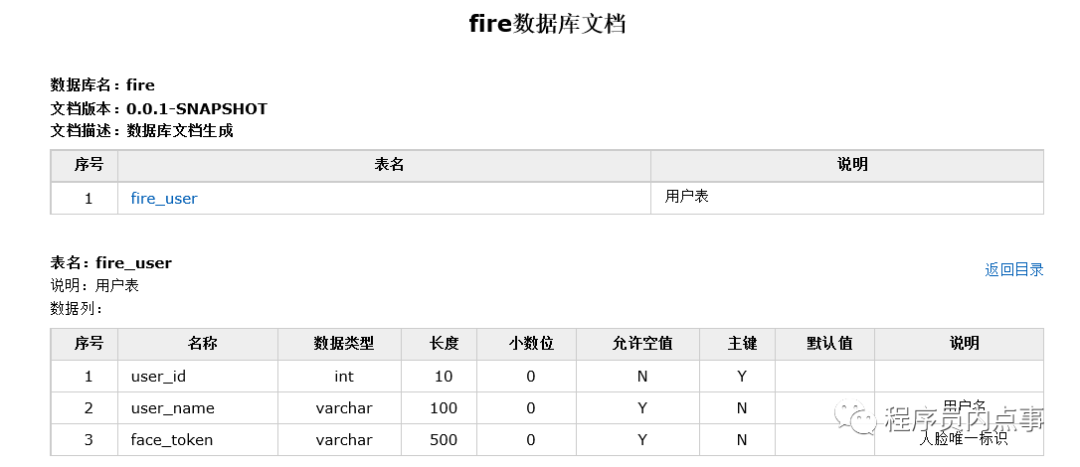
MD文檔樣式

不得不說(shuō)這個(gè)工具是真TM好用,提前完成任務(wù),有點(diǎn)傲嬌有木有!
demo 的 GitHub 地址:
https://github.com/chengxy-nds/Springboot-Notebook/tree/master/springboot-database-doc
