Cocos Shader丨通過 UV 坐標實現(xiàn)「點擊產(chǎn)生水波紋」效果
在開發(fā)中,我們可以通過 UV 坐標實現(xiàn)多種 Shader 效果。本次,Cocos 布道師孫二喵將分享如何用 UV 坐標實現(xiàn)水波紋。Demo 見文末。
什么是 UV 坐標
UV 坐標,也稱為紋理坐標,是 3D 建模和游戲開發(fā)中的一個重要概念。
在 3D 建模中,我們常通過紋理映射,將一張紋理(也就是圖片)黏在模型表面,以控制模型外觀。模型的每個頂點都有一個 UV 坐標,定義了該頂點在紋理中對應的 2D 坐標。通過 UV 坐標,我們就可以將 2D 圖像上的每一個點精確映射到 3D 模型表面,實現(xiàn)高精度的紋理和貼圖效果。
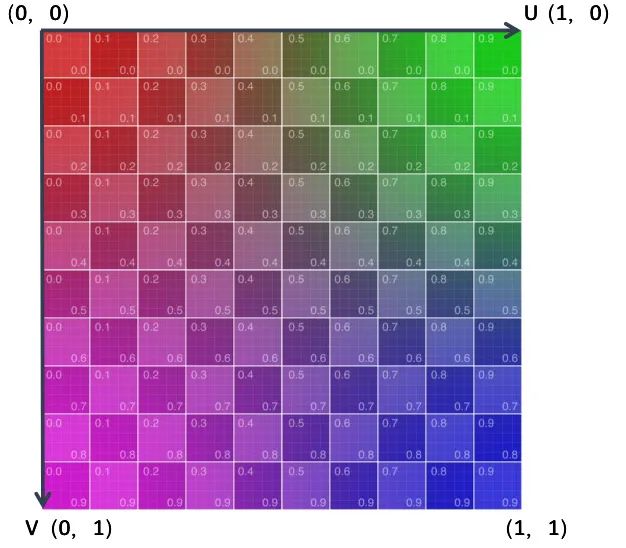
命名為 UV 的原因是 XYZ 已經(jīng)被用于表示三維空間中對象的坐標軸,為了區(qū)分開,所以用了 UV 命名。其中 U 是水平方向坐標軸,V 是垂直方向坐標軸,U 和 V 的范圍都是 0 到 1。
Cocos 中的 UV 坐標
在 Cocos 中,UV 坐標系的原點默認在左上角,紋理和圖片像素的垂直軸、以及在著色器中對紋理進行采樣時,都是下指向的,即從上到下。
這與大多數(shù)圖像文件格式存儲像素數(shù)據(jù)的方式一致,也與大多數(shù)圖形 API 的工作方式一致,包括 DirectX、Vulkan、Metal、WebGPU,但 OpenGL 除外。如果你以前的開發(fā)經(jīng)驗是基于 OpenGL,在用同樣的方式開發(fā) Cocos 游戲的 Shader 時,會發(fā)現(xiàn)你的網(wǎng)格上的紋理是垂直翻轉(zhuǎn)的。此時務必要以左上角為 UV 的原點,做一下調(diào)整。
UV 坐標系也與 Cocos 中其他地方使用的世界坐標系(Y 軸指向上方,如下圖)不一致,通過世界坐標計算 UV 位置的時候也需要注意這個問題。
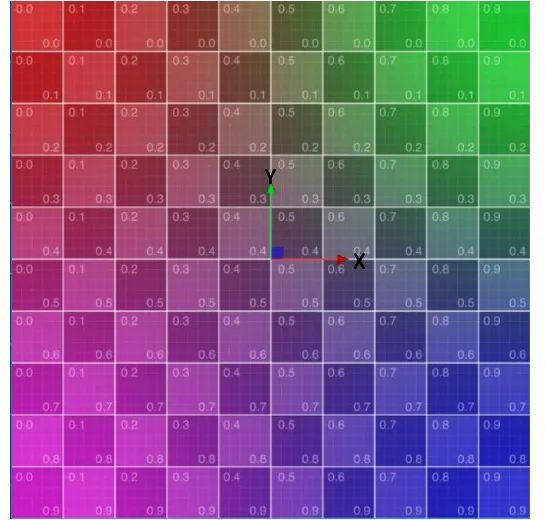
Cocos 中的世界坐標系
在 Shader 內(nèi)使用 UV
在 Cocos 中,2D 精靈的 Shader 和 3D Mesh 的 UV 都是在頂點著色器(VS)中獲得,并傳入像素著色器中(FS)。
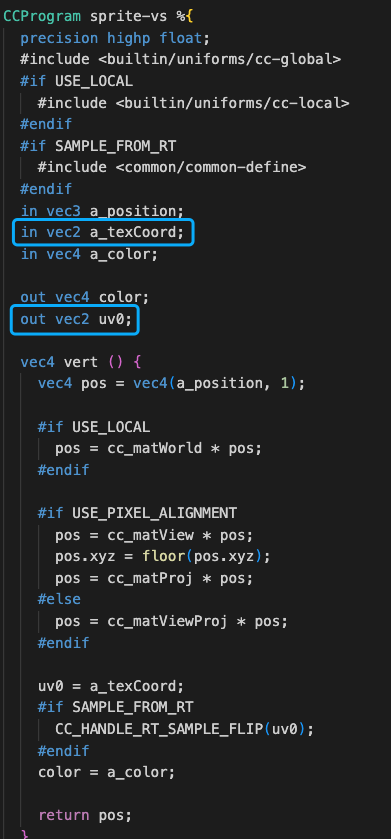
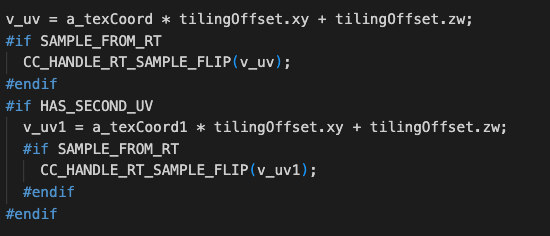
在 Cocos 中,3D 的 Shader 默認會乘以平鋪 Tilling 系數(shù)并加上 Offset 偏移系數(shù),同時支持 RenderTexture 的翻轉(zhuǎn)修復。
我們先來看一個 UV 應用的小效果:
vec4 frag () {
    vec4 col = mainColor * texture(mainTexture, v_uv);

    vec2 uv = v_uv;

    if(uv.y>0.5){
      col.rgb *= 0.5;
    }

    CC_APPLY_FOG(col, v_position);
    return CCFragOutput(col);
  }
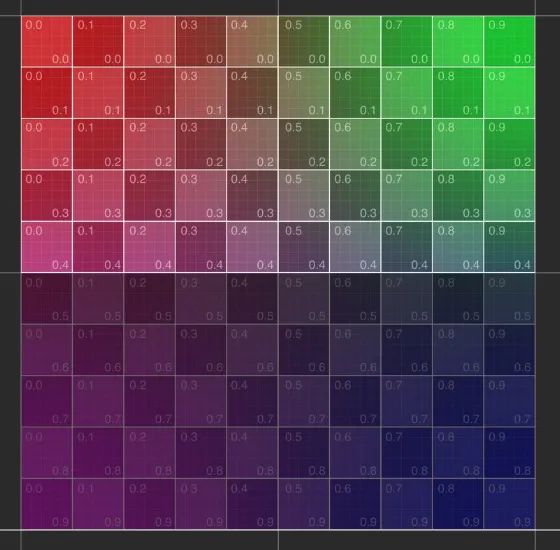
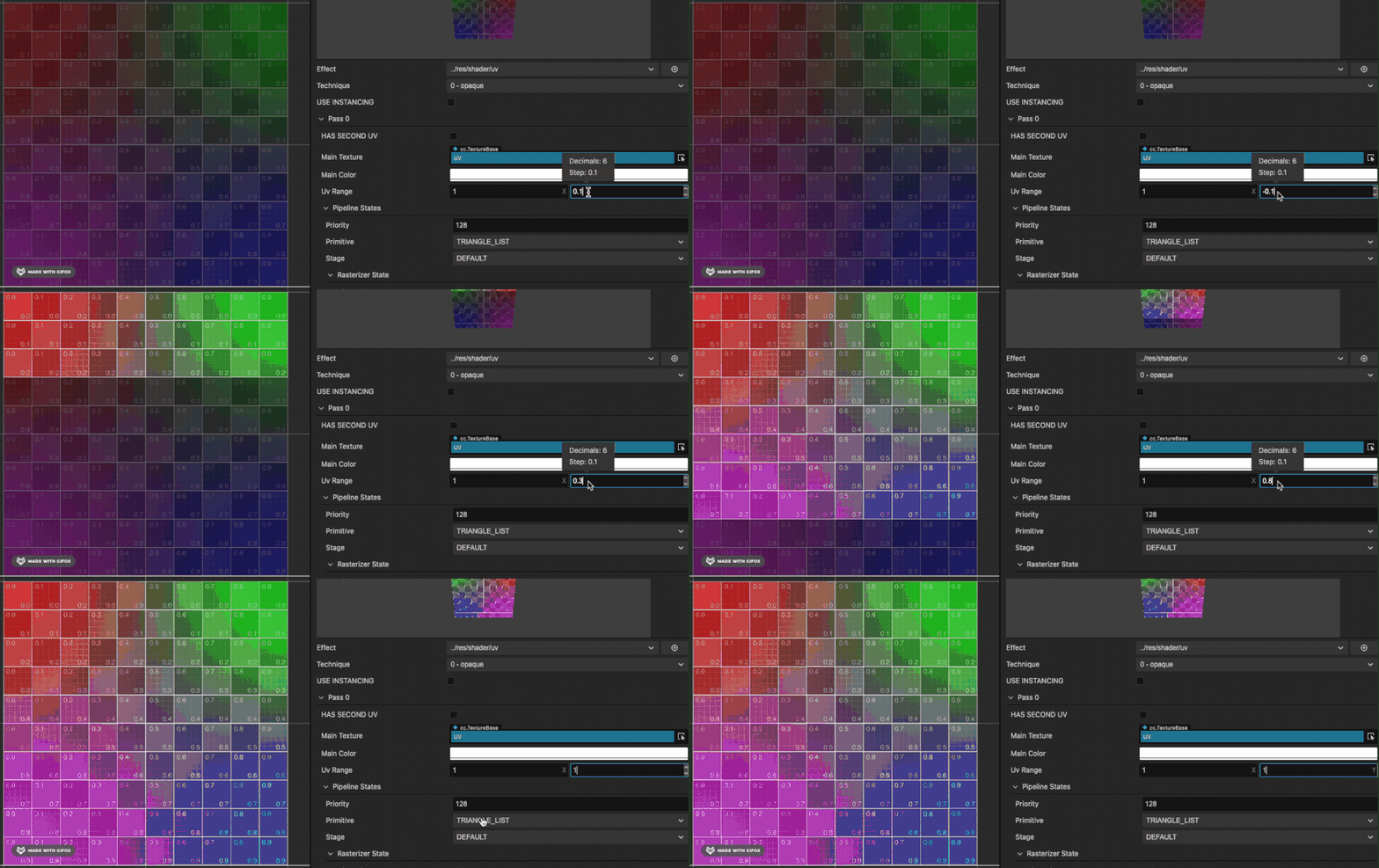
當 UV 的 V 大于 0.5 時候,把顏色的 RGB 都乘 0.5,使顏色變暗。動態(tài)改變這個數(shù)值,就可以實現(xiàn)簡單的動畫效果:
UV 在 Shader 中的更多應用
使用 UV 坐標可以實現(xiàn)多種 Shader 效果,如幀動畫、水波紋、煙霧、火焰等。
幀動畫
幀動畫的實現(xiàn),可以參考麒麟子的文章:
https://forum.cocos.org/t/topic/145096
水波紋效果
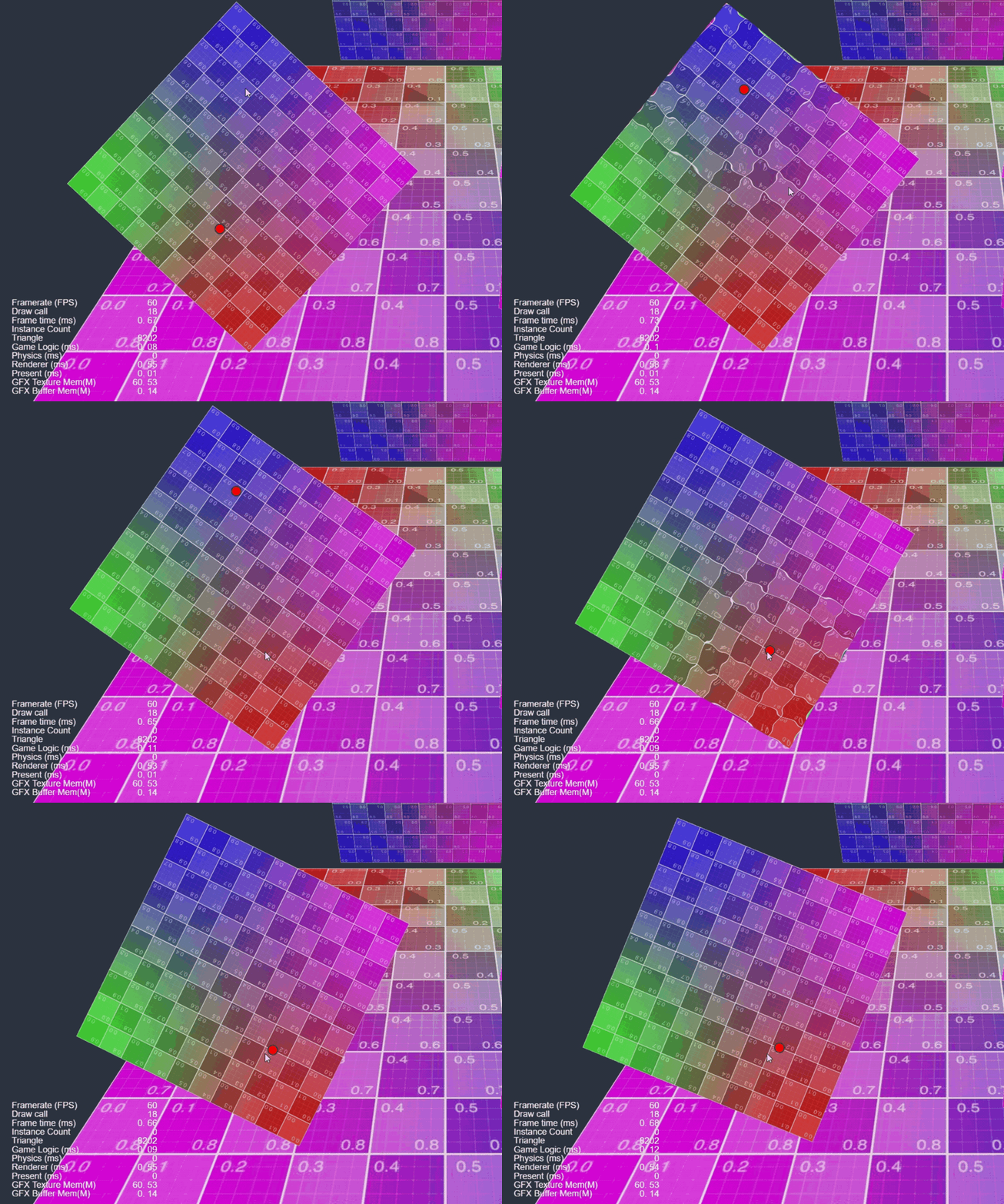
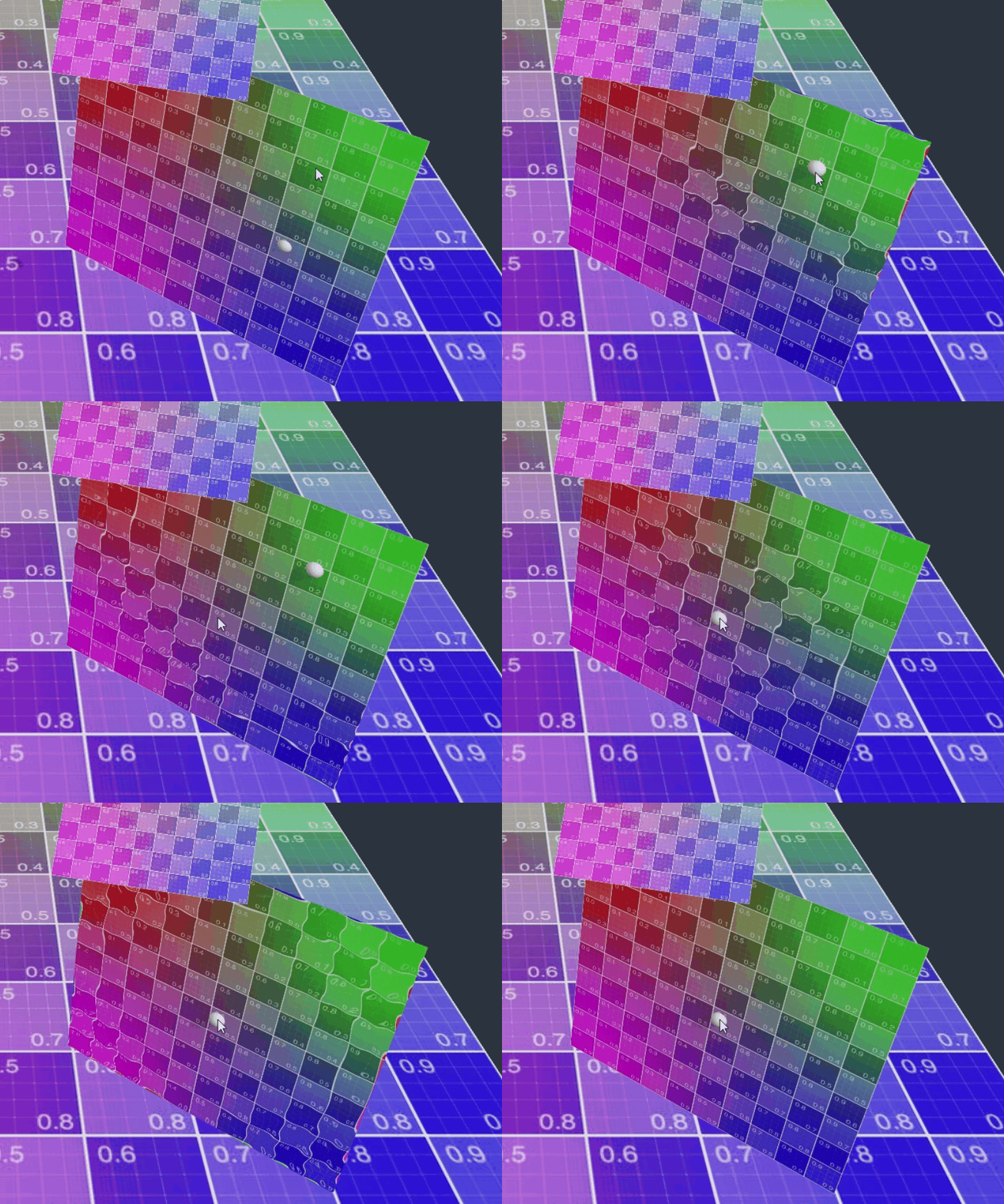
本次重點分享如何通過 UV 在 2D 精靈和 3D 面片上實現(xiàn)“點擊后出現(xiàn)水波紋”的效果。
實現(xiàn)思路大同小異,通過 Sin 函數(shù)波動模擬水波,再在 Update 函數(shù)內(nèi)增加波動的范圍。
vec2 waveOffset (in vec2 uv0) {
      float waveWidth = 0.25;
      vec2 uv = uv0;
      #if USE_WAVE
      vec2 clickPos = vec2(waveFactor.x-uv0.x,waveFactor.y-uv0.y);
      float dis = sqrt(clickPos.x * clickPos.x + clickPos.y * clickPos.y);
      float discardFactor = clamp(waveWidth - abs(waveFactor.w - dis), 0.0, 1.0)/waveWidth;
      float sinFactor =  sin(dis * 100.0 + waveFactor.z * 10.0) * 0.01;
      vec2 offset = normalize(clickPos) * sinFactor * discardFactor;
      uv += offset;
      #endif
      return uv;
  }
這里簡單做了一些優(yōu)化,UV 在外部提前計算好(為了方便動畫效果),使用 1 個 Vec4 進行 Shader 參數(shù)設(shè)置,減少開銷。
2D 精靈上實現(xiàn)水波紋效果
效果演示
@ccclass('spTouchExample')
export class spTouchExample extends Component {

    @property
    waveDis = 0.4;
    @property
    waveSpeed = 1;
    @property
    waveStr = 0.5;
    @property(Node)
    debug: Node = null;

    @property(Label)
    debugText: Label = null;

    public waveProp: Vec4 = new Vec4();

    private _trans: UITransform;
    private _pass: renderer.Pass;
    private _handle: number;

    start() {
        this._trans = this.node.getComponent(UITransform);

        this._pass = this.node.getComponent(Sprite).material.passes[0];

        this.waveProp.w = 100;

        this.waveProp.z = this.waveStr;

        this._handle = this._pass.getHandle("waveFactor");

    }

    onEnable() {

        this.node.on(Node.EventType.TOUCH_START, this.onTouchStart, this);
    }

    onDisable() {

        this.node.off(Node.EventType.TOUCH_START, this.onTouchStart, this);

    }

    onTouchStart(event: EventTouch) {

        const touch = event.touch;

        touch.getUILocation(v2_0);

        v3_0.set(v2_0.x, v2_0.y);

        this._trans.convertToNodeSpaceAR(v3_0, v3_0);

        this.debug.setPosition(v3_0);

        const size = this._trans.contentSize;

        const x = size.x;

        const y = size.y;

        v4_0.x = (x * 0.5 + v3_0.x) / x;

        v4_0.y = 1 - (y * 0.5 + v3_0.y) / y;

        v4_0.w = 0;

        this.waveProp.set(v4_0);

        this.debugText.string = "Clicked: " + this.node.name + "  UV: " + v4_0.x.toFixed(2) + ", " + v4_0.y.toFixed(2);

    }


    update(dt) {

        if (this.waveProp.w < 100) {

            this.waveProp.w += dt * this.waveSpeed;
            if (this.waveProp.w > this.waveDis) {
                this.waveProp.w = 100;
            }
            this._pass.setUniform(this._handle, this.waveProp);

        }

    }


}
這里在圖片節(jié)點上添加了點擊的監(jiān)聽,把點擊的 UI 世界坐標轉(zhuǎn)換成了圖片的本地坐標,再用本地坐標和圖片的長寬算出 UV 的位置,在 update 里設(shè)置材質(zhì)的 uniform 參數(shù)。
3D 面片上實現(xiàn)水波紋效果
效果演示
onTouchStart(event: EventTouch) {
        const touch = event.touch!;
        this.cameraCom.screenPointToRay(touch.getLocationX(), touch.getLocationY(), this._ray);
        this.rayHit();

    }

    /* check model hit */
    rayHit() {
        let distance = 300;
        let mesh: MeshRenderer
        for (let v of this.meshes) {
            let dis = geometry.intersect.rayModel(this._ray, v.model);
            if (dis && dis < distance) {
                distance = dis;
                mesh = v;
            }
        }

        if (mesh) {
            this._ray.computeHit(v3_0, distance);
            const node = mesh.node;
            m4_0.set(node.worldMatrix);
            const halfSize = mesh.model.modelBounds.halfExtents;

            const scale = halfSize.x * 0.1 * node.scale.x;

            this.debug.setWorldPosition(v3_0);

            this.debug.setScale(scale, scale, scale);

            m4_0.invert();
            Vec3.transformMat4(v3_0, v3_0, m4_0)


            if (halfSize.y == 0) {

                const x = halfSize.x;
                const z = halfSize.z;

                v4_0.x = (x + v3_0.x) / (x * 2);
                v4_0.y = (z + v3_0.z) / (z * 2);
            } else {
                const x = halfSize.x;
                const y = halfSize.y;
                v4_0.x = (x + v3_0.x) / (x * 2);
                v4_0.y = (y - v3_0.y) / (y * 2);
            }

            v4_0.w = 0.1;

            const meshCtrl = node.getComponent(meshTouchCtrl);

            meshCtrl.waveProp.set(v4_0);

            this.debugText.string = "Clicked: " + node.name + "  UV: " + v4_0.x.toFixed(2) + ", " + v4_0.y.toFixed(2);

        }
    }
注:這里只針對 UV Mapping 時候平鋪的 3D 面片。
這里通過屏幕射線檢測點擊的位置。
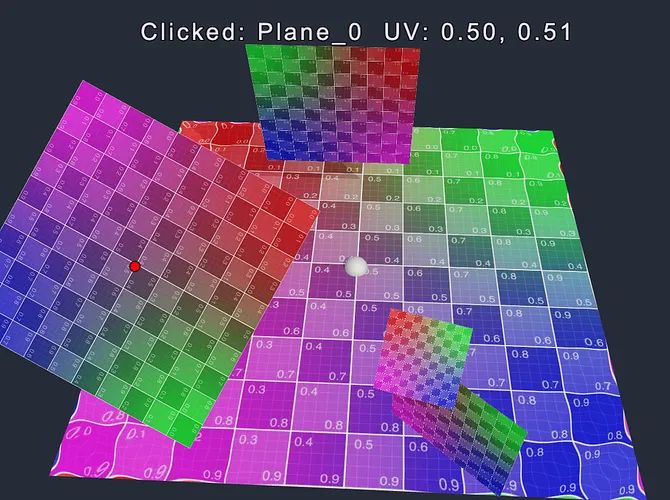
在計算 UV 的時候會有所不同。通過點擊位置的世界坐標乘以面片節(jié)點的世界矩陣的逆矩陣,把點擊位置的世界坐標轉(zhuǎn)換為在面片節(jié)點的下的本地坐標。這里還需要點擊的物體判斷是面片 Quad 還是地面 Plane(Cocos 內(nèi)置的基礎(chǔ)幾何體,通過半包圍確認),算出點擊位置所在的 UV 坐標。
資源鏈接
Demo 源碼下載:
https://forum.cocos.org/uploads/short-url/9FaEj4MDNfBPu1b2rEEcqUBWX09.zip
論壇討論帖:
https://forum.cocos.org/t/topic/145096
需要 Demo 的小伙伴,請將上方的源碼鏈接復制到瀏覽器,即可自動下載。歡迎前往論壇專貼,一起交流探討!
未來,我也將定期分享 Cocos Shader 的實際應用,以及相關(guān) Demo 源碼,帶大家快速上手實現(xiàn)更多漂亮的 Shader 效果!