
2 分鐘定制一個高大上的 GitHub 首頁
點(diǎn)擊上方藍(lán)色“polarisxu”關(guān)注我,設(shè)個星標(biāo),不會讓你失望
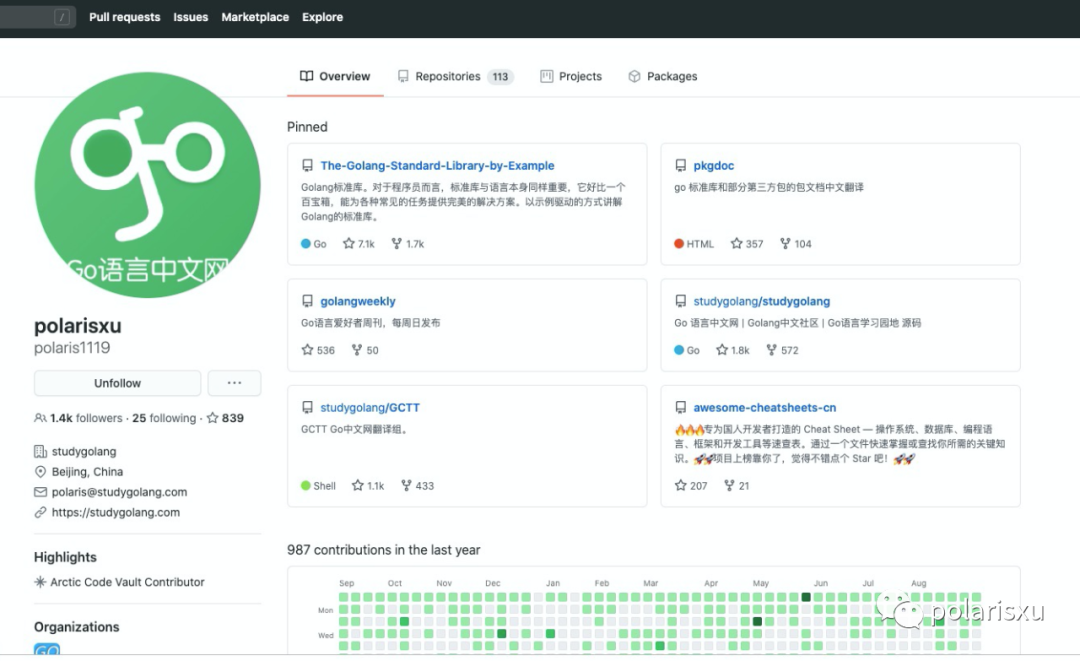
前段時間 GitHub 出了一個功能,可以定制自己的 GitHub 首頁。比如我的首頁 https://github.com/polaris1119 之前是這樣的:
定制后是這樣的:
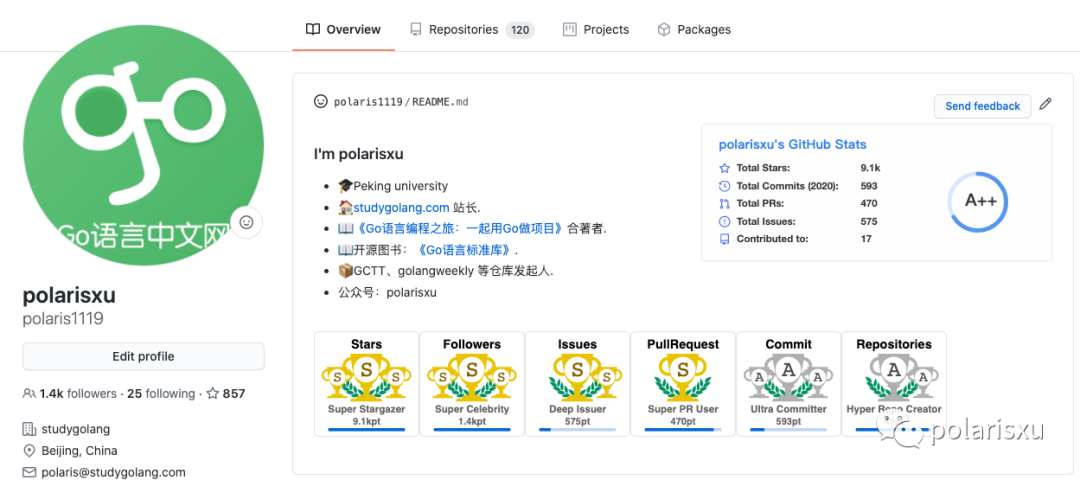
看著很“高端”吧。
現(xiàn)在就給大家講一下怎么做到的。
1、新建一個同名倉庫
新創(chuàng)建一個和 GitHub 賬號同名的 repository(倉庫),比如我的賬號是 polaris1119,所以創(chuàng)建這個倉庫:https://github.com/polaris1119/polaris1119。
官方提示:
polaris1119/polaris1119 is a special repository. Its
README.mdwill appear on your public profile!
2、編輯該倉庫的 README.md 文件
在該文件最頂部增加如下內(nèi)容(該文件默認(rèn)有的內(nèi)容可以不用管),相應(yīng)部分需要修改為你的:
<img?src="https://github-readme-stats.vercel.app/api?username=polaris1119&show_icons=true"?alt="logo"?height="160"?align="right"?style="margin:?5px;?margin-bottom:?20px;"?/>

###?I'm?polarisxu

-???Peking?university
-???[studygolang.com](https://studygolang.com)?站長.
-???[《Go語言編程之旅:一起用Go做項(xiàng)目》](https://u.jd.com/RMSbOS)合著者.
-???開源圖書:[《Go語言標(biāo)準(zhǔn)庫》](https://github.com/polaris1119/The-Golang-Standard-Library-by-Example).
-???GCTT、golangweekly?等倉庫發(fā)起人.
-?公眾號:polarisxu

<img?src="https://github-profile-trophy.vercel.app/?username=polaris1119&theme=flat&column=7"?alt="logo"?height="160"?align="center"?style="margin:?auto;?margin-bottom:?20px;"?/>
對這三部分內(nèi)容進(jìn)行簡單說明:
頂部的 img 標(biāo)簽,顯示為一張圖片,控制的是我主頁上面右邊的圖:polarisxu’s GitHub Stats;其中 username=polaris1119改為你的 username 即可;中間的文字,一般寫上你的一些介紹,主要成就或項(xiàng)目等,隨意發(fā)揮; 底部的 img 標(biāo)簽,顯示為一張圖片,控制的是我主頁下邊的“獎杯”圖片;其中 username=polaris1119改為你的 username 即可;
保存,回到你的 GitHub 主頁,有驚喜沒?!對比一下別人的,有沒有要更多貢獻(xiàn)開源的沖動?!
總結(jié)
沒有統(tǒng)計這個過程是不是 2 分鐘能搞定,但我覺得差不多吧。如果對上面兩張圖是怎么實(shí)現(xiàn)的感興趣,自己去摸索吧。歡迎大家留言秀出你的 GitHub 首頁地址(留言沒法發(fā)圖片,只能貼鏈接了)。
往期推薦
覺得不錯,歡迎關(guān)注:
推薦閱讀
1、深入揭秘前端路由本質(zhì),手寫 mini-router
3、尤大 3 天前發(fā)在 GitHub 上的 vue-lit 是啥?
如果覺得文章不錯,幫忙點(diǎn)個在看唄