
保護版權(quán),用 Python 為圖片添加盲水印
如果你想保護自己的原創(chuàng)圖片,那最好的方式就是為圖片添加盲水印,盲水印就是圖片有水印但人眼看不出來,需要通過程序才能提取水印,相當于隱形“蓋章”,可以用在數(shù)據(jù)泄露溯源、版權(quán)保護等場景。今天分享如何用 Python 為圖片添加盲水印。
為圖片添加盲水印,自然是搜索相關(guān)的工具,通常情況下,我會去 GitHub 輸入英文關(guān)鍵字進行搜索,搜索結(jié)果如下:
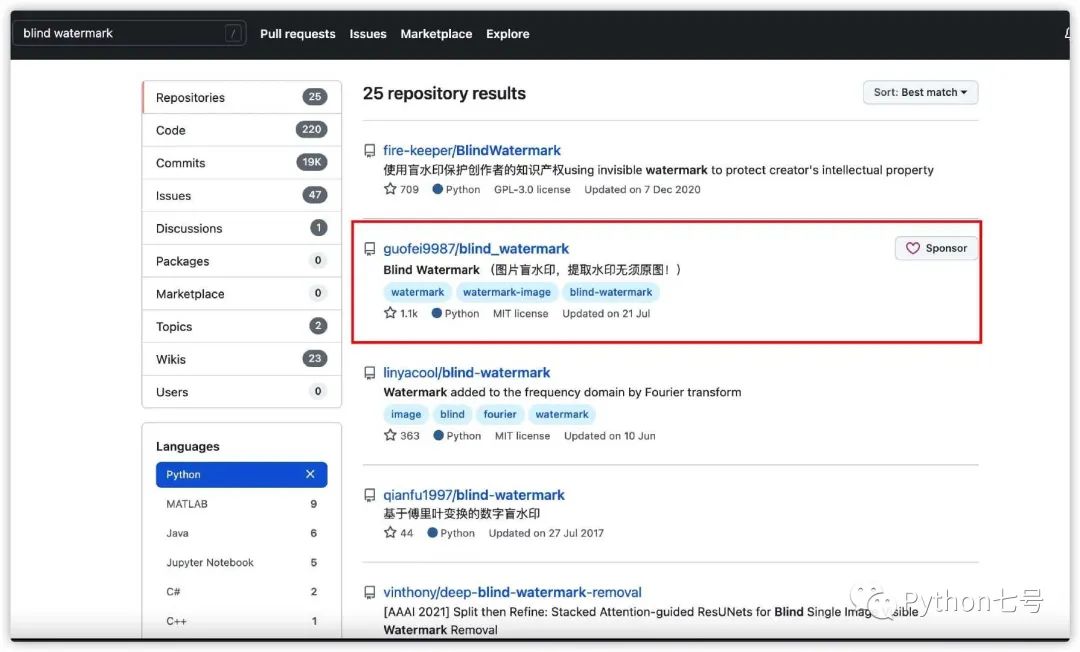
選擇 star 數(shù)量最多的通常錯不了,guofei9987/blind_watermark 試了一下,果然是最好用的,特點:
簡單。解析水印圖時無需原圖 抗攻擊。水印圖剪裁、旋轉(zhuǎn)都不會破壞圖中的盲水印 支持密碼加密
以下是其使用方法,主要內(nèi)容:
1、安裝 2、添加文本水印與提取 3、添加圖片水印與提取 4、抗攻擊能力 5、原理
1、安裝
安裝正式版:
pip install blind-watermark
我安裝后使用的時候報錯:ModuleNotFoundError: No module named 'pywt',此時,可以通過 pip install pywavelets 來解決。
安裝開發(fā)版本:
git clone [email protected]:guofei9987/blind_watermark.git
cd blind_watermark
pip install .
該工具用到的其他庫:
numpy>=1.17.0
opencv-python
setuptools
PyWavelets
2、添加文本水印與提取
添加文本水印:
from blind_watermark import WaterMark

## 設(shè)置密碼,默認是 1
bwm1 = WaterMark(password_img=1, password_wm=1)

## 讀取原始圖片
bwm1.read_img('pic/ori_img.jpg')

## 定義水印文本
wm = '@guofei9987 開源萬歲!'

## 合并文本并輸出新的圖片
bwm1.read_wm(wm, mode='str')
bwm1.embed('output/embedded.png')

## 輸出結(jié)果
len_wm = len(bwm1.wm_bit)
print('Put down the length of wm_bit {len_wm}'.format(len_wm=len_wm))
提取文本水印
bwm1 = WaterMark(password_img=1, password_wm=1)
wm_extract = bwm1.extract('output/embedded.png', wm_shape=len_wm, mode='str')
print(wm_extract)
3、添加圖片水印與提取
添加圖片水印
from blind_watermark import WaterMark

bwm1 = WaterMark(password_wm=1, password_img=1)

## 讀取原始圖片
bwm1.read_img('pic/ori_img.jpg')

## 讀取水印圖片
bwm1.read_wm('pic/watermark.png')

## 合并
bwm1.embed('output/embedded.png')
提取圖片水印
bwm1 = WaterMark(password_wm=1, password_img=1)
# notice that wm_shape is necessary
bwm1.extract(filename='output/embedded.png', wm_shape=(128, 128), out_wm_name='output/extracted.png', )
4、抗攻擊能力
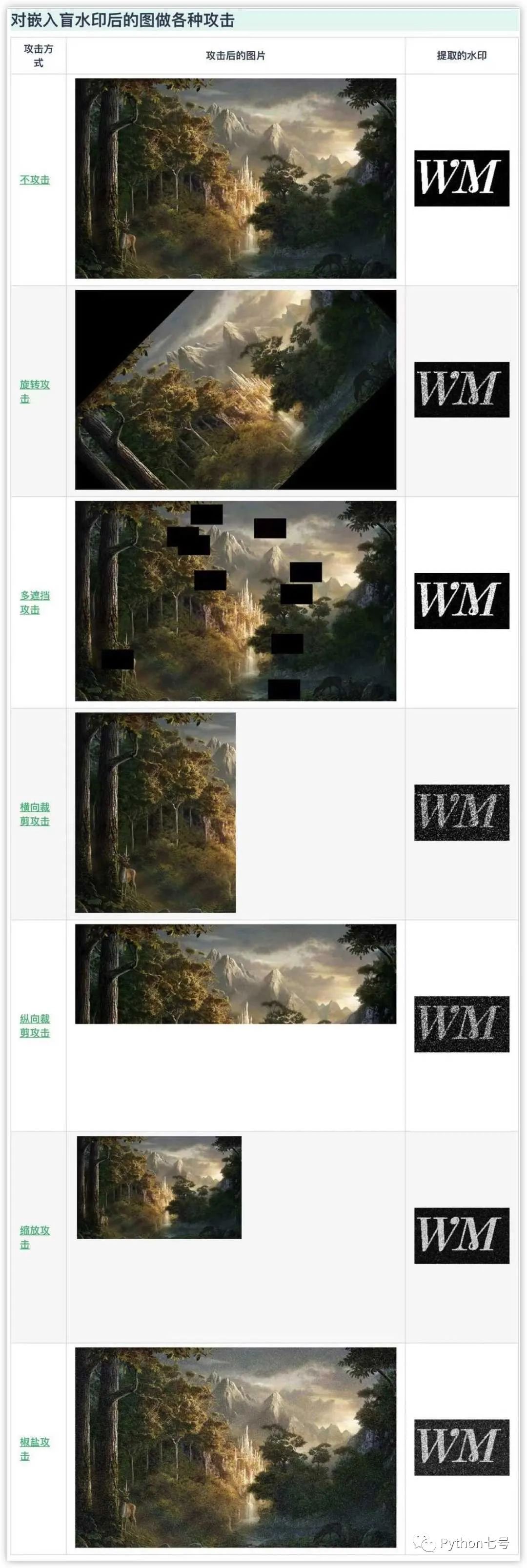
附各攻擊的方法:
旋轉(zhuǎn)攻擊.py[1] 多遮擋攻擊.py[2] 橫向裁剪攻擊.py[3] 縱向裁剪攻擊.py[4] 縮放攻擊.py[5] 椒鹽擊.py[6] 亮度調(diào)高攻擊.py[7] 亮度調(diào)暗攻擊.py[8]
5、原理
(小波轉(zhuǎn)換技術(shù))[https://en.wikipedia.org/wiki/Wavelet_transform]
最后的話
本文分享了 Python 為圖片添加盲水印的方法,如果覺得有幫助,請點贊、在看、轉(zhuǎn)發(fā),關(guān)注公眾號「Python七號」,每天學習一個小技術(shù)。
參考資料
旋轉(zhuǎn)攻擊.py: https://github.com/guofei9987/blind_watermark/blob/master/examples/旋轉(zhuǎn)攻擊.py
[2]多遮擋攻擊.py: https://github.com/guofei9987/blind_watermark/blob/master/examples/多遮擋攻擊.py
[3]橫向裁剪攻擊.py: https://github.com/guofei9987/blind_watermark/blob/master/examples/橫向裁剪攻擊.py
[4]縱向裁剪攻擊.py: https://github.com/guofei9987/blind_watermark/blob/master/examples/縱向裁剪攻擊.py
[5]縮放攻擊.py: https://github.com/guofei9987/blind_watermark/blob/master/examples/縮放攻擊.py
[6]椒鹽擊.py: https://github.com/guofei9987/blind_watermark/blob/master/examples/椒鹽攻擊.py
[7]亮度調(diào)高攻擊.py: https://github.com/guofei9987/blind_watermark/blob/master/examples/亮度調(diào)高攻擊.py
[8]亮度調(diào)暗攻擊.py: https://github.com/guofei9987/blind_watermark/blob/master/examples/亮度調(diào)低攻擊.py