
iOS 原生項(xiàng)目嵌入 Flutter
作者:晨曦_iOS
https://juejin.cn/post/7036393182053007367
雖然一般不建議在原生項(xiàng)目中嵌入Flutter,但是Flutter也可以支持這種方式,下面我們來(lái)看一下具體的實(shí)現(xiàn)。
原生嵌入 Flutter 的工程配置

如圖,我們想使原生嵌入Flutter的話,使用Android Studio創(chuàng)建項(xiàng)目的時(shí)候就要選擇Module進(jìn)行創(chuàng)建,使之作為一個(gè)模塊來(lái)開(kāi)發(fā)。
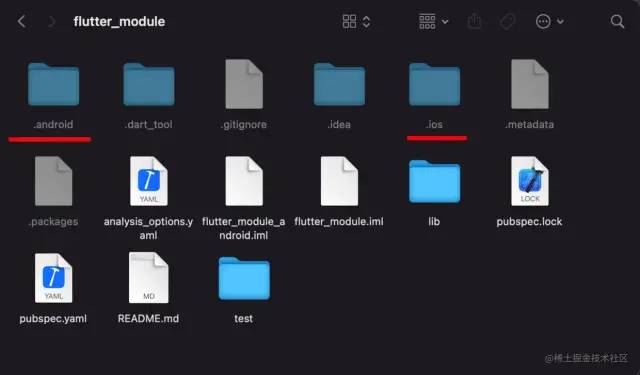
打開(kāi)我們新建的flutter_module工程目錄可以看到,與創(chuàng)建的Flutter App相比,文件里面仍然有Android、iOS工程文件,但是這里只是為了讓我們做調(diào)試用的,而且這兩個(gè)文件都是隱藏文件,不過(guò)Android、iOS工程中不建議加入原生代碼,而且即使加了,打包的時(shí)候也不會(huì)被打包進(jìn)去。flutter_module是一個(gè)純Flutter的工程。

Podfile文件配置
flutter_application_path = '../flutter_module'
load File.join(flutter_application_path,'.iOS','Flutter','podhelper.rb')

platform :ios, '9.0'

target 'NativeDemo' do
  install_all_flutter_pods(flutter_application_path)
  use_frameworks!

  # Pods for NativeDemo

end
我們使用Xcode創(chuàng)建一個(gè)原生工程,NativeDemo,使用終端,cd到NativeDemo目錄下,pod init,然后配置Podfile文件,然后執(zhí)行pod install。
pod install完成之后,打開(kāi)原生項(xiàng)目,引用頭文件#import <Flutter/Flutter.h>,可以成功的話就代表配置成功,現(xiàn)在的話原生工程與Flutter就有聯(lián)系了,下面我們就可以實(shí)現(xiàn)代碼了,來(lái)使原生工程中嵌入Flutter。
原生項(xiàng)目調(diào)起 Flutter 頁(yè)面
原生代碼部分
#import "ViewController.h"
#import <Flutter/Flutter.h>

@interface ViewController ()
@property(nonatomic, strong) FlutterEngine* flutterEngine;
@property(nonatomic, strong) FlutterViewController* flutterVc;
@property(nonatomic, strong) FlutterBasicMessageChannel * msgChannel;
@end

@implementation ViewController

-(FlutterEngine *)flutterEngine
{
    if (!_flutterEngine) {
        FlutterEngine * engine = [[FlutterEngine alloc] initWithName:@"hank"];
        if (engine.run) {
            _flutterEngine = engine;
        }
    }
    return _flutterEngine;
}

- (IBAction)pushFlutter:(id)sender {

    self.flutterVc.modalPresentationStyle = UIModalPresentationFullScreen;

    //創(chuàng)建channel
    FlutterMethodChannel * methodChannel = [FlutterMethodChannel methodChannelWithName:@"one_page" binaryMessenger:self.flutterVc.binaryMessenger];
    //告訴Flutter對(duì)應(yīng)的頁(yè)面
    [methodChannel invokeMethod:@"one" arguments:nil];

    //彈出頁(yè)面
    [self presentViewController:self.flutterVc animated:YES completion:nil];

    //監(jiān)聽(tīng)退出
    [methodChannel setMethodCallHandler:^(FlutterMethodCall * _Nonnull call, FlutterResult  _Nonnull result) {
        //如果是exit我就退出頁(yè)面!
        if ([call.method isEqualToString:@"exit"]) {
            [self.flutterVc dismissViewControllerAnimated:YES completion:nil];
        }
    }];
}
- (IBAction)pushFlutterTwo:(id)sender {
    self.flutterVc.modalPresentationStyle = UIModalPresentationFullScreen;

    //創(chuàng)建channel
    FlutterMethodChannel * methodChannel = [FlutterMethodChannel methodChannelWithName:@"two_page" binaryMessenger:self.flutterVc.binaryMessenger];
    //告訴Flutter對(duì)應(yīng)的頁(yè)面
    [methodChannel invokeMethod:@"two" arguments:nil];

    //彈出頁(yè)面
    [self presentViewController:self.flutterVc animated:YES completion:nil];

    //監(jiān)聽(tīng)退出
    [methodChannel setMethodCallHandler:^(FlutterMethodCall * _Nonnull call, FlutterResult  _Nonnull result) {
        //如果是exit我就退出頁(yè)面!
        if ([call.method isEqualToString:@"exit"]) {
            [self.flutterVc dismissViewControllerAnimated:YES completion:nil];
        }
    }];
}

- (void)viewDidLoad {
    [super viewDidLoad];

    self.flutterVc = [[FlutterViewController alloc] initWithEngine:self.flutterEngine nibName:nil bundle:nil];
    self.msgChannel = [FlutterBasicMessageChannel messageChannelWithName:@"messageChannel" binaryMessenger:self.flutterVc.binaryMessenger];

    [self.msgChannel setMessageHandler:^(id  _Nullable message, FlutterReply  _Nonnull callback) {
        NSLog(@"收到Flutter的:%@",message);
    }];

}

-(void)touchesBegan:(NSSet<UITouch *> *)touches withEvent:(UIEvent *)event
{
    static int a = 0;
    [self.msgChannel sendMessage:[NSString stringWithFormat:@"%d",a++]];
}
在原生代碼部分我們定義了三個(gè)屬性,flutterEngine代表引擎對(duì)象,flutterVc是FlutterViewController類(lèi)型的控制器對(duì)象,msgChannel是通信方式中的一種channel,為FlutterBasicMessageChannel類(lèi)型,下面會(huì)有介紹。
在這里我們實(shí)現(xiàn)了pushFlutter與pushFlutterTwo兩個(gè)方法,代表調(diào)起兩個(gè)不同的Flutter頁(yè)面。在這兩個(gè)方法中,我們首先創(chuàng)建methodChannel對(duì)象,并分別傳入one跟two兩個(gè)字符串標(biāo)識(shí),并且binaryMessenger傳參傳入的都是self.flutterVc.binaryMessenger。在兩個(gè)方法中分別調(diào)用invokeMethod方法,向Flutter頁(yè)面發(fā)送消息,然后彈出頁(yè)面,并且實(shí)現(xiàn)setMethodCallHandler方法,在閉包中判斷call.method isEqualToString:@"exit",進(jìn)行頁(yè)面的退出。
Flutter 代碼部分
// ignore_for_file: avoid_print

import 'package:flutter/material.dart';
import 'package:flutter/services.dart';

void main() => runApp(const MyApp());

class MyApp extends StatefulWidget {
  const MyApp({Key? key}) : super(key: key);

  @override
  _MyAppState createState() => _MyAppState();
}

class _MyAppState extends State<MyApp> {
  final MethodChannel _oneChannel = const MethodChannel('one_page');
  final MethodChannel _twoChannel = const MethodChannel('two_page');
  final BasicMessageChannel _messageChannel =
      const BasicMessageChannel('messageChannel', StandardMessageCodec());

  String pageIndex = 'one';

  @override
  void initState() {
    super.initState();

    _messageChannel.setMessageHandler((message) {
      print('收到來(lái)自iOS的$message');
      return Future(() {});
    });

    _oneChannel.setMethodCallHandler((call) {
      pageIndex = call.method;
      print(call.method);
      setState(() {});
      return Future(() {});
    });
    _twoChannel.setMethodCallHandler((call) {
      pageIndex = call.method;
      print(call.method);
      setState(() {});
      return Future(() {});
    });
  }

  @override
  Widget build(BuildContext context) {
    return MaterialApp(
      title: 'Flutter Demo',
      theme: ThemeData(
        primarySwatch: Colors.blue,
      ),
      home: _rootPage(pageIndex),
    );
  }

  //根據(jù)pageIndex來(lái)返回頁(yè)面!
  Widget _rootPage(String pageIndex) {
    switch (pageIndex) {
      case 'one':
        return Scaffold(
          appBar: AppBar(
            title: Text(pageIndex),
          ),
          body: Column(
            mainAxisAlignment: MainAxisAlignment.center,
            children: [
              ElevatedButton(
                onPressed: () {
                  _oneChannel.invokeMapMethod('exit');
                },
                child: Text(pageIndex),
              ),
              TextField(
                onChanged: (String str) {
                  _messageChannel.send(str);
                },
              )
            ],
          ),
        );
      case 'two':
        return Scaffold(
          appBar: AppBar(
            title: Text(pageIndex),
          ),
          body: Center(
            child: ElevatedButton(
              onPressed: () {
                _twoChannel.invokeMapMethod('exit');
              },
              child: Text(pageIndex),
            ),
          ),
        );
      default:
        return Scaffold(
          appBar: AppBar(
            title: Text(pageIndex),
          ),
          body: Center(
            child: ElevatedButton(
              onPressed: () {
                const MethodChannel('default_page').invokeMapMethod('exit');
              },
              child: Text(pageIndex),
            ),
          ),
        );
    }
  }
}
在Flutter代碼中我們定義了_oneChannel與_twoChannel這兩個(gè)變量用了接收原生頁(yè)面發(fā)送的消息,并且向原生頁(yè)面發(fā)送消息。定義了變量pageIndex用來(lái)標(biāo)識(shí)創(chuàng)建那個(gè)頁(yè)面。
在initState方法中調(diào)用setMethodCallHandler方法,獲取到原生頁(yè)面?zhèn)鱽?lái)的數(shù)據(jù)并賦值給pageIndex,然后調(diào)用setState方法。
在build方法中我們調(diào)用_rootPage方法來(lái)判斷創(chuàng)建哪個(gè)頁(yè)面。并且分別在這兩個(gè)頁(yè)面的點(diǎn)擊事件中調(diào)用invokeMapMethod方法,代表退出頁(yè)面,原生頁(yè)面在setMethodCallHandler閉包中接收到exit數(shù)據(jù)后就會(huì)調(diào)用[self.flutterVc dismissViewControllerAnimated:YES completion:nil],進(jìn)行頁(yè)面的退出。
Flutter 與原生的通信
MethodChannel:Flutter與Native端相互調(diào)用,調(diào)用后可以返回結(jié)果,可以Native端主動(dòng)調(diào)用,也可以Flutter主動(dòng)調(diào)用,屬于雙向通信。此方式為最常用的方式,Native端調(diào)用需要在主線程中執(zhí)行。BasicMessageChannel: 用于使用指定的編解碼器對(duì)消息進(jìn)行編碼和解碼,屬于雙向通信,可以Native端主動(dòng)調(diào)用,也可Flutter主動(dòng)調(diào)用。EventChannel:用于數(shù)據(jù)流(event streams)的通信,Native端主動(dòng)發(fā)送數(shù)據(jù)給Flutter,通常用于狀態(tài)的監(jiān)聽(tīng),比如網(wǎng)絡(luò)變化、傳感器數(shù)據(jù)等。
Flutter與原生通信有三種方式,Flutter為我們提供了三種Channel,分別是MethodChannel、BasicMessageChannel與EventChannel。但是我們比較常用的就是MethodChannel與BasicMessageChannel這兩種。因?yàn)?code style="font-size: 14px;font-family: 'Operator Mono', Consolas, Monaco, Menlo, monospace;word-break: break-all;overflow-wrap: break-word;padding: 2px 4px;border-radius: 4px;margin-right: 2px;margin-left: 2px;color: rgb(233, 105, 0);background: rgb(248, 248, 248);">MethodChannel前面已經(jīng)講過(guò)了,所以這里我們介紹一下BasicMessageChannel的用法。
BasicMessageChannel 用法
BasicMessageChannel的用法與FlutterMethodChannel類(lèi)似,在上面的代碼示例中,首先在Flutter代碼中我們也是定義一個(gè)BasicMessageChannel類(lèi)型的變量_messageChannel,在_messageChannel的setMessageHandler閉包中接收來(lái)自于原生頁(yè)面發(fā)來(lái)的消息,調(diào)用_messageChannel的send方法向原生頁(yè)面進(jìn)行通信,在輸入框文字變化的時(shí)候都會(huì)調(diào)用send方法。在原生代碼中也是類(lèi)似,定義了msgChannel屬性,setMessageHandler中的block負(fù)責(zé)接收消息,sendMessage發(fā)送消息,在touchesBegan中向Flutter傳遞a的累加值。
作者:晨曦_iOS
https://juejin.cn/post/7036393182053007367
-End-
最近有一些小伙伴,讓我?guī)兔φ乙恍?nbsp;面試題 資料,于是我翻遍了收藏的 5T 資料后,匯總整理出來(lái),可以說(shuō)是程序員面試必備!所有資料都整理到網(wǎng)盤(pán)了,歡迎下載!
面試題】即可獲取 好文分享給更多人↓↓