Flutter 中嵌入Android原生View
建議使用 Android Studio 進行開發(fā),在 Android Studio 左側 project tab下選中 android 目錄下任意一個文件,右上角會出現 「Open for Editing in Android Studio」 ,

點擊即可打開,打開后 project tab 并不是一個 Android 項目,而是項目中所有 Android 項目,包含第三方:
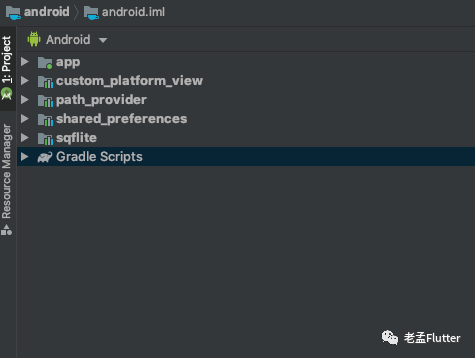
app 目錄是當前項目的 android 目錄,其他則是第三方的 android 目錄。
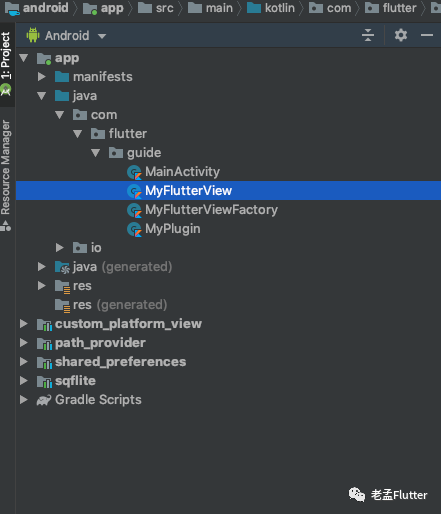
在「App」 項目的 「java/包名」 目錄下創(chuàng)建嵌入 Flutter 中的 Android View,此 View 繼承 「PlatformView」 :
class?MyFlutterView(context:?Context)?:?PlatformView?{
????override?fun?getView():?View?{
????????TODO("Not?yet?implemented")
????}

????override?fun?dispose()?{
????????TODO("Not?yet?implemented")
????}
}
「getView」 :返回要嵌入 Flutter 層次結構的Android View 「dispose」:釋放此View時調用,此方法調用后 View 不可用,此方法需要清除所有對象引用,否則會造成內存泄漏。
返回一個簡單的 「TextView」 :
class?MyFlutterView(context:?Context,?messenger:?BinaryMessenger,?viewId:?Int,?args:?Map<String,?Any>?)?:?PlatformView?{

????val?textView:?TextView?=?TextView(context)

????init?{
????????textView.text?=?"我是Android?View"
????}

????override?fun?getView():?View?{

????????return?textView
????}

????override?fun?dispose()?{
????????TODO("Not?yet?implemented")
????}
}
????
「messenger」:用于消息傳遞,后面介紹 Flutter 與 原生通信時用到此參數。 「viewId」:View 生成時會分配一個唯一 ID。 「args」:Flutter 傳遞的初始化參數。
注冊PlatformView
創(chuàng)建PlatformViewFactory:
class?MyFlutterViewFactory(val?messenger:?BinaryMessenger)?:?PlatformViewFactory(StandardMessageCodec.INSTANCE)?{

????override?fun?create(context:?Context,?viewId:?Int,?args:?Any?):?PlatformView?{
????????val?flutterView?=?MyFlutterView(context,?messenger,?viewId,?args?as?Map<String,?Any>?)
????????return?flutterView
????}

}
????
創(chuàng)建 「MyPlugin」 :
class?MyPlugin?:?FlutterPlugin?{

????override?fun?onAttachedToEngine(binding:?FlutterPlugin.FlutterPluginBinding)?{
????????val?messenger:?BinaryMessenger?=?binding.binaryMessenger
????????binding
????????????????.platformViewRegistry
????????????????.registerViewFactory(
????????????????????????"plugins.flutter.io/custom_platform_view",?MyFlutterViewFactory(messenger))
????}

????companion?object?{
????????@JvmStatic
????????fun?registerWith(registrar:?PluginRegistry.Registrar)?{
????????????registrar
????????????????????.platformViewRegistry()
????????????????????.registerViewFactory(
????????????????????????????"plugins.flutter.io/custom_platform_view",
????????????????????????????MyFlutterViewFactory(registrar.messenger()))
????????}
????}

????override?fun?onDetachedFromEngine(binding:?FlutterPlugin.FlutterPluginBinding)?{

????}
}
????
記住 「plugins.flutter.io/custom_platform_view」 ,這個字符串在 Flutter 中需要與其保持一致。
在 「App 中 MainActivity」 中注冊:
class?MainActivity?:?FlutterActivity()?{
????override?fun?configureFlutterEngine(flutterEngine:?FlutterEngine)?{
????????super.configureFlutterEngine(flutterEngine)
????????flutterEngine.plugins.add(MyPlugin())
????}
}

????
如果是 Flutter Plugin,沒有「MainActivity」,則在對應的 「Plugin onAttachedToEngine 和 registerWith」 方法修改如下:
public?class?CustomPlatformViewPlugin?:?FlutterPlugin,MethodCallHandler?{
????///?The?MethodChannel?that?will?the?communication?between?Flutter?and?native?Android
????///
????///?This?local?reference?serves?to?register?the?plugin?with?the?Flutter?Engine?and?unregister?it
????///?when?the?Flutter?Engine?is?detached?from?the?Activity
????private?lateinit?var?channel:?MethodChannel

????override?fun?onAttachedToEngine(@NonNull?flutterPluginBinding:?FlutterPlugin.FlutterPluginBinding)?{
????????channel?=?MethodChannel(flutterPluginBinding.getFlutterEngine().getDartExecutor(),?"custom_platform_view")
????????channel.setMethodCallHandler(this)

????????val?messenger:?BinaryMessenger?=?flutterPluginBinding.binaryMessenger
????????flutterPluginBinding
????????????????.platformViewRegistry
????????????????.registerViewFactory(
????????????????????????"plugins.flutter.io/custom_platform_view",?MyFlutterViewFactory(messenger))

????}

????//?This?static?function?is?optional?and?equivalent?to?onAttachedToEngine.?It?supports?the?old
????//?pre-Flutter-1.12?Android?projects.?You?are?encouraged?to?continue?supporting
????//?plugin?registration?via?this?function?while?apps?migrate?to?use?the?new?Android?APIs
????//?post-flutter-1.12?via?https://flutter.dev/go/android-project-migration.
????//
????//?It?is?encouraged?to?share?logic?between?onAttachedToEngine?and?registerWith?to?keep
????//?them?functionally?equivalent.?Only?one?of?onAttachedToEngine?or?registerWith?will?be?called
????//?depending?on?the?user's?project.?onAttachedToEngine?or?registerWith?must?both?be?defined
????//?in?the?same?class.
????companion?object?{
????????@JvmStatic
????????fun?registerWith(registrar:?Registrar)?{
????????????val?channel?=?MethodChannel(registrar.messenger(),?"custom_platform_view")
????????????channel.setMethodCallHandler(CustomPlatformViewPlugin())

????????????registrar
????????????????????.platformViewRegistry()
????????????????????.registerViewFactory(
????????????????????????????"plugins.flutter.io/custom_platform_view",
????????????????????????????MyFlutterViewFactory(registrar.messenger()))
????????}
????}

????override?fun?onMethodCall(@NonNull?call:?MethodCall,?@NonNull?result:?Result)?{
????????if?(call.method?==?"getPlatformVersion")?{
????????????result.success("Android?${android.os.Build.VERSION.RELEASE}")
????????}?else?{
????????????result.notImplemented()
????????}
????}

????override?fun?onDetachedFromEngine(@NonNull?binding:?FlutterPlugin.FlutterPluginBinding)?{
????????channel.setMethodCallHandler(null)
????}
}

????
嵌入Flutter
在 Flutter 中調用
class?PlatformViewDemo?extends?StatelessWidget?{
??@override
??Widget?build(BuildContext?context)?{
????Widget?platformView(){
??????if(defaultTargetPlatform?==?TargetPlatform.android){
????????return?AndroidView(
??????????viewType:?'plugins.flutter.io/custom_platform_view',
????????);
??????}
????}
????return?Scaffold(
??????appBar:?AppBar(),
??????body:?Center(
????????child:?platformView(),
??????),
????);
??}
}
????
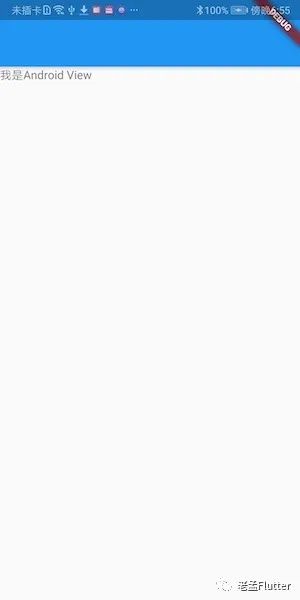
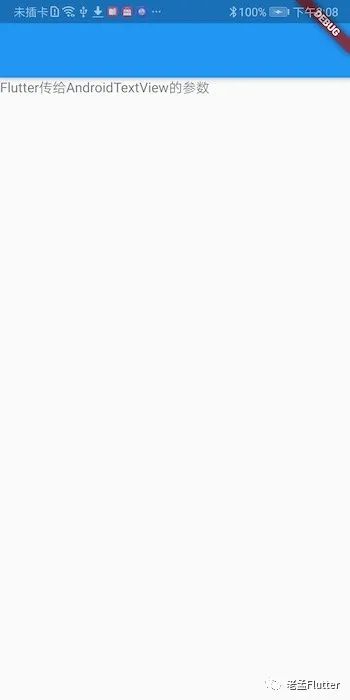
上面嵌入的是 Android View,因此通過 「defaultTargetPlatform == TargetPlatform.android」 判斷當前平臺加載,在 Android 上運行效果:
設置初始化參數
Flutter 端修改如下:
AndroidView(
??????????viewType:?'plugins.flutter.io/custom_platform_view',
??????????creationParams:?{'text':?'Flutter傳給AndroidTextView的參數'},
??????????creationParamsCodec:?StandardMessageCodec(),
????????)

????
「creationParams」 :傳遞的參數,插件可以將此參數傳遞給 AndroidView 的構造函數。
creationParamsCodec
:將 creationParams 編碼后再發(fā)送給平臺側,它應該與傳遞給構造函數的編解碼器匹配。值的范圍:
StandardMessageCodec JSONMessageCodec StringCodec BinaryCodec
修改 MyFlutterView :
class?MyFlutterView(context:?Context,?messenger:?BinaryMessenger,?viewId:?Int,?args:?Map<String,?Any>?)?:?PlatformView?{

????val?textView:?TextView?=?TextView(context)

????init?{
????????args?.also?{
????????????textView.text?=?it["text"]?as?String
????????}
????}

????override?fun?getView():?View?{

????????return?textView
????}

????override?fun?dispose()?{
????????TODO("Not?yet?implemented")
????}
}

????
最終效果:
Flutter 向 Android View 發(fā)送消息
修改 Flutter 端,創(chuàng)建 「MethodChannel」 用于通信:
class?PlatformViewDemo?extends?StatefulWidget?{
??@override
??_PlatformViewDemoState?createState()?=>?_PlatformViewDemoState();
}

class?_PlatformViewDemoState?extends?State<PlatformViewDemo>?{
??static?const?platform?=
??????const?MethodChannel('com.flutter.guide.MyFlutterView');

??@override
??Widget?build(BuildContext?context)?{
????Widget?platformView()?{
??????if?(defaultTargetPlatform?==?TargetPlatform.android)?{
????????return?AndroidView(
??????????viewType:?'plugins.flutter.io/custom_platform_view',
??????????creationParams:?{'text':?'Flutter傳給AndroidTextView的參數'},
??????????creationParamsCodec:?StandardMessageCodec(),
????????);
??????}
????}

????return?Scaffold(
??????appBar:?AppBar(),
??????body:?Column(children:?[
????????RaisedButton(
??????????child:?Text('傳遞參數給原生View'),
??????????onPressed:?()?{
????????????platform.invokeMethod('setText',?{'name':?'laomeng',?'age':?18});
??????????},
????????),
????????Expanded(child:?platformView()),
??????]),
????);
??}
}
????
在 原生View 中也創(chuàng)建一個 「MethodChannel」 用于通信:
class?MyFlutterView(context:?Context,?messenger:?BinaryMessenger,?viewId:?Int,?args:?Map<String,?Any>?)?:?PlatformView,?MethodChannel.MethodCallHandler?{

????val?textView:?TextView?=?TextView(context)
????private?var?methodChannel:?MethodChannel

????init?{
????????args?.also?{
????????????textView.text?=?it["text"]?as?String
????????}
????????methodChannel?=?MethodChannel(messenger,?"com.flutter.guide.MyFlutterView")
????????methodChannel.setMethodCallHandler(this)
????}

????override?fun?getView():?View?{

????????return?textView
????}

????override?fun?dispose()?{
????????methodChannel.setMethodCallHandler(null)
????}

????override?fun?onMethodCall(call:?MethodCall,?result:?MethodChannel.Result)?{
????????if?(call.method?==?"setText")?{
????????????val?name?=?call.argument("name")?as?String?
????????????val?age?=?call.argument("age")?as?Int?

????????????textView.text?=?"hello,$name,年齡:$age"
????????}?else?{
????????????result.notImplemented()
????????}
????}
}
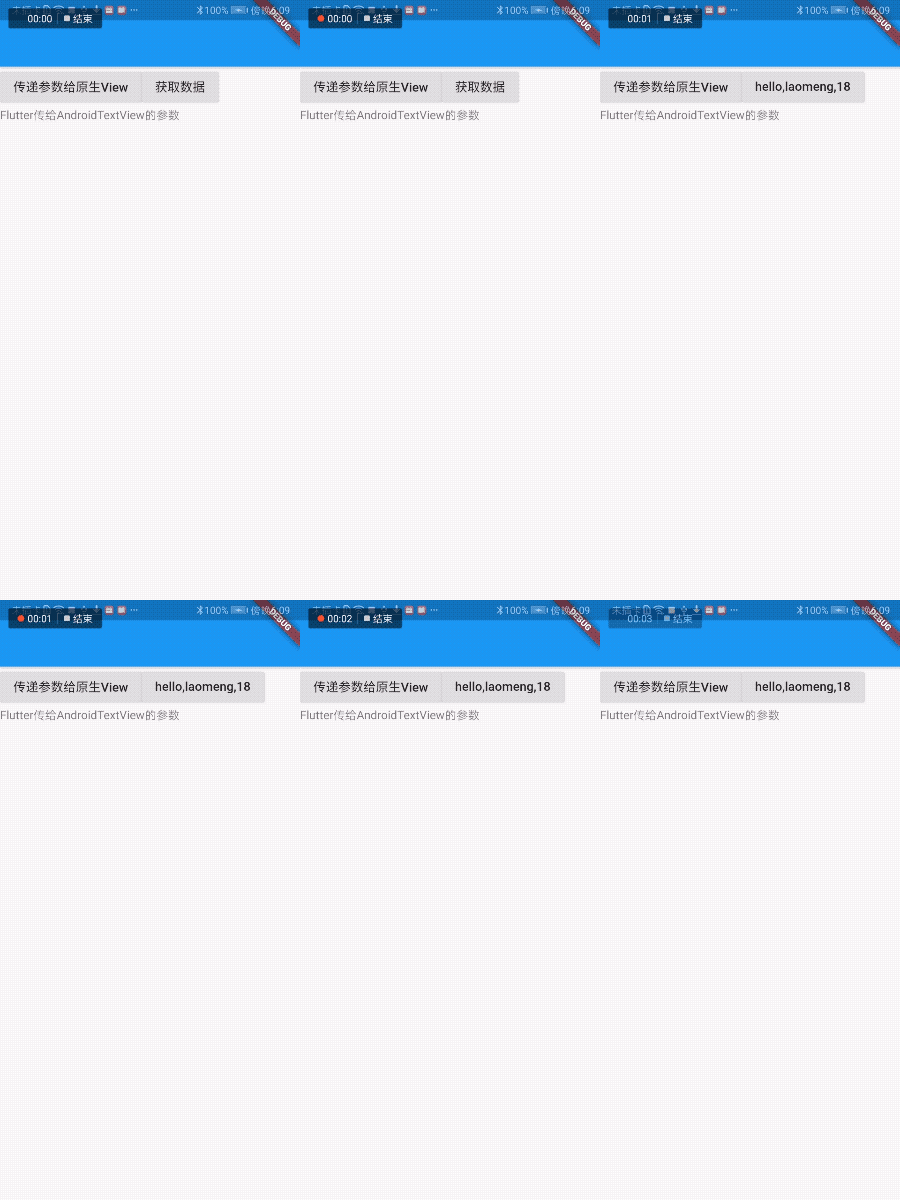
Flutter 向 Android View 獲取消息
與上面發(fā)送信息不同的是,Flutter 向原生請求數據,原生返回數據到 Flutter 端,修改 「MyFlutterView onMethodCall」:
override?fun?onMethodCall(call:?MethodCall,?result:?MethodChannel.Result)?{
????if?(call.method?==?"setText")?{
????????val?name?=?call.argument("name")?as?String?
????????val?age?=?call.argument("age")?as?Int?
????????textView.text?=?"hello,$name,年齡:$age"
????}?else?if?(call.method?==?"getData")?{
????????val?name?=?call.argument("name")?as?String?
????????val?age?=?call.argument("age")?as?Int?

????????var?map?=?mapOf("name"?to?"hello,$name",
????????????????"age"?to?"$age"
????????)
????????result.success(map)
????}?else?{
????????result.notImplemented()
????}
}

????
「result.success(map)」 是返回的數據。
Flutter 端接收數據:
var?_data?=?'獲取數據';

RaisedButton(
??child:?Text('$_data'),
??onPressed:?()?async?{
????var?result?=?await?platform
????????.invokeMethod('getData',?{'name':?'laomeng',?'age':?18});
????setState(()?{
??????_data?=?'${result['name']},${result['age']}';
????});
??},
),

????
解決多個原生View通信沖突問題
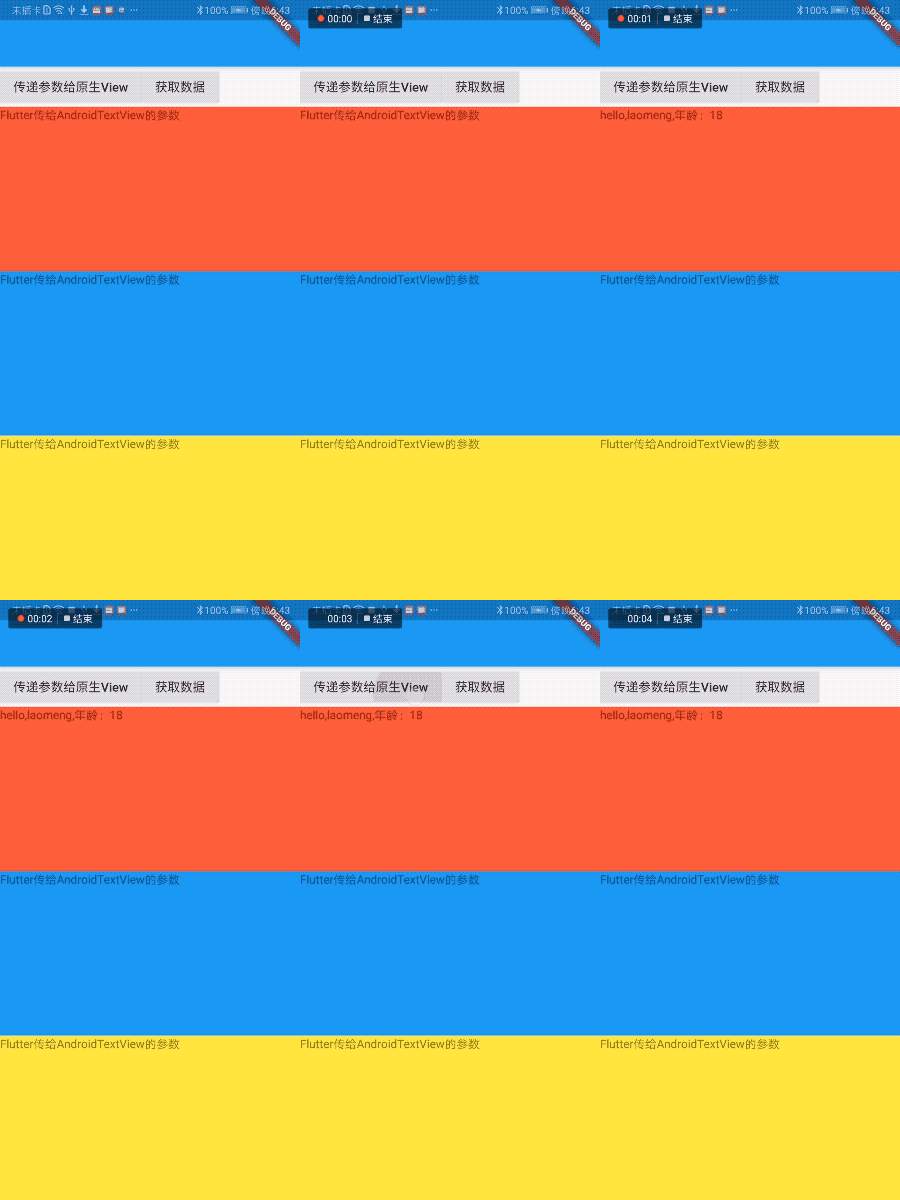
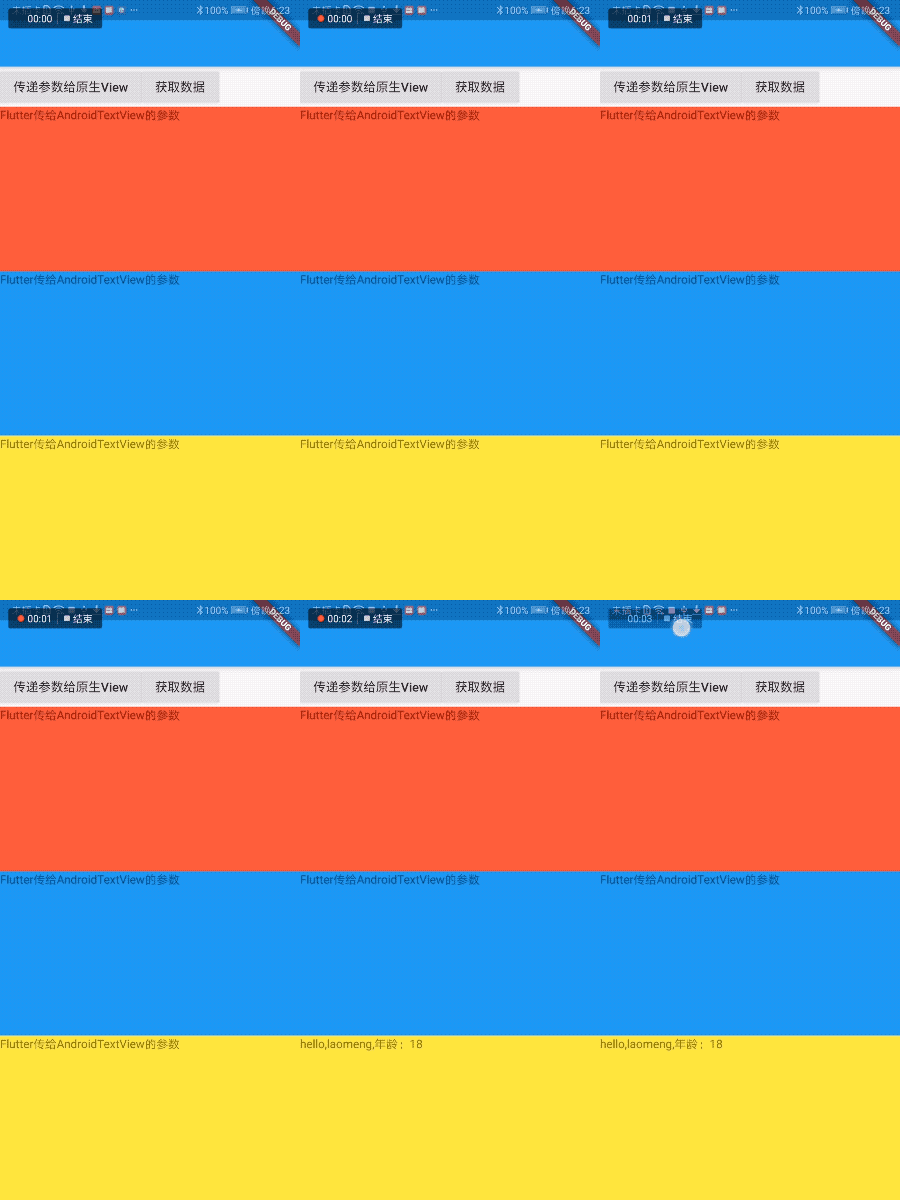
當然頁面有3個原生View,
class?PlatformViewDemo?extends?StatefulWidget?{
??@override
??_PlatformViewDemoState?createState()?=>?_PlatformViewDemoState();
}

class?_PlatformViewDemoState?extends?State<PlatformViewDemo>?{
??static?const?platform?=
??????const?MethodChannel('com.flutter.guide.MyFlutterView');

??var?_data?=?'獲取數據';

??@override
??Widget?build(BuildContext?context)?{
????Widget?platformView()?{
??????if?(defaultTargetPlatform?==?TargetPlatform.android)?{
????????return?AndroidView(
??????????viewType:?'plugins.flutter.io/custom_platform_view',
??????????creationParams:?{'text':?'Flutter傳給AndroidTextView的參數'},
??????????creationParamsCodec:?StandardMessageCodec(),
????????);
??????}
????}

????return?Scaffold(
??????appBar:?AppBar(),
??????body:?Column(children:?[
????????Row(
??????????children:?[
????????????RaisedButton(
??????????????child:?Text('傳遞參數給原生View'),
??????????????onPressed:?()?{
????????????????platform
????????????????????.invokeMethod('setText',?{'name':?'laomeng',?'age':?18});
??????????????},
????????????),
????????????RaisedButton(
??????????????child:?Text('$_data'),
??????????????onPressed:?()?async?{
????????????????var?result?=?await?platform
????????????????????.invokeMethod('getData',?{'name':?'laomeng',?'age':?18});
????????????????setState(()?{
??????????????????_data?=?'${result['name']},${result['age']}';
????????????????});
??????????????},
????????????),
??????????],
????????),
????????Expanded(child:?Container(color:?Colors.red,?child:?platformView())),
????????Expanded(child:?Container(color:?Colors.blue,?child:?platformView())),
????????Expanded(child:?Container(color:?Colors.yellow,?child:?platformView())),
??????]),
????);
??}
}
????
此時點擊 「傳遞參數給原生View」 按鈕哪個View會改變內容,實際上只有最后一個會改變。
如何改變指定View的內容?重點是 「MethodChannel」,只需修改上面3個通道的名稱不相同即可:
「第一種方法」:將一個唯一 id 通過初始化參數傳遞給原生 View,原生 View使用這個id 構建不同名稱的 「MethodChannel」。 「第二種方法(推薦)」:原生 View 生成時,系統(tǒng)會為其生成唯一id:viewId,使用 viewId 構建不同名稱的 「MethodChannel」。
原生 View 使用 viewId 構建不同名稱的 「MethodChannel」:
class?MyFlutterView(context:?Context,?messenger:?BinaryMessenger,?viewId:?Int,?args:?Map<String,?Any>?)?:?PlatformView,?MethodChannel.MethodCallHandler?{

????val?textView:?TextView?=?TextView(context)
????private?var?methodChannel:?MethodChannel

????init?{
????????args?.also?{
????????????textView.text?=?it["text"]?as?String
????????}
????????methodChannel?=?MethodChannel(messenger,?"com.flutter.guide.MyFlutterView_$viewId")
????????methodChannel.setMethodCallHandler(this)
????}
??...
}
????
Flutter 端為每一個原生 View 創(chuàng)建不同的「MethodChannel」:
var?platforms?=?[];

AndroidView(
??viewType:?'plugins.flutter.io/custom_platform_view',
??onPlatformViewCreated:?(viewId)?{
????print('viewId:$viewId');
????platforms
????????.add(MethodChannel('com.flutter.guide.MyFlutterView_$viewId'));
??},
??creationParams:?{'text':?'Flutter傳給AndroidTextView的參數'},
??creationParamsCodec:?StandardMessageCodec(),
)

????
給第一個發(fā)送消息:
platforms[0]
????.invokeMethod('setText',?{'name':?'laomeng',?'age':?18});