
利用Python操作Mysql數(shù)據(jù)庫(kù)
我們?cè)谶M(jìn)行Python編程的時(shí)候,時(shí)常要將一些數(shù)據(jù)保存起來(lái),其中最方便的莫過(guò)于保存在文本文件了。但是如果保存的文件太大,用文本文件就不太現(xiàn)實(shí)了,畢竟打開(kāi)都是個(gè)問(wèn)題,這個(gè)時(shí)候我們需要用到數(shù)據(jù)庫(kù)。提到數(shù)據(jù)庫(kù),相信大部分人都不會(huì)陌生,今天我們要學(xué)的就是數(shù)據(jù)庫(kù)中小編自認(rèn)為最棒的Mysql數(shù)據(jù)庫(kù)了。
一、下載導(dǎo)入模塊
為了讓Python與Mysql 交互,這里我們需要用到Pymsql模塊才行。
下載模塊:
pip install pymysql導(dǎo)入模塊:
import pymysql二、創(chuàng)建數(shù)據(jù)庫(kù)
打開(kāi)數(shù)據(jù)庫(kù)連接軟件 SqlYong,如圖:
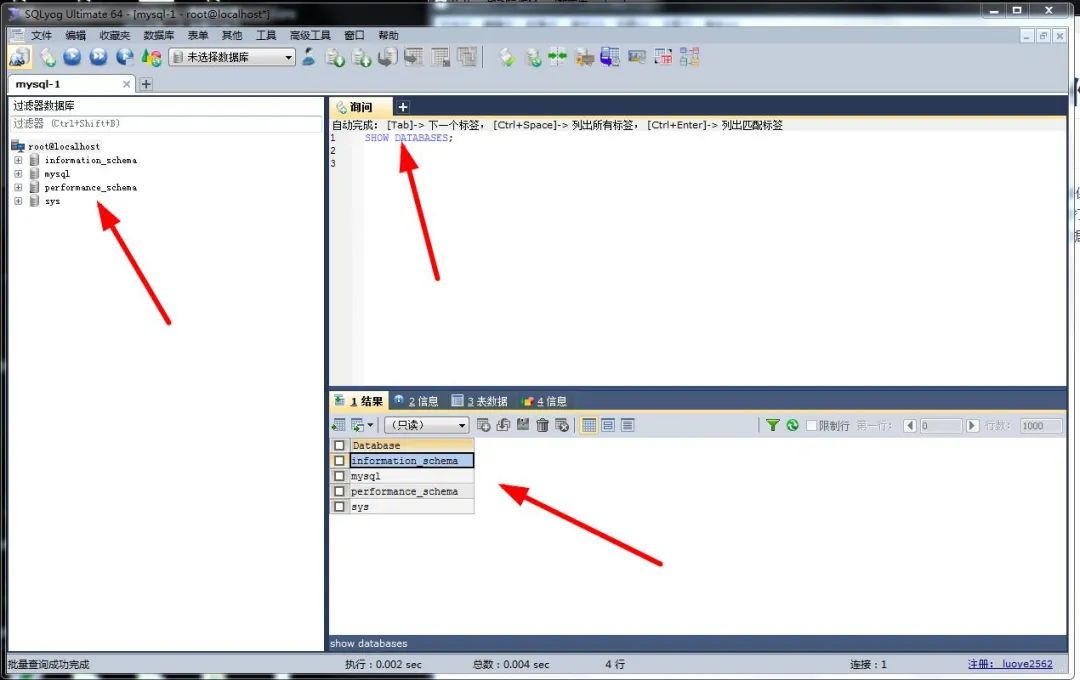
輸入命令:
CREATE DATABASE IF NOT EXISTS people;這樣就創(chuàng)建了一個(gè)people 數(shù)據(jù)庫(kù)。
三、創(chuàng)建數(shù)據(jù)表,并寫(xiě)入數(shù)據(jù)
USE people;CREATE TABLE IF NOT EXISTS student(id INT PRIMARY KEY AUTO_INCREMENT,NAME CHAR(10) UNIQUE,score INT NOT NULL,tim DATETIME)ENGINE=INNOBASE CHARSET utf8;INSERT INTO student(NAME,score,tim)VALUES('fasd',60,'2020-06-01')SELECT * FROM student;
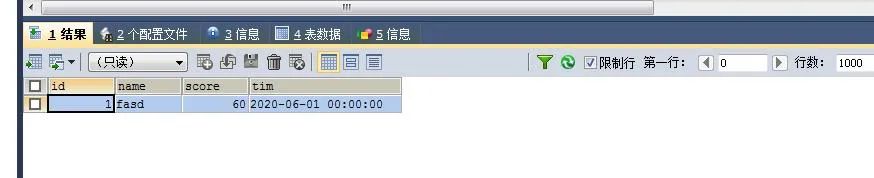
通過(guò)上述操作便創(chuàng)建了一個(gè)數(shù)據(jù)表Student并向其中寫(xiě)入了數(shù)據(jù),結(jié)果如下:
我們可以一行代碼刪除這個(gè)插入的 數(shù)據(jù):
TRUNCATE student;四、Mysql與Python建立連接
將下圖中的參數(shù)依次填入初始化參數(shù)中,
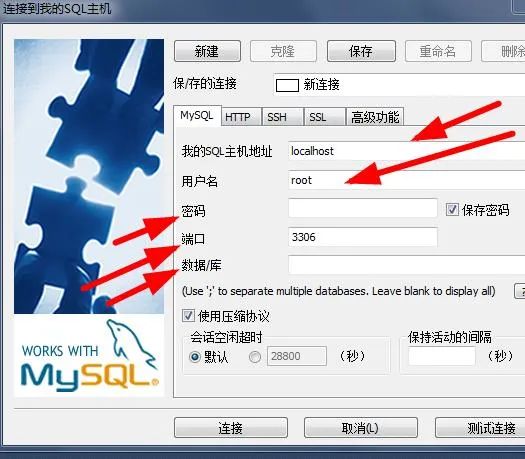
db=pymysql.connect(host='localhost',user='root',password='123456',port=3306,db='people')這樣就連接到了people數(shù)據(jù)庫(kù),可以看下連接成功的打印信息:
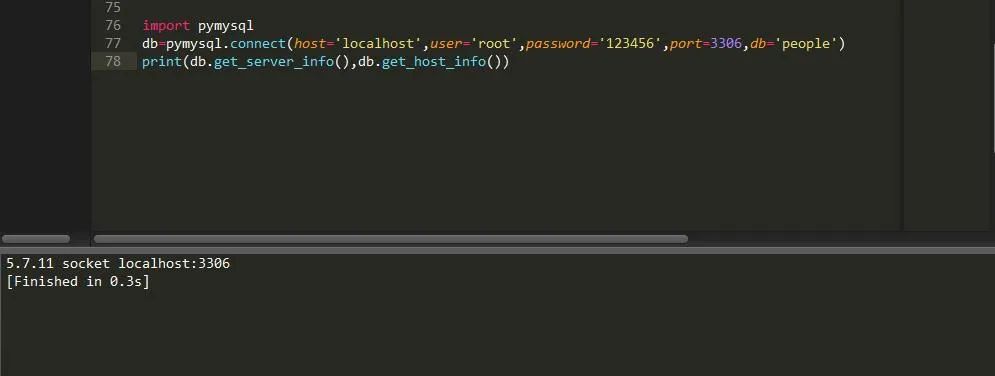
可以看到我們打印了Mysql的版本和Host信息。
五、創(chuàng)建游標(biāo)執(zhí)行操作
1.創(chuàng)建游標(biāo)
cur=db.cursor2.編寫(xiě)插入數(shù)據(jù)表達(dá)式
sql="INSERT INTO student(NAME,score,tim)VALUES('任性的90后boy',100,now())"3.開(kāi)啟游標(biāo)事件
cur.begin()4.執(zhí)行數(shù)據(jù)庫(kù)語(yǔ)句,異常判斷
try:cur.execute(sql) 執(zhí)行數(shù)據(jù)庫(kù)語(yǔ)句except Exception as e:print(e)db.rollback() 發(fā)生異常進(jìn)行游標(biāo)回滾操作else:db.commit() 提交數(shù)據(jù)庫(kù)操作finally:cur.close() 關(guān)閉游標(biāo)db.close() 關(guān)閉數(shù)據(jù)庫(kù)
5,執(zhí)行插入操作
數(shù)據(jù)庫(kù)建立好后,我們可以對(duì)它們進(jìn)行插入數(shù)據(jù)的操作。
import timedb=pymysql.connect(host='localhost',user='root',password='123456',port=3306,db='people')cur=db.cursor()db.begin()sql="INSERT INTO student(NAME,score,tim) VALUES ('%s',%d,'%s')"data=('HW',90,tt)try:cur.execute(sql%data)except Exception as e:print(e)db.rollback()else:db.commit()finally:cur.close()db.close()
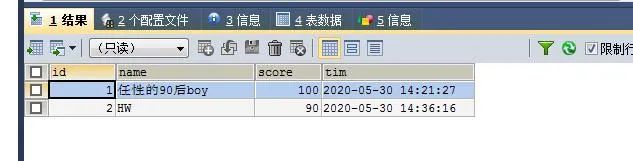
這樣就可以將數(shù)據(jù)插入進(jìn)去了。我們還可以自定義插入:
import pymysqlimport timett=time.strftime('%Y-%m-%d %H:%M:%S',time.localtime(time.time()))db=pymysql.connect(host='localhost',user='root',password='123456',port=3306,db='people')cur=db.cursor()db.begin()s=input('string:')d=input('number:')sql="INSERT INTO student(NAME,score,tim)VALUES('%s','%s','%s')"try:data=(s,d,tt)cur.execute(sql%data)except Exception as e:print(e)db.rollback()else:db.commit()finally:cur.close()db.close()
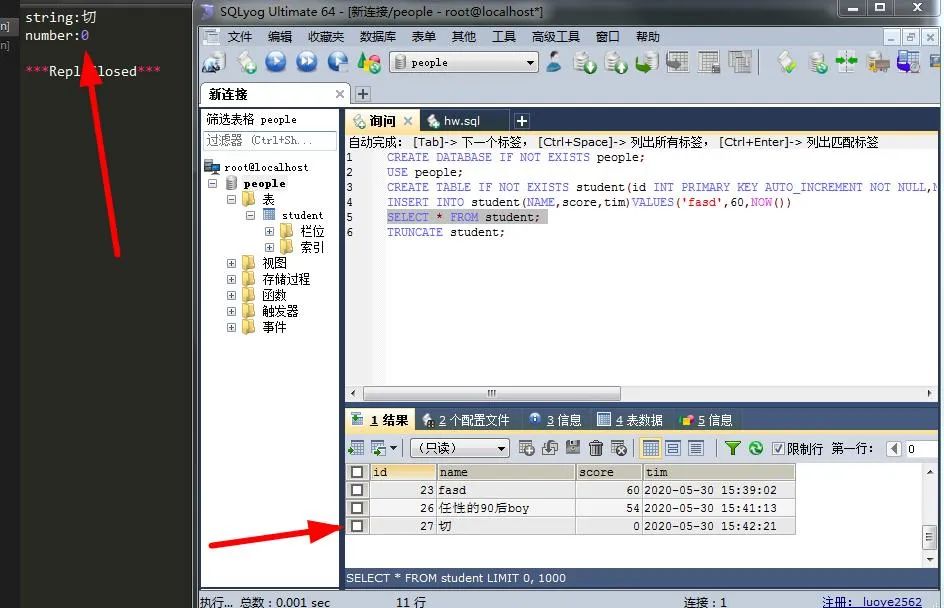
另外,我們也可以同時(shí)插入多條數(shù)據(jù),只需先定義好所有的數(shù)據(jù),然后在調(diào)用即可,這里需要用到插入多條數(shù)據(jù)的函數(shù)Executemany,在這里我插入十萬(wàn)條數(shù)據(jù),并測(cè)試插入時(shí)間,步驟如下:
import pymysqlimport timestart=time.time()tt=time.strftime('%Y-%m-%d %H:%M:%S',time.localtime(time.time()))db=pymysql.connect(host='localhost',user='root',password='123456',port=3306,db='people')cur=db.cursor()db.begin()sql="insert into student(NAME,score,tim)values(%s,%s,%s)"def get():ab=[]for y in range(1,100000):if y>=100:data=('user-'+str(y),str(str(float('%.f'%(y%100)))),tt)else:data=('user-'+str(y),str(y),tt)ab.append(data)return abtry:data=get()cur.executemany(sql,data)except Exception as e:print(e)db.rollback()else:db.commit()finally:print('插入數(shù)據(jù)完畢')cur.close()db.close()end=time.time()print('用時(shí):',str(end-start))
6.執(zhí)行更新操作
有些數(shù)據(jù)我們覺(jué)得它過(guò)時(shí)了,想更改,就要更新它的數(shù)據(jù)。
import timedb=pymysql.connect(host='localhost',user='root',password='123456',port=3306,db='people')cur=db.cursor()db.begin()sql="update student set name='zjj' where score=100 " 當(dāng)分?jǐn)?shù)是100分的時(shí)候?qū)⒚指臑閦jjtry:cur.execute(sql%data)except Exception as e:print(e)db.rollback()else:db.commit()finally:cur.close()db.close()

7.執(zhí)行刪除操作
有時(shí)候一些數(shù)據(jù)如果對(duì)于我們來(lái)說(shuō)沒(méi)有任何作用了的話(huà)了,我們就可以將它刪除了,不過(guò)這里是刪除數(shù)據(jù)表中的一條記錄。
import pymysqldb=pymysql.connect(host='localhost',user='root',password='123456',port=3306,db='people')cur=db.cursor()db.begin()sql="delete from student where name='fasd';" 當(dāng)名字等于‘fasd’的時(shí)候刪除這個(gè)記錄try:cur.execute(sql)except Exception as e:print(e)db.rollback()else:db.commit()finally:cur.close()db.close()
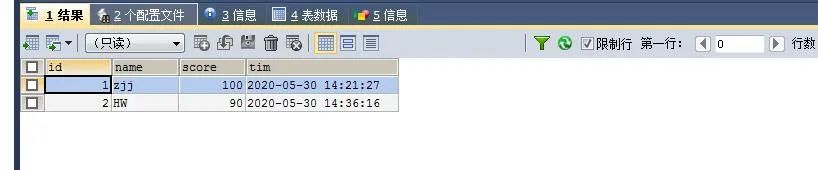
你也可以刪除表中所有的數(shù)據(jù),只需將Sql語(yǔ)句改為:
sql='TRUNCATE student;'當(dāng)然你也可以刪除表,但是一般不建議這樣做,以免誤刪:
DROP TABLE IF EXISTS student;8.執(zhí)行查詢(xún)操作
有時(shí)候我們需要對(duì)數(shù)據(jù)庫(kù)中的數(shù)據(jù)進(jìn)行查詢(xún),Python也能輕松幫我們搞定。
import pymysqlimport timett=time.strftime('%Y-%m-%d %H:%M:%S',time.localtime(time.time()))db=pymysql.connect(host='localhost',user='root',password='123456',port=3306,db='people')cur=db.cursor()db.begin()sql="select * from student;"try:cur.execute(sql)res=cur.fetchall() 查詢(xún)數(shù)據(jù)庫(kù)中的數(shù)據(jù)for y in res:print(y) 打印數(shù)據(jù)庫(kù)中標(biāo)的所有數(shù)據(jù),以元祖的形式except Exception as e:print(e)db.rollback()else:db.commit()finally:cur.close()db.close()
六、總結(jié)
在我們進(jìn)行網(wǎng)絡(luò)爬蟲(chóng)的時(shí)候,需要保存大量數(shù)據(jù),這個(gè)時(shí)候數(shù)據(jù)庫(kù)就派上用場(chǎng)了,可以更方便而且更快捷保存數(shù)據(jù)。


