
Volley 源碼解讀
Volley 的中文翻譯為“齊射、并發(fā)”,是在2013年的Google大會(huì)上發(fā)布的一款A(yù)ndroid平臺(tái)網(wǎng)絡(luò)通信庫,具有網(wǎng)絡(luò)請(qǐng)求的處理、小圖片的異步加載和緩存等功能,能夠幫助 Android APP 更方便地執(zhí)行網(wǎng)絡(luò)操作,而且更快速高效。Volley可是說是把AsyncHttpClient和Universal-Image-Loader的優(yōu)點(diǎn)集于了一身,既可以像AsyncHttpClient一樣非常簡(jiǎn)單地進(jìn)行HTTP通信,也可以像Universal-Image-Loader一樣輕松加載網(wǎng)絡(luò)上的圖片。除了簡(jiǎn)單易用之外,Volley在性能方面也進(jìn)行了大幅度的調(diào)整,它的設(shè)計(jì)目標(biāo)就是非常適合去進(jìn)行數(shù)據(jù)量不大,但通信頻繁的網(wǎng)絡(luò)操作,而對(duì)于大數(shù)據(jù)量的網(wǎng)絡(luò)操作,比如說下載文件等,Volley的表現(xiàn)就會(huì)非常糟糕。
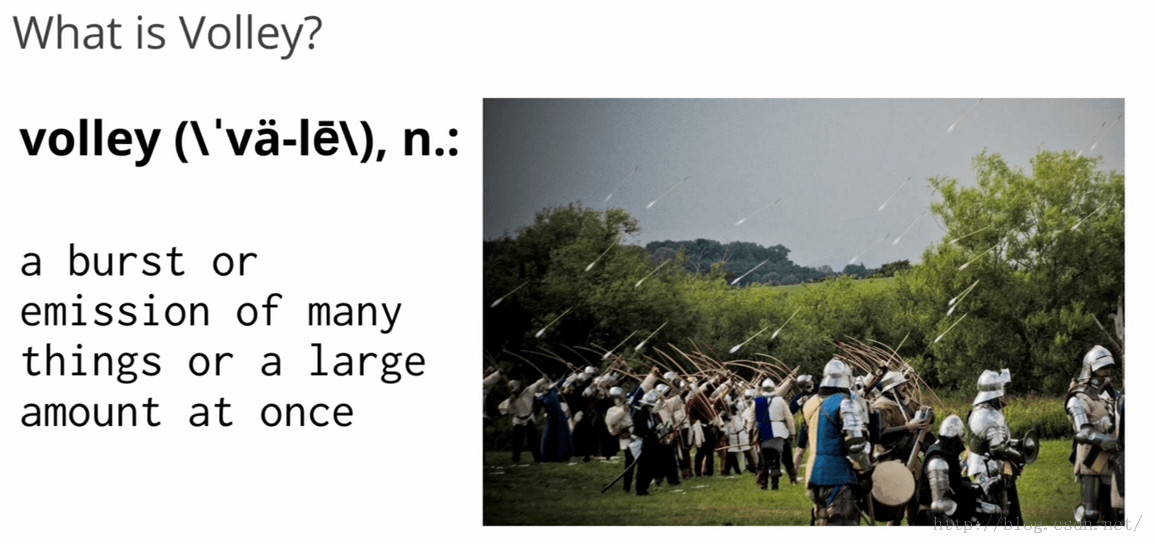
在Google IO的演講上,其配圖是一幅發(fā)射火弓箭的圖,有點(diǎn)類似流星。這表示,Volley特別適合數(shù)據(jù)量不大但是通信頻繁的場(chǎng)景。見下圖:
目錄
-
[Volley特點(diǎn)]
-
[Volley執(zhí)行流程]
-
[Volley初始化]
-
[創(chuàng)建RequestQueue]
- [DiskBasedCache]
-
[CacheDispatcher & NetworkDispatcher]
-
[Request]
-
[加入RequestQueue]
-
[Request#finish自己]
-
[取消請(qǐng)求]
-
[緩存處理]
-
[Request請(qǐng)求失敗重試機(jī)制]
-
[PoolingByteArrayOutputStream & ByteArrayPool]
-
[Volley加載圖片 ]
-
[Handler]
-
[volley gson改造 ]
- [volley okhttp改造]
Volley特點(diǎn)
-
自動(dòng)調(diào)度網(wǎng)絡(luò)請(qǐng)求;
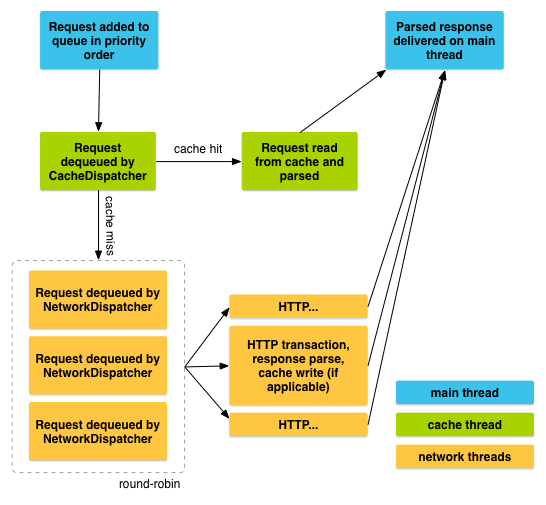
- Volley直接new 5個(gè)線程(默認(rèn)5個(gè)),讓多個(gè)線程去搶奪網(wǎng)絡(luò)請(qǐng)求對(duì)象(Request),搶到就執(zhí)行,搶不到就等待,直到有網(wǎng)絡(luò)請(qǐng)求到來。
-
可以加載圖片;
-
通過標(biāo)準(zhǔn)的 HTTP cache coherence(高速緩存一致性)緩存磁盤和內(nèi)存透明的響應(yīng);
-
支持指定請(qǐng)求的優(yōu)先級(jí);
- 根據(jù)優(yōu)先級(jí)去請(qǐng)求數(shù)據(jù)
- 網(wǎng)絡(luò)請(qǐng)求cancel機(jī)制。我們可以取消單個(gè)請(qǐng)求,或者指定取消請(qǐng)求隊(duì)列中的一個(gè)區(qū)域;
- 例如Activity finish后結(jié)束請(qǐng)求
- 框架容易被定制,例如,定制重試或者網(wǎng)絡(luò)請(qǐng)求庫;
- 例如基于Okhttp的Volley
Volley執(zhí)行流程
Volley初始化
創(chuàng)建RequestQueue
使用Volley時(shí)我們需要先創(chuàng)建一個(gè)RequestQueue,如下
RequestQueue queue = Volley.newRequestQueue(context);Volley.newRequestQueue(context)最終調(diào)用了如下方法
    public static RequestQueue newRequestQueue(Context context, HttpStack stack) {
        File cacheDir = new File(context.getCacheDir(), DEFAULT_CACHE_DIR);
        ...
        if (stack == null) {
            if (Build.VERSION.SDK_INT >= 9) {
                stack = new HurlStack();
            } else {
                // Prior to Gingerbread, HttpUrlConnection was unreliable.
                // See: http://android-developers.blogspot.com/2011/09/androids-http-clients.html
                stack = new HttpClientStack(AndroidHttpClient.newInstance(userAgent));
            }
        }

        Network network = new BasicNetwork(stack);

        RequestQueue queue = new RequestQueue(new DiskBasedCache(cacheDir), network);
        queue.start();

        return queue;
    }
HttpStack 是一個(gè)接口,主要用于請(qǐng)求網(wǎng)絡(luò)數(shù)據(jù),并返回結(jié)果。默認(rèn)情況下stack是null,
當(dāng)android版本>=9時(shí)使用HurlStack,否則使用HttpClientStack
若用戶想要使用其他的網(wǎng)絡(luò)請(qǐng)求類庫,比如okhttp等就可以實(shí)現(xiàn)HttpStack接口,并在
HttpResponse performRequest(Request request, Map additionalHeaders)
    throws IOException, AuthFailureError
中調(diào)用okhttp進(jìn)行網(wǎng)絡(luò)請(qǐng)求,并把請(qǐng)求的結(jié)果封裝成一個(gè)
HttpResponse返回即可,HttpResponse中包含了狀態(tài)碼,響應(yīng)頭,body信息。
newRequestQueue中創(chuàng)建了一個(gè)BasicNetwork對(duì)象,BasicNetwork使用HttpStack執(zhí)行網(wǎng)絡(luò)請(qǐng)求,成功后返回一個(gè)NetworkResponse,NetworkResponse只是一個(gè)簡(jiǎn)單的記錄狀態(tài)碼,body,響應(yīng)頭,服務(wù)端是否返回304并且緩存過,執(zhí)行網(wǎng)絡(luò)請(qǐng)求時(shí)間的類。
DiskBasedCache
newRequestQueue 中還創(chuàng)建了一個(gè) RequestQueue,RequestQueue 中持有一個(gè) DiskBasedCache 對(duì)象,DiskBasedCache 是把服務(wù)端返回的數(shù)據(jù)保持到本地文件中的類,默認(rèn)大小5M。
緩存文件是一個(gè)二進(jìn)制文件,非文本文件,
緩存文件的開頭有個(gè)特殊的整型魔數(shù)(CACHE_MAGIC),用于判斷是不是緩存文件。DiskBasedCache 初始化時(shí)會(huì)
讀取特定文件夾下的所有文件的部分?jǐn)?shù)據(jù),包括響應(yīng)頭等極少數(shù)數(shù)據(jù),不包含body,當(dāng)調(diào)用DiskBasedCache的get(String key)方法時(shí)才讀取body部分,若文件開頭魔數(shù)不是 CACHE_MAGIC 則刪除。是的話就把讀取的數(shù)據(jù)保存到內(nèi)存中。代碼如下
public synchronized void initialize() {
        if (!mRootDirectory.exists()) {

            return;
        }

        File[] files = mRootDirectory.listFiles();
        if (files == null) {
            return;
        }
        for (File file : files) {
            BufferedInputStream fis = null;
            try {
                fis = new BufferedInputStream(new FileInputStream(file));
                CacheHeader entry = CacheHeader.readHeader(fis);
                entry.size = file.length();
                putEntry(entry.key, entry);
            } catch (IOException e) {
                if (file != null) {
                    file.delete();
                }
            } finally {
                try {
                    if (fis != null) {
                        fis.close();
                    }
                } catch (IOException ignored) { }
            }
        }
    }
緩存文件除了可以保存 int,long 型數(shù)據(jù),還可以保存 String 字符串,Map
保存 Map
    static String readString(InputStream is) throws IOException {
        int n = (int) readLong(is);
        byte[] b = streamToBytes(is, n);
        return new String(b, "UTF-8");
    }
    static Map readStringStringMap(InputStream is) throws IOException {
        int size = readInt(is);
        Map result = (size == 0)
        ? Collections.emptyMap()
        : new HashMap(size);
        for (int i = 0; i < size; i++) {
            String key = readString(is).intern();
            String value = readString(is).intern();
            result.put(key, value);
        }
        return result;
    }
    static long readLong(InputStream is) throws IOException {
        long n = 0;
        n |= ((read(is) & 0xFFL) << 0);
        n |= ((read(is) & 0xFFL) << 8);
        n |= ((read(is) & 0xFFL) << 16);
        n |= ((read(is) & 0xFFL) << 24);
        n |= ((read(is) & 0xFFL) << 32);
        n |= ((read(is) & 0xFFL) << 40);
        n |= ((read(is) & 0xFFL) << 48);
        n |= ((read(is) & 0xFFL) << 56);
        return n;
    }
緩存文件名由cache key字符串的前半段字符串的hashCode拼接上cache key(網(wǎng)絡(luò)請(qǐng)求url)后
半段字符串的hashCode值組成。代碼如下
private String getFilenameForKey(String key) {
        int firstHalfLength = key.length() / 2;
        String localFilename = String.valueOf(key.substring(0, firstHalfLength).hashCode());
        localFilename += String.valueOf(key.substring(firstHalfLength).hashCode());
        return localFilename;
    }
當(dāng)緩存文件占用空間超過指定值時(shí),Volley只是簡(jiǎn)單的刪除的部分文件,刪除代碼如下
private void pruneIfNeeded(int neededSpace) {
        if ((mTotalSize + neededSpace) < mMaxCacheSizeInBytes) {
            return;
        }

        Iterator> iterator = mEntries.entrySet().iterator();
        while (iterator.hasNext()) {
            Map.Entry entry = iterator.next();
            CacheHeader e = entry.getValue();
            boolean deleted = getFileForKey(e.key).delete();
            if (deleted) {
                mTotalSize -= e.size;
            }
            iterator.remove();

            if ((mTotalSize + neededSpace) < mMaxCacheSizeInBytes * 0.9f) {
                break;
            }
        }
    }
可以看到刪除時(shí)只是遍歷mEntries,如果刪除成功并且剩余文件所占大小+新的緩存所需空間
CacheDispatcher & NetworkDispatcher
RequestQueue 只是一個(gè)普通的類,沒有繼承任何類,RequestQueue 的 start 方法中創(chuàng)建了一個(gè) CacheDispatcher,和4個(gè)(默認(rèn)4個(gè))NetworkDispatcher,
CacheDispatcher 和 NetworkDispatcher 都是 Thread 的直接子類,這5個(gè) Thread 就是前面提到的搶奪網(wǎng)絡(luò)請(qǐng)求對(duì)象的 Thread。
調(diào)用start()時(shí)先調(diào)用了一下stop(),stop()中把5個(gè)線程的mQuit設(shè)為 true,然后調(diào)用interrupt()讓 Thread 的run不再執(zhí)行。
代碼如下
public void start() {
        stop();  // Make sure any currently running dispatchers are stopped.
        // Create the cache dispatcher and start it.
        mCacheDispatcher = new CacheDispatcher(mCacheQueue, mNetworkQueue, mCache, mDelivery);
        mCacheDispatcher.start();

        // Create network dispatchers (and corresponding threads) up to the pool size.
        for (int i = 0; i < mDispatchers.length; i++) {
            NetworkDispatcher networkDispatcher = new NetworkDispatcher(mNetworkQueue, mNetwork,
                mCache, mDelivery);
            mDispatchers[i] = networkDispatcher;
            networkDispatcher.start();
        }

        mCache.initialize();
         while (true) {
            try {
              // Get a request from the cache triage queue, blocking until
              // at least one is available.
                final Request request = mCacheQueue.take();

                ...

            }
        }
    }
 /**
     * Stops the cache and network dispatchers.
     */
    public void stop() {
        if (mCacheDispatcher != null) {
            mCacheDispatcher.quit();
        }
        for (int i = 0; i < mDispatchers.length; i++) {
            if (mDispatchers[i] != null) {
                mDispatchers[i].quit();
            }
        }
    }
CacheDispatcher啟動(dòng)后先調(diào)用了一下DiskBasedCache的initialize()方法,這個(gè)方法要讀取文件,比較耗時(shí),Volley把他放到了Cache線程中。
CacheDispatcher和NetworkDispatcher的run方法內(nèi)部很像,都是在 while (true)循環(huán)中從PriorityBlockingQueue中讀取Request,CacheDispatcher 獨(dú)享一個(gè)PriorityBlockingQueue,其余4各 NetworkDispatcher 共享一個(gè)PriorityBlockingQueue 。PriorityBlockingQueue是一個(gè)阻塞隊(duì)列,當(dāng)隊(duì)列里沒有Request時(shí)take()方法就會(huì)阻塞,直到有Request到來,PriorityBlockingQueue是線程安全的
同一個(gè) Request 只能被1個(gè)線程獲取到。PriorityBlockingQueue 可以根據(jù)線程優(yōu)先級(jí)對(duì)隊(duì)列里的reqest進(jìn)行排序。
Volley 的初始化到這就完成了,下面開始執(zhí)行網(wǎng)絡(luò)請(qǐng)求
Request
使用 Volley 進(jìn)行網(wǎng)絡(luò)請(qǐng)求時(shí)我們要把請(qǐng)求封裝成一個(gè) Request 對(duì)象,包括url,請(qǐng)求參數(shù),請(qǐng)求成功失敗 Listener,
Volley 默認(rèn)給我們提供了 ImageRequest(獲取圖片),
JsonObjectRequest、JsonArrayRequest(獲取json),StringRequest(獲取 String)。
例如:
Requestrequest=new StringRequest(Method.GET, "http://mogujie.com", new  Listener(){
        @Override
        public void onResponse(String response) {
        }

    }, new Response.ErrorListener() {
        @Override
        public void onErrorResponse(VolleyError error) {
        }
    });
    Volley.newRequestQueue(context).add(request);
只需要把Request丟進(jìn)requestQueue中就可以。
加入RequestQueue
我們來看一下add方法:
 public  Request add(Request request) {
        // Tag the request as belonging to this queue and add it to the set of current requests.
        request.setRequestQueue(this);
        synchronized (mCurrentRequests) {
            mCurrentRequests.add(request);
        }

        // Process requests in the order they are added.
        request.setSequence(getSequenceNumber());
        request.addMarker("add-to-queue");

        // If the request is uncacheable, skip the cache queue and go straight to the network.
        if (!request.shouldCache()) {
            mNetworkQueue.add(request);
            return request;
        }

        // Insert request into stage if there's already a request with the same cache key in flight.
        synchronized (mWaitingRequests) {
            String cacheKey = request.getCacheKey();
            if (mWaitingRequests.containsKey(cacheKey)) {
                // There is already a request in flight. Queue up.
                Queue> stagedRequests = mWaitingRequests.get(cacheKey);
                if (stagedRequests == null) {
                    stagedRequests = new LinkedList>();
                }
                stagedRequests.add(request);
                mWaitingRequests.put(cacheKey, stagedRequests);
                if (VolleyLog.DEBUG) {
                    VolleyLog.v("Request for cacheKey=%s is in flight, putting on hold.", cacheKey);
                }
            } else {
                // Insert 'null' queue for this cacheKey, indicating there is now a request in
                // flight.
                mWaitingRequests.put(cacheKey, null);
                mCacheQueue.add(request);
            }
            return request;
        }
    }
add方法中首先設(shè)置了request所在的請(qǐng)求隊(duì)列,為了在用戶取消請(qǐng)求時(shí)能夠把request從requestQueue中移除掉。
接下來設(shè)置了一下request的序列號(hào),序列號(hào)按添加順序依次從0開始編號(hào),同一個(gè)隊(duì)列中任何兩個(gè)request的序列號(hào)都不相同。序列號(hào)可以影響request的優(yōu)先級(jí)。
request.addMarker("")用于調(diào)試(打印日志等)。
通過查看源碼我們可以看到request默認(rèn)是需要緩存的。
/** Whether or not responses to this request should be cached. */
    private boolean mShouldCache = true;
若request不需要緩存則直接把request丟到mNetworkQueue,然后4個(gè) NetworkDispatcher 就可以"搶奪"request了,誰"搶"到誰就執(zhí)行網(wǎng)絡(luò)請(qǐng)求
如需要緩存則先判斷一下mWaitingRequests中有沒有正在請(qǐng)求的相同的request(根據(jù)request的url判斷),沒有的話就把該request丟到mCacheQueue中,
這樣 CacheDispatcher 執(zhí)行完之前的請(qǐng)求后就可以執(zhí)行該request了,若已經(jīng)有相同的request正在執(zhí)行,則只需保存一下該request,
等相同的request執(zhí)行完后直接使用其結(jié)果就可。
CacheDispatcher中獲取到request后先判斷一下request后有沒有取消,有的話就finish掉自己,然后等待下一個(gè)request的到來
 if (request.isCanceled()) {
        request.finish("cache-discard-canceled");
        continue;
    }
接下來會(huì)從緩存中取緩存,沒有或者緩存已經(jīng)過期,就把request丟掉mNetworkQueue中,讓NetworkDisptcher去“搶奪”request
 // Attempt to retrieve this item from cache.
    Cache.Entry entry = mCache.get(request.getCacheKey());
    if (entry == null) {
        request.addMarker("cache-miss");
        // Cache miss; send off to the network dispatcher.
        mNetworkQueue.put(request);
        continue;
    }
      // If it is completely expired, just send it to the network.
    if (entry.isExpired()) {
        request.addMarker("cache-hit-expired");
        request.setCacheEntry(entry);
        mNetworkQueue.put(request);
        continue;
    }
若取到緩存且沒過期,則解析緩存
  Response response = request.parseNetworkResponse(
        new NetworkResponse(entry.data, entry.responseHeaders));
若不需要刷新則把request和response丟到ui線程中,回調(diào)request中的請(qǐng)求成功或失敗listener,同時(shí)finish自己
若還需要刷新的話還需要把request丟到mNetworkQueue中,讓NetworkDispatcher去獲取數(shù)據(jù)。
NetworkDispatcher在獲取到數(shù)據(jù)后執(zhí)行了如下代碼:
// TODO: Only update cache metadata instead of entire record for 304s.
    if (request.shouldCache() && response.cacheEntry != null) {
        mCache.put(request.getCacheKey(), response.cacheEntry);
        request.addMarker("network-cache-written");
    }
CacheDispatcher 才是處理緩存相關(guān)的,為什么 NetworkDispatcher 中還需要進(jìn)行以上的判斷呢?
Request#finish自己
前面我們提到過 CacheDispatcher 把相同的request放到了隊(duì)列中,當(dāng)獲取到數(shù)據(jù)后調(diào)用了request的finish方法,該方法又調(diào)用了
mRequestQueue的finish方法。
 void finish(final String tag) {
        if (mRequestQueue != null) {
            mRequestQueue.finish(this);
        }
        ...
    }
request的finish方法如下:
 void finish(Request request) {

        ...
        if (request.shouldCache()) {
            synchronized (mWaitingRequests) {
                String cacheKey = request.getCacheKey();
                Queue> waitingRequests = mWaitingRequests.remove(cacheKey);
                if (waitingRequests != null) {
                    if (VolleyLog.DEBUG) {
                        VolleyLog.v("Releasing %d waiting requests for cacheKey=%s.",
                            waitingRequests.size(), cacheKey);
                    }
                        // Process all queued up requests. They won't be considered as in flight, but
                        // that's not a problem as the cache has been primed by 'request'.
                    mCacheQueue.addAll(waitingRequests);
                }
            }
        }
    }
}
finish中取出了相同的request所在的隊(duì)列,然后把請(qǐng)求丟到了mCacheQueue中,丟到mCacheQueue后就會(huì)導(dǎo)致 CacheDispatcher 去執(zhí)行網(wǎng)絡(luò)請(qǐng)求,
這時(shí)由于上次的請(qǐng)求已經(jīng)緩存了,所以可以直接使用上傳的數(shù)據(jù)了,到此為止request如何finish自己就介紹完了。
取消請(qǐng)求
我們可以調(diào)用request.cancel取消某個(gè)請(qǐng)求,也可以調(diào)用requestQueue的 cancelAll(RequestFilter filter) 或cancelAll(final Object tag) 取消多個(gè)請(qǐng)求。
我們來看一下cancelAll(RequestFilter filter) 方法
 /**
     * Cancels all requests in this queue for which the given filter applies.
     * @param filter The filtering function to use
     */
    public void cancelAll(RequestFilter filter) {
        synchronized (mCurrentRequests) {
            for (Request request : mCurrentRequests) {
                if (filter.apply(request)) {
                    request.cancel();
                }
            }
        }
    }
cancelAll需要一個(gè)RequestFilter,RequestFilter是一個(gè)接口,代碼如下
 /**
     * A simple predicate or filter interface for Requests, for use by
     * {@link RequestQueue#cancelAll(RequestFilter)}.
     */
    public interface RequestFilter {
        public boolean apply(Request request);
    }
我們可以通過實(shí)現(xiàn)自己的RequestFilter來取消特定的請(qǐng)求,比如我們可以在apply中判斷request的url是不是http://api.mogujie.org/gw/mwp.timelinemwp.homeListActionlet/1/?data=xxx,若是則返回true,否則返回false,這樣就可以結(jié)束特定url的請(qǐng)求。
cancelAll(final Object tag)中自己實(shí)現(xiàn)了一個(gè)RequestFilter,根據(jù)tag來結(jié)束特定請(qǐng)求,代碼如下:
 /**
     * Cancels all requests in this queue with the given tag. Tag must be non-null
     * and equality is by identity.
     */
    public void cancelAll(final Object tag) {
        if (tag == null) {
            throw new IllegalArgumentException("Cannot cancelAll with a null tag");
        }
        cancelAll(new RequestFilter() {
            @Override
            public boolean apply(Request request) {
                return request.getTag() == tag;
            }
        });
    }
根據(jù)以上代碼可以看出,最終都是調(diào)用了request的cancel方法,cancel中只是簡(jiǎn)單的標(biāo)記了一下該request需要結(jié)束,代碼如下:
  /**
     * Mark this request as canceled.  No callback will be delivered.
     */
    public void cancel() {
        mCanceled = true;
    }
Volley會(huì)在執(zhí)行網(wǎng)絡(luò)請(qǐng)求前和回調(diào)監(jiān)聽前判斷一下標(biāo)記位是否已取消,若取消就結(jié)束自己,不再執(zhí)行網(wǎng)絡(luò)請(qǐng)求,也不回調(diào),從而達(dá)到取消請(qǐng)求的效果。代碼如下:
NetworkDispatcher 和 CacheDispatcher
    @Override
    public void run() {
       ...
        while (true) {
            try {
               ...
                final Request request = mCacheQueue.take();
               ...
                if (request.isCanceled()) {
                    request.finish("cache-discard-canceled");
                    continue;
                }
           }

       }
   }
ExecutorDelivery中
    public void run() {

            if (mRequest.isCanceled()) {
                mRequest.finish("canceled-at-delivery");
                return;
            }

            // Deliver a normal response or error, depending.
            if (mResponse.isSuccess()) {
                mRequest.deliverResponse(mResponse.result);
            } else {
                mRequest.deliverError(mResponse.error);
            }
緩存處理
HttpHeaderParser.parseCacheHeaders
處理字符串(分割等)得到響應(yīng)頭,并把響應(yīng)頭,body包裝到Cache.Entry中返回。
當(dāng)NetworkDispatcher請(qǐng)求到數(shù)據(jù)后會(huì)判斷requset是否需要緩存,需要的話會(huì)調(diào)用DiskBasedCache的put(String key, Entry entry)方法,key是url,put中先調(diào)用了pruneIfNeeded,如果緩存新的數(shù)據(jù)后超過規(guī)定大小就先刪除一部分。
  /**
     * Prunes the cache to fit the amount of bytes specified.
     * @param neededSpace The amount of bytes we are trying to fit into the cache.
     */
    private void pruneIfNeeded(int neededSpace) {
        if ((mTotalSize + neededSpace) < mMaxCacheSizeInBytes) {
            return;
        }
        long before = mTotalSize;

        Iterator> iterator = mEntries.entrySet().iterator();
        while (iterator.hasNext()) {
            Map.Entry entry = iterator.next();
            CacheHeader e = entry.getValue();
            boolean deleted = getFileForKey(e.key).delete();
            if (deleted) {
                mTotalSize -= e.size;
            }
            iterator.remove();
            if ((mTotalSize + neededSpace) < mMaxCacheSizeInBytes * HYSTERESIS_FACTOR) {
                break;
            }
        }
    }
put中可以看到數(shù)據(jù)被保存到了文件中。
 /**
     * Puts the entry with the specified key into the cache.
     */
    @Override
    public synchronized void put(String key, Entry entry) {
        pruneIfNeeded(entry.data.length);
        File file = getFileForKey(key);
        try {
            BufferedOutputStream fos = new BufferedOutputStream(new FileOutputStream(file));
            CacheHeader e = new CacheHeader(key, entry);
            boolean success = e.writeHeader(fos);
            if (!success) {
                fos.close();
                VolleyLog.d("Failed to write header for %s", file.getAbsolutePath());
                throw new IOException();
            }
            fos.write(entry.data);
            fos.close();
            putEntry(key, e);
            return;
        } catch (IOException e) {
        }
        boolean deleted = file.delete();
        if (!deleted) {
            VolleyLog.d("Could not clean up file %s", file.getAbsolutePath());
        }
    }
Request請(qǐng)求失敗重試機(jī)制
Volley的請(qǐng)求重試機(jī)制是在Request中設(shè)置的,這樣的好處是每一個(gè)Request都可以有自己的重試機(jī)制,代碼如下
  /**
     * Creates a new request with the given method (one of the values from {@link Method}),
     * URL, and error listener.  Note that the normal response listener is not provided here as
     * delivery of responses is provided by subclasses, who have a better idea of how to deliver
     * an already-parsed response.
     */
    public Request(int method, String url, Response.ErrorListener listener) {
        mMethod = method;
        mUrl = url;
        mErrorListener = listener;
        setRetryPolicy(new DefaultRetryPolicy());

        mDefaultTrafficStatsTag = findDefaultTrafficStatsTag(url);
    }
Request#setRetryPolicy中只是記錄了一下RetryPolicy
/**
     * Sets the retry policy for this request.
     *
     * @return This Request object to allow for chaining.
     */
    public Request setRetryPolicy(RetryPolicy retryPolicy) {
        mRetryPolicy = retryPolicy;
        return this;
    }
DefaultRetryPolicy實(shí)現(xiàn)了RetryPolicy接口,根據(jù)接口我們可以看到DefaultRetryPolicy可以提供當(dāng)前超時(shí)時(shí)間,當(dāng)前重試次數(shù)等
/**
 * Retry policy for a request.
 */
public interface RetryPolicy {

    /**
     * Returns the current timeout (used for logging).
     */
    public int getCurrentTimeout();

    /**
     * Returns the current retry count (used for logging).
     */
    public int getCurrentRetryCount();

    /**
     * Prepares for the next retry by applying a backoff to the timeout.
     * @param error The error code of the last attempt.
     * @throws VolleyError In the event that the retry could not be performed (for example if we
     * ran out of attempts), the passed in error is thrown.
     */
    public void retry(VolleyError error) throws VolleyError;
}
BasicNetwork中performRequest中請(qǐng)求失敗(SocketTimeoutException,ConnectTimeoutException等)時(shí)會(huì)再次請(qǐng)求一次(默認(rèn)重試一次)
若還是失敗就會(huì)拋出VolleyError異常
具體代碼如下:
public NetworkResponse performRequest(Request request) throws VolleyError {
        ...
        while (true) {
            ...
            try {
                ...
                httpResponse = mHttpStack.performRequest(request, headers);
                ...
                return new NetworkResponse(statusCode, responseContents, responseHeaders, false,
                    SystemClock.elapsedRealtime() - requestStart);
            } catch (SocketTimeoutException e) {
                attemptRetryOnException("socket", request, new TimeoutError());
            } catch (ConnectTimeoutException e) {
                attemptRetryOnException("connection", request, new TimeoutError());
            } catch (MalformedURLException e) {
                throw new RuntimeException("Bad URL " + request.getUrl(), e);
            } catch (IOException e) {
                ...
            }
        }
    }
attemptRetryOnException代碼如下:
 private static void attemptRetryOnException(String logPrefix, Request request,
            VolleyError exception) throws VolleyError {
        RetryPolicy retryPolicy = request.getRetryPolicy();
        int oldTimeout = request.getTimeoutMs();

        try {
            retryPolicy.retry(exception);
        } catch (VolleyError e) {
            request.addMarker(
                    String.format("%s-timeout-giveup [timeout=%s]", logPrefix, oldTimeout));
            throw e;
        }
        request.addMarker(String.format("%s-retry [timeout=%s]", logPrefix, oldTimeout));
    }
request.getRetryPolicy()得到的是DefaultRetryPolicy類,DefaultRetryPolicy中retry方法
    public void retry(VolleyError error) throws VolleyError {
        mCurrentRetryCount++;
        mCurrentTimeoutMs += (mCurrentTimeoutMs * mBackoffMultiplier);
        if (!hasAttemptRemaining()) {
            throw error;
        }
    }

    //Returns true if this policy has attempts remaining, false otherwise.
    protected boolean hasAttemptRemaining() {
        return mCurrentRetryCount <= mMaxNumRetries;
    }
request.getRetryPolicy() 得到的是 DefaultRetryPolicy 對(duì)象,request重試次數(shù)超過規(guī)定的次數(shù)時(shí)
attemptRetryOnException 就會(huì)拋出 VolleyError,從而導(dǎo)致 performRequest() 方法中 while
循環(huán)終止,同時(shí)繼續(xù)向上拋異常。
PoolingByteArrayOutputStream & ByteArrayPool
為了避免讀取服務(wù)端數(shù)據(jù)時(shí)反復(fù)的內(nèi)存申請(qǐng),Volley提供了PoolingByteArrayOutputStream和ByteArrayPool。
我們先看一下PoolingByteArrayOutputStream的父類ByteArrayOutputStream
/**
     * The byte array containing the bytes written.
     */
    protected byte[] buf;

    /**
     * The number of bytes written.
     */
    protected int count;
ByteArrayOutputStream中提供了兩個(gè)protected 的byte[] buf 和 int count,buf用于write時(shí)保存數(shù)據(jù),count記錄buf已使用的大小,因?yàn)槎际莗rotected,所有在子類中可以對(duì)其進(jìn)行修改。
我們來看一下ByteArrayOutputStream的write方法,可以看到write中調(diào)用了擴(kuò)展buf大小的expand方法,再來看一下expand的具體實(shí)現(xiàn)
  private void expand(int i) {
        /* Can the buffer handle @i more bytes, if not expand it */
        if (count + i <= buf.length) {
            return;
        }

        byte[] newbuf = new byte[(count + i) * 2];
        System.arraycopy(buf, 0, newbuf, 0, count);
        buf = newbuf;
    }
可以看到當(dāng)已使用的空間+要寫入的大小>buf大小時(shí),直接new 了一個(gè)兩倍大小的空間,并把原來的buf中的數(shù)據(jù)復(fù)制到了新的空間中,最后把新分配的空間賦值給了buf,原來的buf由于沒有被任何對(duì)象持有,最終會(huì)被回收掉。PoolingByteArrayOutputStream就是在重寫的expand對(duì)buf進(jìn)行了處理。
 @Override
    public synchronized void write(byte[] buffer, int offset, int len) {
        Arrays.checkOffsetAndCount(buffer.length, offset, len);
        if (len == 0) {
            return;
        }
        expand(len);
        System.arraycopy(buffer, offset, buf, this.count, len);
        this.count += len;
    }

    /**
     * Writes the specified byte {@code oneByte} to the OutputStream. Only the
     * low order byte of {@code oneByte} is written.
     *
     * @param oneByte
     *            the byte to be written.
     */
    @Override
    public synchronized void write(int oneByte) {
        if (count == buf.length) {
            expand(1);
        }
        buf[count++] = (byte) oneByte;
    }
接下來我們看一下PoolingByteArrayOutputStream是怎么復(fù)用內(nèi)存空間的。
在執(zhí)行網(wǎng)絡(luò)請(qǐng)求的BasicNetwork我們看到new 了一個(gè)ByteArrayPool
 /**
     * @param httpStack HTTP stack to be used
     */
    public BasicNetwork(HttpStack httpStack) {
        // If a pool isn't passed in, then build a small default pool that will give us a lot of
        // benefit and not use too much memory.
        this(httpStack, new ByteArrayPool(DEFAULT_POOL_SIZE));
    }
我們看一下ByteArrayPool的構(gòu)造函數(shù)
 /** The buffer pool, arranged both by last use and by buffer size */
    private List mBuffersByLastUse = new LinkedList();
    private List mBuffersBySize = new ArrayList(64);

 /**
     * @param sizeLimit the maximum size of the pool, in bytes
     */
    public ByteArrayPool(int sizeLimit) {
        mSizeLimit = sizeLimit;
    }
可以看到ByteArrayPool只是記錄了一下最大的內(nèi)存池空間,默認(rèn)是4096 bytes,并創(chuàng)建了兩個(gè)保存byte[]數(shù)組的List。
為什么要有兩個(gè)List , mBuffersBySize用于二分查找,(int pos = Collections.binarySearch(mBuffersBySize, buf, BUF_COMPARATOR);)。mBuffersByLastUse用于LRU(Least recently used,最近最少使用)置換算法。
我們從BasicNetwork中看到讀取服務(wù)端數(shù)據(jù)時(shí)調(diào)用了entityToBytes方法
  /** Reads the contents of HttpEntity into a byte[]. */
    private byte[] entityToBytes(HttpEntity entity) throws IOException, ServerError {
        PoolingByteArrayOutputStream bytes =
                new PoolingByteArrayOutputStream(mPool, (int) entity.getContentLength());
        byte[] buffer = null;
        try {
            InputStream in = entity.getContent();
            if (in == null) {
                throw new ServerError();
            }
            buffer = mPool.getBuf(1024);
            int count;
            while ((count = in.read(buffer)) != -1) {
                bytes.write(buffer, 0, count);
            }
            return bytes.toByteArray();
        } finally {
            try {
                // Close the InputStream and release the resources by "consuming the content".
                entity.consumeContent();
            } catch (IOException e) {
                // This can happen if there was an exception above that left the entity in
                // an invalid state.
                VolleyLog.v("Error occured when calling consumingContent");
            }
            mPool.returnBuf(buffer);
            bytes.close();
        }
    }
entityToBytes中又new 了一個(gè)PoolingByteArrayOutputStream,PoolingByteArrayOutputStream是繼承自java.io.ByteArrayOutputStream的。我們看一下PoolingByteArrayOutputStream構(gòu)造函數(shù)
 /**
     * Constructs a new {@code ByteArrayOutputStream} with a default size of {@code size} bytes. If
     * more than {@code size} bytes are written to this instance, the underlying byte array will
     * expand.
     *
     * @param size initial size for the underlying byte array. The value will be pinned to a default
     *        minimum size.
     */
    public PoolingByteArrayOutputStream(ByteArrayPool pool, int size) {
        mPool = pool;
        buf = mPool.getBuf(Math.max(size, DEFAULT_SIZE));
    }
PoolingByteArrayOutputStream構(gòu)造函數(shù)中調(diào)用了mPool.getBuf并賦值給了父類的buf,所以以后調(diào)用write時(shí)都是把數(shù)據(jù)寫到了mPool.getBuf得到的byte[]數(shù)組中,也就是byte[]池中。getBuf代碼如下:
 /**
     * Returns a buffer from the pool if one is available in the requested size, or allocates a new
     * one if a pooled one is not available.
     *
     * @param len the minimum size, in bytes, of the requested buffer. The returned buffer may be
     *        larger.
     * @return a byte[] buffer is always returned.
     */
    public synchronized byte[] getBuf(int len) {
        for (int i = 0; i < mBuffersBySize.size(); i++) {
            byte[] buf = mBuffersBySize.get(i);
            if (buf.length >= len) {
                mCurrentSize -= buf.length;
                mBuffersBySize.remove(i);
                mBuffersByLastUse.remove(buf);
                return buf;
            }
        }
        return new byte[len];
    }
由于內(nèi)存池是被多個(gè)NetworkDispatcher公用的,所以getBuf前加了synchronized,getBuf就是從byte[]池中找一個(gè)滿足大小的空間返回,并從List移除掉,若沒有足夠大的則new一個(gè)。再來看一下PoolingByteArrayOutputStream的write方法
 @Override
    public synchronized void write(byte[] buffer, int offset, int len) {
        expand(len);
        super.write(buffer, offset, len);
    }

    @Override
    public synchronized void write(int oneByte) {
        expand(1);
        super.write(oneByte);
    }
可以看到write中調(diào)用了expand方法,這個(gè)方法不是ByteArrayOutputStream中的,而是PoolingByteArrayOutputStream重寫的,現(xiàn)在看一下expand方法
 /**
     * Ensures there is enough space in the buffer for the given number of additional bytes.
     */
    private void expand(int i) {
        /* Can the buffer handle @i more bytes, if not expand it */
        if (count + i <= buf.length) {
            return;
        }
        byte[] newbuf = mPool.getBuf((count + i) * 2);
        System.arraycopy(buf, 0, newbuf, 0, count);
        mPool.returnBuf(buf);
        buf = newbuf;
    }
expand中沒有調(diào)用父類的expand方法,其與父類expand方法的卻別就是由每次的new byte[]變成了從byte[]池中獲取。
在entityToBytes方法中我們看到用完之后又調(diào)用了mPool.returnBuf(buffer);把byte[]歸還給了byte[]池,代碼如下:
 /**
     * Returns a buffer to the pool, throwing away old buffers if the pool would exceed its allotted
     * size.
     *
     * @param buf the buffer to return to the pool.
     */
    public synchronized void returnBuf(byte[] buf) {
        if (buf == null || buf.length > mSizeLimit) {
            return;
        }
        mBuffersByLastUse.add(buf);
        int pos = Collections.binarySearch(mBuffersBySize, buf, BUF_COMPARATOR);
        if (pos < 0) {
            pos = -pos - 1;
        }
        mBuffersBySize.add(pos, buf);
        mCurrentSize += buf.length;
        trim();
    }

    /**
     * Removes buffers from the pool until it is under its size limit.
     */
    private synchronized void trim() {
        while (mCurrentSize > mSizeLimit) {
            byte[] buf = mBuffersByLastUse.remove(0);
            mBuffersBySize.remove(buf);
            mCurrentSize -= buf.length;
        }
    }
Volley加載圖片
Volley除了可以獲取json還可以加載圖片,用法如下:
ImageRequest imageRequest = new ImageRequest(url,
        new Response.Listener() {
            @Override
            public void onResponse(Bitmap response) {
                imageView.setImageBitmap(response);
            }
        }, 0, 0, Config.RGB_565, new Response.ErrorListener() {
            @Override
            public void onErrorResponse(VolleyError error) {
                imageView.setImageResource(R.drawable.default_image);
            }
        });
ImageRequest的構(gòu)造函數(shù)接收6個(gè)參數(shù),第一個(gè)參數(shù)就是圖片的URL地址。第二個(gè)參數(shù)是圖片請(qǐng)求成功的回調(diào),這里我們把返回的Bitmap參數(shù)設(shè)置到ImageView中。第三第四個(gè)參數(shù)分別用于指定允許圖片最大的寬度和高度,如果指定的網(wǎng)絡(luò)圖片的寬度或高度大于這里的最大值,則會(huì)對(duì)圖片進(jìn)行壓縮,指定成0的話就表示不管圖片有多大,都不會(huì)進(jìn)行壓縮。第五個(gè)參數(shù)用于指定圖片的顏色屬性,Bitmap.Config下的幾個(gè)常量都可以在這里使用,其中ARGB_8888可以展示最好的顏色屬性,每個(gè)圖片像素占據(jù)4個(gè)字節(jié)的大小,而RGB_565則表示每個(gè)圖片像素占據(jù)2個(gè)字節(jié)大小。第六個(gè)參數(shù)是圖片請(qǐng)求失敗的回調(diào),這里我們當(dāng)請(qǐng)求失敗時(shí)在ImageView中顯示一張默認(rèn)圖片。
ImageRequest默認(rèn)采用GET方式獲取圖片,采用ScaleType.CENTER_INSIDE方式縮放圖片
 public ImageRequest(String url, Response.Listener listener, int maxWidth, int maxHeight,
            ScaleType scaleType, Config decodeConfig, Response.ErrorListener errorListener) {
        super(Method.GET, url, errorListener);
        setRetryPolicy(new DefaultRetryPolicy(DEFAULT_IMAGE_TIMEOUT_MS, DEFAULT_IMAGE_MAX_RETRIES,
                DEFAULT_IMAGE_BACKOFF_MULT));
        mListener = listener;
        mDecodeConfig = decodeConfig;
        mMaxWidth = maxWidth;
        mMaxHeight = maxHeight;
        mScaleType = scaleType;
    }

    /**
     * For API compatibility with the pre-ScaleType variant of the constructor. Equivalent to
     * the normal constructor with {@code ScaleType.CENTER_INSIDE}.
     */
    @Deprecated
    public ImageRequest(String url, Response.Listener listener, int maxWidth, int maxHeight,
            Config decodeConfig, Response.ErrorListener errorListener) {
        this(url, listener, maxWidth, maxHeight,
                ScaleType.CENTER_INSIDE, decodeConfig, errorListener);
    }
我們來看一下ImageRequest具體執(zhí)行邏輯
  @Override
    protected Response parseNetworkResponse(NetworkResponse response) {
        // Serialize all decode on a global lock to reduce concurrent heap usage.
        synchronized (sDecodeLock) {
            try {
                return doParse(response);
            } catch (OutOfMemoryError e) {
                VolleyLog.e("Caught OOM for %d byte image, url=%s", response.data.length, getUrl());
                return Response.error(new ParseError(e));
            }
        }
    }

    /**
     * The real guts of parseNetworkResponse. Broken out for readability.
     */
    private Response doParse(NetworkResponse response) {
        byte[] data = response.data;
        BitmapFactory.Options decodeOptions = new BitmapFactory.Options();
        Bitmap bitmap = null;
        if (mMaxWidth == 0 && mMaxHeight == 0) {
            decodeOptions.inPreferredConfig = mDecodeConfig;
            bitmap = BitmapFactory.decodeByteArray(data, 0, data.length, decodeOptions);
        } else {
            // If we have to resize this image, first get the natural bounds.
            decodeOptions.inJustDecodeBounds = true;
            BitmapFactory.decodeByteArray(data, 0, data.length, decodeOptions);
            int actualWidth = decodeOptions.outWidth;
            int actualHeight = decodeOptions.outHeight;

            // Then compute the dimensions we would ideally like to decode to.
            int desiredWidth = getResizedDimension(mMaxWidth, mMaxHeight,
                    actualWidth, actualHeight, mScaleType);
            int desiredHeight = getResizedDimension(mMaxHeight, mMaxWidth,
                    actualHeight, actualWidth, mScaleType);

            // Decode to the nearest power of two scaling factor.
            decodeOptions.inJustDecodeBounds = false;
            // TODO(ficus): Do we need this or is it okay since API 8 doesn't support it?
            // decodeOptions.inPreferQualityOverSpeed = PREFER_QUALITY_OVER_SPEED;
            decodeOptions.inSampleSize =
                findBestSampleSize(actualWidth, actualHeight, desiredWidth, desiredHeight);
            Bitmap tempBitmap =
                BitmapFactory.decodeByteArray(data, 0, data.length, decodeOptions);

            // If necessary, scale down to the maximal acceptable size.
            if (tempBitmap != null && (tempBitmap.getWidth() > desiredWidth ||
                    tempBitmap.getHeight() > desiredHeight)) {
                bitmap = Bitmap.createScaledBitmap(tempBitmap,
                        desiredWidth, desiredHeight, true);
                tempBitmap.recycle();
            } else {
                bitmap = tempBitmap;
            }
        }

        if (bitmap == null) {
            return Response.error(new ParseError(response));
        } else {
            return Response.success(bitmap, HttpHeaderParser.parseCacheHeaders(response));
        }
    }
doParse中對(duì)圖片進(jìn)行了縮放處理,可以看到當(dāng)mMaxWidth == 0 && mMaxHeight == 0時(shí),沒有做過多的處理,這種情況適合于不打的圖片,否則容易導(dǎo)致內(nèi)存溢出。else中對(duì)圖片進(jìn)行了縮放處理,首先創(chuàng)建一個(gè)Options 對(duì)象,并設(shè)置decodeOptions.inJustDecodeBounds = true,然后使用BitmapFactory.decodeByteArray(data, 0, data.length, decodeOptions);時(shí)就可以只獲取圖片的大小,而不需要把data數(shù)組轉(zhuǎn)換成bitmap,BitmapFactory.decodeByteArray(data, 0, data.length, decodeOptions);可以直接從內(nèi)存中獲取圖片的寬高,之后就可以使用int actualWidth = decodeOptions.outWidth;int actualHeight = decodeOptions.outHeight;
來獲取圖片寬高了。
獲取到圖片寬高后需要通過findBestSampleSize找到一個(gè)合適的縮放比例并賦值給decodeOptions.inSampleSize,縮放比例一定是2的n次冪。即使不是2的冪最終也會(huì)按2的n次冪處理
 static int findBestSampleSize(
            int actualWidth, int actualHeight, int desiredWidth, int desiredHeight) {
        double wr = (double) actualWidth / desiredWidth;
        double hr = (double) actualHeight / desiredHeight;
        double ratio = Math.min(wr, hr);
        float n = 1.0f;
        while ((n * 2) <= ratio) {
            n *= 2;
        }

        return (int) n;
    }
/**
* If set to a value > 1, requests the decoder to subsample the original
* image, returning a smaller image to save memory. The sample size is
* the number of pixels in either dimension that correspond to a single
* pixel in the decoded bitmap. For example, inSampleSize == 4 returns
* an image that is 1/4 the width/height of the original, and 1/16 the
* number of pixels. Any value <= 1 is treated the same as 1. Note: the
* decoder uses a final value based on powers of 2, any other value will
* be rounded down to the nearest power of 2.
*/
public int inSampleSize;獲取到縮放比例后就可以通過一下代碼獲取到圖片了
decodeOptions.inJustDecodeBounds = false;
decodeOptions.inSampleSize =
                findBestSampleSize(actualWidth, actualHeight, desiredWidth, desiredHeight);
Bitmap tempBitmap =BitmapFactory.decodeByteArray(data, 0, data.length, decodeOptions);
Handler
Volley進(jìn)行網(wǎng)絡(luò)請(qǐng)求是在非ui線程中進(jìn)行的,回調(diào)是怎么跑到ui線程中執(zhí)行的呢?
Volley在創(chuàng)建RequestQueue時(shí)new 了一個(gè) ExecutorDelivery(new Handler(Looper.getMainLooper()))
 public RequestQueue(Cache cache, Network network, int threadPoolSize) {
        this(cache, network, threadPoolSize,
                new ExecutorDelivery(new Handler(Looper.getMainLooper())));
    }
以前使用handler時(shí)我們都是直接new Handler(),沒有跟任何參數(shù),但不跟參數(shù)的Handler默認(rèn)使用的是該線程獨(dú)有的Looper,默認(rèn)情況下ui線程是有Looper的而其他線程是沒有Looper的,在非UI線程中直接new Handler()會(huì)出錯(cuò),我們可以通過Looper.getMainLooper()得到ui線程的Looper,這樣任何線程都可以使用ui線程的Looper了,而且可以在任何線程中創(chuàng)建Handler,并且使用handler發(fā)送消息時(shí)就會(huì)跑到ui線程執(zhí)行了。
也就是說如果我們想在任何線程中都可以創(chuàng)建Hadler,并且handler發(fā)送的消息要在ui線程執(zhí)行的話,就可以采用這種方式創(chuàng)建Handler
new Handler(Looper.getMainLooper());volley gson改造
在實(shí)際開發(fā)中我們會(huì)遇到對(duì)文字表情的混排處理,一種做法是服務(wù)端直接返回轉(zhuǎn)意后的字符串(比如 ? 用 \:wx 代替),然后客戶端每次都要在ui線程中解析字符串轉(zhuǎn)換成Spanned,若是在ListView中,滾動(dòng)就會(huì)非常卡頓。
我們可以自定義一個(gè)XJsonRequestResponse中把圖文混拍json轉(zhuǎn)換成Spanned即可,由于Response是在非ui線程中執(zhí)行的,所已不會(huì)導(dǎo)致ANR。
demo如下:
先看效果圖:
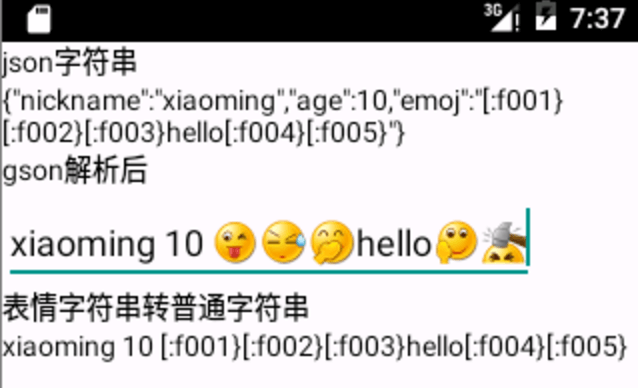
代碼如下:
String json = "{\"nickname\":\"xiaoming\",\"age\":10,\"emoj\":\"[:f001}[:f002}[:f003}hello[:f004}[:f005}\"}";
        jsonTv.setText(json);

        Gson gson = new GsonBuilder().registerTypeAdapter(Spanned.class, new String2Spanned()).create();

        Person person = gson.fromJson(json, Person.class);

        editText.append(person.getNickname());
        editText.append(" ");
        editText.append(person.getAge() + " ");
        editText.append(person.getEmoj());

        tv.append(Spanned2String.parse(editText.getText()));
public class Person {
private Spanned emoj;
private String nickname;
private int age;
}
/**
 * 字符串轉(zhuǎn)表情Spanned 表情格式 [:f000}
 *
 * @author wanjian
 *
 */
public class String2Spanned extends TypeAdapter {

    static Pattern pattern;

    static Map map = new HashMap();

    static ImageGetter imageGetter = new ImageGetter() {
        @Override
        public Drawable getDrawable(String source) {
            int id = Integer.parseInt(source);
            Drawable d = MyApplication.application.getResources().getDrawable(id);
            d.setBounds(0, 0, d.getIntrinsicWidth(), d.getIntrinsicHeight());
            return d;
        }
    };

    static {

        pattern = Pattern.compile("\\[:f\\d{3}\\}");
        //省略部分代碼
        map.put("[:f000}", R.drawable.f000);
        map.put("[:f001}", R.drawable.f001);
        map.put("[:f002}", R.drawable.f002);
        map.put("[:f003}", R.drawable.f003);
        map.put("[:f004}", R.drawable.f004);
        map.put("[:f005}", R.drawable.f005);
    }

    @Override
    public Spanned read(JsonReader in) throws IOException {
        if (in.peek() == JsonToken.NULL) {
            in.nextNull();
            return null;
        }

        String origStr = in.nextString();
        Matcher matcher = pattern.matcher(origStr);

        StringBuilder stringBuilder = new StringBuilder();

        int last = 0;
        while (matcher.find()) {

            int s = matcher.start();
            int e = matcher.end();
            stringBuilder.append(origStr.substring(last, s));

            String group = matcher.group();
            Integer emojId = map.get(group);
            if (emojId == null) {
                stringBuilder.append(group);
            } else {
                stringBuilder.append("");
            }

            last = e;

        }
        stringBuilder.append(origStr.substring(last, origStr.length()));
                // String ss = "";

        return Html.fromHtml(stringBuilder.toString(), imageGetter, null);
    }

    @Override
    public void write(JsonWriter arg0, Spanned arg1) throws IOException {

    }

}
import org.apache.commons.lang.StringEscapeUtils;
/**
 * 表情轉(zhuǎn) 字符串
 * @author wanjian
 *
 */
public class Spanned2String {

    //
    //   hello

    static Pattern pattern;
    static Mapmap=new HashMap<>();
    static{
        pattern=Pattern.compile("");
          //省略部分代碼
        map.put(String.valueOf(R.drawable.f000) , "[:f000}");
        map.put(String.valueOf(R.drawable.f001) , "[:f001}");
        map.put(String.valueOf(R.drawable.f002) , "[:f002}");
        map.put(String.valueOf(R.drawable.f003) , "[:f003}");
        map.put(String.valueOf(R.drawable.f004) , "[:f004}");
    }
    public static String decode(String str) {
      String[] tmp = str.split(";&#|&#|;");
      StringBuilder sb = new StringBuilder("");
      for (int i = 0; i < tmp.length; i++) {
        if (tmp[i].matches("\\d{5}")) {
          sb.append((char) Integer.parseInt(tmp[i]));
        } else {
          sb.append(tmp[i]);
        }
      }
      return sb.toString();
    }

    public static String parse(Spanned spanned  ) {

        try {

            String origHtml= Html.toHtml(spanned);
            //某些機(jī)型Html.toHtml得到的字符串略有區(qū)別,需要處理下
            //模擬器:  慢慢
            //小米2A 慢慢

            String origStr=origHtml.substring(origHtml.indexOf(">")+1, origHtml.length()-5);
            origStr=StringEscapeUtils.unescapeHtml(origStr);//html 漢字實(shí)體編碼轉(zhuǎn)換
            Matcher matcher=pattern.matcher(origStr);

           //      hello
            StringBuilder stringBuilder=new StringBuilder();
            int last=0;
            while (matcher.find()) {
                int s= matcher.start();
                int e=matcher.end();

                stringBuilder.append(origStr.substring( last,s));

                String group=matcher.group();
                String id=group.substring(10, group.length()-2);

                String emojStr=map.get(id);
                if (emojStr==null) {
                    stringBuilder.append(group);

                }else{
                    stringBuilder.append(emojStr);

                }

                last=e;

            }
            stringBuilder.append(origStr.substring(last, origStr.length()));
            return stringBuilder.toString().replace("
", "\n");

        } catch (Exception e) {
            // TODO Auto-generated catch block
            e.printStackTrace();

            return "";
        }

    }

} volley okhttp改造
public class OkHttpStack implements HttpStack {
    private final OkHttpClient mClient;

    public OkHttpStack(OkHttpClient client) {
        this.mClient = client;
    }

    @Override
    public HttpResponse performRequest(com.android.volley.Request request, Map additionalHeaders)
            throws IOException, AuthFailureError {
        OkHttpClient client = mClient.clone();
        int timeoutMs = request.getTimeoutMs();
        client.setConnectTimeout(timeoutMs, TimeUnit.MILLISECONDS);
        client.setReadTimeout(timeoutMs, TimeUnit.MILLISECONDS);
        client.setWriteTimeout(timeoutMs, TimeUnit.MILLISECONDS);

        com.squareup.okhttp.Request.Builder okHttpRequestBuilder = new com.squareup.okhttp.Request.Builder();
        okHttpRequestBuilder.url(request.getUrl());

        Map headers = request.getHeaders();

        for (final String name : headers.keySet()) {
            if (name!=null&& headers.get(name)!=null) {
                okHttpRequestBuilder.addHeader(name, headers.get(name));
            }

        }

        for (final String name : additionalHeaders.keySet()) {
            if (name!=null&& headers.get(name)!=null)
                okHttpRequestBuilder.addHeader(name, additionalHeaders.get(name));
        }

        setConnectionParametersForRequest(okHttpRequestBuilder, request);

        com.squareup.okhttp.Request okHttpRequest = okHttpRequestBuilder.build();
        Response okHttpResponse = client.newCall(okHttpRequest).execute();

        StatusLine responseStatus = new BasicStatusLine(parseProtocol(okHttpResponse.protocol()), okHttpResponse.code(),
                okHttpResponse.message());

        BasicHttpResponse response = new BasicHttpResponse(responseStatus);
        response.setEntity(entityFromOkHttpResponse(okHttpResponse));

        Headers responseHeaders = okHttpResponse.headers();

        for (int i = 0, len = responseHeaders.size(); i < len; i++) {
            final String name = responseHeaders.name(i), value = responseHeaders.value(i);

            if (name != null) {
                response.addHeader(new BasicHeader(name, value));
            }
        }

        return response;
    }

    private static HttpEntity entityFromOkHttpResponse(Response r) throws IOException {
        BasicHttpEntity entity = new BasicHttpEntity();
        ResponseBody body = r.body();

        entity.setContent(body.byteStream());
        entity.setContentLength(body.contentLength());
        entity.setContentEncoding(r.header("Content-Encoding"));

        if (body.contentType() != null) {
            entity.setContentType(body.contentType().type());
        }
        return entity;
    }

    private static void setConnectionParametersForRequest(com.squareup.okhttp.Request.Builder builder,
            com.android.volley.Request request) throws IOException, AuthFailureError {
        switch (request.getMethod()) {
        case com.android.volley.Request.Method.DEPRECATED_GET_OR_POST:
            // Ensure backwards compatibility.
            // Volley assumes a request with a null body is a GET.
            byte[] postBody = request.getPostBody();

            if (postBody != null) {
                builder.post(RequestBody.create(MediaType.parse(request.getPostBodyContentType()), postBody));
            }
            break;

        case com.android.volley.Request.Method.GET:
            builder.get();
            break;

        case com.android.volley.Request.Method.DELETE:
            builder.delete();
            break;

        case com.android.volley.Request.Method.POST:
            builder.post(createRequestBody(request));
            break;

        case com.android.volley.Request.Method.PUT:
            builder.put(createRequestBody(request));
            break;

        // case com.android.volley.Request.Method.HEAD:
        // builder.head();
        // break;
        //
        // case com.android.volley.Request.Method.OPTIONS:
        // builder.method("OPTIONS", null);
        // break;
        //
        // case com.android.volley.Request.Method.TRACE:
        // builder.method("TRACE", null);
        // break;
        //
        // case com.android.volley.Request.Method.PATCH:
        // builder.patch(createRequestBody(request));
        // break;

        default:
            throw new IllegalStateException("Unknown method type.");
        }
    }

    private static ProtocolVersion parseProtocol(final Protocol p) {
        switch (p) {
        case HTTP_1_0:
            return new ProtocolVersion("HTTP", 1, 0);
        case HTTP_1_1:
            return new ProtocolVersion("HTTP", 1, 1);
        case SPDY_3:
            return new ProtocolVersion("SPDY", 3, 1);
        case HTTP_2:
            return new ProtocolVersion("HTTP", 2, 0);
        }

        throw new IllegalAccessError("Unkwown protocol");
    }

    private static RequestBody createRequestBody(com.android.volley.Request r) throws AuthFailureError {
        final byte[] body = r.getBody();
        if (body == null)
            return null;

        return RequestBody.create(MediaType.parse(r.getBodyContentType()), body);
    }
}