
【Python基礎(chǔ)】用Python制作漂亮的流動(dòng)桑基圖
??來(lái)源:Python數(shù)據(jù)之道
作者:Peter
整理:Lemon
桑基圖繪制實(shí)踐
本文中介紹的是如何制作桑基圖,使用的可視化庫(kù)是強(qiáng)大的 Pyecharts (版本1.7.1,版本一致很重要)。文章將從如下幾個(gè)方面進(jìn)行介紹:
什么是桑基圖 官網(wǎng)的兩個(gè) demo桑基圖繪制項(xiàng)目實(shí)戰(zhàn)
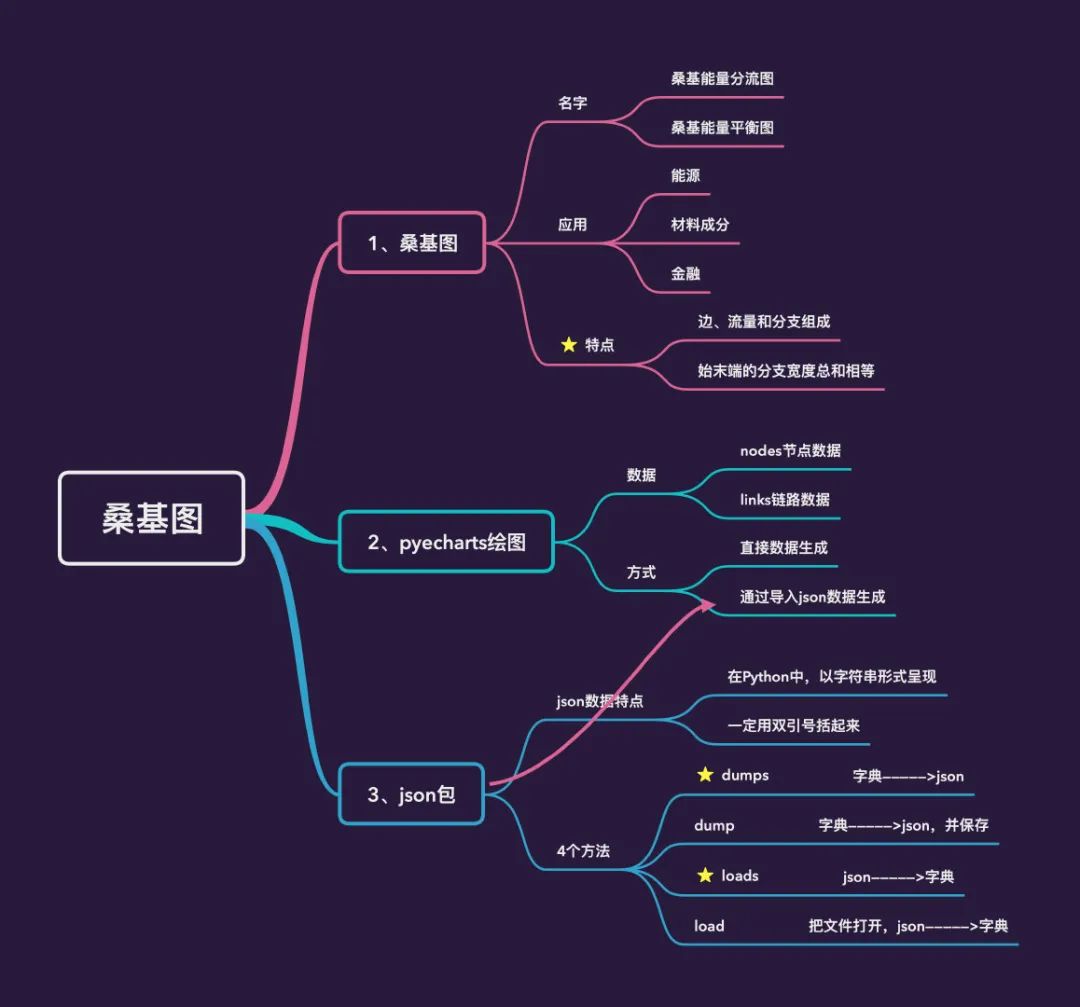
什么是桑基圖?
桑基圖(桑葚圖),也叫桑基能量分流圖或者桑基能量平衡圖,里面的桑基其實(shí)是一個(gè)人名,全名是 馬修·亨利·菲尼亞斯·里爾·桑基(Matthew Henry Phineas Riall Sankey) ,是一名愛(ài)爾蘭裔工程師,也是英國(guó)皇家陸軍工兵的上尉[1]。

早在 1898 年的時(shí)候,他就使用這種圖形來(lái)表示蒸汽機(jī)的能源效率:

桑基之后,桑基圖逐漸成為科學(xué)和工程領(lǐng)域,代表平衡、能量流、物質(zhì)流的標(biāo)準(zhǔn)模型,在一些產(chǎn)品的生命周期評(píng)估中也常被使用,通常應(yīng)用于能源、材料成分、金融等數(shù)據(jù)的可視化分析。主要特點(diǎn)是:
圖形由邊、流量和支點(diǎn)組成。邊代表了流動(dòng)的數(shù)據(jù),流量代表了流動(dòng)數(shù)據(jù)的具體數(shù)值,節(jié)點(diǎn)代表了不同分類 始末端的分支寬度總和相等,即所有主支寬度的總和應(yīng)與所有分出去的分支寬度的總和相等,保持能量的平衡。
官網(wǎng)demo
本文中使用的Pyecharts版本是1.7.1,版本的一致非常重要。
import?pyecharts
pyecharts.__version__

demo_1
首先我們看看官網(wǎng)的第一個(gè)demo:
from?pyecharts?import?options?as?opts
from?pyecharts.charts?import?Sankey

nodes?=?[???#?所有節(jié)點(diǎn)名稱
????{"name":?"category1"},
????{"name":?"category2"},
????{"name":?"category3"},
????{"name":?"category4"},
????{"name":?"category5"},
????{"name":?"category6"},
]

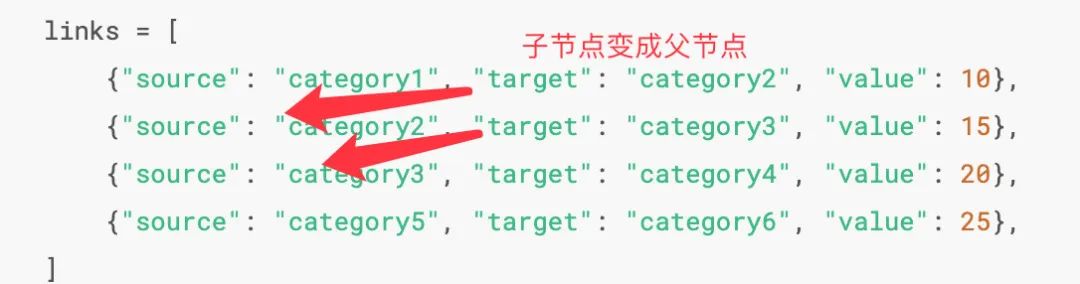
links?=?[??#?每一條鏈路的數(shù)據(jù),包含:父節(jié)點(diǎn)source +?子節(jié)點(diǎn)target +?數(shù)據(jù)值value
????{"source":?"category1",?"target":?"category2",?"value":?10},???
????{"source":?"category2",?"target":?"category3",?"value":?15},
????{"source":?"category3",?"target":?"category4",?"value":?20},
????{"source":?"category5",?"target":?"category6",?"value":?25},
]
c?=?(
????Sankey()
????.add(
????????"sankey",
????????nodes,
????????links,
????????linestyle_opt=opts.LineStyleOpts(opacity=0.2,?curve=0.5,?color="source"),
????????label_opts=opts.LabelOpts(position="right"),
????)
????.set_global_opts(title_opts=opts.TitleOpts(title="Sankey-基本示例"))
??#??.render("sankey_base.html")????生成HTML文件
)

c.render_notebook()???#?jupyter?notebook中在線顯示
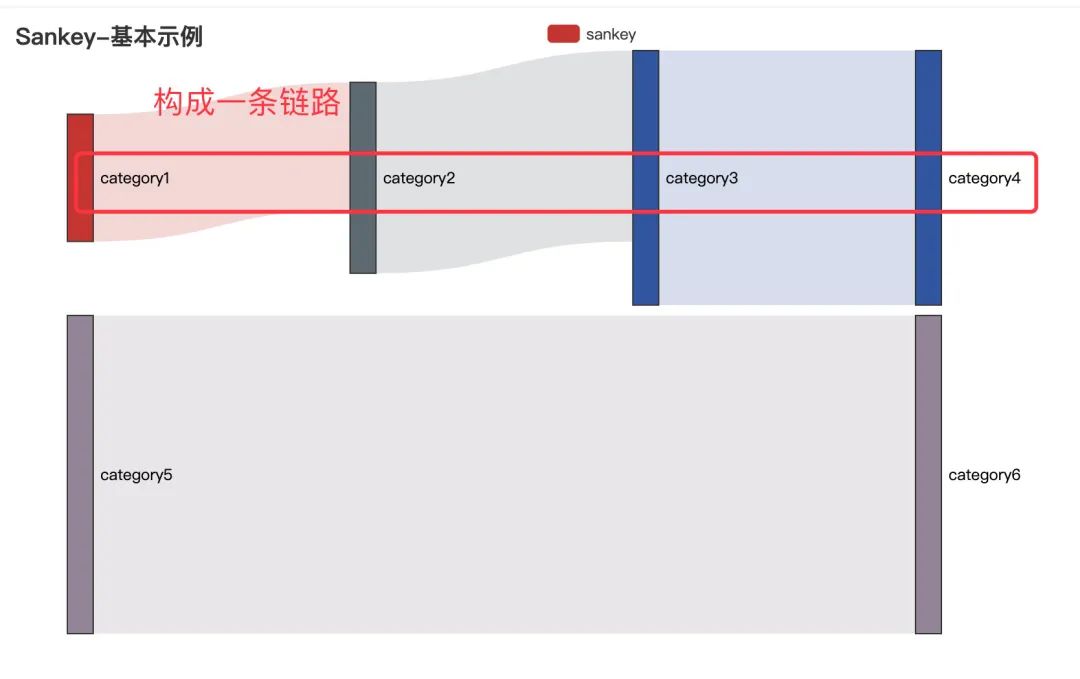
在上面的代碼中,nodes部分表示的是所有的節(jié)點(diǎn)名稱,不管是父節(jié)點(diǎn)還是最小的子節(jié)點(diǎn)都要列出來(lái);links部分表示的是每條鏈路的數(shù)據(jù),包含:父節(jié)點(diǎn)source + 子節(jié)點(diǎn)target + 數(shù)據(jù)值value。根據(jù)links的數(shù)據(jù),我們可以發(fā)現(xiàn):category1——-category2———category3———category4構(gòu)成了一條完整的鏈路,category5—category6構(gòu)成了另一條鏈路。
下面是最終的圖形:
demo_2
接下來(lái)我們看看官網(wǎng)的第二個(gè)demo:
import?json

from?pyecharts?import?options?as?opts
from?pyecharts.charts?import?Sankey

with?open("product.json",?"r",?encoding="utf-8")?as?f:???#?導(dǎo)入json數(shù)據(jù)
????j?=?json.load(f)????#?json數(shù)據(jù)轉(zhuǎn)成字典數(shù)據(jù)
c?=?(
????Sankey()
????.add(
????????"sankey",
????????nodes=j["nodes"],???#?取出json數(shù)據(jù)的節(jié)點(diǎn)和鏈路數(shù)據(jù)
????????links=j["links"],
????????pos_top="10%",
????????focus_node_adjacency=True,
????????levels=[
????????????opts.SankeyLevelsOpts(
????????????????depth=0,
????????????????itemstyle_opts=opts.ItemStyleOpts(color="#fbb4ae"),
????????????????linestyle_opts=opts.LineStyleOpts(color="source",?opacity=0.6),
????????????),
????????????opts.SankeyLevelsOpts(
????????????????depth=1,
????????????????itemstyle_opts=opts.ItemStyleOpts(color="#b3cde3"),
????????????????linestyle_opts=opts.LineStyleOpts(color="source",?opacity=0.6),
????????????),
????????????opts.SankeyLevelsOpts(
????????????????depth=2,
????????????????itemstyle_opts=opts.ItemStyleOpts(color="#ccebc5"),
????????????????linestyle_opts=opts.LineStyleOpts(color="source",?opacity=0.6),
????????????),
????????????opts.SankeyLevelsOpts(
????????????????depth=3,
????????????????itemstyle_opts=opts.ItemStyleOpts(color="#decbe4"),
????????????????linestyle_opts=opts.LineStyleOpts(color="source",?opacity=0.6),
????????????),
????????],
????????linestyle_opt=opts.LineStyleOpts(curve=0.5),
????)
????.set_global_opts(
????????title_opts=opts.TitleOpts(title="Sankey-Level?Settings"),
????????tooltip_opts=opts.TooltipOpts(trigger="item",?trigger_on="mousemove"),
????)
#????.render("sankey_with_level_setting.html")
)

c.render_notebook()???#?在線顯示
讀取本地的 json數(shù)據(jù),通過(guò)josn.load()讀取轉(zhuǎn)成Python字典取出 json數(shù)據(jù)中的節(jié)點(diǎn)和鏈路數(shù)據(jù)進(jìn)行繪圖
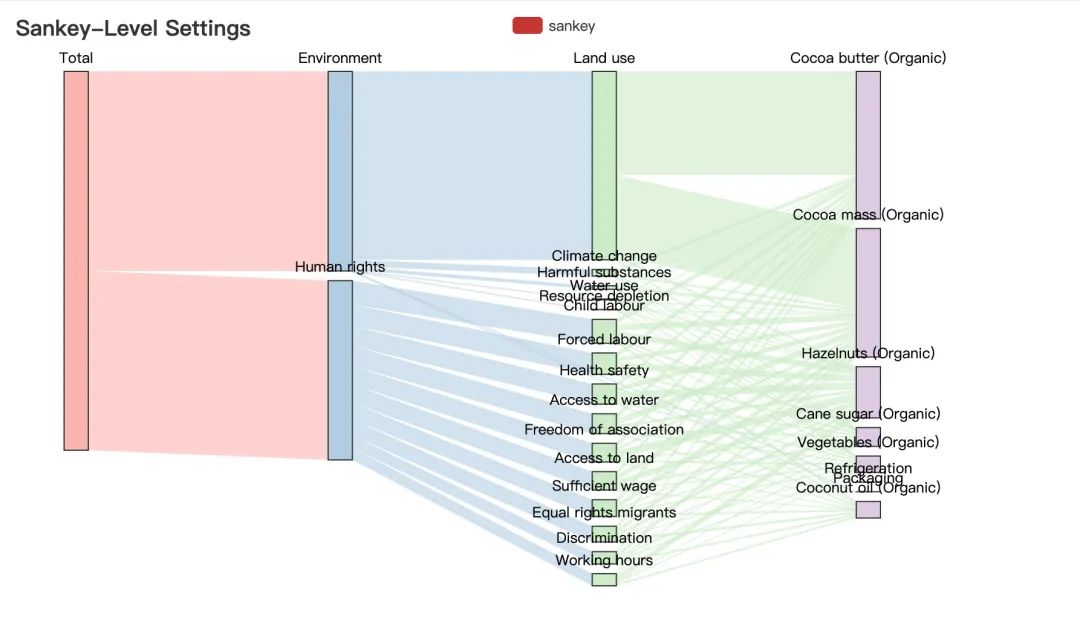
桑基圖繪制實(shí)踐
原始數(shù)據(jù)整理
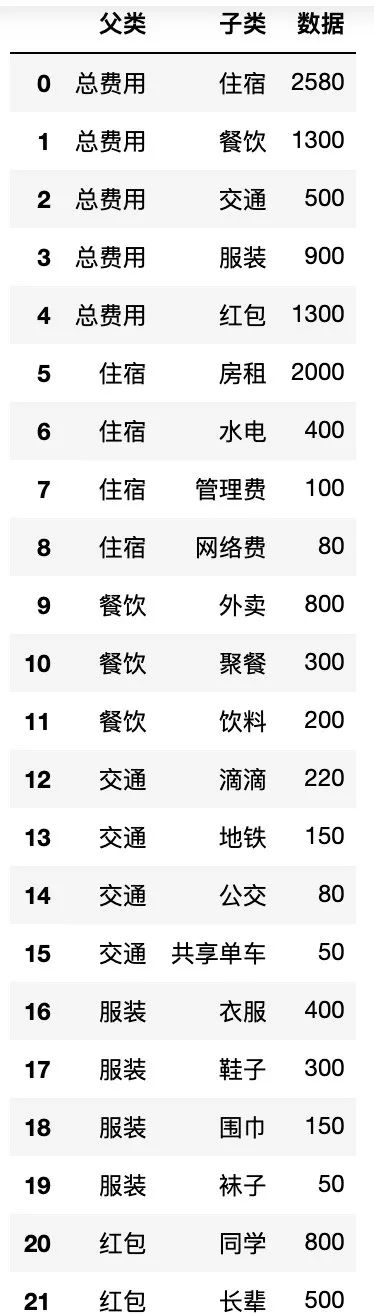
通過(guò)上面官網(wǎng)的例子我們明白了繪制桑基圖需要的兩個(gè)數(shù)據(jù):節(jié)點(diǎn)數(shù)據(jù)+鏈路數(shù)據(jù),下面?通過(guò)一個(gè)實(shí)際的案例來(lái)講解如何生成繪制桑基圖需要的數(shù)據(jù)
認(rèn)識(shí)原始數(shù)據(jù)
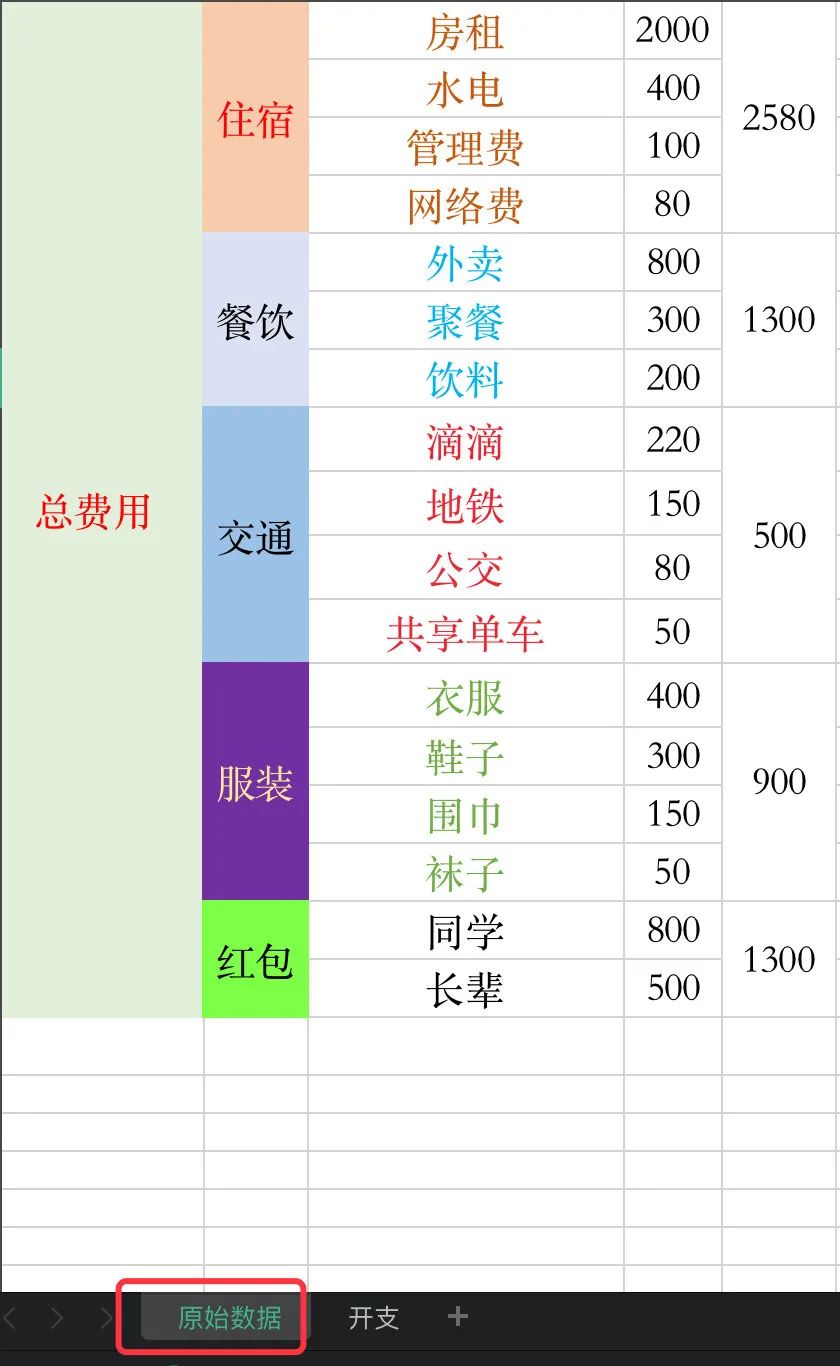
Peter同學(xué)一個(gè)人在深圳搬磚,辛辛苦苦地搬了一個(gè)月,產(chǎn)生很多的開(kāi)銷?,這些開(kāi)支主要分成5大塊:
住宿 餐飲 交通 服裝 紅包
每個(gè)部分又分別有不同的去向,所以這些數(shù)據(jù)就自然構(gòu)成了一條條的鏈路,比如:總費(fèi)用—住宿—房租(2000),總費(fèi)用—交通—滴滴(220)等,我們只考慮兩個(gè)節(jié)點(diǎn)之間的關(guān)系
分層級(jí)整理數(shù)據(jù)
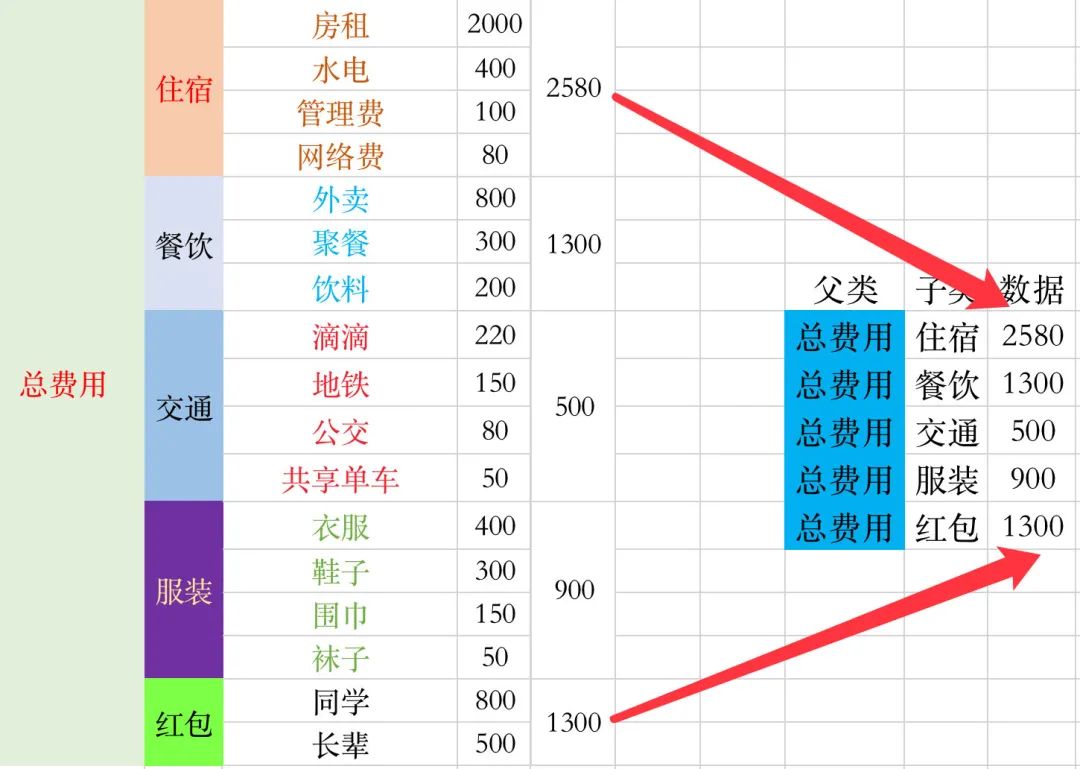
1、接下來(lái)我們分不同的層級(jí)來(lái)整理原始數(shù)據(jù),首先是第一層:總費(fèi)用到5個(gè)子版塊。算出每個(gè)子版塊的總和
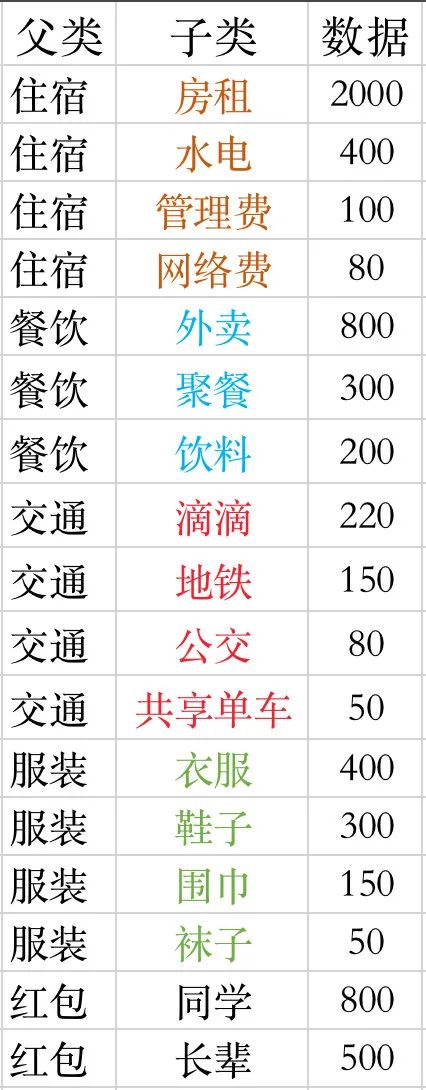
2、整理5個(gè)子版塊的數(shù)據(jù)
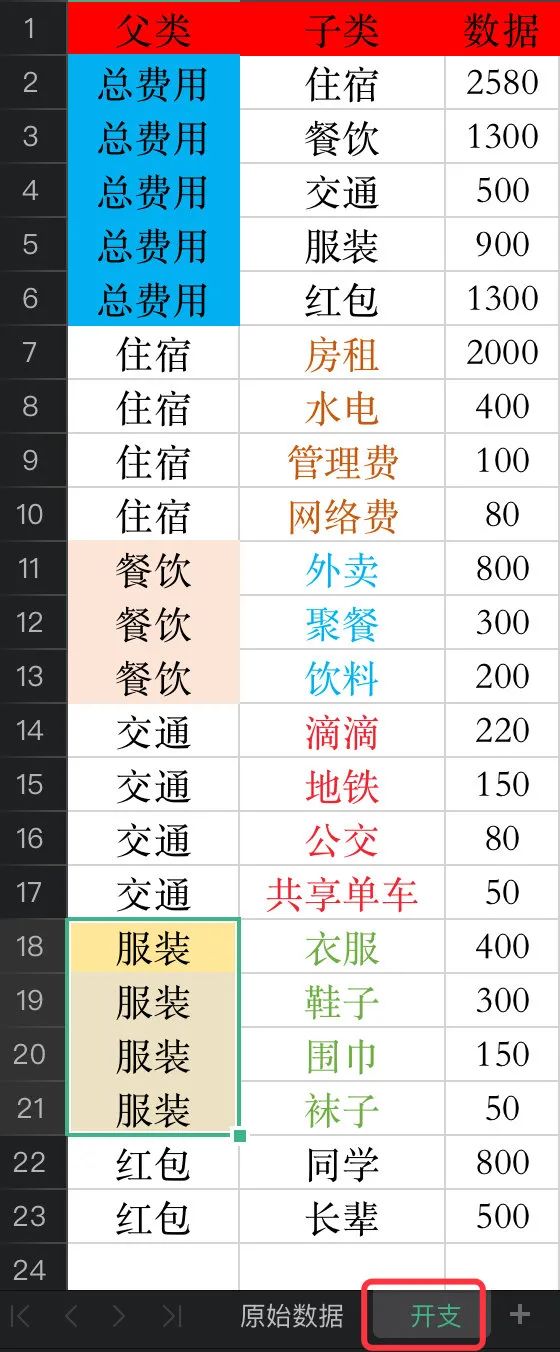
3、我們將上面兩個(gè)步驟得到的數(shù)據(jù)放入一個(gè)sheet中,命名為開(kāi)支:
桑基圖數(shù)據(jù)生成
讀取數(shù)據(jù)
首先我們將上面制作好的開(kāi)支這份數(shù)據(jù)讀到pandas中:
import?pandas?as?pd
import?numpy?as?np
import?json

#?等價(jià)于:data = pd.read_excel("life.xlsx",sheet_name=1)? 1表示sheet_name的索引位置,索引從0開(kāi)始
df?=?pd.read_excel("life.xlsx",sheet_name="開(kāi)支")??#?直接寫(xiě)名字
df.head()
注意兩點(diǎn):
當(dāng)一個(gè)表格中存在多個(gè) sheet的時(shí)候,我們需要指定sheet_name的名字指定 sheet_name的名字有兩種方式:直接指定名字 指定該 sheet_name的位置索引
確定全部節(jié)點(diǎn)nodes
1、先找出全部的節(jié)點(diǎn)
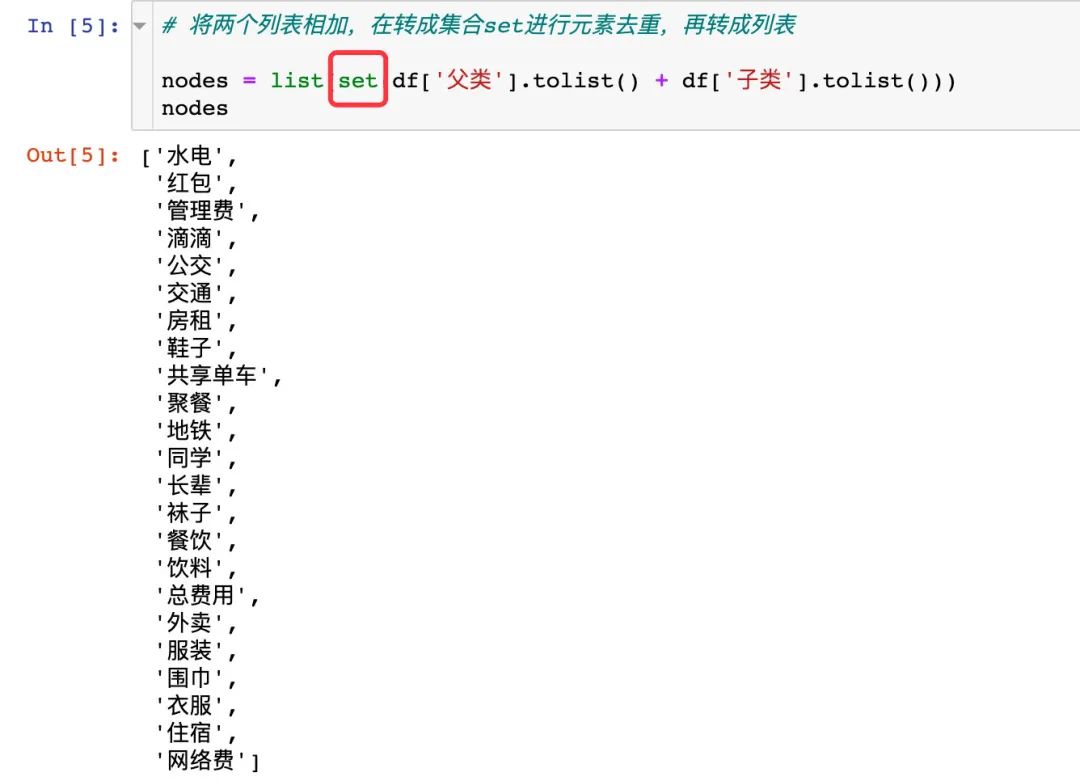
所有的節(jié)點(diǎn)數(shù)據(jù)就是上面的父類和子類中去重后的元素,我們使用集合set進(jìn)行去重,再轉(zhuǎn)成列表
#?父類+子類中的數(shù)據(jù),需要去重

df['父類'].tolist()
df['子類'].tolist()
將上面的數(shù)據(jù)相加并且去重:
#?將兩個(gè)列表相加,在轉(zhuǎn)成集合set進(jìn)行元素去重,再轉(zhuǎn)成列表

nodes?=?list(set(df['父類'].tolist()?+?df['子類'].tolist()))?
nodes
2、生成節(jié)點(diǎn)數(shù)據(jù)
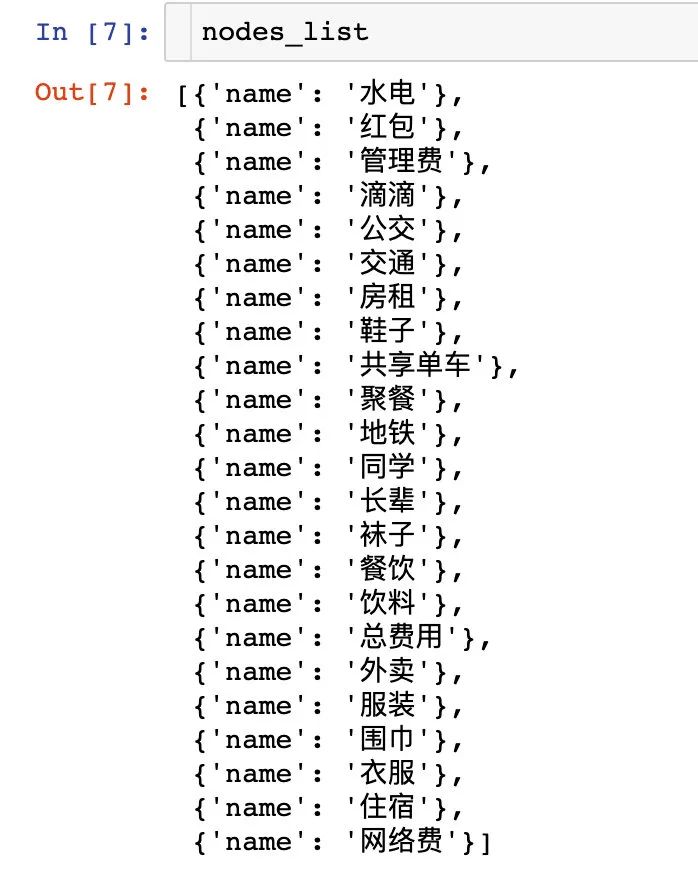
#?節(jié)點(diǎn)列表數(shù)據(jù):?nodes_list

nodes_list?=?[]
for?i?in?nodes:
????dic?=?{}
????dic["name"]?=?i
????nodes_list.append(dic)
nodes_list
生成鏈路數(shù)據(jù)
我們將導(dǎo)入的數(shù)據(jù)生成鏈路數(shù)據(jù):每一行記錄都是一個(gè)鏈路數(shù)據(jù):
links_list?=?[]

for?i?in?range(len(df)):
????dic?=?{}
????dic['source']?=?df.iloc[i,0]??#?父類
????dic['target']?=?df.iloc[i,1]??#?子類
????dic['value']?=?int(df.iloc[i,2])???#?數(shù)據(jù)值?:?使用int函數(shù)直接強(qiáng)制轉(zhuǎn)換,防止json.dump()報(bào)錯(cuò)
????links_list.append(dic)
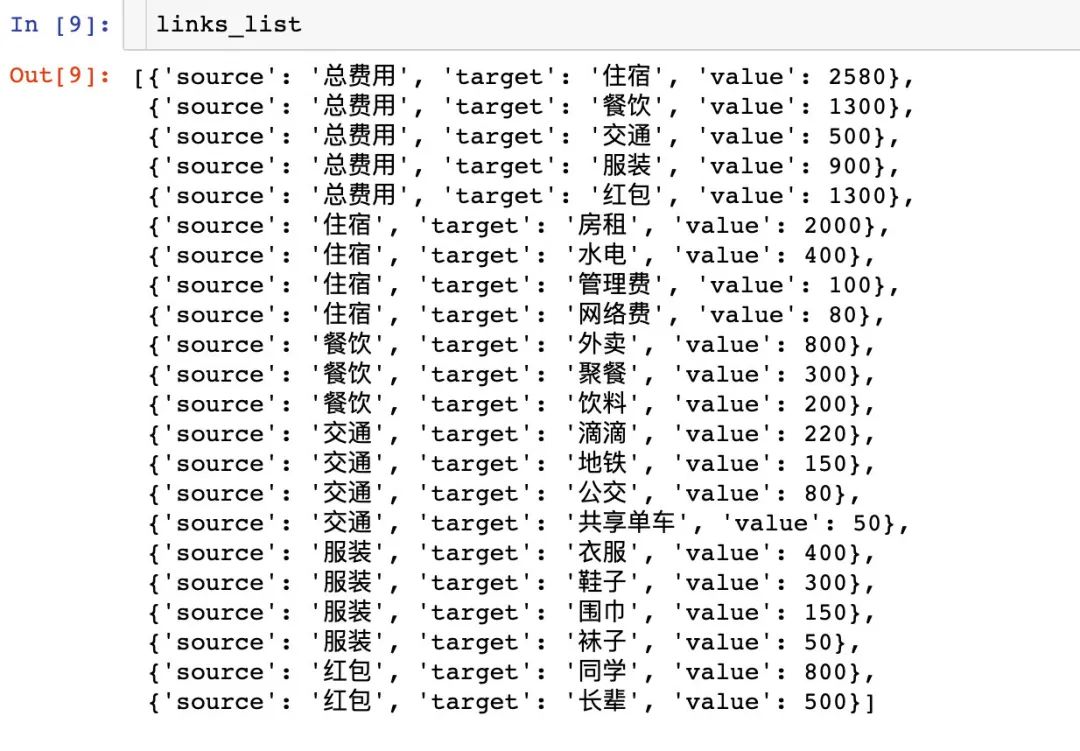
Attention??:導(dǎo)入的數(shù)據(jù)部分需要強(qiáng)制轉(zhuǎn)換成int類型,防止后面的數(shù)據(jù)處理報(bào)錯(cuò)。
到此為止,我們已經(jīng)完成了桑葚圖中節(jié)點(diǎn)數(shù)據(jù)和鏈路數(shù)據(jù)的生成,下面開(kāi)始繪圖。
繪制桑基圖
我們通過(guò)官網(wǎng)的2種不同方式來(lái)繪制桑基圖
方式1
這種方式比較簡(jiǎn)單:直接將上面得到的nodes_list和links_list整體放入繪圖的代碼中:
#?需要事先導(dǎo)入,否則jupyter?notebook中可能不會(huì)出圖
from?pyecharts.globals?import?CurrentConfig,?OnlineHostType
from?pyecharts?import?options?as?opts??#?圖形設(shè)置
from?pyecharts.charts?import?Sankey????#?導(dǎo)入桑基圖型的類

nodes_list?=?[
?{'name':?'圍巾'},
?{'name':?'長(zhǎng)輩'},
?{'name':?'網(wǎng)絡(luò)費(fèi)'},
?{'name':?'服裝'},
?{'name':?'公交'},
?{'name':?'同學(xué)'},
?{'name':?'襪子'},
?{'name':?'總費(fèi)用'},
?{'name':?'衣服'},
?{'name':?'紅包'},
?{'name':?'交通'},
?{'name':?'聚餐'},
?{'name':?'滴滴'},
?{'name':?'餐飲'},
?{'name':?'管理費(fèi)'},
?{'name':?'水電'},
?{'name':?'共享單車'},
?{'name':?'外賣'},
?{'name':?'房租'},
?{'name':?'住宿'},
?{'name':?'飲料'},
?{'name':?'鞋子'},
?{'name':?'地鐵'}
]

links_list?=?[
?{'source':?'總費(fèi)用',?'target':?'住宿',?'value':?2580},
?{'source':?'總費(fèi)用',?'target':?'餐飲',?'value':?1300},
?{'source':?'總費(fèi)用',?'target':?'交通',?'value':?500},
?{'source':?'總費(fèi)用',?'target':?'服裝',?'value':?900},
?{'source':?'總費(fèi)用',?'target':?'紅包',?'value':?1300},
?{'source':?'住宿',?'target':?'房租',?'value':?2000},
?{'source':?'住宿',?'target':?'水電',?'value':?400},
?{'source':?'住宿',?'target':?'管理費(fèi)',?'value':?100},
?{'source':?'住宿',?'target':?'網(wǎng)絡(luò)費(fèi)',?'value':?80},
?{'source':?'餐飲',?'target':?'外賣',?'value':?800},
?{'source':?'餐飲',?'target':?'聚餐',?'value':?300},
?{'source':?'餐飲',?'target':?'飲料',?'value':?200},
?{'source':?'交通',?'target':?'滴滴',?'value':?220},
?{'source':?'交通',?'target':?'地鐵',?'value':?150},
?{'source':?'交通',?'target':?'公交',?'value':?80},
?{'source':?'交通',?'target':?'共享單車',?'value':?50},
?{'source':?'服裝',?'target':?'衣服',?'value':?400},
?{'source':?'服裝',?'target':?'鞋子',?'value':?300},
?{'source':?'服裝',?'target':?'圍巾',?'value':?150},
?{'source':?'服裝',?'target':?'襪子',?'value':?50},
?{'source':?'紅包',?'target':?'同學(xué)',?'value':?800},
?{'source':?'紅包',?'target':?'長(zhǎng)輩',?'value':?500}
]

c?=?(
????Sankey()
????.add(
????????"月度開(kāi)支",
????????nodes_list,
????????links_list,
????????linestyle_opt=opts.LineStyleOpts(opacity=0.5,?curve=0.5,?color="source"),
????????label_opts=opts.LabelOpts(position="right"),
????)
????.set_global_opts(title_opts=opts.TitleOpts(title="月度開(kāi)支桑葚圖"))
)

c.render_notebook()
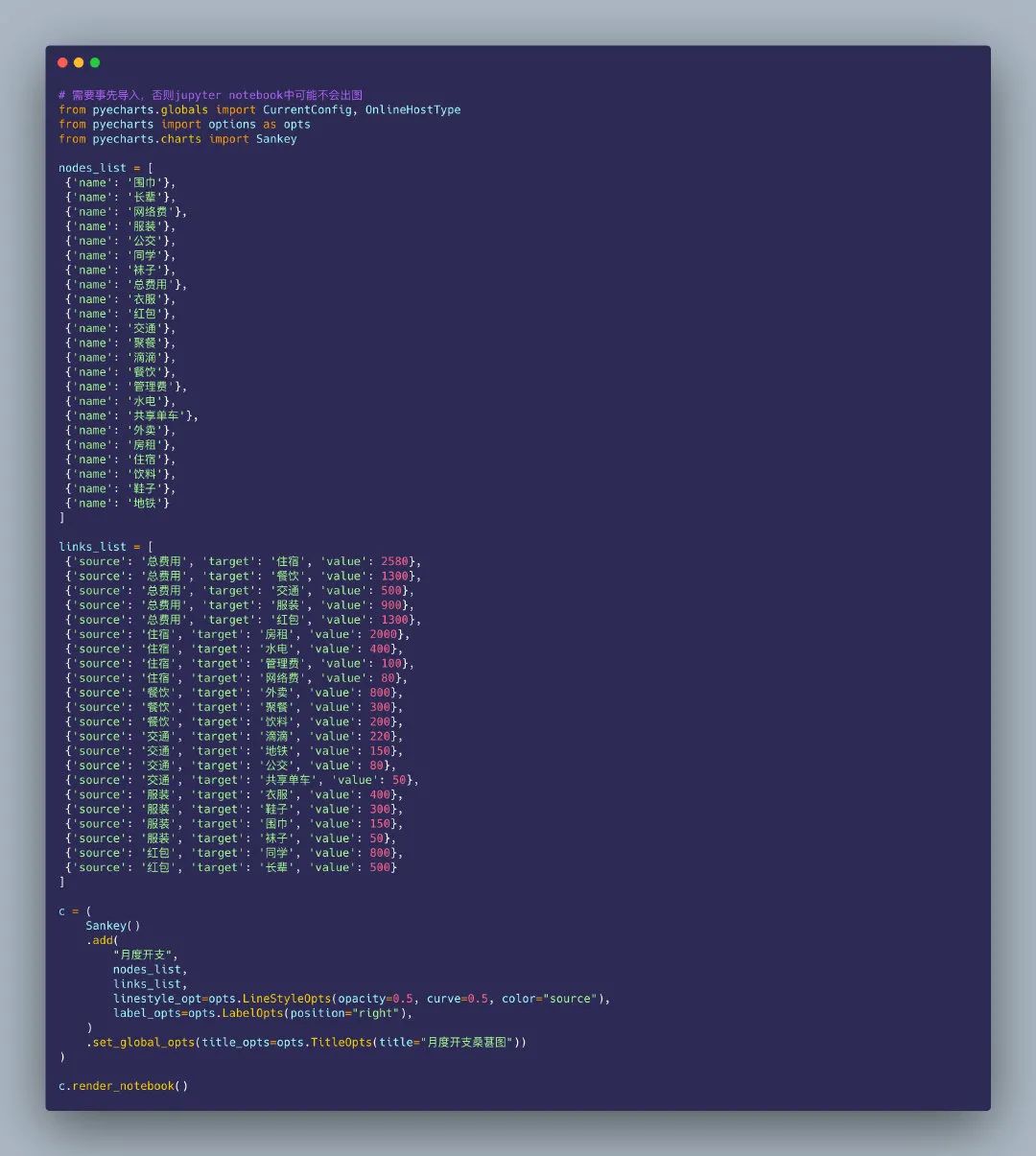
得到的桑基圖在notebook中是動(dòng)態(tài)的圖形:
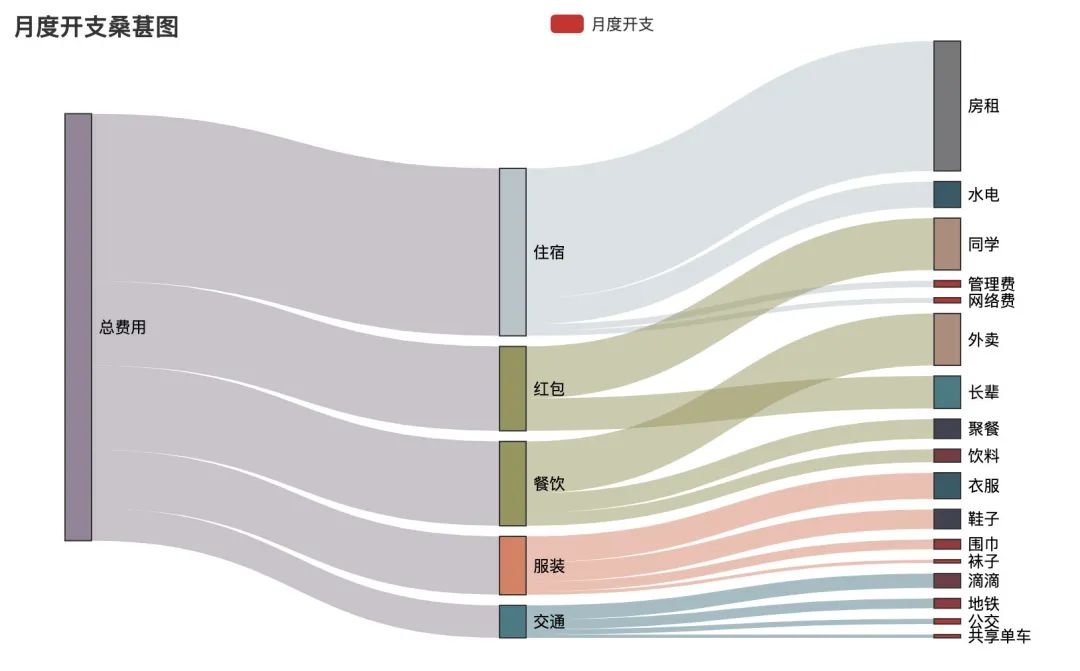
動(dòng)態(tài)視頻效果如下:
方式2
如果數(shù)據(jù)比較少,將nodes_list和links_list放入繪圖的代碼中不會(huì)占據(jù)過(guò)多的空間;但是如果數(shù)據(jù)量大,不同鏈路種類多,全部放在整個(gè)繪圖代碼中,就會(huì)顯得整個(gè)代碼很臃腫。
于是產(chǎn)生了方式2:先將上面得到的nodes_list和links_list生成一個(gè)json文件,再將json文件通過(guò)with方法讀進(jìn)來(lái)進(jìn)行繪圖。下面講解如何通過(guò)得到的nodes_list和links_list數(shù)據(jù)生成我們繪圖需要的json數(shù)據(jù)。
json格式的數(shù)據(jù),在python中以字符串的形式呈現(xiàn),一定要用雙引號(hào)括起來(lái)。json模塊中提供的4個(gè)功能:
dumps:python字典數(shù)據(jù)類型轉(zhuǎn)成json數(shù)據(jù)類型的字符串dump:字典數(shù)據(jù)轉(zhuǎn)成字符串并且存儲(chǔ)在文件中loads:把json字符串轉(zhuǎn)成字典數(shù)據(jù)類型load:把文件打開(kāi),并且從字符串轉(zhuǎn)換成字典數(shù)據(jù)類型
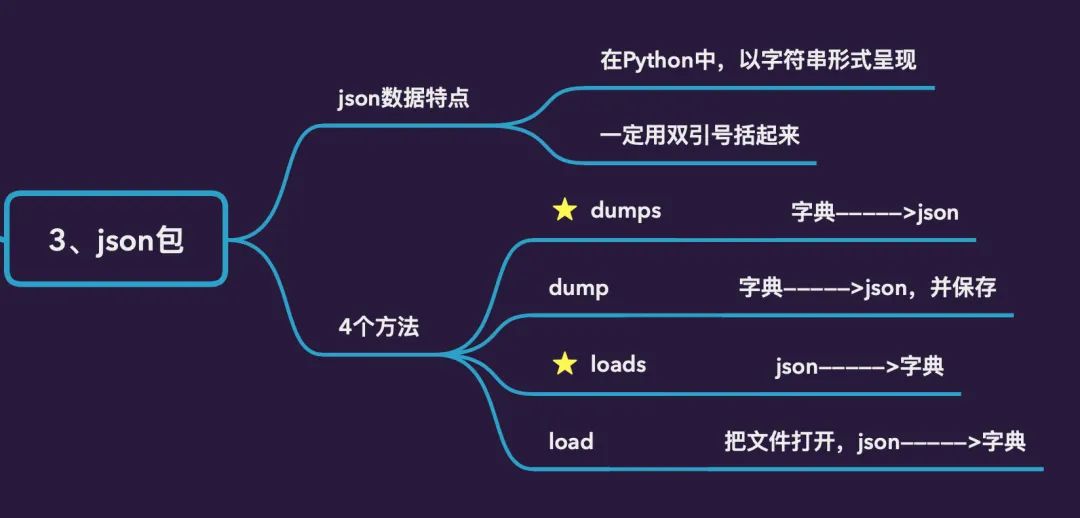
1、先生成字典數(shù)據(jù)
data_dic?=?{}

data_dic["nodes"]?=?nodes_list
data_dic["links"]?=?links_list
得到的字典data_dic數(shù)據(jù)分為節(jié)點(diǎn)數(shù)據(jù)和鏈路數(shù)據(jù),具體如下:
{'nodes':?[{'name':?'圍巾'},???#?節(jié)點(diǎn)部分?jǐn)?shù)據(jù)
??{'name':?'長(zhǎng)輩'},
??{'name':?'網(wǎng)絡(luò)費(fèi)'},
??{'name':?'服裝'},
??{'name':?'公交'},
??{'name':?'同學(xué)'},
??{'name':?'襪子'},
??{'name':?'總費(fèi)用'},
??{'name':?'衣服'},
??{'name':?'紅包'},
??{'name':?'交通'},
??{'name':?'聚餐'},
??{'name':?'滴滴'},
??{'name':?'餐飲'},
??{'name':?'管理費(fèi)'},
??{'name':?'水電'},
??{'name':?'共享單車'},
??{'name':?'外賣'},
??{'name':?'房租'},
??{'name':?'住宿'},
??{'name':?'飲料'},
??{'name':?'鞋子'},
??{'name':?'地鐵'}],
?'links':?[{'source':?'總費(fèi)用',?'target':?'住宿',?'value':?2580},??#?鏈路部分?jǐn)?shù)據(jù)
??{'source':?'總費(fèi)用',?'target':?'餐飲',?'value':?1300},
??{'source':?'總費(fèi)用',?'target':?'交通',?'value':?500},
??{'source':?'總費(fèi)用',?'target':?'服裝',?'value':?900},
??{'source':?'總費(fèi)用',?'target':?'紅包',?'value':?1300},
??{'source':?'住宿',?'target':?'房租',?'value':?2000},
??{'source':?'住宿',?'target':?'水電',?'value':?400},
??{'source':?'住宿',?'target':?'管理費(fèi)',?'value':?100},
??{'source':?'住宿',?'target':?'網(wǎng)絡(luò)費(fèi)',?'value':?80},
??{'source':?'餐飲',?'target':?'外賣',?'value':?800},
??{'source':?'餐飲',?'target':?'聚餐',?'value':?300},
??{'source':?'餐飲',?'target':?'飲料',?'value':?200},
??{'source':?'交通',?'target':?'滴滴',?'value':?220},
??{'source':?'交通',?'target':?'地鐵',?'value':?150},
??{'source':?'交通',?'target':?'公交',?'value':?80},
??{'source':?'交通',?'target':?'共享單車',?'value':?50},
??{'source':?'服裝',?'target':?'衣服',?'value':?400},
??{'source':?'服裝',?'target':?'鞋子',?'value':?300},
??{'source':?'服裝',?'target':?'圍巾',?'value':?150},
??{'source':?'服裝',?'target':?'襪子',?'value':?50},
??{'source':?'紅包',?'target':?'同學(xué)',?'value':?800},
??{'source':?'紅包',?'target':?'長(zhǎng)輩',?'value':?500}]}
2、將生成的字典數(shù)據(jù)轉(zhuǎn)成json數(shù)據(jù),并保存到本地
通過(guò)json.dump方法將上面生成的字典類型數(shù)據(jù)轉(zhuǎn)成json數(shù)據(jù),并保存到本地:
with?open("sankey.json","w",encoding="utf-8")?as?f:???#?數(shù)據(jù)保存到了本地
????#?json.dump(data_dic,?f)???寫(xiě)入一行數(shù)據(jù)
????json.dump(data_dic,?f,?indent=2,?sort_keys=True,?ensure_ascii=False)??#?寫(xiě)入多行數(shù)據(jù)
3、讀取json數(shù)據(jù)進(jìn)行繪圖
import?json

from?pyecharts?import?options?as?opts
from?pyecharts.charts?import?Sankey

with?open("sankey.json",?"r",?encoding="utf-8")?as?f:???#?1、打開(kāi)保存的文件
????j?=?json.load(f)???#?2、json字符串轉(zhuǎn)成字典類型數(shù)據(jù)
c?=?(
????Sankey()
????.add(
????????"月度開(kāi)支",
????????nodes=j["nodes"],???#?3、通過(guò)鍵值對(duì)的映射關(guān)系來(lái)讀取數(shù)據(jù)
????????links=j["links"],
????????pos_top="20%",
????????focus_node_adjacency=True,
????????levels=[
????????????opts.SankeyLevelsOpts(
????????????????depth=0,
#?????????????????itemstyle_opts=opts.ItemStyleOpts(color="#fbb4ae"),??4、屬性的設(shè)置部分
????????????????linestyle_opts=opts.LineStyleOpts(color="source",?opacity=0.6),
????????????),
????????????opts.SankeyLevelsOpts(
????????????????depth=1,
#?????????????????itemstyle_opts=opts.ItemStyleOpts(color="#b3cde3"),
????????????????linestyle_opts=opts.LineStyleOpts(color="source",?opacity=0.6),
????????????),
????????????opts.SankeyLevelsOpts(
????????????????depth=2,
#?????????????????itemstyle_opts=opts.ItemStyleOpts(color="#ccebc5"),
????????????????linestyle_opts=opts.LineStyleOpts(color="source",?opacity=0.6),
????????????),
????????],
????????linestyle_opt=opts.LineStyleOpts(curve=0.5,color="source",opacity=0.6,type_="dotted"),
????????label_opts=opts.LabelOpts(position="right")
????)
????.set_global_opts(
????????title_opts=opts.TitleOpts(title="月度開(kāi)支桑葚圖"),
????????tooltip_opts=opts.TooltipOpts(trigger="item",?trigger_on="mousemove|click",is_show=True),
????)
)

c.render_notebook()
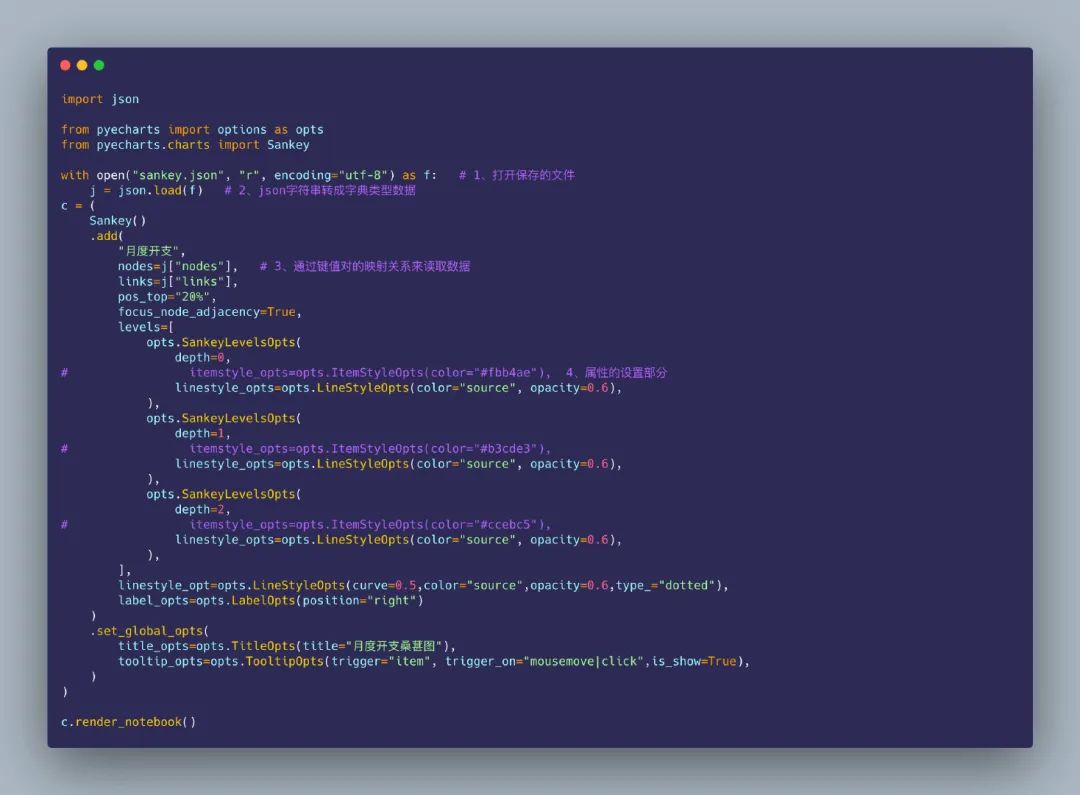
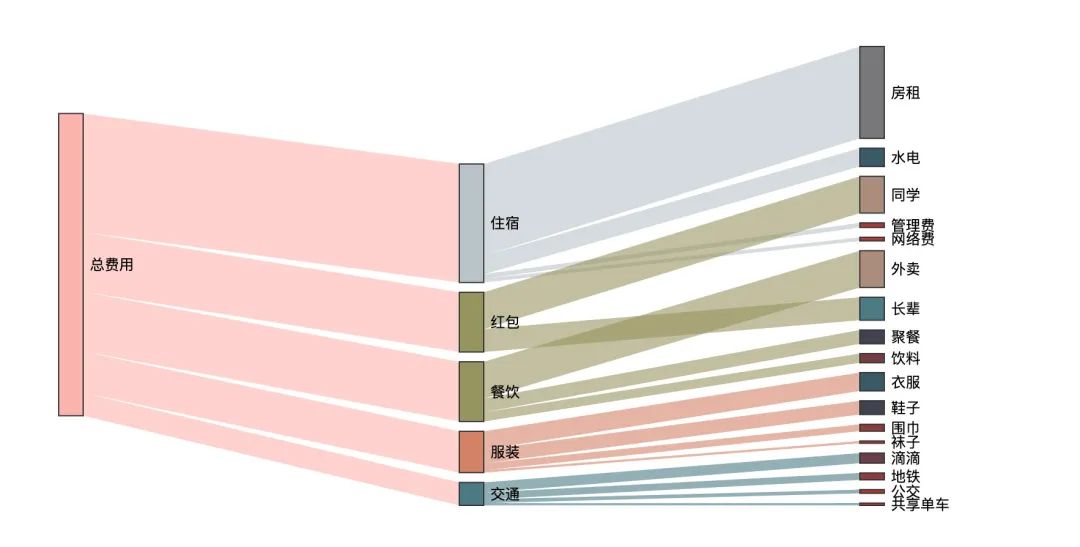
看看實(shí)際的動(dòng)態(tài)化效果:
參考資料
桑基的介紹: https://zhuanlan.zhihu.com/p/127360262
作者簡(jiǎn)介
Peter,碩士畢業(yè)僧一枚,從電子專業(yè)自學(xué)Python入門(mén)數(shù)據(jù)行業(yè),擅長(zhǎng)數(shù)據(jù)分析及可視化。喜歡數(shù)據(jù),堅(jiān)持跑步,熱愛(ài)閱讀,樂(lè)觀生活。個(gè)人格言:不浮于世,不負(fù)于己
個(gè)人站點(diǎn):www.renpeter.cn,歡迎常來(lái)小屋逛逛
---------End---------
往期精彩回顧
獲取本站知識(shí)星球優(yōu)惠券,復(fù)制鏈接直接打開(kāi):
https://t.zsxq.com/qFiUFMV
本站qq群704220115。
加入微信群請(qǐng)掃碼: