
Android自定義實(shí)現(xiàn)繪制時(shí)鐘表盤
首先看下效果圖:
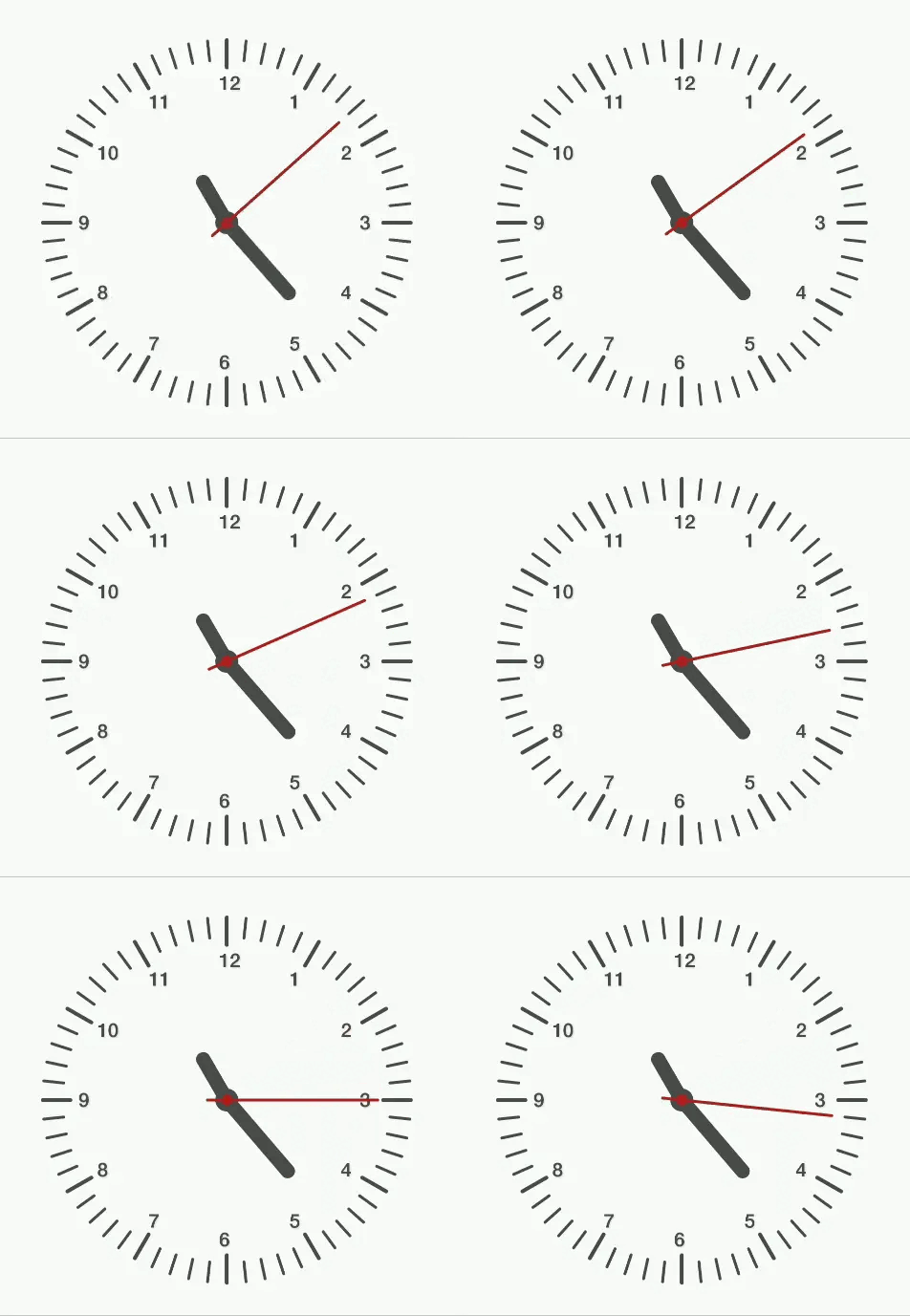
實(shí)現(xiàn)步驟:
繪制表盤[刻度,數(shù)字]
繪制指針
讓指針走起來(lái)~
具體如下:
繪制表盤:
首先需要計(jì)算出刻度的起點(diǎn)和終點(diǎn)坐標(biāo)值,這里我們通過(guò)構(gòu)建兩個(gè)半徑不同的同心圓,大圓半徑減小圓半徑,就可以得到一條刻度,只用改變角度,就可以獲取所有刻度:
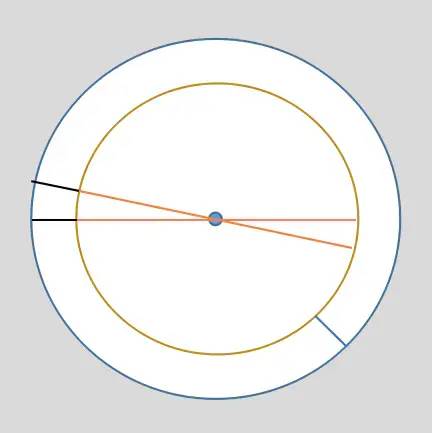
/*** 通過(guò)改變角度值,獲取不同角度方向的外圓一點(diǎn)到圓心連線過(guò)內(nèi)圓一點(diǎn)的路徑坐標(biāo)集合* @param x0 圓心x* @param y0 圓心y* @param outRadius 外圓半徑* @param innerRadius 內(nèi)圓半徑* @param angle 角度* @return 返回*/private float[] getDialPaths(int x0,int y0,int outRadius,int innerRadius,int angle){float[] paths = new float[4];paths[0] = (float) (x0 + outRadius * Math.cos(angle * Math.PI / 180));paths[1] = (float) (y0 + outRadius * Math.sin(angle * Math.PI / 180));paths[2] = (float) (x0 + innerRadius * Math.cos(angle * Math.PI / 180));paths[3] = (float) (y0 + innerRadius * Math.sin(angle * Math.PI / 180));return paths;}
秒針刻度間隔360/60 = 6 度,循環(huán)繪制60次,每一次角度加6,就可以了,繪制代碼如下:
for (int i = 0; i < 60 ; i++) {if (i % 5 == 0){//獲取刻度路徑float[] dialKdPaths = getDialPaths(halfMinLength, halfMinLength, halfMinLength - 8, halfMinLength * 5 / 6, -i * 6);canvas.drawLines(dialKdPaths,paintKd30);float[] dialPathsStr = getDialPaths(halfMinLength, halfMinLength, halfMinLength - 8, halfMinLength * 3 / 4, -i * 6);canvas.drawText(strKedu[i/5],dialPathsStr[2] - 16,dialPathsStr[3] + 14,paintKd30Text);continue;}float[] dialKdPaths = getDialPaths(halfMinLength, halfMinLength, halfMinLength - 8, halfMinLength * 7 / 8, -i * 6);canvas.drawLines(dialKdPaths,paintKdSecond);}
繪制指針和旋轉(zhuǎn)指針
這里的重點(diǎn)在于對(duì)指針旋轉(zhuǎn)的理解:
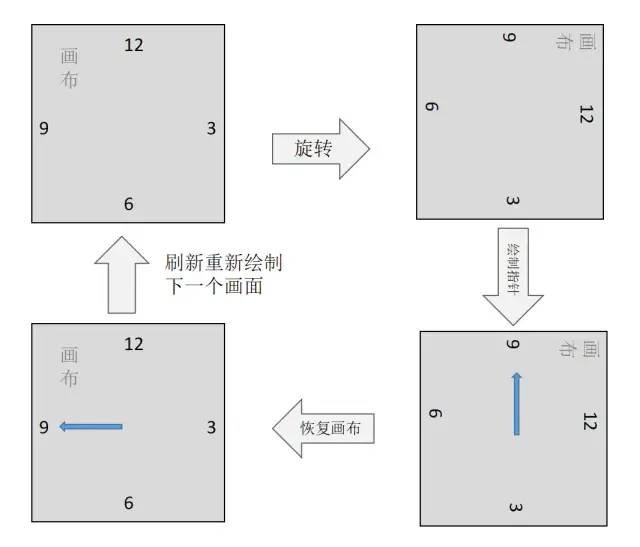
通過(guò)上圖可以看到,我們通過(guò)旋轉(zhuǎn)畫布,然后繪制指針,最后恢復(fù)畫布,從而改變了指針的指向,具體操作過(guò)程是:
保存已經(jīng)繪制畫面
以一定角度旋轉(zhuǎn)畫布
繪制指針
恢復(fù)畫布角度
代碼如下:以時(shí)針繪制為例
//時(shí)針繪制canvas.save(); //保存之前內(nèi)容canvas.rotate(angleHour,halfMinLength,halfMinLength); //旋轉(zhuǎn)的是畫布,從而得到指針旋轉(zhuǎn)的效果canvas.drawLine(halfMinLength,halfMinLength,halfMinLength,halfMinLength*3/4,paintHour);canvas.restore(); //恢復(fù)
讓時(shí)間走起來(lái)
通過(guò)實(shí)時(shí)的計(jì)算時(shí)針,分針,秒針的角度,然后通知重新繪制畫面,我們就看到時(shí)間在走動(dòng)。
/*** 更新時(shí)分秒針的角度,開始繪制*/public void startRun(){new Thread(new Runnable() {@Overridepublic void run() {while (drawable){try {Thread.sleep(1000); // 睡1supdataAngleSecond(); //更新秒針角度updataAngleMinute(); //更新分針角度updataAngleHour(); //更新時(shí)針角度postInvalidate(); //重新繪制} catch (InterruptedException e) {e.printStackTrace();}}}}).start();}
完整代碼如下:
public class DialView extends View {private boolean drawable = true; //是否可以繪制private int halfMinLength; //最小寬/高的一半長(zhǎng)度private Paint paintKd30; //時(shí)針刻度線畫筆private Paint paintKd30Text; // 時(shí)針數(shù)字畫筆private Paint paintKdSecond; //秒針刻度線畫筆private Paint paintHour; //時(shí)針畫筆private Paint paintCircleBar;//指針圓心畫筆private Paint paintMinute; //分針畫筆private Paint paintSecond; //秒針畫筆private float angleHour; //時(shí)針旋轉(zhuǎn)角度private float angleMinute; //分針旋轉(zhuǎn)角度private float angleSecond; //秒針旋轉(zhuǎn)角度private int cuurSecond; //當(dāng)前秒private int cuurMinute; //當(dāng)前分private int cuurHour; //當(dāng)前時(shí)private Calendar mCalendar;private boolean isMorning = true; //上午/下午private String[] strKedu = {"3","2","1","12","11","10","9","8","7","6","5","4"};public DialView(Context context) {this(context,null);}public DialView(Context context, AttributeSet attrs) {this(context, attrs,-1);}public DialView(Context context, AttributeSet attrs, int defStyleAttr) {super(context, attrs, defStyleAttr);initPaint(); //初始化畫筆initTime(); //初始化時(shí)間}protected void onMeasure(int widthMeasureSpec, int heightMeasureSpec) {super.onMeasure(widthMeasureSpec, heightMeasureSpec);int width = MeasureSpec.getSize(widthMeasureSpec);int height = MeasureSpec.getSize(heightMeasureSpec);halfMinLength = Math.min(width,height) / 2;System.out.println(halfMinLength);}protected void onDraw(Canvas canvas) {super.onDraw(canvas);//表盤刻度繪制for (int i = 0; i < 60 ; i++) {if (i % 5 == 0){//獲取刻度路徑float[] dialKdPaths = getDialPaths(halfMinLength, halfMinLength, halfMinLength - 8, halfMinLength * 5 / 6, -i * 6);canvas.drawLines(dialKdPaths,paintKd30);float[] dialPathsStr = getDialPaths(halfMinLength, halfMinLength, halfMinLength - 8, halfMinLength * 3 / 4, -i * 6);canvas.drawText(strKedu[i/5],dialPathsStr[2] - 16,dialPathsStr[3] + 14,paintKd30Text);continue;}float[] dialKdPaths = getDialPaths(halfMinLength, halfMinLength, halfMinLength - 8, halfMinLength * 7 / 8, -i * 6);canvas.drawLines(dialKdPaths,paintKdSecond);}//指針繪制//時(shí)針繪制canvas.save(); //保存之前內(nèi)容canvas.rotate(angleHour,halfMinLength,halfMinLength); //旋轉(zhuǎn)的是畫布,從而得到指針旋轉(zhuǎn)的效果canvas.drawLine(halfMinLength,halfMinLength,halfMinLength,halfMinLength*3/4,paintHour);canvas.restore(); //恢復(fù)//繪制分針canvas.save();canvas.rotate(angleMinute,halfMinLength,halfMinLength); //旋轉(zhuǎn)的是畫布,從而得到指針旋轉(zhuǎn)的效果canvas.drawLine(halfMinLength,halfMinLength,halfMinLength,halfMinLength/2,paintMinute);paintCircleBar.setColor(Color.rgb(75,75,75));paintCircleBar.setShadowLayer(4,4,8,Color.argb(70,40,40,40));canvas.drawCircle(halfMinLength,halfMinLength,24,paintCircleBar);canvas.restore();//繪制秒針canvas.save();canvas.rotate(angleSecond,halfMinLength,halfMinLength); //旋轉(zhuǎn)的是畫布,從而得到指針旋轉(zhuǎn)的效果canvas.drawLine(halfMinLength,halfMinLength + 40,halfMinLength,halfMinLength / 4 - 20,paintSecond);paintCircleBar.setColor(Color.rgb(178,34,34));paintCircleBar.setShadowLayer(4,4,8,Color.argb(50,80,0,0));canvas.drawCircle(halfMinLength,halfMinLength,12,paintCircleBar);canvas.restore();}/*** 初始化時(shí),分,秒*/private void initTime() {mCalendar = Calendar.getInstance();cuurHour = mCalendar.get(Calendar.HOUR_OF_DAY);cuurMinute = mCalendar.get(Calendar.MINUTE);cuurSecond = mCalendar.get(Calendar.SECOND);if (cuurHour >= 12){cuurHour = cuurHour - 12;isMorning = false;}else{isMorning = true;}angleSecond = cuurSecond * 6f;angleMinute = cuurMinute * 6f;angleHour = cuurHour * 6f * 5f;}/*** 更新時(shí)分秒針的角度,開始繪制*/public void startRun(){new Thread(new Runnable() {public void run() {while (drawable){try {Thread.sleep(1000); // 睡1supdataAngleSecond(); //更新秒針角度updataAngleMinute(); //更新分針角度updataAngleHour(); //更新時(shí)針角度postInvalidate(); //重新繪制} catch (InterruptedException e) {e.printStackTrace();}}}}).start();}private void updataAngleHour() {//更新時(shí)針角度angleHour = angleHour + (30f/3600);if (angleHour >= 360){angleHour = 0;cuurHour = 0;}}private void updataAngleMinute() {//更新分針角度angleMinute = angleMinute + 0.1f;if (angleMinute >= 360){angleMinute = 0;cuurMinute = 0;cuurHour += 1;}}private void updataAngleSecond() {//更新秒針角度angleSecond = angleSecond + 6;cuurSecond += 1;if (angleSecond >= 360){angleSecond = 0;cuurSecond = 0;cuurMinute += 1;//一分鐘同步一次本地時(shí)間mCalendar = Calendar.getInstance();cuurHour = mCalendar.get(Calendar.HOUR_OF_DAY);cuurMinute = mCalendar.get(Calendar.MINUTE);cuurSecond = mCalendar.get(Calendar.SECOND);if (cuurHour >= 12){cuurHour = cuurHour - 12;isMorning = false;}else{isMorning = true;}angleSecond = cuurSecond * 6f;angleMinute = cuurMinute * 6f;angleHour = cuurHour * 6f * 5f;}}/*** 停止繪制*/public void stopDrawing(){drawable = false;}/*** 通過(guò)改變角度值,獲取不同角度方向的外圓一點(diǎn)到圓心連線過(guò)內(nèi)圓一點(diǎn)的路徑坐標(biāo)集合* @param x0 圓心x* @param y0 圓心y* @param outRadius 外圓半徑* @param innerRadius 內(nèi)圓半徑* @param angle 角度* @return 返回*/private float[] getDialPaths(int x0,int y0,int outRadius,int innerRadius,int angle){float[] paths = new float[4];paths[0] = (float) (x0 + outRadius * Math.cos(angle * Math.PI / 180));paths[1] = (float) (y0 + outRadius * Math.sin(angle * Math.PI / 180));paths[2] = (float) (x0 + innerRadius * Math.cos(angle * Math.PI / 180));paths[3] = (float) (y0 + innerRadius * Math.sin(angle * Math.PI / 180));return paths;}/*** 初始化畫筆參數(shù)*/private void initPaint() {paintKd30 = new Paint();paintKd30.setStrokeWidth(8);paintKd30.setColor(Color.rgb(75,75,75));paintKd30.setAntiAlias(true);paintKd30.setDither(true);paintKd30.setStrokeCap(Paint.Cap.ROUND);paintKd30Text = new Paint();paintKd30Text.setTextAlign(Paint.Align.LEFT); //左對(duì)齊paintKd30Text.setStrokeWidth(6); //設(shè)置寬度paintKd30Text.setTextSize(40); //文字大小paintKd30Text.setTypeface(Typeface.DEFAULT_BOLD); //加粗paintKd30Text.setColor(Color.rgb(75,75,75)); //畫筆顏色paintKd30Text.setAntiAlias(true); //抗鋸齒paintKd30Text.setDither(true); //抖動(dòng)paintKd30Text.setStrokeCap(Paint.Cap.ROUND); //筆尖圓角paintKd30Text.setShadowLayer(4,2,4,Color.argb(60,90,90,90)); //陰影paintKdSecond = new Paint();paintKdSecond.setStrokeWidth(6);paintKdSecond.setColor(Color.rgb(75,75,75));paintKdSecond.setAntiAlias(true);paintKdSecond.setDither(true);paintKdSecond.setStrokeCap(Paint.Cap.ROUND);paintKdSecond.setShadowLayer(4,5,10,Color.argb(50,80,80,80));paintHour = new Paint();paintHour.setStrokeWidth(30);paintHour.setColor(Color.rgb(75,75,75));paintHour.setAntiAlias(true);paintHour.setDither(true);paintHour.setStrokeCap(Paint.Cap.ROUND);paintHour.setShadowLayer(4,5,10,Color.argb(50,80,80,80));paintCircleBar = new Paint();paintCircleBar.setStrokeWidth(6);// paintCircleBar.setColor(Color.rgb(178,34,34));paintCircleBar.setAntiAlias(true);paintCircleBar.setDither(true);paintCircleBar.setStrokeCap(Paint.Cap.ROUND);// paintCircleBar.setShadowLayer(4,5,10,Color.argb(100,80,80,80));paintMinute = new Paint();paintMinute.setStrokeWidth(30);paintMinute.setColor(Color.rgb(75,75,75));paintMinute.setAntiAlias(true);paintMinute.setDither(true);paintMinute.setStrokeCap(Paint.Cap.ROUND);paintMinute.setShadowLayer(4,5,10,Color.rgb(80,80,80));paintSecond = new Paint();paintSecond.setStrokeWidth(6);paintSecond.setColor(Color.rgb(180,30,30));paintSecond.setAntiAlias(true);paintSecond.setDither(true);paintSecond.setStrokeCap(Paint.Cap.ROUND);paintSecond.setShadowLayer(4,2,10,Color.argb(100,90,90,90));}}
代碼中有比較詳細(xì)的注釋。
評(píng)論
圖片
表情