
企業(yè)級(jí)日志系統(tǒng) ELK 原理與實(shí)踐詳細(xì)介紹

1.1、ELK簡(jiǎn)介
ELK是Elasticsearch、Logstash、Kibana三大開(kāi)源框架首字母大寫(xiě)簡(jiǎn)稱(chēng)(但是后期出現(xiàn)的filebeat(beats中的一種)可以用來(lái)替代logstash的數(shù)據(jù)收集功能,比較輕量級(jí))。市面上也被稱(chēng)為 Elastic Stack。
Filebeat是用于轉(zhuǎn)發(fā)和集中日志數(shù)據(jù)的輕量級(jí)傳送工具。Filebeat監(jiān)視您指定的日志文件或位置,收集日志事件,并將它們轉(zhuǎn)發(fā)到Elasticsearch或 Logstash進(jìn)行索引。Filebeat的工作方式如下:?jiǎn)?dòng)Filebeat時(shí),它將啟動(dòng)一個(gè)或多個(gè)輸入,這些輸入將在為日志數(shù)據(jù)指定的位置中查找。對(duì)于Filebeat所找到的每個(gè)日志,F(xiàn)ilebeat都會(huì)啟動(dòng)收集器。每個(gè)收集器都讀取單個(gè)日志以獲取新內(nèi)容,并將新日志數(shù)據(jù)發(fā)送到libbeat,libbeat將聚集事件,并將聚集的數(shù)據(jù)發(fā)送到為Filebeat配置的輸出。
Logstash是免費(fèi)且開(kāi)放的服務(wù)器端數(shù)據(jù)處理管道,能夠從多個(gè)來(lái)源采集數(shù)據(jù),轉(zhuǎn)換數(shù)據(jù),然后將數(shù)據(jù)發(fā)送到您最喜歡的“存儲(chǔ)庫(kù)”中。Logstash能夠動(dòng)態(tài)地采集、轉(zhuǎn)換和傳輸數(shù)據(jù),不受格式或復(fù)雜度的影響。利用Grok從非結(jié)構(gòu)化數(shù)據(jù)中派生出結(jié)構(gòu),從IP地址解碼出地理坐標(biāo),匿名化或排除敏感字段,并簡(jiǎn)化整體處理過(guò)程。
Elasticsearch是Elastic Stack核心的分布式搜索和分析引擎,是一個(gè)基于Lucene、分布式、通過(guò)Restful方式進(jìn)行交互的近實(shí)時(shí)搜索平臺(tái)框架。Elasticsearch為所有類(lèi)型的數(shù)據(jù)提供近乎實(shí)時(shí)的搜索和分析。無(wú)論您是結(jié)構(gòu)化文本還是非結(jié)構(gòu)化文本,數(shù)字?jǐn)?shù)據(jù)或地理空間數(shù)據(jù),Elasticsearch都能以支持快速搜索的方式有效地對(duì)其進(jìn)行存儲(chǔ)和索引。
Kibana是一個(gè)針對(duì)Elasticsearch的開(kāi)源分析及可視化平臺(tái),用來(lái)搜索、查看交互存儲(chǔ)在Elasticsearch索引中的數(shù)據(jù)。使用Kibana,可以通過(guò)各種圖表進(jìn)行高級(jí)數(shù)據(jù)分析及展示。并且可以為 Logstash 和 ElasticSearch 提供的日志分析友好的 Web 界面,可以匯總、分析和搜索重要數(shù)據(jù)日志。還可以讓海量數(shù)據(jù)更容易理解。它操作簡(jiǎn)單,基于瀏覽器的用戶(hù)界面可以快速創(chuàng)建儀表板(dashboard)實(shí)時(shí)顯示Elasticsearch查詢(xún)動(dòng)態(tài)
1.2、為什么要使用ELK
日志主要包括系統(tǒng)日志、應(yīng)用程序日志和安全日志。系統(tǒng)運(yùn)維和開(kāi)發(fā)人員可以通過(guò)日志了解服務(wù)器軟硬件信息、檢查配置過(guò)程中的錯(cuò)誤及錯(cuò)誤發(fā)生的原因。經(jīng)常分析日志可以了解服務(wù)器的負(fù)荷,性能安全性,從而及時(shí)采取措施糾正錯(cuò)誤。
往往單臺(tái)機(jī)器的日志我們使用grep、awk等工具就能基本實(shí)現(xiàn)簡(jiǎn)單分析,但是當(dāng)日志被分散的儲(chǔ)存不同的設(shè)備上。如果你管理數(shù)十上百臺(tái)服務(wù)器,你還在使用依次登錄每臺(tái)機(jī)器的傳統(tǒng)方法查閱日志。這樣是不是感覺(jué)很繁瑣和效率低下。當(dāng)務(wù)之急我們使用集中化的日志管理,例如:開(kāi)源的syslog,將所有服務(wù)器上的日志收集匯總。集中化管理日志后,日志的統(tǒng)計(jì)和檢索又成為一件比較麻煩的事情,一般我們使用grep、awk和wc等Linux命令能實(shí)現(xiàn)檢索和統(tǒng)計(jì),但是對(duì)于要求更高的查詢(xún)、排序和統(tǒng)計(jì)等要求和龐大的機(jī)器數(shù)量依然使用這樣的方法難免有點(diǎn)力不從心。
一般大型系統(tǒng)是一個(gè)分布式部署的架構(gòu),不同的服務(wù)模塊部署在不同的服務(wù)器上,問(wèn)題出現(xiàn)時(shí),大部分情況需要根據(jù)問(wèn)題暴露的關(guān)鍵信息,定位到具體的服務(wù)器和服務(wù)模塊,構(gòu)建一套集中式日志系統(tǒng),可以提高定位問(wèn)題的效率。
1.3、完整日志系統(tǒng)基本特征
收集:能夠采集多種來(lái)源的日志數(shù)據(jù) 傳輸:能夠穩(wěn)定的把日志數(shù)據(jù)解析過(guò)濾并傳輸?shù)酱鎯?chǔ)系統(tǒng) 存儲(chǔ):存儲(chǔ)日志數(shù)據(jù) 分析:支持 UI 分析 警告:能夠提供錯(cuò)誤報(bào)告,監(jiān)控機(jī)制
二、ELK架構(gòu)分析
2.1、beats+elasticsearch+kibana模式
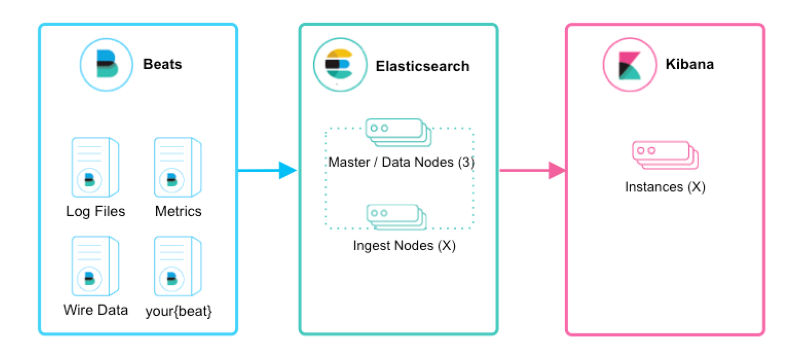
如上圖所示,該ELK框架由beats(日志分析我們通常使用filebeat)+elasticsearch+kibana構(gòu)成,這個(gè)框架比較簡(jiǎn)單,入門(mén)級(jí)的框架。其中filebeat也能通過(guò)module對(duì)日志進(jìn)行簡(jiǎn)單的解析和索引。并查看預(yù)建的Kibana儀表板。
該框架適合簡(jiǎn)單的日志數(shù)據(jù),一般可以用來(lái)玩玩,生產(chǎn)環(huán)境建議接入logstash
2.2、beats+logstash+elasticsearch+kibana模式
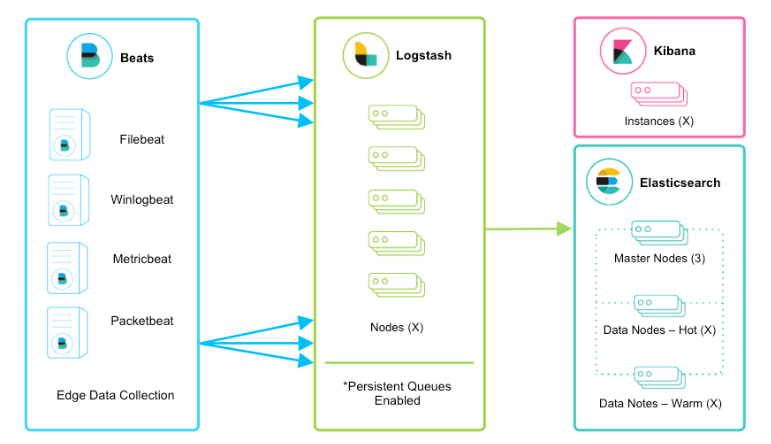
該框架是在上面的框架的基礎(chǔ)上引入了logstash,引入logstash帶來(lái)的好處如下:
通Logstash具有基于磁盤(pán)的自適應(yīng)緩沖系統(tǒng),該系統(tǒng)將吸收傳入的吞吐量,從而減輕背壓 從其他數(shù)據(jù)源(例如數(shù)據(jù)庫(kù),S3或消息傳遞隊(duì)列)中提取 將數(shù)據(jù)發(fā)送到多個(gè)目的地,例如S3,HDFS或?qū)懭胛募?/span> 使用條件數(shù)據(jù)流邏輯組成更復(fù)雜的處理管道
filebeat結(jié)合logstash帶來(lái)的優(yōu)勢(shì):
1、水平可擴(kuò)展性,高可用性和可變負(fù)載處理:filebeat和logstash可以實(shí)現(xiàn)節(jié)點(diǎn)之間的負(fù)載均衡,多個(gè)logstash可以實(shí)現(xiàn)logstash的高可用
2、消息持久性與至少一次交付保證:使用Filebeat或Winlogbeat進(jìn)行日志收集時(shí),可以保證至少一次交付。從Filebeat或Winlogbeat到Logstash以及從Logstash到Elasticsearch的兩種通信協(xié)議都是同步的,并且支持確認(rèn)。Logstash持久隊(duì)列提供跨節(jié)點(diǎn)故障的保護(hù)。對(duì)于Logstash中的磁盤(pán)級(jí)彈性,確保磁盤(pán)冗余非常重要。
3、具有身份驗(yàn)證和有線加密的端到端安全傳輸:從Beats到Logstash以及從 Logstash到Elasticsearch的傳輸都可以使用加密方式傳遞 。與Elasticsearch進(jìn)行通訊時(shí),有很多安全選項(xiàng),包括基本身份驗(yàn)證,TLS,PKI,LDAP,AD和其他自定義領(lǐng)域
當(dāng)然在該框架的基礎(chǔ)上還可以引入其他的輸入數(shù)據(jù)的方式:比如:TCP,UDP和HTTP協(xié)議是將數(shù)據(jù)輸入Logstash的常用方法(如下圖所示):

2.3、beats+緩存/消息隊(duì)列+logstash+elasticsearch+kibana模式
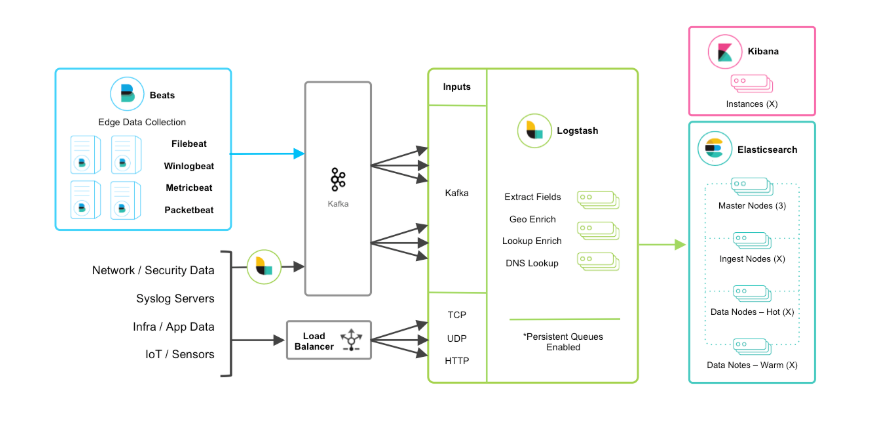
在如上的基礎(chǔ)上我們可以在beats和logstash中間添加一些組件redis、kafka、RabbitMQ等,添加中間件將會(huì)有如下好處:第一,降低對(duì)日志所在機(jī)器的影響,這些機(jī)器上一般都部署著反向代理或應(yīng)用服務(wù),本身負(fù)載就很重了,所以盡可能的在這些機(jī)器上少做事;第二,如果有很多臺(tái)機(jī)器需要做日志收集,那么讓每臺(tái)機(jī)器都向Elasticsearch持續(xù)寫(xiě)入數(shù)據(jù),必然會(huì)對(duì)Elasticsearch造成壓力,因此需要對(duì)數(shù)據(jù)進(jìn)行緩沖,同時(shí),這樣的緩沖也可以一定程度的保護(hù)數(shù)據(jù)不丟失;第三,將日志數(shù)據(jù)的格式化與處理放到Indexer中統(tǒng)一做,可以在一處修改代碼、部署,避免需要到多臺(tái)機(jī)器上去修改配置
三、ELK部署
elk各個(gè)組件的網(wǎng)址可以在官網(wǎng)下載:https://www.elastic.co/cn/
或者在中文社區(qū)下載:https://elasticsearch.cn/download/
注:本次安裝都是采用壓縮包的方式安裝
3.1、filebeat的安裝介紹
3.1.1、原理
Filebeat的工作方式如下:?jiǎn)?dòng)Filebeat時(shí),它將啟動(dòng)一個(gè)或多個(gè)輸入,這些輸入將在為日志數(shù)據(jù)指定的位置中查找。對(duì)于Filebeat所找到的每個(gè)日志,F(xiàn)ilebeat都會(huì)啟動(dòng)收集器。每個(gè)收集器都讀取單個(gè)日志以獲取新內(nèi)容,并將新日志數(shù)據(jù)發(fā)送到libbeat,libbeat將聚集事件,并將聚集的數(shù)據(jù)發(fā)送到為Filebeat配置的輸出
Filebeat結(jié)構(gòu):由兩個(gè)組件構(gòu)成,分別是inputs(輸入)和harvesters(收集器),這些組件一起工作來(lái)跟蹤文件并將事件數(shù)據(jù)發(fā)送到您指定的輸出,harvester負(fù)責(zé)讀取單個(gè)文件的內(nèi)容。harvester逐行讀取每個(gè)文件,并將內(nèi)容發(fā)送到輸出。為每個(gè)文件啟動(dòng)一個(gè)harvester。harvester負(fù)責(zé)打開(kāi)和關(guān)閉文件,這意味著文件描述符在harvester運(yùn)行時(shí)保持打開(kāi)狀態(tài)。如果在收集文件時(shí)刪除或重命名文件,F(xiàn)ilebeat將繼續(xù)讀取該文件。這樣做的副作用是,磁盤(pán)上的空間一直保留到harvester關(guān)閉。默認(rèn)情況下,F(xiàn)ilebeat保持文件打開(kāi),直到達(dá)到close_inactive
3.1.2、簡(jiǎn)單安裝
本文采用壓縮包的方式安裝,linux版本,filebeat-7.7.0-linux-x86_64.tar.gz
curl-L-Ohttps://artifacts.elastic.co/downloads/beats/filebeat/filebeat-7.7.0-linux-x86_64.tar.gz
tar?-xzvf?filebeat-7.7.0-linux-x86_64.tar.gz
配置示例文件:filebeat.reference.yml(包含所有未過(guò)時(shí)的配置項(xiàng)) 配置文件:filebeat.yml 啟動(dòng)命令:./filebeat -e
3.2、logstash的安裝介紹
3.2.1、基本原理
logstash分為三個(gè)步驟:inputs(必須的)→ filters(可選的)→ outputs(必須的),inputs生成時(shí)間,filters對(duì)其事件進(jìn)行過(guò)濾和處理,outputs輸出到輸出端或者決定其存儲(chǔ)在哪些組件里。inputs和outputs支持編碼和解碼
Logstash管道中的每個(gè)input階段都在自己的線程中運(yùn)行。將寫(xiě)事件輸入到內(nèi)存(默認(rèn))或磁盤(pán)上的中心隊(duì)列。每個(gè)管道工作線程從該隊(duì)列中取出一批事件,通過(guò)配置的filter處理該批事件,然后通過(guò)output輸出到指定的組件存儲(chǔ)。管道處理數(shù)據(jù)量的大小和管道工作線程的數(shù)量是可配置的
3.2.2、簡(jiǎn)單安裝
下載地址1:https://www.elastic.co/cn/downloads/logstash
下載地址2:https://elasticsearch.cn/download/
這里需要安裝jdk,我使用的是elasticsearch7.7.0自帶的jdk:

解壓即安裝:
tar?-zxvf?logstash-7.7.0.tar.gz
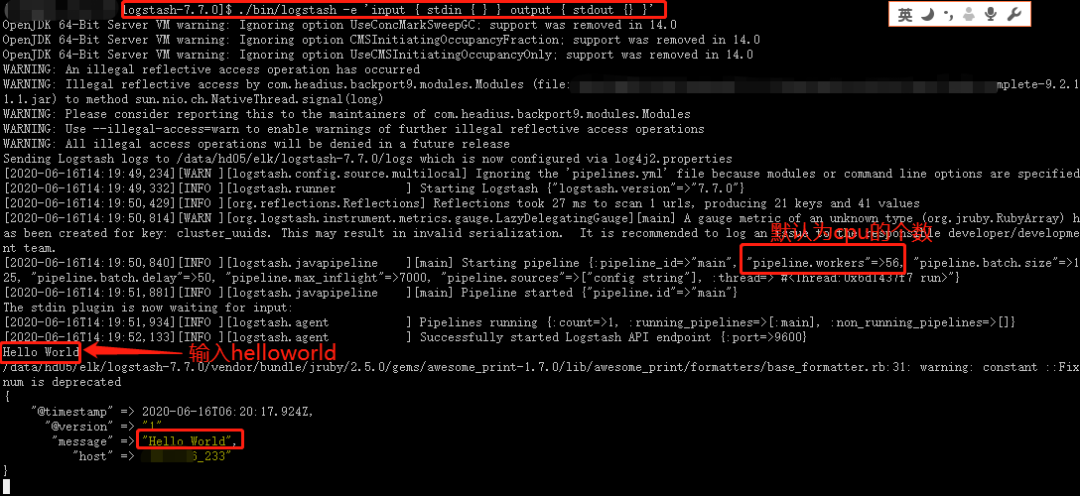
來(lái)個(gè)logstash版本的HelloWorld:
./bin/logstash?-e?'input?{?stdin?{?}?}?output?{?stdout?{}?}'
3.3、elasticsearch的安裝介紹
3.3.1、基本介紹
Elasticsearch(ES)是一個(gè)基于Lucene構(gòu)建的開(kāi)源、分布式、RESTful接口的全文搜索引擎。Elasticsearch還是一個(gè)分布式文檔數(shù)據(jù)庫(kù),其中每個(gè)字段均可被索引,而且每個(gè)字段的數(shù)據(jù)均可被搜索,ES能夠橫向擴(kuò)展至數(shù)以百計(jì)的服務(wù)器存儲(chǔ)以及處理PB級(jí)的數(shù)據(jù)。可以在極短的時(shí)間內(nèi)存儲(chǔ)、搜索和分析大量的數(shù)據(jù)。
基本概念有:Cluster 集群、Node節(jié)點(diǎn)、Index索引、Document文檔、Shards & Replicas分片與副本等
elasticsearch的優(yōu)勢(shì):
分布式:橫向擴(kuò)展非常靈活 全文檢索:基于lucene的強(qiáng)大的全文檢索能力; 近實(shí)時(shí)搜索和分析:數(shù)據(jù)進(jìn)入ES,可達(dá)到近實(shí)時(shí)搜索,還可進(jìn)行聚合分析 高可用:容錯(cuò)機(jī)制,自動(dòng)發(fā)現(xiàn)新的或失敗的節(jié)點(diǎn),重組和重新平衡數(shù)據(jù) 模式自由:ES的動(dòng)態(tài)mapping機(jī)制可以自動(dòng)檢測(cè)數(shù)據(jù)的結(jié)構(gòu)和類(lèi)型,創(chuàng)建索引并使數(shù)據(jù)可搜索。 RESTful API:JSON + HTTP
3.3.2、linux系統(tǒng)參數(shù)設(shè)置
1、設(shè)置系統(tǒng)配置
ulimit?#暫時(shí)修改,切換到該用戶(hù)es,ulimit?-n?65535?
/etc/security/limits.conf?#永久修改?es?-??nofile??65535
ulimit?-a?#查看當(dāng)前用戶(hù)的資源限制

2、禁用sawpping
方式一:
swapoff?-a?#臨時(shí)禁用所有的swap文件
vim?/etc/fstab?#注釋掉所有的swap相關(guān)的行,永久禁用

方式二:
cat?/proc/sys/vm/swappiness?#查看該值
sysctl?vm.swappiness=1?#臨時(shí)修改該值為1
vim?/etc/sysctl.conf?#修改文件?永久生效
vm.swappiness?=?1?#如果有該值,則修改該值,若沒(méi)有,則追加該選項(xiàng),sysctl?-p生效命令

方式三:
配置elasticsearch.yml文件,添加如下配置:
bootstrap.memory_lock:?true
GET?_nodes?filter_path=**.mlockall??#檢查如上配置是否成功
注意:如果試圖分配比可用內(nèi)存更多的內(nèi)存,mlockall可能會(huì)導(dǎo)致JVM或shell會(huì)話退出!

3、配置文件描述符
ulimit?-n?65535??#臨時(shí)修改
vim?/etc/security/limits.conf?#永久修改
es?????????soft????nproc?????65535
es?????????hard????nproc?????65535

4、配置虛擬內(nèi)存
sysctl?-w?vm.max_map_count=262144?#臨時(shí)修改該值
vim?/etc/sysctl.conf?#永久修改
vm.max_map_count=262144

5、配置線程數(shù)
ulimit?-u?4096?#臨時(shí)修改
vim?/etc/security/limits.conf?#永久修改
3.3.3、elasticsearch安裝
elasticsearch是需要其他用戶(hù)啟動(dòng)的,所以需要先創(chuàng)建一個(gè)新的用戶(hù)elk:
groupadd??elastic
useradd?elk?-d?/data/hd05/elk?-g?elastic
echo?'2edseoir@'?|?passwd?elk?--stdin
下載:https://elasticsearch.cn/download/
也可以去官網(wǎng)下載:wget https://artifacts.elastic.co/downloads/elasticsearch/elasticsearch-7.7.0-linux-x86_64.tar.gz
解壓:tar -zxvf elasticsearch-7.7.0-linux-x86_64.tar.gz
建立軟鏈接:ln –s elasticsearch-7.7.0? es
目錄介紹:
$ES_HOME:/data/hd05/elk/elasticsearch-7.7.0
bin:?$ES_HOME/bin??#es啟動(dòng)命令和插件安裝命令
conf:$ES_HOME/conf?#elasticsearch.yml配置文件目錄
data:$ES_HOME/data??#對(duì)應(yīng)的參數(shù)path.data,用于存放索引分片數(shù)據(jù)文件
logs:$ES_HOME/logs??#對(duì)應(yīng)的參數(shù)path.logs,用于存放日志
jdk:$ES_HOME/jdk??#自帶支持該es版本的jdk
plugins:?$ES_HOME/jplugins?#插件存放目錄
lib:?$ES_HOME/lib?#存放依賴(lài)包,比如java類(lèi)庫(kù)
modules:?$ES_HOME/modules?#包含所有的es模塊
配置自帶的java環(huán)境:
Vim?~/.bashrc
\############往后面添加如下內(nèi)容######################
export?JAVA_HOME=/data/hd05/elk/es/jdk
export?PATH=????????????????/??????:JAVAHOME/bin:PATH
export?CLASSPATH=.:$JAVA_HOME/lib/dt.jar\:/lib/tools.jar
jvm.options文件說(shuō)明:
配置java參數(shù)
一種是通過(guò)修改/data/hd05/elk/elasticsearch-7.7.0/config/jvm.options文件修改jvm參數(shù),一個(gè)使用過(guò)一個(gè)變量ES_JAVA_OPTS來(lái)聲明jvm參數(shù)
/data/hd05/elk/elasticsearch-7.7.0/config/jvm.options介紹:
8:-Xmx2g??#表示只適合java8
8-:-Xmx2g??#表示適合高于java8的版本
8-9:-Xmx2g?#表示適合java8,和java9
其他配置,都是jvm的相關(guān)參數(shù),如果要想明白,得去看java虛擬機(jī)

通過(guò)變量ES_JAVA_OPTS來(lái)聲明jvm參數(shù):
例如:export?ES_JAVA_OPTS="$ES_JAVA_OPTS?-Djava.io.tmpdir=/path/to/temp/dir"
./bin/elasticsearch
配置config/jvm.options
[elk@lgh?config]$?cat??jvm.options??|?egrep?-v?'^$|#'?????????????????
-Xms2g
-Xmx2g
8-13:-XX:+UseConcMarkSweepGC
8-13:-XX:CMSInitiatingOccupancyFraction=75
8-13:-XX:+UseCMSInitiatingOccupancyOnly
14-:-XX:+UseG1GC
14-:-XX:G1ReservePercent=25
14-:-XX:InitiatingHeapOccupancyPercent=30
-Djava.io.tmpdir=${ES_TMPDIR}
-XX:+HeapDumpOnOutOfMemoryError
-XX:HeapDumpPath=data
-XX:ErrorFile=logs/hs_err_pid%p.log
8:-XX:+PrintGCDetails
8:-XX:+PrintGCDateStamps
8:-XX:+PrintTenuringDistribution
8:-XX:+PrintGCApplicationStoppedTime
8:-Xloggc:logs/gc.log
8:-XX:+UseGCLogFileRotation
8:-XX:NumberOfGCLogFiles=32
8:-XX:GCLogFileSize=64m
9-:-Xlog:gc*,gc+age=trace,safepoint:file=logs/gc.log:utctime,pid,tags:filecount=32,filesize=64m
配置加密通信證書(shū)
生成證書(shū):
方法一:
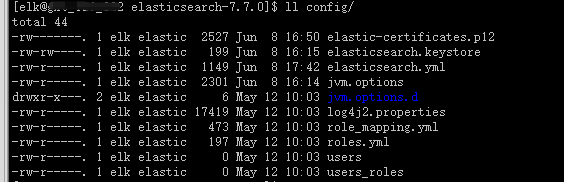
./bin/elasticsearch-certutil?ca?-out?config/elastic-certificates.p12?-pass?"password"
查看config目錄,有elastic-certificates.p12文件生成
方法二:
./bin/elasticsearch-certutil?ca??#創(chuàng)建集群認(rèn)證機(jī)構(gòu),需要交互輸入密碼
./bin/elasticsearch-certutil?cert?--ca?elastic-stack-ca.p12??#為節(jié)點(diǎn)頒發(fā)證書(shū),與上面密碼一樣
執(zhí)行./bin/elasticsearch-keystore?add?xpack.security.transport.ssl.keystore.secure_password?并輸入第一步輸入的密碼?
執(zhí)行./bin/elasticsearch-keystore?add?xpack.security.transport.ssl.truststore.secure_password?并輸入第一步輸入的密碼?
將生成的elastic-certificates.p12、elastic-stack-ca.p12文件移動(dòng)到config目錄下
配置config/elasticsearch.yml
[elk@lgh?config]$?cat??elasticsearch.yml??|?egrep?-v?'^$|#'
cluster.name:?my_cluster
node.name:?lgh01
node.data:?true
node.master:?true
path.data:?/data/hd05/elk/elasticsearch-7.7.0/data
path.logs:?/data/hd05/elk/elasticsearch-7.7.0/logs
network.host:?192.168.110.130
http.port:?9200
transport.tcp.port:?9300
discovery.seed_hosts:?["192.168.110.130","192.168.110.131","192.168.110.132","192.168.110.133"]
cluster.initial_master_nodes:?["lgh01","lgh02","lgh03"]
cluster.routing.allocation.cluster_concurrent_rebalance:?32
cluster.routing.allocation.node_concurrent_recoveries:?32
cluster.routing.allocation.node_initial_primaries_recoveries:?32
http.cors.enabled:?true
http.cors.allow-origin:?'*'

#下面的是配置x-pack和tsl/ssl加密通信的
xpack.security.enabled:?true
xpack.license.self_generated.type:?basic
xpack.security.transport.ssl.enabled:?true
xpack.security.transport.ssl.verification_mode:?certificate
xpack.security.transport.ssl.keystore.path:?elastic-certificates.p12
xpack.security.transport.ssl.truststore.path:?elastic-certificates.p12

bootstrap.memory_lock:?false???#centos6需要配置
bootstrap.system_call_filter:?false?#centos6需要配置
然后通過(guò)scp到其他的節(jié)點(diǎn),修改上面的node.name和node.master參數(shù),然后要?jiǎng)h除data目標(biāo),不然會(huì)存在報(bào)錯(cuò)
然后使用 ./bin/elasticsearch -d 后臺(tái)啟動(dòng) elasticsearch,去掉 ``-d` 則是前端啟動(dòng) elasticsearch
然后 ./bin/elasticsearch-setup-passwords interactive 配置默認(rèn)用戶(hù)的密碼:(有如下的交互),可以使用auto自動(dòng)生成。
[elk@lgh?elasticsearch-7.7.0]$?./bin/elasticsearch-setup-passwords?interactive
Enter?password?for?the?elasticsearch?keystore?:?
Initiating?the?setup?of?passwords?for?reserved?users?elastic,apm_system,kibana,logstash_system,beats_system,remote_monitoring_user.
You?will?be?prompted?to?enter?passwords?as?the?process?progresses.
Please?confirm?that?you?would?like?to?continue?[y/N]y


Enter?password?for?[elastic]:?
Reenter?password?for?[elastic]:?
Enter?password?for?[apm_system]:?
Reenter?password?for?[apm_system]:?
Enter?password?for?[kibana]:?
Reenter?password?for?[kibana]:?
Enter?password?for?[logstash_system]:?
Reenter?password?for?[logstash_system]:?
Enter?password?for?[beats_system]:?
Reenter?password?for?[beats_system]:?
Enter?password?for?[remote_monitoring_user]:?
Reenter?password?for?[remote_monitoring_user]:?
1qaz@WSXChanged?password?for?user?[apm_system]
Changed?password?for?user?[kibana]
Changed?password?for?user?[logstash_system]
Changed?password?for?user?[beats_system]
Changed?password?for?user?[remote_monitoring_user]
然后可以登錄 http://192.168.110.130:9200/ 需要輸入密碼,輸入 elastic/passwd 即可登錄

3.3.4、head插件安裝
https://github.com/mobz/elasticsearch-head ? #head官網(wǎng)
https://nodejs.org/zh-cn/download/ ?#nodejs下載
官方說(shuō)明,elasticsearch7有三種方式使用head插件,這里我只試過(guò)兩種:
第一種:使用谷歌瀏覽器head插件,這個(gè)直接在谷歌瀏覽器上面安裝插件就可以使用了
第二種:使用head服務(wù)(把head當(dāng)做一個(gè)服務(wù)來(lái)使用),安裝如下
#Running?with?built?in?server
git?clone?git://github.com/mobz/elasticsearch-head.git
cd?elasticsearch-head
npm?install
npm?run?start
open?http://localhost:9100/
如果在如上的安裝過(guò)程中報(bào)錯(cuò),可以嘗試下這個(gè)命令再繼續(xù)安裝npm install [email protected] --ignore-scripts
3.4、kibana的安裝介紹
下載地址:https://elasticsearch.cn/download/
也可以去官網(wǎng)下載
解壓后修改kibana.yml文件
[elk@lgh?config]$?cat?kibana.yml??|?egrep?-v?"^$|#"
server.port:?5601
server.host:?"0.0.0.0"
server.name:?"my-kibana"
elasticsearch.hosts:?["http://192.168.110.130:9200","http://192.168.110.131:9200","http://192.168.110.132:9200"]
elasticsearch.preserveHost:?true
kibana.index:?".kibana"
elasticsearch.username:?"elastic"
elasticsearch.password:?"password"???#或者使用keystore的保存的密碼"${ES_PWD}"
./bin/kibana ?啟動(dòng)
訪問(wèn)網(wǎng)址:http://192.168.110.130:5601/ ?并使用 elastic/password 登錄
四、實(shí)例分析
現(xiàn)在我們弄一個(gè)beats+緩存/消息隊(duì)列+logstash+elasticsearch+kibana的實(shí)例:
中間組件我們使用kafka,我們看下filebeat把kafka作為output的官網(wǎng):
https://www.elastic.co/guide/en/beats/filebeat/7.7/kafka-output.html

這里要注意kafka的版本,我試過(guò)兩個(gè)都是極端的版本,坑了自己一把。假如你已經(jīng)有kafka集群了,我這里安裝的是一個(gè)單機(jī)版本(1.1.1):
數(shù)據(jù)集我們采用apache的日志格式,下載地址:https://download.elastic.co/demos/logstash/gettingstarted/logstash-tutorial.log.gz
日志格式如下:
[elk@lgh?~]$?tail?-3?logstash-tutorial.log?
86.1.76.62?-?-?[04/Jan/2015:05:30:37?+0000]?"GET?/projects/xdotool/?HTTP/1.1"?200?12292?"http://www.haskell.org/haskellwiki/Xmonad/Frequently_asked_questions"?"Mozilla/5.0?(X11;?Linux?x86_64;?rv:24.0)?Gecko/20140205?Firefox/24.0?Iceweasel/24.3.0"
86.1.76.62?-?-?[04/Jan/2015:05:30:37?+0000]?"GET?/reset.css?HTTP/1.1"?200?1015?"http://www.semicomplete.com/projects/xdotool/"?"Mozilla/5.0?(X11;?Linux?x86_64;?rv:24.0)?Gecko/20140205?Firefox/24.0?Iceweasel/24.3.0"
86.1.76.62?-?-?[04/Jan/2015:05:30:37?+0000]?"GET?/style2.css?HTTP/1.1"?200?4877?"http://www.semicomplete.com/projects/xdotool/"?"Mozilla/5.0?(X11;?Linux?x86_64;?rv:24.0)?Gecko/20140205?Firefox/24.0?Iceweasel/24.3.0"
首先我們配置filebeat的配置文件filebeat.yml
#===========================?Filebeat?inputs?=============================

filebeat.inputs:

#?Each?-?is?an?input.?Most?options?can?be?set?at?the?input?level,?so
#?you?can?use?different?inputs?for?various?configurations.
#?Below?are?the?input?specific?configurations.

-?type:?log

??#?Change?to?true?to?enable?this?input?configuration.
??enabled:?true

??#?Paths?that?should?be?crawled?and?fetched.?Glob?based?paths.
??paths:
????-?/data/elk/logstash-tutorial.log??#這里使用的是apache的日志格式
????#-?c:\programdata\elasticsearch\logs\*

??#?Exclude?lines.?A?list?of?regular?expressions?to?match.?It?drops?the?lines?that?are
??#?matching?any?regular?expression?from?the?list.
??#exclude_lines:?['^DBG']

??#?Include?lines.?A?list?of?regular?expressions?to?match.?It?exports?the?lines?that?are
??#?matching?any?regular?expression?from?the?list.
??#include_lines:?['^ERR',?'^WARN']

??#?Exclude?files.?A?list?of?regular?expressions?to?match.?Filebeat?drops?the?files?that
??#?are?matching?any?regular?expression?from?the?list.?By?default,?no?files?are?dropped.
??#exclude_files:?['.gz$']

??#?Optional?additional?fields.?These?fields?can?be?freely?picked
??#?to?add?additional?information?to?the?crawled?log?files?for?filtering
??#fields:
??#??level:?debug
??#??review:?1

??###?Multiline?options

??#?Multiline?can?be?used?for?log?messages?spanning?multiple?lines.?This?is?common
??#?for?Java?Stack?Traces?or?C-Line?Continuation

??#?The?regexp?Pattern?that?has?to?be?matched.?The?example?pattern?matches?all?lines?starting?with?[
??#multiline.pattern:?^\[

??#?Defines?if?the?pattern?set?under?pattern?should?be?negated?or?not.?Default?is?false.
??#multiline.negate:?false

??#?Match?can?be?set?to?"after"?or?"before".?It?is?used?to?define?if?lines?should?be?append?to?a?pattern
??#?that?was?(not)?matched?before?or?after?or?as?long?as?a?pattern?is?not?matched?based?on?negate.
??#?Note:?After?is?the?equivalent?to?previous?and?before?is?the?equivalent?to?to?next?in?Logstash
??#multiline.match:?after
#================================?Outputs?=====================================
output.kafka:
??hosts:?["192.168.110.130:9092"]???#配置kafka的broker
??topic:?'filebeat_test'???#配置topic?名字
??partition.round_robin:
????reachable_only:?false
??required_acks:?1
??compression:?gzip
??max_message_bytes:?1000000
然后使用命令后臺(tái)啟動(dòng):
cd?filebeat-7.7.0-linux-x86_64?&&?nohup?./filebeat?-e?&
接下來(lái)我們配置logstash的配置文件
cd?logstash-7.7.0/?&&?mkidr?conf.d
cd?conf.d
vim?apache.conf?
################apache.conf文件中填入如下內(nèi)容##############################
input?{
????????kafka{
????????????????bootstrap_servers?=>?"192.168.110.130:9092"
????????????????topics?=>?["filebeat_test"]
????????????????group_id?=>?"test123"
????????????????auto_offset_reset?=>?"earliest"
????????}
????}
filter?{
json
????????{
????????????????source?=>?"message"
????????}
????????grok?{
????????match?=>?{?"message"?=>?"%{COMBINEDAPACHELOG}"}
????????remove_field?=>?"message"
????}
}
output?{
????stdout?{?codec?=>?rubydebug?}
????elasticsearch?{
????????????????????hosts?=>?["192.168.110.130:9200","192.168.110.131:9200","10.18.126.224:9200","192.168.110.132:9200"]
????????????????????index?=>?"test_kakfa"
????????????????????user?=>?"elastic"
????????????????????password?=>?"${ES_PWD}"
????????????????}
}
然后后臺(tái)啟動(dòng)logstash命令
cd?logstash-7.7.0/?&&?nohup?./bin/logstash?-f?conf.d/apache.conf?&
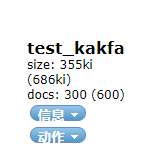
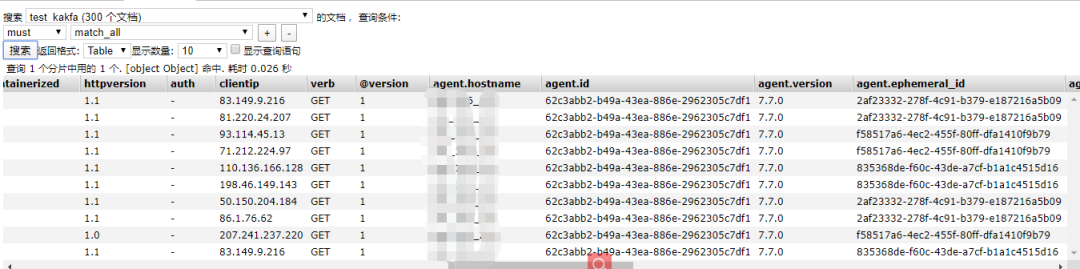
然后我們查看elasticsearch集群查看該索引
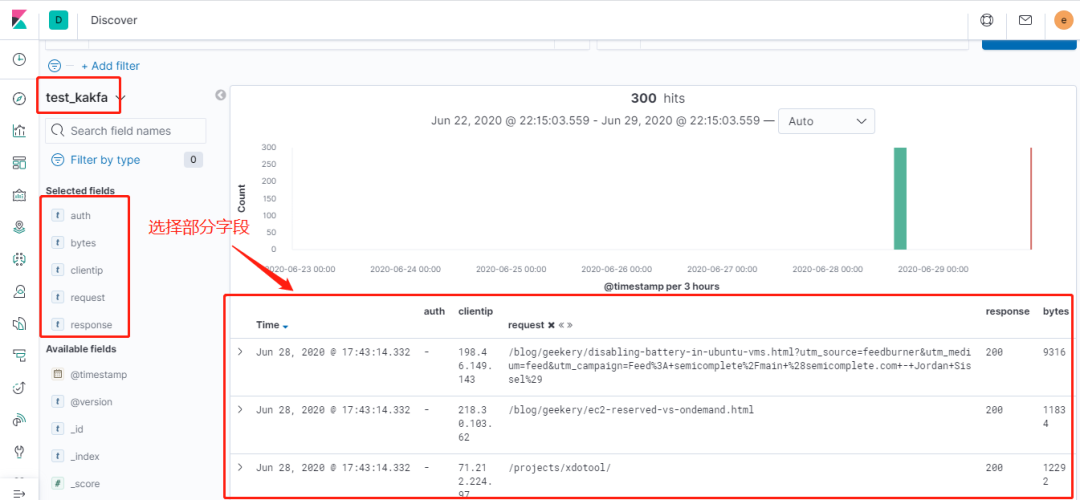
接下來(lái)我們登錄到kibana查看該索引的分析
原文鏈接:https://www.cnblogs.com/zsql/p/13164414.html
有收獲,點(diǎn)個(gè)在看?
