
一文助你搞懂 AST
點上方藍字關(guān)注公眾號「前端UpUp」
好朋友在團隊分享的文章
作者:fecym
原文地址:https://chengyuming.cn/views/webpack/AST.html
什么是 AST
抽象語法樹(Abstract Syntax Tree)簡稱 AST,是源代碼的抽象語法結(jié)構(gòu)的樹狀表現(xiàn)形式。webpack、eslint 等很多工具庫的核心都是通過抽象語法書這個概念來實現(xiàn)對代碼的檢查、分析等操作。今天我為大家分享一下 JavaScript 這類解釋型語言的抽象語法樹的概念
我們常用的瀏覽器就是通過將 js 代碼轉(zhuǎn)化為抽象語法樹來進行下一步的分析等其他操作。所以將 js 轉(zhuǎn)化為抽象語法樹更利于程序的分析。
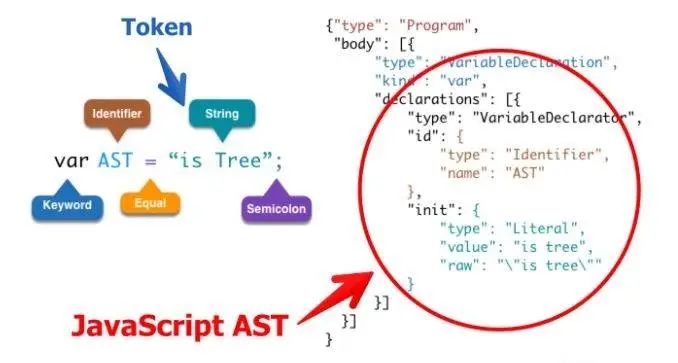
如上圖中變量聲明語句,轉(zhuǎn)換為 AST 之后就是右圖中顯示的樣式
左圖中對應(yīng)的:
var是一個關(guān)鍵字AST是一個定義者=是 Equal 等號的叫法有很多形式,在后面我們還會看到is tree是一個字符串;就是 Semicoion
首先一段代碼轉(zhuǎn)換成的抽象語法樹是一個對象,該對象會有一個頂級的 type 屬性 Program;第二個屬性是 body 是一個數(shù)組。
body 數(shù)組中存放的每一項都是一個對象,里面包含了所有的對于該語句的描述信息
type:         描述該語句的類型  --> 變量聲明的語句
kind:         變量聲明的關(guān)鍵字  --> var
declaration:  聲明內(nèi)容的數(shù)組,里面每一項也是一個對象
            type: 描述該語句的類型
            id:   描述變量名稱的對象
                type: 定義
                name: 變量的名字
            init: 初始化變量值的對象
                type:   類型
                value:  值 "is tree" 不帶引號
                row:    "\"is tree"\" 帶引號
詞法分析和語法分析
JavaScript 是解釋型語言,一般通過 詞法分析 -> 語法分析 -> 語法樹,就可以開始解釋執(zhí)行了
詞法分析:也叫掃描,是將字符流轉(zhuǎn)換為記號流(tokens),它會讀取我們的代碼然后按照一定的規(guī)則合成一個個的標識
比如說:var a = 2 ,這段代碼通常會被分解成 var、a、=、2
;[
  { type: 'Keyword', value: 'var' },
  { type: 'Identifier', value: 'a' },
  { type: 'Punctuator', value: '=' },
  { type: 'Numeric', value: '2' },
]
當詞法分析源代碼的時候,它會一個一個字符的讀取代碼,所以很形象地稱之為掃描 - scans。當它遇到空格、操作符,或者特殊符號的時候,它會認為一個話已經(jīng)完成了。
語法分析:也稱解析器,將詞法分析出來的數(shù)組轉(zhuǎn)換成樹的形式,同時驗證語法。語法如果有錯的話,拋出語法錯誤。
{..."type": "VariableDeclarator","id": {"type": "Identifier","name": "a"},...}
語法分析成 AST ,我們可以在這里在線看到效果 http://esprima.org
AST 能做什么
語法檢查、代碼風格檢查、格式化代碼、語法高亮、錯誤提示、自動補全等 代碼混淆壓縮 優(yōu)化變更代碼,改變代碼結(jié)構(gòu)等
比如說,有個函數(shù) function a() {} 我想把它變成 function b() {}
比如說,在 webpack 中代碼編譯完成后 require('a') --> __webapck__require__("*/**/a.js")
下面來介紹一套工具,可以把代碼轉(zhuǎn)成語法樹然后改變節(jié)點以及重新生成代碼
AST 解析流程
準備工具:
esprima:code => ast 代碼轉(zhuǎn) ast estraverse: traverse ast 轉(zhuǎn)換樹 escodegen: ast => code
在推薦一個常用的 AST 在線轉(zhuǎn)換網(wǎng)站:https://astexplorer.net/
比如說一段代碼 function getUser() {},我們把函數(shù)名字更改為 hello,看代碼流程
看以下代碼,簡單說明 AST 遍歷流程
const esprima = require('esprima')
const estraverse = require('estraverse')
const code = `function getUser() {}`
// 生成 AST
const ast = esprima.parseScript(code)
// 轉(zhuǎn)換 AST,只會遍歷 type 屬性
// traverse 方法中有進入和離開兩個鉤子函數(shù)
estraverse.traverse(ast, {
  enter(node) {
    console.log('enter -> node.type', node.type)
  },
  leave(node) {
    console.log('leave -> node.type', node.type)
  },
})
輸出結(jié)果如下:
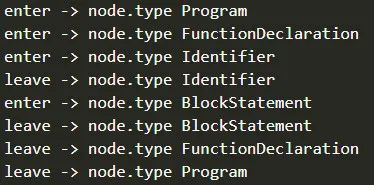
由此可以得到 AST 遍歷的流程是深度優(yōu)先,遍歷過程如下:
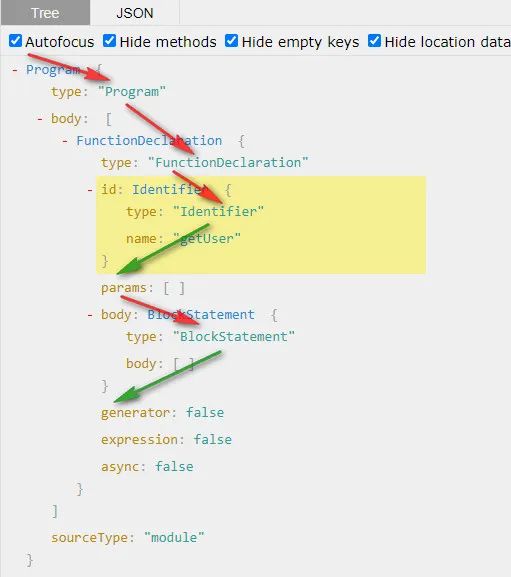
修改函數(shù)名字
此時我們發(fā)現(xiàn)函數(shù)的名字在 type 為 Identifier 的時候就是該函數(shù)的名字,我們就可以直接修改它便可實現(xiàn)一個更改函數(shù)名字的 AST 工具
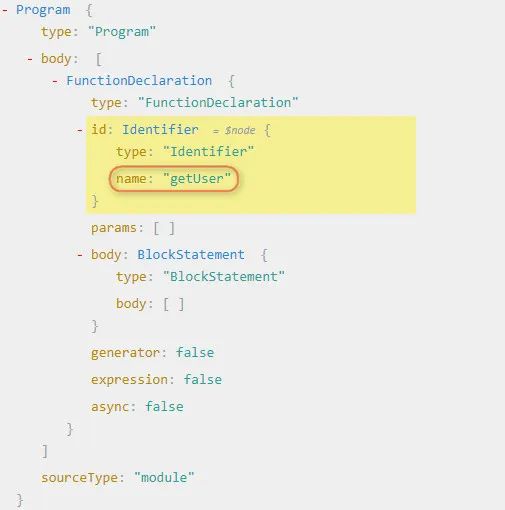
// 轉(zhuǎn)換樹
estraverse.traverse(ast, {
  // 進入離開修改都是可以的
  enter(node) {
    console.log('enter -> node.type', node.type)
    if (node.type === 'Identifier') {
      node.name = 'hello'
    }
  },
  leave(node) {
    console.log('leave -> node.type', node.type)
  },
})
// 生成新的代碼
const result = escodegen.generate(ast)
console.log(result)
// function hello() {}
babel 工作原理
提到 AST 我們肯定會想到 babel,自從 Es6 開始大規(guī)模使用以來,babel 就出現(xiàn)了,它主要解決了就是一些瀏覽器不兼容 Es6 新特性的問題,其實就把 Es6 代碼轉(zhuǎn)換為 Es5 的代碼,兼容所有瀏覽器,babel 轉(zhuǎn)換代碼其實就是用了 AST,babel 與 AST 就有著很一種特別的關(guān)系。
那么我們就在 babel 的中來使用 AST,看看 babel 是如何編譯代碼的(不講源碼啊)
需要用到兩個工具包 @babel/core、@babel/preset-env
當我們配置 babel 的時候,不管是在 .babelrc 或者 babel.config.js 文件里面配置的都有 presets 和 plugins 兩個配置項(還有其他配置項,這里不做介紹)
插件和預(yù)設(shè)的區(qū)別
// .babelrc
{
  "presets": ["@babel/preset-env"],
  "plugins": []
}
當我們配置了 presets 中有 @babel/preset-env,那么 @babel/core 就會去找 preset-env 預(yù)設(shè)的插件包,它是一套
babel 核心包并不會去轉(zhuǎn)換代碼,核心包只提供一些核心 API,真正的代碼轉(zhuǎn)換工作由插件或者預(yù)設(shè)來完成,比如要轉(zhuǎn)換箭頭函數(shù),會用到這個 plugin,@babel/plugin-transform-arrow-functions,當需要轉(zhuǎn)換的要求增加時,我們不可能去一一配置相應(yīng)的 plugin,這個時候就可以用到預(yù)設(shè)了,也就是 presets。presets 是 plugins 的集合,一個 presets 內(nèi)部包含了很多 plugin。
babel 插件的使用
現(xiàn)在我們有一個箭頭函數(shù),要想把它轉(zhuǎn)成普通函數(shù),我們就可以直接這么寫:
const babel = require('@babel/core')
const code = `const fn = (a, b) => a + b`
// babel 有 transform 方法會幫我們自動遍歷,使用相應(yīng)的預(yù)設(shè)或者插件轉(zhuǎn)換相應(yīng)的代碼
const r = babel.transform(code, {
  presets: ['@babel/preset-env'],
})
console.log(r.code)
// 打印結(jié)果如下
// "use strict";
// var fn = function fn() { return a + b; };
此時我們可以看到最終代碼會被轉(zhuǎn)成普通函數(shù),但是我們,只需要箭頭函數(shù)轉(zhuǎn)通函數(shù)的功能,不需要用這么大一套包,只需要一個箭頭函數(shù)轉(zhuǎn)普通函數(shù)的包,我們其實是可以在 node_modules 下面找到有個叫做 plugin-transform-arrow-functions 的插件,這個插件是專門用來處理 箭頭函數(shù)的,我們就可以這么寫:
const r = babel.transform(code, {
  plugins: ['@babel/plugin-transform-arrow-functions'],
})
console.log(r.code)
// 打印結(jié)果如下
// const fn = function () { return a + b; };
我們可以從打印結(jié)果發(fā)現(xiàn)此時并沒有轉(zhuǎn)換我們變量的聲明方式還是 const 聲明,只是轉(zhuǎn)換了箭頭函數(shù)
編寫自己的插件
此時,我們就可以自己來寫一些插件,來實現(xiàn)代碼的轉(zhuǎn)換,中間處理代碼的過程就是使用前面提到的 AST 的處理邏輯
現(xiàn)在我們來個實戰(zhàn)把 const fn = (a, b) => a + b 轉(zhuǎn)換為 const fn = function(a, b) { return a + b }
分析 AST 結(jié)構(gòu)
首先我們在在線分析 AST 的網(wǎng)站上分析 const fn = (a, b) => a + b 和 const fn = function(a, b) { return a + b }看兩者語法樹的區(qū)別
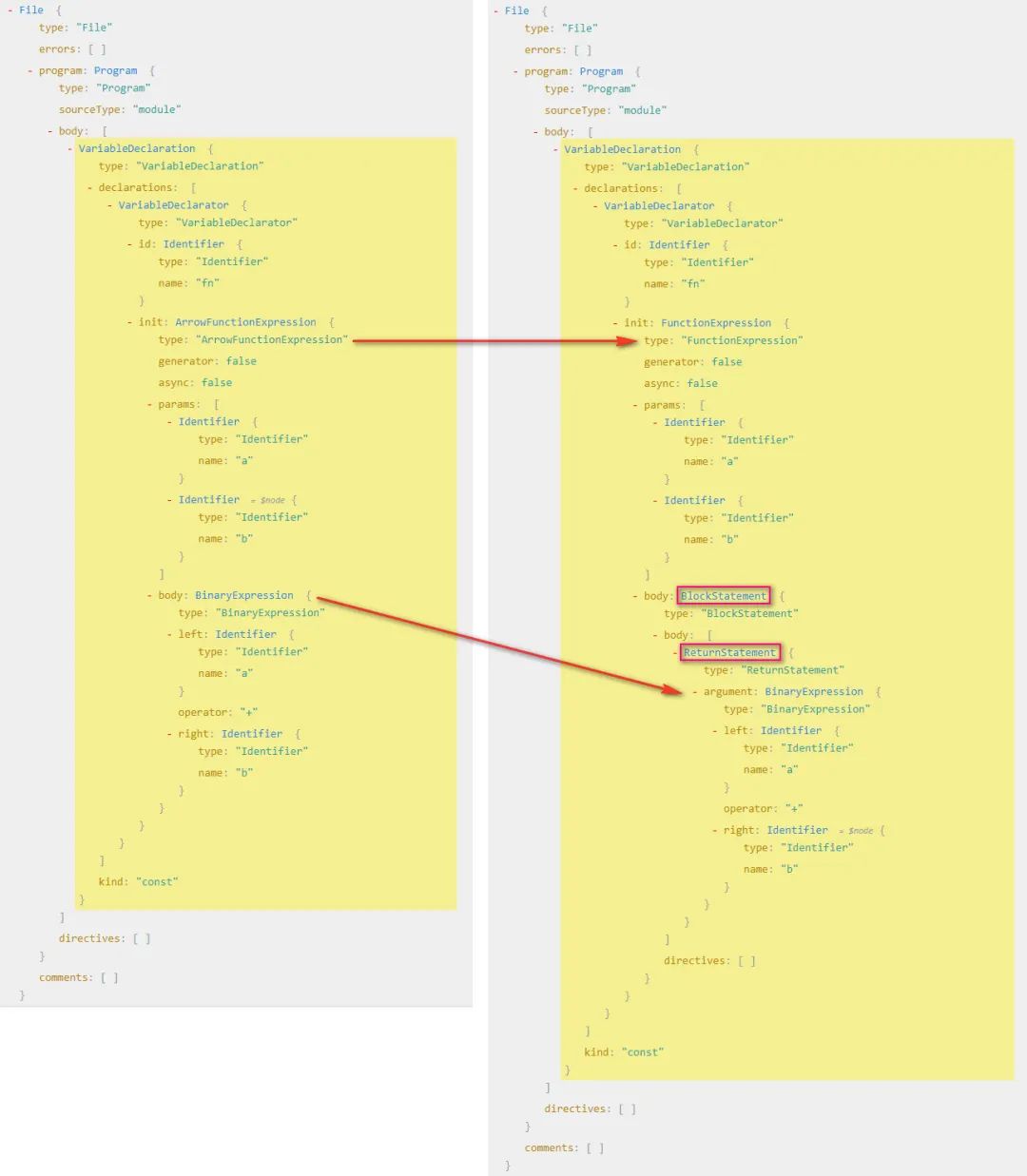
根據(jù)我們分析可得:
變成普通函數(shù)之后他就不叫箭頭函數(shù)了 ArrowFunctionExpression,而是函數(shù)表達式了FunctionExpression所以首先我們要把 箭頭函數(shù)表達式(ArrowFunctionExpression)轉(zhuǎn)換為函數(shù)表達式(FunctionExpression)要把 二進制表達式(BinaryExpression)放到一個代碼塊中(BlockStatement)其實我們要做就是把一棵樹變成另外一顆樹,說白了其實就是拼成另一顆樹的結(jié)構(gòu),然后生成新的代碼,就可以完成代碼的轉(zhuǎn)換
訪問者模式
在 babel 中,我們開發(fā) plugins 的時候要用到訪問者模式,就是說在訪問到某一個路徑的時候進行匹配,然后在對這個節(jié)點進行修改,比如說上面的當我們訪問到 ArrowFunctionExpression 的時候,對 ArrowFunctionExpression 進行修改,變成普通函數(shù)
那么我們就可以這么寫:
const babel = require('@babel/core')
const code = `const fn = (a, b) => a + b` // 轉(zhuǎn)換后 const fn = function(a, b) { return a + b }
const arrowFnPlugin = {
  // 訪問者模式
  visitor: {
    // 當訪問到某個路徑的時候進行匹配
    ArrowFunctionExpression(path) {
      // 拿到節(jié)點
      const node = path.node
      console.log('ArrowFunctionExpression -> node', node)
    },
  },
}

const r = babel.transform(code, {
  plugins: [arrowFnPlugin],
})

console.log(r)
修改 AST 結(jié)構(gòu)
此時我們拿到的結(jié)果是這樣的節(jié)點結(jié)果是 這樣的,其實就是 ArrowFunctionExpression 的 AST,此時我們要做的是把 ArrowFunctionExpression 的結(jié)構(gòu)替換成 FunctionExpression的結(jié)構(gòu),但是需要我們組裝類似的結(jié)構(gòu),這么直接寫很麻煩,但是 babel 為我們提供了一個工具叫做 @babel/types
@babel/types 有兩個作用:
判斷這個節(jié)點是不是這個節(jié)點(ArrowFunctionExpression 下面的 path.node 是不是一個 ArrowFunctionExpression) 生成對應(yīng)的表達式
然后我們使用的時候,需要經(jīng)常查文檔,因為里面的節(jié)點類型特別多,不是做編譯相關(guān)工作的是記不住怎么多節(jié)點的
那么接下來我們就開始生成一個 FunctionExpression,然后把之前的 ArrowFunctionExpression 替換掉,我們可以看 types 文檔,找到 functionExpression,該方法接受相應(yīng)的參數(shù)我們傳遞過去即可生成一個 FunctionExpression
t.functionExpression(id, params, body, generator, async)
id: Identifier (default: null) id 可傳遞 null params: Array<LVal> (required) 函數(shù)參數(shù),可以把之前的參數(shù)拿過來 body: BlockStatement (required) 函數(shù)體,接受一個 BlockStatement我們需要生成一個generator: boolean (default: false) 是否為 generator 函數(shù),當然不是了 async: boolean (default: false) 是否為 async 函數(shù),肯定不是了
還需要生成一個 BlockStatement,我們接著看文檔找到 BlockStatement 接受的參數(shù)
t.blockStatement(body, directives)
看文檔說明,blockStatement 接受一個 body,那我們把之前的 body 拿過來就可以直接用,不過這里 body 接受一個數(shù)組
我們細看 AST 結(jié)構(gòu),函數(shù)表達式中的 BlockStatement 中的 body 是一個 ReturnStatement,所以我們還需要生成一個 ReturnStatement
現(xiàn)在我們就可以改寫 AST 了
const babel = require('@babel/core')
const t = require('@babel/types')
const code = `const fn = (a, b) => a + b` // const fn = function(a, b) { return a + b }
const arrowFnPlugin = {
  // 訪問者模式
  visitor: {
    // 當訪問到某個路徑的時候進行匹配
    ArrowFunctionExpression(path) {
      // 拿到節(jié)點然后替換節(jié)點
      const node = path.node
      console.log('ArrowFunctionExpression -> node', node)
      // 拿到函數(shù)的參數(shù)
      const params = node.params
      const body = node.body
      const functionExpression = t.functionExpression(null, params, t.blockStatement([body]))
      // 替換原來的函數(shù)
      path.replaceWith(functionExpression)
    },
  },
}
const r = babel.transform(code, {
  plugins: [arrowFnPlugin],
})
console.log(r.code) // const fn = function (a, b) { return a + b; };
特殊情況
我們知道在剪頭函數(shù)中是可以省略 return 關(guān)鍵字,我們上面是處理了省略關(guān)鍵字的寫法,但是如果用戶寫了 return 關(guān)鍵字后,我們寫的這個插件就有問題了,所以我們可以在優(yōu)化一下
const fn = (a, b) => { retrun a + b } -> const fn = function(a, b) { return a + b }
觀察代碼我們發(fā)現(xiàn),我們就不需要把 body 轉(zhuǎn)換成 blockStatement 了,直接放過去就可以了,那么我們就可以這么寫
ArrowFunctionExpression(path) {
  // 拿到節(jié)點然后替換節(jié)點
  const node = path.node
  console.log("ArrowFunctionExpression -> node", node)
  // 拿到函數(shù)的參數(shù)
  const params = node.params
  let body = node.body
  // 判斷是不是 blockStatement,不是的話讓他變成 blockStatement
  if (!t.isBlockStatement(body)) {
    body = t.blockStatement([body])
  }
  const functionExpression = t.functionExpression(null, params, body)
  // 替換原來的函數(shù)
  path.replaceWith(functionExpression)
}
按需引入
在開發(fā)中,我們引入 UI 框架,比如 vue 中用到的 element-ui,vant 或者 React 中的 antd 都支持全局引入和按需引入,默認是全局引入,如果需要按需引入就需要安裝一個 babel-plugin-import 的插件,將全局的寫法變成按需引入的寫法。
就拿我最近開發(fā)移動端用的 vant 為例, import { Button } from 'vant' 這種寫法經(jīng)過這個插件之后會變成 import Button from 'vant/lib/Button' 這種寫法,引用整個 vant 變成了我只用了 vant 下面的某一個文件,打包后的文件會比全部引入的文件大小要小很多
分析語法樹
import { Button, Icon } from 'vant'寫法轉(zhuǎn)換為import Button from 'vant/lib/Button'; import Icon from 'vant/lib/Icon'
看一下兩個語法樹的區(qū)別
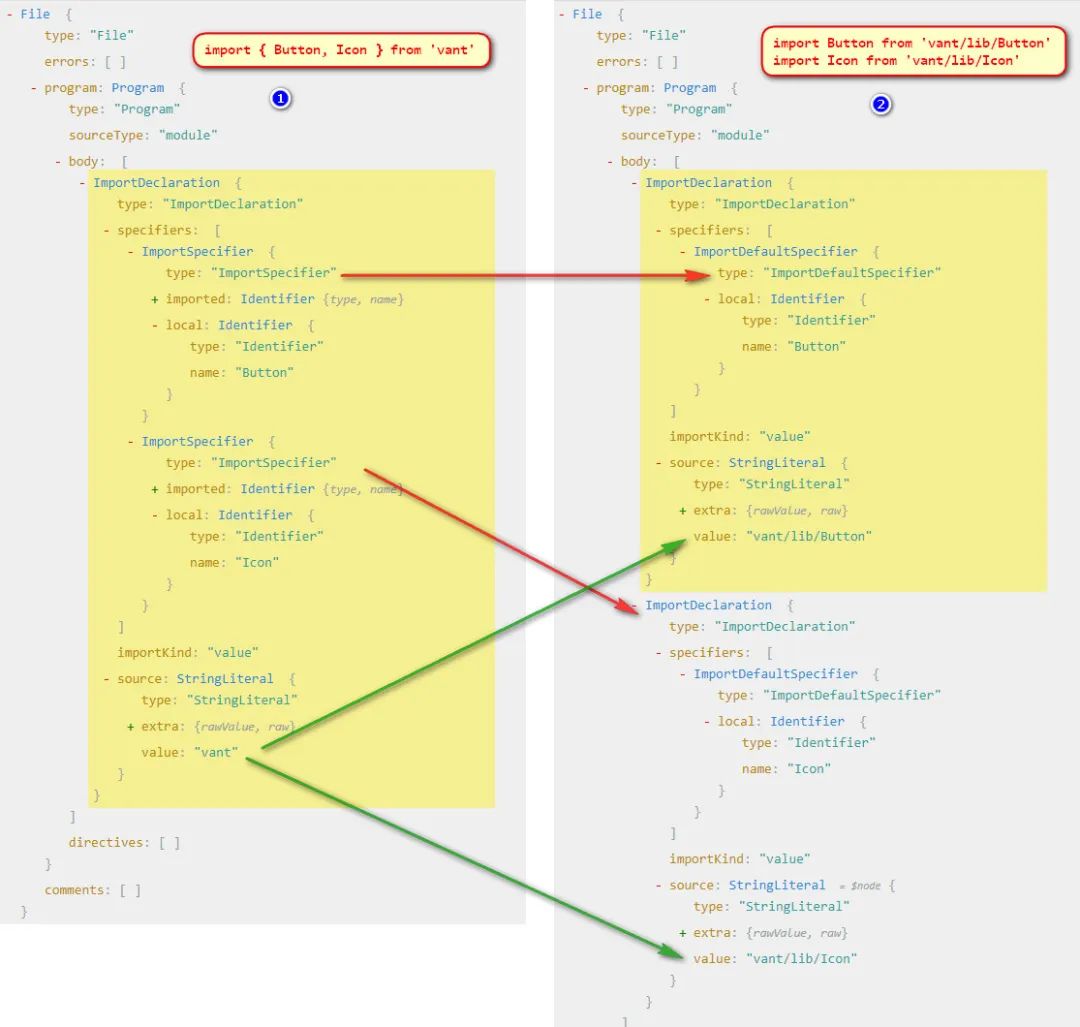
根據(jù)兩張圖分析我們可以得到一些信息:
我們發(fā)現(xiàn)解構(gòu)方式引入的模塊只有 import 聲明,第二張圖是兩個 import 聲明 解構(gòu)方式引入的詳細說明里面( specifiers)是兩個ImportSpecifier,第二張圖里面是分開的,而且都是ImportDefaultSpecifier他們引入的 source也不一樣那我們要做的其實就是要把單個的 ImportDeclaration變成多個ImportDeclaration, 然后把單個 import 解構(gòu)引入的specifiers部分ImportSpecifier轉(zhuǎn)換成多個ImportDefaultSpecifier并修改對應(yīng)的source即可
分析類型
為了方便傳遞參數(shù),這次我們寫到一個函數(shù)里面,可以方便傳遞轉(zhuǎn)換后拼接的目錄
這里我們需要用到的幾個類型,也需要在 types 官網(wǎng)上找對應(yīng)的解釋
首先我們要生成多個
importDeclaration類型/**
* @param {Array<ImportSpecifier | ImportDefaultSpecifier | ImportNamespaceSpecifier>} specifiers (required)
* @param {StringLiteral} source (required)
*/
t.importDeclaration(specifiers, source)在
importDeclaration中需要生成ImportDefaultSpecifier/**
* @param {Identifier} local (required)
*/
t.importDefaultSpecifier(local)在
importDeclaration中還需要生成一個StringLiteral/**
* @param {string} value (required)
*/
t.stringLiteral(value)
上代碼
按照上面的分析,我們開始上代碼
const babel = require('@babel/core')
const t = require('@babel/types')
const code = `import { Button, Icon } from 'vant'`
// import Button from 'vant/lib/Button'
// import Icon from 'vant/lib/Icon'
function importPlugin(opt) {
  const { libraryDir } = opt
  return {
    visitor: {
      ImportDeclaration(path) {
        const node = path.node
        // console.log("ImportDeclaration -> node", node)
        // 得到節(jié)點的詳細說明,然后轉(zhuǎn)換成多個的 import 聲明
        const specifiers = node.specifiers
        // 要處理這個我們做一些判斷,首先判斷不是默認導出我們才處理,要考慮 import vant, { Button, Icon } from 'vant' 寫法
        // 還要考慮 specifiers 的長度,如果長度不是 1 并且不是默認導出我們才需要轉(zhuǎn)換
        if (!(specifiers.length === 1 && t.isImportDefaultSpecifier(specifiers[0]))) {
          const result = specifiers.map((specifier) => {
            const local = specifier.local
            const source = t.stringLiteral(`${node.source.value}/${libraryDir}/${specifier.local.name}`)
            // console.log("ImportDeclaration -> specifier", specifier)
            return t.importDeclaration([t.importDefaultSpecifier(local)],source)
          })
          console.log('ImportDeclaration -> result', result)
          // 因為這次要替換的 AST 不是一個,而是多個的,所以需要 `path.replaceWithMultiple(result)` 來替換,但是一執(zhí)行發(fā)現(xiàn)死循環(huán)了
          path.replaceWithMultiple(result)
        }
      },
    },
  }
}
const r = babel.transform(code, {
  plugins: [importPlugin({ libraryDir: 'lib' })],
})
console.log(r.code)
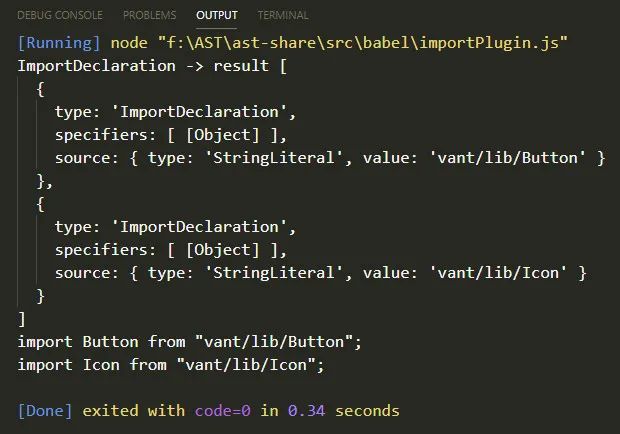
看打印結(jié)果和轉(zhuǎn)換結(jié)果似乎沒什么問題,這個插件幾乎就實現(xiàn)了
特殊情況
但是我們考慮一種情況,如果用戶不全部按需加載了,按需加載只是一種選擇,如果用戶這么寫了 import vant, { Button, Icon } from 'vant',那么我們這個插件就出現(xiàn)問題了
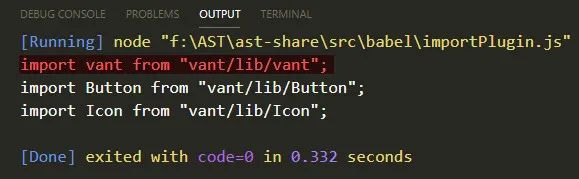
如果遇到這種寫法,那么默認導入的他的 source 應(yīng)該是不變的,我們要把原來的 source 拿出來
所以還需要判斷一下,每一個 specifier 是不是一個 ImportDefaultSpecifier 然后處理不同的 source,完整處理邏輯應(yīng)該如下
function importPlugin(opt) {
  const { libraryDir } = opt
  return {
    visitor: {
      ImportDeclaration(path) {
        const node = path.node
        // console.log("ImportDeclaration -> node", node)
        // 得到節(jié)點的詳細說明,然后轉(zhuǎn)換成多個的 import 聲明
        const specifiers = node.specifiers
        // 要處理這個我們做一些判斷,首先判斷不是默認導出我們才處理,要考慮 import vant, { Button, Icon } from 'vant' 寫法
        // 還要考慮 specifiers 的長度,如果長度不是 1 并且不是默認導出我們才需要轉(zhuǎn)換
        if (
          !(
            specifiers.length === 1 && t.isImportDefaultSpecifier(specifiers[0])
          )
        ) {
          const result = specifiers.map((specifier) => {
            let local = specifier.local,
              source
            // 判斷是否存在默認導出的情況
            if (t.isImportDefaultSpecifier(specifier)) {
              source = t.stringLiteral(node.source.value)
            } else {
              source = t.stringLiteral(
                `${node.source.value}/${libraryDir}/${specifier.local.name}`
              )
            }
            return t.importDeclaration(
              [t.importDefaultSpecifier(local)],
              source
            )
          })
          path.replaceWithMultiple(result)
        }
      },
    },
  }
}
babylon
在 babel 官網(wǎng)上有一句話 Babylon is a JavaScript parser used in Babel.
babylon 與 babel 的關(guān)系
babel 使用的引擎是 babylon,Babylon 并非 babel 團隊自己開發(fā)的,而是 fork 的 acorn 項目,acorn 的項目本人在很早之前在興趣部落 1.0 在構(gòu)建中使用,為了是做一些代碼的轉(zhuǎn)換,是很不錯的一款引擎,不過 acorn 引擎只提供基本的解析 ast 的能力,遍歷還需要配套的 acorn-travesal, 替換節(jié)點需要使用 acorn-,而這些開發(fā),在 Babel 的插件體系開發(fā)下,變得一體化了(摘自 AlloyTeam 團隊的剖析 babel)
使用 babylon
使用 babylon 編寫一個數(shù)組 rest 轉(zhuǎn) Es5 語法的插件
把 const arr = [ ...arr1, ...arr2 ] 轉(zhuǎn)成 var arr = [].concat(arr1, arr2)
我們使用 babylon 的話就不需要使用 @babel/core 了,只需要用到他里面的 traverse 和 generator,用到的包有 babylon、@babel/traverse、@babel/generator、@babel/types
分析語法樹
先來看一下兩棵語法樹的區(qū)別
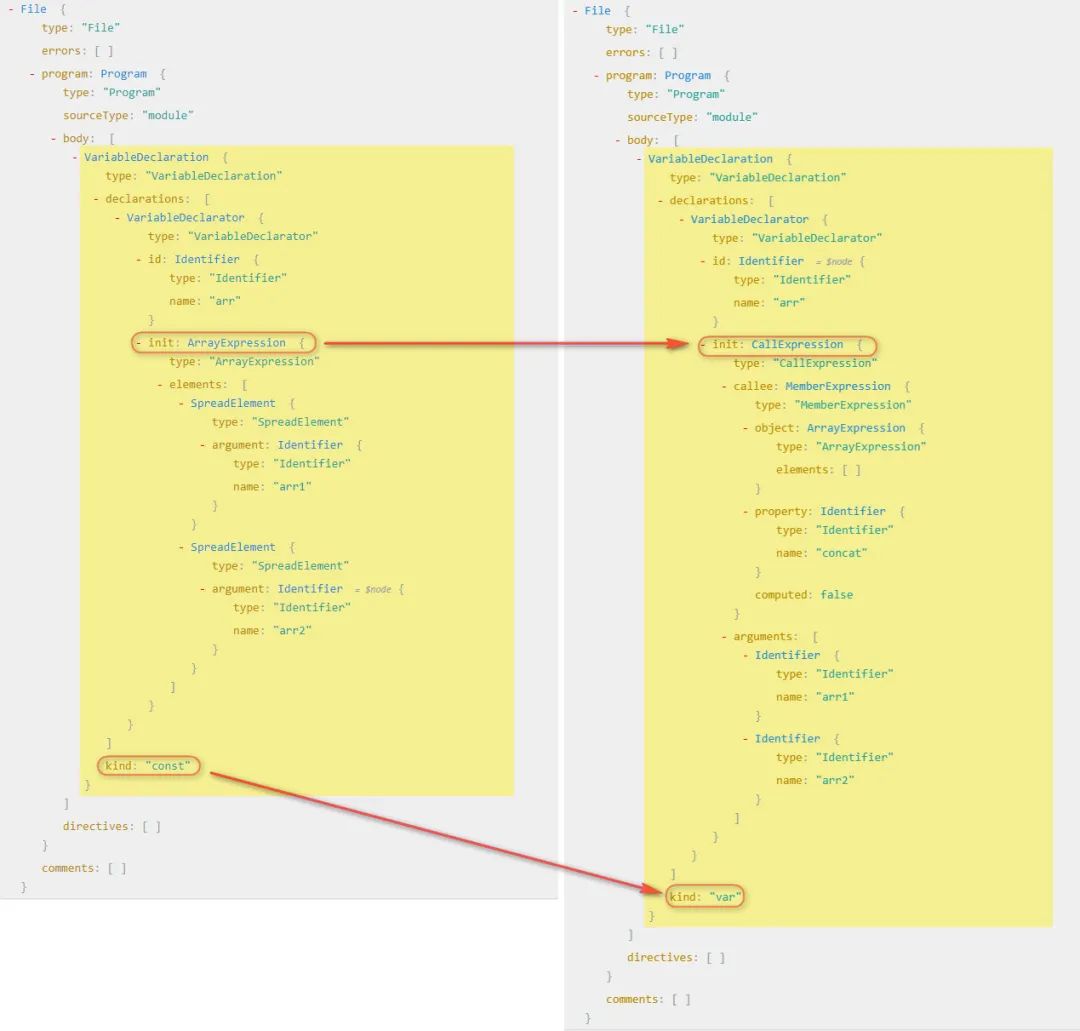
根據(jù)上圖我們分析得出:
兩棵樹都是變量聲明的方式,不同的是他們聲明的關(guān)鍵字不一樣 他們初始化變量值的時候是不一樣的,一個數(shù)組表達式(ArrayExpression)另一個是調(diào)用表達式(CallExpression) 那我們要做的就很簡單了,就是把 數(shù)組表達式轉(zhuǎn)換為調(diào)用表達式就可以
分析類型
這段代碼的核心生成一個 callExpression 調(diào)用表達式,所以對應(yīng)官網(wǎng)上的類型,我們分析需要用到的 api
先來分析 init 里面的,首先是 callExpression
/**
 * @param {Expression} callee  (required)
 * @param {Array<Expression | SpreadElement | JSXNamespacedName>} source (required)
 */
t.callExpression(callee, arguments)
對應(yīng)語法樹上 callee 是一個 MemberExpression,所以要生成一個成員表達式
/**
 * @param {Expression} object  (required)
 * @param {if computed then Expression else Identifier} property (required)
 * @param {boolean} computed (default: false)
 * @param {boolean} optional (default: null)
 */
t.memberExpression(object, property, computed, optional)
在 callee 的 object 是一個 ArrayExpression 數(shù)組表達式,是一個空數(shù)組
/**
 * @param {Array<null | Expression | SpreadElement>} elements  (default: [])
 */
t.arrayExpression(elements)
對了里面的東西分析完了,我們還要生成 VariableDeclarator 和 VariableDeclaration 最終生成新的語法樹
/**
 * @param {LVal} id  (required)
 * @param {Expression} init (default: null)
 */
t.variableDeclarator(id, init)

/**
 * @param {"var" | "let" | "const"} kind  (required)
 * @param {Array<VariableDeclarator>} declarations (required)
 */
t.variableDeclaration(kind, declarations)
其實倒著分析語法樹,分析完怎么寫也就清晰了,那么我們開始上代碼吧
上代碼
const babylon = require('babylon')
// 使用 babel 提供的包,traverse 和 generator 都是被暴露在 default 對象上的
const traverse = require('@babel/traverse').default
const generator = require('@babel/generator').default
const t = require('@babel/types')

const code = `const arr = [ ...arr1, ...arr2 ]` // var arr = [].concat(arr1, arr2)

const ast = babylon.parse(code, {
  sourceType: 'module',
})

// 轉(zhuǎn)換樹
traverse(ast, {
  VariableDeclaration(path) {
    const node = path.node
    const declarations = node.declarations
    console.log('VariableDeclarator -> declarations', declarations)
    const kind = 'var'
    // 邊界判定
    if (node.kind !== kind && declarations.length === 1 && t.isArrayExpression(declarations[0].init)) {
      // 取得之前的 elements
      const args = declarations[0].init.elements.map((item) => item.argument)
      const callee = t.memberExpression(t.arrayExpression(), t.identifier('concat'), false)
      const init = t.callExpression(callee, args)
      const declaration = t.variableDeclarator(declarations[0].id, init)
      const variableDeclaration = t.variableDeclaration(kind, [declaration])
      path.replaceWith(variableDeclaration)
    }
  },
})
具體語法書
和抽象語法樹相對的是具體語法樹(Concrete Syntax Tree)簡稱 CST(通常稱作分析樹)。一般的,在源代碼的翻譯和編譯過程中,語法分析器創(chuàng)建出分析樹。一旦 AST 被創(chuàng)建出來,在后續(xù)的處理過程中,比如語義分析階段,會添加一些信息。可參考抽象語法樹和具體語法樹有什么區(qū)別?
補充
關(guān)于 node 類型,全集大致如下:
(parameter) node: Identifier | SimpleLiteral | RegExpLiteral | Program | FunctionDeclaration | FunctionExpression | ArrowFunctionExpression | SwitchCase | CatchClause | VariableDeclarator | ExpressionStatement | BlockStatement | EmptyStatement | DebuggerStatement | WithStatement | ReturnStatement | LabeledStatement | BreakStatement | ContinueStatement | IfStatement | SwitchStatement | ThrowStatement | TryStatement | WhileStatement | DoWhileStatement | ForStatement | ForInStatement | ForOfStatement | VariableDeclaration | ClassDeclaration | ThisExpression | ArrayExpression | ObjectExpression | YieldExpression | UnaryExpression | UpdateExpression | BinaryExpression | AssignmentExpression | LogicalExpression | MemberExpression | ConditionalExpression | SimpleCallExpression | NewExpression | SequenceExpression | TemplateLiteral | TaggedTemplateExpression | ClassExpression | MetaProperty | AwaitExpression | Property | AssignmentProperty | Super | TemplateElement | SpreadElement | ObjectPattern | ArrayPattern | RestElement | AssignmentPattern | ClassBody | MethodDefinition | ImportDeclaration | ExportNamedDeclaration | ExportDefaultDeclaration | ExportAllDeclaration | ImportSpecifier | ImportDefaultSpecifier | ImportNamespaceSpecifier | ExportSpecifier
Babel 有文檔對 AST 樹的詳細定義,可參考這里
配套源碼地址
代碼以存放到 GitHub,地址:https://github.com/fecym/ast-share
參考鏈接
JavaScript 語法解析、AST、V8、JIT 詳解 AST 抽象語法樹 AST 抽象語法樹 ps: 這個里面有 class 轉(zhuǎn) Es5 構(gòu)造函數(shù)的過程,有興趣可以看一下 剖析 Babel——Babel 總覽 | AlloyTeam @babel/types
感謝大家
關(guān)注「前端UpUp」,分享精選面試熱點文章。
加我好友,一起討論算法,2021一起UpUp。
“在看轉(zhuǎn)發(fā)”是最大的支持