
記一次Apache HttpClient使用不當導致的請求超時問題分享排查過程
你知道的越多,不知道的就越多,業(yè)余的像一棵小草!
你來,我們一起精進!你不來,我和你的競爭對手一起精進!
編輯:業(yè)余草
來源:juejin.cn/post/7124317267407405070
推薦:https://t.zsxq.com/135BocxbM
自律才能自由
記一次Apache HttpClient使用不當導致的請求超時問題分享排查過程
背景
近期負責的線上應用出現(xiàn)調(diào)用失敗的問題,排查后發(fā)現(xiàn)是 HttpClient 相關的問題,特此記錄一下。
因為涉及線上數(shù)據(jù)安全隱私,模擬生產(chǎn)的應用寫了 demo,模擬一定的并發(fā)請求復現(xiàn)該問題。
問題介紹
收到線上告警通知:外部服務調(diào)用某應用 A 大量報錯,平均響應時常很長,經(jīng)常有請求超時的情況。
問題排查
查連接情況
外部請求是 http 請求,所以可以查一下連接的情況。對應 java 進程的連接數(shù):
具體的連接情況:

[root@sky ~]# netstat -tanp | grep 8433 | grep 8080 | wc -l
400
應用的 8080 端口有 400 個連接。
查線程情況
平均響應時常比較長,一般是線程長時間在等待某個步驟完成。查一下應用的線程執(zhí)行情況:
執(zhí)行命令 jstack 8433 | less。
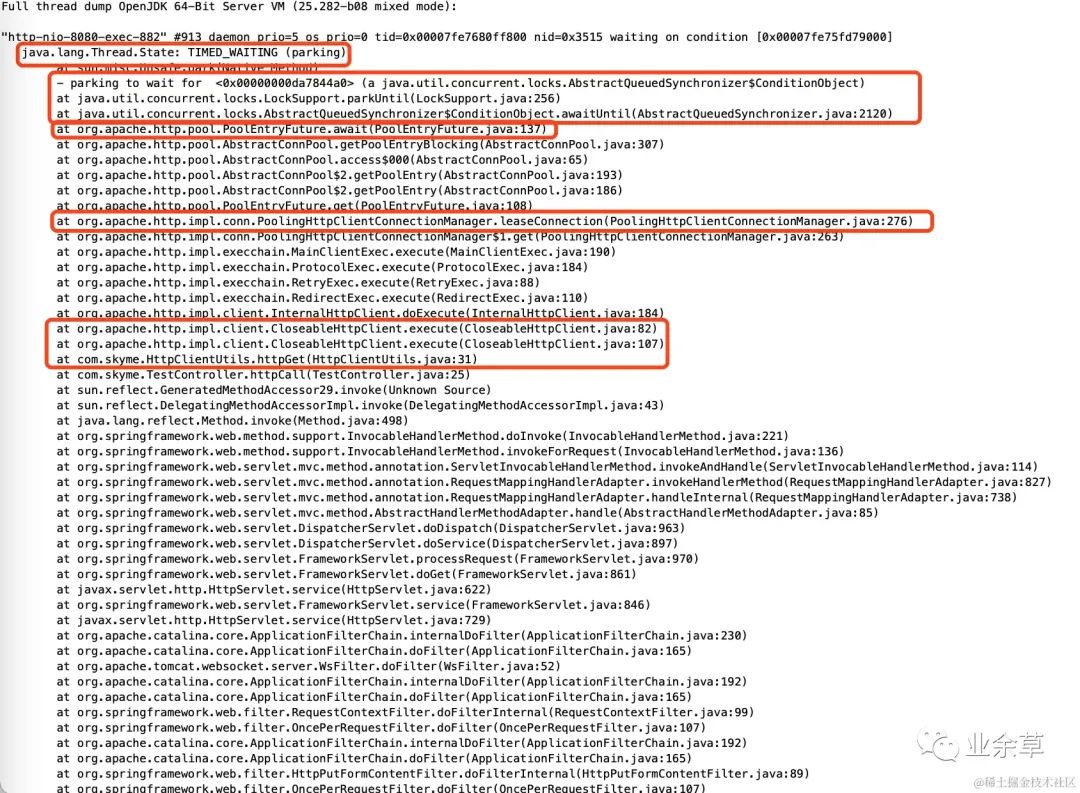
jstack 的日志中有很多類似上面圖中的線程,處于 TIME_WAITING狀態(tài),而下面的堆棧中,HttpClientUtils.httpGet()是使用 Apache HttpClient 工具封裝的 http 請求函數(shù),PoolHttpClientConnectionManager.leaseConnection()看上去是在等待獲取連接。大概分析得出:有很多線程在執(zhí)行過程中,等待HttpClient獲取連接。
查應用異常日志
查一下應用的日志,尋找線索,在日志中看到許多下面的異常日志:
2022-07-24 21:47:44.765 ERROR 82381 --- [pool-2-thread-7] com.skyme.TestController                 : error:

org.apache.http.conn.ConnectionPoolTimeoutException: Timeout waiting for connection from pool
 at org.apache.http.impl.conn.PoolingHttpClientConnectionManager.leaseConnection(PoolingHttpClientConnectionManager.java:286) ~[httpclient-4.5.2.jar:4.5.2]
 at org.apache.http.impl.conn.PoolingHttpClientConnectionManager$1.get(PoolingHttpClientConnectionManager.java:263) ~[httpclient-4.5.2.jar:4.5.2]
 at org.apache.http.impl.execchain.MainClientExec.execute(MainClientExec.java:190) ~[httpclient-4.5.2.jar:4.5.2]
 at org.apache.http.impl.execchain.ProtocolExec.execute(ProtocolExec.java:184) ~[httpclient-4.5.2.jar:4.5.2]
 at org.apache.http.impl.execchain.RetryExec.execute(RetryExec.java:88) ~[httpclient-4.5.2.jar:4.5.2]
 at org.apache.http.impl.execchain.RedirectExec.execute(RedirectExec.java:110) ~[httpclient-4.5.2.jar:4.5.2]
 at org.apache.http.impl.client.InternalHttpClient.doExecute(InternalHttpClient.java:184) ~[httpclient-4.5.2.jar:4.5.2]
 at org.apache.http.impl.client.CloseableHttpClient.execute(CloseableHttpClient.java:82) ~[httpclient-4.5.2.jar:4.5.2]
 at org.apache.http.impl.client.CloseableHttpClient.execute(CloseableHttpClient.java:107) ~[httpclient-4.5.2.jar:4.5.2]
 at com.skyme.HttpClientUtils.httpGet(HttpClientUtils.java:31) ~[classes/:na]
 at com.skyme.TestController.lambda$batchHttpCall$0(TestController.java:47) ~[classes/:na]
 at java.util.concurrent.ThreadPoolExecutor.runWorker(ThreadPoolExecutor.java:1142) ~[na:1.8.0_73]
 at java.util.concurrent.ThreadPoolExecutor$Worker.run(ThreadPoolExecutor.java:617) ~[na:1.8.0_73]
 at java.lang.Thread.run(Thread.java:745) ~[na:1.8.0_73]
初步結(jié)論
外部有大量請求,很多請求的處理線程在等待 HttpClient 獲取連接,問題應該在 HttpClient。
進一步排查
分析 HttpClient
日志里兩個關鍵信息:
-
是 HttpClient 內(nèi)部報錯
org.apache.http.conn.ConnectionPoolTimeoutException: Timeout waiting for connection from pool
 at org.apache.http.impl.conn.PoolingHttpClientConnectionManager.leaseConnection(PoolingHttpClientConnectionManager.java:286) ~[httpclient-4.5.2.jar:4.5.2]
對應的源碼org.apache.http.impl.conn.PoolingHttpClientConnectionManager.leaseConnection(PoolingHttpClientConnectionManager.java:286):
protected HttpClientConnection leaseConnection(
        final Future<CPoolEntry> future,
        final long timeout,
        final TimeUnit tunit) throws InterruptedException, ExecutionException, ConnectionPoolTimeoutException {
    final CPoolEntry entry;
    try {
        entry = future.get(timeout, tunit); // 該處會拋出TimeoutException
        if (entry == null || future.isCancelled()) {
            throw new InterruptedException();
        }
        Asserts.check(entry.getConnection() != null, "Pool entry with no connection");
        if (this.log.isDebugEnabled()) {
            this.log.debug("Connection leased: " + format(entry) + formatStats(entry.getRoute()));
        }
        return CPoolProxy.newProxy(entry);
    } catch (final TimeoutException ex) {
        // 捕獲TimeoutException異常,再拋出ConnectionPoolTimeoutException
        throw new ConnectionPoolTimeoutException("Timeout waiting for connection from pool");
    }
}
拋出ConnectionPoolTimeoutException是因為觸發(fā)了TimeoutException異常,而TimeoutException異常對應于entry = future.get(timeout, tunit);
PoolingHttpClientConnectionManager.leaseConnection 是為了獲取連接,分析一下其執(zhí)行流程,獲取 connection 時序圖如下:

重點的步驟:
-
如果 route 下有空閑連接,則直接返回空閑連接 -
如果沒有空閑連接,且該 connPerRoute 及池中 conn 數(shù)均沒有達到最大值,的 conn 數(shù)沒有達到最大值,則創(chuàng)建連接,并放入池中,并返回該連接 -
如果沒有空閑連接,且達到了 maxRoute 或 maxPoolsize,則阻塞等待,等待的時常,便是 entry = future.get(timeout, tunit);中的timeout時長。如果指定的時間沒有 lease 到 connection ,則entry = future.get(timeout, tunit);會拋出TimeoutException異常。
一般 pool 設計都是和上面的類似,我們繼續(xù)分析一下 httpclient pool 的結(jié)構(gòu) :
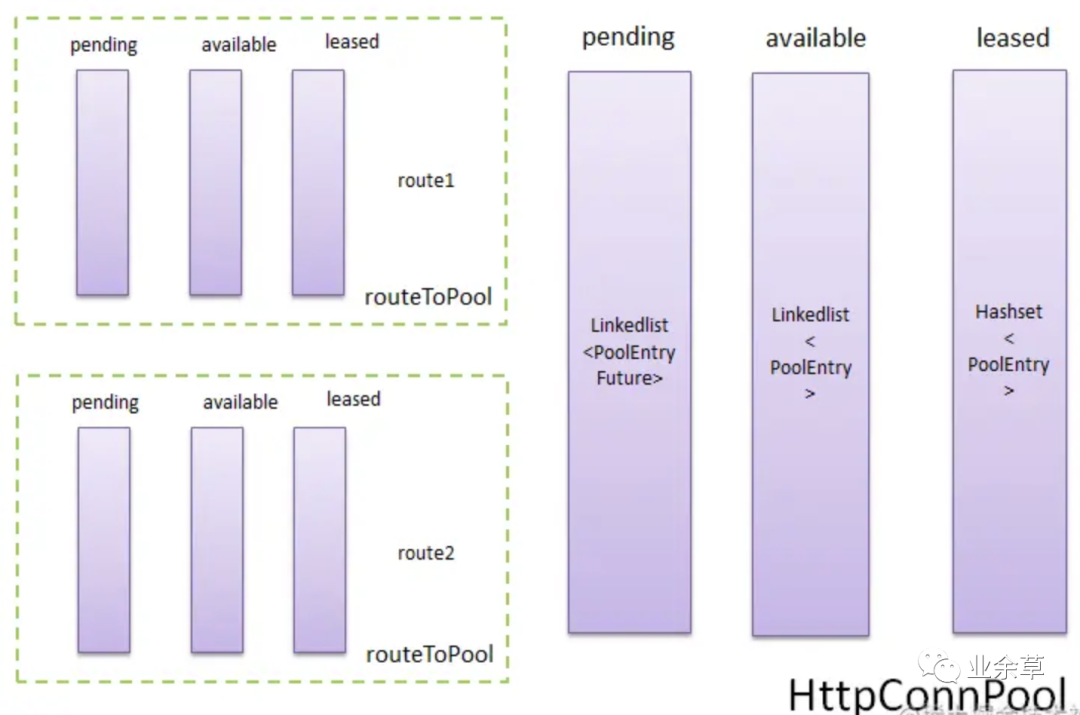
PoolEntry<HttpRoute, OperatedClientConnection>: 路由和連接的對應關系。
routeToPool: 可以多個(圖中僅示例兩個),圖中各隊列大小動態(tài)變化,并不相等。
maxTotal: 限制的是外層 httpConnPool 中 leased 集合和 available 隊列的總和的大小,httpConnPool 的 leased 和 available 的大小沒有單獨限制。
maxPerRoute: 限制的是每個 routeToPool 中 leased 集合和 available 隊列的總和的大小。
一步步跟蹤源碼entry = future.get(timeout, tunit);,定位到核心調(diào)用處 org.apache.http.pool.AbstractConnPool#getPoolEntryBlocking() ,對應源碼
private E getPoolEntryBlocking(
        final T route, final Object state,
        final long timeout, final TimeUnit tunit,
        final PoolEntryFuture<E> future)
            throws IOException, InterruptedException, TimeoutException {

    Date deadline = null; // 阻塞等待的截止時間
    if (timeout > 0) {
        deadline = new Date
            (System.currentTimeMillis() + tunit.toMillis(timeout));
    }
    // 首先對當前連接池加鎖,當前鎖是可重入鎖ReentrantLockthis.lock.lock();
    this.lock.lock();
    try {
        // 獲得一個當前HttpRoute對應的連接池,即routeToPool
        final RouteSpecificPool<T, C, E> pool = getPool(route);
        E entry = null;
        while (entry == null) {
            Asserts.check(!this.isShutDown, "Connection pool shut down");
            for (;;) {
                entry = pool.getFree(state);
                if (entry == null) {
                    break;
                }
                // 如果拿到的是過期連接或者已關閉連接,就釋放資源,繼續(xù)循環(huán)獲取
                if (entry.isExpired(System.currentTimeMillis())) {
                    entry.close();
                } else if (this.validateAfterInactivity > 0) {
                    if (entry.getUpdated() + this.validateAfterInactivity <= System.currentTimeMillis()) {
                        if (!validate(entry)) {
                            entry.close();
                        }
                    }
                }
                if (entry.isClosed()) {
                    this.available.remove(entry);
                    pool.free(entry, false);
                } else {
                    break;
                }
            }
            // 拿到未在使用中的(available)有效連接就退出循環(huán),直接return對應連接
            if (entry != null) {
                this.available.remove(entry);
                this.leased.add(entry);
                onReuse(entry);
                return entry;
            }

            // New connection is needed。執(zhí)行到這說明沒有拿到連接,需要新建連接
            final int maxPerRoute = getMax(route);
            // Shrink the pool prior to allocating a new connection
            // pool.getAllocatedCount()=pool.available.size() + pool.leased.size(),可用的加正在租借的即當前池中已有的連接
            // 如果route對應的連接池的已有連接數(shù)超過了支持的最大連接數(shù)量(加1的目的?),則通過LRU清理掉一些連接。
            final int excess = Math.max(0, pool.getAllocatedCount() + 1 - maxPerRoute);
            if (excess > 0) {
                for (int i = 0; i < excess; i++) {
                    final E lastUsed = pool.getLastUsed();
                    if (lastUsed == null) {
                        break;
                    }
                    lastUsed.close();
                    this.available.remove(lastUsed);
                    pool.remove(lastUsed);
                }
            }

            // 如果route對應的連接池的已有連接數(shù)未達到最大最大限制
            if (pool.getAllocatedCount() < maxPerRoute) {
                final int totalUsed = this.leased.size();
                // freeCapacity指大池子里除了已用連接,最多能容納的空閑連接數(shù)(包括已經(jīng)創(chuàng)建的available連接和后續(xù)還允許創(chuàng)建的available連接)
                final int freeCapacity = Math.max(this.maxTotal - totalUsed, 0);
                if (freeCapacity > 0) {
                    final int totalAvailable = this.available.size();
                    // 此時當前route肯定leased已滿,無available,若大池子里已達到上限,且大池子里還有available的空閑連接,那可以清理其他route下的無available連接,為新連接挪出位置。所以close的是otherpool中l(wèi)astUsed的available連接。若大池子沒有達到上限,則沒必要做清理。
                    if (totalAvailable > freeCapacity - 1) {
                        if (!this.available.isEmpty()) {
                            final E lastUsed = this.available.removeLast();
                            lastUsed.close();
                            final RouteSpecificPool<T, C, E> otherpool = getPool(lastUsed.getRoute());
                            otherpool.remove(lastUsed);
                        }
                    }
                    // 創(chuàng)建一個新連接
                    final C conn = this.connFactory.create(route);
                    // 放入route對應的池子的leased集合
                    entry = pool.add(conn);
                    // 放入大池子的leased集合
                    this.leased.add(entry);
                    // reutrn該連接
                    return entry;
                }
            }

            // 到這里證明沒有從獲得route池中獲得有效連接,并且想要自己建立連接時當前route連接池已經(jīng)到達最大值,即已經(jīng)有連接在使用,但是對當前線程不可用
            boolean success = false;
            try {
                // 將future放入route池中等待,實際就是加入route池的pending集合
                pool.queue(future);
                // 放入大池子的pending集合
                this.pending.add(future);
                // 如果等待到了信號量的通知,success為true。如果到截止時間還未等到,則success為false
                success = future.await(deadline);
            } finally {
                // In case of 'success', we were woken up by the
                // connection pool and should now have a connection
                // waiting for us, or else we're shutting down.
                // Just continue in the loop, both cases are checked.
                // fanally,從等待隊列中移除
                pool.unqueue(future);
                this.pending.remove(future);
            }
            // check for spurious wakeup vs. timeout
            // 如果沒有等到信號量通知并且當前時間已經(jīng)超時,則退出循環(huán)
            if (!success && (deadline != null) &&
                (deadline.getTime() <= System.currentTimeMillis())) {
                break;
            }
        }
        // 最終也沒有等到信號量通知,沒有拿到可用連接,則拋異常
        throw new TimeoutException("Timeout waiting for connection");
    } finally {
        // 釋放對大池子的鎖
        this.lock.unlock();
    }
}
綜合分析:
-
通過線程池獲取連接要通過 ReetrantLock 加鎖,保證線程安全 -
不論是大連接池還是小連接池,當超過數(shù)量的時候,都要通過LRU釋放一些連接 -
如果拿到了可用連接,則返回給上層使用 -
如果沒有拿到可用連接,HttpClient 會判斷當前 route 連接池是否已經(jīng)超過了最大數(shù)量,沒有到上限就會新建一個連接,并放入池中 -
如果到達了上限,就排隊等待,等到了信號量,就重新獲得一次,等待不到就拋 TimeoutException
思考
池類的設計,不管是連接池,線程池,一般不夠用的場景,都是最大數(shù)設置的不夠大,不足以應對并發(fā)獲取連接、線程等?
確認HttpClient實際情況
上面的都是猜想,最終問題定位還是要摸清實際情況。
應用里是如何創(chuàng)建 HttpClient 實例
下面是應用中創(chuàng)建 HttpClient 實例的地方,我們從變量 HTTP_CLIENT開始定位。
private static final CloseableHttpClient HTTP_CLIENT = HttpClients
    .custom()
    .setDefaultRequestConfig(
            RequestConfig.custom()
            .setCookieSpec(CookieSpecs.IGNORE_COOKIES)
            .setConnectionRequestTimeout(30000)
            .build()
    ).build();
上面代碼可知:
-
沒有設置 maxPerRoute、maxTotal這類的參數(shù)。 -
從連接池獲取連接的超時時間的參數(shù) ConnectionRequestTimeout ,設置為30秒。
arthas 定位實際數(shù)據(jù)
因為不是本地環(huán)境,不能方便地 Debug,這時可以用 arthas 來查進行內(nèi)存中 HttpClient 的實際數(shù)據(jù)。
在 arthas 中執(zhí)行:getstatic com.skyme.HttpClientUtils HTTP_CLIENT -x 4,結(jié)果如下:

routeToPool中,route [https//github.com] 的使用情況是:leased 為 2,avaibable 為 0,pending 為 198。
leased + avaibable 結(jié)果為 2,怎么這么少?難道是 maxPerRoute 參數(shù)設置的過小?
在 arthas 結(jié)果中我們找到了 maxPerRoute 相關的配置,maxPerRoute 默認值只有2,因為我們創(chuàng)建 HttpClient 實例時,沒有設置maxPerRoute的數(shù)值,所以每個route 的 maxPerRoute 為2, 這和上面的 leased + avaibable 的結(jié)果對應上了。此外,還有一個重要參數(shù) maxToal 為 20。
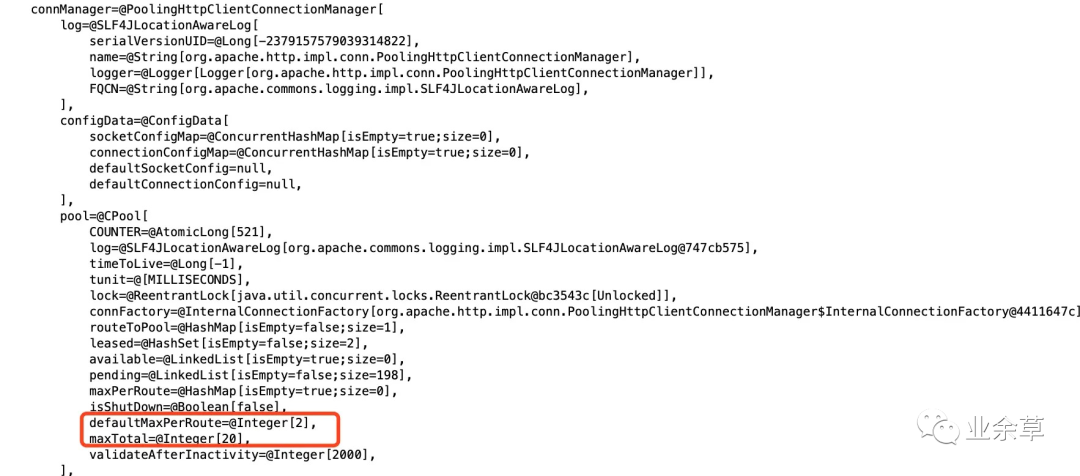
大致結(jié)論:默認參數(shù)太小
到這里,問題基本定位清楚了。因為應用沒有顯示地設置 maxPerRoute 和 maxToal ,所以取了默認值,默認值比較小,maxPerRoute 為2, maxToal 為20, 導致并發(fā)獲取連接時,連接不夠用,導致了獲取連接的線程一直在等待,等待時間為我們創(chuàng)建 HttpClien 實例時自定義的 30 秒,等待時間過長,導致了外部請求超時。
解決辦法
臨時辦法
可以使用 arthas 的 vmtool 命令將內(nèi)存中的 defaultMaxPerRoute 、maxTotal 參數(shù)修改大一些,該操作過于風騷,一般不符合生產(chǎn)環(huán)境的運維操作規(guī)范。但是測試環(huán)境或者緊急情況可以嘗試使用。
[arthas@8433]$ vmtool --action getInstances --className org.apache.http.impl.client.CloseableHttpClient --express 'instances[0].connManager.pool.defaultMaxPerRoute=100'
@Integer[100]
[arthas@8433]$ vmtool --action getInstances --className org.apache.http.impl.client.CloseableHttpClient --express 'instances[0].connManager.pool.maxTotal=500'
修改后,連接池中 leased 明顯增多,pending 減少。
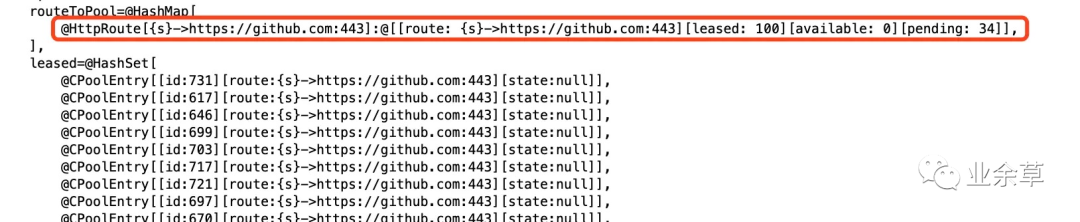
一段時間后,pending 為 0,說明沒有阻塞,連接數(shù)已足夠使用。

注意:
-
該修改不需要應用重啟,但應用重啟后,內(nèi)存的設置將銷毀,依然還會存在問題。 -
非常規(guī)操作,謹慎執(zhí)行。 -
vmtool 命令在 arthas 3.5.1 版本之后才有。
長期辦法
修改代碼,配置合理的最大連接數(shù) maxPerRoute、maxTotal、ConnectionRequestTimeout。
當前 HttpClient 版本為 4.5.2,其他版本可能代碼有所差異。
private final static PoolingHttpClientConnectionManager POOLING_HTTP_CLIENT_CONNECTION_MANAGER
        = new PoolingHttpClientConnectionManager();

static {
    // 每個route默認的最大連接數(shù)
    POOLING_HTTP_CLIENT_CONNECTION_MANAGER.setDefaultMaxPerRoute(100);
    // 總的連接池最大連接數(shù)
    POOLING_HTTP_CLIENT_CONNECTION_MANAGER.setMaxTotal(500);
}

private static final CloseableHttpClient HTTP_CLIENT = HttpClients
    .custom()
    .setConnectionManager(POOLING_HTTP_CLIENT_CONNECTION_MANAGER)
    .setDefaultRequestConfig(
            RequestConfig.custom()
            .setCookieSpec(CookieSpecs.IGNORE_COOKIES)//
            // 從連接池獲取連接的超時時間
            .setConnectionRequestTimeout(10000)
            .build()
    ).build();
defaultMaxPerRoute 設置為 100,maxTotal 設置為 500,并將 connectionRequestTimeout 從 30 秒減少到 10 秒,沒有拿到連接快速失敗,防止過多的線程阻塞導致擠壓。
總結(jié)
-
問題原因是 HttpClient 使用時沒有對參數(shù)足夠了解,對于連接池的框架,最好設置最大數(shù),獲取連接的等待超時時間,以及回收的周期,連接是否可用的校驗等等參數(shù)。其他池類的框架同理,例如線程池。 -
通過源碼、日志、線程、連接等多方面進行分析,結(jié)論會更準確。 -
arthas 是神器,可以多嘗試。